
Marketing Automation for Agencies: A Practical Playbook
A client asks why leads are slipping through, an account manager is reconciling three CRM exports, and someone is rebuilding a nurture sequence because the last client used a different field name for “qualified lead.” The campaign itself may be working, but the delivery system behind it is consuming the margin that made the retainer worthwhile.
That's the operating reality of marketing automation for agencies. The challenge isn't finding another workflow builder. It's creating a repeatable layer for permissions, data, approvals, campaign logic, quality assurance, and reporting across clients that rarely share the same stack. Automation becomes commercially useful when the agency can run it consistently, explain its impact clearly, and hand it to another strategist without relying on tribal knowledge.
Why Agencies Need a Different Automation Approach
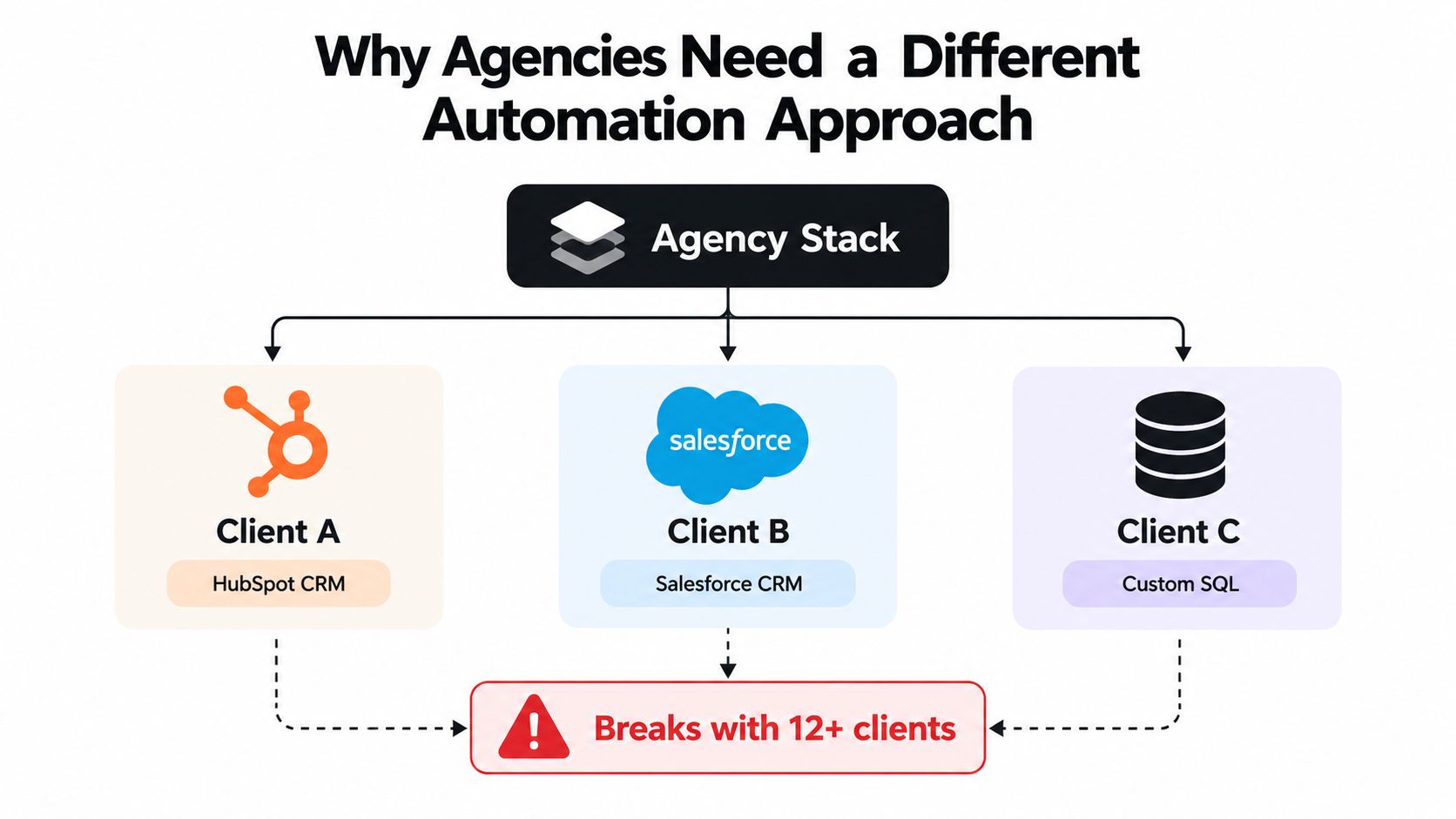
An in-house marketing team can usually design around one CRM, one consent model, one sales process, and one reporting convention. An agency can't. Every account may have a different CRM, different lifecycle definitions, different data permissions, and a different view of what qualifies as a sales-ready lead.
That difference changes the unit of design. You aren't building one perfect workflow. You're building a system that can absorb variation without forcing the delivery team to start over for every engagement. A generic automation playbook often looks efficient during a sales demo, then breaks when one client uses HubSpot, another uses Salesforce, and a third relies on a custom database.
The adoption gap makes this more urgent. Industry summaries place marketing automation adoption at about 76% of companies, with adoption around 89% in B2B SaaS, while only about 12% of marketing teams with more than 50 employees still operate without a dedicated automation platform, according to recent marketing automation adoption data. Clients increasingly expect an agency to understand automation as part of normal delivery, not as an optional technical add-on.
Use a maturity ladder
A practical maturity model helps an agency diagnose its operating layer before buying more software:
- Ad Hoc: Strategists build workflows inside individual client accounts, with inconsistent naming, undocumented triggers, and manual reporting.
- Standardized: The agency introduces templates for intake, field mapping, workflow naming, approvals, and reporting. Templates still require account-specific adaptation.
- Operationalized: QA checklists, permission rules, scoring matrices, escalation paths, and monthly reporting routines become part of delivery.
- Scaled: The agency can onboard new accounts using reusable assets, compare performance across a portfolio, control access by role, and improve playbooks without destabilizing live client work.
Each stage solves a different commercial problem. Ad hoc work creates dependency on individual specialists. Standardization reduces setup friction. Operationalization protects quality. Scaling turns automation into a retainer-defensible service rather than a collection of clever builds.
Practical rule: Standardize the decisions around a workflow before standardizing the workflow itself. A template is only reusable when its assumptions are visible.
For a useful primer on the fundamentals, small business marketing automation provides context that can help account teams explain automation to less technical clients. The agency's job is then to adapt that foundation to multi-client governance, not to copy an in-house setup outright.
Choosing the Right Automation Stack for an Agency
The right platform category depends on the agency problem you're trying to solve. Feature count is a poor selection method because a tool can be powerful in isolation and still create excessive administration across a portfolio.
| Category | Best Fit | Seat Cost Profile | Reporting White-Label | Onboarding Time per Client |
|---|---|---|---|---|
| All-in-one suites, such as HubSpot or ActiveCampaign | Smaller retainers and teams that want a compressed setup | Easier to forecast, but costs can rise with contacts and advanced features | Often suitable for branded client views, subject to plan and configuration | Usually shorter when the client already uses the suite |
| Mid-market workflow engines, such as Marketo, Iterable, or Braze | Complex nurture logic, high-volume lifecycle programs, and mature client teams | Higher administration and specialist resource requirements | Strong reporting depth, but often needs agency configuration | Longer because data models, permissions, and governance require careful setup |
| Native ad-platform automation, such as Google, LinkedIn, or Meta | Audience activation and channel-specific campaign actions | Low direct platform cost, with hidden cost in disconnected data and manual reconciliation | Limited as a complete agency reporting layer | Fast for channel execution, slower when connected to CRM outcomes |
| Composable stacks using tools such as Customer.io or n8n | Clients with varied systems and a need for flexible orchestration | Variable, with costs distributed across tools, usage, and technical support | Depends on the reporting layer and data model | Flexible, but onboarding depends heavily on documentation and integration quality |
Evaluate every option against four agency constraints:
- Total cost per client seat: Include implementation, maintenance, training, troubleshooting, and client access. A low subscription price doesn't guarantee a low delivery cost.
- Permission granularity: Separate agency administrators, strategists, analysts, contractors, and client reviewers. Shared credentials create accountability and security problems.
- White-label reporting: Clients should see a coherent view of activity and commercial outcomes, not a collage of vendor dashboards.
- Onboarding effort: Measure how long it takes to move from intake to a tested workflow, not how quickly a salesperson can demonstrate a trigger.
The market is expanding, but expansion also creates tool sprawl. One marketing technology report found that the field reached 9,932 solutions, after growing 24% since 2020, while market summaries place the global category at $6.65 billion in 2024 and project $15.58 billion by 2030, with a projected 15.3% CAGR from 2025 to 2030 in the cited marketing automation market overview. For agencies, that growth makes selection discipline more important, not less.
Use this comparison of marketing automation tools as an input to your shortlist, then test each candidate against a real client onboarding scenario.
The decision rule is simple: choose the deepest tool whose total seat and delivery cost still leaves margin after the agency fee. Don't choose the platform with the longest feature list. Choose the one your team can govern, explain, and maintain across real accounts.
Designing Campaign Workflows That Convert
A mid-market SaaS client sells a 24-month subscription. The agency shouldn't begin by writing emails. It should begin by deciding which audience states matter and what evidence moves a contact from one state to another.
Start with behavioral segmentation
Create a master list that contains all marketable contacts permitted by the client's consent policy. From that list, define an MQL segment using the client's agreed combination of fit and engagement. Then create a product-qualified cohort from trial signups and activation events.
Demographics may tell you that a contact works at a target company. Behavior tells you whether the contact is moving toward a buying decision. A trial signup, repeated use of a core feature, attendance at a product session, or a return visit to commercial pages can justify a different route from a passive content download.
A useful workflow might run like this:
- A form fill starts a three-step nurture with two educational emails and one case study.
- Trial activation opens a parallel product-led track focused on the actions associated with meaningful product use.
- A booked sales call pauses marketing touches and sends a sales handoff notification.
- If the contact remains inactive, a re-engagement branch at day 45 offers an ROI calculator or a relevant next step.
- Existing customers enter a suppression or customer-success path instead of continuing through acquisition messaging.
The assets should have jobs, not just publication dates. The educational emails address the problem. The case study supplies context for evaluation. The ROI calculator helps a buyer build an internal business case. The sales notification gives the representative the context needed to follow up without asking the prospect to repeat information.
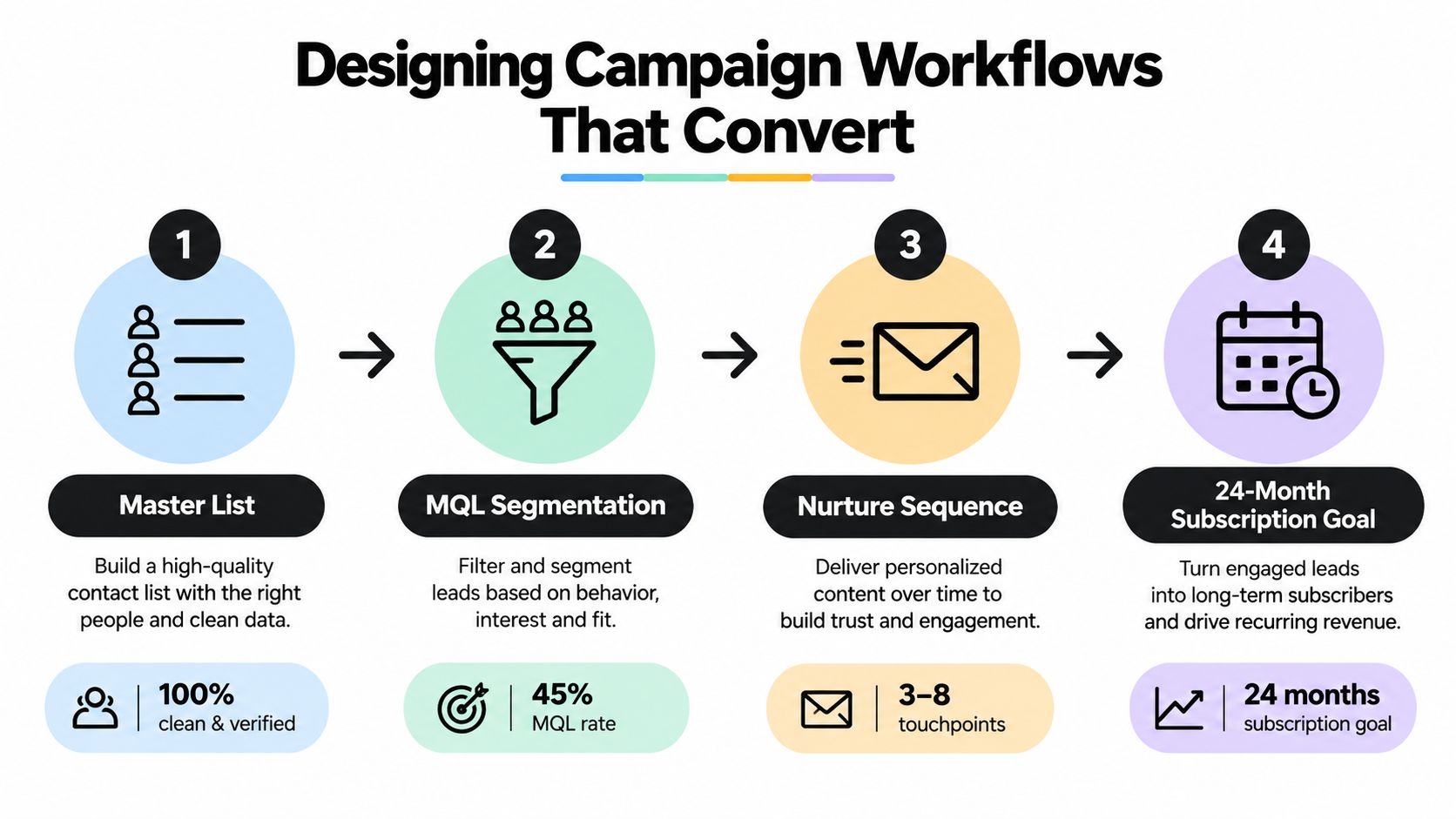
Triggered email is usually the first optimization layer worth examining. Triggered messages have 67.9% higher open rates and more than 241% better click-through rates than standard blasts, and top-performing automation flows can generate up to 30 times the revenue per recipient of a single campaign, according to workflow performance benchmarks. Those figures don't guarantee performance for every client, but they support prioritizing event-based routing and segmentation over more frequent batch sends.
Prevent the three common breaks
Duplicate triggers occur when a contact qualifies for several segments and enters overlapping workflows. Add entry guards, record the active journey, and define which workflow has priority.
Missing exit conditions leave contacts inside long nurtures after they've converted, become inactive, or changed lifecycle stage. Every branch needs explicit exits for sales acceptance, customer status, unsubscribe, disqualification, and inactivity.
No customer suppression creates embarrassing messages, especially when a new acquisition workflow continues after a subscription starts. Sync customer status from the CRM and apply suppression logic before every acquisition send.
The video below offers a visual reference for thinking about workflow structure and sequence logic.
Building Lead Scoring Models Across Multiple Clients
Lead scoring becomes fragile when agencies treat it as a universal number. A score that signals sales readiness for a short transactional cycle may be meaningless for a considered B2B purchase. The portable part should be the framework, not the final threshold.
Use three shared attribute groups across clients:
- Firmographic fit: Company size, market, role, geography, or account segment, where the client's sales process uses those signals.
- Behavioral intent: Product use, pricing-page activity, demo requests, trial activation, or high-value content engagement.
- Engagement decay: A mechanism that reduces the influence of old activity so a contact doesn't remain highly ranked because of a single historic action.
Translate the client's actual sales process into the model. Ask sales which actions usually precede a qualified conversation, which actions create noise, and which accounts deserve a manual review. Apply negative scoring to suppress irrelevant roles, invalid submissions, competitors, or contacts that repeatedly engage without matching the ideal customer profile.
Keep the rules outside the platform interface. A documented matrix lets the agency migrate logic between HubSpot, Salesforce, or a custom system without reconstructing it from screenshots. It also gives the client a reviewable artifact during quarterly planning.
| Attribute Category | Example Criteria | Point Range | Decay Rule |
|---|---|---|---|
| Firmographic fit | Target role, account segment, relevant market | Low to high, based on sales priority | Stable while the record remains valid |
| High-intent behavior | Demo request, sales-call booking, trial activation | High | Retain briefly, then review if no progression |
| Product engagement | Repeated use of a meaningful feature or activation event | Moderate to high | Reduce after a period of inactivity |
| Content engagement | Case study, webinar, guide, or solution-page interaction | Low to moderate | Reduce faster than product or sales behavior |
| Disqualifying signal | Student, competitor, invalid firm, or unsuitable geography | Negative | Remove or retain according to client policy |
Document separate thresholds for MQL, SQL, and disqualified states. The threshold should reflect the client's capacity and sales definition, not an arbitrary target chosen because the CRM makes it easy to enter.
For more implementation guidance, use these lead scoring best practices alongside the client's own conversion history. Version the matrix by quarter or approved change set, record who changed it, and note which lifecycle definition the new version supports.
Connecting CRMs, Ad Platforms, and Data Sources
An agency rarely needs every available connector. It needs a dependable path for the data that changes decisions.
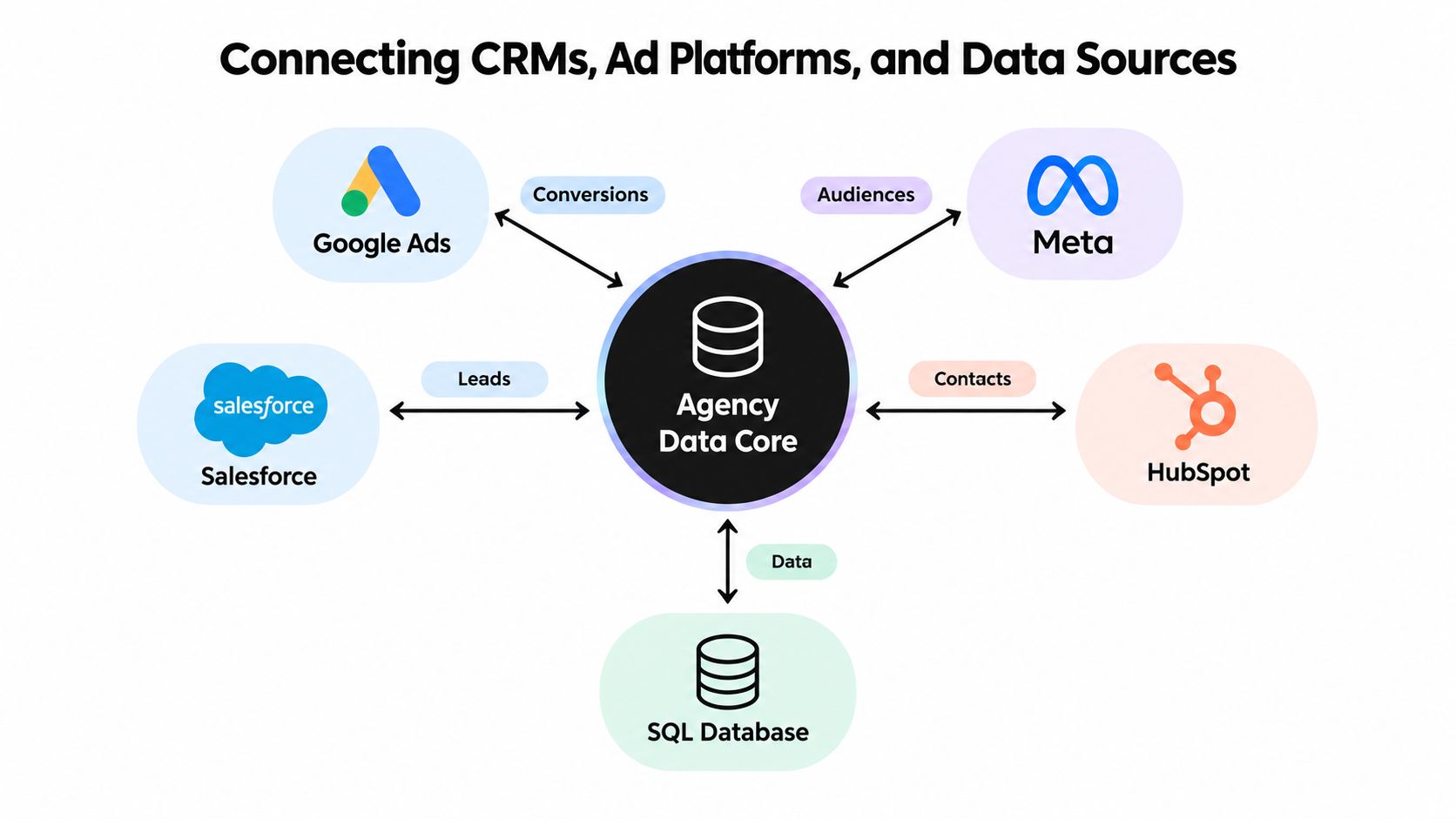
The core flow usually starts with ad platforms sending conversion events and audience signals into the automation layer. That layer updates lifecycle stages in the CRM. The CRM then returns opportunity and closed-deal outcomes so the agency can refine scoring, audiences, and reporting. Reverse ETL can push enriched lead or account attributes back to advertising platforms for audience activation, provided consent and platform policies allow it.
Build the integration map first
Prioritize connections in this order:
- CRM to automation platform: Establish the authoritative record and lifecycle fields.
- Forms and website events to CRM: Capture source, consent, campaign, and behavioral data at entry.
- Ad platforms to conversion layer: Send qualified conversion events instead of relying only on raw form fills.
- CRM to reporting system: Expose lifecycle, opportunity, and revenue fields for client reporting.
- Closed revenue back to audiences and scoring: Use commercial outcomes to improve targeting and prioritization.
- Internal operations systems: Create tasks, alerts, and handoffs only after the customer data path is stable.
Native connectors are usually the first choice when field mapping and error handling are clear. Webhooks fit real-time events and custom applications. Zapier-style bridges are useful for straightforward handoffs, but complex transformations may need a workflow engine or a more deliberate data layer.
Treat hygiene as part of the integration
Most integration failures begin with unclear data ownership. Before adding a connector, answer these questions:
- What is the deduplication key? Email may not be sufficient for account-based programs or shared company records.
- Who owns each field? Define whether the CRM, form, enrichment source, or automation tool can overwrite it.
- Are UTM values governed? Use a naming standard before campaign data enters the CRM.
- Do consent flags travel with the record? A contact shouldn't lose marketing eligibility just because it moved between systems.
- What happens when a field is empty? A sync should not overwrite a valid value with a blank value without a deliberate rule.
- How are failures surfaced? Every important connection needs an owner, an alert path, and a replay procedure.
Privacy fragmentation makes this work more consequential. The IAB describes privacy regulation and media fragmentation as drivers of investment in AI-powered data integration, audience intelligence, and campaign automation, while automated QA and anomaly detection are becoming important for identifying traffic irregularities and performance drops in a changing measurement environment, as outlined in the IAB State of Data companion guide.
Use data integration best practices to structure the audit, but keep the client's consent model and CRM ownership rules at the center. More connectors won't repair an undefined source of truth.
Testing, QA, and the KPIs to Report
Automation QA has two separate jobs. Operational QA checks whether the workflow fires, routes, updates, and exits correctly. Outcome QA checks whether the resulting experience improves the path to qualified pipeline.
Before launch, run a controlled test record through every meaningful branch. Verify the trigger, field population, audience membership, suppression logic, notification, unsubscribe path, and CRM update. Review the email on mobile, confirm the links and personalization tokens, and inspect the handoff a sales representative receives.
A compact pre-launch checklist should include:
- Trigger verification: Test the exact event, not a simulated shortcut.
- Suppression review: Include customers, employees, competitors, unsubscribed contacts, and disqualified records where relevant.
- Field validation: Confirm that source, lifecycle stage, consent, owner, and campaign fields populate as intended.
- Exit testing: Force a conversion, sales acceptance, unsubscribe, and inactivity condition.
- Failure handling: Confirm that the team receives an actionable error alert rather than a silent failure.
The implementation risk is material. Industry analyses report that 42% to 54% of marketing automation projects are scrapped because they fail to integrate with legacy systems or because teams lack the skills to operate them, according to an agency ROI and implementation analysis. An agency should therefore sell QA and maintenance as part of the service, not absorb them invisibly.
Report activity separately from impact
Client-facing reports should focus on business movement:
- MQL-to-SQL conversion
- Pipeline influenced
- Cost per qualified lead
- Campaign ROI
- Sales response and acceptance quality
Internal health reports should protect delivery quality:
- Workflow error rate
- Data sync latency
- Deliverability
- Suppression-list changes
- Lead-score distribution drift
- Unresolved integration alerts
Monthly reporting works best in three layers. Start with what ran, including sends, workflow entries, exits, and handoffs. Then show what changed, including qualified progression and pipeline influence. Finish with what the agency will adjust, such as a segment rule, an exit condition, a scoring threshold, or a data-quality fix.
Clients rarely want a catalogue of automations. They want to know what the system did, what the sales team received, and what decision follows from the evidence.
Scaling Automation Playbooks Across Your Client Portfolio
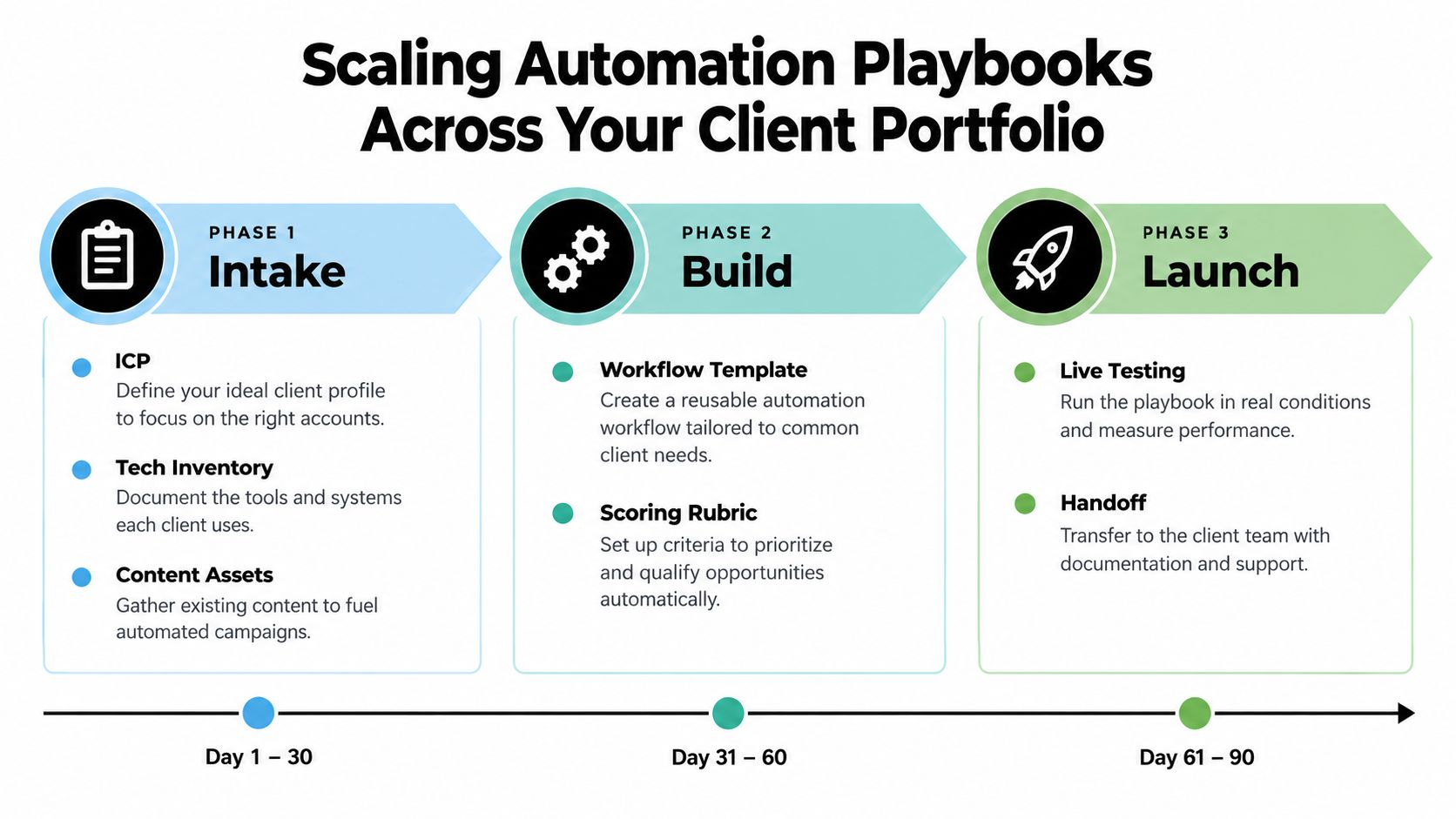
A scalable agency playbook has three properties. It's reusable without being rigid, visible enough for a client to approve, and documented well enough for a new strategist to operate.
The onboarding sequence below gives the delivery team a practical 90-day structure.
Phase one covers intake
Collect the ideal customer profile, lifecycle definitions, consent requirements, technology inventory, existing campaigns, content assets, reporting expectations, and approval contacts. Record the client's vocabulary. “Qualified lead,” “active customer,” and “sales accepted” must mean the same thing to the client, the account team, and the automation builder.
Create an access matrix before building. List the systems, the agency owner, the client owner, reviewer permissions, administrator permissions, and removal process. This prevents the common mistake of giving every contributor broad access because the original setup was rushed.
Phase two covers the build
Start with the workflow template, scoring rubric, integration map, naming convention, and QA checklist. Build the simplest useful path first, then add branches after the core route passes testing.
Store each playbook as a versioned SOP. Include the purpose, entry criteria, required fields, branch logic, suppression rules, owner, failure response, reporting fields, and change history. Screenshots can help, but they shouldn't replace written logic.
Phase three covers launch and operation
Run live tests with controlled records, review early activity with the client, and create a recurring operating cadence. The cadence should include workflow monitoring, data-quality review, report preparation, and a renewal conversation tied to business impact.
A tiered service menu helps clients understand how the operating layer can expand:
- Starter: Core lead capture, two foundational workflows, basic scoring, and health checks.
- Growth: Lifecycle nurture, CRM synchronization, attribution, and consolidated reporting.
- Retainer plus: Account-based programs, custom integrations, advanced QA, and ongoing experimentation.
Consolidate reporting through one dashboard layer where possible. Leadership should be able to compare margin, retention risk, workflow health, and pipeline influence without asking an account manager to collect disconnected exports from every platform.
Multi-client scalability remains a major agency pain point. 61% of agencies identify tool scalability for multi-client operations as a top automation challenge, while 38% report using agentic AI for workflow automation and 79% say AI saves them five or more hours per week, according to agency benchmarks for 2026. Those figures point to a practical opportunity, but experimentation needs control. Reserve an innovation slot for one client, document the result, and only then decide whether the change belongs in the shared playbook.
The maturity path should be visible to the client: basic nurture first, then lifecycle orchestration, then attribution and revenue operations. That progression gives the agency a credible expansion conversation because each new layer solves an observable operating problem.
MakeAutomation helps agencies and B2B teams build CRM workflows, lead scoring, AI-assisted operations, voice automation, documentation, and repeatable delivery processes around their existing systems. Visit MakeAutomation to review how a structured automation layer could improve onboarding, campaign execution, reporting consolidation, and retainer delivery across your client portfolio.