Project Management Workflow That Scales B2B Growth
A client says the project is late. The account manager says the work is waiting on strategy. Strategy says they sent everything to design. Design says they never got a final brief. The project manager spends half the morning chasing screenshots, Slack threads, and spreadsheet updates just to answer one basic question: where is the work stuck?
That's what poor workflow looks like in real life. Not lazy people. Not bad intentions. Just work moving through too many hands without a shared system for handoffs, status, and proof.
This matters more than most realize. A widely cited benchmark says organizations waste 9.9% of every dollar invested in projects because of poor project performance, according to PMI's 2018 Pulse of the Profession research, summarized by Kissflow's project workflow statistics. On a $10 million project investment, that's roughly $990,000 lost to inefficiency, rework, or preventable execution problems.
For B2B teams and agencies, the mess usually doesn't start with the task list. It starts with missing baselines, fuzzy ownership, and reporting that nobody fully trusts. Teams think they need a better board in Asana, ClickUp, Jira, or Monday. Often they need something more basic first: a project management workflow that defines how information moves, not just how tasks move.
The difference is huge. When teams can see what stage work is in, what “done” means, who accepts the handoff, and what changed since the baseline, projects stop feeling like a daily rescue mission. If you need a practical way to map that kind of flow, a workflow visualization approach helps teams spot invisible bottlenecks before they add more tools.
Introduction Why Project Work Feels Chaotic Without a Workflow
Chaos usually shows up in ordinary moments.
A SaaS marketing team launches a campaign request. Sales wants a one-pager for a new segment. Product needs messaging review. Creative is waiting for approved copy. RevOps needs final assets before CRM sequences go live. Everyone is working. Nobody is aligned.
An agency sees the same pattern in a different shape. Client kickoff happens on Monday. Notes live in Google Docs. Scope lives in a proposal PDF. Tasks live in ClickUp. Timelines live in a spreadsheet. Approvals happen in email. By the second week, the team isn't asking “What do we do next?” They're asking “Which version is real?”
The hidden cost isn't effort
Most struggling teams don't have a motivation problem. They have a coordination problem.
A weak project management workflow creates friction in predictable places:
- At intake: Work starts before the brief is complete.
- At handoff: One team thinks they're done, while the next team says the input isn't usable.
- At reporting: Leaders get a status update, but no one can explain what changed from the original plan.
- At escalation: Risks sit because there's no rule for when to flag them.
The busiest teams often have the least reliable visibility.
That's why workflow should be treated like an operating system for delivery. It decides how work enters the team, how it moves, who touches it, what gets recorded, and how someone outside the project can understand progress without asking five people.
What good workflow feels like
A healthy workflow doesn't make work bureaucratic. It makes work legible.
People know when a task is ready. They know what stage comes next. They know which fields must be complete before a handoff. They know where to look for current status. And when something slips, the team can see whether the problem is scope, capacity, waiting time, or decision delay.
That's what turns project management from status chasing into controlled execution.
What a Project Management Workflow Really Means
A project management workflow is the route information and decisions follow as work moves from request to completion. Tasks are part of that route, but they are not the whole system. The job of a workflow is to make sure the right input reaches the right person, in the right condition, at the right time, with a status that means the same thing to everyone.
A relay race works here as a comparison. The race is not won by having fast runners alone. It is won by clean baton passes, marked exchange zones, and clear rules for when one runner is finished and the next begins. Project work behaves the same way. Teams rarely struggle because no one is working. They struggle because information arrives late, arrives incomplete, or arrives in a format the next person cannot use.
Workflow versus process versus checklist
These terms blur together, and that confusion leads teams to fix the wrong problem.
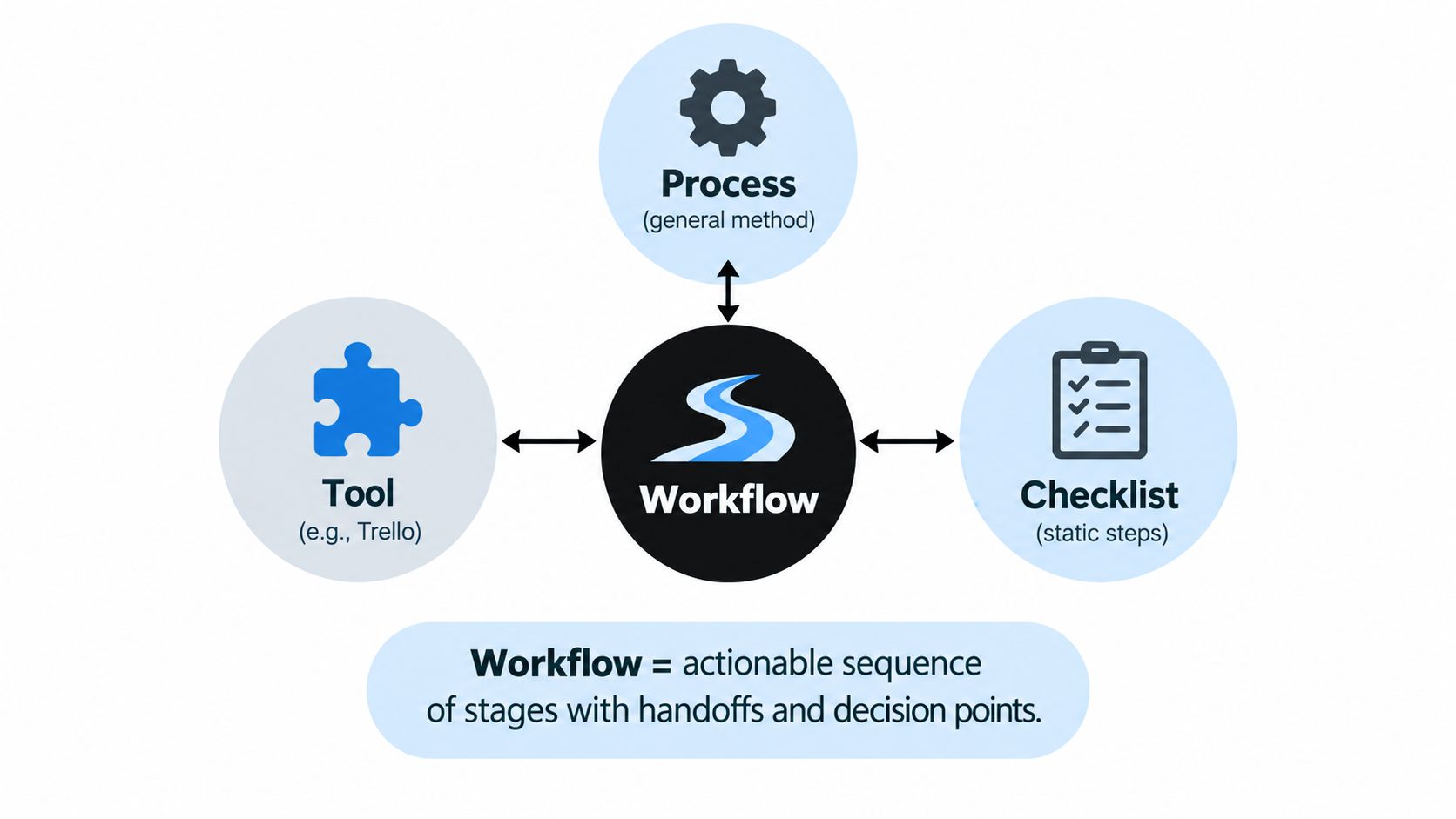
- Process: The broad operating method. An agency may follow discovery, production, review, and launch. A SaaS team may use request, planning, build, QA, and release.
- Checklist: The items required inside one step. That could be “confirm audience,” “attach source files,” or “approve legal copy.”
- Tool: The system used to store or move the work. Trello, Asana, Jira, Notion, Airtable, HubSpot, and Slack fit here.
- Workflow: The path that connects all of it. It defines what must be true before work enters a stage, what status change records progress, who approves the handoff, and what gets logged for reporting.
That last part gets missed often.
A team can have a solid process and detailed checklists and still create chaos if status labels are vague, intake fields are inconsistent, or approvals happen in side channels. In practice, workflow is less about task coordination than about information integration. If your brief lives in one tool, your client feedback lives in email, your timeline lives in a spreadsheet, and your status report is built by hand every Friday, your workflow is fragmented even if everyone is busy.
Why workflow matters beyond task movement
Good workflow design lets a company answer simple questions without detective work.
What was requested? What changed? Who approved it? Is the work blocked, in review, or done? What is late because of capacity, and what is late because the input was incomplete?
Those answers depend on definitions, baselines, and handoff rules. They do not appear automatically because a team bought project management software.
This is also why automation often disappoints. If “in review” means one thing to account managers and another thing to designers, an automated alert only sends confusion faster. If there is no agreed baseline for scope, due date, or effort, a dashboard can show activity but still fail to show variance.
Why this matters financially
The cost shows up in margin before it shows up in a postmortem.
For agencies, unclear workflow often means senior people spend billable hours translating briefs, chasing approvals, and rebuilding files that should have been usable at handoff. On retainer work, that eats utilization and narrows profit on accounts that looked healthy on paper.
For B2B SaaS teams, the same pattern delays launches, complicates cross-functional reporting, and makes planning less reliable in the next cycle. The waste is not only missed deadlines. It is also the hidden labor of reconciling scattered information after the fact.
Practical rule: If your team cannot explain current status, last change, next owner, and source of truth in one place, you do not have a reliable workflow. You have activity that still needs interpretation.
What a workflow is supposed to create
A useful workflow creates shared meaning.
- A known starting point. Work does not begin until the required information is present.
- A consistent status language. “Ready,” “in progress,” “in review,” and “done” have agreed definitions.
- A traceable handoff path. Each transition leaves a record someone else can understand later.
- A reporting layer. Leaders can compare plan versus actual without asking the team to rebuild the story by hand.
That is what makes workflow operational, not administrative. It gives teams a system they can run, measure, and improve before they try to automate it.
Core Components That Make Workflows Work
A workflow works like a relay system for information. Stages matter, but the test is whether the next person receives the right inputs, can trust the current status, and can report progress without rebuilding the story from scratch.
That is why strong workflows are designed as operating systems for decisions and reporting, not just checklists for task movement.
Stages and ownership
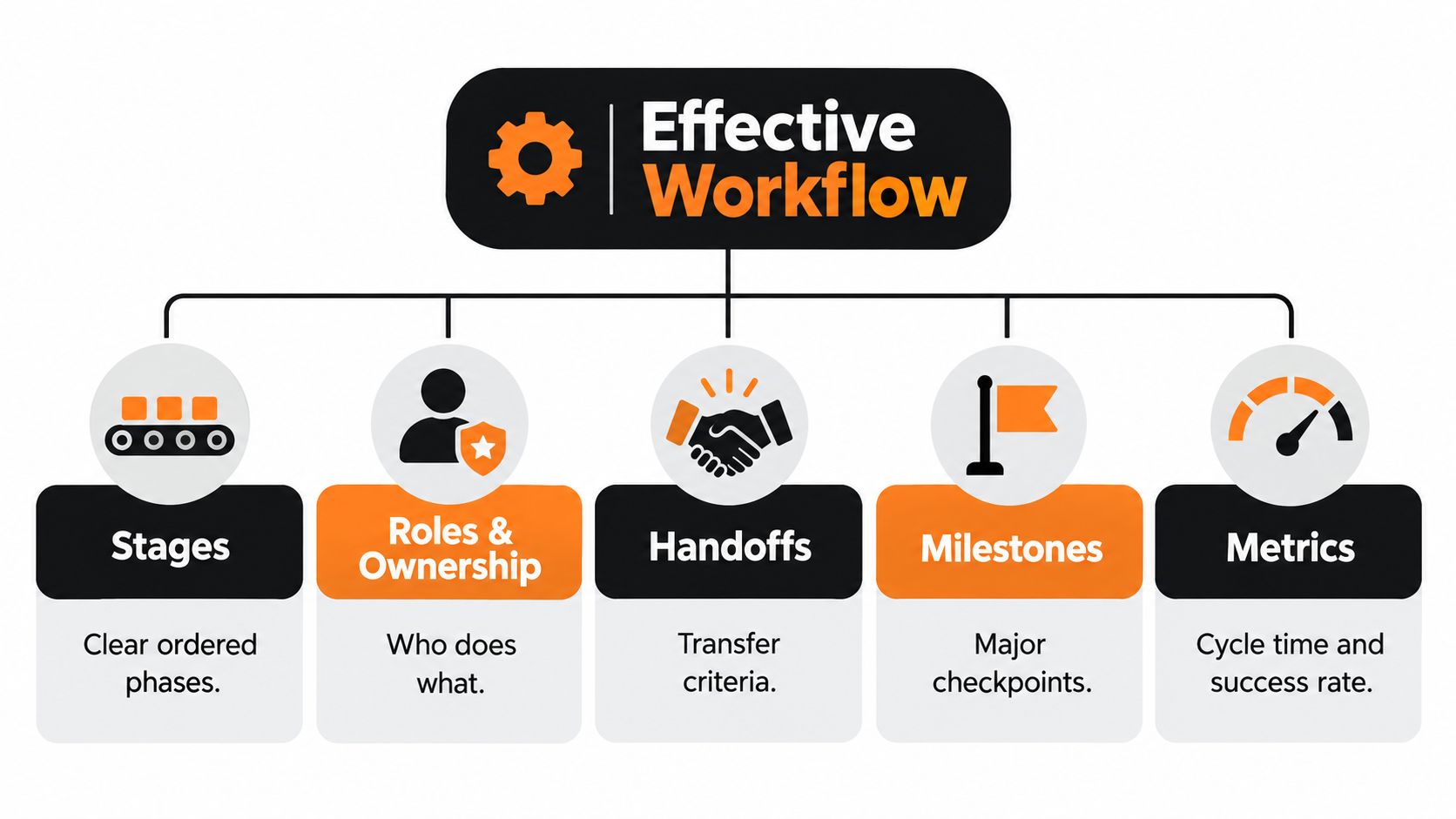
Every workflow needs clear stages with practical meaning. The list should be short enough that people use it consistently, but specific enough that leaders can tell the difference between work that has started, work under review, and work that is complete.
A B2B service workflow might include intake, scoping, production, internal review, client review, revisions, and closeout. A SaaS internal project might use request, planning, build, QA, launch, and retrospective.
Each stage also needs one accountable owner. Use a named role or person, not a broad department label. If "marketing" owns a stage, nobody can tell who is responsible for checking completeness, updating status, or pushing the handoff forward.
Handoffs and status definitions
Handoffs fail most often when entry criteria are undefined.
“Design starts after strategy is complete” sounds clear until a designer opens the brief and finds missing assets, no approved message hierarchy, and three versions of the same note in three different places. At that point, the problem is not coordination alone. It is information quality.
Every handoff needs a small acceptance standard. What must be present. Who verifies it. Where the source files or approved inputs live. What status confirms acceptance. What happens if the package is incomplete.
Status definitions need the same discipline. “In progress” is rarely enough in a multi-team workflow because it hides important operational differences. Active work, waiting on client feedback, blocked by legal review, and ready for QA produce very different timelines and reporting outcomes.
A simple audit helps expose weak spots. Pick one recurring handoff and ask:
- What must be present before the next team accepts the work?
- Who checks it and where do they check it?
- What status change confirms the transfer happened?
- What happens if the criteria are not met?
If those answers vary by project manager, account lead, or department, the workflow is still running on interpretation. Teams that want to tighten that layer usually get more value from process standardization methods than from adding another dashboard.
Milestones and control points
Milestones are checkpoints for comparison.
They only help when the team has a baseline to compare against. Without a baseline date, a revised date is just a new guess. With a baseline, leaders can see drift early, ask why it changed, and separate a normal adjustment from a pattern of late upstream work.
As summarized in Tolodora's project management statistics review, PMI's 2025 project success research reported that 50% of projects worldwide were rated successful, up from 48% in 2024, while 13% were classified as outright failures. The same source also describes the milestone history monitor, which records baseline milestone dates, review dates, and revised planned achievement dates so teams can see schedule drift over time.
That matters because projects rarely go off track in one dramatic moment. They drift through a series of small date changes, unclear reviews, and quiet scope additions that never get recorded cleanly.
Teams do not need more milestone labels. They need a baseline, change history, and a habit of recording why the date moved.
Documentation and metrics
Documentation should reduce interpretation.
Keep one source for scope, one source for current status, and one source for approvals or key decisions. If the same answer can live in Slack, email, a spreadsheet, and a project board comment, reporting turns into reconciliation work.
Metrics then show whether the workflow is stable enough to improve or automate. Useful measures include cycle time, waiting time between stages, revision loops, milestone slippage, and reopen rates after review.
Those metrics matter because they reveal where information breaks down. Long cycle time may reflect overloaded staff, but it can also point to unclear intake requirements. Repeated revision loops may look like execution trouble, but the root cause is often an incomplete brief or vague approval standard. That is the angle many teams miss. Workflow performance is usually an information design problem before it becomes a tooling problem.
Benefits and Business Impact of a Standardized Workflow
Teams rarely miss deadlines because people are lazy or tools are weak. They miss them because information arrives incomplete, status means different things to different people, and handoffs happen without a shared definition of done.
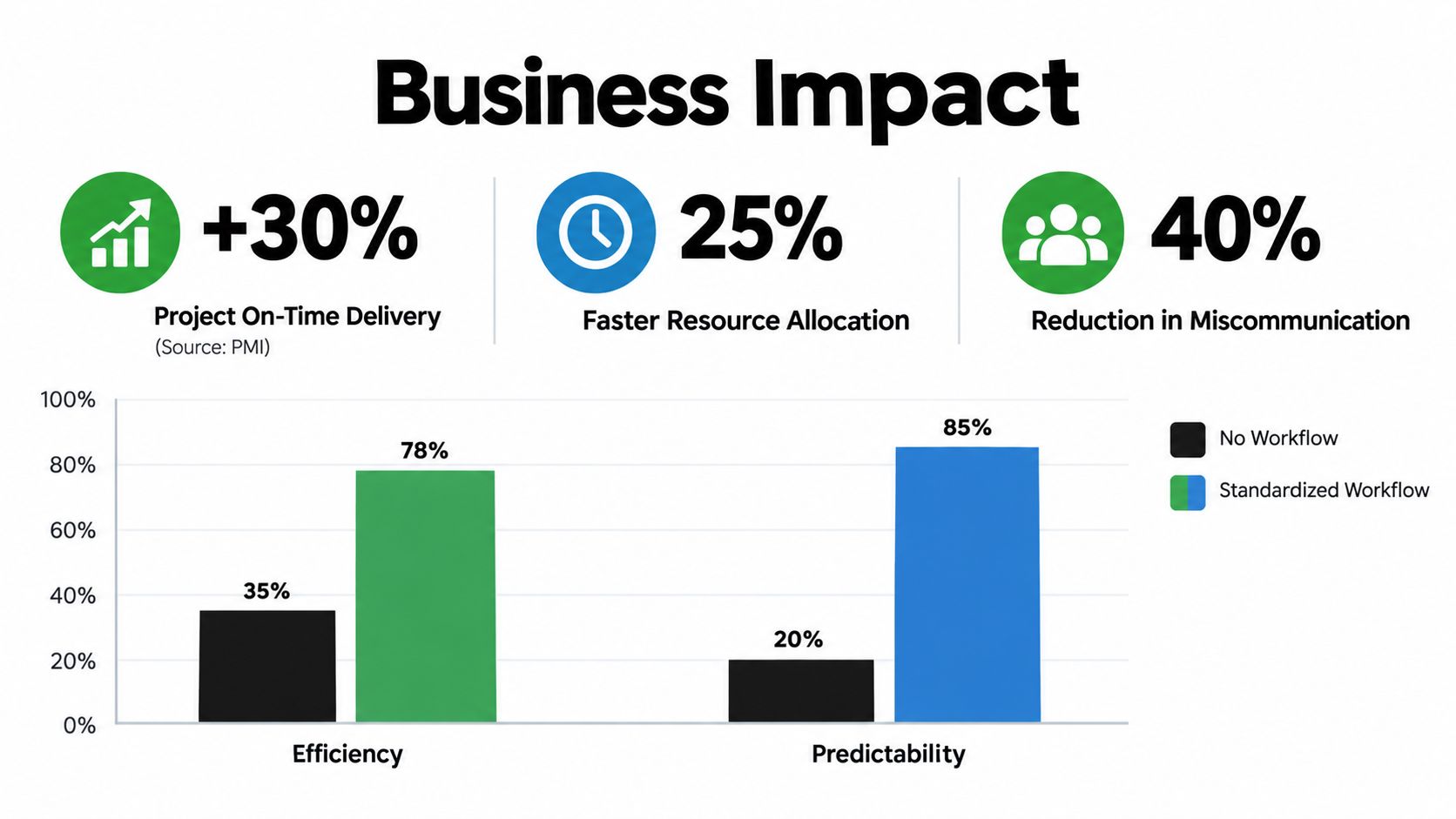
Standardization fixes that at the operating level. It gives every project the same basic plumbing. Requests enter in a consistent format. Work is staged the same way. Status rolls up the same way for managers, clients, and leadership. The result is less time spent translating, chasing, and reconciling.
Better governance means less low value work
Good governance works like traffic signals at a busy intersection. It does not exist to slow cars down. It exists so everyone can move without constant collisions.
In project operations, that means a standard way to decide what gets started, what waits, and what needs clearer input before anyone touches it. Without that structure, teams start work too early, discover missing details later, and then spend billable or strategic time fixing preventable confusion.
A 2019 PMO study found that portfolio management maturity and alignment with business goals positively influenced PMO efficiency, as summarized in the MDPI study on PMO efficiency. For operators, the practical lesson is simple. A workflow tied to business priorities reduces work that never should have entered delivery in the first place.
Standardization improves reporting because status stops being subjective
This is the benefit leaders feel fastest.
If one account manager marks a project "in progress" when the brief is still incomplete, while another uses "in progress" only after production starts, the report is already compromised. The board may look tidy, but the reporting layer is unstable.
A standardized workflow solves that by defining stages in operational terms. Ready means the required inputs are present. In review means the work is waiting on a named reviewer. Complete means it met the acceptance standard, not that someone stopped working on it. Once those definitions are shared, rollup reporting becomes far more trustworthy.
That shift matters because workflow is not only a task coordination system. It is an information integration system. The workflow has to connect intake, delivery, approvals, capacity, and reporting into one understandable picture.
Benchmarking helps teams see where process quality is uneven
Ad hoc work hides patterns. Standardized work exposes them.
Once teams run projects through the same stages, they can compare planning time, activity duration, wait states, and sequencing by project type. They can also see whether one client team always stalls at approval, whether one service line needs extra scoping before kickoff, or whether a recurring handoff keeps arriving half complete.
The pattern usually points back to information quality:
- Long planning time often means intake fields are too loose or required context is missing.
- Large variation in task duration often means handoffs are inconsistent, so each owner has to reinterpret the work.
- Repeated sequencing problems often mean dependencies were not defined early enough.
- Frequent status disputes often mean stage definitions are too vague for reporting.
A short video can help make that idea more concrete in day-to-day project work.
What leaders actually gain
Leaders usually want three things. Fewer surprises, clearer tradeoffs, and reports they can trust.
A standardized workflow supports all three. It makes project health easier to compare across accounts or departments. It shows where capacity is tight before deadlines slip. It also helps teams decide what should become a repeatable template and what needs custom handling.
The business impact is not that every project runs the same way. The business impact is that every project can be read the same way. That is the foundation for better planning, cleaner reporting, and useful automation later.
Tools Templates and Integrations That Power Modern Workflows
Teams usually blame tools when projects feel messy. In practice, the mess often starts earlier, in how information enters the system, how status is defined, and how handoffs are recorded.
Software should support that structure. It cannot create it for you.
A useful way to choose tools is to trace the path of project information from intake to reporting. A workflow works like a relay race. If the baton is missing details at the first handoff, every runner after that slows down to figure out what they received.
Start there. Before comparing platforms, write down the information your team must capture, update, and report on:
- Intake details from sales, client success, or internal stakeholders
- Execution data such as owners, due dates, files, blockers, and approvals
- Status definitions that mean the same thing across every team
- Reporting outputs for leaders, clients, and portfolio reviews
- System connections to tools like HubSpot, Salesforce, Slack, Google Drive, Notion, or QuickBooks
That list sounds simple. It is also where many workflow setups break.
If intake fields are vague, the project tool becomes a place where delivery teams chase missing context. If status labels are loose, dashboards look polished but still trigger arguments in review meetings. If handoffs are inconsistent, integrations only move incomplete information faster.
Choose tool categories by workflow job
Feature lists can distract teams from the real decision. The better question is which system should own each part of the workflow.
| Tool Category | Primary Job in the Workflow | Integration to Prioritize |
|---|---|---|
| Intake and request management | Capture structured briefs, scope details, and approvals before work starts | CRM or form-to-project sync |
| Project execution platform | Track stages, dependencies, owners, due dates, and delivery progress | File storage and team chat |
| Documentation workspace | Store SOPs, briefs, scope notes, and decision history | Links back to project records |
| Reporting layer | Combine project and commercial data for leadership or client reporting | Project platform and CRM data |
| Automation platform | Move approved information between systems and trigger rule-based updates | Project tool, CRM, and communication stack |
A B2B SaaS team might use HubSpot for the customer handoff, Asana or ClickUp for onboarding delivery, Notion for process notes, Slack for internal alerts, and Airtable or Looker Studio for reporting. An agency may keep more of that stack inside Jira and Confluence. The exact combination matters less than the clarity of each system's role.
Templates do more work than teams expect
Templates are often the fastest way to improve workflow quality because they reduce interpretation.
A strong template includes prebuilt stages, required fields, default owners, milestone checkpoints, and approval steps. That gives every new project the same starting frame. It also improves reporting, because the same fields and status points show up across accounts instead of being recreated from scratch.
This is also why baselining belongs in the setup stage, not as an afterthought. If a template does not define the expected stages, timing, and handoff points, your reports have nothing stable to compare against later.
If you are evaluating stack options, this roundup of project management tools is a practical place to compare common platforms. Teams that want to map the workflow before configuring software can also use MakeAutomation's workflow diagram builder to document steps, decisions, manual tasks, and automation points in a factual, shareable format.
One caution helps here. A flashy integration is easy to buy and hard to govern. A plain template with clear status rules often improves delivery faster than a new automation layer, because it fixes the information model the automation would depend on.
Automation Opportunities From CRM to Notifications Done Right
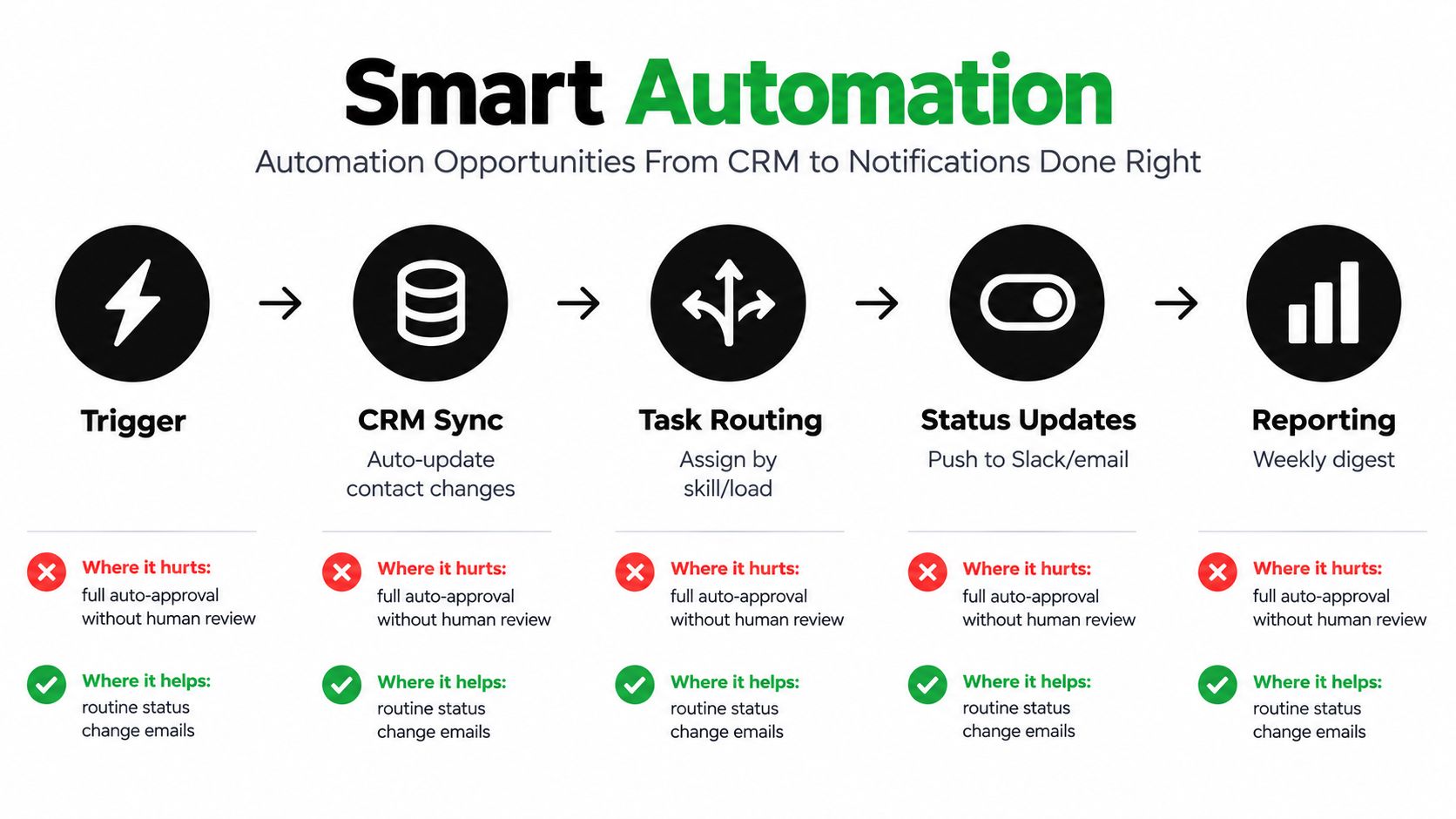
Automation helps most when it removes repetitive movement of information. It hurts when it hides bad decisions inside fast systems.
That's the main misunderstanding around project automation. Teams think automation means fewer clicks. In practice, it means cleaner rules. If your status labels are vague or your handoffs are inconsistent, automation will spread those flaws faster.
Where automation creates real value
The biggest workflow bottleneck often isn't planning. It's reporting and visibility. According to PMwares' 2026 state of project management summary, 72% of respondents spend two or more days every month manually collating project reports, 22% of organizations still use Excel for project planning, 11% use no project management solution at all, and about a third of projects are never baselined.
That's why smart automation usually starts in these places:
- CRM to project creation: When a deal closes in HubSpot or Salesforce, create a project shell with the right client, scope type, owner, and kickoff checklist.
- Task routing: Assign work based on team, service line, or workload rules instead of manual forwarding.
- Status notifications: Push updates to Slack or email when a project changes stage, hits a review checkpoint, or becomes blocked.
- Reporting rollups: Pull project status, milestone shifts, and open risks into a weekly leadership view without rebuilding the report by hand.
What to standardize before you automate
Before turning on workflows in Zapier, Make, HubSpot, Jira, or ClickUp, lock these down first:
- Status definitions so “waiting,” “blocked,” and “ready for review” mean the same thing every time.
- Handoff criteria so the receiving person knows whether to accept or reject incoming work.
- Baseline fields so changes can be measured against the original plan.
- Exception rules so the system knows when humans must review instead of auto-advancing.
Automate routine transfer. Don't automate judgment until the team can explain the judgment clearly.
A useful analogy is ad operations. Teams often want software to generate ads, push variations live, and report results automatically. That works only when naming conventions, approval paths, and asset rules are already stable. The same logic appears in this automate Facebook ad creation guide, where automation is most useful after the upstream structure is defined.
Where teams over-automate
The common trap is auto-approving too much. A task moves to “complete” because a field changed, not because the next team has what they need. Or a dashboard turns green while the actual deliverable still sits in revision.
Good automation is selective. It handles movement, reminders, syncing, and compilation. Humans still review scope changes, quality checks, and exceptions.
Your Implementation Roadmap for B2B SaaS and Agencies
The cleanest rollout is phased. Not because change needs ceremony, but because teams learn quickly once they can see the workflow in operation.
Phase one through three
Start by mapping one recurring delivery motion. For an agency, that might be campaign launch or website production. For a SaaS team, it might be cross-functional launch management. Pick the workflow that creates the most status chasing.
Then standardize the basics:
- Define stages with plain names people already use.
- Set handoff criteria for each transition.
- Create status definitions that reflect real operating conditions.
- Establish a baseline for timeline and key milestones.
After that, configure the tools around the workflow rather than the other way around. Set up required fields, templates, views, and permissions. Keep the first version narrow.
Phase four and five
Only then should automation come in. Trend coverage summarized by The Digital Project Manager's project management trends page notes that project platforms are moving toward AI-assisted planning, real-time collaboration, and deeper integrations, while also highlighting that a major hurdle is integrating new tools into existing workflows. That matches what operators see every day. The challenge usually isn't access to AI. It's workflow inconsistency.
Once the core is stable, automate low-risk, high-frequency actions such as project creation, notifications, report assembly, and CRM sync. Keep approvals and exception handling visible.
A final scaling move is deciding which work should stay with your core team and which should be delegated. For repetitive coordination tasks, some companies use operational support roles to maintain data hygiene, update systems, and prepare reporting. If that model fits your team, this guide to Hire Latin American virtual assistants is a useful reference for thinking through support capacity.
The operating rule that keeps workflows scalable
The workflow that scales isn't the one with the most automation. It's the one with the fewest ambiguous moments.
That usually means fewer exceptions, cleaner status definitions, and tighter handoffs. Once those are in place, AI and automation become multipliers instead of noise.
MakeAutomation helps B2B and SaaS teams document, standardize, and automate workflows across project delivery, CRM operations, reporting, and SOPs. If your team is stuck in status chasing or disconnected tools, visit MakeAutomation to map the workflow first and automate the right parts second.