Project Management Workflow Automation: How to Build It
It's Thursday afternoon, a client asks where the project stands, and you open three tools before you can answer. Dates live in the board, the budget lives in a sheet, and the last status note is a Slack thread nobody can find. The work itself isn't late. The picture of the work is.
Project management workflow automation is how you stop paying that tax every week. It runs the repetitive steps, reminders, roll-ups, and handoffs, once the rules are stable. It fails when teams automate judgment, hide exceptions, or glue together data that doesn't match. Rank candidates by risk before effort. Keep a person on scope, money, staffing, and client promises.
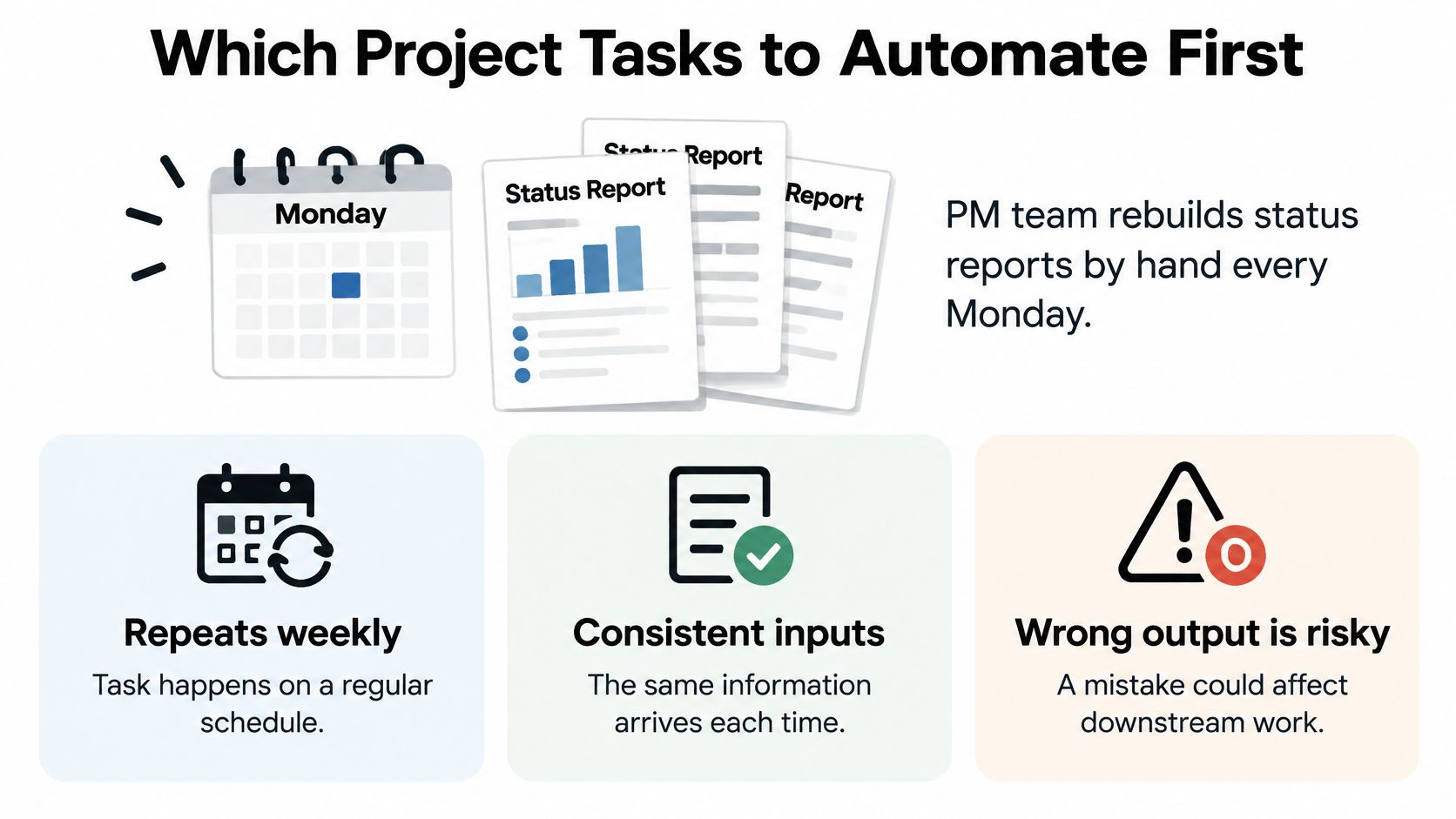
I would not start with the cleverest AI feature on the shortlist. I'd start with one weekly task whose inputs don't change and whose mistakes are cheap to undo.
Which Project Tasks to Automate First
A weekly status pack is a sensible automation candidate when task data is already consistent and errors are easy to correct. If the dates are stale or ownership is unclear, automation will only produce a faster, more polished mistake. Start with work that repeats, follows stable rules, and has a clear human owner for exceptions.
Automation works best when the steps, templates, approval rules, and escalation path are already understood. In 2018, the Project Management Institute reported feedback from 4,455 project-management practitioners and found that 93% of organizations used standardized project-management practices. Reporting and coordination are practical places to look for repeatable work. AI can assist with these tasks, but keep a person responsible for checking outputs, especially when project information comes from disconnected systems. Document the workflow before handing its steps to software.
The same principle applies beyond project boards. Teams automating safety workflows across Australian worksites can automate repeatable checks and alerts while keeping hazard decisions with a person. Project teams should use the same boundary: automate predictable handoffs, and keep judgment calls human-owned.
Sort by risk, then score
| Task | Automation type | Risk level | First pilot? |
|---|---|---|---|
| Deadline and overdue reminders | Notification trigger | Low | Yes |
| Status roll-up from task data | Data aggregation | Low | Yes |
| Dependency alerts across teams | Notification and routing | Low | Yes |
| Task creation from approved templates | Structured creation | Low to medium | Yes, once templates are stable |
| Meeting-note extraction into tasks | AI-assisted extraction | Medium | Only with a review queue |
| Scope change approval | Approval routing | High | No, keep human-approved |
| Staffing and resource reassignment | Recommendation | High | No, keep human-owned |
| Client commitments and pricing changes | Gated action | High | No, keep human-owned |
| Risk acceptance | Decision support only | High | No, keep human-owned |
Rank candidates by the consequences of a bad action before comparing build effort. For low-risk tasks, score monthly time saved, error reduction, business impact, and build effort. Then choose a small first set. Deadline reminders repeat regularly, and an incorrect notification is easy to retract. Status roll-ups suit automation when the source fields are reliable. Dependency alerts can surface blocked work before it disappears between teams.
Meeting-note extraction needs a review queue because transcripts can produce inaccurate tasks or owners. Keep scope approval, staffing changes, pricing, client commitments, and risk acceptance under human control. Those decisions can change obligations or resource allocation, so speed alone is not a reason to automate them.
How to Map Your Workflow and Set a Baseline
Targets get missed when teams automate the mess they already have. McKinsey found that only 61% of respondents said their organizations met automation targets. The groups that did meet them treated automation as a priority, gave people as much attention as technology, and built an operating model meant to scale. Redesign first. Then automate the clean version.
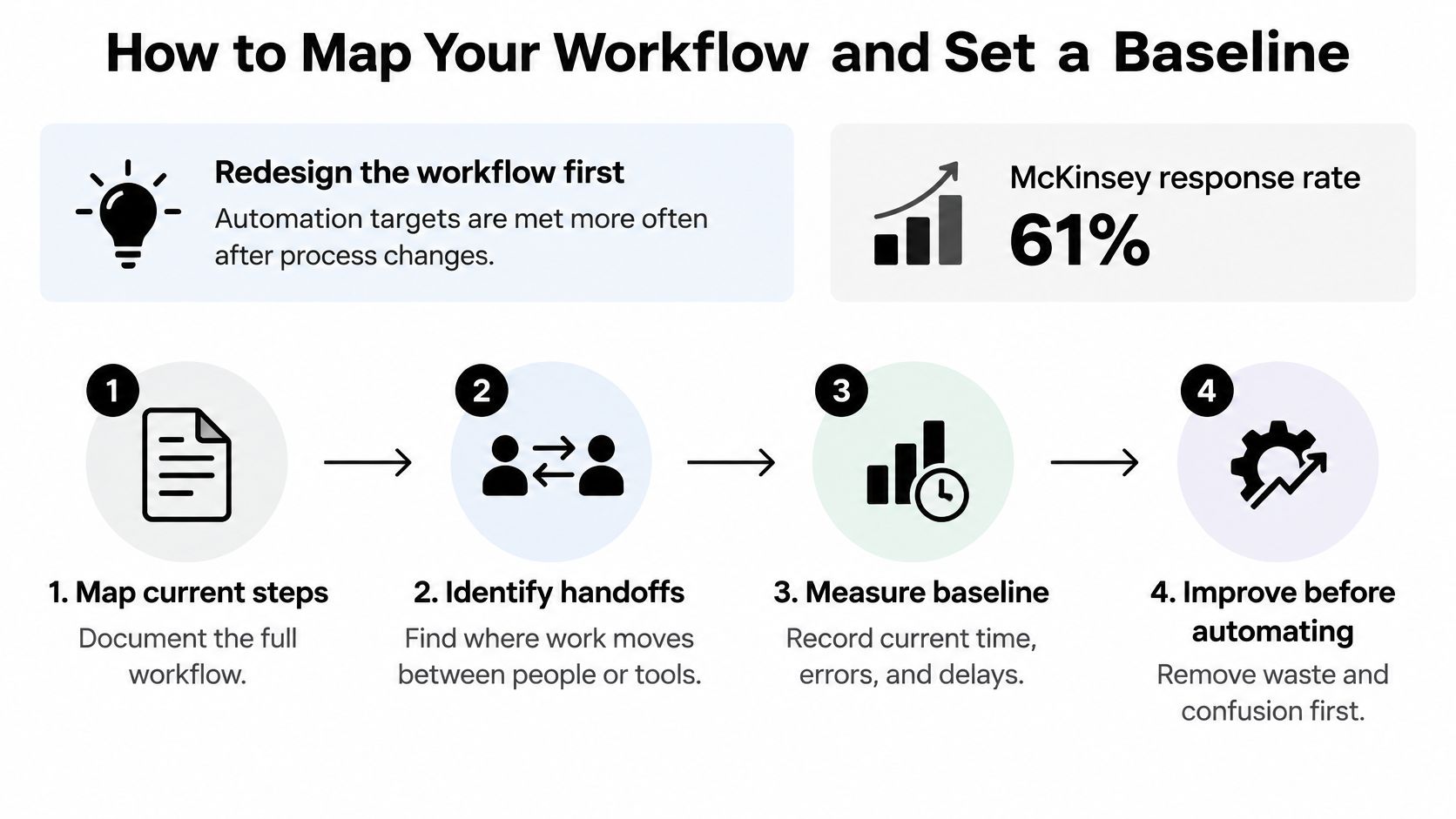
A one-page map beats a mural. If your written procedure and the live path have drifted apart, settle that gap the way you would in any SOP versus process review before a single trigger is built. Our free Workflow Diagram Builder is enough to sketch stages, decisions, and the spots that should stay manual.
Five steps and the slip that follows each
- Name one bottleneck and one target. Pick cycle time, throughput, error rate, or delivery predictability, and write the number you want. The slip is naming three goals, then optimizing none of them.
- Walk one real project from kickoff to close. Write who acts at each stage, not the role on the org chart. The slip is interviewing managers and never watching the person who moves the card.
- Mark handoffs, approval gates, data sources, and exception paths. These are the places work waits or breaks. The slip is mapping only the happy path, so the weird cases show up in production.
- Record the baseline before you change anything. Capture cycle time, manual touches per task, rework rate, escaped errors, and cost per completed workflow. The slip is using task volume, which rewards activity instead of results.
- Redesign, then pick one pilot. Remove steps, name an owner, and choose the workflow that is high-volume and low-ambiguity. The slip is automating five flows because the tool made it easy.
Standardized steps are fair game after that redesign. Task creation from approved requirements, dependency notifications, status aggregation, and escalation routing can run on their own. Judgment-heavy scope changes and risk acceptance stay with a person.
A short walkthrough of mapping a live board before you add rules:
What the finished map contains
One page. One named owner per stage. An exception list with a named resolver for each item. Successful organizations in that McKinsey work were seven times more likely to involve communications functions in automation-related changes and more than twice as likely to involve HR. Tell people what will change before the pilot, not after the first bad alert.
Practical rule: The benchmark is the share of runs that meet the target SLA with no manual fix, plus how fast exceptions clear and whether people still use the flow a month later. A count of automations deployed is not a result.
Instrument the pilot with event logs, SLA timers, an audit trail, and an exception queue. Scale only through a named operating model, with training and a cross-functional owner, not by copying the scenario into every board on Friday.
How to Design Triggers, Actions and Approval Gates
Every automation has four parts. A trigger starts it. A condition decides whether it should run. An action does the work. A gate decides whether a person must see it first. Skip the gate and you get speed with no one to blame when the output is wrong.
Use three tiers, and write the tier on the scenario before you build it.
- Auto-run fits low-risk actions. Reminders, board updates, and internal notifications can fire on their own.
- Auto-with-review fits medium-risk drafts. The system prepares the work and a person releases it.
- Human-approved fits anything that changes scope, money, staffing, or a client commitment. The system may route and remind. It may not decide.
Pairings that hold up
| Trigger | Typical action | Guardrail |
|---|---|---|
| Task status changed to Done | Notify the client-facing owner and update the project board | Confirm the acceptance criteria field is filled |
| Dependency task completed | Unblock the downstream task and notify its owner | Require owner confirmation for milestone-critical tasks |
| Budget spent above 80% of allocation | Alert the finance lead and create a review task | Set the threshold per project type |
| Client intake form submitted | Create the project and a kickoff task | Validate required fields before creating anything |
| Meeting note tagged as action item | Draft the task in a review queue | A human approves before it reaches the board |
| Scope change request logged | Route to the PM and sponsor for approval | Never auto-approve |
| Milestone date slips past plan | Re-forecast the schedule and notify the sponsor | Require PM sign-off before resetting the baseline |
Failures the table will not show you
A webhook that fires twice creates duplicate tasks unless every record carries a unique ID and a retry updates the original. An automation that moves a task into the status that triggers it will loop until the board is a mess. Due-date reminders set in one time zone will ping a team on another continent at 3 a.m. Two scenarios writing the same field will overwrite each other, and the last write wins with no argument.
Log six things on every run: the trigger, the source data, the output, the approver, the override reason, and the downstream effect. Silent failure is the design I would reject. Send the miss to an exception queue that a named person clears inside a set window, such as one business day for client-facing flows and two for internal ones.
If this trigger fails, who sees it, and how fast? If you can't answer in one line, the automation isn't ready.
Choosing Tools and Connecting Your Stack Safely
| Tool | Best fit | Build style | Hosting | Main risk to check |
|---|---|---|---|---|
| Zapier | Fast linear automations with the widest app library | Trigger and action steps | Cloud | Cost rises with task volume; review the current task tier before you commit |
| Make.com | Multi-step scenarios with branching and data transforms | Visual scenario canvas | Cloud | Operation-based usage can grow quickly on busy boards |
| n8n | Custom logic and developer-led teams | Node-based canvas with code nodes | Cloud or self-hosted | Someone must maintain servers, credentials, and updates |
Pick against the workflow, not the logo. App coverage matters first. If the board, chat tool, CRM, and docs aren't in the catalog, you'll be back to copy-paste. Branching matters when a done task should notify one owner and a slipped milestone should notify another. Data transformation matters when dates, currencies, or status names don't match across tools. Maintenance matters after launch, because the person who built it may leave. Data hosting matters when client files can't sit on a vendor you haven't reviewed.
We build on Zapier, Make.com, and n8n, and we compare them the same way in our notes on project management automation tools. A linear reminder rarely needs a self-hosted canvas. A flow with branching, lookups, and custom error paths often does.
Connect the stack before you trust it
- List every account and API permission the scenario needs, per tool. Use a least-privilege service account, not someone's personal login.
- Write a field-mapping sheet with source field, target field, format, and whether the field is required. Normalize dates, time zones, and currencies before anything moves.
- Put a unique ID on every record so a retried run updates the existing task instead of cloning it.
- Time the path. Webhooks are near instant. Polling can lag by minutes. API rate limits will stall a busy board during Monday morning updates.
- Name the fallback for a tool with no API. A scheduled CSV import or a parsed email is slower, and it is still better than an unowned manual step.
Choose the platform that can run the most complex workflow on your shortlist. Then confirm the simpler ones run on it too. Two platforms for three flows means two places for credentials to expire.
How to Test, Roll Out and Win Team Adoption
Before a workflow reaches a live project, test the conditions that can stop it or send work to the wrong person. A summary of automation research reports that 70% of organizations attempting large-scale automation or digital-transformation programs did not achieve their stated goals, according to this summary of automation failures. It also identifies common failure points in RPA work: automating broken processes (41%), insufficient testing (38%), weak monitoring and governance (36%), and inadequate exception handling (31%). Treat exceptions and approval gates as part of the design, not as cleanup after launch.

For each test, write the expected result beside the case. That gives testers a clear pass-or-fail check.
- Normal cases: A clean task closes and the right person receives a notification.
- Boundary values: A due date is today, a budget is exactly 80%, or an optional field is empty.
- Duplicate events: The same webhook arrives twice, but only one task is created.
- Missing data: A required field is blank, so the workflow creates nothing and flags the item.
- Permission failures: The service account cannot access the board, and the run enters an exception queue.
- Integration outages: The chat tool is unavailable, so the action retries and then alerts its owner.
- Human overrides: A project manager rejects a draft, and the reason is recorded.
Pilot small, then watch the people
Start with one project type or department for four to six weeks. Set rollback criteria before launch, including the share of runs that require manual correction and whether an error reaches a client. Review false positives and false negatives during the pilot. Use the existing baseline to assess cycle time, rework, escaped errors, manual touches per task, and cost per completed workflow. More runs alone do not prove the automation is working.
Announcing the automation after it goes live is a common adoption mistake, so bring the people who will receive the notifications into the design from the start. Explain what changes, what stays manual, and how to override a run. Let staff practise in a sandbox project before using a live client board. A named owner should answer questions and keep a visible feedback channel open, as recommended in these workflow automation best practices.
A 2025 global study of 870 professionals across 97 countries identified staff resistance as a leading barrier at 62%, and ethical concerns or bias at 54%, according to the AIPM research group. Address both in design sessions and assign the process owner to respond before launch. Adoption means people continue using the workflow after a month, while the need to override it declines.
KPIs That Prove Your Automation Works
Hours saved can rise while delivery gets worse. A 2025 survey found that more than 55% of respondents reported gaps in cross-functional data sharing and only 33% said their infrastructure was fully integrated, and a separate global survey of 1,651 project and portfolio professionals found that 61% said their tools made it difficult to demonstrate measurable contributions to overall project outcomes, while 87% still reported needing human input at least some of the time, according to Galorath's 2025 survey. Tie each automation to one baseline and one outcome. Disconnected tools will keep the end-to-end path unchanged no matter how clever the local rule is.
| Metric | How to measure it | Success direction | Review cadence |
|---|---|---|---|
| Cycle time per workflow | Hours from trigger to close, compared with the baseline | Down | Weekly in pilot |
| Manual touches per task | Count of manual actions logged per task | Down | Weekly in pilot |
| Rework rate | Share of tasks reopened after closing | Down | Monthly |
| Escaped errors | Errors found after a client or sponsor sees the output | Down | Weekly in pilot |
| Runs meeting SLA without intervention | Share of runs completed on time with no manual fix | Up | Weekly in pilot |
| Exception resolution time | Hours a flagged item waits in the exception queue | Down | Weekly |
| Milestones delivered on time | Share of milestones met against the original plan | Up | Monthly |
| Gross project margin | Margin per project, compared with similar pre-automation projects | Up | Quarterly |
| Cost per completed workflow | Total run and maintenance cost divided by completed workflows | Down | Quarterly |
Attribution and cadence
Compare similar projects before and after the change. Comparing one project with itself hides a quiet month or a brutal one. Track the exception rate next to time saved. An automation that cuts hours and raises escaped errors is a net loss. Then check where the saved time went. If it disappears into more meetings, you didn't gain capacity. Design teams already know that a clear meeting cadence for design projects protects review time. The same idea applies here. Reinvest saved hours in quality work or revenue work, and write that down.
Pick three to five KPIs, not fifteen. Review the operational ones weekly during the pilot and monthly after launch. Review margin, cost per workflow, and return on the build quarterly. Integration and event tracking come before any autonomous agent. If the fields don't match, the metric is fiction.
A rising SLA share with a falling exception queue is the signal worth keeping. A rising task count is not.
Confirm Your First Workflow Before You Build It
Build only when four checks are true. If one fails, fix that item first. Pilots stall more often from a missing owner than from a missing feature.
- The workflow is a real operating bottleneck. Someone can name the cost or the delay in a sentence.
- A named owner can define how it should run, including who resolves each exception.
- Baseline numbers already exist for cycle time, manual touches, rework rate, and escaped errors, recorded against the KPI set.
- The path passes the low-risk test. No scope, money, staffing, or client-commitment decision sits inside it.
We work with clients that have a real operating bottleneck and an owner who can help define the workflow, because that is the fit that makes a build maintainable. After discovery, the map, the failure points, and a priority order based on time saved, error reduction, business impact, and implementation effort come before any scenario is turned on. Clients own the workflows, the code, and the documentation, and the handover includes training so the team can change the flow later.
Three actions this week
- Write the baseline row for the chosen workflow, with a real number in each cell you can measure today.
- Book a thirty-minute mapping session with the owner, and leave with the exception list and a named resolver.
- Put the pilot dates and the rollback criteria on the calendar before anyone opens the builder.
Simple workflows can often be completed in 1–3 business days once those three items exist. A client can start with one defined project and continue with ongoing optimization, new automation requests, or a maintenance retainer. Many teams prefer that we handle later changes, either per request or on a retainer, after a communication and request process is agreed at the start.
The first measurable step is the day the baseline row has a number in it. Until then, you are guessing, and a guess is a bad thing to automate.
MakeAutomation maps the project workflow you already run, then builds the triggers, approval gates, and exception handling that keep low-risk work moving without taking scope, pricing, or client commitments away from your team. We connect the tools you use, document the result, and hand it over so your people can run it. If you have one bottleneck and an owner who can define it, visit MakeAutomation and start with that single workflow.