Prevention of Conflict: A 2026 Guide for Teams
The team Slack goes quiet after a missed launch date, then the thread starts. Product says engineering changed scope, engineering says sales promised a timeline, and someone posts a screenshot of a customer complaint that no one owns. At that point, you're not dealing with a single disagreement anymore, you're dealing with a system that failed to stop tension earlier.
That's why prevention of conflict works better as an operating model than as an occasional mediation skill. In high-growth SaaS teams, the problem usually isn't that people lack goodwill. It's that roles blur, decisions disappear into chat, and no one has a trigger for when a small mismatch becomes a live issue.
The scale of the problem is bigger than one team. UN Women reports that in 2023 more than 170 armed conflicts were recorded worldwide, and approximately 612 million women and girls lived within 50 kilometers of those conflicts, a 50 percent increase compared with a decade earlier UN Women facts and figures. That's the same logic at work inside organizations, just at a different scale. Conflict prevention is about spotting risk while there's still room to shape the outcome.
For teams that want a practical reference point outside corporate settings, building school conflict programs is a useful reminder that prevention always works best when it's built into daily routines, not left to improvisation.
Introduction to Prevention of Conflict Framework
A common pattern shows up in SaaS operations: one release slips, one customer-facing promise gets contradicted, and then three people spend two days clarifying who decided what. By the time the meeting happens, everyone is already defending their version of the story. The energy goes into blame control instead of issue control.
A better prevention of conflict framework treats tension like an operational risk. That means looking at the process that produced the friction, not just the personalities involved. It also means using rules, logs, and escalation paths before emotions take over.
Practical rule: if a disagreement keeps reappearing in different meetings, the system is usually the issue, not the people.
The value of this approach shows up in day-to-day execution. Prevention works best when teams catch small mismatches early, before they turn into customer escalations, internal rework, or avoidable churn in decision-making. That is why the strongest programs combine clear ownership, lightweight documentation, and response paths that people use.
In practice, that means teams need a workflow for spotting risk, a communication standard for reducing ambiguity, and a response path for the cases that still break through. It also means tying those habits to the tools people already use, because a process that lives only in a training deck will not hold up under pressure. The rest of this guide stays grounded in what works inside real operating systems, not just in soft-skills training.
For teams that want a practical reference point outside corporate settings, building school conflict programs is a useful reminder that prevention works best when it is built into daily routines, not left to improvisation. For a closer look at how teams can categorize the kinds of friction they face, three types of conflict is a useful starting point.
Identifying Conflict Risk Factors
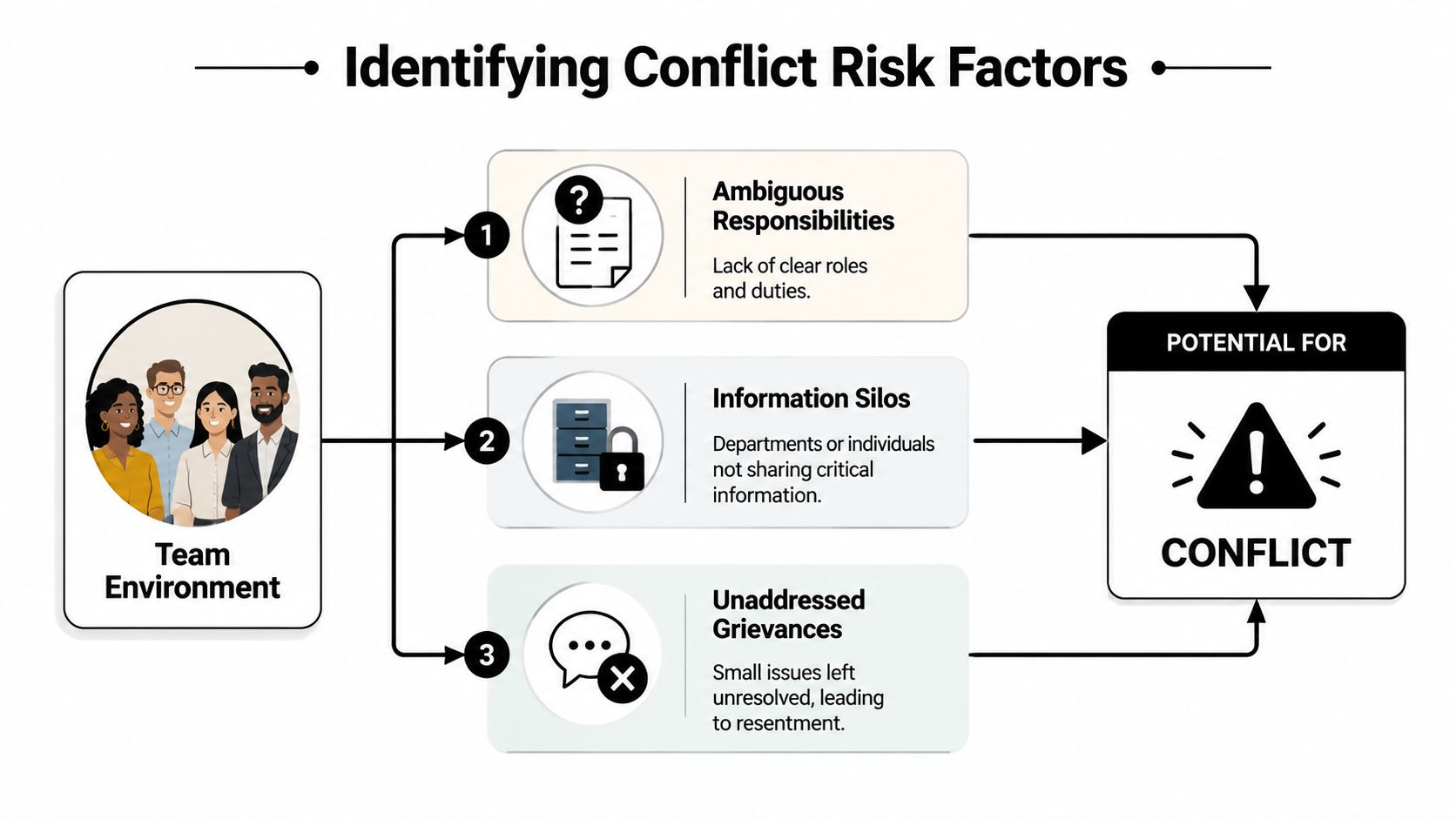
Before a team can prevent conflict, it has to learn to diagnose it early. In SaaS environments, the warning signs are usually mundane at first, a role nobody owns, a handoff that lives in someone's inbox, or a grievance that keeps surfacing in private DMs instead of in the working cadence. Those are not minor annoyances. They're signals that the operating model is drifting.
Run a rapid risk audit
The fastest useful audit starts with the work itself. Review where decisions get made, where they get written down, and where they vanish. Then compare that against the places where tension is showing up, recurring misunderstandings usually point to ambiguous responsibilities or information silos, while repeated private complaints often point to unaddressed grievances.
A rigorous conflict-prevention workflow follows four stages, analyze the conflict context, map key actors and stakeholders, build scenarios, and plan targeted responses, with early and intensified intervention when risk rises Inclusive Security workflow. That sequence is useful because it turns a fuzzy concern into something operational. It tells you what to examine first, who can influence the outcome, and what happens if nothing changes.
A good audit doesn't need theatrical interviews. It needs simple evidence, project handoff notes, meeting notes, decision records, and the places where people keep asking the same question. If you're using this conflict-type overview as a companion, the key is to separate task conflict from process conflict and interpersonal strain, because each one needs a different response.
Track what repeats, not what is loudest. Repetition is usually the cleaner signal.
Translate behavior into a risk profile
Once the pattern is visible, document it in plain language. For example, “design and engineering disagree about approval ownership on every launch that touches billing.” That's far more useful than “there's tension between teams.” It gives you a place to intervene, and it tells you what kind of intervention makes sense.
The goal is not to label people as difficult. The goal is to identify the conditions that keep producing friction. That's what lets ops, HR, and leadership move from reactive cleanup to prevention.
Building Preventative Communication and Process Norms
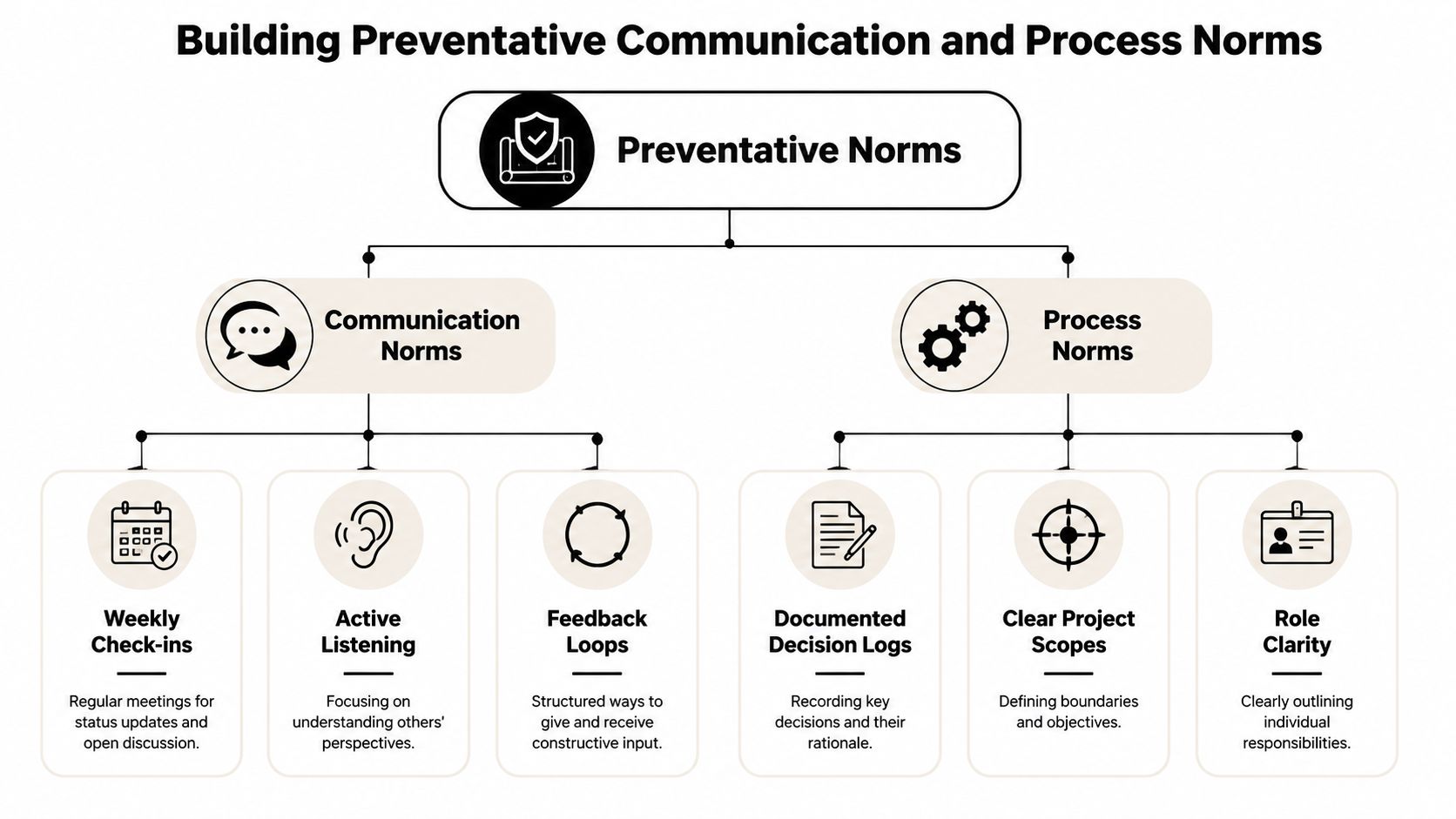
Prevention gets durable only when people know how to work with each other before things go wrong. In practice, that means making communication predictable and making process visible. Teams that rely on memory and goodwill almost always end up re-litigating the same issue in slightly different language.
Set the communication standard first
Start with a small set of norms that everyone can follow. Weekly check-ins work because they create a regular place for friction to surface before it hardens. Decision logs work because they stop people from arguing about what was agreed to after the fact. Rotating facilitators work because they reduce the risk that one dominant voice controls every meeting.
That aligns with guidance that links risk analysis and early response to structural drivers, not just mediation skill, and calls for measurable indicators, policy controls, and governance reforms UN News on conflict prevention. In other words, prevention is not just “be nicer in meetings.” It's build a system that makes ambiguity harder to hide.
A useful internal reference here is improving internal communication, especially if your team has grown faster than its meeting discipline. The practical question is simple. Where do people need to know something, and how do you force that knowledge into a shared place before it becomes a dispute?
Write norms into the work itself
A communication norm that lives in a culture deck and nowhere else won't hold under pressure. Tie it to existing rhythms. Put decision logging into launch checklists. Put role clarity into project kickoff templates. Put feedback loops into recurring manager 1:1s.
If a norm can't survive a busy quarter, it isn't a norm yet.
The strongest versions are specific. “All project owners post a summary after decision meetings.” “Every cross-functional launch includes one owner for scope, one owner for timeline, and one owner for customer messaging.” Those statements reduce finger-pointing because they make ownership legible before the conflict starts.
Establishing SOPs and Automation Touchpoints
A growing SaaS team can talk about conflict prevention all day and still miss the actual failure point. The breakdown usually happens at a handoff, in an approval queue, after a performance note, or when two teams interpret the same workflow differently. SOPs make the response consistent, and automation makes sure the response happens before frustration turns into a dispute.
Start with the touchpoints where conflict tends to surface, onboarding, project handoffs, performance feedback, recruiting, and cross-team approvals. Define the expected action for each one. If a handoff is late, send a check-in prompt. If a candidate interview score falls below the agreed threshold, trigger a review. If a project slips, require a structured debrief before the next sprint begins.
That approach fits the broader logic in UN natural resource guidance, which emphasizes governance, equitable access, rights enforcement, and early-warning data inside prevention systems. The organizational version is the same. Conflict prevention gets stronger when signals feed the decision layer, not when they sit in a dashboard that no one acts on.
Automation Touchpoints Overview
| Touchpoint | Purpose | Trigger | Tool Example |
|---|---|---|---|
| Onboarding check-in | Surface confusion early | New hire completes first week | Form + HR workflow automation |
| Project handoff | Catch scope drift | Task moves between owners | Project management automation |
| Post-meeting recap | Lock in decisions | Meeting ends | Auto-generated decision log |
| Candidate screening | Reduce hiring friction | Interview stage completion | ATS scoring rule |
| Team sentiment pulse | Detect hidden strain | Weekly or post-release survey | Survey platform + alert routing |
The table matters because consistency matters. If the same trigger always produces the same response, the team stops depending on memory and starts depending on process. That is what makes prevention measurable instead of anecdotal.
A practical reference for timing and follow-up is how to schedule tutoring sessions efficiently. The coordination logic is similar. The system works only when the right follow-up happens at the right moment, not when someone remembers to chase it later.
For implementation, start with one SOP per risk point and document the trigger, the owner, the response, and the escalation path. A clear guide on how to create SOPs helps keep that first version usable. Then connect the SOP to a workflow tool after the manual process is stable. If the process is unclear on paper, automation will only speed up the confusion.
Creating Sample Scripts and Templates
People often freeze because they know a conversation needs to happen, but they don't know how to begin without making it worse. Good scripts reduce that friction. They give managers and teammates a calm entry point, keep the discussion anchored in facts, and lower the odds that someone feels ambushed.
The most useful scripts are short. They don't over-explain, and they don't sound performative. They open the door, define the issue, and end with a next step.

One-on-one check-in script
Use this when tension is showing up in work quality, response time, or tone.
“Thanks for making time. I've noticed a few moments where handoffs felt unclear, and I want to catch that early. What's been slowing things down on your side, and what do you need from me or the team to make this smoother?”
That opener works because it names behavior without accusing intent. It also invites the other person to explain the constraint instead of forcing them into defense mode.
Cross-team alignment script
Use this when two teams keep revisiting the same disagreement.
“We're seeing the same issue in more than one project, so I want us to agree on the problem definition before we talk solutions. What exactly is the mismatch, who owns each part, and what would a finished handoff look like to both teams?”
The sequence here mirrors operational conflict management, which starts with a neutral setting, then ground rules, then each party's perspective, then joint problem definition, followed by brainstorming, an action plan, and follow-up monitoring operational conflict management guidance. The key pitfall is skipping the shared definition stage. If the group can't agree on the problem, it won't agree on the fix.
Ask for the problem definition before the solution list. Otherwise people negotiate around different issues.
Closing commitment line
End every script with a concrete commitment. “Let's confirm owners by Friday and review the outcome in next week's check-in.” That keeps the conversation from becoming a cathartic dead end. It also turns tension into a tracked action.
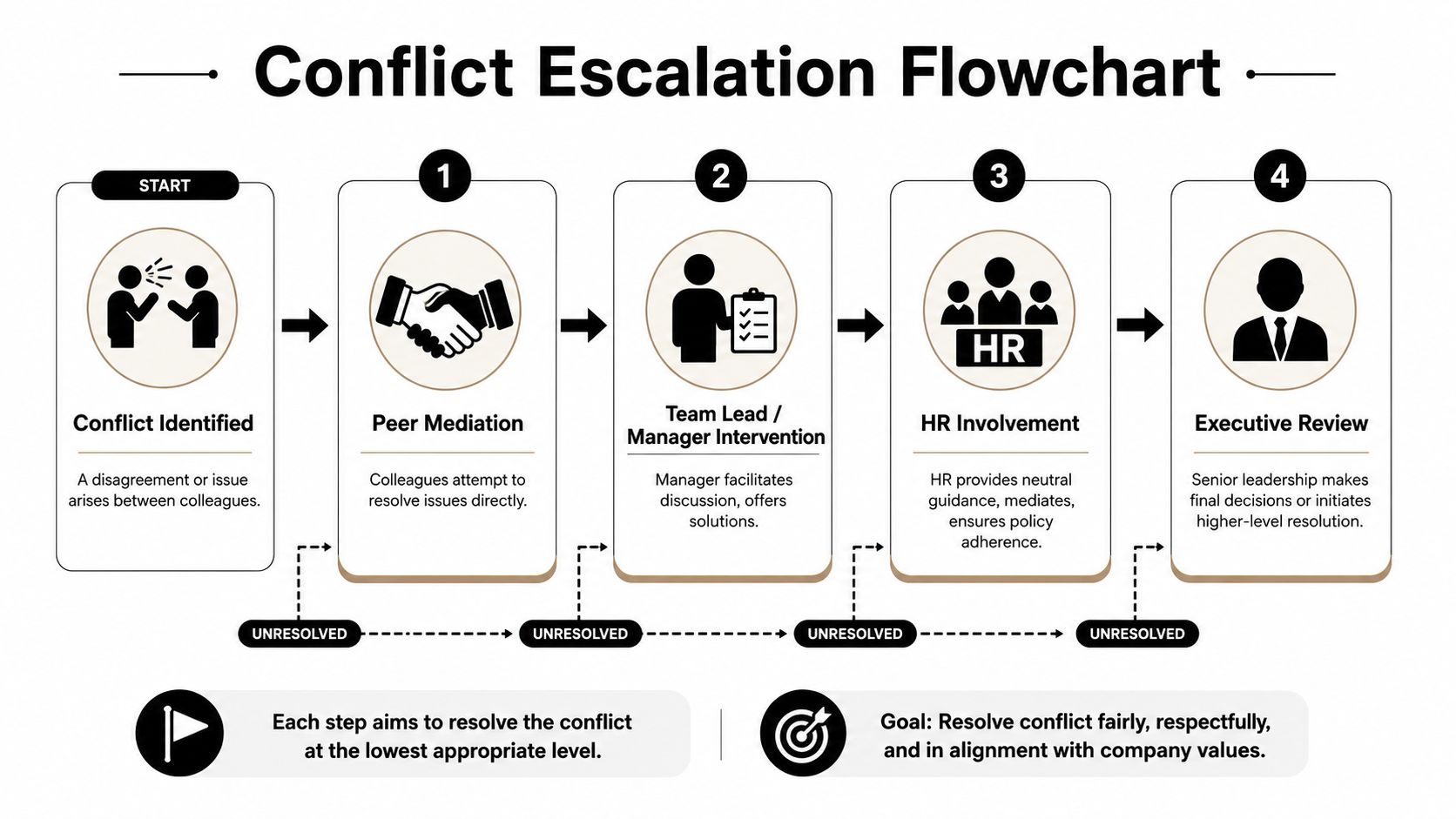
Designing Escalation Flowcharts
Not every conflict can be solved in the room where it starts. Some disputes need a clear route upward, and teams get into trouble when that route is informal, political, or unpredictable. A good escalation flowchart removes guesswork and makes the process feel fair even when the outcome is hard.
Define the thresholds
Start by deciding what should stay local and what should move up. Peer mediation belongs at the lowest level when the issue is contained and both sides are willing to talk. Manager intervention belongs when the issue affects delivery, scope, or repeated behavior. HR belongs when policy, conduct, or fairness is in question. Executive review belongs when the disagreement affects multiple functions or creates material risk.
The point is not to build a bureaucracy for every conflict. The point is to make escalation predictable so people don't wait too long or jump too high too soon.
Map the decision gates
A clean flowchart names four things at every step, the trigger, the owner, the communication channel, and the timing. If a peer discussion doesn't resolve the issue, the manager doesn't need a new argument, they need the agreed decision gate. If HR steps in, everyone should know what evidence is needed and what the next review point looks like.
That structure matters because it keeps escalation from feeling personal. People may not like the outcome, but they can still trust the process.
Keep the flow visible
The best version is one page, not a policy manual. Put it where managers and team leads work, inside the handbook, the project hub, or the people-ops workspace. If the chart is hidden, the process will be ignored until someone is already upset.
A simple escalation route is one of the fastest ways to reduce uncertainty. It also protects lower-level managers from having to improvise under pressure, which is where a lot of avoidable damage starts.
Tracking KPIs and Continuous Improvement
Conflict prevention gets stronger when it is measured like any other operating system. If you do not track the signals, you cannot tell whether the norms are working or just sounding good in meetings. The right KPI set is usually small, visible, and tied to actual behavior in the team.
Track whether check-ins are happening, how long it takes to close out a conflict after it is raised, whether sentiment is improving in pulse surveys, and how often issues escalate past the first intervention point. Those measures are not there to punish teams. They show where the system is catching issues early and where it is missing them, which is what makes the process worth improving.
The business case is real. As noted in the World Bank analysis, prevention systems in high-risk settings can produce large economic gains and reduce the likelihood of conflict. At organizational scale, you will not model returns with the same macroeconomics, but the direction is the same. Modest prevention spend can reduce churn, rework, and leadership distraction.
Build the review cadence
Quarterly audits are enough for many operational units. Review the metrics, sample a few escalations, and check where the process was followed and where it broke down. Then update the SOPs, the scripts, or the triggers based on what happened, not what looked good on paper.
A prevention system should get easier to use over time, not more complicated.
That is the true test. If the team relies less on escalation because the upstream process works better, the system is doing its job. If the dashboard fills up but behavior does not change, the metrics are decorative.
For teams that want a scalable operating partner to build and automate these prevention systems, MakeAutomation can help.