How to Automate Documentation: A Step-by-Step SOP Guide
Your sales team closes a deal, the project manager copies details into an onboarding document, and someone asks which checklist is current. Meanwhile, the call summary is still in the CRM, the delivery requirements are in Slack, and the person who knows the exceptions is on leave.
Learning how to automate documentation starts with connecting those records, not asking AI to write a better document. The practical approach is exception-based documentation: automate routine records and drafting, then send consequential claims to someone accountable for checking them. You're removing repetitive typing, not responsibility.
Which Documents Are Worth Automating First
Document types ranked by automation fit
| Document type | Trigger event | Automation fit | Human review needed |
|---|---|---|---|
| Meeting notes and call summaries | Call ends in CRM | High | Light check |
| Onboarding checklists | New client signed | High | Light check |
| Project status reports | Milestone marked complete | High | Spot check |
| Support macros and FAQ entries | Ticket resolved and tagged | Medium | Spot check |
| Standard operating procedures | Workflow change deployed | Medium | Owner approval |
| Compliance and data-handling records | Policy or permission change | Low | Mandatory approval |
| Recruitment decision records | Candidate stage change | Low | Mandatory approval |
Start with this ranking, not a software subscription. High fit means the necessary information already exists in structured fields, such as CRM stages, ticket tags, or project milestones. Low fit doesn't mean automation is useless, it means a machine shouldn't decide whether the resulting statement is safe to publish.
In Camunda's 2024 State of Process Orchestration Report, 95% of surveyed IT decision-makers and business leaders said automation had helped achieve operational efficiency. That supports investing in automation, not automating every document indiscriminately.
Rank the work and the consequences
List recurring documents, their current authors, their frequency, and the systems containing their inputs. Rank volume multiplied by the cost of an error to expose where mistakes could become expensive, then favor high-volume, low-consequence records for the pilot. A frequently produced document with serious hiring or contractual implications deserves stronger controls, not faster publishing.
Separate instructions from evidence. A call summary records what happened; an SOP tells someone what to do next. Understanding the difference between an SOP and a process helps prevent an automatically generated activity log from becoming an unreviewed operating instruction.
For support teams, Vight's guidance on reclaiming technician time for diagnosis offers useful context: automate repetitive handling so specialists can concentrate on judgment. Apply that distinction to documentation by capturing ticket facts automatically while checking proposed troubleshooting instructions.
Pilot rule: Choose documents whose errors are easy to spot and inexpensive to correct.
Meeting summaries and onboarding checklists are usually strong candidates. Keep the scope narrow: summarize explicit commitments, or assemble tasks from an approved service package, rather than inventing recommendations.
No-Code Platforms or Custom Code for Documentation
No-code platforms versus custom code for documentation automation
| Criterion | No-code platform (Zapier, Make.com, n8n) | Custom code |
|---|---|---|
| Best fit | Standard app connectors and fast pilots | Complex logic, high volume, or specialised integrations |
| Setup speed | Faster when connectors match the workflow | More initial engineering and deployment work |
| Who maintains it | Operations team in a visual editor | Engineers in version control |
| Data control | Hosting determines boundaries; n8n can be self-hosted | Direct control over storage and access, with implementation responsibility |
| Audit trail | Platform run history, subject to retention settings | Application logs and commit history you maintain |
Maintenance matters more than the first build. Zapier and Make.com are useful when the source application, document destination, and approval channel have suitable connectors. n8n provides a middle path when self-hosting is important, although your team then owns infrastructure maintenance and security configuration.
A visual editor doesn't eliminate engineering decisions. Someone still needs to understand authentication, field mappings, retries, and what happens when an application returns incomplete data. This explanation of what no-code automation involves helps distinguish a visual interface from a maintenance-free system.
Choose around the maintenance owner
Say an agency builds onboarding documentation in a Make.com scenario that only its operations lead understands. The CRM administrator renames a field, but the scenario continues running and writes blank sections because it still references the old mapping.
The fix isn't necessarily custom code. Required-field validation, an error route posting to a shared channel, and a runbook entry for field renames address the actual failure. Rebuilding the same unchecked logic in Python would preserve the problem.
A hybrid workflow often makes sense: let the visual platform handle triggers, notifications, and approvals, while a small script handles a difficult transformation. Give that script a defined input schema and explicit error responses so the operations team can troubleshoot without reading its implementation.
Switch to code when you can name the limit you've hit, not because the visual workflow looks complicated.
At MakeAutomation, we're platform-agnostic and may recommend n8n or custom code for complex logic, higher volume, data control, or specialised integrations. Start the pilot with the simplest maintainable option, then change architecture when a specific constraint justifies it.
How to Build a Documentation Workflow Step by Step
Build around a traceable source event, with a separate drafting and publishing stage. Before connecting an AI model, agree on what the record must contain and what should happen when that information is unavailable.
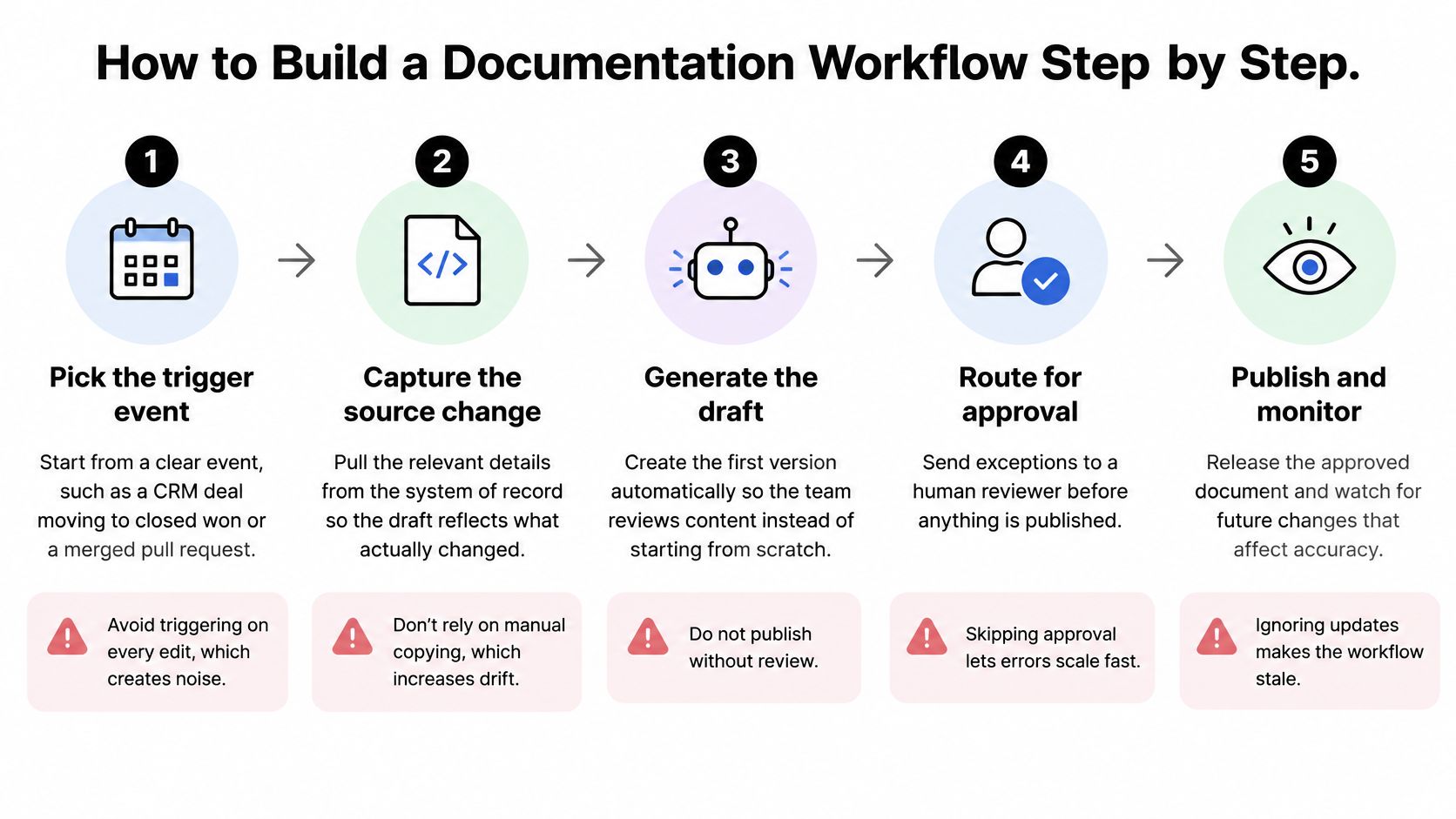
The workflow below shows the overall path from an event to a monitored document.
Build the record before polishing the prose
Pick the trigger event. Use a meaningful state transition, such as a CRM deal moving to closed won or a merged pull request, because triggering on every edit floods reviewers with unfinished work. Capture the event identifier so you can distinguish a new change from a replay.
Define the template fields. Specify owner, event date, decision, outcome, linked records, and required evidence, because free-text inputs make completeness difficult to check. For onboarding, map the purchased service to an approved task list instead of asking the model to design the delivery process.
Connect source data to the drafting step. Pass only relevant event fields and approved reference material, because unrestricted drafting encourages the model to fill gaps from general knowledge. Instruct it to mark unavailable values as missing, and use deterministic field mappings for names, dates, and identifiers rather than asking AI to rewrite them.
Assign the review route. Send the draft and its supporting inputs to a named owner, with a fallback reviewer and an agreed escalation deadline, because an unassigned approval request can sit unread. Keep notifications actionable by linking directly to the draft and stating what needs a decision.
Save an approved, versioned record. Publish to the designated SOP folder or knowledge base with a version identifier and a concise changelog, because overwriting the previous document destroys useful history. Store the publication location against the originating record so colleagues can find the canonical version.
Test realistic failure paths. Exercise missing fields, duplicate events, API timeouts, denied permissions, and failed writes, because a successful demonstration doesn't prove recovery works. Make retries safe by checking whether the event already produced a record, and send failures to a monitored destination.
Write the operating runbook. Document connections, mappings, template locations, retry behavior, and recovery actions so someone other than the builder can maintain the workflow. Include a worked field-change example, because a diagram alone won't explain how to repair a broken mapping.
Make the handover usable
For another implementation perspective, SpecStory, Inc.’s a practical guide to documentation automation is a useful companion when deciding what to generate and where it belongs.
At MakeAutomation, our build and handover process includes implementation, failure-path testing, system documentation, and showing the client's team how to operate it. We design for maintainability and provide documentation and training so clients can modify their workflows themselves.
A successful launch produces a real record that the reviewer can explain field by field. A polished draft isn't enough if nobody can show where its contents came from.
Keeping Humans in the Approval Loop
Return to the hypothetical agency: after its CRM field names change, blank onboarding sections reach the published checklist. Nobody notices until a new hire asks why the setup instructions are missing. The failure isn't poor writing, it's publication without validation.
Review should happen where the owner can inspect both the draft and its evidence.

Separate routine facts from consequential claims
Exception-based approval allows routine metadata to pass automatically only when required fields match the source event and validation checks pass. Timestamps, assigned owners, and tightly constrained change summaries can qualify; pricing commitments, legal terms, hiring decisions, and data-handling claims require an accountable reviewer.
The ACM paper on documentation and human validation supports subject-matter review of AI suggestions and escalation of uncertain cases. Apply that principle through a human-in-the-loop automation design with explicit approval authority, rather than a general notification that anyone can ignore.
Don't treat a model's confidence score as proof. Ask it to identify statements it cannot tie to source fields, then verify those references programmatically where possible. For data documentation, reviewers should check collection methods, preprocessing, limitations, represented populations, and privacy risks, not merely whether the schema description sounds plausible.
Preserve evidence and a way back
Maintain an ownership matrix assigning an accountable person and backup to each document type. Store the source event ID, access-controlled input snapshot, draft, reviewer, decision, and timestamp with the approval record; avoid copying sensitive inputs into broadly accessible logs.
Keep the previous approved version available during review and provide a straightforward revert action. Configure a rejection-based pause rule so recurring failures lead to inspection of the prompt, template, and source mapping rather than another automatic retry.
Use the video below as a discussion aid when agreeing on your team's approval boundaries.
Pause publishing under these conditions:
- Source change: A required field or its meaning has changed.
- Compliance flag: The draft introduces a sensitive or regulated claim.
- Repeated rejection: Reviewers identify a recurring defect.
- Missing owner: Nobody has authority to approve the document.
Keeping Automated Docs Accurate After Launch
Documents become stale when a CRM field, API, permission, or model changes without a corresponding documentation review. The workflow can still report a successful run while publishing instructions that no longer match the system.
Treat documentation as a living operational control, not a completed writing task. In the 2025 data-governance survey, 58% of respondents used self-service documentation to provide trusted data access. That trust requires maintenance, not just an accessible search box.
Connect each document to its dependencies
Create a dependency register linking each SOP to its source fields, workflows, integrations, owner, and access classification. For example, an onboarding SOP might depend on the CRM service-package field, a project-template mapping, and the workflow that creates delivery tasks.
When a dependency changes, send affected owners a versioned diff showing what changed, why, who approved it, and which downstream instructions need checking. A generic notification that documentation was updated doesn't tell a delivery lead whether their team must work differently.
Use this checklist as an operating control.
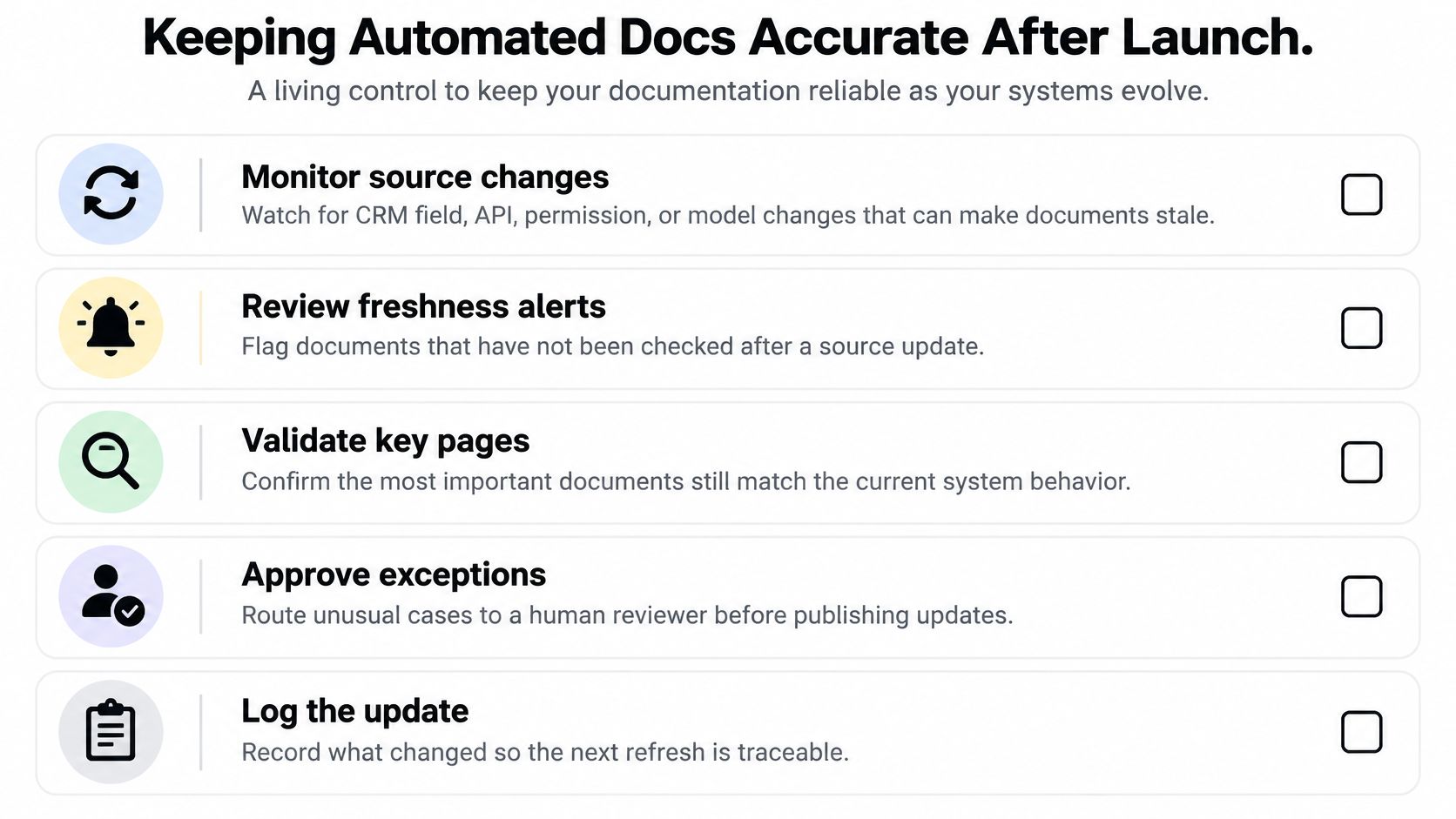
- Monitor source changes: Track CRM schema changes, API revisions, workflow deployments, permission changes, and model-performance alerts.
- Flag unverified documents: Mark an SOP stale when a dependency changes without a matching review, and schedule periodic checks for sources without change events.
- Set a freshness commitment: Agree how quickly an owner must assess changes, prioritizing instructions that affect access, customer commitments, or sensitive data.
- Validate critical instructions: Check that screenshots, examples, and procedural steps still match actual system behavior.
- Log the update: Preserve the reason, approval, affected dependencies, and publication status.
Maintain the supporting material too
For API handovers at MakeAutomation, clients receive complete documentation auto-generated from the OpenAPI specification, example requests for every endpoint, a Postman collection, deployment guides, and runbooks for common issues. Those assets should remain aligned with the deployed contract, not just the repository's newest draft.
Watch for repeated questions about the same topic and support tickets quoting outdated steps. Both are practical signals that people can find documentation but can't safely use it.
Pick One Workflow to Automate This Month
Choose a high-fit candidate with light review, then define what the pilot will exclude. An onboarding checklist can assemble approved delivery tasks without interpreting contract language; a meeting summary can capture explicit decisions without guessing what an ambiguous conversation meant.
For onboarding, use Mazurly's guidance to plan your remote client kickoff before configuring the trigger. It's easier to automate a settled checklist than to debug disagreements about what onboarding should include.
Measure the full cost of the record
Run the build sequence over a short pilot period, including failure tests and a handover rehearsal. Establish a manual baseline using comparable documents, then track these measures through a defined observation window:
- Draft error rate: Count records requiring factual correction, separating cosmetic edits from consequential mistakes.
- Net time saved: Compare manual preparation with automated preparation, review, and recovery work.
- Approval rejections: Record rejection reasons so you can distinguish weak inputs from a weak template.
- Freshness flags: Check whether alerts identify genuine changes or merely create more administrative work.
Continue only when errors stay within your agreed tolerance and the saved time exceeds review and maintenance effort. Pause expansion when reviewers repeatedly reject drafts, especially when the same unsupported claim keeps returning.
A pilot is ready to expand when someone other than its builder can operate it and recover from a failure.
Expand by evidence, not enthusiasm
Have the backup operator change a template field and recover a failed run using the runbook. If they need undocumented instructions from the builder, improve the handover before adding another document type.
Keep control of the implementation as it grows. At MakeAutomation, we explain what we're doing and why in plain terms, and clients own the workflows, code, and documentation we build.
If you need outside help, our consulting process follows five steps: discovery and process mapping, opportunity analysis, architecture and tool selection, build and test, and handover and training.
MakeAutomation helps B2B teams build documentation workflows with source-data validation, approval routing, and maintainable handovers. Visit MakeAutomation to discuss a recurring document you want to automate, bringing its current template, source systems, and approval requirements so we can map a practical starting point.