Legacy System Integration: A Practical Guide for B2B Teams
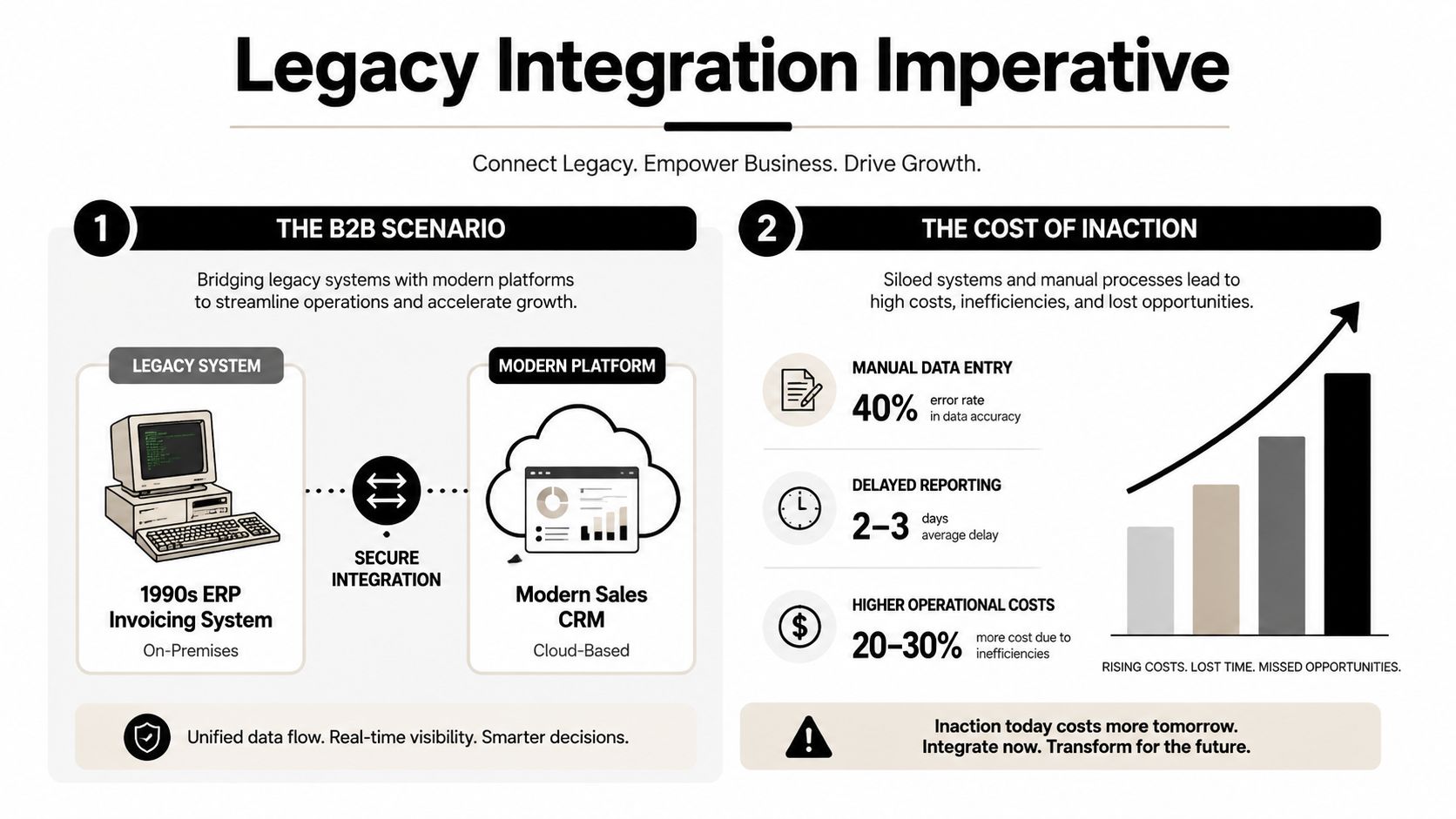
Your CFO dashboard looks modern, but the numbers behind it may still come from a 20-year-old ERP. Sales reps update a cloud CRM, finance issues invoices from a mainframe or aging on-premise platform, and operations moves records between them through spreadsheets, scheduled exports, or carefully guarded scripts. The business appears connected from the outside, while the underlying workflows remain fragmented.
That situation is common for a reason. A 2025 industry survey found that 62% of organizations still rely on legacy software, while 50% said they haven't upgraded because the current system still works. The same survey found that 68% depend on internal IT teams for maintenance, turning integration into an ongoing operating responsibility rather than a one-time architecture decision. (OutSystems legacy modernization research)
Why Legacy System Integration Matters More Than Ever
The practical question usually isn't whether the ERP should be replaced. It's whether the sales team can see reliable account status, whether finance can invoice without rekeying orders, and whether customer success can trust the renewal data in the CRM.
A replacement program may eventually make sense, but it introduces its own risks. Core systems often contain years of business rules, exception handling, custom fields, and operational knowledge that isn't written down anywhere else. Removing that system before understanding those dependencies can disrupt billing, fulfillment, reporting, and compliance at the same time.
That's why legacy system integration is often safer than rip-and-replace. An integration layer can expose selected business functions, translate older data formats, and connect proven systems to modern applications without forcing the company to change every workflow at once.
Treat the hybrid stack as an operating model
The strategic mistake is to treat integration as a delivery milestone. Go-live only creates the first version of a system that someone must monitor, secure, document, and change.
Large enterprises have been carrying this problem for years. A 2025 statistics roundup citing McKinsey estimates that about 70% of software in Fortune 500 companies is more than 20 years old, and reports that organizations spend 60% to 80% of IT budgets maintaining legacy infrastructure. The same roundup places the legacy modernization market at $24.98 billion in 2025, with a projection of $56.87 billion by 2030, representing a 17.92% CAGR. (Legacy modernization statistics roundup)
Those figures explain why the integration layer has become a strategic asset. It preserves working business logic while giving newer systems controlled access to it.
Every program should make four explicit decisions:
- Wrap: Which stable functions should an API, gateway, or adapter expose?
- Replace: Which component creates enough friction or risk to justify retirement?
- Leave alone: Which system is reliable, isolated, and not worth disturbing yet?
- Govern: Who owns data definitions, access policies, incidents, and future changes?
Practical rule: If nobody owns the integration after deployment, the company hasn't modernized the workflow. It's only moved the risk into a less visible layer.
Choosing the Right Integration Pattern
No integration pattern wins every situation. The right choice depends on the number of systems involved, the quality of existing interfaces, the need for centralized governance, and the team that will operate the result.
| Pattern | Best Fit | Team Skill | Typical Cost | Speed to Value |
|---|---|---|---|---|
| API wrapper | A stable legacy function needs controlled access from a modern application | API development, security, legacy-system knowledge | Lower initial cost, with ongoing maintenance | Fast for a focused workflow |
| Enterprise Service Bus | Many systems require routing, transformation, orchestration, and centralized policy | Integration architecture, message modeling, operations | Higher platform and governance investment | Moderate |
| iPaaS | B2B or SaaS teams need connectors, workflow automation, and manageable administration | Platform configuration, data mapping, API fundamentals | Subscription and implementation costs | Fast for supported applications |
| Event-driven architecture | Workflows need loose coupling, asynchronous processing, or automation at scale | Distributed systems, event design, observability | Higher design and operational complexity | Slower initially, strong long-term flexibility |
API wrappers
An API wrapper is usually the best first move when the legacy platform already exposes a usable SOAP endpoint, database procedure, command interface, or other callable function. The wrapper translates that interface into a documented service with modern authentication, validation, and consistent responses.
For example, a CRM might call a wrapper to retrieve invoice status without connecting directly to the ERP database. The wrapper can hide coded fields, enforce permissions, and prevent the CRM team from learning fragile internal implementation details.
The trade-off is ownership. A wrapper doesn't remove the legacy dependency. It creates a new contract around it, so someone must version the API, test it after ERP changes, and maintain a runbook for failures. Teams evaluating API-led connectivity can review API-led connectivity patterns before committing to a broader architecture.
ESB and iPaaS
An ESB fits organizations with complex routing and transformation requirements across many systems. It provides a governed place for message handling, canonical models, policy enforcement, and orchestration. That control is useful, but it can become expensive and slow if the team builds a central platform for a small number of straightforward workflows.
An iPaaS is often more practical for B2B and SaaS teams. Platforms such as Workato, Boomi, MuleSoft, and Make can provide connectors, transformation tools, monitoring, and administrative controls without requiring every workflow to be custom coded. The limitation is connector quality and platform fit. A connector may support common CRM actions but still require custom work for a proprietary ERP or unusual transaction sequence.
Event-driven architecture
Events make sense when systems shouldn't wait on one another, when consumers need to subscribe independently, or when automation must react to business changes. An order-created event could feed analytics, customer notifications, fulfillment, and an AI workflow without each consumer calling the ERP directly.
This pattern demands stronger operational discipline. Event schemas need ownership, failed messages need replay procedures, and teams must understand eventual consistency. Don't choose events merely because they sound modern. Choose them when decoupling solves a real coordination or scale problem.
Planning Data Migration and Field-Level Mapping
A 2026 industry compilation reports that 95% of organizations struggle with system integration, while only 2% have integrated more than half of their applications. It also reports that 39% of developers identify inconsistent documentation as the biggest roadblock. Those figures point to a planning problem: before building connectors, teams need to inventory dependencies, clarify data ownership, and identify the undocumented rules embedded in legacy applications. (Legacy integration challenges compilation)
Start with a field-level inventory
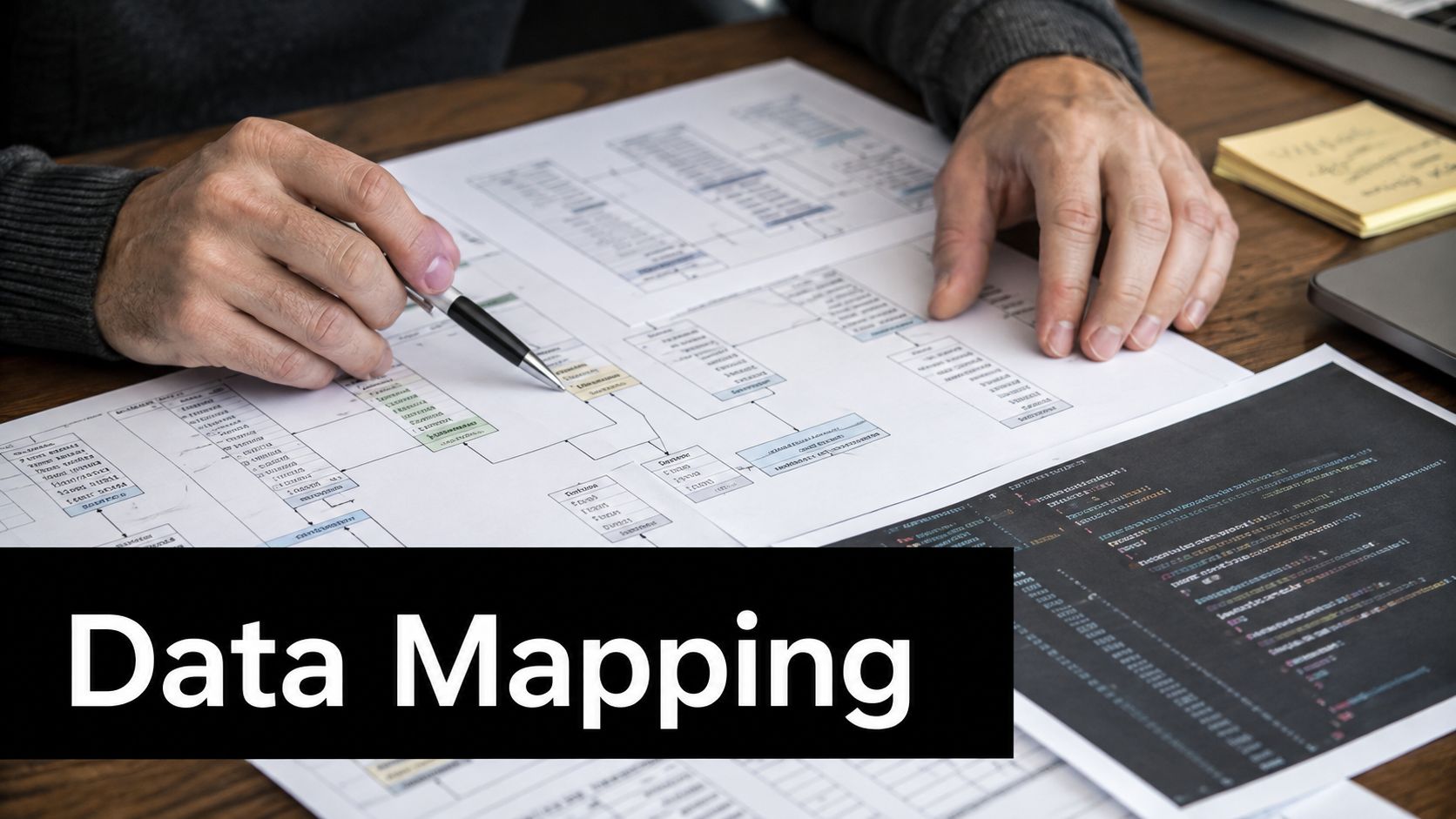
Choose one business flow, such as quote-to-cash, and document every system that touches it. For each field, record the source, destination, data type, transformation, owner, timing, and failure behavior. Include fixed-width strings, database triggers, undocumented codes, and manual operator steps. These details often carry business meaning that a connector cannot infer.
Suppose the ERP stores customer status as A, H, or X, while the CRM expects Active, On Hold, or Closed. Map the meaning, not just the value. Confirm who owns the status and define the response to an unknown code, such as rejection, quarantine, or manual review.
Date fields need the same treatment. One system may store local timestamps, another coordinated time, and a third may use an empty date to represent a business state. Define the canonical format at the integration boundary and preserve the original value when audit requirements call for it.
Resolve ownership before transformation
Conflicting master data is a governance issue disguised as field mapping. If the CRM and ERP both store customer addresses, assign ownership for legal billing details and sales-facing information. Document who approves changes and how the other system receives them.
Use a staging environment to profile real records rather than ideal samples. Migration scripts should be idempotent, so rerunning a batch does not create duplicate accounts or orders. Reconciliation reports should compare record counts, key totals, rejected records, and transformed values before production cutover.
A migration workflow also needs an operating model after launch. Assign an owner for mapping changes, version the specification, and give support staff a runbook for quarantined records and safe reruns. Data migration automation guidance can help structure an auditable process instead of leaving the team with only a successful job status.
Before cutover, require these artifacts:
- Dependency inventory: Interfaces, jobs, scripts, database procedures, and manual handoffs.
- Mapping specification: Source fields, target fields, transformations, defaults, and rejection rules.
- Ownership register: System of record and accountable business owner for each critical entity.
- Reconciliation report: Checks proving that the destination matches the approved source population.
- Recovery procedure: Steps for stopping, correcting, and safely rerunning the migration.
In the schema walkthrough, look for how source fields connect to target fields, where transformations occur, and which exceptions require human review.
Securing Authentication and Sensitive Data
A legacy application may only support basic authentication or a static service account, while the connected SaaS platform expects OAuth 2.0, signed tokens, or single sign-on. The safest design doesn't force the old system to adopt every modern protocol. It places a controlled security boundary in front of it.
An API gateway or token broker can accept modern credentials from the cloud application, validate scopes and policies, then call the legacy endpoint through a tightly restricted service identity. The legacy core remains unchanged, while the boundary provides authentication, authorization, throttling, logging, and request validation.
Put controls at the integration boundary
Use separate credentials for each integration purpose. A billing connector shouldn't receive broad read and write access to customer records, and an analytics pipeline shouldn't be able to trigger financial transactions.
Store secrets in a managed vault rather than configuration files or workflow steps. Rotate credentials through an operational procedure that includes testing, ownership, and rollback. Encrypt traffic in transit and protect sensitive data at rest, but also limit what the integration stores. Passing through a value doesn't mean the platform should retain it indefinitely.
Audit logs should answer practical questions: which application requested the data, which identity authorized it, what operation occurred, whether it succeeded, and which correlation ID connects the event to downstream activity. Logs must avoid exposing secrets and sensitive payloads unnecessarily.
Security boundary: Modern authentication at the gateway is useful only if authorization still reflects the legacy transaction's real business risk.
Zero Trust policies belong at every meaningful hop. Validate the calling application, restrict network paths, enforce least privilege, and treat internal traffic as untrusted until the policy check succeeds. Teams that need to compare implementation options can use this API authentication methods reference while documenting their chosen controls.
The operations team also needs a response plan. Define who investigates rejected tokens, expired certificates, unusual request volume, and suspected data exposure. Security becomes durable when those scenarios appear in a runbook and are rehearsed, not when they appear only in an architecture diagram.
Testing, Rollout, and Rollback Strategies
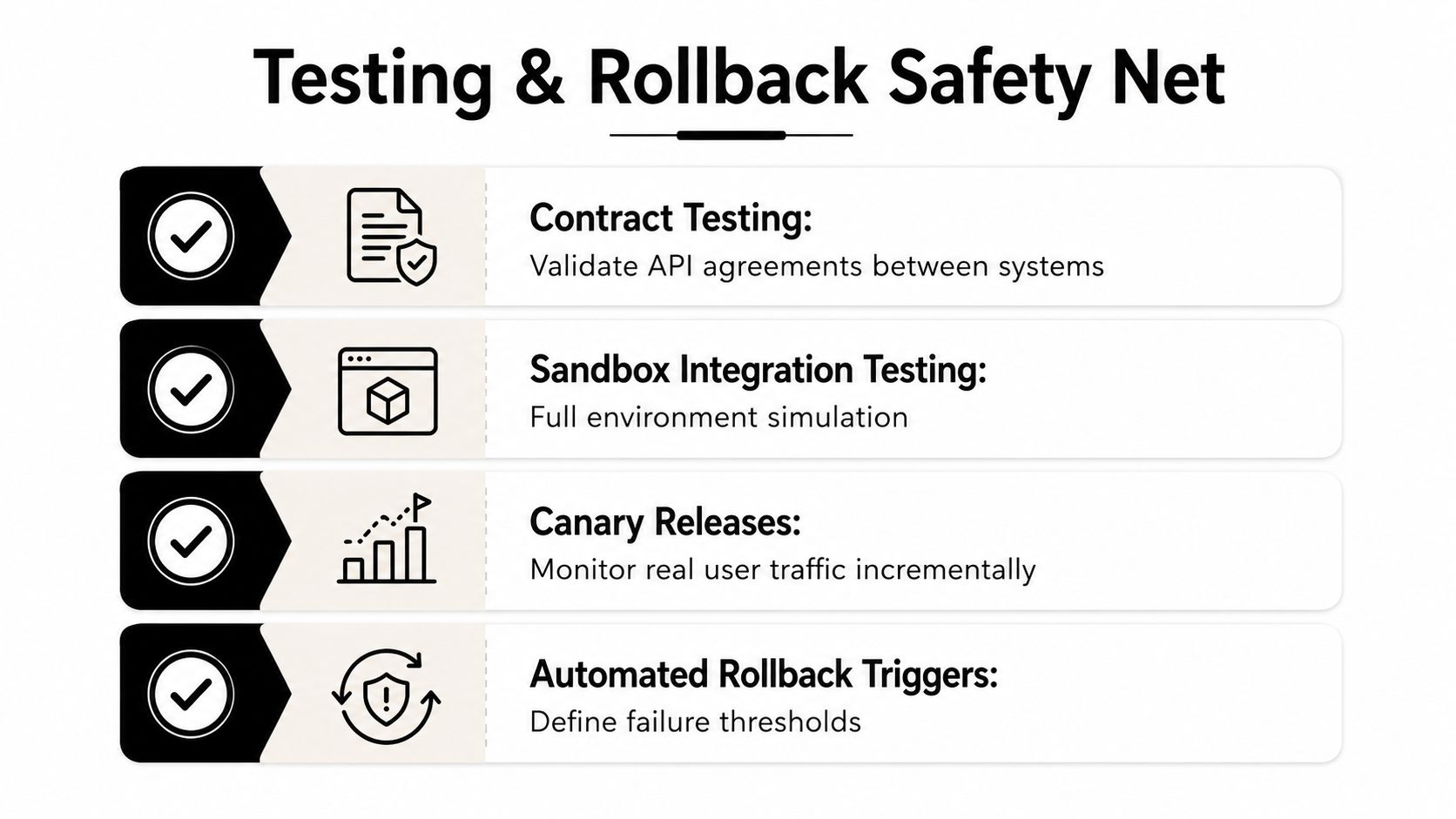
Testing and rollback belong in the same plan. Tests reduce the chance of failure, while rollback limits the damage when production behavior differs from the sandbox.
Start with contract tests. They verify that the CRM sends the fields the wrapper expects and that the wrapper returns a response the CRM can process. These tests catch broken agreements before a full transaction crosses the environment boundary.
Sandbox integration tests should exercise complete workflows, including invalid records, timeouts, duplicate messages, partial responses, and downstream outages. A successful happy-path test proves very little when the legacy platform behaves differently under operational pressure.
Release in controlled steps
Use feature flags to direct selected workflows through the new path while preserving the old path. A canary release can begin with a limited business process or carefully selected users, then expand after the operations team reviews errors, latency, reconciliation, and support tickets.
Dual writes require caution. Writing to both systems can protect continuity, but it can also create conflicting updates if ownership isn't explicit. If you use a dual-write window, define the authoritative record, conflict resolution, reconciliation frequency, and exact end date before enabling it.
A rollback plan should name:
- Go or no-go authority: The person authorized to stop the release.
- Rollback triggers: Error classes, reconciliation failures, security alerts, or unacceptable operational impact.
- Technical action: Feature-flag reversal, queue pause, snapshot restore, or route change.
- Business communication: Who informs finance, sales, support, and affected customers.
- Recovery owner: The person responsible for replaying valid transactions after stabilization.
The team should test the rollback itself. A procedure nobody has executed under pressure is an assumption, not a safety net.
Timelines, Resourcing, and ROI Trade-offs
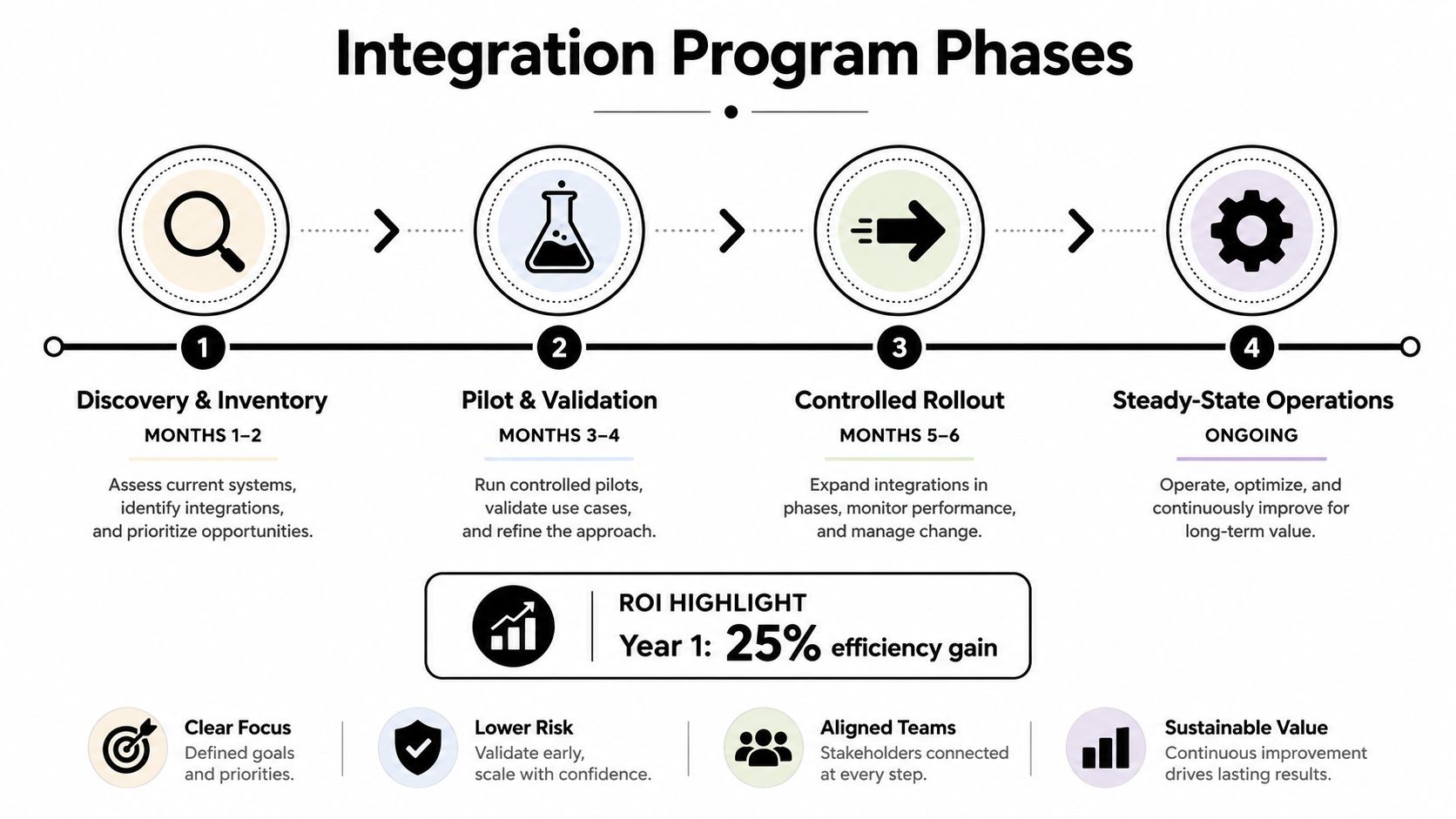
Structure integration programs across four phases: discovery, pilot, controlled rollout, and steady-state operations. Integration programs commonly slip when discovery is compressed into a timeline baseline designed for a single-build deliverable. Treating operations as part of the program exposes the people, controls, and runbooks required after launch.
Discovery and inventory establish which systems, interfaces, jobs, owners, and exceptions exist. The pilot proves one high-value flow and reveals hidden dependencies. Controlled rollout expands the pattern while preserving a tested path back. Steady-state operations then cover monitoring, upgrades, access reviews, incident response, and documentation.
The schedule depends on system complexity, data quality, approval paths, and team availability. Public guidance on legacy modernization also warns that agencies need explicit plans for decades-old systems rather than assuming a simple modernization path. (HFS legacy application modernization research)
Build the business case around capacity
The strongest ROI case usually combines several operational effects:
- Less manual handling: Fewer exports, spreadsheet edits, and repeated data entry.
- Faster customer work: Sales and service teams access dependable information without waiting for back-office updates.
- Lower maintenance exposure: Reusable interfaces replace scattered scripts and undocumented point-to-point connections.
- More engineering capacity: Developers spend less time repairing transfers and more time improving the product.
Resourcing creates a real trade-off. Internal IT understands the legacy platform and business exceptions, but may lack capacity for sustained delivery and support. An external integrator can accelerate architecture and implementation, but internal owners must retain decisions, context, and runbook knowledge. A hybrid pod often works best, pairing process owners and system experts with integration engineers.
Calculate ROI across the operating model. Include the cost of running old and new systems, maintaining connectors after vendor changes, supporting failed transactions, reviewing access, and refreshing documentation. A defensible proposal names the manual workflow being removed, the operational risk being reduced, and the owner who will measure the result after launch. The same owner should keep the process current as interfaces, teams, and business rules change.
Monitoring, Long-Term Operations, and AI Readiness
The hybrid period determines whether an integration keeps producing value. A connector may work at launch, then a vendor changes a field, a legacy job runs late, or a certificate expires. Without observability and clear ownership, the first signal may be a customer complaint.
Operational monitoring must cover more than uptime. Track message acceptance, transformation failures, queue age, retry volume, reconciliation differences, authentication errors, and business results such as completed orders or posted invoices. Every alert needs a named owner, severity, response target, and escalation path. Keep a runbook beside the dashboard so operators know when to retry, replay, pause traffic, or escalate.
A 2025 modernization report found that 43% of organizations struggle to integrate legacy systems with newer tools and platforms, 52% report that refactoring or re-architecting applications is more complex than cost, compliance, or performance issues, 42% struggle to adopt automation and AI, and nearly 60% of AI leaders identify legacy-system integration as the primary barrier to agentic AI adoption. It also reports that 49% of respondents said legacy maintenance costs exceeded plan in the last year. (Ensono modernization report)
Make AI consume governed capabilities
AI readiness begins with dependable access to governed capabilities. Expose narrowly defined business functions such as checking order status, retrieving approved customer terms, or validating account eligibility. Require authentication, authorization, input validation, logging, and human approval for actions with financial, legal, or customer impact.
Use the integration layer to enforce data quality before AI receives a record. Define authoritative fields, reject ambiguous states, preserve provenance, and prevent an agent from inferring permission from incomplete data. An API wrapper may suit a small number of stable functions. An ESB provides central routing and policy control, while an iPaaS can reduce delivery effort across SaaS applications. Each choice requires an owner, release process, and support model that match its operating cost.
A durable operating model includes:
- Named service owner: Accountable for availability, changes, and technical debt.
- Business data steward: Responsible for definitions, ownership, and exception decisions.
- Runbooks: Clear procedures for retries, replay, credential rotation, and reconciliation.
- Change control: Impact review for legacy patches, SaaS releases, schema changes, and model updates.
- Regular review: A recurring assessment of incidents, costs, unused connectors, and retirement candidates.
Legacy system integration succeeds when the company manages the connection as a product with a lifecycle. Start with one valuable workflow, document the contract, secure the boundary, prove rollback, and fund the people who will operate it after delivery. Assign the same accountability through future interface, team, and business-rule changes.