Mule API Led Connectivity: Guide to Scalable Automation
Growth usually breaks before revenue does.
A B2B SaaS company can get far on hustle, smart people, and a handful of direct integrations. At five customers, nobody minds if the sales team exports CSVs from the CRM, ops pastes onboarding data into the project tool, and finance reconciles billing in spreadsheets every Friday. It feels scrappy, not dangerous.
Then growth compounds the mess.
The CRM no longer matches the support platform. Product usage data sits in one system, contract data in another, and renewal alerts in someone’s inbox. A new client asks for partner portal access, and your team discovers the information they need lives across six apps and two custom scripts. What looked like “automation” was a pile of point-to-point connections glued together by manual checks.
Your best employees become human middleware.
They watch for failed syncs. They correct duplicate records. They re-enter lead data because marketing and sales tools interpret fields differently. They delay launches because nobody wants to touch the brittle workflow that somehow still runs invoicing.
That’s the moment most founders realize the problem isn’t effort. It’s architecture.
The Breaking Point of Unmanaged Growth
A lot of teams hit the same pattern. The first integration solves one urgent problem. The second copies the first. The third adds custom logic because the data model doesn’t quite fit. A year later, nobody can explain the full chain without opening three dashboards and asking the one engineer who originally built it.

How the chaos shows up in daily operations
The symptoms are rarely dramatic at first. They look like small inefficiencies.
- Sales slows down: Reps can't trust account data because marketing enrichment, CRM activity, and support history don't line up.
- Onboarding drags: Ops has to gather contract details, provisioning data, and customer preferences from separate systems before kickoff can start.
- Finance cleans up after everyone else: Billing disputes happen because the subscription platform and CRM disagree about what the customer purchased.
- Support works blind: Agents answer tickets without a full customer view, so handoffs take longer and frustration rises.
None of that is a software problem in isolation. It’s a connectivity problem.
Why point-to-point fails at scale
Point-to-point integration seems cheaper because it’s direct. Connect app A to app B, then move on. But growing companies don’t have two systems. They have many systems, each with its own schema, workflows, permissions, and update cycles.
Every new connection creates another dependency. Every change risks breaking several others.
The cost of bad integration isn't just maintenance. It's delayed decisions, slower handoffs, and teams losing trust in their own data.
That’s why unmanaged growth feels expensive long before the accounting team calls it technical debt. Your company keeps paying for the same business capability multiple times. Once in software spend, again in engineering effort, and again in manual labor.
The founder-level problem
If you're aiming for 7-figure growth, you can't run core operations on fragile one-off integrations. You need a way to make systems reusable, predictable, and easier to evolve.
That’s where mule api led connectivity matters. Not as a buzzword. As a way to replace ad hoc connections with a structure your team can scale without rebuilding the same logic every quarter.
What Is Mule API-Led Connectivity Really?
Think of your software stack like a building’s electrical system.
If every room had to run power through extension cords plugged into other extension cords, the building might work for a while. But it would be ugly, risky, and hard to expand. Add one more device and something trips. Move one cable and another room goes dark.
That’s how many SaaS companies handle integration.
Mule API-led connectivity is the planned electrical grid version. Instead of wiring every app directly to every other app, you create standardized access points that expose data and business capabilities in a controlled, reusable way. If you want a plain-language refresher on what an Application Programming Interface (API) is, that glossary is a useful starting point before you go deeper into architecture.
It’s a method, not just a product
Here, readers often get confused. MuleSoft sells a platform, but API-led connectivity is the architectural strategy.
The strategy says your company should stop treating integrations as one-off plumbing jobs and start treating them as reusable assets. A customer record, an order status lookup, a lead qualification workflow, or an onboarding trigger shouldn't be rebuilt every time another team needs it.
You design those capabilities once, expose them cleanly, and let multiple teams reuse them.
Why this matters now
The pressure for connected experiences isn’t theoretical. In 2022, 72% of customer interactions occurred digitally, and most organizations identified siloed apps and data integration as the biggest obstacle to digital transformation, according to MuleSoft’s benchmark reporting in its article on the state of API-led connectivity.
For a founder, that translates into a simple business reality. Customers expect fast responses, consistent data, and smooth handoffs across sales, onboarding, billing, and support. Your internal systems can’t stay fragmented while your external experience pretends to be unified.
What changes when you adopt the model
You stop asking, “How do we connect this app to that app?”
You start asking better questions:
- What business capability are we exposing?
- Who should reuse it?
- Where should business logic live?
- How do we avoid rebuilding the same integration later?
That shift is what moves integration from reactive work to strategic infrastructure.
Practical rule: If two teams need the same data and your answer is “we’ll build another connector,” you probably need API-led design, not another workflow patch.
For B2B SaaS companies, that matters most in areas like CRM sync, lead routing, customer onboarding, partner integrations, and reporting. Those processes touch multiple systems, change often, and directly affect revenue velocity. API-led connectivity gives those moving parts a structure.
The Three Layers of API-Led Architecture Explained
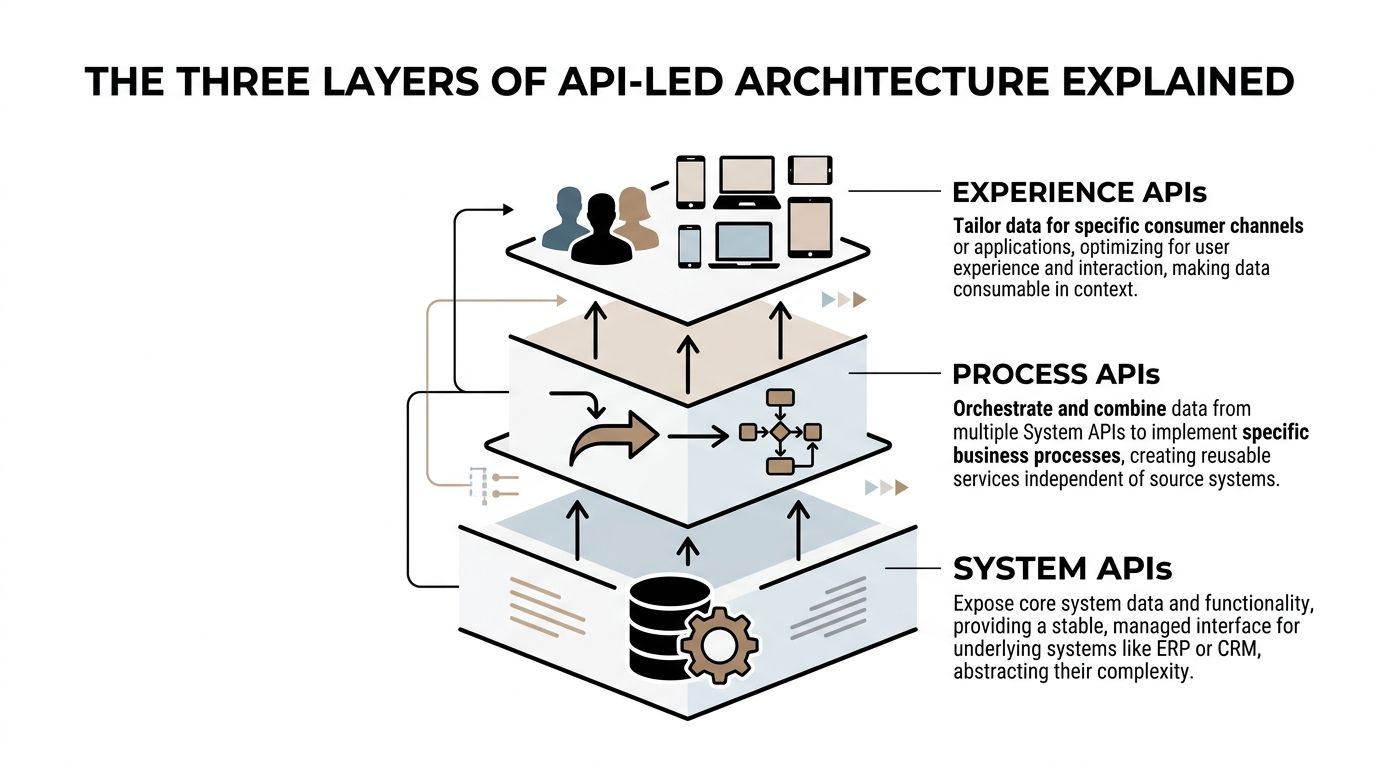
The reason mule api led connectivity works is that it separates concerns. Not every API should do everything. MuleSoft organizes integration into three layers: System APIs, Process APIs, and Experience APIs.
That separation is what keeps your architecture clean when the business gets more complex.
System APIs
System APIs sit closest to your systems of record.
They connect directly to tools like Salesforce, NetSuite, a product database, or an internal app. Their job is to expose data from those systems in a stable, managed way without forcing every downstream team to understand the quirks of the underlying source.
A founder doesn’t need to care about the implementation details. The business advantage is simpler. When your CRM changes fields or your ERP gets upgraded, you don’t want every workflow and dashboard to break. A System API isolates that change.
A common SaaS example is a Customer System API that exposes account records from Salesforce. Another might expose subscription data from your billing platform or user activity from your product database.
These APIs are not where you should cram business logic. They should stay focused and reliable.
Process APIs
Process APIs are where your business logic lives.
They pull data from multiple System APIs, combine it, apply rules, and return something useful for a business process. If System APIs are the raw ingredients, Process APIs are the recipe.
Say your sales team wants a unified lead profile. That profile may require CRM firmographics, website activity, enrichment data, and open support issues. A Process API can orchestrate those sources into one clean response.
This is the layer that often provides significant value because it turns disconnected records into workflows the business can effectively use.
MuleSoft’s architecture guidance shows this approach can produce 3-5x faster project delivery, with teams reusing an average of 70% of APIs across initiatives, and it gives the example of a Process API merging data into a unified response in sub-200ms in enterprise deployments, as described in this API-led connectivity architecture overview.
Experience APIs
Experience APIs adapt Process API outputs for specific consumers.
The important word is specific.
Your sales dashboard doesn't need the same payload as your partner portal. Your mobile app doesn't need the same response shape as your internal operations console. Instead of forcing every channel to consume a generic, bloated response, Experience APIs suit the output for that use case.
That keeps front-end teams faster and reduces unnecessary coupling.
A SaaS company might use:
- One Experience API for the sales dashboard
- Another for an outbound automation tool
- Another for a customer-facing portal
All of them can rely on the same Process API underneath.
Why the layers matter together
Without layers, teams tend to bury logic inside whichever integration they’re building at the moment. That works once. Then another team needs the same logic and duplicates it. Soon, “customer status” means one thing in sales and another in support.
Layering prevents that drift.
Consider this simplified view:
| Layer | Primary Purpose | Connects To | Example for a SaaS Co. | Key Characteristic |
|---|---|---|---|---|
| System API | Expose core system data | CRM, ERP, database, billing app | Retrieve account and contact records from Salesforce | Stable access to source systems |
| Process API | Orchestrate business logic | Multiple System APIs | Build a 360-degree lead profile using CRM, product, and support data | Reusable business workflow |
| Experience API | Adapt data for a channel | Apps, portals, dashboards, automations | Deliver lead profile data to a sales dashboard | Channel-specific output |
A concrete lead-gen example
Suppose your company wants faster outbound execution.
Your reps need account data from Salesforce, product usage from your app database, and recent support history before they call or email. In a brittle environment, every tool grabs that data differently. One field is stale, one source lags, and one workflow fails without notification.
In an API-led setup:
- System APIs expose Salesforce, product usage, and support data.
- A Process API builds a “qualified outbound prospect” object.
- Experience APIs deliver that object to your sales workspace, your AI agent, or your outreach platform.
That same pattern also plays well with modern engineering approaches such as Node.js and microservices, because each layer has a clear responsibility instead of becoming one oversized integration service.
If your team keeps rebuilding “customer 360” in different tools, that’s usually a Process API problem, not a reporting problem.
Where teams usually get this wrong
They collapse all three layers into one flow.
That creates fast demos and slow companies. One API starts touching core systems directly, applying business logic, and formatting output for one consumer. It becomes hard to reuse, risky to change, and expensive to scale.
The three-layer model avoids that trap. It gives you a modular way to support more customers, more channels, and more automation without multiplying fragility.
Achieving Agility and Reuse for Your SaaS Business
A founder doesn’t buy architecture for architecture’s sake. You care because your team is spending too much time holding systems together instead of moving the business forward.
That’s where API-led design changes the economics.

Reuse stops duplicated work
When teams build integrations project by project, they duplicate effort constantly. Sales asks for customer sync. Support asks for the same customer sync with a few tweaks. RevOps asks for it again inside a reporting pipeline.
API-led design turns that repeated build work into reusable assets.
If you’ve already created a clean way to access customer, subscription, or activity data, the next automation doesn’t start from zero. It starts from what already exists.
That’s why the business case is so strong. In a Concord USA case described in its write-up on the [advantages of API-led connectivity], search times dropped from 3-5 minutes to under 10 seconds. The same source also notes that reusability and centralized management can cut integration costs by up to 30%, and it highlights operational outcomes such as automating 64% of customer service requests.
Agility shows up in launches, not diagrams
You feel agility when a new project no longer requires tearing apart existing integrations.
A partner portal. A new internal dashboard. A revised lead-scoring model. A customer success workspace. With API-led connectivity, your team can build a new consumer layer on top of stable business logic instead of rebuilding the full pipeline each time.
That matters for growth because bottlenecks rarely come from lack of ideas. They come from implementation drag.
For many operators, that overlaps with broader work on enhanced workflow automation, especially when the core issue isn't task automation alone but the missing data layer underneath it.
What this means for CRM and revenue operations
CRM problems are often integration problems wearing a CRM label.
The sales team says records are messy. Marketing says attribution is off. Customer success says handoff notes never arrive. Finance says renewal triggers are late. Those teams may all be right, but the fundamental issue is that data and workflow logic live in disconnected places.
An API-led model creates a cleaner base for CRM integration. Instead of every tool writing directly into every other tool, you define controlled ways to access and move customer data.
That gives you:
- Cleaner lead routing: One source of truth for qualification logic.
- Better handoffs: Shared process logic between sales, onboarding, and support.
- Safer change management: You can update one workflow without destabilizing five others.
- More room for AI: Agents and automations work better when they pull from consistent, governed APIs instead of scattered app connections.
A short explainer is worth watching if you want a visual take on how this model supports scale.
The growth advantage founders experience
The biggest win is operational headroom.
Your senior people stop babysitting workflows. Your engineers stop rewriting integration logic. Your GTM team gets faster access to reliable customer context. And your business can add tools, channels, or service lines without turning every expansion into a systems cleanup project.
Build reusable capabilities once. Then let growth consume them many times.
That’s how integration shifts from a hidden tax into an asset.
Essential Design Patterns for Lasting Success
API-led architecture can still fail if teams build it sloppily. Good layers alone don’t guarantee reliable automation. The difference comes from design discipline.
Start contract-first
Define the API before you build the implementation.
That means agreeing on the request shape, response structure, error model, and ownership before developers start wiring systems together. In MuleSoft environments, teams often do this with RAML or OpenAPI Specification.
Why it matters is simple. A contract-first approach forces clarity early. Consumers know what to expect, producers know what they must support, and future changes become easier to manage.
Keep Process APIs reusable
Process APIs are where teams often make avoidable mistakes.
They start with a reusable orchestration flow, then sneak in channel-specific formatting because one dashboard needs a custom field order. Later, another team consumes that same API and discovers it carries presentation logic that doesn’t belong there.
Don’t let the middle layer become a dumping ground.
Use Process APIs for business logic that multiple consumers can share. Keep channel formatting for Experience APIs.
Design for retries and idempotency
Automations fail in the world. Networks time out. Third-party systems lag. Jobs retry.
If an onboarding workflow retries after a temporary failure, it shouldn’t create duplicate customers, duplicate tasks, or duplicate invoices. That’s why idempotent behavior matters. The same request, repeated safely, should not create unintended side effects.
For revenue operations, this is not a technical nicety. It protects customer trust.
Version deliberately
Founders usually meet versioning after something breaks.
A consuming system expects one field name. The provider renames it. A downstream workflow fails. Sales notices two days later when leads stop routing.
Avoid that cycle by treating APIs like products with versions, deprecation rules, and change communication. Some changes are backward compatible. Some are not. Your team should know the difference before release.
Use caching where it belongs
Not every request should hit every backend system every time.
Caching often makes the biggest difference in the Process layer, where multiple source calls are aggregated into a business response. If your sales dashboard asks for a customer profile repeatedly, you may not need fresh reads from every source on every request.
That’s one reason performance-oriented Process API patterns matter. Salesforce’s explanation of API-led delivery notes that MuleSoft customers report 3-5x faster project delivery and 300% productivity increases, and it describes Process APIs using parallel fan-out and fan-in patterns that can handle 10,000+ transactions per second with latency under 50ms in benchmarked scenarios on its API-led connectivity overview.
Practical patterns worth adopting early
- Standardized error responses: Give consuming apps consistent error codes and messages, so troubleshooting doesn’t become guesswork.
- Correlation IDs: Trace a request across layers when something fails in a multi-step flow.
- Clear ownership: Assign one team or person to each API product. Shared ownership usually means vague ownership.
- Thin System APIs: Resist the urge to bury transformations there.
- Consumer-aware Experience APIs: Optimize payloads for the user or system consuming them.
Good API design reduces future meetings. Bad API design creates them.
A simple quality checklist
Before shipping an API, ask:
- Is the contract clear enough for another team to consume without a meeting?
- Does this layer contain only the logic appropriate to that layer?
- Will a retry behave safely?
- Can we change the backend without breaking consumers?
- Do we know how this API will be monitored and versioned?
Teams that answer those questions early usually avoid the maintenance nightmare that makes architecture initiatives lose credibility.
Building a Secure and Governed API Ecosystem
Security and governance are where many integration programs either mature or drift into chaos.
A clean API-led diagram looks impressive. But if nobody controls who can access what, how versions are published, or how changes move through environments, the architecture won’t stay useful for long.
Governance is what makes reuse real
Reuse doesn’t happen because an API exists. It happens because people can find it, trust it, and know how to consume it.
That usually means you need:
- A shared catalog or exchange where teams can discover available APIs
- Naming and documentation standards so one team’s “customer” doesn’t mean another team’s “account”
- Lifecycle rules for publishing, updating, deprecating, and retiring APIs
- Review gates that stop ad hoc patterns from multiplying again
If you’re also cleaning up fragmented data movement, these data integration best practices help frame the operational side of that work.
Security belongs at every layer
The layered model supports a stronger security posture because each layer has different responsibilities.
System APIs often need the strictest controls because they expose systems of record. Process APIs often need rate limits, policy enforcement, and service-to-service controls. Experience APIs may need user-aware permissions suited to channels like partner portals or internal apps.
This layered policy model is more practical than relying on each consuming app to “do the right thing.”
The messy middle is normal
One of the hardest parts of adopting mule api led connectivity is that you rarely get a clean slate.
MuleSoft’s Trailhead content acknowledges the hybrid migration reality directly: new APIs often need to coexist with legacy integrations during a 6-18 month transition period, and teams have to manage data consistency and governance across systems that aren’t fully API-enabled while maintaining business continuity, as noted in its guidance on exploring API-led connectivity.
That matters because many founders expect a tidy before-and-after transformation. Real migrations are rarely tidy.
How to handle migration without stalling the business
A phased strategy works better than a full rip-and-replace.
Start with high-value domains where poor connectivity hurts revenue or operations most. Customer data, lead flow, billing visibility, and onboarding are common candidates. Wrap core systems with stable System APIs first. Then move shared business logic into Process APIs. Leave the outer experience layer for teams that need faster changes.
That sequencing lowers disruption.
Hybrid periods don't mean the strategy is failing. They mean you're modernizing without shutting the business down.
Operational discipline keeps trust high
Once APIs are live, governance becomes ongoing work.
You need monitoring, alerts, release practices, and visibility into usage. Teams should know which APIs are critical, which consumers depend on them, and what happens if they degrade. Without that operating model, reuse becomes risky, and teams go back to building one-off workarounds.
Founders don’t need to run governance personally. But they do need to insist that integration is treated as an owned capability, not just a collection of projects.
Answering Your Top API-Led Connectivity Questions
How is API-led connectivity different from microservices
They solve different problems.
Microservices organize application functionality into smaller deployable services. API-led connectivity organizes integration and access to systems and business capabilities. You can use both together, and many companies do.
A useful shortcut is this: microservices help you structure software you build. API-led connectivity helps you structure how systems talk to each other.
What’s a realistic first project for a small SaaS company
Pick a workflow that is painful, cross-functional, and repeated often.
Good first candidates include:
- Lead handoff between marketing and sales
- Customer onboarding across CRM, project management, and billing
- Support visibility into subscription and account data
- Renewal workflows that need product usage plus contract context
Avoid starting with the broadest possible transformation. Start where faster, cleaner connectivity immediately removes manual work.
Do you have to use MuleSoft’s Anypoint Platform
No. The architecture pattern is broader than any single product.
MuleSoft provides tooling for designing, managing, and governing the model, which can make adoption easier. But the core principle is architectural: separate system access, business orchestration, and channel experience so your integrations stay modular and reusable.
How do we measure ROI on the first project
Start with business friction, not vanity metrics.
Track things like manual steps removed, error reduction, handoff speed, time to launch a new workflow, and how often a reusable API is consumed by more than one initiative. The first win comes from less duplicated effort and fewer operational delays.
If the project doesn’t save time for a team, it’s probably the wrong first project.
What confuses teams the most
They think every API needs to be broadly reusable.
That’s too rigid. The primary goal is appropriate reuse. Some System and Process APIs should be reused widely. Some Experience APIs are intentionally specific to one channel. Don’t force generic design where specificity adds clarity.
How do we avoid overengineering
Use these filters before building anything new:
- Is this a stable capability the business will need again?
- Should the logic live in the system, process, or experience layer?
- Who will own it after launch?
- Will another team realistically consume it?
If you can’t answer those, pause and simplify.
What’s the founder takeaway
You don’t need to become an integration architect.
You do need to recognize when poor connectivity is limiting growth. If your company is adding people to compensate for broken handoffs, duplicated data, and fragile automations, the issue is bigger than tooling. It’s structural.
API-led connectivity gives growth-stage teams a way to scale systems without scaling confusion.
If your team is stuck managing manual handoffs, brittle CRM workflows, or disconnected lead-gen systems, MakeAutomation helps B2B and SaaS companies turn those bottlenecks into scalable automation. From CRM automation and AI-enhanced operations to recruitment workflows and outbound voice AI agents, they can help you design and implement the operational backbone needed for cleaner execution and faster growth.