How to Build an Automation Business Case That Gets Approved
You've done the spreadsheet. You've counted the hours, multiplied by hourly rates, and built a savings number that looks good enough to fund itself. Then finance asks who stops doing the work, what happens when half the team ignores the new process, and where the saving shows up in revenue or margin. The room goes quiet. That moment is fixable, but not with a bigger estimate. You need an automation business case that prices adoption, training, and downstream results before anyone else prices them for you.
Why Most Automation Business Cases Get Rejected
A founder I picture in almost every review meeting opens confidently. The deck says the ops team spends hours each week updating the CRM, chasing approvals, and copying data between tools. Multiply those hours by a loaded rate, subtract the software quote, and the payback looks fast. The CFO nods, then asks a simple question. Which cost leaves the P&L?
The Math That Sounds Cheap
Nobody's salary drops because a workflow got faster. The same people stay employed, now with some capacity you haven't assigned to anything measurable. Finance hears that instantly. Time saved is not cash saved unless you cut overtime, contractor spend, or outsourced work, or you redeploy those hours to named output such as qualified pipeline, billable delivery, or faster onboarding.
The second hole is adoption. Your model assumes everyone uses the new process correctly from day one. They won't. Some reps keep side spreadsheets. Some project managers update status in Slack instead of the system. Some recruiters skip fields and poison the data the automation depends on.
Don't present licensed capacity as realized value. Finance will discount it, and they'll be right.
The evidence supports that skepticism. EY's 2025 Work Reimagined Survey findings show that only 12% of employees receive sufficient AI training, while workers receiving at least 81 hours of annual training reported 14 hours of productivity gained per week versus 3 hours among those receiving fewer than 4 hours. Training isn't a soft add-on. It's the difference between modeled value and value people produce.
What Reviewers Reject
They don't usually reject the opportunity. They reject the framing.
- Single optimistic ROI: One number invites an argument about that number instead of a decision about risk and return.
- Missing enablement costs: Workflow redesign, training time, data cleanup, and governance don't appear, so the case looks artificially cheap.
- Intangible downstream benefits: You claim better customer experience or faster response, but you don't name the metric that will prove it.
- No owner for realization: Nobody is accountable for converting freed hours into pipeline, capacity, or lower spend.
Stop defending a headline saving. Bring a structured argument instead. Show the baseline, the adoption threshold you must hit, the investment that raises your chance of hitting it, and the commercial metric that confirms the result. Approved cases don't win because they're louder. They win because finance can audit the logic without having to trust your optimism.
Defining Goals, Scope, and Success Metrics
Start with the business problem, not the tool. "Save time on reporting" isn't a goal finance can verify. "Shorten the sales cycle by removing manual CRM handoffs between marketing, SDRs, and account executives" is. One describes activity. The other describes an outcome someone owns.
That distinction matters at scale. McKinsey Global Institute's 2017 automation analysis estimated that roughly half of all paid activities worldwide could potentially be automated using demonstrated technologies, representing nearly $15 trillion in wages. You don't need that scale in your deck. You need its lesson. The opportunity is broad, so your job is choosing narrowly and proving value clearly.
Qualify the Workflow Before You Pitch It
Score each candidate on four practical tests.
- Volume: The workflow runs often enough that delays and errors compound into visible cost.
- Repetition: Steps follow rules your team can state, document, and test.
- Exception rate: Exceptions exist, but they don't dominate the process or require senior judgment every time.
- Strategic importance: Improving it affects revenue, margin, delivery capacity, retention, or speed to hire.
Lead routing, client onboarding, project status reporting, recruitment screening, and inbound call qualification usually score well in B2B and SaaS firms. They're frequent, cross-functional, and easy for customers or managers to feel when they break.
Domain examples help you scope tightly. Just as operators evaluate tools that automate tutoring operations against specific scheduling, billing, and communication jobs rather than generic efficiency, you should judge HubSpot, Salesforce, Zapier, Make, or a voice agent against the exact handoffs in your workflow.
Name a Metric Finance Can Check
Pick one primary success metric and a small set of guardrails. If you automate lead routing, the primary metric might be qualified opportunities created, with speed to first contact and disqualification accuracy as guardrails. If you automate onboarding, use time to first value, then watch support tickets and completion quality.
Choose a pilot that's small enough to measure and large enough to matter. One segment, one region, or one service line is usually right. Define the baseline before launch, state the target, and write down what happens to freed capacity by role and name. If you can't complete this sentence, you're not ready to model ROI yet. "We will automate this workflow for this team, move this metric from this baseline to this target, and redeploy the capacity to this outcome."
Mapping the Current Workflow Before You Automate It
Don't automate the process you think you have. Map the one your team runs on a busy Tuesday, including workarounds, duplicate entry, and the person who fixes broken handoffs. That's where your baseline gets credible.
Use proven business process mapping techniques to document every actor, tool, input, decision, and handoff from trigger to completed outcome. Sit with the people who do the work. Watch real cases move through the CRM, inbox, project board, billing system, and chat threads. Vendor demos won't show you this layer. Your operators will.
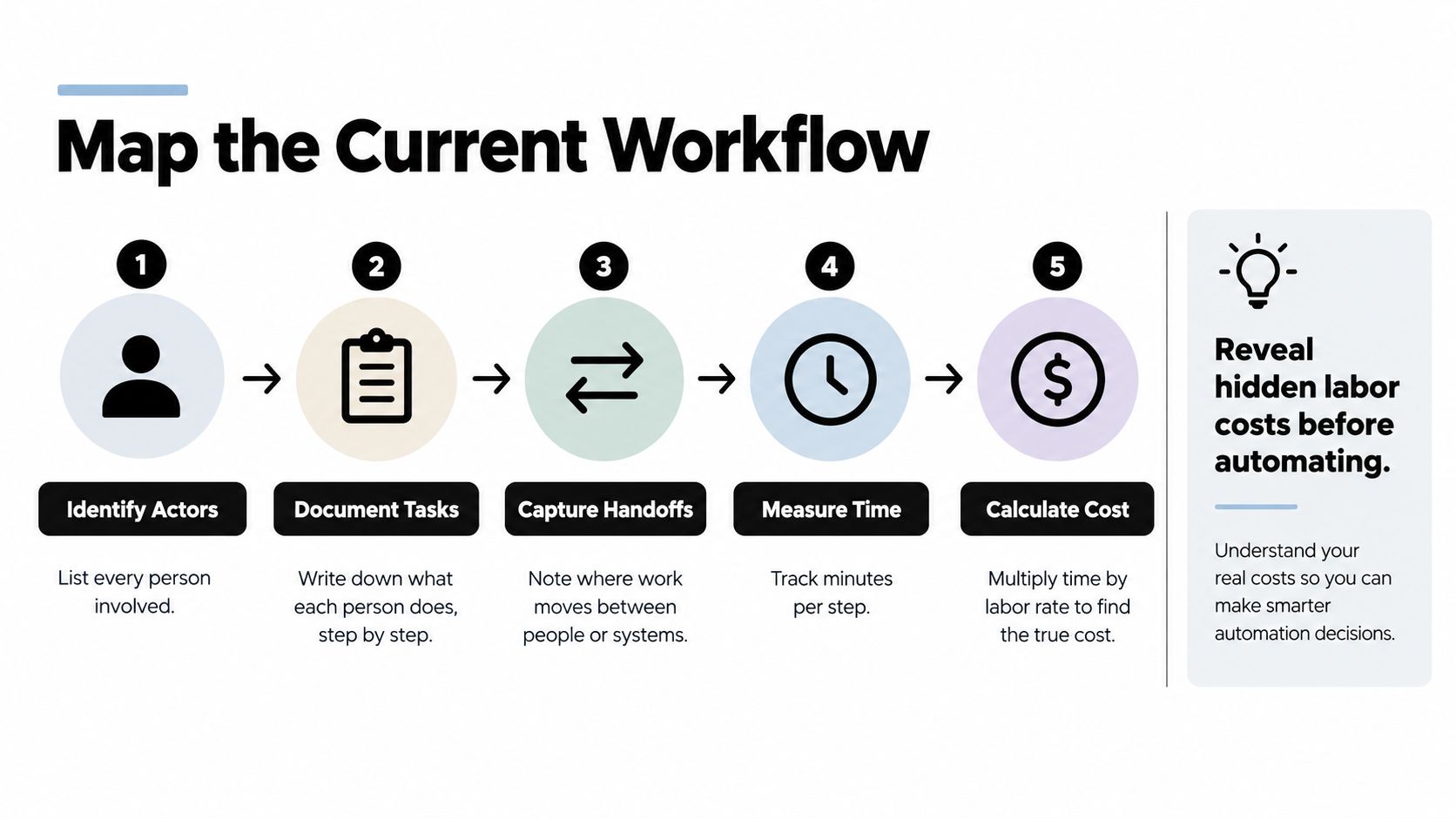
The visual below gives you a simple sequence for turning that observation into a costed map.
Count Total Cycle Time, Not Touch Time
For each step, record active work, waiting time, rework, and who touches it. A lead may need only a brief review, but it can sit in a queue, get routed to the wrong owner, bounce back for missing firmographic data, and then wait again for a manager. Touch time understates the cost. Cycle time exposes the commercial damage, especially when response speed affects conversion.
Separate judgment from delay. A sales manager reviewing an unusual discount adds judgment. The same manager copying opportunity notes from email into Salesforce adds delay. A recruiter assessing a borderline candidate adds judgment. Chasing calendar availability adds delay. Automate delay first, and design human review where judgment protects revenue or quality.
Email is often where hidden work hides. Approvals, exception requests, client documents, and internal escalations pile up in individual inboxes with no queue owner. If that pattern appears in your map, find an AI email assistant as one option for triage, but price the underlying handoff problem first. Sorting messages faster won't fix an approval rule nobody understands.
What a Usable Map Must Show
- Actors and owners: Every person or team that creates, reviews, approves, or repairs work.
- Systems and handoffs: Each tool change, copy and paste, export, upload, and manual notification.
- Queues and rework: Where cases wait, why they return, and which missing inputs cause loops.
- Exceptions: The cases that break the standard path and the senior time they consume.
- Business consequence: Late response, forecast error, delayed invoice, missed start date, or poor customer experience.
In a typical lead to cash map, the expensive steps are rarely data entry alone. They're the gaps between marketing qualification, sales acceptance, contracting, onboarding, and billing. Once you see those gaps, you may choose a different automation target entirely. That's the point. A good map sometimes kills the original idea and gives you a stronger one.
Estimating Costs, Savings, and a Four-Scenario ROI
Build the model finance wishes you'd built. Don't give them one ROI figure based on full adoption, perfect data, and zero behavior change. Give them four scenarios and show which assumptions move the result.
Start with full costs. Include software licenses, implementation, integrations, data cleanup, internal project time, training hours, workflow redesign, governance, monitoring, and ongoing maintenance. Add the temporary cost of running old and new processes during rollout. If your case only carries the vendor quote, it's incomplete.
Use a structured cost-benefit analysis framework to keep benefit pools separate. Count each benefit once. Released capacity, avoided rework, faster cycle time, and increased conversion can overlap, so assign each to one owner and one measurement method. Double counting is the fastest way to lose credibility in the room.
Model Adoption Honestly
The four scenarios below are an illustrative structure, not a forecast. Replace the example values with your baseline, your quoted costs, and adoption levels your team can defend.
Four-Scenario ROI Model for an Automation Investment
| Scenario | Adoption Rate | Annual Savings | Payback (Months) | Key Risk |
|---|---|---|---|---|
| Downside | Low, limited team uptake | Below annual running cost | No payback in year one | Old process remains in use |
| Conservative | Partial uptake in pilot team | Modest net benefit after training | Longer than vendor estimate | Data quality slows expansion |
| Base | Strong uptake with named owners | Clear net benefit from verified outcomes | Within planned budget period | Exceptions need active management |
| Optimistic | Broad uptake and clean data | Highest modeled benefit | Fastest modeled payback | Capacity is not redeployed productively |
Finance doesn't expect certainty. They expect you to know what breaks the case. State the adoption threshold where benefits exceed total cost, then explain what you'll spend to reach it.
Tie Savings to Outcomes People Can Verify
For CRM automation, don't stop at minutes saved per update. Model better forecast completeness, faster lead response, and opportunity creation. For project automation, model delivery capacity and margin protection, then check quality. For recruitment, connect screening and scheduling to time to hire and recruiter capacity for candidate evaluation. For voice agents, measure resolved demand, qualified transfers, conversion, and escalation quality.
Finance teams in other settings face the same discipline. Examples such as workflow automation for church finance teams are useful context because they force the same questions about approvals, controls, and reconciliation, even though your operating context is different.
Use payback period for timing, net present value when benefits extend across years, and internal rate of return only when comparing investment options on consistent assumptions. My recommendation is blunt. Lead with the base case, show the downside without flinching, and treat the optimistic case as upside. The workflow with the lower enablement burden often beats the workflow with the larger theoretical labor reduction because people adopt it.
Calculating Payback and Choosing Tactical Versus Strategic Bets
Payback answers a useful question. How long until cumulative net benefit covers the investment? It doesn't answer whether the investment makes your company easier to scale. You need both lenses, and you need to say which one governs the decision before the review starts.
Tactical automations remove a narrow, rules based burden. Invoice reminders, status notifications, meeting scheduling, document routing, and standard CRM updates fit here. They're contained, measurable, and usually easier to adopt. Fund them when the workflow is stable, the exception path is clear, and the owner can retire the manual step quickly.
Strategic automations change how capacity or revenue scales. End to end inbound call qualification with a voice agent, automated lead enrichment and routing across segments, or client onboarding that coordinates sales, delivery, finance, and support can take longer to pay back. The return shows up as capacity without proportional headcount, faster customer response, better conversion, or more consistent execution across teams.
Use Revenue per Employee as the Sharper Test
Hours saved can rise while commercial performance stays flat. That's why I push teams to track downstream output. PwC's 2025 AI Jobs Barometer report found that industries most able to use AI achieved productivity growth three times higher when measured by revenue per employee, and productivity growth in the most AI exposed industries nearly quadrupled since 2022. Don't copy those findings into your forecast. Use them to choose a better question. Will this automation help each employee support more revenue, margin, or high quality delivery?
If freed capacity has no named destination, don't book it as value yet. Assign it first, then measure what it produces.
Apply a simple decision rule. If the process is high volume, stable, and rules based, choose the tactical bet and demand a short, evidence based payback. If the process constrains growth, choose the strategic bet only with staged funding, explicit adoption gates, and metrics for conversion, capacity, quality, and customer outcome. If the process is low value and rarely causes downstream harm, consider not automating it at all. Eliminating a pointless report is cheaper than automating its production forever.
Sequence the portfolio deliberately. Start with one tactical win that builds trust and produces clean baseline data. Use that credibility to fund the strategic workflow that changes how the business grows. Don't launch five disconnected pilots and call it a strategy. Finance funds portfolios with decision rules, stop points, and owners, not collections of interesting tools.
Risk, Governance, and Change Management That Actually Protect the Case
Most cases treat risk as an appendix. That's backward. Governance and adoption decide whether your forecast survives contact with real users, messy data, and competing priorities. Put them inside the investment logic, with owners and costs attached.
The governance view below is useful because it separates technical, operational, data, and people risks instead of hiding them under a generic implementation risk label.
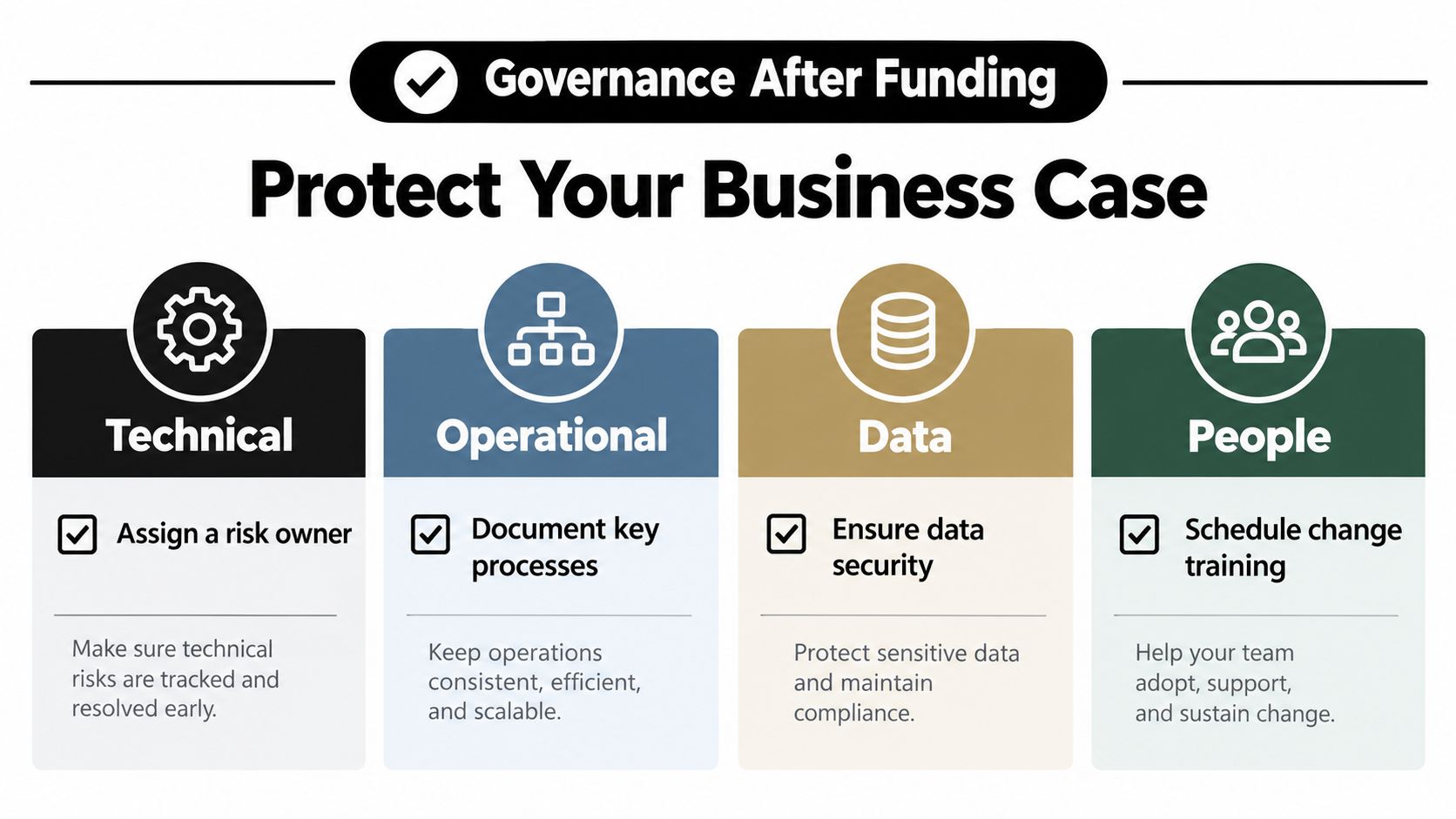
Technical risk covers integrations, permissions, reliability, vendor limits, and what happens when an upstream field or workflow changes. Operational risk covers exception ownership, escalation paths, service levels, and whether the old process gets retired. Data risk covers duplicate records, missing fields, inconsistent definitions, and access controls. People risk covers training, incentives, trust, and the manager behaviors that either reinforce or undermine the new workflow.
Set an Adoption Threshold and Instrument It
Decide in advance how much real usage the project needs before you count savings. Track active users against licensed users, completed automated cases against eligible cases, exception rates, override rates, and rework after automation. Review those measures with the workflow owner, not just the project team.
The change plan below is worth studying before you write the rollout section of your case, particularly the parts about sequencing communication, training, and feedback.
Use a practical change management implementation approach to assign a sponsor, workflow owner, data owner, and support path. Train by role, not by feature list. A rep needs to know what changes in daily pipeline work. A manager needs to know which reports replace manual inspection. An operations lead needs to know how exceptions get resolved when the automation is uncertain.
Retire the old process on a stated date. Running parallel systems feels safe, but it preserves duplicate work and makes adoption optional. Keep a controlled fallback for genuine failures, then close the side spreadsheet, legacy form, or manual approval thread.
I'll take a modest case with strong governance over an aggressive case with vague adoption plans every time. The first produces evidence. The second produces a postmortem.
Stakeholder Alignment, Templates, and Your Next Review Meeting
Map what each stakeholder must believe before the meeting. Finance needs auditable assumptions and a downside case. Operations needs exception ownership and capacity plans. Sales leadership needs proof that pipeline quality won't drop. End users need a workflow that makes their day easier. IT or security needs access, data, and vendor answers early, not after you've promised a launch date.
Bring those conversations into the room with a one page summary, not a dense model dump.

A One Page Executive Summary You Can Adapt
- Problem: Name the workflow, baseline, delay, error, or capacity constraint in business terms.
- Proposed change: State the pilot scope, systems involved, human review points, and old steps being retired.
- Four scenario result: Show adoption, net benefit, payback, and the main risk for each scenario.
- Value realization: Name the owner and the downstream metric for pipeline, margin, capacity, quality, or customer outcome.
- Decision requested: State the funding stage, review date, adoption gate, and stop rule if results miss the threshold.
Spend the two weeks before review validating assumptions with the people who do the work. Rehearse the hard questions. Which cost falls? What if adoption stalls? What data must be cleaned first? Decide which assumptions you can flex and which ones invalidate the case.
After approval, update the case with actual adoption, exception, and outcome data every quarter. Your automation business case should become an operating artifact that earns the next round of funding from measured results, not a pitch document that expires at launch.
If you're preparing an automation business case and need your baseline, workflow map, adoption assumptions, and downstream metrics to hold up in a finance review, MakeAutomation can help you audit the process, model the scenarios, and implement the workflows with documentation and team training. Visit the site to discuss your highest impact candidate and turn it into a staged, measurable automation plan.