
How to Improve Workflow Efficiency: A Practical Guide
“Just add AI” is bad advice when nobody can explain why a lead needs another approval or who owns a stalled onboarding request. If you want to know how to improve workflow efficiency, start with those questions, not a software shortlist. Redesign the work first, then choose technology that supports the redesigned process.
Why Most Workflow Efficiency Advice Gets It Backwards
A faster task doesn't automatically create a faster operation. You can generate proposals instantly and still leave buyers waiting because nobody has authority to approve pricing.
Consider a hypothetical SaaS qualification workflow. Marketing captures a lead, sales development checks fit, an account executive repeats the qualification, and a manager approves the opportunity. Reps bypass required CRM fields because completing them doesn't help the buyer move forward.
Adding an AI qualification assistant doesn't resolve that disagreement. Unless leadership defines which assessment counts and who can override it, employees must reconcile another recommendation. The company has added output without removing work.
Readiness means changing responsibilities
Deloitte's 2026 research, based on 3,235 leaders surveyed in August–September 2025, identified insufficient worker skills as the biggest barrier to integrating AI into existing workflows, while education, rather than role or workflow redesign, was the most common talent response (Deloitte's State of AI in the Enterprise).
Training matters, but teaching employees to operate software won't settle unclear decision rights. An operations director must decide which approvals remain necessary. A sales leader must agree on qualification criteria. A support manager must give agents permission to resolve routine cases without unnecessary escalation.
Practical rule: Don't automate a step until someone can explain its purpose, its owner, and what happens when it fails.
Treat readiness as an operating agreement, not a training attendance record. Ask employees to walk through an unusual case using the proposed process. If they disagree about who decides, the design isn't ready.
Use operational checkpoints, not launch milestones
A software rollout can finish while the underlying process remains unresolved. Require evidence at each checkpoint:
- Audit: The team can describe how work moves, including unofficial workarounds.
- Standardize: Owners agree on required inputs, decision rules, and completion criteria.
- Decide: Each task has a defensible automate, augment, or human-controlled assignment.
- Instrument: The team can detect whether the redesign improves delivery without degrading quality.
Don't confuse buying capability with building capacity. An automation subscription gives you access to functions. Capacity comes from removing avoidable work and helping employees handle the remaining work reliably.
Run an End-to-End Workflow Audit Before You Touch Any Tool
Start with a bounded process, such as inbound lead capture through delivery handoff. Don't audit “sales” as a department. Define the initiating event and the outcome that marks completion.
Use actual CRM records, proposal documents, and message threads to reconstruct the journey. The process diagram in a training deck is a hypothesis until you compare it with completed and stalled work.
The following diagram illustrates the pipeline. Its waiting-time label is illustrative, not a benchmark or a measured result.
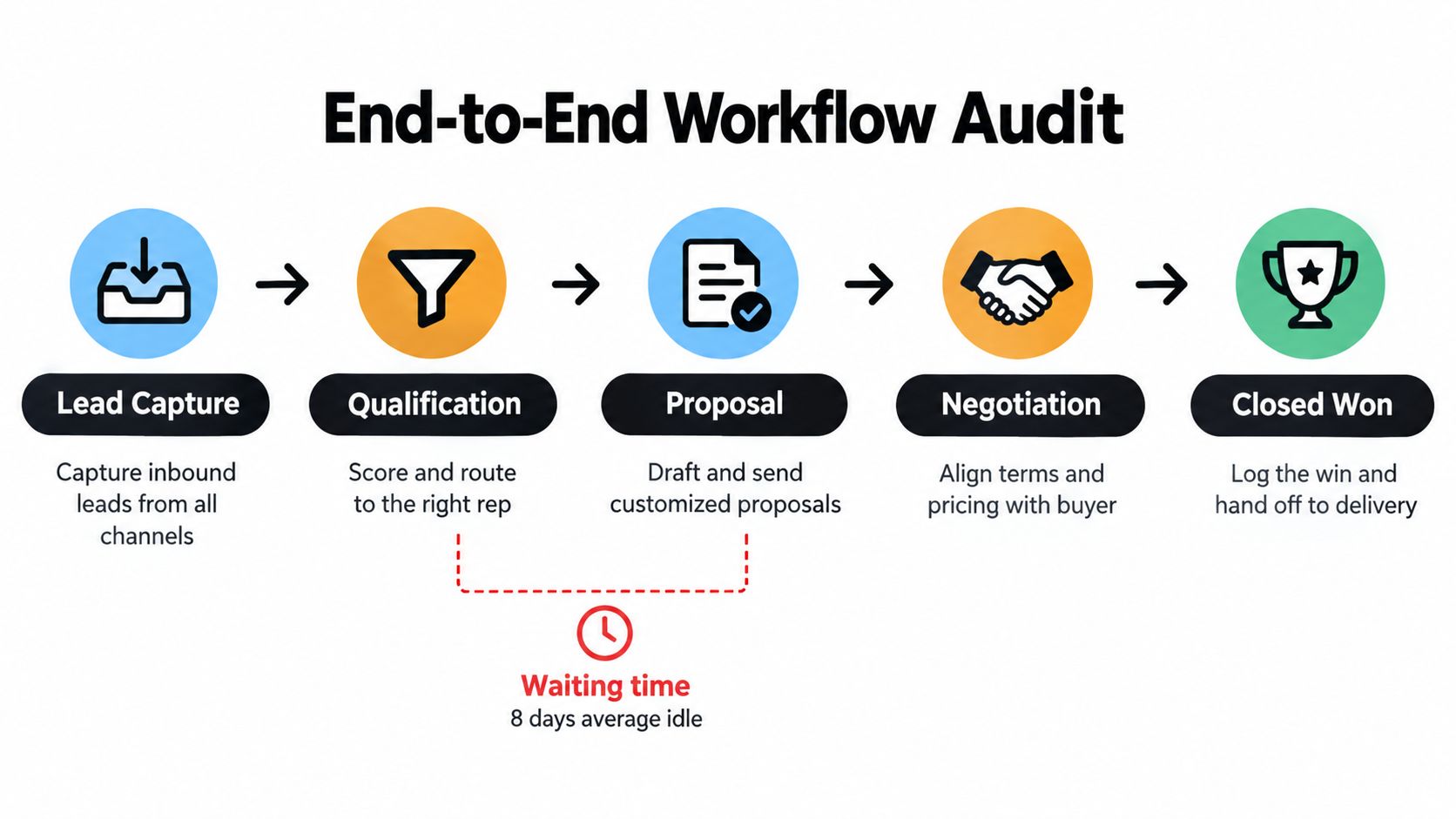
Follow the record across departmental boundaries
Ask the employee performing each activity to show what triggers it, where the required information lives, and how they signal completion. Include spreadsheets and direct messages if employees depend on them.
Capture the following in a compact audit sheet:
| Audit field | What to record |
|---|---|
| Activity | The action performed, not just the CRM stage |
| Owner | Accountable role and backup |
| Input and output | Required information and resulting deliverable |
| Decision rule | Conditions that determine the next action |
| Handoff | Receiving role and acceptance criteria |
| Exception path | Escalation destination and resolution authority |
| Timing evidence | Entry, start, transfer, and completion timestamps |
For a proposal handoff, “qualified” is insufficient. Specify whether the account executive needs confirmed requirements, an approved product configuration, and a purchasing contact. Otherwise, the proposal team must discover missing information after accepting the work.
Challenge the unofficial steps
Ask direct questions: What do you copy manually? Which approval changes the outcome? Where does work return because someone misunderstood the request? Which required field do you complete only after the deal advances?
Use workflow visualization to make these paths visible. For a complementary optimization resource, Recepta.ai's guide can help you find bottlenecks and automate tasks after you've established the current state.
Keep the unit of analysis small. McKinsey Global Institute's 2017 analysis estimated that approximately 49% of paid activities were technically automatable using demonstrated technologies, but fewer than 5% of occupations were fully automatable, while about 60% contained at least 30% automatable activities (McKinsey's automation analysis).
That distinction is useful operationally: evaluate document preparation, routing, and checks separately instead of declaring an entire role automatable.
Finish with a page that shows the normal path, return loops, and unresolved ownership questions. Have the people doing the work validate it before engineering estimates an implementation.
The Four Metrics That Expose Where Time Actually Goes
A support agent can write a reply quickly while the customer waits for an internal decision. A project manager can reduce meeting time while deliverables sit untouched in approval queues. Measure the customer's elapsed experience separately from employee effort.
Use this visual to distinguish the metrics. The displayed before-and-after values are illustrative, not sourced performance results or promised improvements.
Separate elapsed time from active effort
Lead time measures elapsed time from an agreed entry event to an accepted outcome. For support, use ticket receipt through accepted resolution. For sales, choose a boundary your team can consistently observe rather than mixing lead creation and opportunity creation.
Service time measures active effort. Include investigation, preparation, review, and correction. If employees verify AI-generated summaries, that verification belongs in service time.
Waiting time measures periods when work isn't progressing. Track queues explicitly instead of assuming every gap between timestamps represents avoidable delay. A buyer-requested pause and an unassigned internal approval need different remedies.
Rework rate measures the share of items returned for correction. Define what counts as a return so ordinary collaboration doesn't become indistinguishable from preventable failure.
A longitudinal workflow-management study reported that 15 of 16 processes, or 94%, were expected to achieve significant average lead-time reductions, ranging from 25% to 83% and averaging 48%; 12 of 16, or 75%, showed expected service-time changes (Reijers' workflow-management study). These were study-specific expectations, not a forecast for your implementation.
Instrument events, then rank queues
Configure HubSpot, Salesforce, Zendesk, or your project system to capture events rather than relying on employees to reconstruct them later.
- Timing fields: Record request creation, stage entry, work start, work stop, handoff, and accepted completion.
- Correction fields: Record return reason, originating stage, and correction effort.
- Context fields: Record work type, complexity, owner, and blocked reason.
Calculate the waiting-to-touch ratio by dividing accumulated waiting time by active service time, using consistent units. Rank comparable workflow types by that ratio. A high ratio directs attention toward coordination; substantial correction effort points toward input quality or unclear requirements.
Don't subtract person-hours from elapsed hours when employees work in parallel. Maintain separate clocks for customer elapsed time and total employee effort.
For a broader measurement specification, use this guide to operational efficiency metrics. Keep definitions fixed during the pilot so apparent improvements don't come from changing how completion is counted.
Use the accompanying video as a discussion prompt during the measurement review.
Standardize Before You Automate With Takt-Time Thinking
Automation amplifies whatever it touches. Point it at a workflow where every employee improvises the same task differently, and you get faster inconsistency, more rework, and exception queues nobody owns. Standardize first. The sequence is not negotiable in practice, because an automated mess is just a mess with better tooling.
The manufacturing literature shows what disciplined standardization does. In one case study, takt time was 332.05 seconds; standard work cut cycle time from 540.75 to 457.49 seconds, a 15.40% improvement, while reprocessing fell from 25% to 8%, a 68% relative reduction (standard-work manufacturing case study). Those numbers come from a production line, not a SaaS onboarding team. The discipline still transfers.
Pace the work against actual demand
Takt time is available productive time divided by customer demand over the same period. An onboarding team with 120 hours of genuine weekly capacity and 15 accounts due that week has a takt of 8 hours per account. If a typical onboarding consumes 11 hours of work, the gap is visible immediately, and you can decide whether to cut steps, add capacity, or renegotiate launch dates before the queue buries you.
Use measured availability, never nominal calendar hours. Deduct meetings, support shifts, and planned leave first. Takt sets the required pace; it does not justify rushing a technical investigation or forcing every customer through identical work.
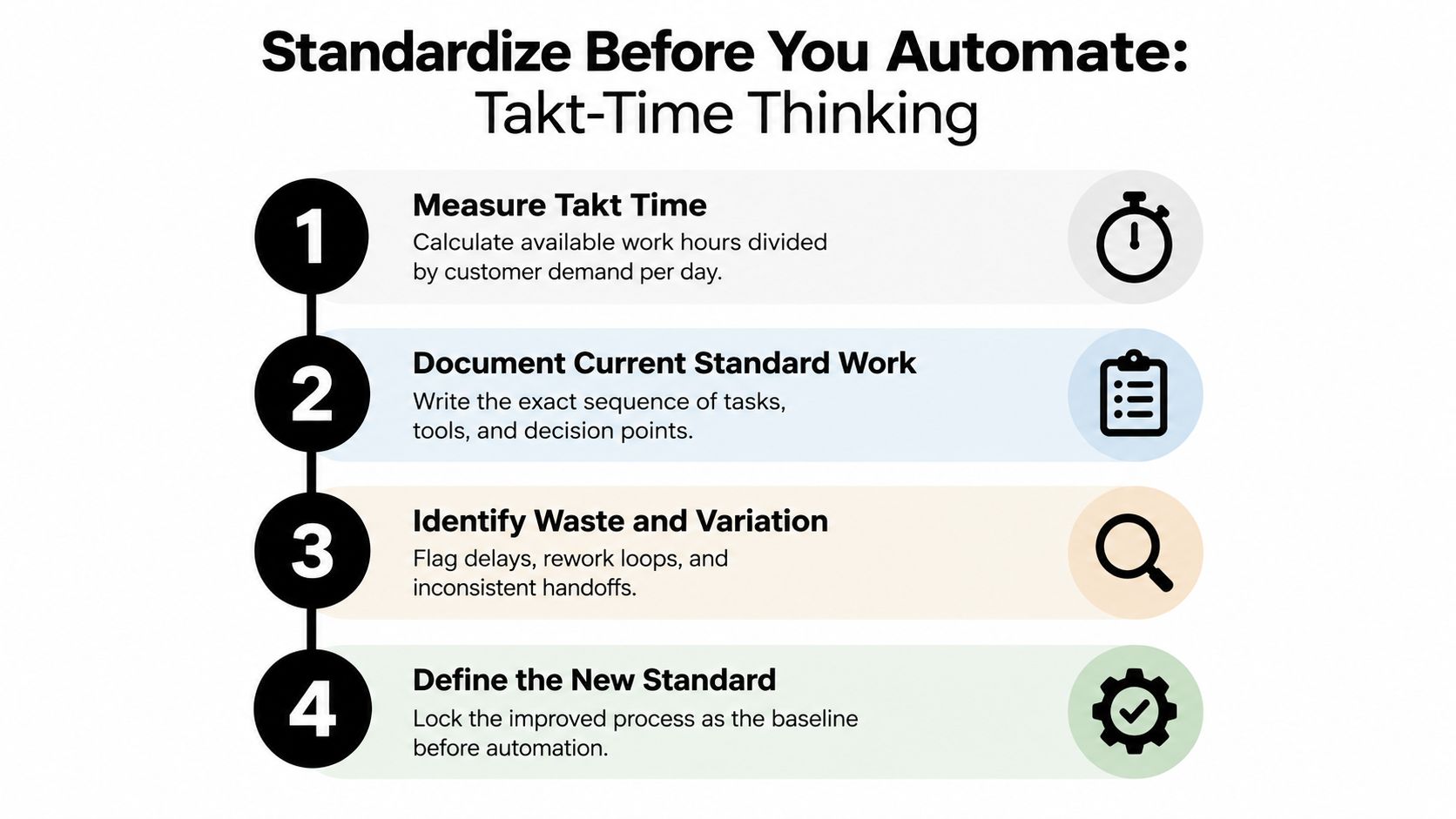
Write the standard from observed work, not a workshop
Shadow your strongest employees through real cycles. Document the current sequence exactly as it runs, including required inputs, systems, decisions, and dependencies. Resist polishing away the awkward steps, because those steps usually hide the rework you need to see. Then strip duplicate checks, pull preparation upstream so the receiving employee stops waiting on missing information, and give every handoff an owner, an exit criterion, a backup, and an escalation route.
For onboarding, replace "handoff complete" with "implementation owner has accepted the requirements, access dependencies, and customer commitments." A clicked button from the sender proves nothing about whether the receiver can start.
For repeatable screen-based activities, a tool for creating sops, such as Trupeer Inc.'s SOP creator, accelerates documentation. Employees still own the decision rules and exception paths.
A standard is useful only when someone can follow it and produce an acceptable outcome.
Validate the draft against live work, then treat process standardization as an operating discipline rather than a documentation project. Version every document, name its owner, record effective dates and revision reasons. Revalidate when demand, staffing, or tooling shifts, and especially when a queue that used to clear starts accumulating.
Automate, Augment, or Leave Human – How to Choose
Automation amplifies whatever workflow you feed it. A standardized process runs faster; a messy one produces rework at machine speed. Run every candidate through a four-factor test before any vendor demo enters the conversation.
The factors: volume (how much effort a change recovers), variability (whether inputs and paths stay predictable), judgment load (how much context and interpretation the work demands), and exception cost (what a wrong output costs you). Score individual tasks rather than whole roles. One sales job contains automatable routing and unautomatable negotiation sitting side by side.
Use the matrix below as a format for assessing your own task list.
| Task | Volume | Variability | Judgment load | Exception cost | Verdict |
|---|---|---|---|---|---|
| Route complete leads using approved territory rules | High | Low | Low | Moderate | Automate with an exception queue |
| Extract fields from unfamiliar contracts | High | High | Moderate | High | Augment with validation |
| Produce status reports from reconciled records | High | Low | Low | Low | Automate |
| Summarize recruiting interviews | Moderate | High | High | High | Augment, retain human evaluation |
| Approve unusual commercial commitments | Low | High | High | High | Leave human-controlled |
Two rows deserve a second look. Routing leads by a validated territory field is safe to automate; deciding whether a multinational account rolls up to an existing strategic relationship is a different task entirely, so ambiguous ownership goes to a named reviewer. Contract work splits the same way. Let software prepare fields for review without permission to write to billing terms. That boundary matters far more than whether the extraction uses AI.
Whatever the verdict, write the rationale in plain language before you evaluate tools. A sentence anyone can audit beats a numerical score nobody can defend:
- Automate when inputs are validated, rules are stable, and errors can be detected and reversed.
- Augment when software can prepare useful work but an employee must interpret context or authorize the result.
- Leave human-controlled when the decision carries relationship, legal, ethical, or commercial consequences.
A defensible rationale sounds like this: automate report compilation because it draws on approved fields and a fixed format, then assign delivery-risk commentary to the project manager. For recruiting, generate interview summaries as drafts the interviewer must correct before making the assessment. For outbound sequencing, suppression rules, and reply handling, apply identical scrutiny before enabling a campaign; Pipecorn's guide to how sales automation streamlines outbound is a useful planning reference.
Reassess every verdict when operating conditions shift. Greater volume does not make automation safer; it makes a flawed rule more consequential. Specify what triggers a reviewer to intervene, what evidence they see, and what authority they hold to stop execution.
Human review needs a decision, not a ceremonial approval click.
Instrument the Workflow With KPIs That Catch Silent Regressions
I once audited a support team whose dashboard showed every triage run completing successfully. The agents were rewriting the AI drafts before anything reached a customer. Technical completion and operational success are different acceptance criteria, and your dashboard only reports the first.
Lock the KPI specification before the pilot starts. If you wait, the implementation team will define success around whichever chart looks healthiest, and every review after that becomes a negotiation over sunk costs.
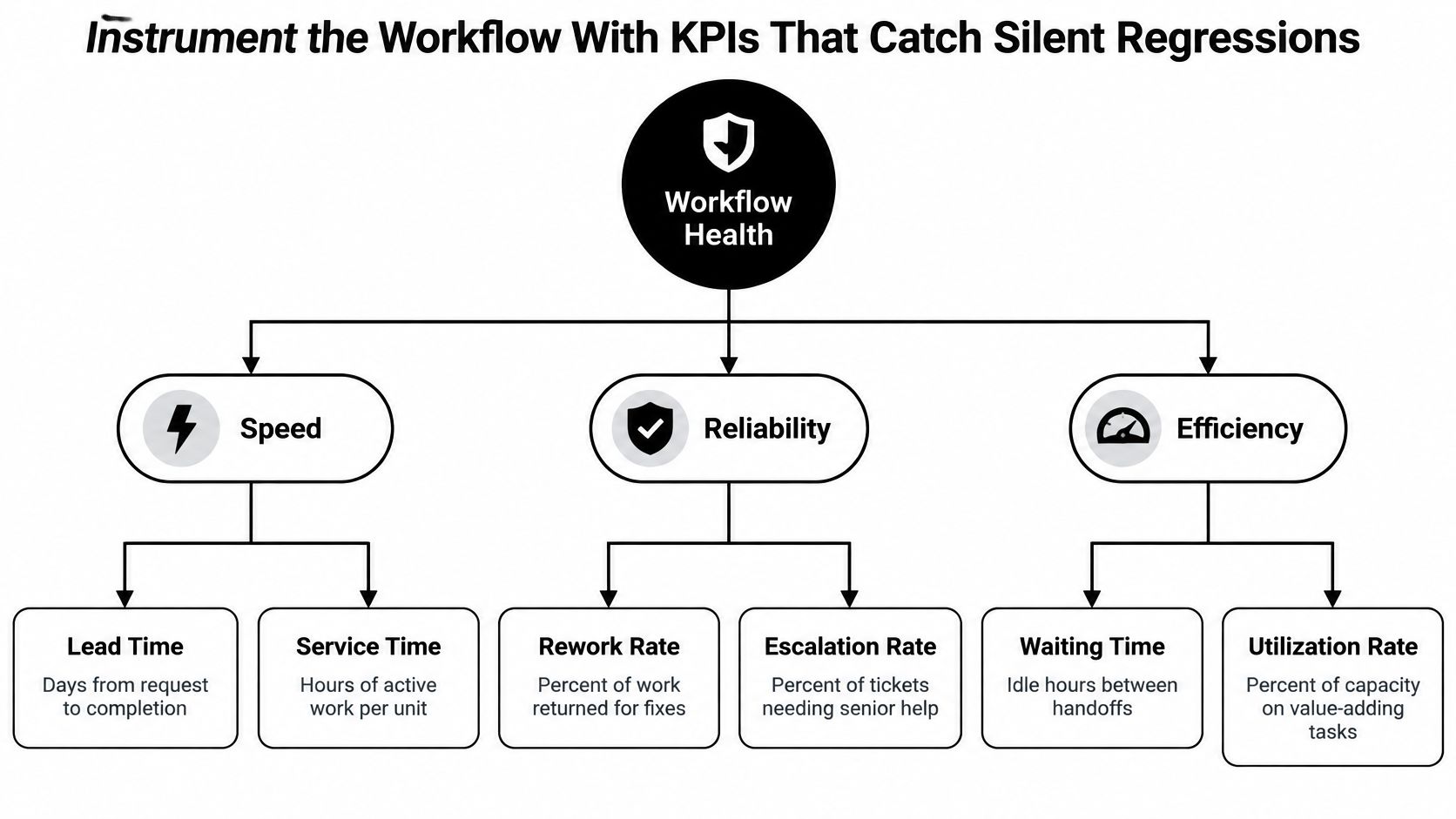
Start with a compact scorecard, then add the safeguards your specific process demands. The diagram above gives you the categories; the table below gives you definitions you can argue about.
| KPI | Operational definition |
|---|---|
| Throughput | Accepted completed items per reporting period |
| SLA attainment | Eligible items completed within the agreed service commitment |
| Rework rate | Items returned for correction relative to completed items |
| Error rate | Checked outputs that fail the agreed quality criteria |
| Automation-exception rate | Attempted automated items requiring intervention |
| Human utilization | Recorded work effort relative to available capacity |
| Verification burden | Employee effort spent checking generated outputs |
Two rules make these numbers honest. First, define every denominator before anyone sees a trend line: an automation-exception rate calculated only over successful runs excludes exactly the failures you need to investigate, and throughput should count accepted outcomes rather than internal tasks the automation spawned. Second, compare like with like. Complex implementations and routine onboarding sharing one average will make a shift in work mix look like process improvement.
Each metric also needs a system of record, a calculation, a baseline window, a reporting cadence, an accountable owner, and a response rule. Set thresholds from actual baseline variation and customer commitments, never from generic productivity targets. Three response conditions cover most failures:
- Pause: an unauthorized commitment, sensitive-data exposure, or other critical control failure stops the affected automation.
- Investigate: rising correction effort or deteriorating service attainment triggers an owner-led review.
- Capacity: a growing review queue requires a routing, staffing, or scope decision before any expansion.
Track verification as work, full stop. When a support agent compares a generated answer against account history and rewrites the response, that effort belongs on the scorecard. Counting the draft as labor saved before measuring the complete handling path is how regressions stay silent.
Release criterion: A faster workflow isn't an improvement if employees must absorb more correction work or customers receive worse outcomes.
Run the pilot on comparable work and inspect the underlying records instead of the averages. Keep a rollback path and a named person authorized to use it.
Averages hide the queue.
Your 30-60-90 Day Rollout and the One Audit You Should Run This Week
Use a 30-60-90 day rollout as a planning structure, not a promise of results. Advance only when the evidence supports the next step.
Days 1–30 establish the baseline
Select priority workflows with visible customer or revenue consequences. Map the actual paths, validate ownership, and capture baseline timing and quality data. The checkpoint is an agreed current-state map, not a completed software purchase.
Days 31–60 prove the redesign
Pilot the improved standard on a bounded process. Apply the decision matrix, test exceptions, and confirm that receiving employees can work from the handoffs. Keep the KPI instrumentation active throughout the pilot.
Days 61–90 scale selectively
Expand only the paths that meet the acceptance criteria. Review alerts, rehearse rollback, and transfer documentation and operating ownership to the team that will maintain the workflow.
Don't skip the pilot because the integration works in a demonstration. A demonstration proves that actions can execute, not that the operating model holds under real demand.
This week, choose a workflow, draw its end-to-end path, and calculate its waiting-to-touch ratio from actual records. Put the largest unexplained queue in front of its owner and agree on a testable change.
For hands-on help, visit MakeAutomation, an option for workflow audits, SOP development, CRM automation, and AI-enhanced operations. Bring a stalled lead, onboarding, or support workflow and ask for a scoped redesign and pilot with clear ownership, exception handling, and measurable acceptance criteria.