
Recruitment Marketing Automation: A Practical Guide
A hiring manager checks the pipeline before a leadership meeting and sees the same problem again: strong candidates have visited the careers page, several applications are waiting for review, and interviews still depend on a chain of manual emails. One recruiter is sourcing, screening, scheduling, answering questions, and trying to keep future candidates warm. By the time someone follows up, a qualified prospect may already be speaking with another company.
Recruitment marketing automation addresses that operating gap. It connects attraction, candidate capture, nurture, routing, scheduling, and measurement so recruiters can spend more time on judgment and less time repairing handoffs. The aim isn't to remove human contact. It's to remove the administrative delay that makes good candidates feel ignored.
Why Recruitment Marketing Automation Matters Now
A B2B hiring team can attract strong technical, commercial, and leadership candidates without converting them. A prospect may find a role through a job board, read employee content, submit an application, and then receive no useful response while recruiters reconcile records across systems. The conversion problem is operational as much as promotional.
Digital candidate interactions now arrive through several channels. In Canada, online job boards were used for 67% of job vacancies in 2015, 76% in 2019, and 79% in 2024, according to SmartRecruiters' candidate experience research. The same research reports that 62% of candidates prefer an automated system that coordinates interviews efficiently, while 72% say interview-process smoothness affects their decision to accept a job.
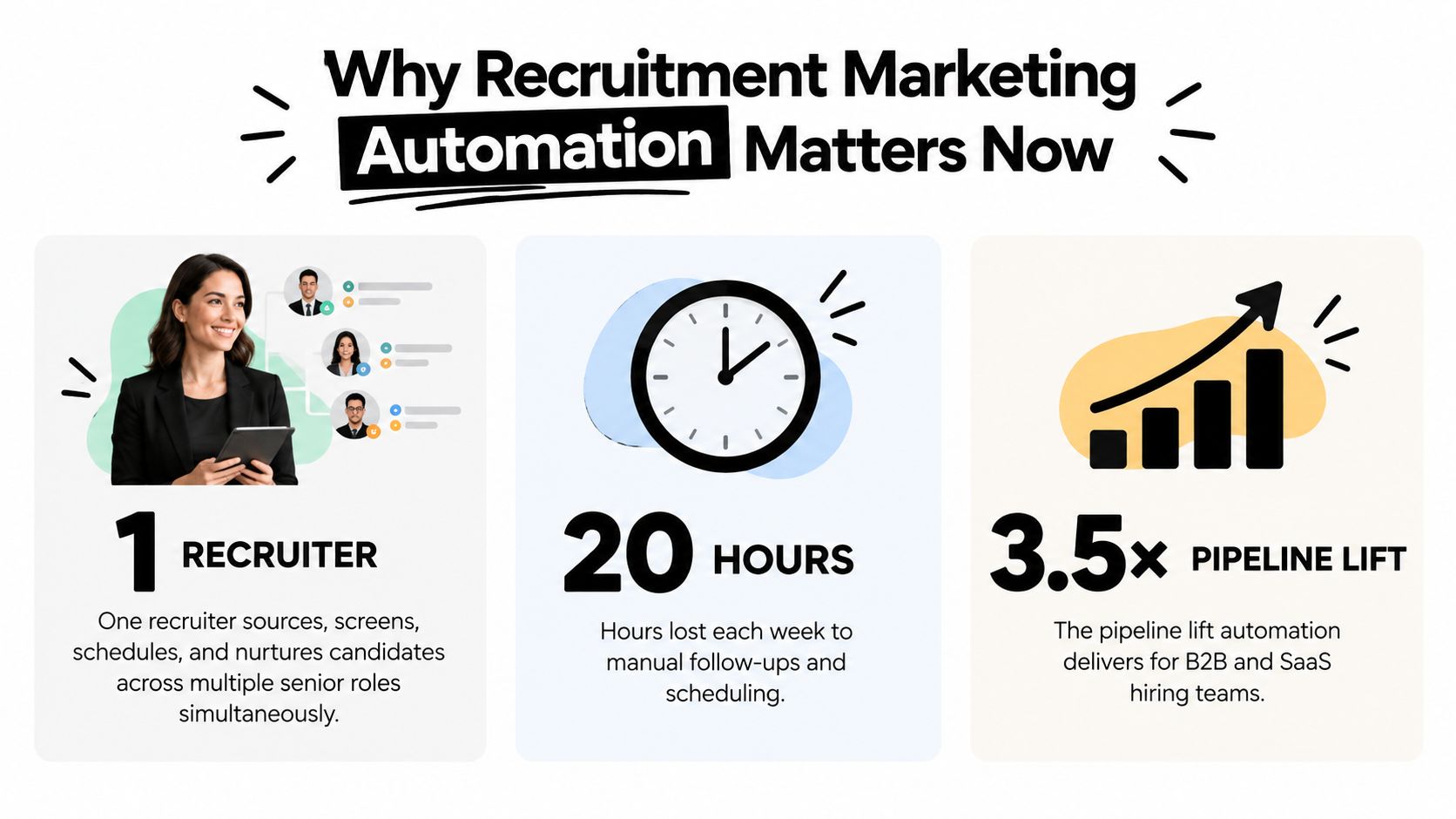
The practical bottleneck is not just message volume. Manual handoffs delay acknowledgments, leave abandoned applications untouched, and make it difficult to distinguish an engaged prospect from someone who clicked once. Automation can capture consent, record source and interest, trigger relevant follow-up, and route a candidate when human judgment is needed.
That design requires restraint. Immediate acknowledgment and interview coordination can reduce friction, but generic sequences can weaken trust. A useful workflow answers routine questions, offers available times, and gives recruiters context before a conversation. It also records rejection outcomes and permission for future contact, so post-rejection nurture remains relevant rather than becoming unwanted outreach.
For teams improving job content, guidance on using AI for job ads can support drafting and optimization. Generated copy still needs review by the hiring team for accuracy, role context, accessibility, and a credible account of the work.
Recruitment marketing automation is a candidate-conversion and trust system. It turns scattered interactions into a usable relationship process, while leaving assessment, exceptions, and sensitive conversations with recruiters.
The Core Building Blocks of an Automation Stack
A workable stack has five functional layers. You don't need every capability on day one, but you do need clear ownership for each stage of the candidate journey.
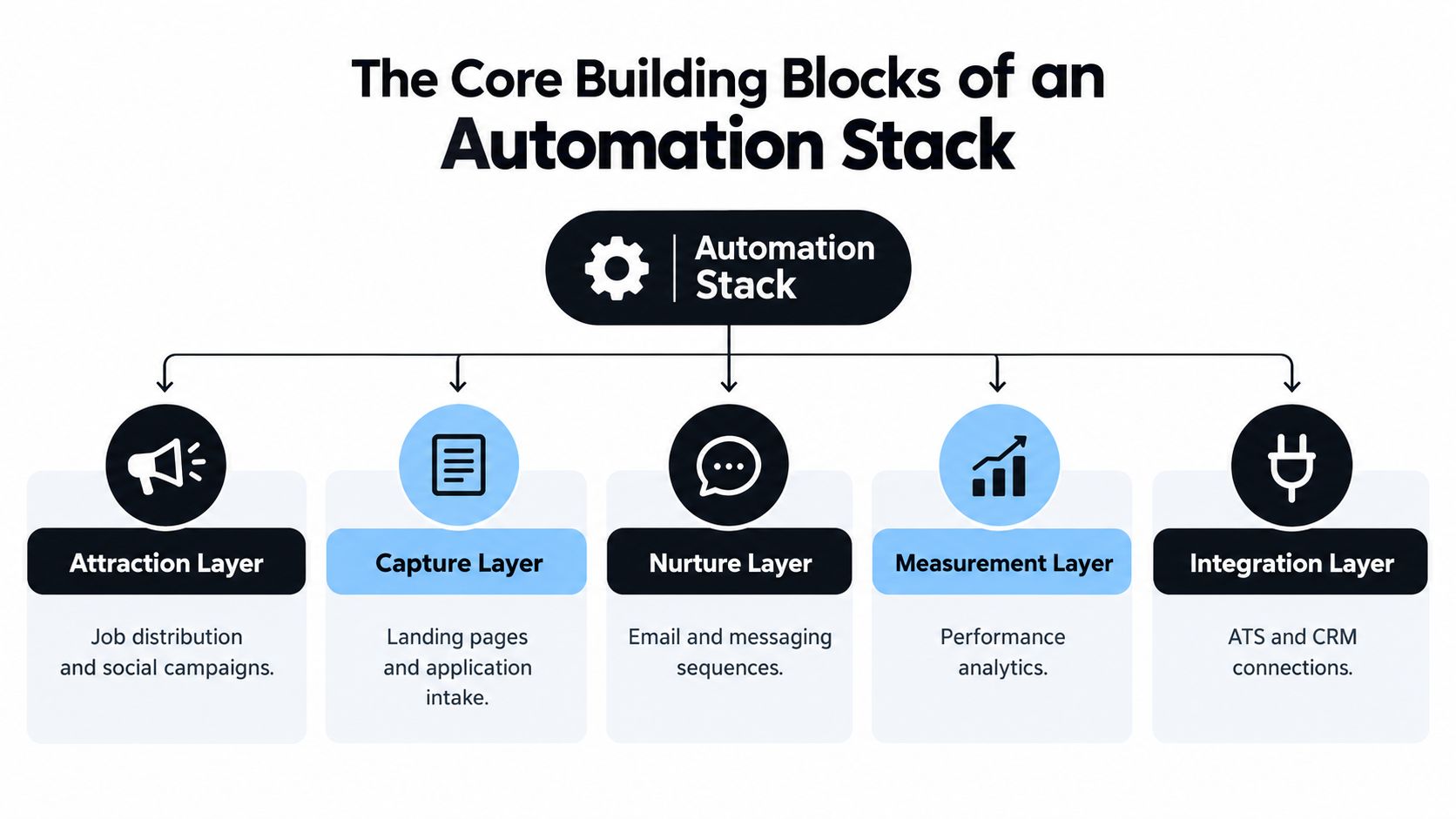
Five layers, five jobs
- Attraction: Distributes vacancies through job boards, social campaigns, search content, employee channels, and targeted outreach. Its job is to create qualified attention, not merely traffic.
- Capture: Uses career pages, role-specific landing pages, forms, and application flows to collect candidate information with as little unnecessary friction as possible.
- Nurture: Stores permissioned prospects and delivers relevant messages, reminders, role recommendations, event invitations, or talent-community content based on known interests.
- Measurement: Connects campaign identifiers to application, screening, interview, offer, and hire outcomes. Without this layer, teams optimize clicks while guessing about quality.
- Integration: Keeps the CRM, ATS, scheduling, assessment, chat, and analytics systems aligned. It owns the movement of records and events between tools.
A failure in one layer creates work elsewhere. A strong campaign can't compensate for an application form that loses source data. A capable ATS won't fix a CRM that creates duplicate candidates. A nurture sequence becomes risky when consent status doesn't travel with the record.
Hiring teams can use a recruitment process template to document owners, fields, triggers, and handoffs before building integrations. That exercise often reveals that different teams use the same stage name for different events.
Build around the candidate record
Decide where each field is authoritative. The CRM may own talent-pool membership and communication preferences, while the ATS owns application stage, interview feedback, and disposition. A shared identifier should connect the records without forcing both systems to hold identical data.
Teams hiring across regions may also need specialized audience sources. For example, a campaign aimed at technical talent can direct candidates toward resources that help them find tech jobs in Latin America, while the ATS remains the system for application decisions.
The stack works when it behaves like one system from the candidate's perspective. Candidates shouldn't receive conflicting messages because two tools disagree about whether an interview is scheduled.
Designing Sourcing Campaigns That Feed a Pipeline
A vacancy campaign should produce more than a short burst of applications. It should identify who engaged, what they care about, whether they gave permission for future contact, and which next step makes sense.
Start with segmentation. Separate audiences by role family, geography, seniority, employment type, consent status, and engagement. A senior account executive in one region shouldn't receive the same content as an early-career sales candidate elsewhere. Segmentation also prevents recruiters from treating every career-page visitor as an active applicant.
Plan the campaign before buying reach
For a SaaS company hiring account executives across different regions, one campaign can share a core employer narrative while using separate landing pages, compensation language, hiring-team contacts, and consent rules. Each page should pass a campaign identifier into the CRM and ATS, preserving the difference between region, role, audience, and channel.
Use job content to answer candidate questions early:
- Role clarity: State outcomes, reporting lines, territory or product scope, and the evidence used in evaluation.
- Search relevance: Use the language candidates use for the role, without stuffing the page with repetitive keywords.
- Conversion focus: Keep the application path proportionate to the information required at that stage.
- Future value: Offer a permission-based talent-community option for candidates who aren't ready to apply.
A visitor who returns to the same role page might receive a reminder or a relevant employee story. An abandoned application may trigger a helpful completion message, but only when the candidate has a lawful and transparent communication basis. A person who opted out must be suppressed, regardless of how valuable the source appears.
Optimize the stage that loses quality
A benchmark from Webtonic's recruitment marketing analysis reports median stage-to-stage conversion rates of 4.66% from click to application, 14.98% from application to screen, 40.45% from screen to interview, 61.33% from interview to offer, and 75.21% from offer to hire. At those medians, 1,000 clicks would produce approximately 47 applications, 7 screens, 3 interviews, 2 offers, and roughly 1 to 2 hires.
These are directional planning benchmarks from a recruitment-marketing vendor, not universal success rates. Their practical value is diagnostic. If a source produces inexpensive applications but weak screens, changing the landing-page headline won't solve the problem. Review the message, audience definition, job requirements, and screening logic together.
Use candidate sourcing strategies as a working checklist, then define the campaign's pause rules before launch. A source should be judged by qualified downstream movement, not by click volume alone.
Wiring the CRM and ATS Into One Source of Truth
Integration problems rarely announce themselves as integration problems. Recruiters see duplicate candidates, missing source fields, stale stages, or a scheduling message that contradicts the ATS. They often respond by changing the campaign, when the failure is a broken data handoff.
Define the flow before choosing the technical method:
- The attraction channel records the campaign and audience.
- The landing page or form creates or updates a prospect.
- The CRM stores consent, segment, engagement, and nurture history.
- The ATS creates the application and owns hiring-stage decisions.
- Scheduling, assessment, and messaging tools return events to the appropriate system.
- Measurement joins those events into a source-to-hire view.
Decide what each system owns
Standardize the fields that cross the boundary first. Candidate identifier, email, role, location, source, campaign, consent status, lifecycle stage, application status, recruiter owner, and last meaningful interaction usually matter more than a large number of optional fields.
Event-based synchronization is appropriate when delay changes the candidate experience. Application receipt, interview booking, cancellation, or disposition should move quickly. Scheduled synchronization can suit lower-risk enrichment or periodic reconciliation, provided the team knows the record may be temporarily stale.
Integration rule: If two systems can edit the same field, document which system wins before the first workflow goes live.
Where Common Integration Decisions Go Wrong
| Integration Decision | Recommended Approach | What Goes Wrong Otherwise |
|---|---|---|
| Candidate identity | Use a stable identifier and defined duplicate-matching rules | The same person receives conflicting messages or appears in multiple recruiter queues |
| Stage mapping | Create a shared event dictionary for CRM and ATS stages | Reports count different actions as the same conversion |
| Consent | Sync consent status, source, timestamp, and opt-out state | Nurture continues after a candidate withdraws permission |
| Attribution | Preserve campaign identifiers from first interaction through hire | The team can report applications but not which source produced qualified outcomes |
| Sync timing | Use immediate events for candidate-facing changes and reconciliation for low-risk updates | Recruiters act on stale information or workflows fire twice |
The funnel benchmarks above show why this matters. A campaign can look healthy at the click and application stages while losing candidates during screening or interviews. If ATS events never return to the CRM, the automation cannot detect that quality gap early.
Common symptoms of integration drift include duplicate contacts after a form submission, applications without source data, candidates stuck in nurture after applying, interview reminders sent after cancellation, and dashboards that disagree about stage counts. Treat those symptoms as data-quality incidents before rewriting the campaign.
Messaging Templates and Personalization That Build Trust
Candidate communication should be designed as a sequence of promises. The first message confirms receipt. The next explains what happens. Later messages either move the candidate forward, close the process clearly, or ask permission to maintain a relationship.
A useful message architecture includes application acknowledgment, screening invitation, scheduling instructions, interview reminders, status updates, offer communication, rejection, and post-rejection nurture. Each template should identify the responsible team, the expected next step, the contact path, and the information the automation cannot answer.

Personalize from useful signals
Relevant personalization can improve clarity. A candidate interested in a product role might receive product-development context, while a returning visitor to a regional role page might receive location-specific process information. The message should make sense if the candidate asks, “How did you know that?”
Risk rises when the system infers sensitive traits, follows behavior too aggressively, or hides why content was selected. Use suppression rules for candidates who applied, declined contact, were rejected for a role, or requested deletion. Make the human escalation route visible, especially for screening questions, accessibility needs, accommodations, and disputed decisions.
Aptitude Research's candidate experience report notes that automated processes can support consistent communication and that chatbots can answer questions about jobs, locations, and organizations. Its cited Talent Board benchmark found that 67% of candidates rated employer information discovered during research at four or five stars. The useful lesson is that automation supports research and consistency, but it shouldn't replace recruiter judgment.
Write messages a recruiter can defend
A personalized rejection that gives no meaningful explanation can feel worse than a brief, honest template. Don't generate feedback that recruiters can't substantiate from the evaluation record. Don't keep rejected candidates in a nurture stream unless they have explicitly agreed to remain in a relevant talent pool.
Teams thinking about building an employer branding career should treat every automated message as part of that brand. Candidates remember whether the company communicated clearly, respected their data, and closed the loop.
Trust test: Before activating a message, ask whether a recruiter could explain its trigger, wording, data source, and next step during a direct candidate call.
Analytics and Attribution for a Recruitment Funnel
Recruitment analytics becomes useful when every important transition is an event rather than a vague status. Instrument the path from ad click to application start, application completion, screen, interview, offer, and hire. Then carry the campaign identifier through the CRM and ATS so the team can compare sources by downstream quality.
Top-of-funnel metrics are still useful, but they aren't the finish line. A high click rate may indicate strong creative, weak targeting, or accidental curiosity. An application count can rise while screening quality falls. The measurement system should expose where candidates stop progressing.
Separate leading and lagging signals
Leading indicators help operators act quickly:
- Time to first response: Shows whether acknowledgment and routing work as intended.
- Application completion: Reveals friction in the form, page, or process.
- Screening invitation acceptance: Tests the relevance and timing of follow-up.
- Interview show rate: Exposes scheduling confusion, poor reminders, or low intent.
- Content engagement: Helps identify topics that assist candidate research.
Lagging indicators tell leadership whether the system creates value:
- Qualified applicants by source
- Interview-to-offer movement
- Offer acceptance
- Hire by campaign and segment
- Recruiter handoff rate
- Reapplication and referral activity
The stage medians cited earlier are useful as directional planning references, but teams should build their own baseline by role family and source. Don't use one benchmark as a target for every vacancy.
Run a weekly operating review
A practical review starts with exceptions. Which source produced applications but few screens? Which segment has strong engagement but poor interview attendance? Which automated rule sent too many candidates to recruiters? Which consent or suppression event failed?
Pause or reduce sources with weak downstream performance, not sources with low click volume. Test one meaningful variable at a time, such as landing-page clarity, audience segment, follow-up timing, or application length. Keep an audit trail for changes so the team can distinguish a campaign effect from a data or process change.
Executive reporting should stay concise and outcome-focused. Recruiter reporting needs operational detail, including individual queues, stale records, missing fields, and upcoming candidate actions. Both views should draw from the same event definitions.
Avoiding the Trust and Bias Traps of Automation
More automation isn't automatically better. A fast workflow can damage an employer brand faster than a slow manual one when it sends generic rejection messages, discards candidates without notice, applies opaque screening rules, or continues nurturing people who asked not to be contacted.
Candidates do want relevance. A 2025 analysis of Fortune 500 career experiences found that 87% failed to use AI and automation to hyper-personalize candidate experiences, while 47% of U.S. adults aged 18 to 34 said career sites should learn their job interests similarly to social-media algorithms, according to Phenom's analysis. Those findings support personalization, but they don't grant permission to collect every signal or hide how recommendations work.
Personalization needs boundaries
Use signals that are proportionate to the candidate's stated interest and the purpose of the interaction. Role viewed, location selected, skills supplied, application status, and explicit talent-pool preferences can support relevant communication. Inferences about protected characteristics, private behavior, or personal circumstances require much greater caution and may be inappropriate to use.
A human-in-the-loop model should include:
- Consent-aware segmentation: Store the communication basis, scope, source, and opt-out state with the candidate record.
- Explainable recommendations: Tell candidates why a role or message is relevant when that explanation affects their experience.
- Suppression rules: Stop nurture after application, withdrawal, opt-out, deletion request, or another defined event.
- Human escalation: Offer a clear contact path for accommodations, disputes, accessibility needs, and process questions.
- Bias checks: Review recommendations, screening outcomes, and dispositions by demographic group where legally permitted.
- Decision logging: Preserve the trigger, rule, data used, reviewer, and outcome for consequential actions.
Automation can answer routine questions about location, role scope, and process steps. It shouldn't make an unreviewed decision that a candidate cannot challenge. For teams evaluating AI resume screening tools, the core questions are explainability, validation, override controls, accessibility, and evidence that the workflow doesn't create disparate outcomes.
Treat rejected candidates as a relationship
A rejection ends one application, not necessarily the candidate relationship. With permission, a candidate can receive relevant future roles, skills content, event invitations, or a request to update preferences. Without permission, the system should close the record appropriately rather than treating rejection as an invitation to keep sending messages.
This post-rejection layer deserves its own measurement. Track reapplication, referrals, talent-pool engagement, employer-brand sentiment, recruiter workload, and time to a qualified future pipeline. Don't count a sequence as successful because it generated opens or clicks if candidates complain, unsubscribe, or never receive a clear outcome.
Use a staged rollout
A growth-stage team can introduce the system without pausing active hiring.
Days 1 to 30 should establish control. Audit the current stack, document the candidate journey, define CRM and ATS ownership, standardize stage and consent fields, and instrument the key funnel events. Review existing templates for unsupported claims, unclear next steps, and missing escalation paths.
Days 31 to 60 should prove one complete workflow. Choose a role family with recurring demand, connect the campaign identifier to the ATS, launch acknowledgment and scheduling automation, and test messages with a limited audience. Have recruiters review every trigger and disposition before expanding the flow.
Days 61 to 90 should extend the relationship layer. Add permission-based nurture, post-rejection options, reapplication routing, and a weekly performance review. Document who can change rules, who reviews bias indicators, and how the team responds when a workflow fails.
Watch for warning signs:
- Rising opt-out or deletion requests
- Falling interview show rates
- More complaints about generic or contradictory messages
- Candidates appearing in multiple nurture streams
- Recruiters overriding automated recommendations frequently
- Strong application volume with weak screening or interview progression
When those signals appear, pause the affected rule and inspect the data, wording, audience, and handoff. Automation compounds when teams review and adjust it. Left unattended, it turns small data errors into repeated candidate experiences.
MakeAutomation helps B2B and SaaS teams document and implement workflows across recruitment, CRM automation, AI operations, and process management. Visit MakeAutomation to discuss a candidate-conversion system that connects sourcing, nurture, scheduling, measurement, and human review without treating candidate trust as an afterthought.