Lead Generation Marketing Automation: A B2B SaaS Guide
At 4:40 on a Friday afternoon, a prospect submits a demo request. The form works, the lead lands in the CRM, and then nothing happens until Monday. The gap isn't a question of whether a sales rep cares. It's a question of whether the system knows what to do next, and whether it can do it reliably.
That's the practical test of lead generation marketing automation. It's not just a way to send more emails. It's the set of rules, data, tools, and handoffs that determine how interest becomes a qualified sales conversation, and whether the process produces useful pipeline or just more activity.
What Lead Generation Automation Really Means
A prospect requests a demo, but the CRM record has no company match and the assigned rep is out of office. A useful automation system holds the record for review or routes it to a defined backup, rather than treating incomplete data as a reliable sales signal.
Lead generation captures interest. Marketing automation applies rules to what happens next, including who gets contacted, with what message, when, and who owns the follow-up. Software can execute those rules consistently; the team must define qualification criteria, exceptions, and when outreach should pause.
Marketing automation grew from email tools and customer databases into platforms that connect campaign activity with lead management. Over time, systems added capabilities such as behavioral tracking, segmentation, scoring, triggered nurturing, and sales handoffs. Modern lead generation automation depends on connected tools, clean records, documented processes, and agreed qualification rules, not just an email scheduler (marketing automation's development and adoption).
The shift was toward persistent, rules-based journeys. A form submission, product-page visit, email interaction, account match, or change in sales stage can trigger a different response. Set limits as carefully as triggers: pause outreach when consent is withdrawn, a record is disputed, or a rep is already handling the conversation. Otherwise, automation can send the wrong message at the wrong time.
Attribution alone cannot prove a workflow caused pipeline. Use a holdout group to compare outcomes, and account for first touches that happen inside AI answers without a click. Those interactions may influence a buyer even when web analytics records no visit.
Automation scales the process it is given. Weak targeting and poor follow-up scale just as efficiently as sound rules. Design the process before buying or configuring the software.
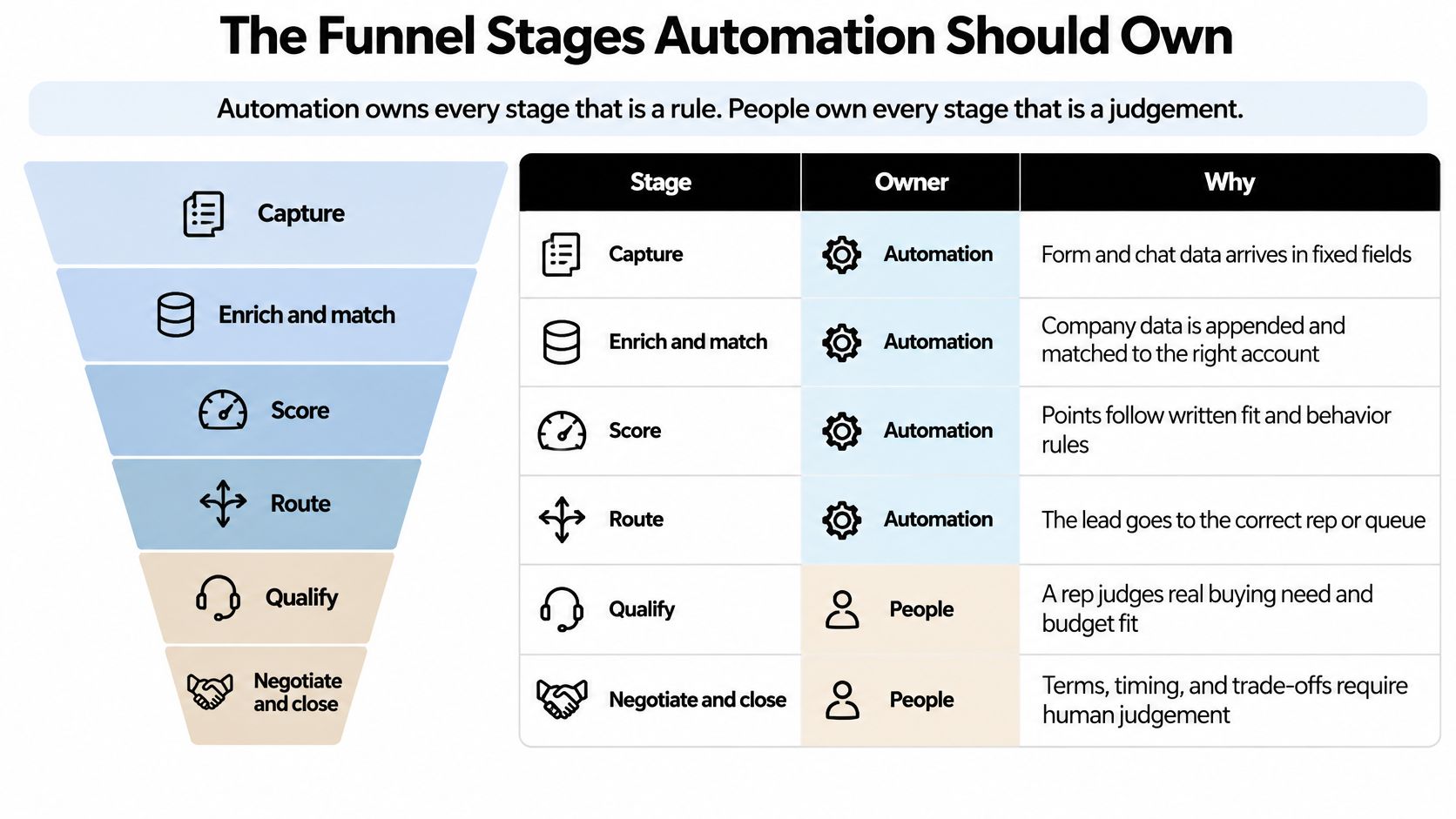
The Funnel Stages Automation Should Own
Automation owns every stage that is a rule. People own every stage that is a judgement.
| Stage | Trigger | Automated action | Sales handoff | Metric to track |
|---|---|---|---|---|
| Capture | Form submit, demo request, chat, or call | Validate consent, deduplicate, and store source | None | Duplicate and invalid record rate |
| Enrich and identify account | New record created | Append firmographics and match to an account | None | Enrichment match rate |
| Score | Behavior or profile change | Recalculate fit and intent scores | None | Score distribution by source |
| Route | Score crosses sales-ready threshold | Assign owner by territory and send alert | Rep accepts within agreed window | Median time to first touch |
| Nurture | Score below threshold or no sales signal | Send a stage-based sequence | Returns to sales when intent rises | Engagement rate by segment |
| Re-engage | No activity for 90 days | Send a reactivation sequence, then recycle | Sales reviews recycled leads | Reactivation-to-opportunity rate |
| Disqualify | Poor fit, competitor, or consent withdrawn | Suppress and close record | None | Suppression accuracy |
A record should pass through capture and enrichment before scoring. If the system can't match a company to an account, it shouldn't route the lead as if the match were reliable. Hold the record for review or send it to a defined exception queue. The point of a workflow is to make decisions consistent, not to hide missing data.
Capture also doesn't always start with a form. A buyer may first encounter a company in an AI-generated answer, find it through a branded search, or hear about it from a peer, then visit the site much later. B2B buyers increasingly use AI search during research, and some interactions won't produce a trackable referral click or an immediate form submission (G2's report on AI and the B2B buying journey).
Build a fallback entry point. Add a self-reported source field to forms or qualification conversations, and preserve it in the CRM. It won't reveal every influence behind a purchase, but it can capture information that referral tracking misses. Teams can also monitor branded searches, AI citations, account engagement, assisted pipeline, and sales conversations connected to AI-influenced research.
For teams refining the top of the funnel, comparing effective lead capture form types can help match the form to the buyer's context instead of asking every visitor to complete the same fields.
The handoffs that most often break are the moment a lead becomes sales-ready and the moment a rep returns a lead to nurture. Define both explicitly. Sales should know what information comes with a new assignment, and marketing automation should stop sales-oriented messaging when a rep records that the lead is back in nurture.
Lead Scoring and Segmentation Rules That Hold Up
Separate fit from intent before assigning points. Fit asks whether the company and person resemble a buyer. Intent asks whether they're acting like a buyer now. If the two are mixed, the score can hide a poor match. For example, a student at a large enterprise might download plenty of content and accumulate engagement points, but still have no buying role or purchase need.
The values below are starting points for calibration, not a universal scoring formula. Compare them against won deals and sales feedback, then change them when the evidence says the rules aren't identifying the right people.
| Signal | Category | Example points | Decay or cap |
|---|---|---|---|
| Economic buyer or champion title | Fit | +20 | Fixed; recheck on job change |
| Company in target size and industry | Fit | +15 | Recheck on enrichment refresh |
| Personal email domain | Fit | -5 | Fixed |
| Pricing page visit | Intent | +10 | Half value after 14 days |
| Demo request | Intent | +30 | Decays after 30 days if not actioned |
| Trial activates core feature | Product intent | +25 | Loses 50% after 21 days inactive |
| Webinar attended | Engagement | +5 | Capped at 15 points per quarter |
| Email unopened across three sends | Engagement | -10 | Resets on any click |
| Student, competitor, or existing customer | Exclusion | Route to review | Manual decision |
Exclusions shouldn't just subtract a few points. They should route to a review path, because a student, competitor, or current customer may require a different process from a prospect. Likewise, a strong score shouldn't automatically stand in for sales qualification. It should trigger a review or handoff according to agreed rules.
Use the scores to create distinct operating segments: a sales-ready segment for leads that meet the agreed threshold, a nurture segment organized by topic or role, and a recycle segment for inactive leads. The scoring rules should make those segments easier to manage, not turn every interaction into a reason to send another message.
Calibration check: Review a sample of high-scoring leads each month. Ask whether a rep would actually have called them, and why. Product pages and campaigns change, so a once-useful score can drift away from current buying signals.
For a deeper review of how to structure scoring inputs and rules, use these lead scoring best practices. Keep the model understandable enough that sales can explain why a lead was assigned, paused, or rejected.
How to Build a Speed-to-Lead Workflow
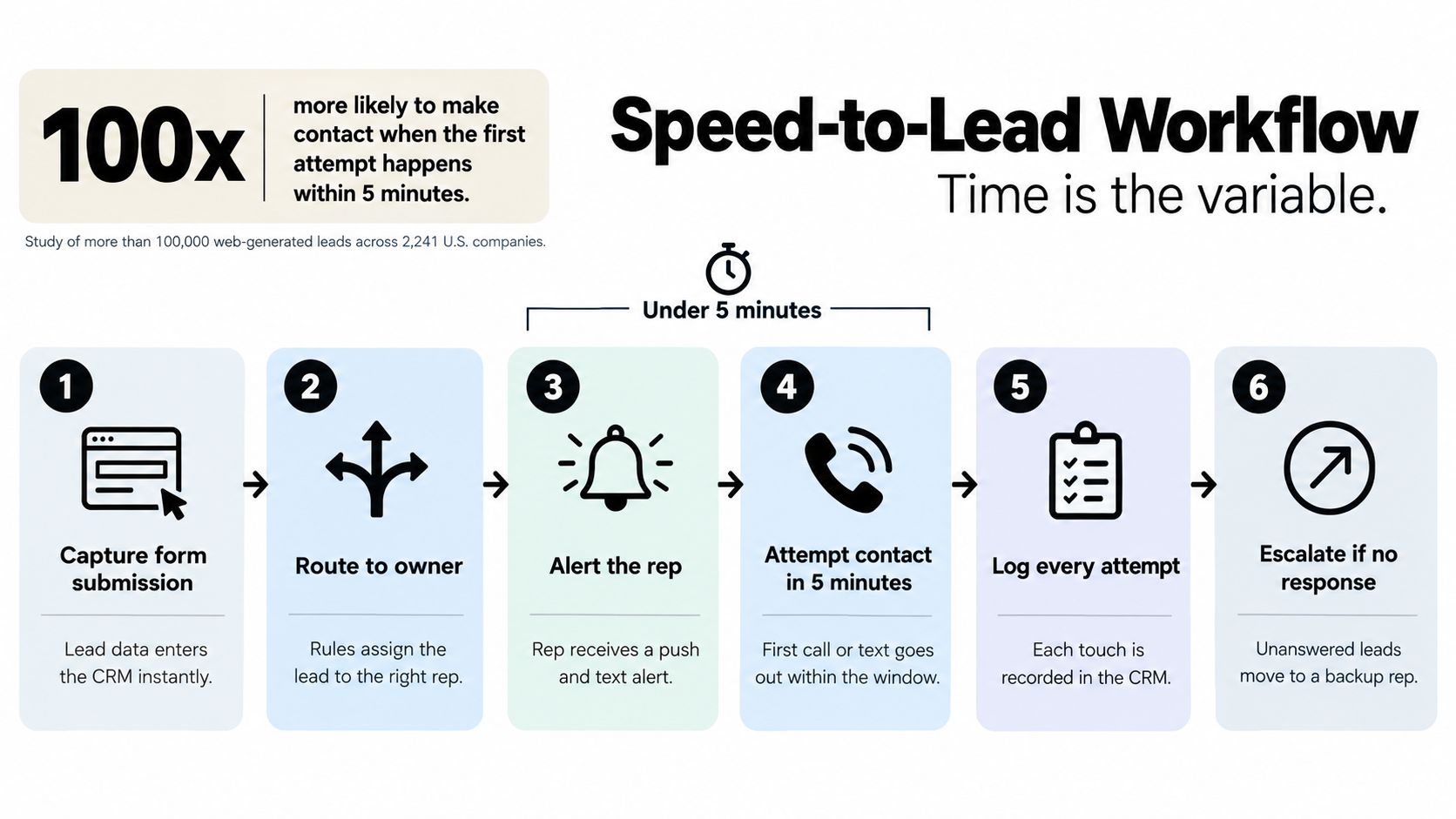
The first response matters because inbound interest can cool while a lead waits in a queue. A study of more than 100,000 web-generated leads across 2,241 U.S. companies found that attempting contact within five minutes made a lead approximately 100 times more likely to be contacted and 21 times more likely to qualify than waiting 30 minutes (the speed-to-lead study and its findings).
Use a five-minute target for high-intent events, such as demo requests, pricing-page conversions, and trial activation. Don't apply the same urgency to every low-intent content download. A fast but irrelevant message can make the experience worse, while prioritizing clear purchase signals gives the team a workable service level.
- Check consent before outreach. Confirm that the record is eligible for the specific communication channel. Don't let an urgency rule bypass consent.
- Enrich and match the record. Append firmographic details and connect the person to the correct account before routing. If the match fails, use a fallback queue instead of guessing.
- Score intent. Apply the fit and behavior rules consistently. A high-intent request should be easy to distinguish from general engagement.
- Assign the right owner. Route by territory or account ownership, and include enough context for the rep to understand why the lead was assigned.
- Send the first touch without waiting for a batch sync. Trigger a compliant email, SMS, or voice-AI action as soon as the record is ready, subject to the consent rules for that channel.
- Escalate when the workflow fails. If enrichment, routing, or rep availability blocks action, send the lead to a fallback queue and start an escalation timer.
Speed alone doesn't prove that the process is working. Track median and 95th-percentile time from submission to first touch, so a slow tail doesn't disappear behind an acceptable average. Also review contact rate and sales-accepted-lead rate by response-time bucket. If faster contacts don't improve meaningful outcomes, investigate the handoff, message, or lead quality rather than pushing reps to respond faster.
A follow-up process also needs clear ownership and a record of outstanding actions. Teams that want a practical way to track proposals to prioritize lead follow-ups can use that kind of task visibility to keep promising conversations from stalling after the first attempt.
Tool Architecture That Keeps Data Clean
Treat the stack as connected layers, not a shopping list. Capture tools collect forms, chat, and call activity. Enrichment and account-matching tools fill data gaps. The CRM holds the record of truth. An automation engine runs rules and sequences, sales engagement tools manage calls and tasks, and analytics reads the resulting activity and pipeline.
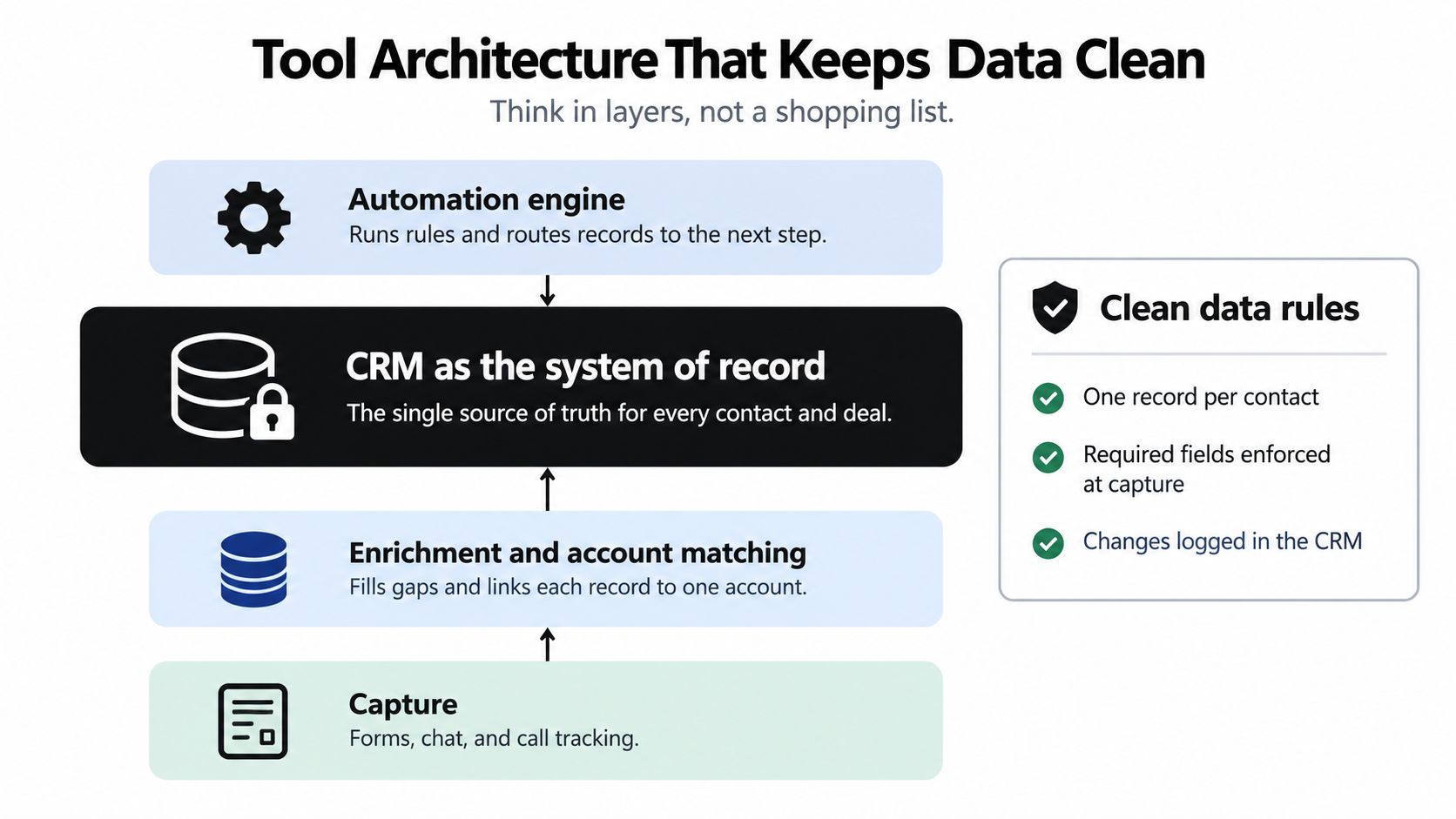
The most important design decision is a normalized data model with explicit lifecycle states. A state should mean the same thing in every connected tool: new, engaged, sales-ready, accepted, opportunity, customer, recycled, or disqualified. If the CRM says a lead is accepted but the automation platform still treats it as nurture, the prospect may receive a marketing sequence while a rep is already in conversation.
Make status changes bidirectional. When a rep updates a lead in the CRM, the automation engine needs to receive that change promptly. When a workflow advances a lead, the CRM should show the new state. Map each state transition to a clear trigger and action, and document what happens when an update fails. A connection that stops syncing without any warning isn't reliable automation.
The governance layer matters just as much as the connections. Record the consent source and timestamp, maintain suppression lists, retry failed API calls, and require human review for high-value accounts. For SMS or voice-AI outreach, require the appropriate explicit opt-in, apply double opt-in where local rules require it, and disclose automated voice calls at the start of the conversation. These controls reduce the risk of a workflow sending a technically valid but unwanted message.
Nucleus Research reviewed 16 ROI case studies and reported an average three-year benefit of $5.44 for every dollar invested, with payback in under six months; the reviewed organizations also increased lead generation by 225% and campaign production by 54% (Nucleus Research's marketing automation ROI review). Those results aren't a guarantee for any individual company. The practical lesson is to connect activity to pipeline, monitor data quality, and establish tests that distinguish incremental results from credit assigned by an attribution model.
MakeAutomation is one option for designing and documenting lead-generation workflows that connect CRM operations, scoring, routing, and follow-up. Teams reviewing their own setup can also use this guide to connect CRM and automation systems around a shared data model.
Measuring Revenue Quality Instead of Lead Volume
A workflow can produce more leads and still make the sales pipeline worse. If new records are rejected, duplicated, or unlikely to buy, higher volume adds cost and distracts sales. Measure whether automation creates qualified opportunities, and set pause rules for signs that it is degrading lead quality.
| Metric | What it tells you | Healthy direction | Review cadence |
|---|---|---|---|
| MQL volume | Raw capture capacity | Rising only if sales-accepted rate holds | Weekly |
| Sales-accepted lead rate | Quality of the marketing-to-sales handoff | Rising, tracked by source | Weekly |
| Median and 95th-percentile first touch | Speed-to-lead health and slow tail | Median under five minutes for high-intent events | Weekly |
| Opportunity creation by source | Pipeline produced by each channel | Stable or rising at falling cost | Monthly |
| Sourced vs. influenced pipeline | How credit is split across touches | Report both, never merge | Monthly |
| Cost per opportunity | Efficiency of the system | Stable or falling as volume grows | Monthly |
| Duplicate and invalid record rate | Data health | Trending down | Monthly |
| Holdout incremental lift | Causal effect of automation | Positive gap versus control group | Each test cycle |
Use the table to separate processing activity from revenue progress. Review disqualification accuracy, buying-group coverage, speed-to-qualified-opportunity, and opportunity-to-close rate alongside lead volume. If sales acceptance drops as MQLs rise, investigate the source, segment, and scoring rules before expanding the workflow. Automation scales the process it is given, including weak qualification.
Test for incremental impact
A holdout test shows whether a workflow improves outcomes beyond what would have happened without it. Randomly exclude a share of eligible leads from the nurture sequence or routing rule, then compare opportunity creation for the treated and control groups over a full sales cycle. Keep the groups comparable, and change one workflow at a time where practical. A positive gap is stronger evidence of incremental impact than crediting a deal to an email click.
Attribution still has a role: it describes recorded interactions. It cannot reliably capture every influence on a buying decision, especially when a buyer first encounters a brand inside an AI answer and never clicks through. Capture self-reported source when a lead enters the CRM, retain opportunity-source fields, and compare account-level engagement and opportunity creation in matched markets against a holdout. Treat the results as an informed estimate, not proof of every touch's contribution.
The 2025 B2B marketing metrics analysis describes how teams track MQLs more consistently than closed-won revenue and influenced pipeline, and notes the limits of attribution models based on narrow, visible interactions. Use attribution for reporting, then test whether a workflow changes outcomes. For a practical approach to evaluating marketing automation ROI, connect campaign activity to opportunity creation and controlled comparisons.
Launch a 30-Day Pilot Before You Scale
A demo request that sits unassigned for hours is a useful pilot starting point. Limit the test to one high-intent source so the team can check routing, data quality, and follow-up before adding more channels.
- Week one: Audit the capture form, consent records, and duplicate rate. Define lifecycle states, then set the operating targets before launch. For example, specify a median first-touch time under five minutes and the minimum sales-accepted rate that would justify continuing. Record the baseline and agree on pause thresholds.
- Week two: Build the demo-request speed-to-lead workflow. Test the fallback queue and escalation timer before launch, including what happens when an assignment fails.
- Week three: Add calibrated scoring rules and hold out a share of eligible leads from the nurture sequence as a control group. Document the control treatment and keep the groups comparable.
- Week four: Review leading indicators only: median and 95th-percentile first-touch time, sales-accepted rate, and early holdout data. Check them against the targets set in week one. The opportunity-creation result for the holdout requires a full sales cycle, so it cannot support an expansion decision at day 30.
Set pause rules in advance. Pause outreach to a segment if duplicate records rise, consent records are incomplete, reps reject more than half of routed leads, or AI-generated personalization draws complaints. Resume only after the team identifies and fixes the cause. Automation scales the process it receives, including its data and handoff problems.
At day 30, decide whether to continue the pilot, not whether to scale based on incomplete outcome data. Expand only after the full-sales-cycle holdout comparison shows incremental opportunity creation and cost per opportunity remains stable. If early indicators miss their targets, fix the data model, scoring, or handoff before adding another source.
MakeAutomation helps B2B and SaaS teams design, document, and implement lead-generation workflows across capture, enrichment, scoring, routing, CRM operations, and follow-up, including voice AI for inbound and outbound calls. If your current automation creates activity without clear revenue evidence, visit MakeAutomation to discuss a focused pilot and how to measure it.