CRM and Automation Guide for Scalable B2B Growth
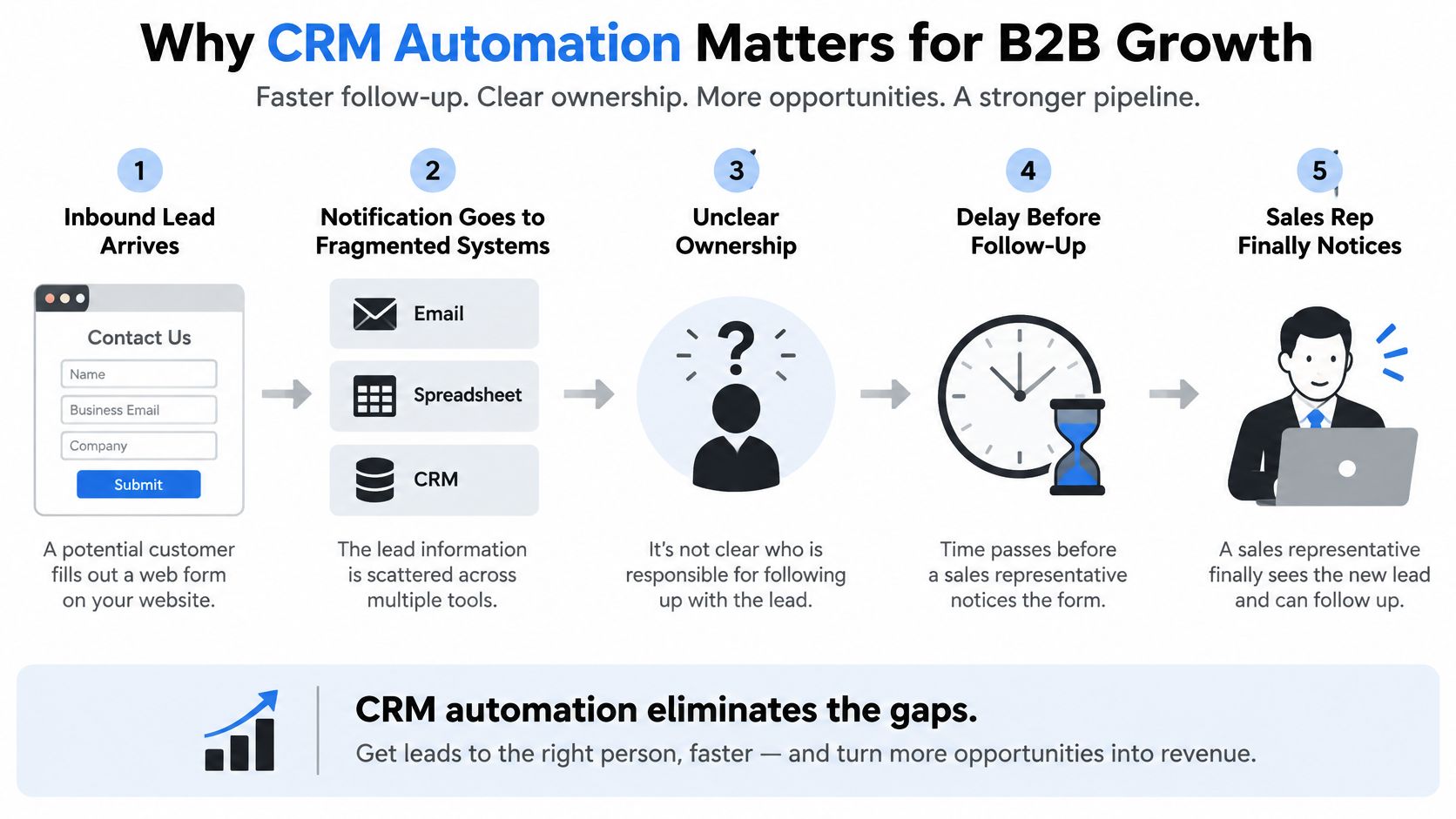
A high intent lead just submitted your demo form. The notification lands in a shared inbox, the spreadsheet hasn't been updated, and nobody's sure who owns the account. By the time a rep notices, the prospect's already talking to a competitor who replied first.
That gap between a customer event and a coordinated response is where most B2B and SaaS teams lose revenue. CRM and automation close it when they're designed as one operating system for revenue work, not as a CRM license plus a few disconnected zaps.
Why CRM Automation Matters for B2B Growth
I've seen this exact sequence in growing SaaS teams more times than I can count. Marketing celebrates a new inbound lead. Sales can't find the enrichment data because it's stuck in the ad platform. Operations copy details into a project board by hand. Each person did their job, and the lead still waited.
The flow below shows how fragmentation creates delay before any rep even sees the form.
From Record Storage to Coordinated Action
A CRM that only stores contacts doesn't fix that wait. Automation turns a record change into validation, routing, a first touch, and a human task, in order, every time. That's the difference between software your team updates when they remember and a system that moves work while people focus on conversations.
This isn't a new idea dressed up by AI. CRM and sales force automation became a major category in the late 1990s and early 2000s as standalone databases evolved into integrated infrastructure for lead tracking, forecasting, customer information, and sales process control. The tools changed. The job didn't. Centralize customer data, make it usable across sales, marketing, service, and operations, and stop asking humans to be the integration layer.
What Scale Actually Requires
Growth breaks manual follow up in predictable ways:
- Volume exposes inconsistency: Two reps qualify the same lead differently, so reporting stops meaning anything.
- Handoffs add latency: Every inbox check and spreadsheet copy is a queue your prospect sits in.
- Visibility disappears: Leaders can't tell whether a pipeline problem is demand, routing, or rep capacity.
Strong implementations start with a business event and a measurable outcome, not a tool purchase. Pick the event, define what should happen next, and decide how you'll know it worked. Installation alone isn't automation.
Understanding How CRM and Automation Work Together
Think of the CRM as your operational memory and automation as the reflex that fires when that memory changes. The diagram below maps that relationship between stored context and triggered action.
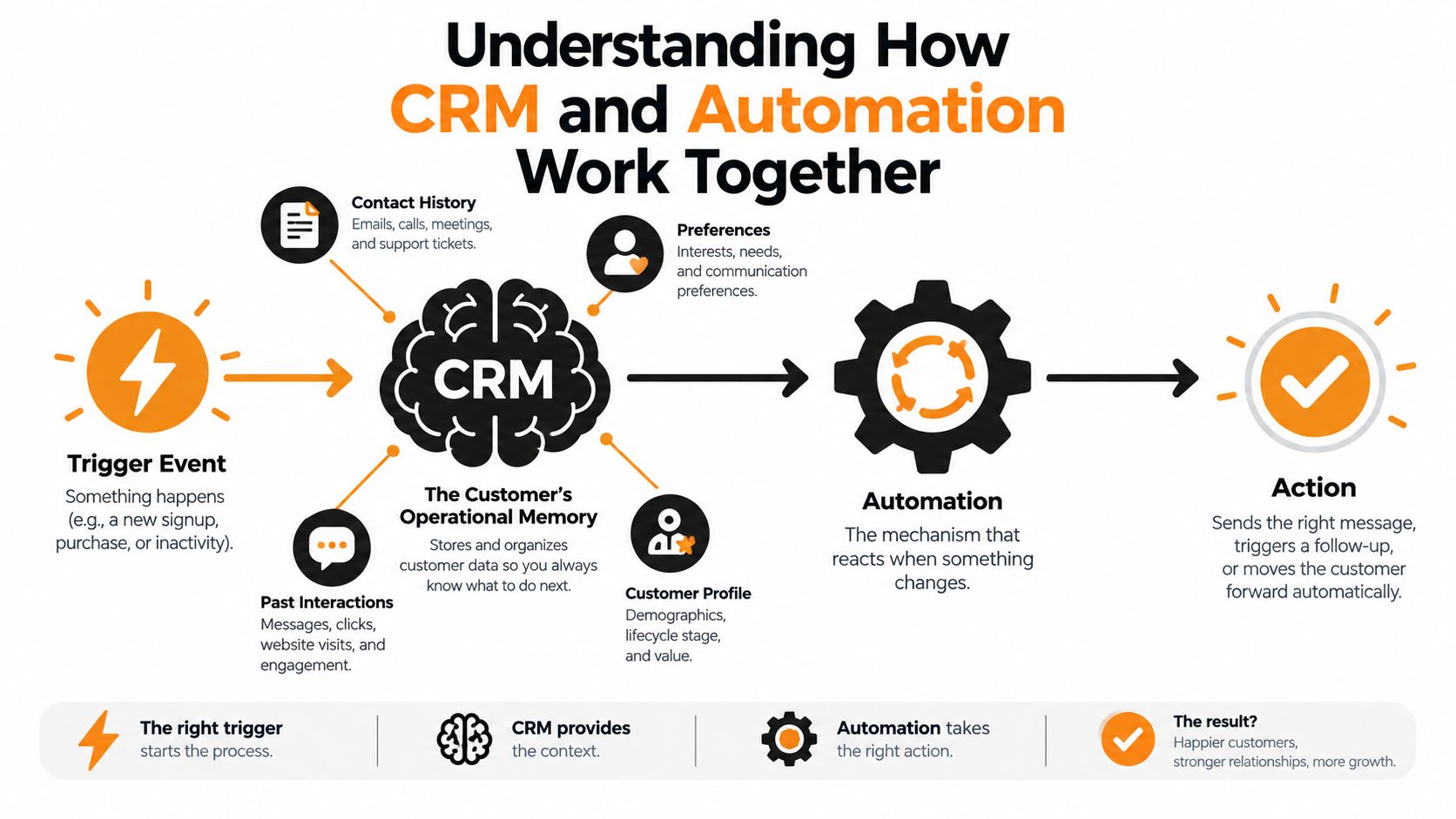
The CRM holds contact history, account context, consent status, deal stage, and open work. Automation watches for an event, checks rules against that context, and executes actions across your stack. Neither layer does much alone. Memory without a reflex means reps hunt for work. A reflex without memory means you send fast, wrong messages at scale.
The CRM stores context and history. Automation converts that context into coordinated action.
One Form Submission as a Working Loop
A prospect submits a demo request on your site. The event creates or updates a CRM record. A workflow validates required fields, enriches company data, scores fit and intent, assigns an owner by territory, sends a compliant acknowledgment, and creates a follow up task for the owner.
Then the loop closes. The workflow writes timestamps, delivery status, and task completion back to the record. Your team can now measure processing time separately from human response time, and leaders can see where leads stall instead of arguing about it.
Order matters here. If enrichment runs after routing, territory rules work from incomplete data. If the acknowledgment fires before a consent and suppression check, you've created risk instead of speed. Reliable CRM and automation depends on each stage completing in sequence, with failure at one stage stopping or rerouting the next.
The short walkthrough below shows that trigger, condition, and action pattern in practice.
Apply the same loop anywhere. A renewal date approaching, a support ticket escalating, or a signed contract are all events. Each one can update memory, fire a reflex, and record the result.
Choosing the Right CRM Automation Architecture
Architecture decisions usually fail in one direction. Teams either force everything into native CRM rules until the logic becomes unreadable, or they build a custom orchestration layer for workflows a simple rule would've handled. Both choices cost you. One costs clarity, the other costs maintenance.
Start with the simplest architecture that satisfies your business logic. Move up a tier only when a specific requirement forces you to.
Three Models and Where Each One Breaks
Native CRM automation keeps rules inside platforms like HubSpot or Salesforce, close to the record. It's the right home for stage updates, task creation, lead rotation, and field based alerts. It breaks when a workflow needs billing, product usage, or support data that lives elsewhere, because you're now syncing data just to run a rule.
Integration led automation connects the CRM to tools like Make, Zapier, your enrichment provider, and your messaging stack. This suits most growth stage teams. You get cross platform coordination without maintaining custom code, though you accept connector limits and less control over retries and error handling.
Custom orchestration gives you full control over event driven paths, queues, and failure recovery. It's justified when volume, compliance, or branching logic demands it. For a useful primer on structuring that layer, see the orchestration strategies from Yellow.ai. Just budget for design, testing, monitoring, and the person who'll own it after launch.
CRM Automation Architecture Comparison
| Approach | Best Fit | Operating Advantage | Main Trade-Off |
|---|---|---|---|
| Native CRM automation | CRM centered rules, smaller teams | Fast to build, close to customer data | Limited reach beyond the CRM |
| Integration led automation | Cross tool workflows, growth stage teams | Broad connectivity without custom code | Connector limits and platform fees |
| Custom orchestration | Complex, high stakes event paths | Full control over logic and recovery | Highest build and maintenance burden |
Measure the choice, don't debate it in the abstract. Track time to change a rule, workflow error rate, and how long a broken step goes unnoticed. If a simple routing tweak needs a developer ticket, you've overbuilt. If failures hide for days, you've underbuilt. Unnecessary customization also makes data governance harder, because nobody can explain which system owns which field anymore.
Designing Reliable Event-Driven Workflows
Speed is the commercial reason to build this way. An audit of 2,241 U.S. companies found firms responding within one hour were nearly seven times more likely to qualify a lead than firms that waited longer. Every manual handoff and every batch job eats into that window, so treat inbound response as a latency sensitive system, not a task queue.
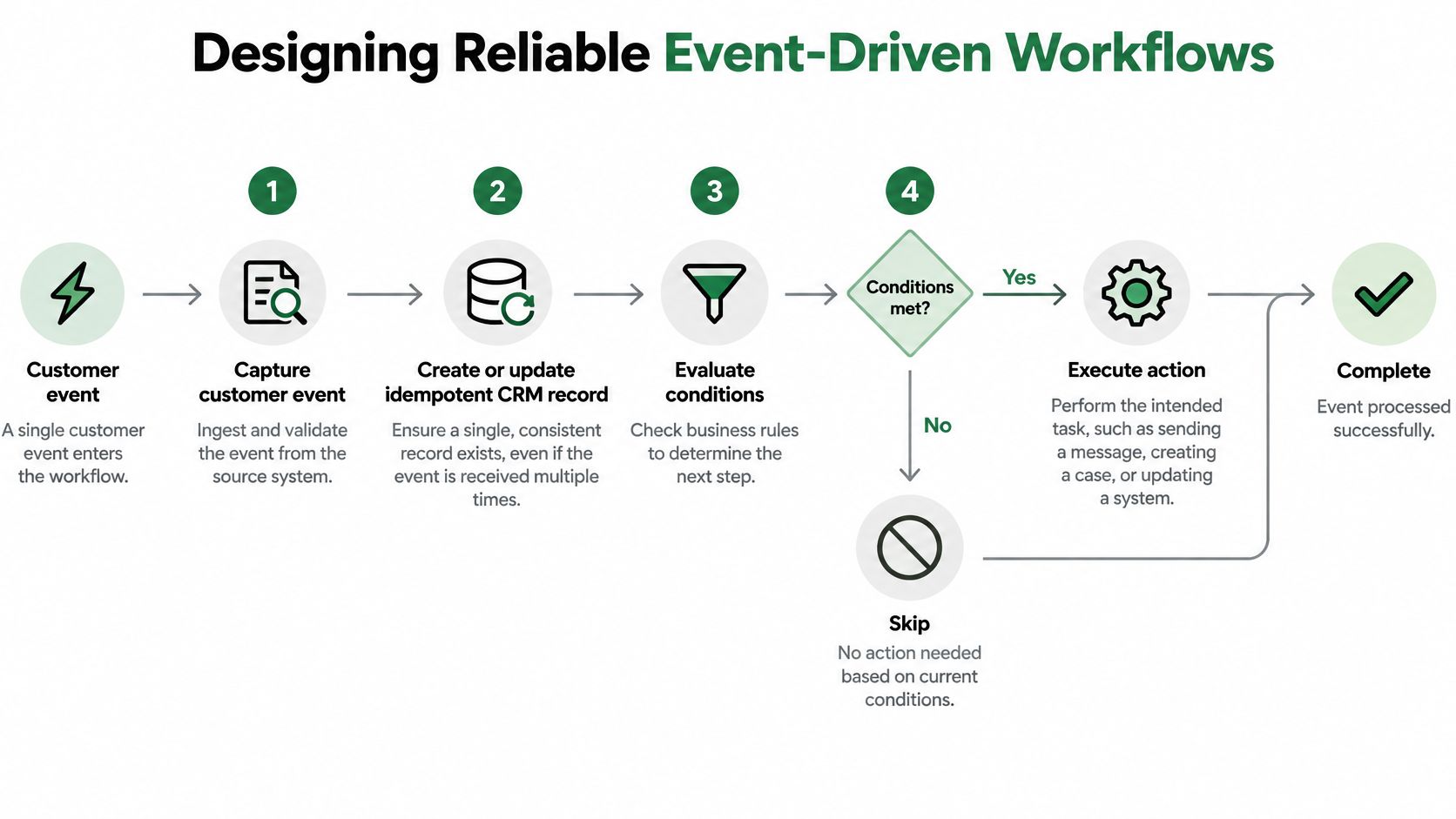
The blueprint below traces one event from capture to controlled completion.
A Reusable Workflow Blueprint
Follow this sequence for any revenue workflow:
- Capture the event: A webhook from your site or product fires immediately. Our reference on designing webhook based automation patterns covers the trigger mechanics in depth.
- Create an idempotent record: Deduplicate against existing contacts so a retried webhook can't create two leads.
- Validate and check consent: Reject or flag records missing required fields before anything sends.
- Enrich and score asynchronously: Don't block the acknowledgment on a slow third party API.
- Assign ownership and act: Route by territory or round robin, send the first compliant touch, and create the human task.
- Write timestamps back: Log created, enriched, assigned, automated contact, and human contact times on the record.
Failure Handling Is Not Optional
Retries, dead letter queues, and exception paths are normal design requirements. APIs time out. Enrichment providers return partial data. A workflow without a fallback channel and an alerting path will fail, and failure without notice is worse than a manual process because everyone assumes it ran.
Recruiting teams hit the same problem when candidate events stall between systems, which the ICT panel workflow guide illustrates well from a different operational angle. The pattern transfers directly. Every automated handoff needs an owner for the exception, not just the happy path.
Practical rule: If you can't see median and p90 latency for each stage, you don't have a fast workflow. You have an unmeasured one.
Benchmark ingestion, deduplication, enrichment, routing, first touch, and human handoff separately. An apparently instant workflow often hides a slow assignment queue at the end.
CRM Automation Use Cases for B2B and SaaS
The same event to outcome pattern adapts across teams. What changes is the trigger, the human checkpoint, and the metric that proves it's working.
Inbound Lead Response
A demo request is the highest stakes version. Contacting a lead within five minutes made successful contact approximately 100 times more likely than waiting 30 minutes, and conversion rates were about eight times higher when the first attempt landed within five minutes. So the workflow acknowledges instantly, enriches and routes in parallel, and escalates high intent leads to a human within minutes. A voice AI agent can qualify basic requirements and hand the rep a transcript with structured fields already captured.
Measure median response latency, contact rate by latency bucket, and qualification rate. Workflow execution counts tell you nothing about revenue.
Lead Nurturing That Respects Attention
Nurturing fails when it becomes scheduled noise. Trigger nurture steps from behavior instead. A pricing page visit, a reopened proposal, or a product trial hitting a usage milestone should change the next action. Score changes can pause marketing sequences when sales starts a live conversation, so the prospect doesn't get two competing threads.
The human checkpoint here is message approval for high value accounts. The metric is conversion to opportunity per segment, paired with opt out rate so volume can't masquerade as progress.
Client Outreach and Relationship Maintenance
For existing clients, automate the memory work. Log calls and emails automatically, create check in reminders from contract and usage signals, and flag accounts that go quiet. Keep humans writing the sensitive messages. A renewal at risk or an unhappy sponsor needs judgment, tone, and context that a template can't supply.
Measure activity completeness, overdue follow ups, and renewal outcomes for accounts the system flagged versus accounts it didn't.
Project Handoffs for Agencies and SaaS Delivery
A closed won deal should build the delivery workspace without an ops person copying fields between tools. The CRM record triggers task creation in your project system, provisions access, starts the onboarding sequence, and alerts an owner if required client inputs don't arrive. Structured fields carry the scope, timeline, and stakeholder list across.
Measure handoff cycle time, missing information exceptions, and rework caused by incomplete briefs. That's where this workflow earns its keep.
Keeping Data and Human Judgment in Control
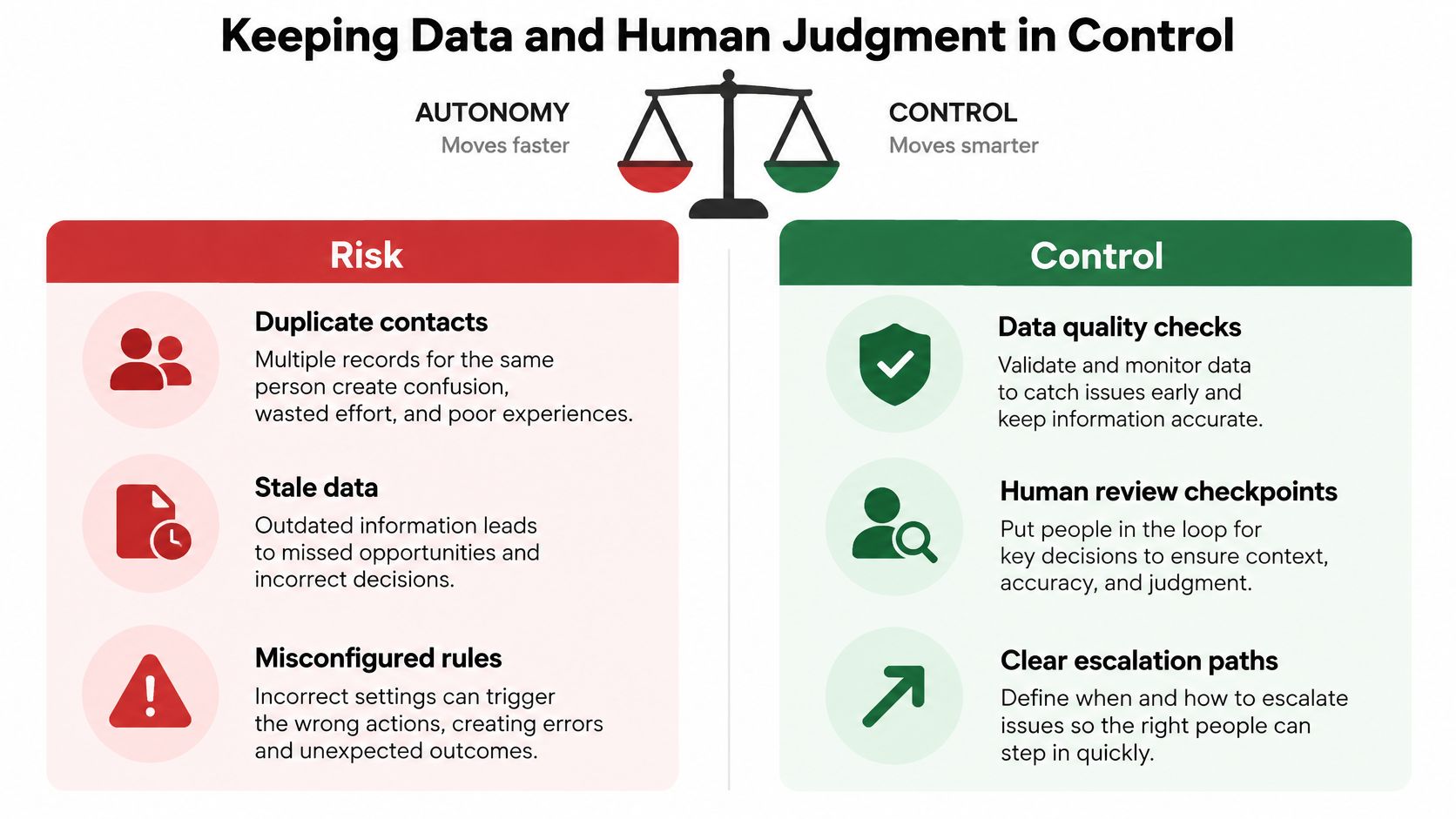
Maximum autonomy doesn't equal maximum return. Automation magnifies whatever sits underneath it. Duplicate contacts become duplicate outreach. A wrong lifecycle stage becomes wrong routing and a forecast nobody trusts. Bad consent data becomes compliance exposure, delivered faster.
The readiness problem is widespread. A 2025 survey of 602 CRM users and administrators found 76% believed less than half of their CRM data was accurate and complete, while 45% said their data was not prepared for AI. Adding AI agents on top of that foundation scales the errors before it scales the efficiency.
The balance below frames the core trade off between unchecked autonomy and deliberate control.
Run a Readiness Check Before You Automate
Score these dimensions for the specific workflow you're about to automate, not the whole CRM:
- Completeness and freshness: Are required fields filled and recently verified?
- Ownership: Does one named person own each critical field's accuracy?
- Consent and suppression: Can the workflow prove permission before every send?
- Duplication rate: Will matching logic catch the same person twice?
- Exception handling and auditability: Can you trace why any action fired?
If a dimension fails, fix it first. Our approach to CRM data cleansing before automation follows exactly that sequence, because deduplication and normalization pay back through every workflow built afterward.
Separate Low Risk From High Risk Actions
Let automation run activity logging, reminders, enrichment, and draft generation without approval. Keep a human accountable for qualification decisions, pricing communication, hiring related decisions, and autonomous outbound calling. Between those poles, use confidence based escalation. When an AI agent hits ambiguous intent, missing consent, or conflicting records, it stops, logs the conflict, and routes to a person with full context.
Every automated decision needs permitted actions, approval thresholds, an audit log, a rollback path, and a named owner. That's not bureaucracy. That's how you keep trust when something misfires, and it's how you fix it in minutes instead of discovering it in a quarterly review.
Measuring CRM Automation ROI and Adoption
Time saved is the weakest ROI story you can tell, because saved minutes don't automatically become revenue. Build a quality adjusted model instead, one that connects costs to cycle time, conversion, and rework.
The evidence supports both the upside and the caution. A cross national study of 1,641 sales representatives attributed 16.4% of sales performance variance to sales force automation usage and $22.2 million in increased sales, yet reported project failure rate estimates ranging from 55% to 75%. The technology works when people use it well. Adoption, training, and implementation quality decide which side of that line you land on.
Count the Real Costs
Separate one time costs from recurring ones:
- One time: Data cleanup, integration work, configuration, training, and governance setup.
- Recurring: Platform and integration fees, monitoring, maintenance, and support for exceptions.
Teams that skip the recurring line items end up with workflows nobody maintains. Our guide to building an automation business case lays out how to present both sides credibly to leadership.
Measure Operations, Then Commerce, Then Adoption
Start with operational outcomes. Track administrative effort, response latency, task completion, cycle time, and exception resolution time. Then connect them to commercial results like qualified pipeline, conversion accuracy, retention, and rework. Finally, track adoption. If reps keep a private spreadsheet because they don't trust the CRM, your workflow hasn't succeeded, regardless of what the execution log says.
Establish a baseline before you launch, pilot with one segment, and compare against a slower or untreated group where that's practical. Record automated and human timestamps separately. A workflow that sends an instant acknowledgment while the rep responds two days later hasn't fixed speed to lead. It's hidden it.
Review results by workflow and segment, not in aggregate. Aggregates let one strong workflow subsidize three broken ones on paper.
Building a Scalable CRM Automation Roadmap
Adoption of AI in sales is already mainstream, but the infrastructure lags behind. Salesforce's 2025 State of Sales research covering 4,050 professionals across 22 countries found 54% of sales teams were already using AI agents, while 51% of sellers said disconnected systems were slowing AI adoption. Your roadmap should close that connection gap before it adds more autonomy.
A Decision Sequence That Holds Up
Pick one measurable revenue or delivery problem. Map the current process and find the manual delays. Check whether the CRM data that workflow needs is trustworthy. Choose the least complex architecture that supports it. Pilot with clear owners, success thresholds, exception handling, and a rollback path. Expand only after you've verified data quality, adoption, and commercial impact.
Three principles carry through every stage:
- Automate a coherent path: Build event to outcome, not isolated clicks.
- Keep humans accountable: Sensitive decisions stay with named people.
- Treat governance as product: Measurement and maintenance ship with the workflow.
Teams that want hands on implementation support for workflow design, CRM automation, and AI enhanced operations can work with MakeAutomation as a delivery partner. The sequence above stays the same whether you build internally or with help.
If your CRM holds the data but your team still moves the work by hand, MakeAutomation can design and implement the event driven workflows, integrations, and voice AI follow up that turn records into revenue action. You'll get documented processes, measurable response and cycle time targets, and hands on support through pilot and scale. Visit us to map your first workflow and see what a dependable automation roadmap looks like for your team.