AI Agent Orchestration Platform: Your 2026 Guide
AI agent orchestration platforms have moved from niche tooling to mainstream enterprise infrastructure fast enough that the market is now estimated at USD 2.73 billion in 2025, rising to USD 3.53 billion in 2026 and projected to reach USD 14.76 billion by 2031 (Mordor Intelligence). That shift matters because orchestration is no longer being bought as a clever demo layer, it's being bought to coordinate real, multi-step work across tools, teams, and approvals.
In a B2B SaaS company, that usually means inbound leads, onboarding tasks, support escalations, invoice checks, and CRM updates don't stay inside one app or one model. They bounce across systems, need context preserved, and often need a human checkpoint before anything risky goes live. That's where orchestration becomes more than “multiple agents,” it becomes the control layer that decides what happens next, what gets remembered, and what gets escalated.
A useful way to think about it is simple. Parallel agents can each do a task, but an orchestration platform decides which agent runs, in what order, with what state, and under what policy. If you want a useful conceptual contrast, the distinction between agentic AI vs traditional automation is a good starting point, and this practical overview from Nolana AI is worth a look: agentic AI vs traditional automation. For a deeper workflow-build context, the internal guide on agentic AI is also relevant.
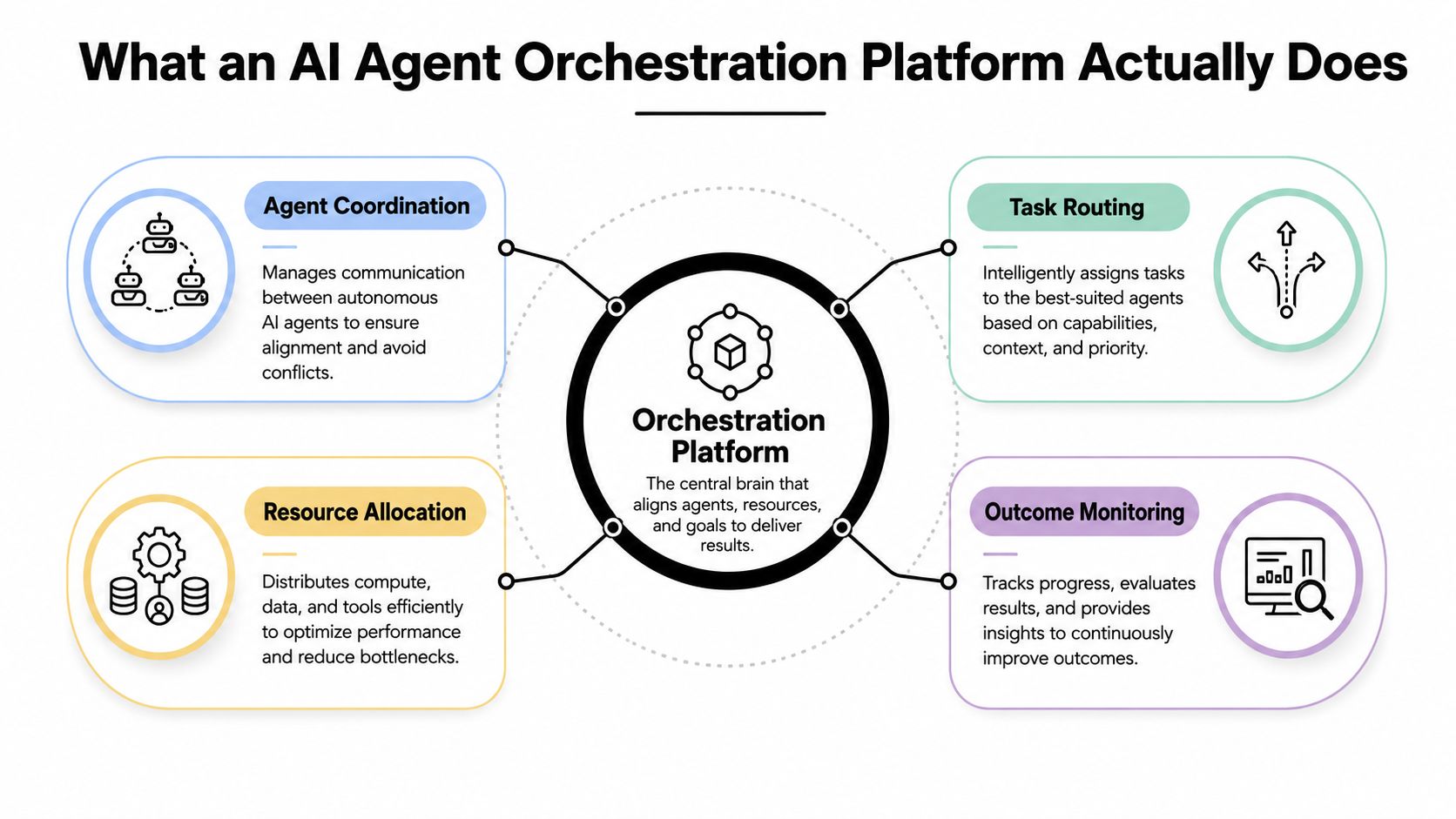
What an AI Agent Orchestration Platform Does
A production orchestration platform behaves like a dispatcher, not a chatbot. It receives a workflow, inspects the current state, assigns work to the right specialist agent, and keeps the sequence moving when one step fails, stalls, or needs a human review. That is the difference between “we have three agents running” and “we have a system that can reliably finish work.”
The lead-routing example makes it concrete
A SaaS team handling 500 inbound leads a day can split the work across agents without losing control. One agent qualifies the lead, another enriches the account, and a third routes it to the right rep based on territory, capacity, or deal size. The orchestration layer keeps the lead's context intact as it moves between those steps, so the enrichment agent does not start from scratch and the routing agent does not guess at missing details.
Practical rule: if a workflow needs remembered context across steps, you need orchestration, not just a collection of agents.
That is why governance belongs in the platform, not inside each agent prompt. Orchestration gives you policy checks, audit trails, approval gates, and a clear record of who or what touched a record before an action went live. For teams comparing agentic AI vs traditional automation, the difference shows up fast. Traditional automation follows a fixed path, while agentic systems need a control layer that can decide whether to continue, retry, or stop for review. For a practical workflow-building reference, see MakeAutomation's guide to agentic AI.
The dispatcher model is the right mental model
A dispatcher watches load, capability, and failure. In an AI system, that means the orchestrator picks the specialist agent, preserves state, and hands off the next action with enough context to avoid rework. If a tool call breaks or a model returns incomplete output, the orchestrator retries, falls back, or routes to a human.
That is also why orchestration is different from merely running several agents in parallel. Parallel agents can produce outputs side by side, but without centralized state and control, the outputs do not become a coherent workflow. In production, the platform is the thing that turns independent reasoning into an accountable process.
That market reality is already reflected in analyst coverage from Mordor Intelligence, which treats orchestration as cloud-first infrastructure for multi-step work rather than a lab experiment.
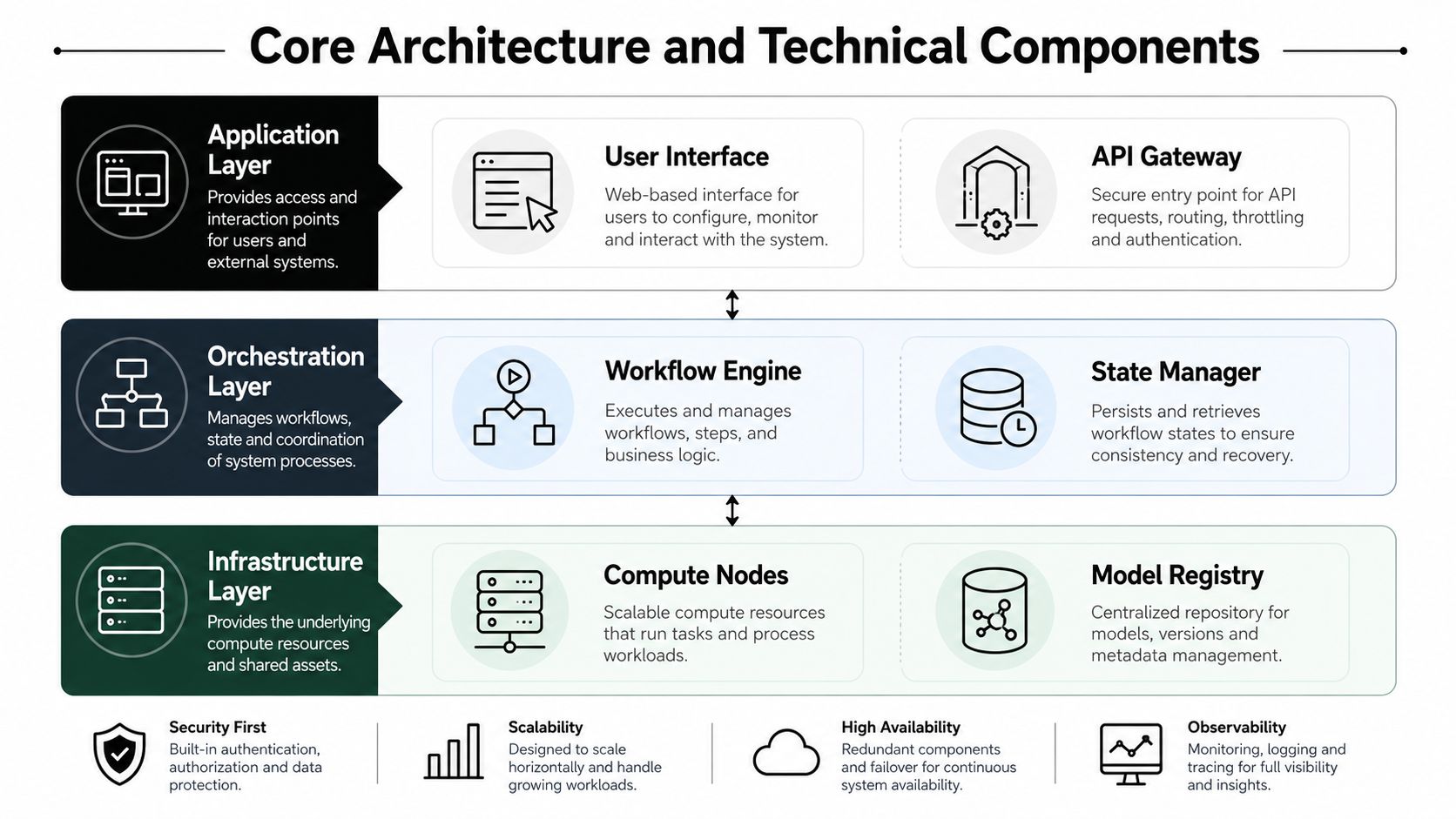
Core Architecture and Technical Components
A serious orchestration stack should be built in layers. That separation keeps one brittle workflow from dragging the whole system down, and it lets teams swap tools without rewriting everything. The cleanest mental model is control plane vs data plane.
Control plane and data plane are not the same job
The control plane handles policy, governance, and decision-making. It defines who can do what, when human approval is required, and how actions are logged. The data plane handles execution, where agents call tools, read records, write updates, and finish tasks.
The best enterprise pattern is boring on purpose, policy above, execution below.
That split matters because governance should not sit inside the hot path. If every agent action has to negotiate policy logic in real time, throughput suffers and failure modes multiply. A separated design keeps RBAC, audit logging, and approvals visible without making the runtime sluggish.
The layers that hold up in production
A production stack usually separates compute, model inference, orchestration logic, memory and state, communication protocols, and observability. Independent architecture guidance also recommends distinct layers for orchestration, tools, memory and state, retrieval, control plane, and runtime, because each layer has a different failure profile and scaling behavior (agent platform architecture guidance). That separation keeps a change in one layer from breaking the others.
For B2B SaaS workflows, I've found this split especially useful when lead routing, CRM updates, and SOP execution share the same infrastructure. A platform that keeps governance outside the runtime can scale tasks more safely, because agent execution stays fast while policy enforcement remains consistent. If you are choosing how to build the workflow layer itself, MakeAutomation's AI agent workflow builder is a practical reference point for how orchestration logic gets assembled without mixing it into execution.
Four functions that matter
Azure's design guidance highlights the hard parts of multi-agent systems, not just the glossy parts. The core functions are task routing, state management, inter-agent communication, and failure recovery (Azure architecture guidance).
- Task routing: sends work to the right specialist agent instead of overloading one generalist.
- State management: preserves short-term and long-term context so work does not restart after each hop.
- Inter-agent communication: passes structured handoffs or events between agents without ambiguity.
- Failure recovery: retries, falls back, or escalates when tools, data, or model outputs fail.
A monolithic design looks simpler on paper, but it tends to create hidden coupling. Once workflows include multiple tools and human checkpoints, that coupling becomes operational risk, especially when you need to audit what happened later.
Auditability is the part founders often underprice. If a sales qualification agent changes CRM fields, routes a ticket, and triggers a follow-up, you need a trace that shows which agent acted, what policy allowed it, and whether a human overrode the result. Without that record, you can run automation, but you cannot really govern it.
How Orchestration Compares to RPA and MLOps
AI agent orchestration, RPA, MLOps, and agent frameworks often get bundled together in buying conversations. They are not the same layer. The practical comparison is about workflow shape, governance, and how much coordination logic you need outside the model itself.
| Dimension | AI Agent Orchestration | RPA | MLOps | Agent Frameworks |
|---|---|---|---|---|
| Handles ambiguity | Good when tasks vary and require reasoning | Weak when inputs shift | Not its main job | Depends on the framework |
| Multi-step coordination | Strong, this is the point | Limited to scripted steps | Not designed for it | Building blocks only |
| Human checkpoints | Native fit | Possible, but usually awkward | Outside scope | Usually custom-built |
| State across steps | Central requirement | Basic state only | Model lifecycle state, not workflow state | Often partial |
| Scaling pattern | Specialized agents and policy-aware routing | More bots, more scripts | More models and pipelines | More code you assemble yourself |
RPA still works well for deterministic work. If the input format stays stable and the process never needs judgment, RPA is usually simpler to run and easier to explain to operations teams. Once the workflow includes variable lead quality, partial data, or escalation rules, scripts start breaking in places that are costly to patch and even harder to audit.
MLOps solves a different layer of the stack. It manages training, deployment, and monitoring of models, not the coordination of multiple agents across business processes. A team can have strong MLOps and still lack a clean way to coordinate a quote-generation agent, a compliance reviewer, and a CRM updater.
Agent frameworks sit one level lower. They provide primitives for tools, memory, and agent behavior, but they do not automatically give you a full control plane, audit trail, or governance model. That is why production teams often build orchestration on top of the framework anyway, especially once human approvals, retries, and policy checks enter the workflow.
The control-plane, data-plane split is the part many explainers skip. The control plane decides which agent runs, what policy applies, and what gets logged. The data plane executes the task, calls tools, and moves payloads between systems. If you blur those layers, you can get a working demo that is hard to govern later.
Rule of thumb: if the problem is “run a known sequence,” RPA may be enough. If the problem is “coordinate several reasoning systems with shared state,” orchestration is the right layer.
The adoption signal also points in that direction. Enterprise data from 2024 enterprise adoption data for AI agent orchestration says adoption of AI agent orchestration platforms rose quickly, Fortune 500 usage of multi-agent systems was already material, and many AI teams had moved orchestration into production for agent collaboration. That pattern fits what I see in B2B SaaS: teams start with one automated workflow, then add review steps, exception handling, and policy controls once the first failure creates real operational risk.
Real B2B and SaaS Use Cases with Measurable ROI
The strongest orchestration cases show up where handoffs, exceptions, and system boundaries already create delay. In those workflows, the payoff is not just speed. It is fewer manual checks, cleaner audit trails, and a control plane that makes the work visible when something breaks.
Lead routing, onboarding, and recruiting are the right starting points
In intelligent lead routing, the ROI is often easiest to see in response time and fewer manual handoffs. A coordinator can qualify the lead, enrich it from the CRM and public sources, then route it with policy rules that keep humans in the loop for enterprise accounts. The value is not the routing logic itself, it is the fact that sales ops no longer has to chase updates across Slack, CRM records, and inboxes just to confirm where a lead landed.
In client onboarding, the agent chain usually handles document collection, account setup, welcome communication, and milestone tracking. The practical gain comes from removing status-check work from operations teams and from keeping the workflow visible in one place. If a form is incomplete or an approval is missing, the orchestrator can pause the process, log the reason, and hand it back with context instead of letting the account drift into silence. That is where auditability matters, because support, implementation, and finance all need to see the same state.
In recruiting, agents can screen resumes, schedule interviews, send follow-ups, and flag compliance issues. The best production setups do not try to make the final hiring call. They keep the pipeline moving, preserve recruiter control over exceptions, and leave a clear record of why a candidate was advanced, held, or rejected. That record becomes useful when hiring managers ask why a step was delayed or why a candidate needed manual review.
The failure recovery logic is where ROI often shows up
A workflow only saves time if it keeps working when a system call fails or a document comes in incomplete. That means retry logic for CRM lookups, fallback paths for missing files, and escalation rules for high-value accounts that need human review. Without those controls, the automation turns into another queue for someone to babysit, and the team ends up spending time on recovery instead of the actual work.
For B2B SaaS teams, the measurable ROI is often in reduced rework and fewer abandoned handoffs. A coordinator that logs every retry, records every exception, and preserves the reason for each fallback gives operations teams something they can audit later. It also makes failure patterns obvious, which is useful when a workflow keeps stalling at the same external system or approval step.
A useful way to judge ROI is simple. Ask whether the workflow now depends less on someone remembering the next manual step. If it does, the platform is buying operational consistency, clearer accountability, and fewer gaps between systems.
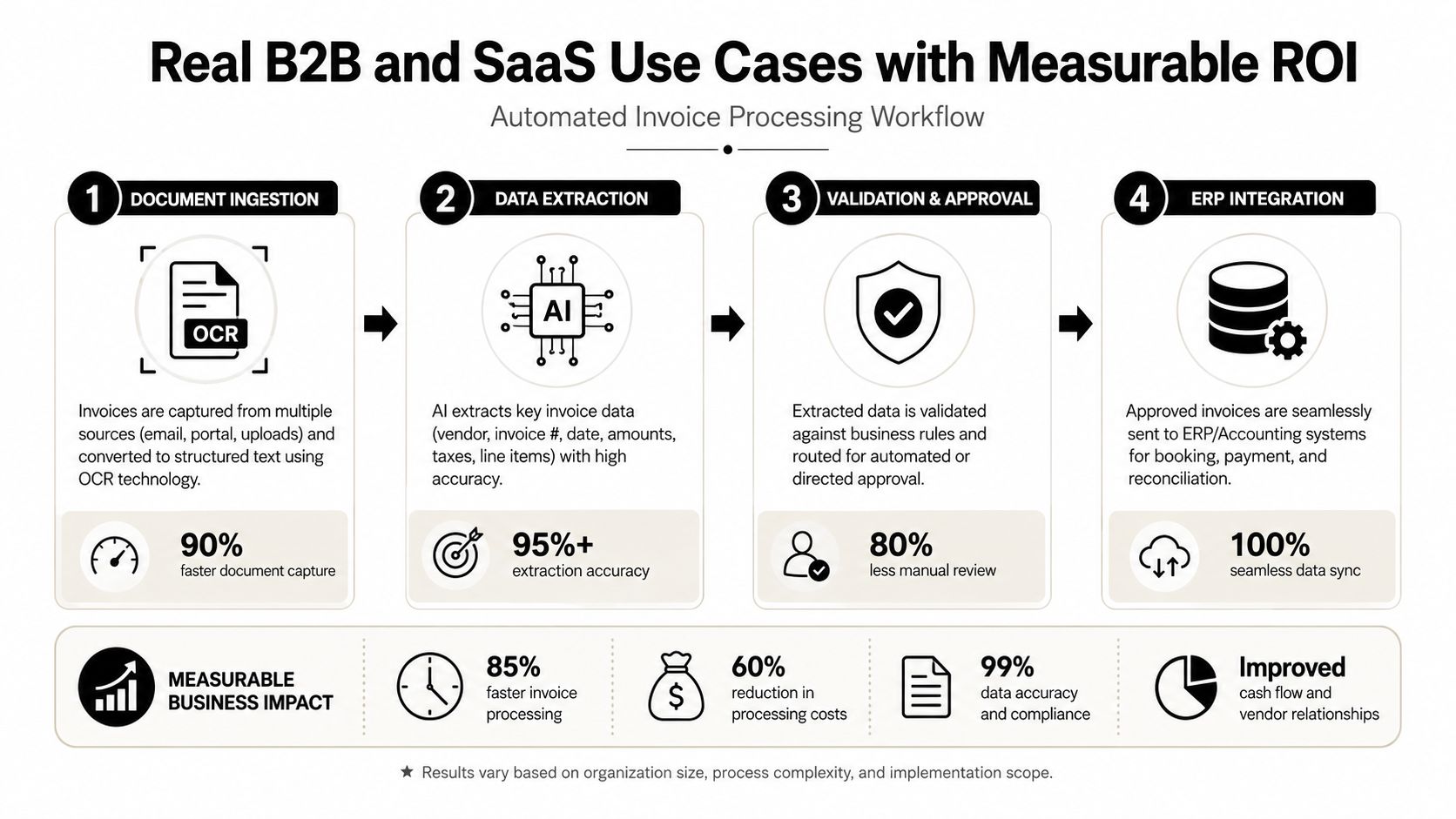
The video below is useful if you want to see how a workflow style maps to real execution.
When Orchestration Is Overkill and What to Use Instead
A central conductor is not the right answer for every workflow. In the systems I've seen fail, the first mistake was treating every process as if it needed more agents, more routing, and more coordination. That usually adds overhead without improving the result.
Choreography can beat orchestration in simple cases
The distinction is straightforward. Orchestration uses a central coordinator that directs each step. Choreography lets agents react to events independently and coordinate only when a signal arrives. If a workflow is loosely coupled, keeps failures isolated, and gives each agent a narrow job, choreography is usually easier to run and maintain.
The trade-off is real. Azure's production patterns for multi-agent systems make the point clearly, orchestration helps with cross-functional or cross-domain work, but it also introduces coordination overhead, added latency, and more failure modes. Those costs show up fast in production. More structure can mean more handoffs, more retries, and more state to inspect when something breaks.
A simple decision filter helps avoid overbuilding
If your workflow has fewer than three sequential dependencies, no rollback requirement, and no need for a full-system dashboard, orchestration is probably more than you need. A single agent with tool access, or a small event-driven chain, can handle the job. The best teams start with the smallest reliable shape, then add control only when the process proves it needs it.
That is also where many enterprise programs stall. The problem is usually deployment, not theory. Teams need stable context boundaries, narrow agent roles, and instrumentation before they need a heavier coordination layer.
If you can't explain the rollback path, you probably don't need multi-agent orchestration yet.
A practical middle ground is a human-in-the-loop workflow for cases that need review without full coordination overhead. Human-in-the-loop automation for agent workflows gives you a place to pause, inspect, and approve before an action becomes final. For some teams, that is enough. For others, a direct event chain with a small amount of choreography gets the work done with less operational friction. The mistake is buying a heavyweight coordinator before the process itself is clear.
Implementation Roadmap and Governance Checklist
Governance cannot be an afterthought in agent systems. Once a workflow starts touching customer records, pricing, or internal approvals, you need a clear record of what happened, who approved it, and whether the action can be reconstructed later. The rollout plan should start with control, not just capability.
Phase one should define boundaries before tools
Start by mapping the workflow from trigger to completion. Identify every system it touches, every decision point, and every place where a human must stay in the loop. Define agent boundaries, authorization limits, and the exact actions that require approval at the same time.
If you are evaluating a platform at this stage, look for RBAC, audit logging, observability dashboards, and support for protocols that help with cross-system coordination. Governance needs to be built in, not bolted on later, as the enterprise AI agent governance best practices from Kore.ai discussion makes clear.
Phase two is the pilot, not the platform rollout
Pick one high-value workflow and instrument every agent action. Log task assignment, tool use, state changes, retries, and human approvals. A pilot only matters if it produces a trace you can inspect when something goes wrong.
For workflows that need review before a final action, human-in-the-loop automation for agent workflows gives you a practical approval gate without forcing full orchestration too early. That matters in B2B SaaS teams where the core question is usually how much control the process needs, not how much AI the platform can layer on top.
A practical checklist for the pilot:
- Define the use case: choose one process with clear business value and repeatable steps.
- Map the data flow: know where state starts, where it is stored, and where it ends.
- Set approval gates: decide which actions always need human review.
- Write the rollback path: define what happens when one step fails.
- Test the audit trail: confirm you can reconstruct each agent action after the fact.
Where MakeAutomation fits naturally
For B2B and SaaS teams, MakeAutomation is one option for handling the implementation side of this work, including lead generation, CRM automation, SOP development, and Voice AI Agent flows for inbound and outbound calls. The useful lens is not whether the system has more AI features, it is whether the workflow can be documented, governed, and handed to a team without creating a hidden mess.
Governance-first deployment beats feature-first deployment every time.
Key Takeaways and Next Steps for Your AI Strategy
A serious AI agent orchestration platform is infrastructure for work that already needs coordination, not a shortcut for every automation problem. If the workflow needs shared state, specialist agents, retry logic, and approval gates, orchestration is probably the right layer. If it doesn't, keep it simpler.
Use three questions to decide whether you're ready. Does the workflow cross multiple systems. Does it need context preserved across steps. Does it require human approval before something risky happens. If you can answer yes to all three, you've got a real orchestration candidate.
For technical teams, the requirements are clear: layered architecture, control-plane separation, observability, auditability, and failure recovery. For operations leaders, start with one workflow, instrument every handoff, and prove the trace before you scale. For founders, don't let feature count drive the decision, let workflow complexity do it.
If you want help sorting that out, MakeAutomation can help map the workflow, identify what should be orchestrated, and show where a simpler automation pattern is enough.
If you're ready to evaluate your workflows properly, visit MakeAutomation and book a conversation about lead routing, CRM automation, SOP design, or Voice AI Agent implementation. The fastest way to avoid overbuilding is to audit one real process, define the governance requirements, and decide whether orchestration is essential or just expensive noise.