AI Governance Best Practices for 2026
Only 21% of organizations have an AI security and governance framework, while formal AI guidance adoption jumped from 52% to 76% in a single year, and companies with AI governance are putting over 12x more AI projects into production than organizations without it (2026 AI governance statistics). That's the part many teams miss. Governance isn't slowing AI down, it's what separates teams that ship from teams that stay stuck in review loops, firefighting, and one-off approvals.
In practice, the teams that win treat AI governance as an operating system for AI delivery, not as a policy PDF. The strongest programs turn risk checks, ownership, lineage, and monitoring into workflows that product, security, and operations can run every week. That's the difference between “we have a policy” and “we can prove this system is controlled.”
Why AI Governance Drives Deployment Speed
The fastest enterprise AI teams usually are not the loosest on control, they are the clearest about it. When governance is vague, product teams wait for ad hoc decisions, security keeps reopening the same questions, and legal gets pulled in late. When governance is explicit, approvals move faster because everyone knows what evidence is required, who signs off, and which risks are already covered.
A 2026 synthesis shows the execution gap clearly. Only 21% of organizations have an AI security and governance framework, yet formal AI guidance adoption rose from 52% to 76% in a single year, and organizations with governance are putting over 12x more AI projects into production than organizations without it (2026 AI governance statistics). Mature governance is also tied to a 27% improvement in AI efficiency gains in that same source, which is the signal for operators. The point is not compliance theater, it is that governance creates a repeatable path from idea to release.
Leadership pressure changed quickly, and it shows up in the release process. By 2025, AI disclosure among S&P 500 companies had moved sharply upward, which means executive teams are now expected to describe what AI they use and how they control it (Thomson Reuters Institute reporting via AI governance summary). In a SaaS org, that pressure turns into more questions from customers, procurement, and security reviewers. Teams that can answer with artifacts, not promises, move faster through those reviews.
Practical rule: every control that removes ambiguity before launch saves more time than it costs.
For teams turning policy into release work, an AI compliance implementation checklist helps convert review points into tasks that product, security, and operations can close. If you are mapping AI into product workflows, this guide to implementing AI in business is useful context for the operational side of adoption.
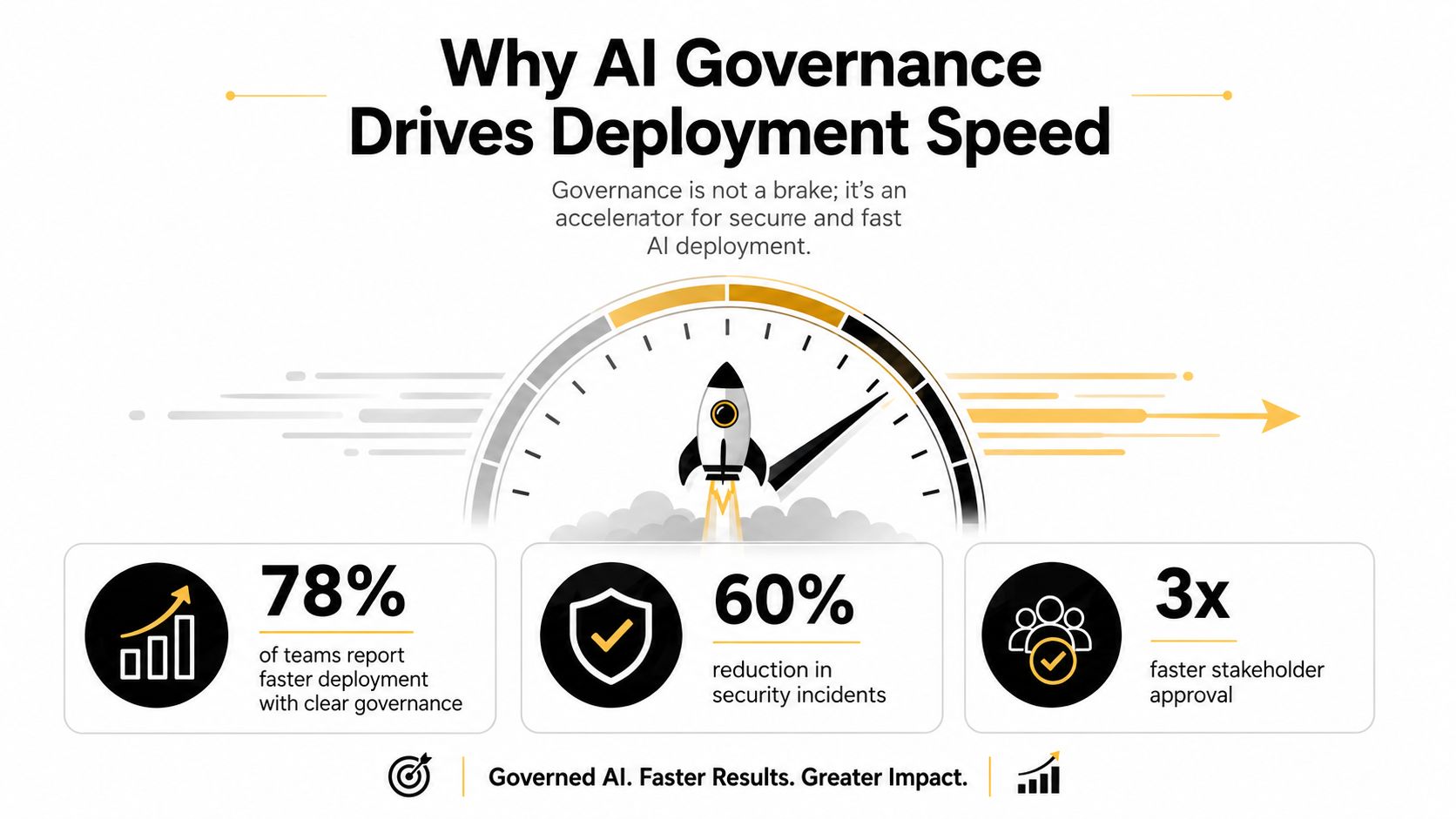
The teams that move fastest do not ask how to avoid governance. They ask which control belongs at each decision point so release can keep moving. That shift turns governance into an operating control, not a document that sits in a folder.
Building Your AI System Inventory and Risk Tiers
If you cannot name every AI system touching customer data or business decisions, you do not have governance yet. The inventory gap usually starts in plain sight. Marketing tries a summarization tool, support tests a chatbot, operations wires a workflow into a vendor API, and no one records the full path from request to output. That leaves security, legal, and product teams reacting after the fact.
The cleanest method is to inventory systems by business function, not only by model name. Start with every AI touchpoint, then attach three fields to each one, owner, purpose, and risk tier. Ownership should sit with a business stakeholder who can accept or reject risk, not only with engineering. If no one outside technical teams can explain the use case, the system is not governed yet.
How to classify risk without overcomplicating it
Risk tiers should reflect what the system does, not how new or complex it sounds. An internal drafting assistant has a different profile from a customer-facing workflow that affects pricing, eligibility, moderation, or compliance decisions. Keep the tiers simple enough that product managers will use them during intake, because a framework that sits outside the release process does not change behavior.
A good inventory is boring. That is the point. If it is hard to maintain, teams stop updating it and shadow AI takes over again.
Common blind spots show up fast once you look for them. Shadow AI often appears when a team adopts a vendor tool outside procurement, or when a prototype moves into production without a formal review. The fix is to make inventory updates part of intake, budget approval, and security review, not a separate spreadsheet ritual. Public-sector guidance on AI governance treats intake as continuous and collaborative rather than a one-time gate, which is the right model if you want the inventory to stay current.
A simple working template usually includes:
- System name and purpose. What the AI does, and where it sits in the workflow.
- Business owner. The person who accepts the use-case risk.
- Data inputs. Which data sources it touches, internally or externally.
- Risk tier. Low, medium, or high, based on impact and sensitivity.
- Review cadence. How often the record gets revisited.
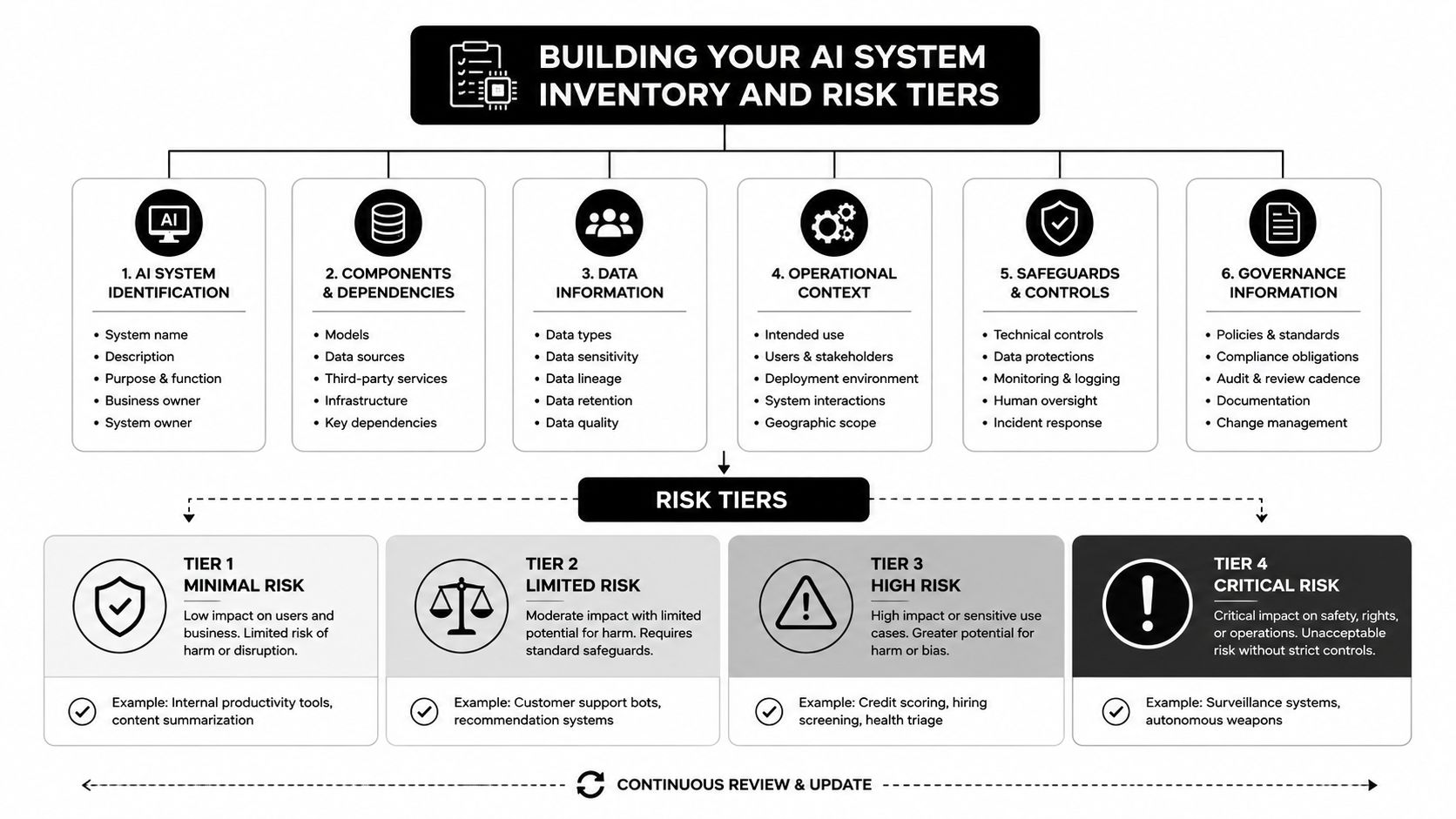
The inventory is the foundation because every later control depends on it. If a system is not listed, it cannot be assessed, monitored, or retired cleanly. Governance programs usually fail first here, not in policy, but in visibility.
Lifecycle Controls From Intake to Retirement
One policy document can't govern an entire AI lifecycle. Intake, development, deployment, monitoring, and retirement each need different controls, because the failure modes change as the system matures. I've seen teams try to solve this with one approval form at the end, and it almost always creates bottlenecks, missed risks, or both.
Intake controls stop weak use cases early
Intake is where you decide whether the use case belongs in the pipeline at all. The best control here is a short, structured request that captures business purpose, data sensitivity, intended users, and expected impact. If the request can't be answered clearly, the review belongs back with the sponsor.
Development controls shape the system before it hardens
During development, teams should document data sources, known limitations, and evaluation criteria before they start testing. That's where you prevent scope creep, because an internal assistant can become a customer-facing dependency if nobody writes down the intended use. Development controls also cover model design choices, prompt logic, and data access boundaries.
Review at the end is too late. By then, the team has already optimized around the wrong assumptions.
Deployment, monitoring, and retirement need their own gates
Deployment controls should require named owners, completed documentation, and release approval based on risk tier. Monitoring controls need to watch for drift, unexpected outputs, policy breaches, and changes in usage patterns. Retirement controls are often skipped, but they matter because lineage, decision records, and decommissioning notes are what make audits possible later.
The lifecycle split matters because each stage answers a different question. Intake asks whether the use case should exist. Development asks whether it's built well enough to test. Deployment asks whether it's safe to release. Monitoring asks whether it still behaves as expected. Retirement asks whether you can prove what it did, why it changed, and when it was shut down.
A practical stage-by-stage checklist looks like this:
- Intake. Capture intended use, owner, and prohibited use.
- Development. Record data sources, evaluation criteria, and known limitations.
- Deployment. Enforce approvals, rollback criteria, and release evidence.
- Monitoring. Track drift, usage outside scope, and incident triggers.
- Retirement. Preserve lineage, decisions, and disposal records.
For teams building AI into business systems, it also helps to align governance with the broader automation workflow used in AI data security practices, because the same controls that protect data movement also help control model behavior.
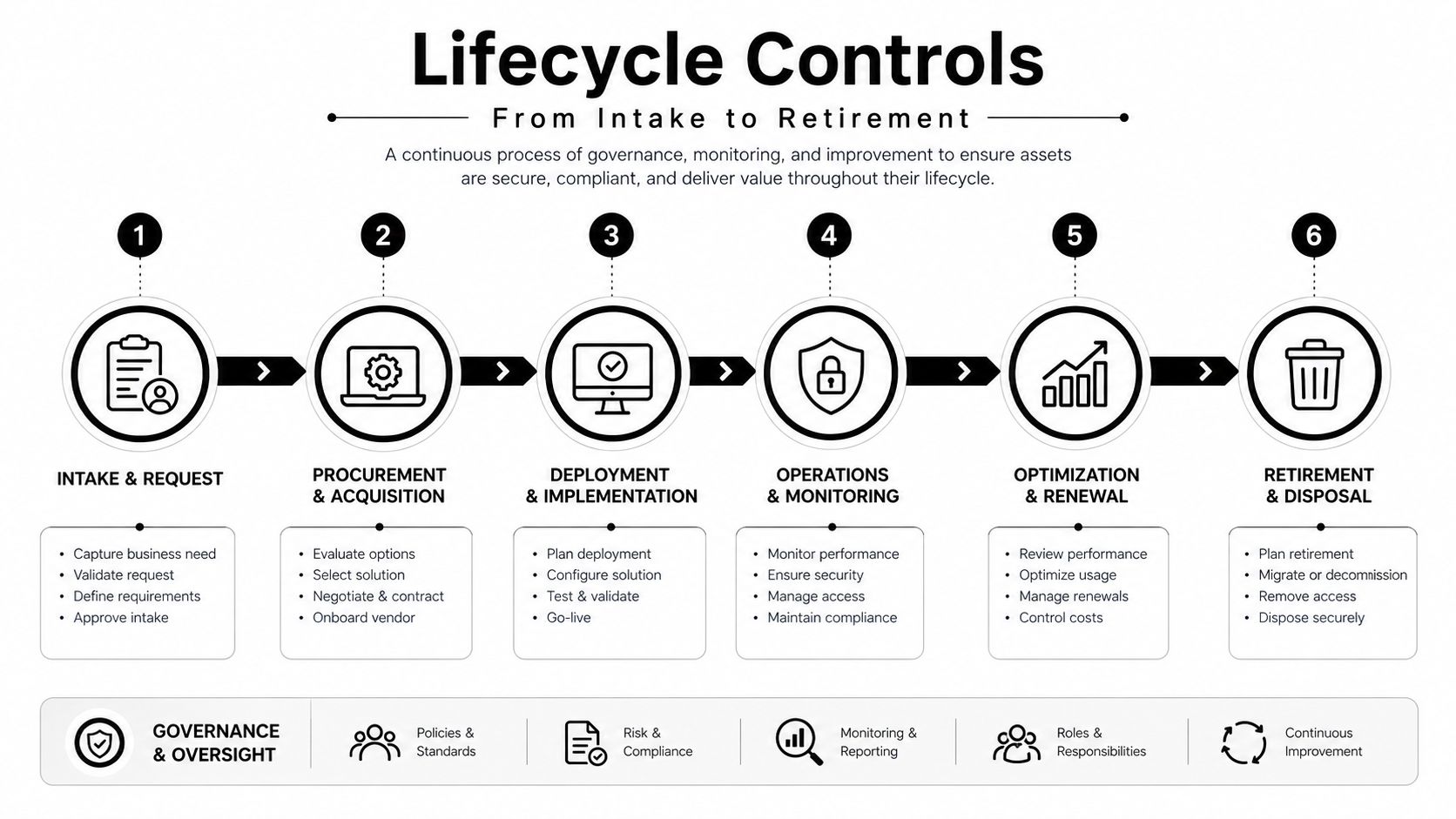
The strongest programs don't treat lifecycle controls as extra paperwork. They embed them into the workflow so the system can't move forward without the right evidence. That's what makes governance durable.
Roles, Data Lineage, and Continuous Monitoring
Governance breaks when no one can answer who approved what. In practice, the cleanest way to avoid that is a RACI model with real decision rights, not a vague committee structure. The accountable person should usually be a business owner who understands the trade-offs, while engineering, security, legal, and privacy stay in consult or review roles depending on the use case.
Data lineage becomes essential. IBM's implementation guidance calls for preset thresholds for bias, drift, and breach detection, continuous monitoring with audit trails, and pre-deployment assessment for bias, explainability, and performance, while Alation recommends immutable logs of datasets, model updates, prompts, and decisions, plus end-to-end lineage from data sources to outputs (IBM AI governance implementation). That combination matters because without traceability, nobody can reproduce a result, explain a failure, or separate model error from data quality issues.
What should be logged
The most useful logs are the ones that answer real operational questions later. Which dataset version trained the model? Which prompt or rule changed before the incident? Who approved the release? Which downstream decision used the output?
You don't need more logs for their own sake. You need logs that let audit, security, and product teams reconstruct the path from input to outcome without guessing.
How to keep monitoring useful
Monitoring should be tied to thresholds and response paths. If a system crosses a drift threshold, or begins producing outputs outside policy, the team should know who gets alerted, what gets paused, and how the incident gets recorded. That's why manual review alone fails at scale. By the time someone notices a pattern in a weekly meeting, users may already have experienced the issue.
If the system changes faster than your review cadence, the review cadence is the problem.
For teams trying to connect governance to day-to-day operations, it helps to keep procurement, budget, and security workflows in the same loop. A tool can't move into production if procurement never validated the contract terms, security never saw the access model, and budget owners never understood the risk tier. That's also where a solution like MakeAutomation's AI agent workflows can fit, since its audit logs and access controls support reviewability and restricted modification when teams are automating operational tasks.
The governance lesson is straightforward. Assign named owners, insist on lineage, and monitor continuously. Anything less leaves you with a control gap that only shows up after users, auditors, or customers ask hard questions.
Measuring Governance as a Business KPI
Governance fails when teams measure paperwork instead of control quality. A folder full of policies does not prove the organization can find every AI system, assess risk the same way every time, or fix issues before they spread into production. If governance is working, it shows up in operational metrics that leadership can read the same way they read revenue, uptime, or incident volume.
The three metrics that matter most are time-to-inventory new AI systems, the share of use cases with documented risk assessments, and time-to-remediation when issues surface. The implementation guidance from Diligent makes the same point about tracking process indicators instead of vanity metrics, because governance that is not tied to measurable controls tends to miss real gaps. That is the right standard. If the policy count keeps rising but the inventory is still incomplete, the program has not improved in any meaningful way. The evidence lives in the controls, not in the binder.
| Metric Type | Example Metric | What It Reveals |
|---|---|---|
| Inventory speed | Time-to-inventory new AI systems | How quickly shadow AI becomes visible |
| Risk coverage | Share of use cases with documented risk assessments | Whether intake discipline is actually working |
| Remediation speed | Time-to-remediation after a governance issue | How fast teams contain and fix problems |
| Release control | Share of launches with completed approvals | Whether deployment gates are enforced |
| Monitoring quality | Alerts that result in action | Whether monitoring is producing useful signal |
Automation patterns that make the metrics real
Dashboards only work when they pull from the systems teams already use. Approval workflows need to sit close to the release process, model checks should run automatically where possible, and audit logs need to be queryable without asking three teams for exports. Annual compliance reviews are too slow for AI systems that keep changing, so the control model has to move closer to continuous oversight.
The practical test is whether the metric changes behavior. A useful dashboard tells non-technical owners when a system changes status, when a review is overdue, and when a control has been bypassed. That matters in generative AI and agentic workflows, where behavior can shift as prompts, tools, and upstream data change.
For cloud-heavy organizations, it helps to review a framework for managing cloud risks effectively alongside AI governance, because the control problem is similar. The work is about permissions, evidence, and exception handling across a live environment, not a static policy file.
Documentation also has to be measurable. A team can use a compliance documentation structure to keep risk assessments, approvals, and change records in one place, which makes audit trails easier to verify and gaps easier to spot. That gives governance a direct place in the operating rhythm instead of leaving it as a periodic review exercise.
The point of KPI-driven governance is not to make the team look good. It is to prove the control system is working before a failure becomes visible to customers or regulators.
Your Audit-Ready Governance Checklist
Audit readiness comes from artifacts that match how the system works. The core set is simple, policy documentation, risk assessment records, model cards or fact sheets, decision logs, and continuous red-team or fairness testing for high-impact use cases. Those artifacts should be current, linked to the system inventory, and owned by the same people who can approve changes.
The fastest way to close the policy-to-practice gap is to translate principles into enforceable workflows. If a model has no fact sheet, it doesn't ship. If a high-risk use case has no documented assessment, it doesn't get approved. If a system changes materially, the logs and approvals need to change with it. A useful reference for structuring the documentation layer is the key compliance documentation components guide, because governance fails quickly when teams don't standardize what evidence they keep.
A practical sequence looks like this:
- Inventory the system. Capture scope, owner, and risk tier.
- Document the evidence. Add risk assessment, model summary, and data lineage.
- Set the gates. Define who approves, who reviews, and what triggers escalation.
- Automate the checks. Use workflows for approvals, logging, and monitoring.
- Test the failure path. Run red-team or fairness checks where impact is high.
Common audit failures usually come from missing ownership, stale documentation, or unlogged changes. The fix is usually operational, not philosophical. Update the workflow, force the artifact at the right gate, and make sure the business owner can see the status without asking engineering for a favor.
For teams that need a repeatable documentation workflow, this compliance documentation resource is a useful internal reference point. And if the program includes multiple AI agents or automated decision paths, external compliance support is worth bringing in when the use case touches regulated data, customer-facing decisions, or cross-border requirements.
If you want AI governance that works in production, MakeAutomation can help you turn policy into automated workflows, audit logs, and approval steps that teams will follow. Visit MakeAutomation if you want help building the inventory, controls, and documentation layer around your AI systems.