Your Guide to Business Process Automation Tools in 2026
If you feel like your business is stuck pushing a race car by hand, you're not alone. The engine you're missing is business process automation (BPA). At their core, BPA tools are the software systems that take over all those repetitive, rule-based tasks currently eating up your team's time and energy—things like manually updating a CRM, processing invoices, or onboarding new clients.
What Are Business Process Automation Tools

Think of BPA tools as a digital workforce that runs 24/7, executing the multi-step workflows that once required a human touch. The point isn't to replace your talented people; it's to get them off the manual hamster wheel so they can focus on what they were actually hired for—strategy, building client relationships, and genuine innovation.
For B2B companies, SaaS firms, and agencies, this is a game-changer. Instead of paying experts to copy and paste data between spreadsheets, you can have them design better products or close bigger deals. The market is certainly catching on. The global business process automation market is on track to hit $19.4 billion by 2026, a massive leap from $9 billion in 2019. This explosion is happening because companies are finally able to reclaim the 30-50% of an employee's day that was previously lost to tedious work.
From Manual Grind to Automated Growth
So, how does this actually play out in a real business? The table below breaks down how BPA turns common operational headaches into sources of efficiency and growth.
| Business Function | Common Manual Pain Point | Automated Solution with BPA Tools |
|---|---|---|
| Lead Management | Sales reps spend hours manually assigning leads, sending follow-ups, and updating the CRM. | Leads are instantly routed based on territory or specialty, personalized email sequences are triggered, and the CRM is updated in real time. |
| Client Onboarding | A new client means a flurry of manual tasks: creating folders, sending welcome emails, and scheduling kick-off calls. | A signed contract automatically kicks off a complete onboarding workflow, from creating project assets to scheduling meetings. |
| Financial Operations | Finance teams are buried in creating invoices, chasing late payments, and reconciling expense reports. | Invoices are generated and sent automatically, payment reminders go out on a schedule, and expense data syncs directly with accounting software. |
Ultimately, BPA is about swapping out expensive, error-prone manual work for intelligent, automated systems. This clears the path for you to scale based on smart strategy, not just brute force and long hours.
Building Your Automation Foundation
To make the most of these tools, it helps to understand the difference between a few key concepts. BPA refers to the big-picture strategy of automating an entire end-to-end business process, like "client onboarding."
A crucial piece of that puzzle is workflow automation, which deals with automating the specific sequences of tasks within that larger process. To get a better handle on this, you can explore our guide on https://makeautomation.co/what-is-workflow-automation/ for a detailed breakdown.
Getting these fundamentals right is the first step. You can also gain valuable perspective by reading what other experts have to say on topics like What Is Workflow Automation. This knowledge will equip you to spot the specific, repetitive tasks in your own business that are perfect candidates for automation, setting the stage for building a more efficient and scalable operation.
Exploring the Main Types of Automation Tools
Diving into business process automation can feel a bit like wandering into a massive hardware store. You know you need tools, but the sheer number of options is overwhelming. Each category of automation software is built for a different job, and knowing the difference is the first step toward building an effective tech stack.
Let's break down the main types, not with dry definitions, but by looking at what they actually do for a business.
Robotic Process Automation: Your Digital Assistant
First, you have Robotic Process Automation (RPA). The best way to think about RPA is as a digital assistant you can train to handle repetitive, rule-based tasks on a computer. It mimics human actions by interacting directly with user interfaces—it can click, type, copy, and paste data between applications that don't have a way to connect otherwise.
A perfect use case? Imagine your team has to manually scrape prospect data from a website and plug it into your CRM. An RPA "bot" can be programmed to do this flawlessly, 24/7, freeing up your sales team to focus on building relationships instead of mind-numbing data entry.
Business Process Management Suites: The Master Architect
While RPA is your diligent assistant for individual tasks, Business Process Management (BPM) suites are the master architects for your entire operation. These platforms are designed to map out, execute, and oversee complex, multi-step processes that cut across different teams, departments, and systems.
Think about your client onboarding workflow. A BPM tool can orchestrate the whole thing from start to finish:
- A signed contract automatically triggers the process.
- The system creates a new client project in Asana and a dedicated Slack channel.
- It then alerts the finance team to generate the first invoice in QuickBooks.
- Finally, it schedules a kickoff meeting and sends invites to everyone involved.
BPM gives you that 10,000-foot view of your core operations, helping you spot bottlenecks and continuously refine how work gets done.
iPaaS Platforms: The Universal Translator
So, what happens when all your different cloud apps don't speak the same language? That's where Integration Platform as a Service (iPaaS) comes in. Tools like Zapier or Make act as universal translators for your entire software suite. Their whole purpose is to connect disparate applications so data can flow between them automatically.
An iPaaS solution becomes the central nervous system for your tech stack. Instead of paying developers to build fragile, one-off integrations, you use pre-built connectors to create powerful "if-this-then-that" workflows. This makes your whole operation incredibly agile and scalable.
AI-Powered Tools: The Brain of the Operation
Finally, we have AI-powered tools. If the other categories are about doing, AI is about thinking and learning. These tools leverage machine learning and natural language processing to tackle tasks that require judgment, context, or analysis of unstructured data—things that stump traditional automation.
For example, an AI tool can read incoming support tickets, understand the customer's sentiment and intent, and automatically route the ticket to the best-equipped agent. In sales, AI can score leads based on their behavior and demographic profile, telling your team exactly which prospects are hot and ready for a call.
When you're mapping out your processes, simple tools like online form builders are often the perfect starting point for capturing the data that kicks off these automated workflows.
How to Choose the Right Automation Tools
Picking the right business process automation tool can feel like trying to buy a car. That shiny sports car looks amazing on the lot, but it’s completely useless for a construction job. To avoid investing in a tool that just sits in the garage gathering dust, you need a clear, vendor-neutral way to evaluate your options based on your actual business problems, not slick marketing.
The whole process has to start with your goals. What are you actually trying to accomplish? Are you drowning in data and need a better way to manage it? Or are you trying to orchestrate complex, multi-step workflows? Maybe you just need to get the different apps you already use to talk to each other.
This decision tree gives you a great visual for how your main goal should point you toward the right category of tool.
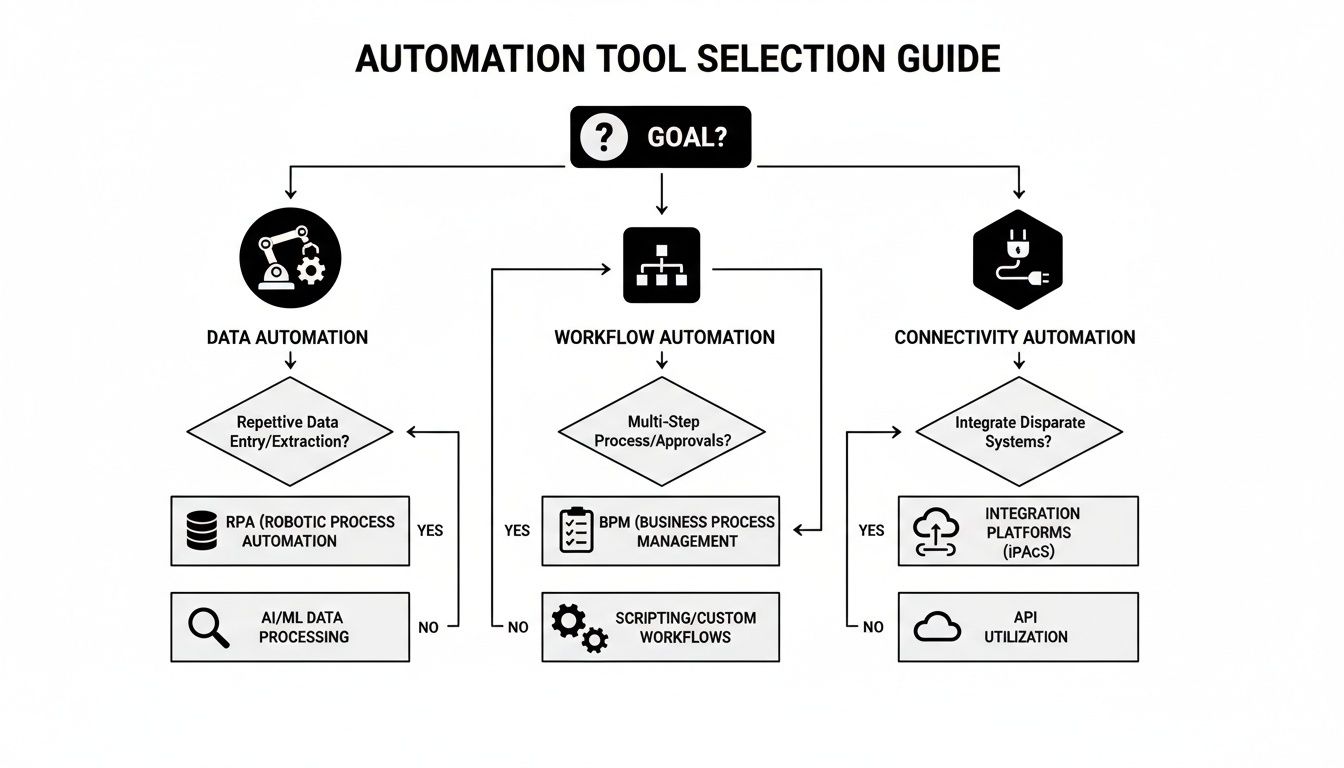
As you can see, the outcome you’re aiming for—whether it's centered on data, workflows, or simple connectivity—narrows down the field considerably.
Evaluate Scalability and Future Needs
One of the biggest mistakes I see people make is forgetting to think about the future. You have to ask: will this tool grow with us, or will it become a bottleneck in six months? A platform that’s perfect for a five-person startup can easily crumble when you’re a 50-person team with ten times the data.
Here are a few questions to keep in mind:
- Volume: Can it handle a massive spike in tasks, users, and data without slowing to a crawl?
- Complexity: As your operations get more sophisticated, can you build more advanced, multi-step automations?
- Cost: Is the pricing model fair? Or will your success be punished with outrageous subscription fees?
Picking a scalable solution means your investment will pay off for years, not just solve today’s headache. There’s a reason this market is booming—companies are constantly looking for an edge.
In fact, the BPA market is projected to hit $19.6 billion by 2026, a huge jump from $9.8 billion in 2020. This explosive growth comes from businesses needing automated systems to serve customers better and improve how teams work together. With 66% of organizations already automating at least one business process, falling behind isn't an option. You can dig into the numbers yourself in this market report from MarketsandMarkets.
Assess Integration Capabilities
Let's be realistic. Your business already runs on a core set of applications—a CRM, a project management tool, accounting software, and Slack. Any new automation tool you bring in has to be a team player, not a lone wolf. Integration is simply the tool's ability to connect and share information with your existing tech stack.
Without solid integrations, you’re just creating new data silos. That's the very problem you were trying to fix.
A great automation tool acts as the central hub connecting all your other software. It ensures data flows freely between your sales, marketing, and operations platforms, creating a single, unified source of truth for your entire business.
Before you commit to anything, check that the tool has reliable, pre-built connectors for the apps you depend on every single day. If it doesn’t, you could be looking at expensive and time-consuming custom development work just to get it working.
Prioritize Ease of Use and Adoption
Finally, remember that even the most powerful tool in the world is useless if your team finds it impossible to use. A steep learning curve can kill adoption before you even get started.
Look for platforms with intuitive, user-friendly interfaces. No-code and low-code builders with visual drag-and-drop editors are a game-changer here. They empower the non-technical people on your team—the ones who actually live and breathe these processes—to build and manage their own automations.
When your operations manager or marketing lead can whip up a new workflow without waiting for a developer, your whole business becomes more agile. You can adapt to changes and seize opportunities much, much faster.
Your Step-by-Step Implementation Roadmap

Jumping into automation without a clear roadmap is a recipe for chaos. It’s easy to get caught up in the excitement of new tools, but a haphazard approach often creates more problems than it solves. What you need is a plan—a structured path that turns a big, intimidating project into a series of calm, manageable steps.
Think of it like building a house. You wouldn't just start throwing up walls. You'd start with a blueprint, pour a solid foundation, and build it piece by piece. This phased approach is how you get automation right, ensuring you see wins early and build momentum for the long run.
Phase 1: Identify and Prioritize
Before you even think about which tool to use, you have to know what you’re fixing. The first move is always to find the most painful, repetitive, and soul-crushing tasks your team is stuck with. Where are people getting bogged down in manual work that a computer could easily handle?
Look for processes that are rule-based and high-volume. For example, your finance team might be spending dozens of hours every month manually chasing down unpaid invoices. Or maybe your sales reps are wasting precious selling time just updating the CRM after every single call. Those are perfect candidates.
Once you have a list, it's time to prioritize. Ask yourself two simple questions:
- Impact: How much time and money will we save by automating this?
- Effort: How hard will it actually be to set this up?
Your first target should be a high-impact, low-effort process. Nailing this "quick win" proves the value of automation to everyone and builds the confidence you'll need for bigger, more complex projects down the line.
Phase 2: Pilot a Small Project
With a process picked out, you can finally dip your toes in the water with a pilot project. It's tempting to want to overhaul an entire department at once, but resist that urge. Instead, pick one small, low-risk workflow and a single tool to test your idea.
Let’s stick with the invoice reminder example. Don't automate the process for your entire client list. Instead, run a pilot with just a handful of them. Set up the automated reminder emails for this small group and see what happens. This controlled experiment lets you iron out the wrinkles without blowing up your entire operation if something goes wrong.
A successful pilot is your proof of concept. It gives you hard data on time saved and efficiency gained, which makes getting buy-in from your team and leadership for a full rollout a whole lot easier.
Phase 3: Design, Train, and Launch
Once your pilot proves successful, you're ready to design the real thing. This means mapping out every single step of the new automated process, defining what triggers it, what actions it takes, and making sure data gets where it needs to go. This is your official blueprint.
With the workflow built, you have to focus on your people. Don’t just drop a new tool in their lap and walk away. Run dedicated training sessions, give them clear instructions, and—most importantly—explain why this change is happening. Frame it as a way to free them from the boring stuff, not as a machine coming for their jobs.
Finally, it's time to launch. Keep a close eye on the new process for the first few weeks. Watch for any unexpected issues and gather feedback from the team on the ground. A smooth launch is critical for building positive momentum. After all, getting your team ready and excited is just as important as the tech itself.
To make this even more concrete, here’s a checklist you can use to guide your implementation from start to finish. It breaks down each phase into specific actions and what success looks like.
BPA Implementation Checklist for B2B and SaaS
| Phase | Key Action | Success Metric |
|---|---|---|
| 1. Identify & Prioritize | Interview teams to find manual pain points. | A prioritized list of at least 3-5 high-impact, low-effort automation opportunities. |
| Quantify the time/cost of one target process. | A clear business case showing potential ROI (e.g., "Saves 10 hours/week"). | |
| 2. Pilot Project | Select one tool and a small, isolated workflow. | Pilot is live within 2-4 weeks. |
| Run the pilot with a small user group. | Measurable improvement in a key metric (e.g., 15% faster invoice payments). | |
| 3. Design & Launch | Document the full-scale automated workflow. | A complete process map is approved by stakeholders. |
| Conduct team training and create support docs. | 100% of affected team members are trained before launch day. | |
| Go live and monitor performance closely. | 99%+ workflow success rate in the first 30 days. |
Following a checklist like this helps ensure no critical steps are missed. It provides a clear, repeatable framework whether you’re automating your first process or your fiftieth.
Thinking about which processes to tackle first? We can help you identify those quick wins and build a roadmap that delivers results. Chat with a MakeAutomation expert today.
Where AI Takes Automation to the Next Level
Think of standard automation like a train on a fixed track. It’s incredibly efficient at getting from Point A to Point B, but it can’t deviate from the path you set. Adding AI to the mix is like swapping that train for a smart, self-driving car. It not only knows the destination but can also analyze traffic, find shortcuts, and react to unexpected roadblocks on its own.
This is where automation stops being a simple task-doer and starts becoming a problem-solver. For B2B and SaaS companies, this shift from merely executing rules to learning and adapting is a massive competitive advantage. AI gives your business process automation tools the ability to handle the nuanced, complex jobs that were previously off-limits to software.
From Simple Tasks to Smart Decisions
The big leap forward with AI is its ability to make judgment calls. Instead of just following a script, AI-powered tools can read unstructured data—think customer emails, messy support tickets, or even social media comments—figure out the intent, and decide on the best course of action without needing a person to step in.
This opens up a whole new world of efficiency and highly personalized service. Here’s what that looks like in the real world:
- Intelligent Chatbots: Forget the frustrating, dead-end bots of the past. Modern AI chatbots can understand complex client questions, provide genuinely helpful answers 24/7, and know exactly when to escalate an issue to the right human expert.
- Predictive Analytics: Imagine your project management tool not just tracking progress, but actively warning you about potential budget overruns or missed deadlines before they become problems. That’s AI analyzing data to give operations directors a chance to be proactive.
- AI-Powered Lead Scoring: Your sales team stops wasting time on cold leads. Instead, they get a constantly updated, prioritized list of prospects who are showing all the right signs of being ready to buy, based on their behavior and engagement patterns.
It's this kind of proactive intelligence that’s fueling incredible market growth. Projections show the business process automation market is set to skyrocket from $19.4 billion in 2025 to an astounding $54.34 billion by 2032. According to a detailed report, this surge is largely thanks to technologies like AI-enhanced lead generation and voice AI agents becoming non-negotiable for both startups and enterprise firms. You can dig into the specifics in these BPA market projections.
Turning Your Data into a Strategic Weapon
With basic automation, you get speed. With AI-enhanced automation, you get intelligence that actually drives growth. Every single customer email, project update, and sales call is transformed from a simple record into a learning opportunity for the system.
By integrating AI, your operational data stops being a passive record of what happened and becomes an active asset that predicts what will happen next. This is how you move from incremental improvements to exponential growth.
This concept is the heart of what the industry calls Intelligent Process Automation (IPA). It’s the powerful fusion of classic automation with the "thinking" capabilities of artificial intelligence, allowing businesses to finally tackle and optimize workflows that were once too messy or subjective to automate. If you want to explore this further, you can learn more about what is intelligent process automation in our guide.
Ultimately, adopting AI-powered tools isn’t just about making your old processes run faster. It’s about building a smarter, more resilient business—one that can anticipate what customers want, put resources where they’ll have the most impact, and secure a real, lasting advantage in the market.
Measuring the Real ROI of Your Automation Strategy

So, how do you actually prove that your investment in business process automation tools is paying off? If you want to get buy-in from stakeholders and secure budget for future projects, you need to measure the real return on investment (ROI). This goes way beyond just cutting costs. It’s about capturing the complete picture of the value you're creating.
A strong business case is always built on a mix of hard numbers and those powerful, but less tangible, wins. It’s tempting to focus only on what's easy to count, but if you ignore the "softer" benefits, you’re only telling half the story. A balanced approach is what truly shows the impact.
Calculating Your Quantitative ROI
First things first, let's track the metrics you can measure directly. These are the quantitative figures that provide the concrete proof that leadership and finance teams love to see. They offer undeniable evidence that your automation efforts are making a real financial difference.
Here are the key metrics we always start with:
- Hours Reclaimed: This is the big one. Calculate the number of employee hours saved each week or month from automating a specific task. Multiply this by your average employee's hourly cost, and you've got a direct labor savings number.
- Error Reduction Costs: Manual work is a magnet for human error, and fixing those mistakes costs time and money. Track how much your error rates have dropped and calculate the savings from avoiding rework, client complaints, or other issues.
- Increased Output: Measure the bump in throughput. For instance, how many more leads can your sales team now handle, or how many more invoices can finance process with the exact same headcount?
A great way to frame this is by tying automation directly to revenue. A 15% increase in lead conversion rates because of faster, automated follow-ups is a powerful statistic that speaks for itself.
Demonstrating Qualitative Wins
Just as important are the qualitative benefits—the improvements that are harder to stick a number on but have a massive effect on your company's culture and performance. In many cases, these wins are what drive the quantitative results in the first place.
These "soft" metrics are essential for painting the full picture of your success. They highlight improvements in your team’s well-being and your customers’ experience, which are the bedrock of long-term growth.
For example, think about these gains:
- Higher Employee Morale: When you free your team from mind-numbing, repetitive work, job satisfaction skyrockets. This leads to lower turnover and a more engaged team that can focus on creative problem-solving and high-value tasks.
- Improved Customer Satisfaction (CSAT): Automation often means faster response times, quicker ticket resolution, and a more consistent experience for your customers. Track your CSAT scores before and after you implement a new workflow to demonstrate the impact.
- Enhanced Agility: With automated processes in place, your business can pivot and adapt to market changes much more quickly. This newfound agility is a major competitive advantage, even if it doesn't appear directly on a balance sheet.
When you combine both the hard numbers and the human-centric wins, you build an undeniable case for the value of automation. For a deeper dive into the specific formulas, check out our guide on how to calculate return on investment.
Even after you've mapped out a plan, some lingering questions are bound to pop up. It’s completely normal. Here are the answers to a few of the most common questions we get from B2B and SaaS leaders who are thinking about business process automation tools.
Which Business Department Benefits Most from BPA Tools?
We get this one a lot. While automation can help pretty much any team, we see the quickest and biggest wins in Finance, HR, and Sales. Think about your finance team—automating invoice processing or payment reminders can literally save hundreds of hours a year. The same goes for HR, where you can take the manual grind out of recruiting and onboarding new hires.
For sales teams, it's a game-changer. Automating things like lead nurturing sequences or just getting new contact info into your CRM correctly means your team can close deals faster. The best advice? Start where you feel the most pain. Find the department drowning in repetitive, manual work and start there.
The real goal is to find those high-volume, rules-based tasks anywhere in your business. The department where you can free up the most human brainpower for high-value, strategic work is always the perfect place to begin.
Are Automation Tools Too Expensive for a Startup?
That's a common misconception, but the reality is quite different. The market is full of affordable, flexible SaaS tools built specifically for businesses that are growing. Many modern low-code and no-code platforms pack an incredible amount of power into plans that scale right alongside you.
The trick is to think about the investment versus the return. Once you calculate the ROI from automating just one key process—like assigning new leads or onboarding a client—the subscription cost often pays for itself in just a few months. Why? Because you’re buying back your team's most valuable asset: their time to focus on growth.
Do I Need Technical Skills to Implement These Tools?
It really depends on the tool you choose, but the overwhelming trend is toward user-friendly, no-code platforms. These newer systems use visual, drag-and-drop builders that let non-technical people create some seriously powerful automations without ever touching a line of code.
Sure, a massive, company-wide project might need some help from your IT department. But for the most part, the people who will actually use the automations—your marketing, sales, and operations teams—can build them themselves. This self-service approach makes your whole company faster and more adaptable.
Ready to figure out which processes in your business are ready for a change? The experts at MakeAutomation can help you build a custom roadmap that delivers real results from day one. Get in touch with us and let's talk.