Conversational AI for Sales: ROI Metrics & Playbooks
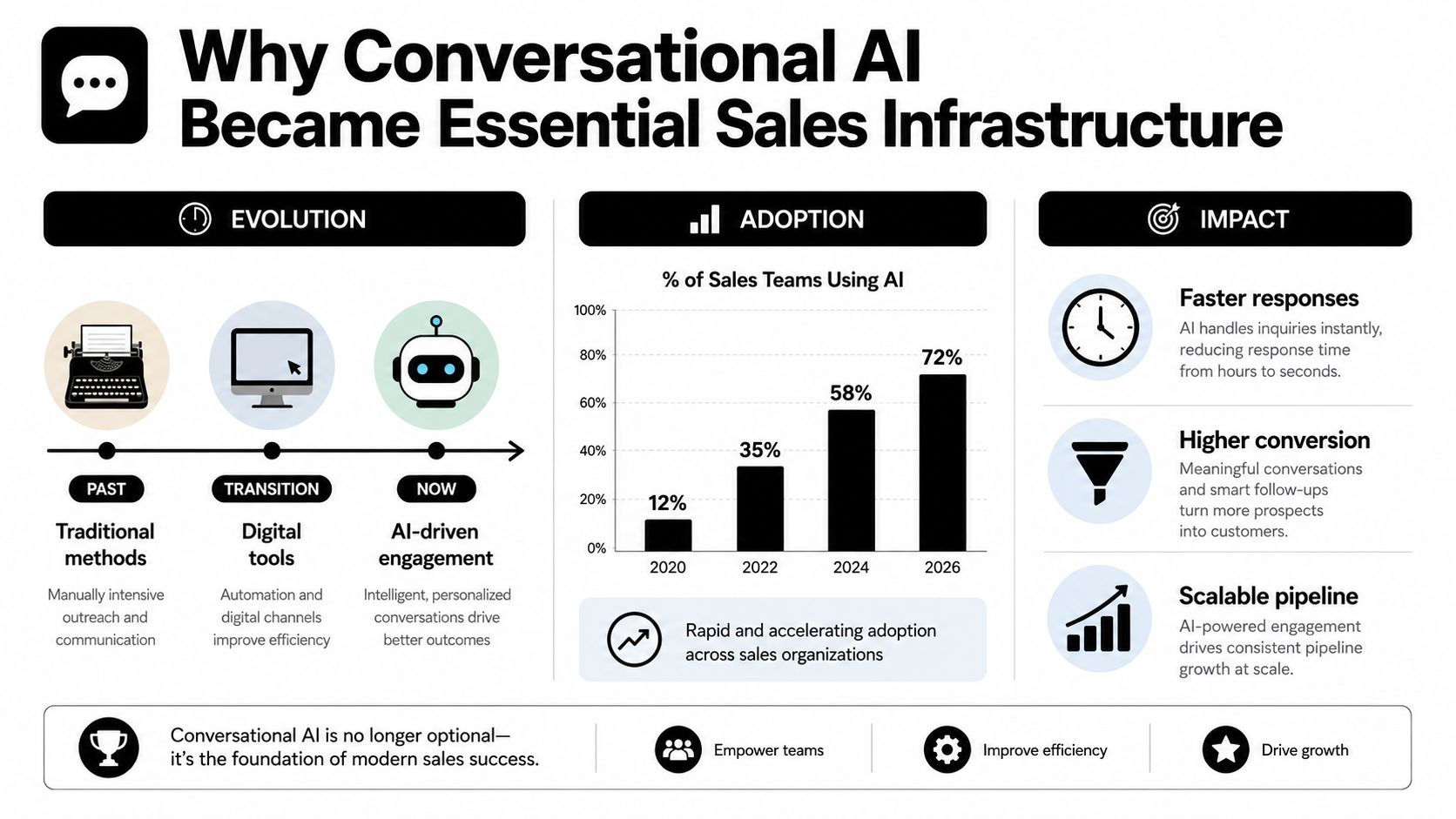
Conversational AI for sales has moved from nice-to-have to operating system. In a 2025 sales and marketing survey, about 45% of sales professionals said they use AI at least weekly, half of GTM employees said the same, and AI users reported 47% higher productivity plus an average of 12 hours per week reclaimed from low-value manual work (ZoomInfo sales and marketing AI survey). One market estimate puts the global conversational AI market at USD 14.3 billion in 2025 and projects USD 78.9 billion by 2033; the exact methodology matters less than the direction, which is sustained expansion across sales workflows rather than a short-lived automation spike. That matters because the work AI is absorbing is not novelty chat. It is qualification, follow-up, CRM updates, and routing, the tasks that decide whether a pipeline moves or stalls.
The operational question is no longer whether AI can answer a question. It is whether it can capture the right fields, apply your qualification logic, route the record correctly, and hand off to a rep without creating garbage in the CRM. I have seen teams get decent demo results and still lose hours cleaning up records because the bot could talk but could not write cleanly to Salesforce or respect round-robin rules. That gap is where agentic AI systems that take actions across tools start to matter, because sales teams need more than conversation, they need controlled execution tied to revenue process.
The market shift also shows up in the way teams prioritize use cases. The highest-return deployments are rarely the most visible ones. They are the ones that sit between first touch and rep assignment, where response time, lead scoring, and disposition logic determine whether a buyer gets fast help or sits in a queue. The same pattern appears in adjacent motions, including AI tools for agent lead scoring, where the value comes from better routing and prioritization, not from a polished chat experience. For B2B and SaaS teams, that growth reflects a structural change in how buyers expect to engage, how fast reps need context, and how much manual coordination a revenue team can realistically carry.
Why Conversational AI Became Essential Sales Infrastructure
Buyer comfort is no longer the bottleneck. A 2025 Business Wire report on buyer preference for AI agents found that nearly 60% of respondents agreed AI agents help in the sales process, while only 6.7% strongly disagreed. For revenue teams, that matters because it removes one of the old objections to automation and shifts the discussion toward execution, governance, and handoff quality. The category is also expanding. One forecast puts the global conversational AI market at USD 17.97 billion in 2026, rising to USD 82.46 billion by 2034 at a 21.0% CAGR, while another projects USD 17.7 billion in 2026 growing to USD 78.9 billion by 2033 at 23.8% CAGR. The methodologies differ, but the direction is consistent, sustained expansion rather than a short-lived software trend.
What It Replaces in a Real Sales Motion
The common mistake is treating conversational AI like a website widget. In a live sales motion, it sits between first touch and human follow-up, where teams usually lose time, context, and clean data. The system has to qualify the lead, capture structured fields, book a meeting when intent is high, update the CRM, and route the conversation to the right rep without forcing the buyer to restate the same information. That operational layer matters more than the chat surface.
For B2B and SaaS teams, the cost of getting it wrong is immediate. If responses wait for business hours, or SDRs still have to rewrite notes, correct records, and send follow-ups by hand, the process slows down and the CRM becomes harder to trust. Conversational AI reduces that coordination burden and gives reps more time for discovery, deal progression, and working live opportunities. The practical value is not in replacing people, it is in removing the steps that steal rep capacity and create inconsistent routing.
A useful starting point is the operating model, not the feature list. The SnapDial voice agent guide treats voice automation as a workflow problem, which is the right frame for sales teams that need production results, not a demo. For a clear baseline on the category itself, what conversational AI is helps align marketing, sales, and operations before the team starts configuring routing, qualification logic, and handoff rules.
Practical rule: if the system cannot move a lead from first message to routed opportunity without manual cleanup, it is not infrastructure yet, it is overhead.
What Separates Sales AI from Generic Chatbots
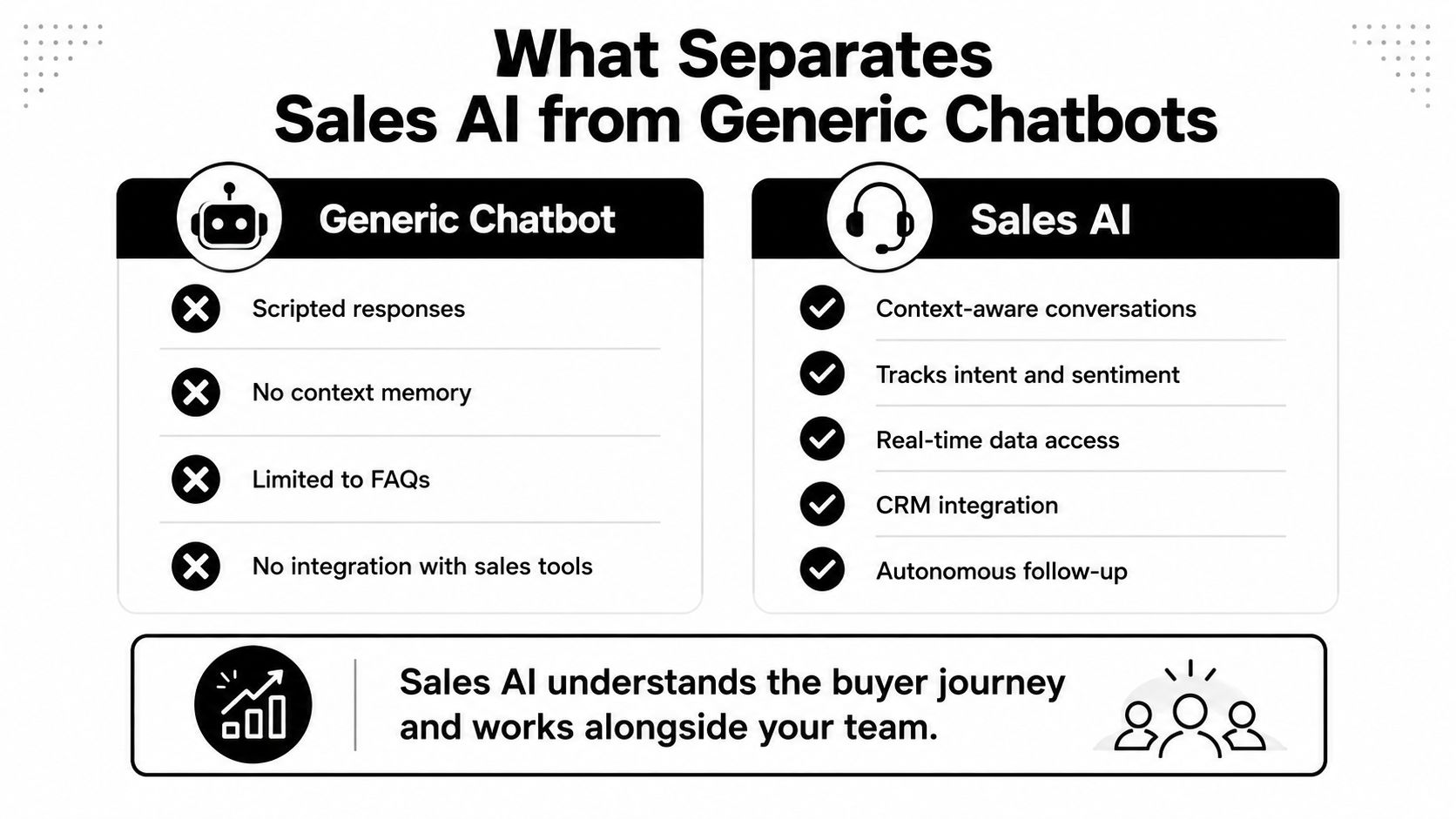
Generic chatbots answer common questions. Sales AI is built to move a buyer through a revenue motion. That difference shows up in how the system reads language, what data it can reach, and how it decides when to hand off to a person.
The capabilities that actually matter
A generic bot usually depends on scripts and keyword matching. That works for a narrow FAQ flow, then breaks the moment a buyer asks about pricing, implementation, integrations, or a competitor. Sales-trained systems use NLP and NLU to interpret the message, intent detection to separate a demo request from a support question, sentiment analysis to catch frustration or urgency, and conversation memory to remember what the prospect already said. Those capabilities let the system keep the conversation moving instead of resetting every time the buyer changes direction.
That matters across channels. A prospect might start in chat, continue by SMS, then finish on a voice call. If the system does not preserve context, the buyer gets treated like a stranger at every handoff. In B2B and SaaS motions, trust drops fast when the conversation restarts from zero. Sales AI needs to carry context across those channels so a pricing request does not get handled the same way as a casual browse, and a competitor mention can trigger a different next step than an integration question.
A sales bot should sound less like a script and more like a competent coordinator that knows when to ask, when to answer, and when to escalate.
Where the vendor evaluation usually goes wrong
Teams often buy tools based on the surface experience, then find out the system cannot read buyer intent well enough to route correctly. A chatbot that can deflect FAQs is useful for support. A sales system has to recognize buying signals, surface the right collateral, and hand off with full context. If a vendor cannot explain how it distinguishes high-intent from low-intent messages, or how it stores conversation memory for later steps, that is a warning sign.
For a more tactical look at lead prioritization logic, the AI tools for agent lead scoring resource is worth a read because it reinforces an important point, scoring only helps when it is attached to a real workflow. I would rather see a plain system that routes correctly and logs cleanly than a flashy bot that gets every greeting right but misses the buyer's actual intent.
Sales AI also starts to look more like agentic software than a static script when it decides what to do next from the conversation itself. A useful reference point is what agentic AI means in practice, because the sales use case depends on that same pattern of interpreting intent, selecting a next action, and passing work forward without waiting for a rep to manually interpret every reply.
A sales bot should earn trust by handling the workflow correctly first, then by sounding polished.
Three Implementation Patterns That Drive Revenue
The cleanest deployments I've seen all started with one sales motion, not three. Teams that try to automate everything at once usually end up with broken routing, vague ownership, and reps who don't trust the leads. Teams that pick one bottleneck, wire it into CRM, then expand, usually get to production faster.
Inbound qualification
Inbound is the most obvious place to start because the buyer is already raising their hand. A prospect lands on the site, asks about pricing, and the AI captures company size, use case, and timeline before offering a meeting slot. If the answer signals high intent, the system books directly onto a rep calendar and pushes the notes into CRM. If the intent is low, it can continue qualifying or place the lead into nurture without clogging the AE queue.
The biggest failure point here is asking too much too early. If the bot behaves like a gatekeeper, bounce rates climb and the team blames the technology when the problem is the script. Keep the early dialogue short, then let the system branch only when the buyer's answer demands it.
Outbound follow-up
Outbound works best when the AI doesn't try to sound like a human SDR writing from scratch. It should take context from the last interaction, draft a relevant follow-up, and surface replies or intent changes that deserve human attention. That's especially useful after webinars, demos, pricing pages, or stalled opportunities, where timing matters more than perfect prose.
I've seen outbound systems fail when they ignore the original conversation and send generic reminders. Buyers can spot that immediately. If the agent can't reference the actual pain point, the follow-up feels automated in the worst way.
Voice agents
Voice is where speed and availability matter most. A caller doesn't want voicemail, and they usually don't want a phone tree either. A voice agent can answer, qualify, capture reason for the call, and route to the right human with context attached. That makes it useful for inbound line coverage, after-hours response, and missed-call recovery.
The key is restraint. Voice agents do well when they handle discovery and routing. They struggle when teams ask them to negotiate complex pricing or resolve highly technical objections. I've found the best pattern is simple, answer fast, collect the minimum qualifying data, then transfer cleanly.
Integration Checklist for CRM and Routing Logic
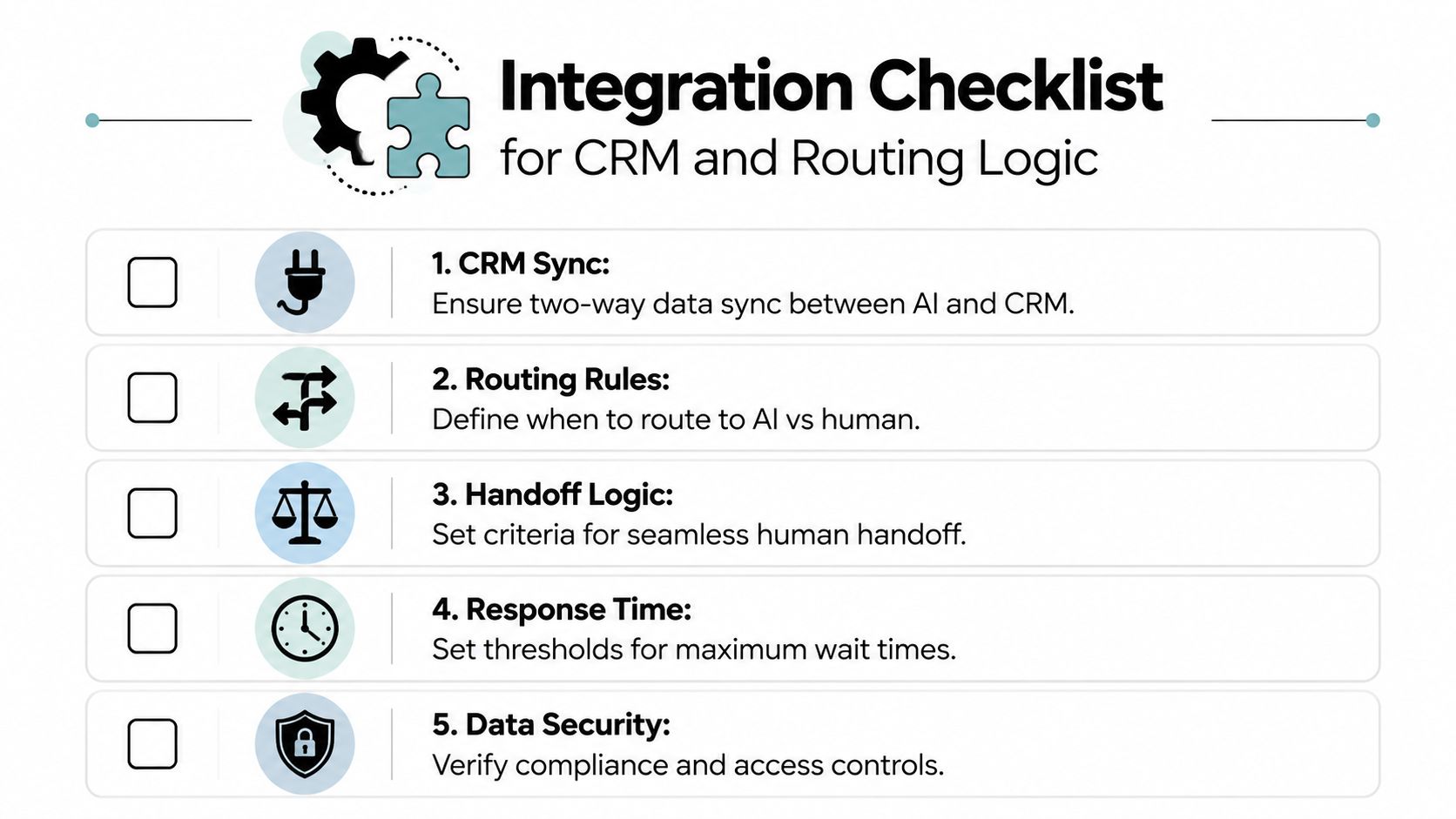
Conversational AI fails when it sits outside the systems that already run your pipeline. If the bot can't write data back to the CRM, feed routing rules, or trigger a clean handoff, you've just added another inbox for the team to monitor. The operational question is simple, does the AI move work forward, or does it create one more place where work can stall?
Start with the data that must sync
At minimum, the system should sync contact identity, company details, conversation transcript, intent signals, qualification fields, meeting status, owner assignment, and next step. That data is what lets a rep open the CRM and understand what happened without replaying the conversation from scratch. If the vendor can't map fields cleanly in both directions, you'll end up with duplicate records and partial context.
Define routing before launch
Routing logic should decide when the AI stays in control, when it books, and when it hands off. I usually see teams set handoff triggers around pricing requests, custom implementation questions, competitor mentions, and any signal that the buyer wants a live conversation. The point is not to automate the most; it's to prevent the funnel from stalling when intent gets strong.
Operational rule: if a lead is hot enough to deserve a rep, the rep should receive the transcript, the score, and the reason for handoff together.
Ask vendors the hard questions
Before you approve a rollout, ask how the platform handles API access, role-based permissions, auditability, and data retention. Then ask what happens when the AI can't answer a question. A safe system should fail gracefully, preserve the conversation, and route the buyer somewhere useful instead of looping them back into the same dead end.
For teams comparing tooling, the internal guide on how to calculate return on investment is a practical companion because it forces the conversation back to business outcomes, not feature lists. I'd also make sure your sales, operations, and marketing leaders agree on the definition of a qualified lead before any configuration starts. If those definitions drift, your reports will look polished and your pipeline will still feel chaotic.
Measuring ROI and Pipeline Impact
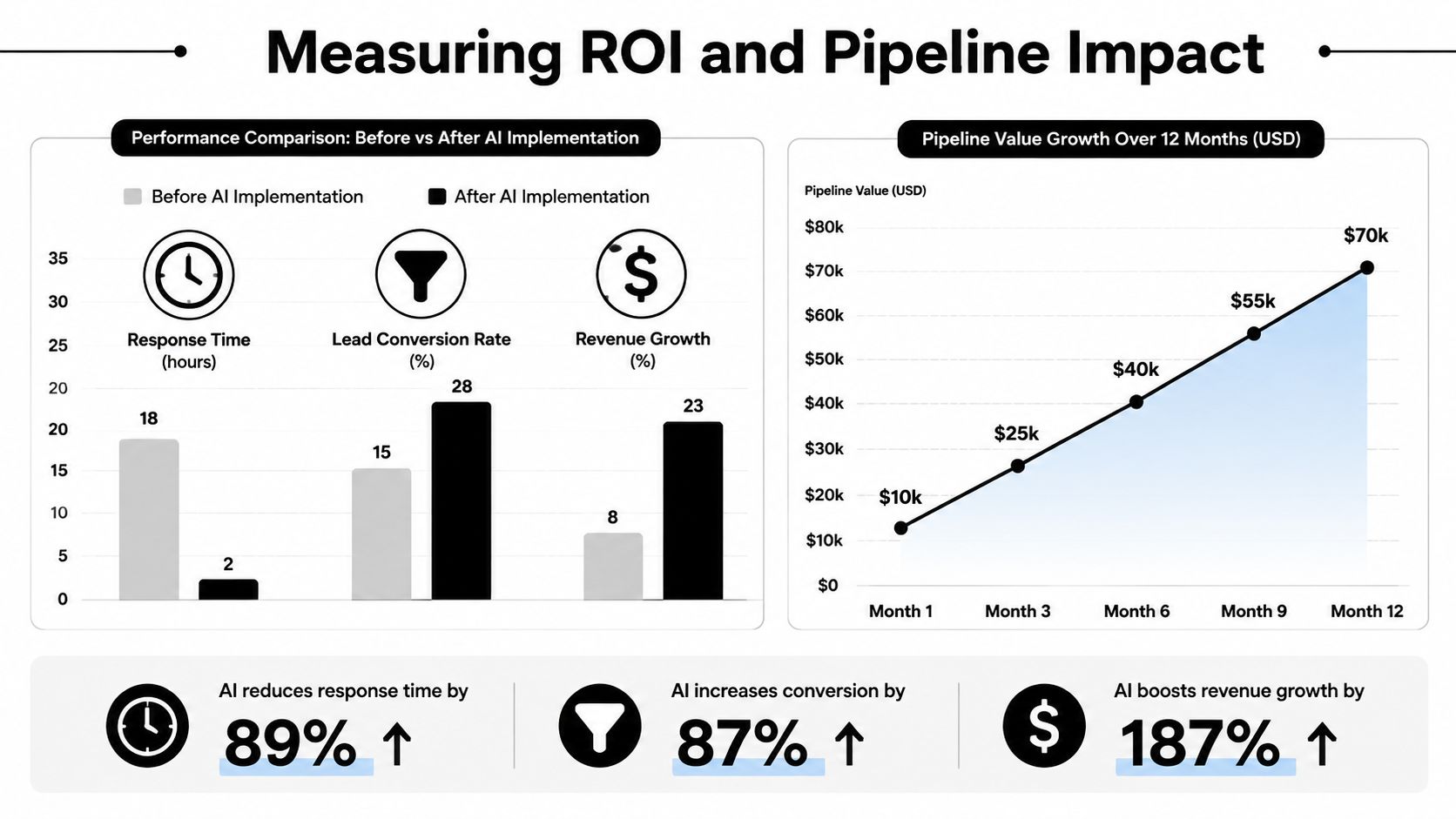
A conversation layer can make a deployment look busy while leaving revenue unchanged. Bot conversations alone do not tell you much. Measure whether the system cuts response time, improves qualification, books more meetings, speeds pipeline movement, and gives reps back time they can use for live selling.
Measure the workflow, not the noise
Start with a baseline before launch. Track first response time, meeting booked rate, qualification accuracy, and the time leads wait before a human follows up. If AI is taking admin work off the plate, measure rep time saved on its own, separate from pipeline metrics. Those are different outcomes, and they should sit in different dashboard views.
One of the easiest mistakes is treating every AI interaction as a qualified lead. A prospect asking a basic product question is not the same as a prospect showing buying intent. If you want the numbers to mean anything, sales, marketing, and operations need the same definition of qualification before the workflow goes live. Otherwise the reports will look tidy and the funnel will still feel messy.
Connect operational gains to revenue impact
As noted earlier, the labor case is already visible in the adoption and productivity gains reported by AI users. That matters because the ROI conversation starts with capacity, not just attribution. If reps spend less time on repetitive qualification and follow-up, they can spend more time on active opportunities. That is real value even before you assign revenue to every conversation.
Buyer acceptance also matters, but only if the system turns that acceptance into cleaner handoffs and faster movement. The reporting I trust ties AI-assisted conversations to booked meetings, stage progression, and rep hours reclaimed, then checks whether those gains hold after the first rollout wave. A dashboard that only shows volume can hide a weak routing rule. A dashboard that only shows booked meetings can hide bad qualification. For teams comparing options, a practical guide to calculating return on investment helps keep the review tied to business outcomes instead of feature claims.
Review transcripts on a regular cadence. Patterns show up quickly. Some prompts will be too long, some objections will need tighter handling, and some routing rules will be too loose. That feedback loop is where the system gets better, and where the gap between a pilot and a production setup usually becomes obvious.
Sample Scripts and Next Steps for Your Team
Scripts only work when they're short enough to feel natural and structured enough to preserve control. I've seen teams over-script their bots until every exchange sounds robotic. The better pattern is a light opening, a few purposeful qualification questions, then a clean handoff when the lead is ready.
Three conversation starters that actually hold up
Website visitor qualification
“Thanks for reaching out. Are you looking for help with outbound, inbound lead capture, or follow-up automation?”
If the buyer answers, the AI should ask one or two routing questions, then offer a meeting only if the signals justify it. The point is to qualify without making the buyer work too hard.
Post-demo follow-up
“Thanks for joining the demo. I can help with next steps, pricing questions, or setup details. What would be most useful right now?”
That keeps the thread aligned with the buyer's actual priority instead of forcing them into a generic nurture path.
Inbound call handling
“Thanks for calling. I can help get you to the right person. What are you trying to solve, and how soon do you need to move?”
That's enough to route urgency without sounding like an interrogation.
What different team sizes should prioritize
A five-person sales team should start with the highest-friction step, usually missed follow-up or inbound qualification. Don't buy for every channel at once. Make one workflow reliable, then expand only after the rep team trusts the output.
A fifty-person team usually has a different problem, which is consistency across territories, ownership, and systems. That team needs stronger routing logic, cleaner CRM sync, and tighter governance around handoff rules. If you're at that stage, custom workflow design often matters more than adding another channel.
A realistic 90-day rollout
Spend the first month mapping the workflow and defining qualification. Use the second month for integration, testing, and transcript review. Use the third month to refine prompts, tighten routing, and compare the new workflow against your baseline.
If you want support designing that operating layer, MakeAutomation can help B2B and SaaS teams build AI sales automation, including agents that debrief calls, respond to leads, and connect those actions back into operational workflows. Start with one motion, measure it cleanly, then expand from there.
If you want conversational AI to work inside your sales stack, not just sit on top of it, visit MakeAutomation and see how its automation and voice AI support can fit into inbound response, lead follow-up, and CRM-connected handoff workflows. The fastest gains usually come from one bottleneck fixed well, then scaled with discipline.