
Inventory Management Automation: Your 2026 B2B Guide
You're probably dealing with one of two problems right now.
Either you don't trust your inventory numbers, or you trust them right up until a promotion lands, a supplier slips, or a customer orders the one item your system said was available but your shelf says isn't. That's usually the moment founders stop treating inventory as a back-office detail and start seeing it for what it is: a control system for cash, fulfillment, and customer experience.
Manual inventory can hold together for a while. A spreadsheet, a shared drive, a warehouse lead who “knows where everything is,” and a weekly reconciliation process can look good enough when volumes are manageable. Then the business grows. More SKUs, more channels, more exceptions, more returns. The old process doesn't just get slower. It gets less reliable in ways that are expensive and hard to diagnose.
Why Your Manual Inventory Is Costing You More Than You Think
Monday starts with a stock check nobody trusts. Sales says a key SKU is available. The warehouse cannot find it. Purchasing places a rush order to be safe. Finance still carries the original units as sellable inventory. By the end of the week, you have expedited freight, delayed shipments, and cash tied up in stock that was never where the system said it was.
That is how manual inventory drains margin. It rarely fails in one dramatic moment. It creates small errors that spread into purchasing, fulfillment, customer service, and reporting. A receiving discrepancy goes unlogged. A picker grabs the wrong variant. A buyer over-orders because the on-hand count is off. Operations knows some stock is dead, while finance still sees it as an asset.

Accuracy is where the business case starts. The inventory automation market overview from DemandLocal notes that the global inventory management automation market was valued at $5.9 billion in 2024, and that optimized implementations using RFID and IoT sensors can achieve 99%+ real-time inventory accuracy, compared with 63–65% accuracy in manual environments. For a founder, that gap matters because every planning decision depends on whether the count is reliable enough to buy, promise, pick, and reorder against.
Manual systems tend to break at the same control points.
- Receiving: Staff confirm shipments on paper or by memory, then update the system later. During that lag, stock may be in the building but unavailable to allocate or sell.
- Transfers: Items move between bins, zones, or sites without a recorded transaction, so location accuracy degrades first and total accuracy follows.
- Returns: Returned units sit in a gray area because inspection, grading, and put-away are not tied to a standard workflow.
- Cycle counts: Teams keep recounting to repair records, but each count pulls labor off fulfillment and only fixes one snapshot.
These are not warehouse-only problems. They affect revenue, working capital, and service levels. If your team spends time “checking what the actual number is,” the business is relying on repeated verification instead of process control.
This is also where founders often underestimate ROI. Time savings matter, but they are usually the smallest line item. Better inventory automation improves purchase timing, reduces avoidable stockouts, cuts excess stock, and gives customer-facing teams cleaner availability data. It also exposes exceptions faster, which matters more than speed once volume grows.
I usually tell clients to price the cost of bad inventory decisions before they price software. Count the margin lost on preventable stockouts. Count the cash sitting in slow-moving stock because replenishment logic is based on stale data. Count the labor spent reconciling mismatches across spreadsheets, warehouse notes, and ERP records. A tighter view of operational efficiency metrics that connect process performance to financial outcomes makes the automation decision much easier to justify.
The trade-off is straightforward. Manual processes can feel cheap because the cost sits inside payroll, write-offs, expediting, and customer friction. Automation makes those control points explicit. It also forces decisions about workflow design, ownership, and exception handling. That work is worth doing because inventory does not get simpler as you add SKUs, channels, suppliers, or locations. Complexity grows faster than headcount can absorb safely.
If inventory is still something your team plans to clean up later, you are probably paying for the same error three times: once in labor, once in cash, and once in customer trust.
Defining Your Automation Objectives and Success Metrics
Inventory management automation goes wrong when the brief is vague. “Improve efficiency” sounds sensible, but it doesn't tell your team what to design, what to buy, or what to measure. Better objectives start with the operational pain you already recognize: stockouts during demand spikes, too much stock in slow-moving items, or delays between a physical movement and a system update.
A useful test is simple. If a proposed feature can't be tied to a measurable business outcome, it's probably a distraction.
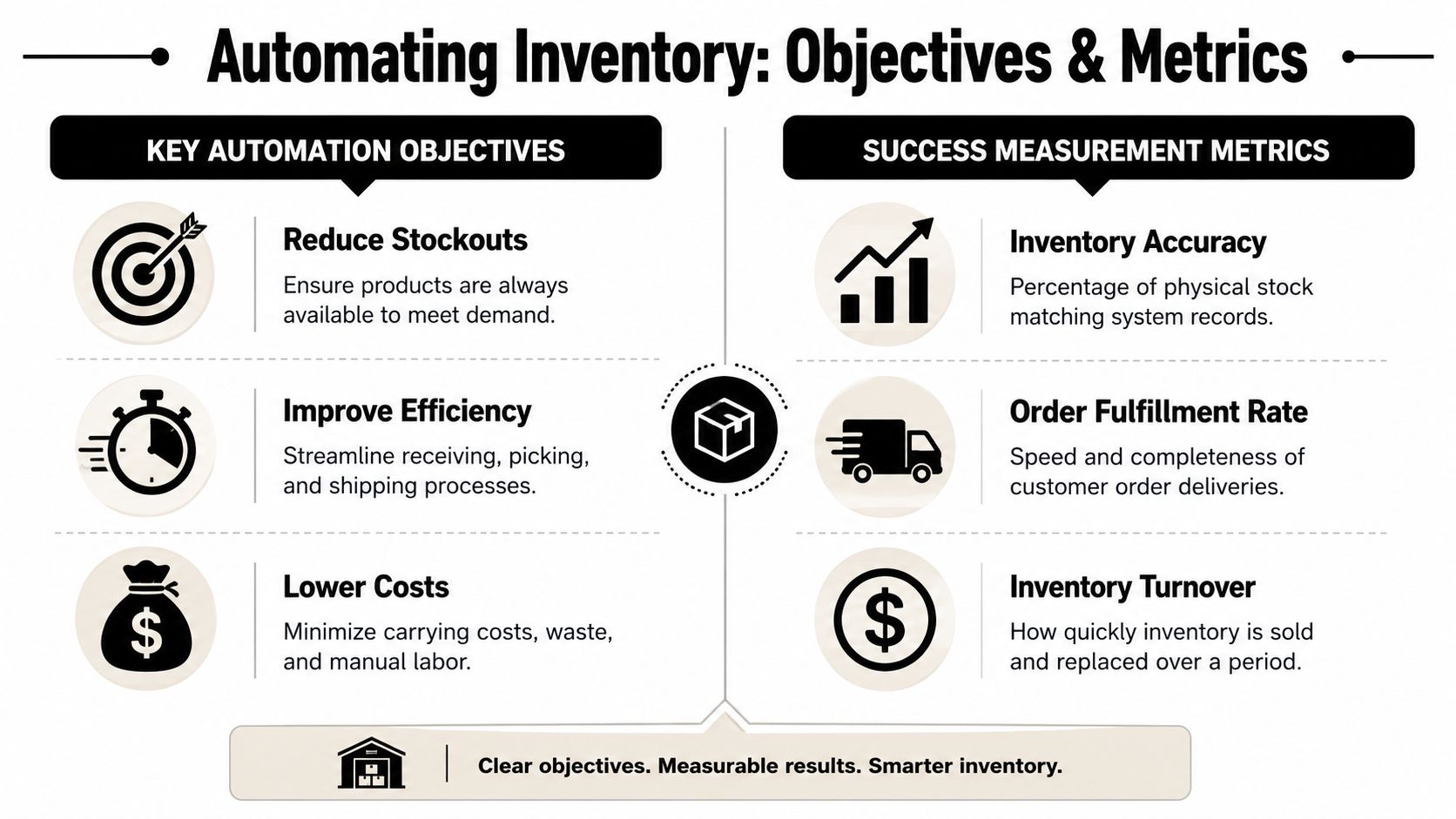
The financial case is already strong. The Firework inventory statistics summary reports that poor inventory management can cost businesses up to 11% of annual revenue through stockouts and overstocking, and that worldwide inventory distortion costs businesses about $1.6 trillion annually. That's why your success metrics should connect directly to revenue protection and cash control, not just staff time saved.
Start with a baseline before you automate
If you don't baseline current performance, your project will drift into opinions. Measure the process as it exists now, even if the numbers are ugly.
I'd build a simple dashboard around a few core metrics:
| Objective | What to measure | Why it matters |
|---|---|---|
| Better stock reliability | Inventory accuracy | Shows whether physical stock matches system records |
| Faster fulfillment flow | Order fulfillment rate and internal cycle time | Reveals whether automation is actually reducing delays |
| Lower inventory drag | Inventory turnover and slow-moving stock review | Highlights whether cash is stuck in the wrong products |
For operations leaders, this is the difference between lagging and leading indicators. ROI is a lagging indicator. You only see it after the system has been live long enough to affect purchasing, fulfillment, and stock health. Inventory accuracy and cycle time are leading indicators. They tell you early whether the rollout is moving in the right direction.
A useful companion framework is to align inventory metrics with broader operating KPIs. This operational efficiency metrics guide from MakeAutomation is relevant if you want inventory improvements tied back to company-level performance rather than treated as a siloed warehouse project.
Turn pain points into decision criteria
Most founders already know what hurts. The work is translating that into implementation logic.
- Frequent stockouts: Set an objective around availability reliability, then measure stock accuracy and reorder discipline.
- Overbuying: Focus on carrying cost behavior, reorder thresholds, and demand review cadence.
- Slow shipping: Track the elapsed time from order release to dispatch-ready status.
- Too many manual checks: Watch exception volume and how often staff must override or correct the system.
Don't let software demos define your objectives. Your operational failures should define them.
What a good success target looks like
A good target is operational, observable, and tied to a process owner. “Reduce inventory chaos” isn't usable. “Cut the number of stock discrepancies discovered during cycle counts” is. “Improve fulfillment” is soft. “Reduce the delay between receiving and sellable availability” is much better.
When teams skip this step, they often buy a capable platform and still feel disappointed. The system may work exactly as designed, but the business never agreed on what success looked like.
Choosing Your Inventory Automation Technology Stack
Most first-time buyers ask the wrong opening question. They ask which software to buy. The better question is how inventory data will be captured, validated, and moved between systems. If that part is weak, the software layer will spend its life processing bad signals faster.
Your stack usually has three layers. A capture layer for barcodes, QR codes, RFID, or camera-based monitoring. A control layer in the form of inventory software, a WMS, or ERP-connected logic. And an integration layer that keeps orders, purchasing, receiving, stock movements, and customer updates in sync.
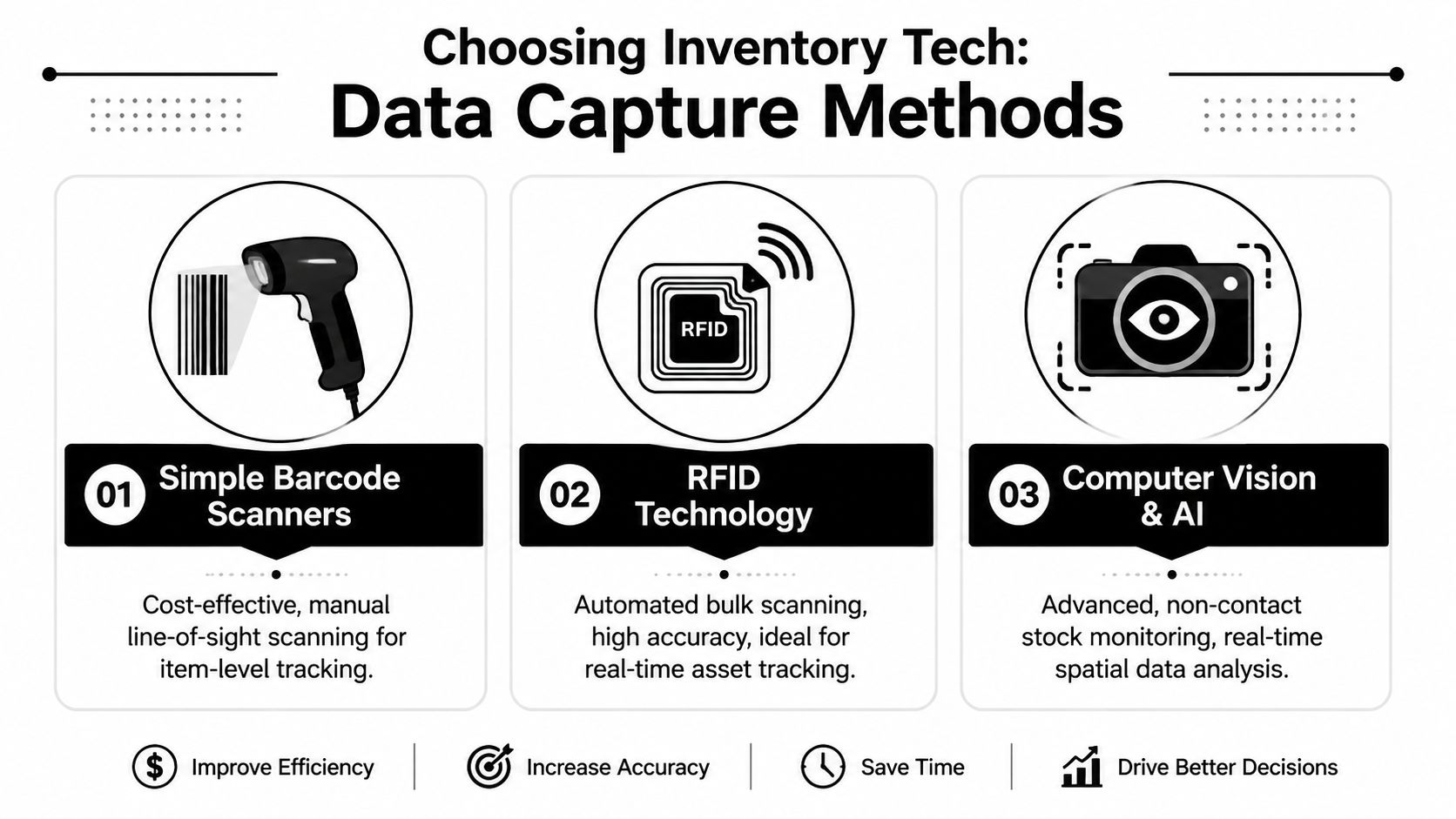
Compare capture methods by fit, not hype
You don't need the most advanced technology. You need the one your operation can support consistently.
| Method | Best fit | Trade-offs | Scalability view |
|---|---|---|---|
| Barcode or QR scanning | Early-stage or mid-complexity operations with disciplined staff workflows | Requires line-of-sight scanning and more human touchpoints | Strong if SOPs are tight and SKU labeling is clean |
| RFID | High-volume environments, fast-moving stock, asset tracking, or operations needing near real-time visibility | Higher implementation complexity, tagging decisions matter | Excellent when speed and location visibility justify the investment |
| Computer vision and AI | Complex environments where non-contact monitoring and spatial awareness matter | Harder to deploy cleanly, depends on physical layout and training quality | Promising, but usually best after core process control is already strong |
Barcode systems are often enough for founders doing their first serious automation project. They're practical, understandable, and easier to troubleshoot. RFID makes sense when manual scan compliance is the limiting factor or when stock moves too quickly for line-of-sight scans to stay reliable. Computer vision can be useful, but I wouldn't use it to compensate for inconsistent receiving, poor labeling, or weak location control.
This walkthrough gives a useful visual comparison before you go deeper into vendor discussions.
Software choices that actually matter
The software side usually falls into these categories:
- Inventory management systems: Good for stock visibility, purchase tracking, reorder logic, and simpler fulfillment operations.
- Warehouse management systems: Better when you need location control, directed putaway, structured picking, task assignment, and stronger exception handling.
- ERP inventory modules: Useful when finance, procurement, and stock need to stay tightly connected, though warehouse depth can vary.
The deciding factor isn't feature count. It's whether the system can support your real transaction flows without forcing workarounds.
For example, if your warehouse team receives partial deliveries, quarantines damaged goods, and processes returns into multiple disposition states, a lightweight tool may look cheaper but create operational debt. If your process is straightforward and volumes are still manageable, a heavy WMS may slow adoption and add complexity you don't need.
Evaluate the stack as a whole
A decent vendor can demo receiving, picking, and replenishment in a polished environment. What matters more is how the system behaves in messy conditions.
Ask practical questions:
- What happens when a supplier short-ships a PO?
- Can the system hold damaged goods in a non-sellable state without manual side records?
- How are unit-of-measure conversions handled?
- Can users see why stock is unavailable, or only that it is?
- How hard is it to reverse a mistaken transaction cleanly?
Buy for exception handling, not the happy-path demo.
One option in the broader automation layer is MakeAutomation, which supports workflow automation around inventory and supply chain processes such as generating purchase orders when inventory reaches minimum thresholds and sending shipping updates to customers. That kind of orchestration can be useful when you need systems to trigger actions across CRM, ecommerce, and operations tools rather than keeping inventory logic isolated inside one platform.
What works in practice
The strongest first stack for most B2B operators isn't flashy. It's a clean item master, consistent barcode labeling, a system that tracks inventory by location, and integrations that keep sales, purchasing, and warehouse actions synchronized. Once that foundation is stable, RFID or more advanced automation has somewhere solid to land.
What usually doesn't work is skipping process discipline and hoping smarter software will compensate.
Designing Automated Workflows and Exception Handling
Good inventory automation doesn't start in software. It starts on the floor. You need to map what physically happens to stock, who touches it, when the system should update, and where a transaction can fail. If you can't draw that clearly for receiving, putaway, picking, dispatch, and returns, you're not ready to automate it.
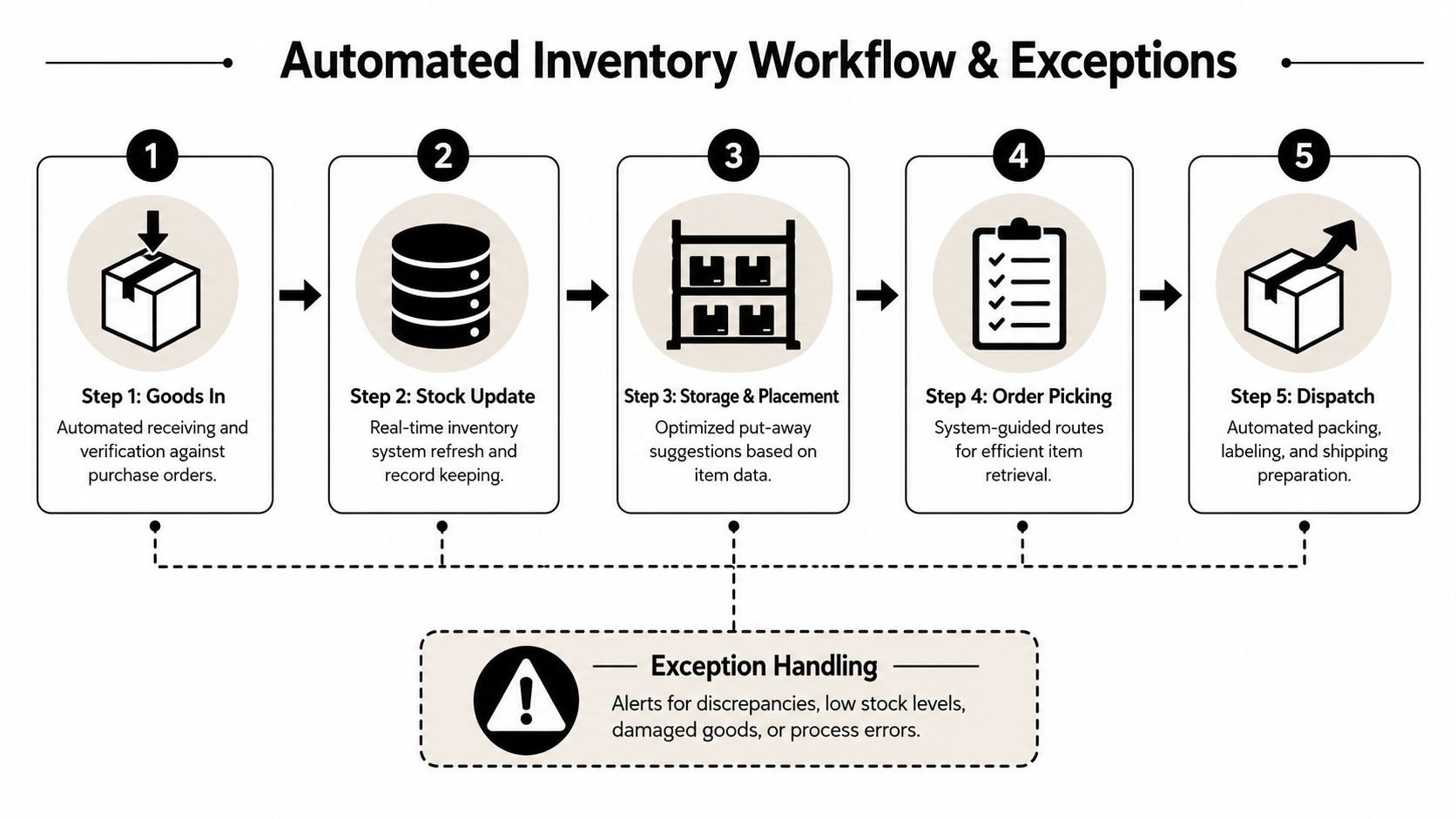
A reliable rollout usually follows a practical sequence. Baseline the current process. Map SKU-level transaction flows. Define reorder logic. Then connect capture tools such as barcode, QR, or RFID into an ERP or WMS so stock movements update in near real time. The point isn't to remove people from the process. It's to reserve human judgment for exceptions while the system handles repeatable steps.
Build the happy path first
Take receiving as an example. A strong automated workflow often looks like this:
- PO arrives in system with expected SKUs, units, and quantities.
- Goods are received against the PO using a scanner or other capture method.
- Discrepancies are flagged immediately instead of being reconciled later in email or on paper.
- Accepted goods are assigned a putaway destination.
- Stock status updates to available, quarantined, or pending inspection based on rules.
That process sounds obvious, but teams often leave one step partly manual. Then the system loses continuity. Inventory becomes physically correct but digitally delayed, or digitally available before the stock has cleared inspection.
Design the exceptions on purpose
Many projects fail under these circumstances. The happy path gets all the attention. The messy reality gets pushed to “we'll handle that manually.”
That doesn't scale.
Typical exceptions include:
- Short shipment: Received quantity is lower than expected.
- Over shipment: Supplier sends extra units not on the PO.
- Damage at receiving: Item is physically present but not sellable.
- Label mismatch: Barcode scans to the wrong SKU or unknown SKU.
- Location failure: Putaway bin is full, blocked, or invalid.
- Pick exception: Picker can't find expected stock in the assigned location.
- Returns disposition: Returned item may be resellable, repairable, or scrap.
Each exception needs a system response. Not a note in Slack. Not a clipboard. A defined response.
Here's the operational standard I push teams toward:
| Exception | Automated response | Human action |
|---|---|---|
| Short shipment | Create discrepancy record and hold PO as partial | Buyer or receiving lead confirms next step |
| Damaged goods | Route stock to quarantine status | Quality or operations approves disposition |
| Missing pick stock | Trigger inventory check task | Supervisor investigates root cause |
| Return received | Hold in inspection state | Team classifies item before resale or write-off |
A related workflow discipline matters in fulfillment too. This order fulfillment automation guide from MakeAutomation is useful when you need inventory workflows and shipping workflows to behave as one connected process instead of separate handoffs.
The right human role in automation isn't “doing less.” It's intervening only where judgment is required.
Keep SOPs tighter than the software
Advanced systems still fail when receiving, putaway, and returns don't follow standard operating procedures. If staff bypass scans, skip status updates, or move stock without recording location changes, the platform will preserve inaccurate information more efficiently.
That's why workflow design should include three layers:
- Transaction rules: What the system updates automatically.
- Exception rules: What triggers an alert, hold, or review task.
- Behavior rules: What staff must do every time, with no informal shortcuts.
The best automated workflows feel boring. They're predictable, easy to follow, and resilient under pressure. That's exactly what you want.
Planning Your Migration and Go-Live Testing
A big-bang inventory launch is tempting because it feels decisive. It also creates the worst possible conditions for finding preventable errors. When receiving, picking, replenishment, returns, and customer orders all hit a new system at once, your team can't tell whether a problem comes from bad data, broken logic, poor training, or an edge case nobody modeled.
Phased migration is slower on paper and faster in reality. It gives you room to isolate failure points before they spread across the whole operation.
Clean the item master before you touch the workflow
The most common implementation mistake is simple. Teams import bad data into a better system and expect the system to repair it. It won't. The Base inventory management guidance warns that a common pitfall is skipping master-data cleanup before go-live. If item codes, units of measure, or location records are inconsistent, automation can amplify bad data. The same guidance recommends regular audits and cycle counts as a control layer after automation.
That aligns with what happens in real projects. Dirty master data creates fake complexity. The software looks unreliable, but the root problem is usually one of these:
- Duplicate SKUs created over time by different teams
- Inconsistent units of measure between purchasing, receiving, and selling
- Unclear location naming that staff interpret differently
- Legacy inactive items still sitting in active workflows
- Missing attribute standards for variants, kits, or bundles
Roll out in slices you can control
A phased launch doesn't have to mean months of hesitation. It means choosing a scope you can test properly.
Good pilot slices include:
- One warehouse zone where receiving and picking are active but manageable
- One product family with similar handling rules
- One transaction type such as inbound receiving before outbound fulfillment
- One team shift where training and observation are easier to control
What matters is that you can observe behavior, compare expected vs actual system outcomes, and make corrections without destabilizing the business.
If your first launch scope is too large to monitor manually, it's too large to launch safely.
Test with operators, not just project leads
I've seen many implementations pass internal review because managers clicked through test scenarios in a clean environment. Then go-live exposed the issue: operators work faster, improvise more, and encounter edge cases the project team never simulated.
Your test plan should include:
- Transaction testing for receiving, putaway, picking, shipping, adjustments, and returns.
- Exception testing for shorts, damage, unknown barcodes, blocked bins, and partial orders.
- User acceptance testing with warehouse staff doing the work in realistic sequences.
- Volume testing under busy conditions, especially if your business has promotional spikes or concentrated daily cutoffs.
- Rollback procedures so a mistaken configuration change doesn't leave inventory in an unrecoverable state.
Before rollout, it's worth pressure-testing your operating model with an automation readiness assessment from MakeAutomation. The useful part of a readiness review isn't the score. It's identifying where process discipline, system dependencies, or data quality will break under live conditions.
Go-live is an operating event, not an IT event
Treat launch day like a controlled operations window. Freeze nonessential changes. Assign clear owners for data corrections, system issues, training questions, and escalation decisions. Keep cycle counts active after launch because they validate whether the digital model still matches the floor.
The strongest launches feel almost uneventful. That usually means the messy work happened before go-live, which is exactly where it belongs.
Optimizing for Continuous Improvement Post-Launch
Thirty days after launch, the pattern is usually clear. The dashboard looks better, transactions are cleaner, and leadership assumes the hard part is done. Then the critical work starts. Post-launch improvement is where inventory automation either becomes a durable operating advantage or settles into an expensive reporting layer.
The goal now is not more visibility. The goal is better decisions, fewer preventable exceptions, and tighter working capital control.
Use ABC logic to prioritize effort
Post-launch teams often make the same mistake they made before automation. They treat every SKU as if it carries the same business risk. It does not.
The AutoStore inventory guide points to a practical approach: combine ABC classification with automated reorder points, then review high-impact items more aggressively than the rest. That lines up with what works in the field. A-items deserve tighter controls because a stockout, count error, or supplier miss hits revenue faster. B-items need discipline, but not the same labor intensity. C-items should stay visible without consuming disproportionate attention.
A workable review cadence usually looks like this:
- A-items: Frequent cycle counts, tighter reorder review, faster exception escalation
- B-items: Scheduled review and standard replenishment controls
- C-items: Lighter monitoring unless demand, margin, or discrepancy patterns shift
That allocation matters for ROI. Teams get more value from reducing errors on revenue-critical SKUs than from over-auditing low-impact stock.
Adjust thresholds based on live behavior
Many companies launch with simple min-max rules. That is a sensible starting point. It is not a sensible permanent policy.
Use the first few months of operating data to revise reorder points, safety stock, and review frequency. Focus on where the process breaks under real conditions, not where it looked clean in design workshops. Repeated emergency replenishment usually means buffers are too thin, lead times are wrong, or demand is more volatile than expected. Chronic overstock points to the opposite problem. Supplier inconsistency and returns handling can distort both.
Post-launch data only creates value when someone changes the rule, owner, or workflow behind it.
Measure the exceptions, not just the transactions
A mature automation program tracks more than inventory accuracy and pick speed. It tracks where human intervention is still required, how often it happens, who resolves it, and how long recovery takes.
That is the gap many first-time buyers miss. Software can automate the standard path, but your operating results are shaped by the exception path. If quantity mismatches from one supplier keep forcing manual reviews, purchasing needs tighter receipt tolerances or vendor scorecards. If returns sit too long before becoming available stock, the issue may be quality inspection capacity or unclear disposition rules. If pick exceptions cluster in one zone, slotting or bin logic likely needs work.
These are implementation decisions, not abstract optimization ideas. They determine whether the system scales cleanly as volume rises.
Improve the physical model with the digital one
Inventory automation does not stop at system settings. Storage design, slotting logic, replenishment paths, and count discipline all affect accuracy and throughput.
The same AutoStore guide also notes that cube-storage layouts can hold substantially more inventory in the same footprint than manual shelving. The exact design will not fit every warehouse, but the broader lesson is useful. Physical flow and software rules should be reviewed together. A weak layout will keep generating exceptions no matter how good the dashboard looks.
Keep a standing review cadence
The strongest operators build a monthly operating review around a short set of questions:
- Which SKUs created the most manual interventions?
- Which reorder settings produced stockouts or excess inventory?
- Which suppliers caused the most receiving variance?
- Which locations generated repeated count discrepancies?
- Which exception queues are growing instead of shrinking?
That review should end with decisions, not observations. Change a threshold. Reassign an owner. Rewrite an exception rule. Adjust slotting. Tighten a receiving step. If nothing changes, the review is just reporting.
The companies that get lasting returns from inventory automation keep refining the system after launch. They treat automation as an operating discipline with feedback loops, not as a one-time software project.
Common Pitfalls and Your Path Forward
The biggest myth in inventory management automation is that technology is the hard part. Usually it isn't. The hard part is forcing operational clarity on a business that has been surviving on workarounds.
A technically sound system can still disappoint if the team isn't trained, if exceptions aren't defined, or if leaders keep allowing off-system behavior whenever pressure rises. Once that happens, trust in the system drops, and people go back to side spreadsheets, hallway confirmations, and manual overrides.
The failure patterns I see most often
Some problems are avoidable if you call them early:
- Over-customizing too soon: Teams try to model every legacy quirk instead of adopting a cleaner standard process.
- Underinvesting in training: Staff are shown where to click but not why transaction discipline matters.
- Ignoring exception ownership: Alerts exist, but nobody owns the response.
- Choosing for demos, not operations: Buyers fall for polished UI and miss weak real-world workflow support.
- Skipping change management: Leaders announce a new system but don't enforce new behaviors.
What good projects do differently
The strongest projects are straightforward in the right places. They clean master data first. They pilot before scaling. They define exception paths before go-live. They use automation to standardize predictable work, then train staff to handle deviations with consistency.
They also keep expectations realistic. Automation won't remove complexity from your business if the complexity is real. What it does is make that complexity visible, structured, and manageable.
Good automation doesn't replace operational discipline. It makes discipline executable.
If you're planning your first major rollout, keep the path forward simple. Pick the process that hurts most. Baseline it. Choose a stack that matches your current maturity, not your fantasy architecture. Launch in phases. Then improve from live data instead of assumptions.
If you want help turning inventory chaos into a system with clear workflows, exception handling, and measurable operational ROI, MakeAutomation works with B2B and SaaS teams to document processes, design automation logic, and implement scalable operating systems that reduce manual coordination without adding unnecessary complexity.