Employee Onboarding Automation: An End-to-End Guide
A lot of B2B SaaS companies hit the same wall at roughly the same stage of growth. Hiring picks up, recruiters close roles faster, managers want people productive immediately, and onboarding is still running on Google Sheets, Slack messages, Jira tickets, email reminders, and somebody in HR remembering what usually happens next.
That's when the cracks show. A laptop ships late. The NDA is signed but never filed in the HRIS. IT provisions Google Workspace but forgets the CRM seat. The manager assumes orientation is booked. The new hire spends Day 1 waiting for access, guessing where to ask questions, and revising their first impression of the company.
Employee onboarding automation fixes the mechanics, but its true value is bigger than cleaner workflows. If you design it well, it improves retention, shortens time-to-value, and gives leaders a way to prove that onboarding is helping the business, not just helping HR stay organized.
The High Cost of Disconnected Onboarding
Manual onboarding rarely fails in one dramatic way. It fails through small misses across teams.
HR sends forms. IT waits for a ticket. Finance needs payroll details. The hiring manager wants a first-week schedule. Nobody owns the full journey, so the new hire experiences the process as a chain of handoffs. In growth-stage companies, this usually gets worse as headcount rises because every function adds its own tool and approval step.
Where the damage actually happens
The common assumption is that poor onboarding is an efficiency problem. It is, but that's the shallow end of the issue. The deeper problem is trust.
When a new hire spends their first days chasing logins, repeating information, or waiting for answers, they don't think, “This company needs a better workflow.” They think, “This place doesn't have it together.”
That perception matters early, given that 20% of employees quit within the first 45 days, and smoother structured onboarding is associated with a 52% increase in retention, according to 2025 onboarding statistics compiled by Thirst. The same roundup says 81% of organizations plan to invest in onboarding technology in 2025, which tells you this is now an operating priority, not an HR side project.
Practical rule: If Day 1 depends on people remembering what to do, you do not have an onboarding process. You have good intentions.
Hidden costs leaders often miss
The obvious costs are easy to spot. Delayed provisioning. Duplicate data entry. Follow-up emails. Slack pings. Manual reminders.
The expensive costs sit below that surface:
- Manager drag: First-line managers spend their early time chasing setup issues instead of building role clarity.
- IT interruption load: Admin teams handle repetitive requests that should have been triggered automatically.
- Inconsistent experience: One hire gets a polished start. The next gets confusion because a different manager runs a different playbook.
- Early attrition risk: Friction in the first weeks weakens confidence before performance has a chance to stabilize.
Disconnected onboarding also creates a reporting problem. Leadership hears that onboarding is “fine” because tasks eventually get completed, but nobody can say whether it improved retention, accelerated productivity, or reduced avoidable churn in the first months.
That's why employee onboarding automation matters. Not because automation is fashionable. Because scaling companies can't afford a first impression that feels improvised.
Blueprint Your Ideal Onboarding Experience
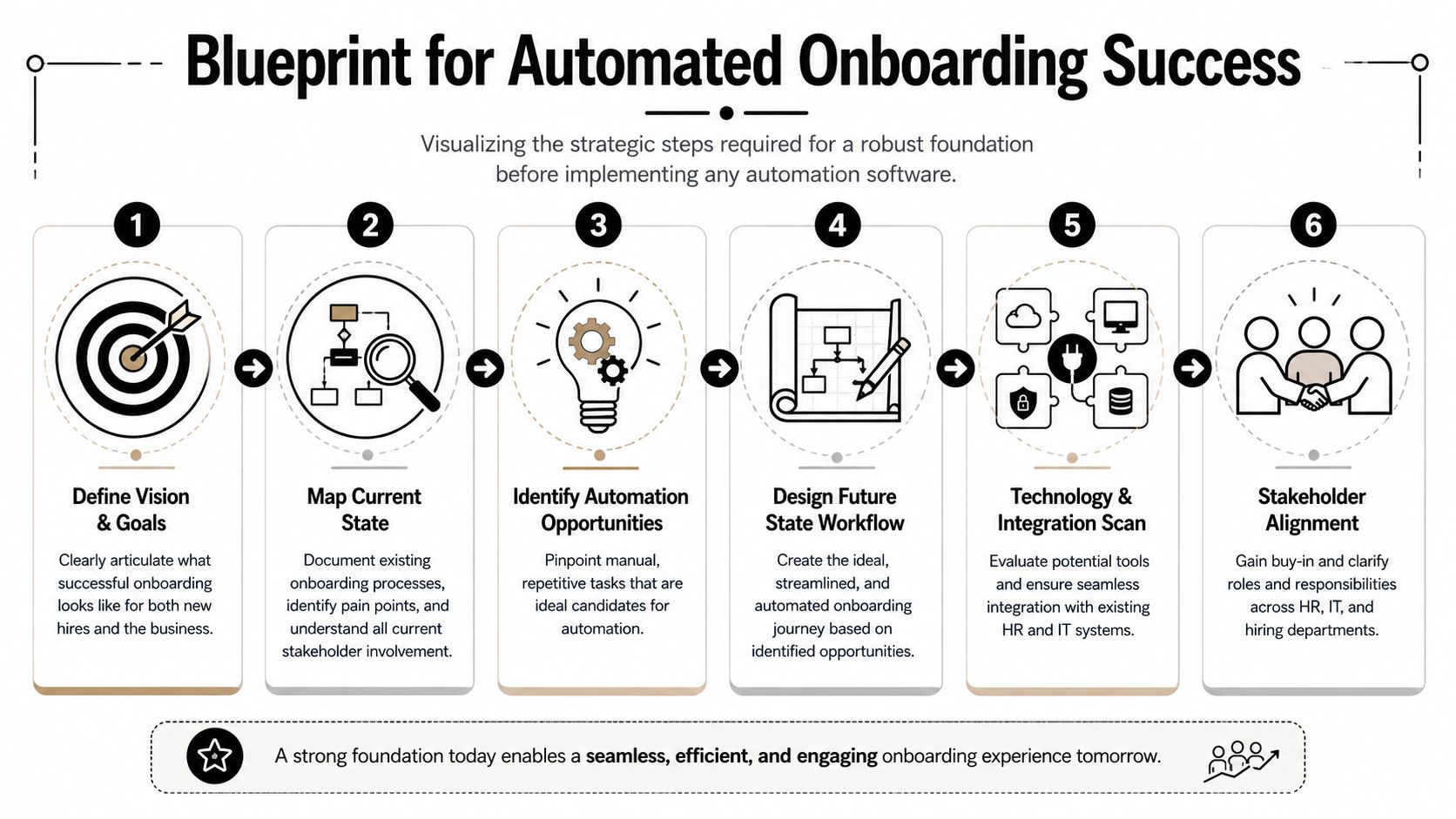
The biggest mistake teams make is buying workflow software before they've agreed on what a good onboarding experience should look like.
If you automate a messy process, you just create faster confusion. Good employee onboarding automation starts with process design, ownership, and decision rules. Software comes after that.
Start with the operating model
Before touching Zapier, Make, Workato, Rippling workflows, or any HR automation platform, document the current state. Organizations often think they know their onboarding process until they try to map it end to end.
You need one timeline that starts when the offer is signed and runs through the first 90 days. That timeline should show who acts, what system they use, what data they need, and what blocks progress.
A useful audit usually uncovers four categories of failure:
Data handoff gaps
Candidate data sits in the ATS, then gets re-entered into the HRIS, payroll, identity system, and project tools.Undefined ownership
HR assumes IT handles access. IT assumes HR submitted complete details. The manager assumes both are done.Role-based inconsistency
Sales hires need Salesforce, Gong, Slack channels, product training, and manager shadowing. Engineering hires need a completely different setup. A generic checklist doesn't survive contact with real teams.Exception chaos
Contractors, part-time staff, international hires, and executive hires all need slightly different paths. If those rules live in people's heads, the workflow breaks.
Design the future state before the stack
A strong design connects HR and IT from a single trigger. According to the Moveworks guide to enterprise HR onboarding automation, a new-hire record should trigger downstream provisioning, permissions, and onboarding tasks across identity, collaboration, and support tools, using rule-based access assignment and approval gates.
That sounds technical, but the practical implication is simple. The HRIS becomes the source of truth. Once a hire reaches the right status, systems should react automatically.
A future-state map should include at least these stages:
| Stage | What should happen | Primary owner |
|---|---|---|
| Pre-boarding | Welcome email, forms, policy acknowledgments, payroll setup | HR |
| Day 0 setup | Email, SSO, device request, software licenses, security groups | IT |
| Day 1 | Calendar, team intros, manager plan, orientation resources | Manager + HR |
| First week | Training assignments, role-specific systems, early check-ins | Manager |
| First 30 to 90 days | Goal setting, milestone reviews, feedback loops | Manager + HR |
What good planning looks like
A practical blueprint is specific enough to automate. That means defining rules such as:
- Department logic: Sales hires get one access bundle, product hires another.
- Location logic: Remote employees trigger shipping tasks, office-based hires do not.
- Approval logic: Standard access is automatic, sensitive systems require review.
- Communication logic: New hires receive different sequences based on role, seniority, and start date.
If your current onboarding relies on a spreadsheet plus tribal knowledge, clean that up first. A tighter process design will do more for outcomes than adding another app.
For teams standardizing the human side at the same time, these employee onboarding best practices are worth pairing with the workflow map. Automation works better when the experience itself is already intentional.
Don't design around tasks alone. Design around the moments where a new hire decides whether your company feels organized, welcoming, and worth committing to.
Building and Integrating Your Automation Stack
Once the process is clear, the technology decision gets easier. You're no longer shopping for “an onboarding solution.” You're deciding how data should move between systems and where workflow logic should live.
For most B2B SaaS companies, the stack usually includes five layers: ATS or recruiting, HRIS, identity and access, communication, and work management. The challenge isn't finding tools. It's making them behave like one system.
Native integrations versus middleware
The first architecture choice is whether to rely on native integrations or use middleware like Make or Zapier between systems.
Here's the practical comparison:
| Approach | Best for | Strengths | Weak spots |
|---|---|---|---|
| Native integrations | Common app pairs with simple logic | Faster setup, lower maintenance, vendor-supported | Limited branching, weaker exception handling |
| Middleware | Multi-step workflows across several systems | Flexible logic, approvals, routing, visibility | More design work, needs process discipline |
Native integrations are fine when the use case is straightforward. Example: a signed offer in your HR platform creates a basic IT ticket.
Middleware is stronger when one event should trigger several coordinated actions. For example, a “ready to onboard” status in the HRIS might create identity accounts, assign project templates in Asana, notify a hiring manager in Slack, open a laptop request in Jira Service Management, and send a pre-boarding email sequence.
Choose a source of truth
Many implementations frequently go wrong. Teams let multiple apps become partially authoritative.
Don't do that. Pick one system to own employment status and core new-hire attributes. In most cases, that's the HRIS.
Then define downstream behavior clearly:
- Identity layer: Okta or Microsoft Entra handles account creation and group membership.
- Communication layer: Slack or Microsoft Teams handles welcome channels and introductions.
- Project layer: Asana, ClickUp, Monday.com, or Jira handles role-specific onboarding tasks.
- Support layer: Jira Service Management, Zendesk, or similar tools handle hardware and support tickets.
- Documentation layer: Your e-signature and document systems store signed artifacts and acknowledgments.
Build for control, not just convenience
A good stack automates standard cases and routes edge cases to humans. That balance matters more than tool count.
I usually recommend three design rules:
- Automate only repeatable decisions: If a rule changes every week, fix the process before automating it.
- Keep approvals narrow: Use approval gates for sensitive access, not for every routine step.
- Log workflow outcomes: If something fails, HR and IT should see where and why.
If your team is comparing middleware patterns, this guide to HR process automation is a useful reference for how to structure cross-functional workflows without overengineering them. And if you're evaluating practical ways to reduce repetitive admin work in adjacent HR operations, LeaveWizard for HR efficiency is a relevant example of how workflow automation can simplify recurring people processes beyond onboarding.
The stack should feel boring once it's live. That's a good sign. New hires should experience coordination, not the architecture behind it.
Crafting High-Impact Automation Workflows
The best onboarding workflows don't look impressive in a systems diagram. They feel smooth to the person joining.
That means the automation has to cover three things at once: communication, access, and managerial follow-through. If one of those is missing, the process still feels incomplete.
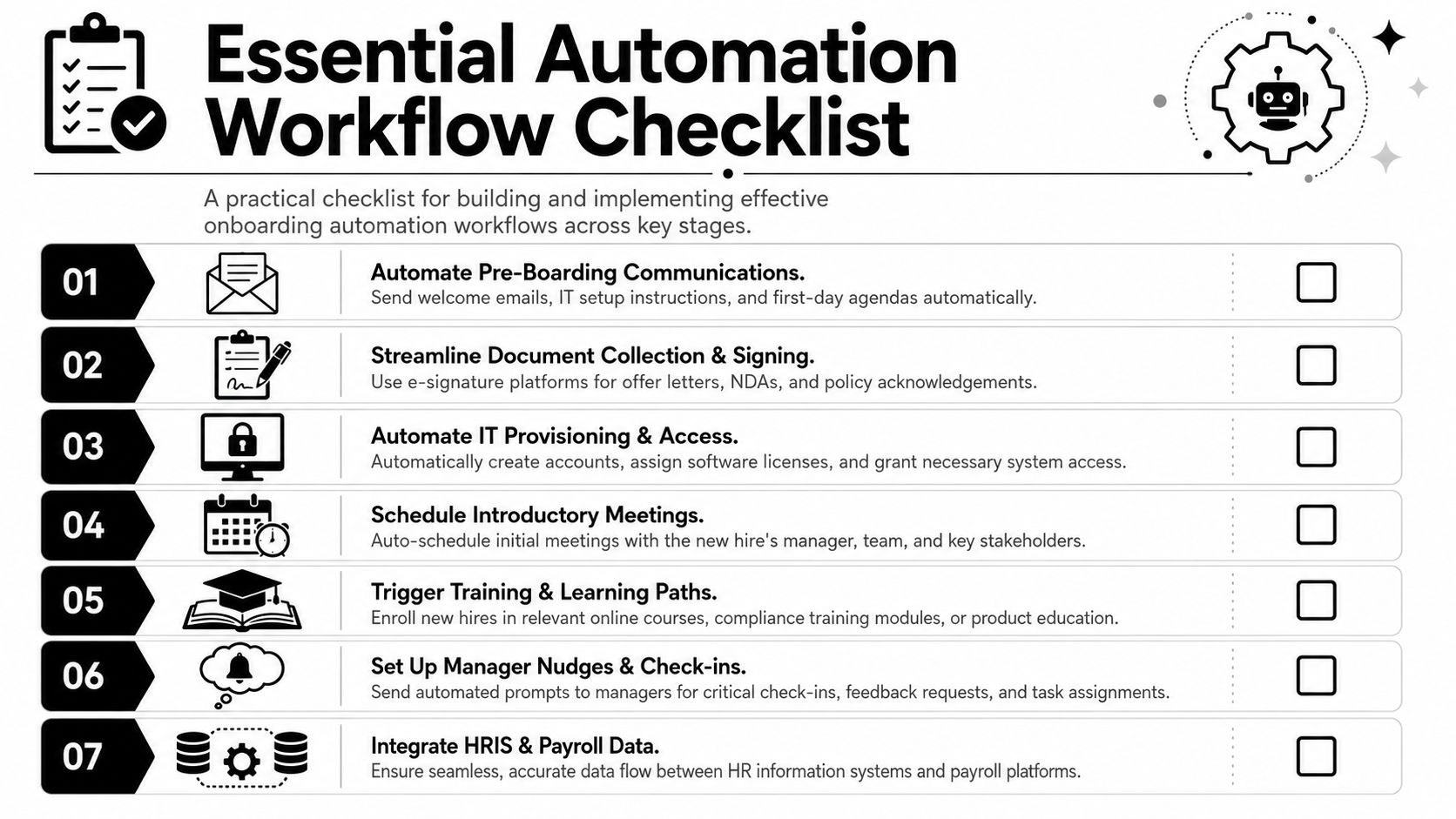
Workflow example for pre-boarding
A clean pre-boarding sequence removes uncertainty before the start date.
A practical version looks like this:
- Trigger: Candidate status changes to hired in the HRIS.
- Email sequence: The new hire receives a welcome message, start-date details, FAQ, and links for forms.
- Document workflow: Offer letter, tax forms, policy acknowledgments, and any role-specific agreements are routed for signature.
- Manager task creation: The hiring manager gets a checklist with team intro responsibilities, first-week plan, and role expectations.
- IT notification: Hardware, shipping, and baseline account setup requests are created automatically.
This is a good place to automate reminders. If forms aren't completed or shipping details are missing, the system should follow up without HR manually chasing people.
Workflow example for Day 1 readiness
Day 1 automation should be invisible. That's the point.
The new hire opens the laptop, signs in, accesses the right systems, sees a calendar that makes sense, and knows what happens next. Internally, several workflows may have fired in the background:
| Trigger | Automated action | Human touchpoint |
|---|---|---|
| Start date confirmed | SSO account created and group rules applied | IT reviews exceptions |
| Department assigned | Role-based app bundle provisioned | Security approves sensitive access |
| Manager assigned | Intro meetings placed on calendar | Manager hosts the meetings |
| Employment record active | Payroll and benefits setup sequence starts | HR answers exceptions |
A workflow is only “done” when the new hire can do useful work without asking for basic access.
To make this concrete, here's a short visual walkthrough before the next layer of workflows:
Workflow example for the first week and beyond
A lot of onboarding automation stops at provisioning. That's a mistake. Access is the starting line, not the outcome.
The first week should trigger role-specific enablement:
- Training enrollment: Sales reps enter product, CRM, messaging, and call-review modules. Engineers get environment setup, architecture docs, and security training.
- Stakeholder intros: Calendar events are scheduled with the manager, buddy, cross-functional peers, and key collaborators.
- Manager nudges: The manager gets reminders to cover expectations, success metrics, and common failure points for the role.
- Knowledge routing: The new hire gets links to the handbook, org chart, team SOPs, customer context, and escalation paths.
- Feedback collection: Short pulse surveys at sensible milestones capture confusion early.
What works and what doesn't
What works is selective automation.
What doesn't work is trying to replace every human interaction with a bot, a template, or an auto-sent email. New hires can tell when a company confuses responsiveness with warmth.
Strong employee onboarding automation handles the repeatable tasks with precision and leaves the meaningful touchpoints to people: the manager who sets context, the teammate who explains how things really work, the mentor who answers the awkward questions a help center never catches.
Measuring Onboarding KPIs and Proving ROI
Many organizations measure onboarding the wrong way. They report completion rates, ticket counts, and whether forms were signed on time.
Those metrics are useful operationally, but they don't prove business impact. Leadership wants to know whether employee onboarding automation changed retention, accelerated productivity, and reduced drag on the teams involved in ramping a new hire.
Start with outcomes, then work backward
The strongest measurement model connects workflow performance to business outcomes across the first 30, 60, and 90 days.
A good dashboard should include both leading and lagging indicators.
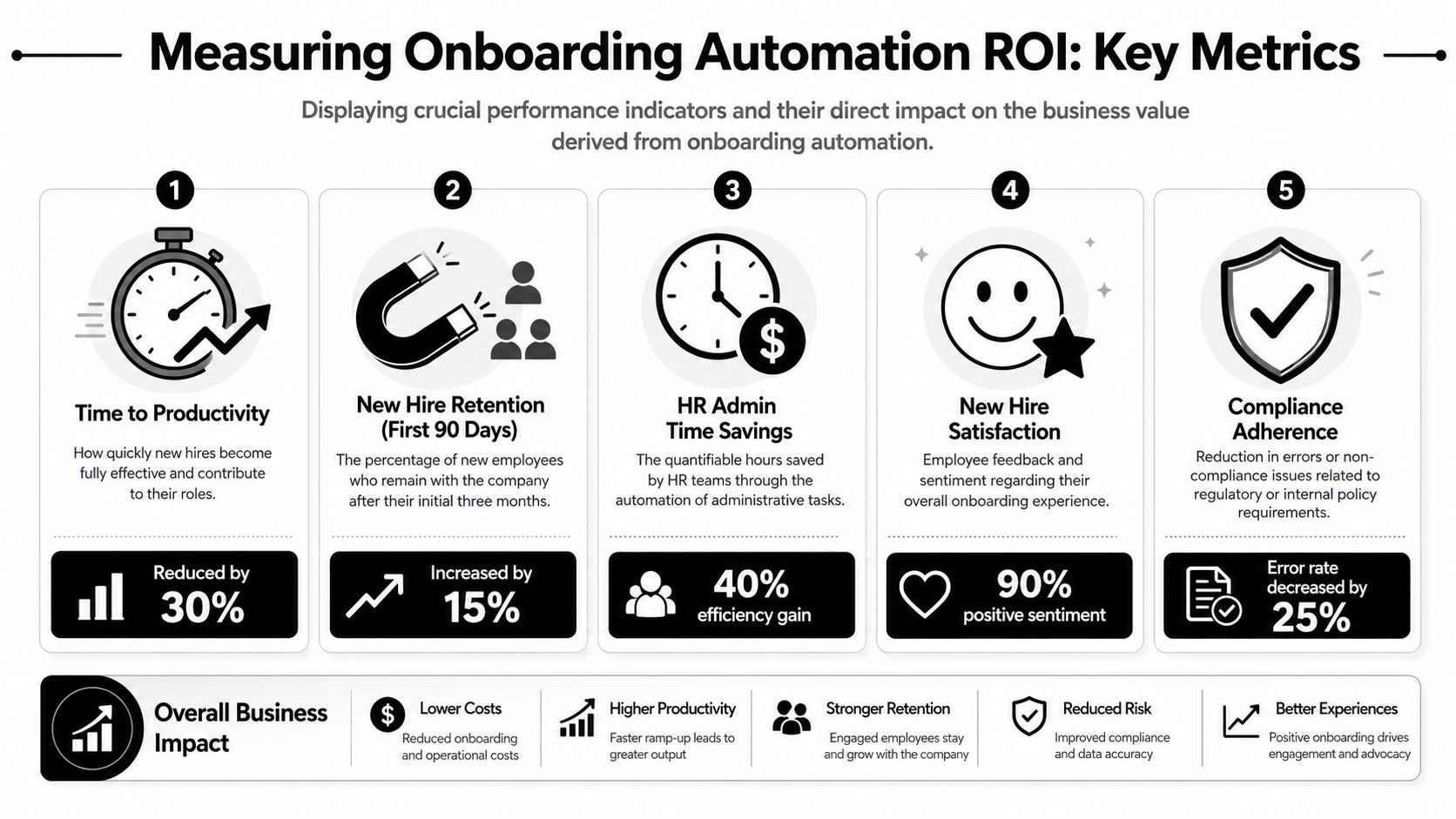
Here's the core structure I recommend:
| Metric type | What to track | Why it matters |
|---|---|---|
| Operational | Time to complete paperwork, account readiness, equipment delivery | Shows where friction still exists |
| Experience | New-hire pulse feedback, manager confidence, support volume | Reveals whether the process feels clear |
| Business | Early retention, time to productivity, first-value milestones | Proves whether onboarding is helping the company |
The measurement challenge is real. According to DocuStream's 2025 onboarding statistics roundup, automation can save 45–105 minutes per hire on paperwork and reduce onboarding time by 5 days, but the more important point is that strong onboarding is associated with 82% improved new-hire retention and productivity gains of over 70%. That's why task completion alone is too shallow a success definition.
A practical KPI framework
Break your KPIs into stages.
First 30 days
- Account readiness by start date
- Paperwork completion before Day 1
- New-hire clarity on role, manager expectations, and support channels
- Completion of role-critical training
Day 31 to 60
- Manager assessment of operational independence
- Reduction in setup-related support requests
- Progress against early role milestones
- Participation in team rituals and recurring meetings
Day 61 to 90
- Retention through the initial period
- Time to first meaningful output for the role
- Productivity benchmarks defined by department
- New-hire confidence and manager confidence trending in the same direction
Measurement warning: Faster onboarding is not the same as better onboarding. If people finish tasks sooner but still lack role clarity, your workflow improved administration, not outcomes.
How to build a defensible ROI case
The cleanest ROI case combines labor savings with downstream business impact.
Your model can include:
- Admin time removed from HR and IT
- Reduction in rework from incorrect or delayed provisioning
- Manager time recovered from chasing setup tasks
- Lower avoidable early attrition
- Faster contribution from new hires in revenue, delivery, or support roles
You don't need a complex finance model to get started. You need agreed definitions.
For example, define what “productive” means by job family. A salesperson might need CRM access, product certification, and a completed first pipeline activity. A customer success manager might need platform access, shadow sessions, and ownership of an initial account set. An engineer might need local environment readiness, repo access, and a merged first pull request.
If your team is building the broader reporting layer around these outcomes, this framework on operational efficiency metrics helps connect workflow data to executive-level decision making.
The ROI conversation gets easier when onboarding stops being measured as an HR process and starts being measured as a business system.
Implementing a Phased Rollout Roadmap
A full onboarding rebuild is generally too much to land in one release. The safer approach is phased rollout with clear ownership, narrow scope, and quick feedback loops.
That matters even more for remote and hybrid companies, where broken onboarding is harder to hide. In-office teams can patch gaps with hallway conversations. Distributed teams can't.
Phase the work by risk and dependency
Start with the tasks that are repetitive, high-friction, and easiest to standardize.
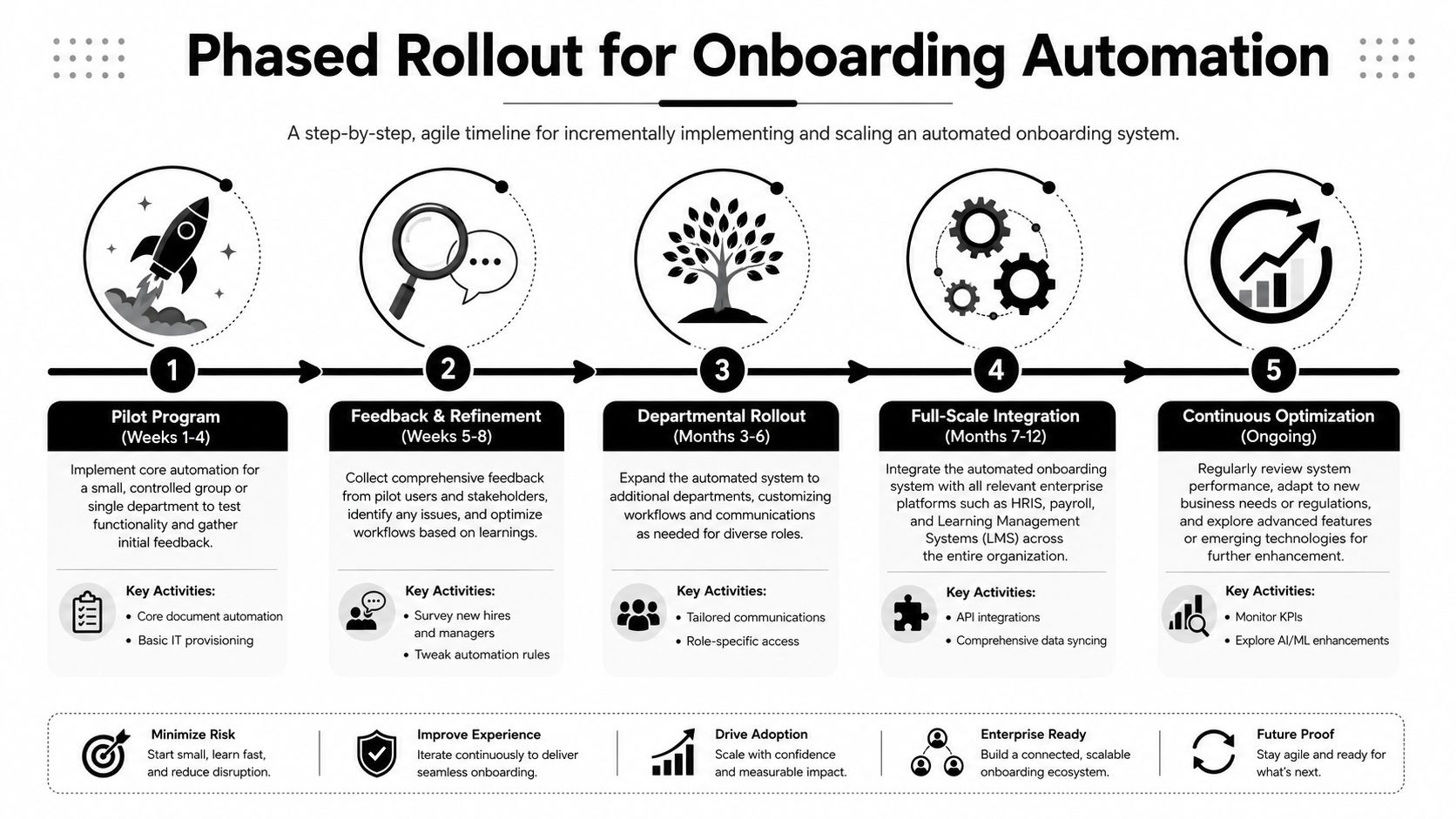
A practical roadmap usually looks like this:
Phase 1 for pre-boarding and access
Automate document routing, data capture, baseline account creation, and hardware requests. These are the highest-confidence workflows because they're repetitive and rules-based.
Keep the scope narrow. Pick one department or one hiring pattern first, such as full-time domestic hires.
Phase 2 for first-week enablement
Once the basics are stable, add manager checklists, training assignment workflows, intro meetings, and role-based task templates.
Process quality starts to matter more than technical setup. If managers disagree on what good onboarding looks like, the automation will expose that inconsistency quickly.
Phase 3 for 30 to 90 day follow-through
Add survey triggers, milestone reminders, probationary review workflows, and role-specific success checks. This is also where you start collecting the data that proves impact.
The best remote onboarding programs keep the admin side automated and the relational side explicit. As the Zendesk guide on onboarding automation notes, the goal is to automate tasks like paperwork and provisioning while keeping key touchpoints like manager check-ins and mentorship human-led.
Protect the human moments
Remote and hybrid teams need this distinction even more than office-based teams.
Automate:
- paperwork
- device provisioning
- training enrollment
- reminder nudges
- access requests
Keep human-led:
- first manager conversation
- team welcome
- role expectation setting
- feedback conversations
- mentorship and buddy interactions
A phased rollout works because it gives teams room to learn. If your first automation release eliminates paperwork chaos and Day 1 access problems, you've already removed the most damaging friction. The rest can mature in layers.
Beyond Automation A Culture of Continuous Improvement
Once employee onboarding automation is live, the analytical work starts. The workflows generate signals you didn't have before: where approvals stall, which roles need extra setup, what new hires ask repeatedly, which managers follow through, and where confusion clusters by department or geography.
That data should change how you run onboarding. Not once a year. Continuously.
Turn workflow data into operating insight
Teams often already have the raw inputs. They just don't review them together.
Look for patterns such as:
- repeated delays tied to one tool or approval step
- role types that need different access bundles
- training modules that are assigned but not used
- manager teams with stronger new-hire confidence than others
- recurring questions that should become documentation or self-service support
A mature program treats onboarding like product improvement. You release a version, watch behavior, collect feedback, and tighten the flow.
The most useful automation data isn't “what completed.” It's “where people still needed help.”
Use automation to create more human capacity
This is the point many companies miss. Automation is not the culture. It protects time for culture.
When HR is no longer buried in forms and follow-up emails, they can spend more time on coaching managers, improving role clarity, and supporting new hires who are drifting. When IT isn't manually provisioning every common app, they can focus on security and exception handling. When managers aren't chasing admin tasks, they can onboard.
That's also where more advanced use cases become worthwhile. Once the basics are stable, teams can personalize learning paths, route role-specific resources more intelligently, and expand self-service support without making the experience colder.
The strongest onboarding systems feel both structured and personal. That combination doesn't happen by accident. It happens when the repetitive work is automated and the human work is treated as the primary priority.
If your team is planning its first serious employee onboarding automation project, MakeAutomation can help design the workflow architecture, connect HR and IT systems, document the process, and build the reporting layer that shows whether onboarding is improving retention and productivity.