How to Improve Customer Onboarding Process for SaaS
Most advice on customer onboarding starts with checklists, welcome emails, and product tours. That advice misses the commercial problem. A customer doesn't renew or expand because your team completed its implementation tasks. They renew because the product reached a meaningful outcome quickly, the right people adopted it, and the buying organization can see continuing value.
A better way to understand how to improve customer onboarding process is to treat onboarding as a revenue control system. It should collect the customer context from sales, route each persona toward a relevant first outcome, automate predictable work, and alert an owner when progress stalls. The result isn't merely fewer support requests. It's a more reliable path from signed contract to willingness to pay, adoption, renewal, and expansion.
Why Onboarding Is a Revenue Engine
Many SaaS companies still treat onboarding as a post-sale service queue. Sales closes the account, implementation receives a handoff, customer success sends a generic checklist, and everyone waits for the customer to ask for help. That model creates an operational illusion: the team is busy, but the customer may not be moving toward value.
The commercial evidence points in a different direction. Research summarized by Paddle's customer onboarding analysis found that customers who viewed onboarding positively showed 12% to 21% higher willingness to pay than the median, while negative onboarding experiences corresponded with a 3% to 9% drop in willingness to pay. Onboarding therefore affects how customers value the product before they make renewal or expansion decisions.
That changes the budget conversation. You're not asking leadership to fund a nicer implementation experience. You're protecting the economics of the account lifecycle.
Value perception starts before renewal
Customers form an opinion about product value through early evidence. Did the platform connect to the systems they use? Did the administrator complete setup without repeated clarification? Did the end user perform the workflow that justified the purchase? Did the manager receive the report or control they expected?
These moments determine whether the customer experiences your product as an operating advantage or another system to maintain. A polished sales process can't compensate for an onboarding journey that introduces uncertainty immediately after signature.
Commercial rule: Every onboarding milestone should either prove a promised outcome, remove a known adoption barrier, or create evidence that the account is progressing.
This is why onboarding connects directly to customer lifetime value, not just support capacity. If your team shortens the path to an outcome, clarifies ownership, and gives each role a relevant reason to return, the customer has stronger evidence for continued investment. The operating principles behind that connection are also relevant to increasing customer lifetime value, especially when expansion depends on sustained product usage.
Replace activity reporting with outcome reporting
A completed kickoff call is an activity. It doesn't prove that the customer is ready to use the product. A sent email is an activity. It doesn't prove that the recipient understood the next step.
Track outcomes such as:
- Configured environment: The required workspace, integration, or permissions are ready.
- First meaningful workflow: The customer completes the action that represents real product use.
- Role adoption: Admins, users, and managers each reach the milestone relevant to their responsibilities.
- Business confirmation: The customer acknowledges that the initial use case is working or identifies a specific blocker.
- Expansion signal: Additional teams, workflows, or use cases begin appearing in the account.
This approach makes the handoff between sales, implementation, and customer success concrete. It also gives leadership a clearer view of risk. An account with every task marked complete but no meaningful workflow activity isn't healthy. An account with a small number of completed tasks and strong role-based usage may be progressing well.
The strongest onboarding programs don't ask whether the team delivered the process. They ask whether the customer has accumulated enough evidence to believe the purchase was correct.
Diagnosing Friction and Early Churn Risks
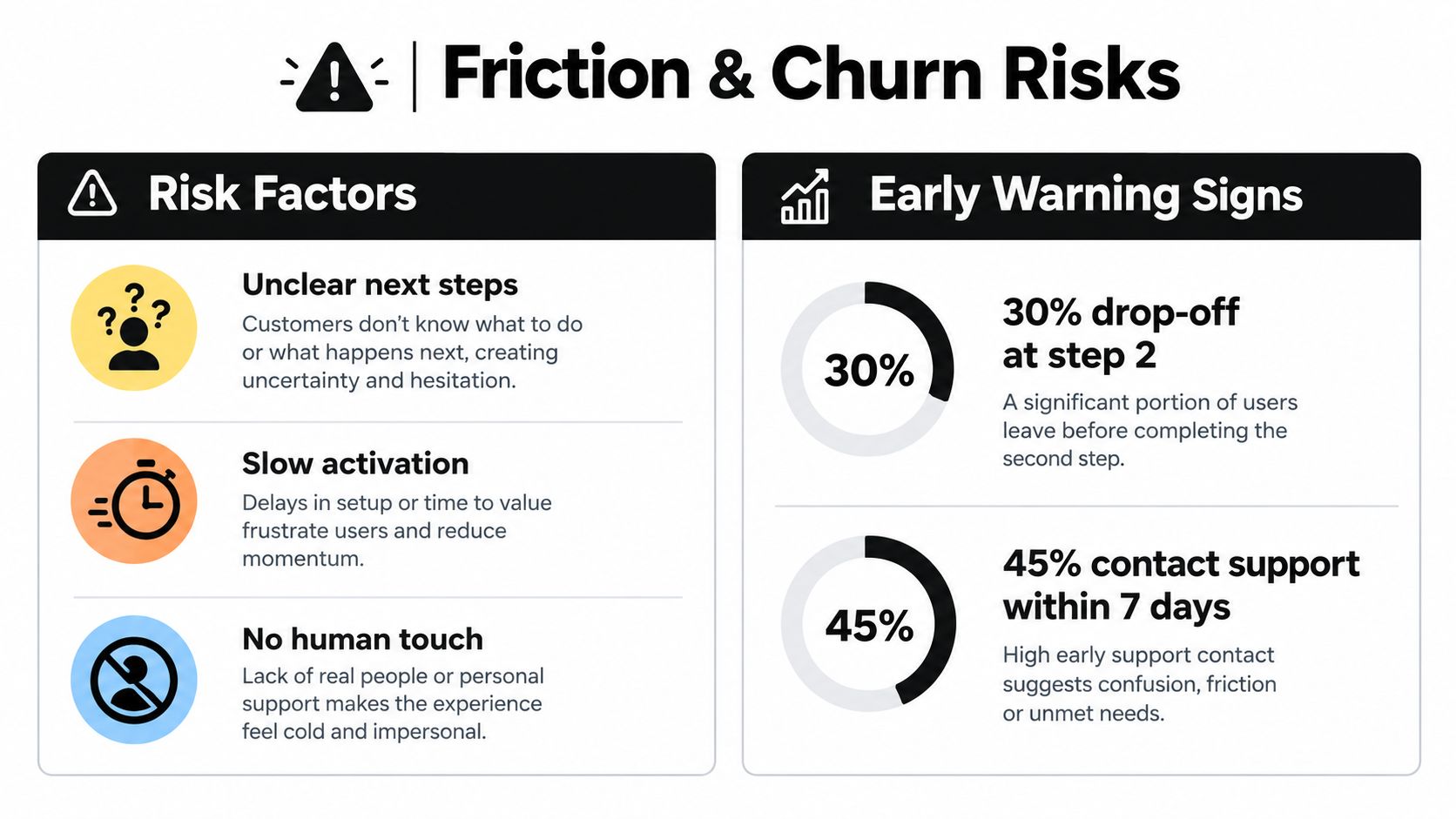
A stalled onboarding process is often a revenue warning before it becomes a support problem. Customers lose momentum at handoffs: sales promises are not translated into implementation requirements, access arrives late, the next task is unclear, or a product tour lists features without connecting them to the purchased outcome. Diagnose those breaks before adding automation, or you will automate confusion.
The speed problem is measurable. HubSpot reported that when a digital onboarding process takes longer than 20 minutes, 70% of customers completely abandon their attempt to open an account, as summarized in UserGuiding's onboarding research. The finding applies most directly to digital account creation, but the operational lesson extends to SaaS implementation. Customers form an early judgment about whether the effort is worth continuing, and that judgment affects willingness to pay long before renewal.
Find the breaks in the journey
Map the customer journey from contract signature through the first meaningful outcome. Follow customer actions and decisions rather than starting with internal departments. Record where the customer must wait, repeat information, choose between competing instructions, or request help.
Look for:
- Repeated data collection: Sales, implementation, and customer success ask for the same information because no shared record carries it forward.
- Unclear next steps: The customer receives several resources but cannot identify the action that drives progress.
- Delayed access: A user is asked to complete training before receiving the permissions or integrations needed to practise.
- Unowned exceptions: A customer stops progressing, but no system assigns the stalled account to a person.
- Feature-first education: The team demonstrates the product broadly instead of guiding the customer through the narrow workflow that motivated the purchase.
Audit where progress data lives. If sales stores goals in CRM notes, customer success tracks health in a spreadsheet, and product stores events in analytics, create one shared onboarding state object before adding alerts. Define the fields that signal progress, blockage, inactivity, and ownership. Automation can then route an intervention to the right person instead of producing another disconnected notification.
Decide when depth is justified
Long onboarding is not automatically thorough onboarding. A complex enterprise configuration may need workshops, data validation, and human review. A standard account may need a short checklist, contextual guidance, and a clear support route. Applying the enterprise path to every customer adds effort without necessarily increasing adoption.
Use a simple diagnostic:
- Can the customer reach a meaningful first outcome without expert intervention? If yes, make that path self-serve.
- Does the account have integration, compliance, migration, or organizational complexity? If yes, add human checkpoints where mistakes would be expensive.
- Does the customer show hesitation or inactivity? If yes, trigger targeted assistance instead of sending more generic content.
- Has the customer completed setup but not used the core workflow? Treat that as an adoption risk, not a successful implementation. Use these signals with customer churn reduction intervention playbooks to determine the next action.
The same source reports that 51% of customer engagement leaders say a meaningful share of customers take no meaningful action in the first 90 days. Monitor inactivity as a leading indicator, then assign an owner and response window before the issue reaches renewal.
At every step, ask: what customer decision does this step enable? If the answer is unclear, remove the step, combine it with another, or delay it until the customer needs it. That discipline keeps onboarding focused on evidence of value rather than completed tasks.
Mapping Persona-Specific Value Journeys
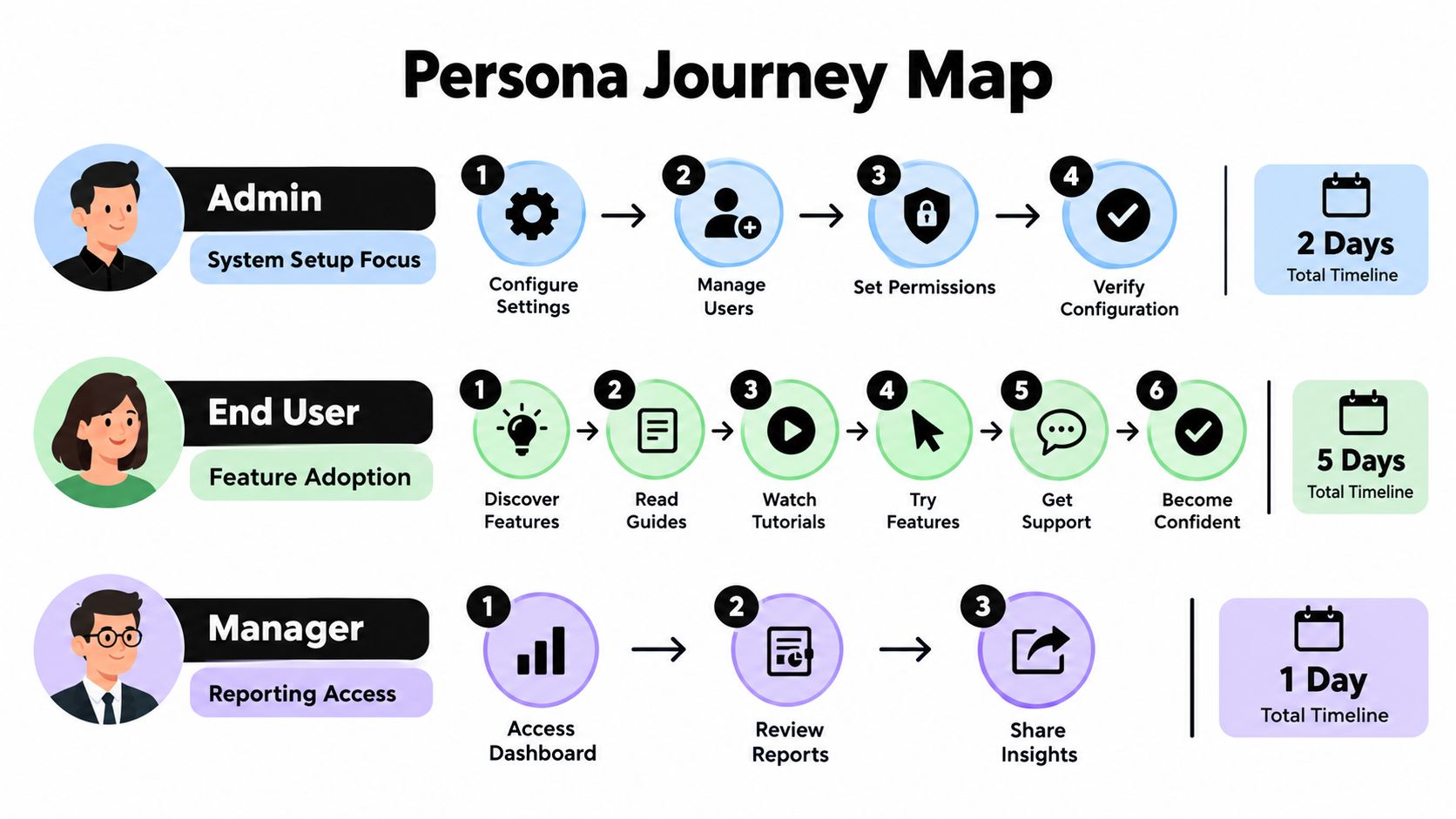
A single onboarding flow can't serve an administrator who configures the system, an end user who performs daily work, and a manager who needs visibility into results. They may belong to the same account, but they don't evaluate value through the same evidence.
Start with the purchase context, not demographic labels. The useful segmentation variables are role, intended workflow, technical responsibility, urgency, and account complexity. Company size can help, but it shouldn't determine the journey by itself. A small company with a complex integration may need more guidance than a larger team using a straightforward workflow.
Build the map from outcomes backward
For each persona, define the first outcome that would make the product feel useful. Then identify the minimum actions required to reach it.
| Persona | First value question | Useful onboarding emphasis |
|---|---|---|
| Administrator | Can I configure the environment safely? | Permissions, integrations, data structure, governance |
| End user | Can I complete my real work faster or more reliably? | Core workflow, examples, contextual guidance |
| Manager | Can I see whether the team is getting value? | Reporting, adoption visibility, business outcomes |
Keep each path concrete. An administrator may need a validated connection and a configured workspace. An end user may need to complete one representative workflow. A manager may need access to reporting and a concise explanation of what the data means.
The Planhat onboarding guidance recommends mapping onboarding by persona, setting a concrete engagement goal, collecting feedback after milestones, and iterating for high-value customer segments. That sequence prevents a common failure: building a polished checklist without defining what success looks like for the person using it.
Design different paths without creating chaos
Persona segmentation doesn't mean maintaining dozens of unrelated programs. Build a shared foundation, then vary the steps that prove value.
The shared foundation might include account provisioning, welcome communication, ownership assignment, access instructions, and support routes. The variable layer should control feature order, examples, required data, training format, and escalation rules.
For example, an administrator can receive a configuration checklist and integration validation prompt. Once those tasks are complete, the system can invite end users into a workflow-focused path. The manager can receive a reporting introduction when enough activity exists to make the report meaningful, rather than receiving an empty dashboard on day one.
Avoid forcing every persona through the same product tour. A manager doesn't need every configuration detail, and an end user shouldn't have to understand governance settings before completing a useful task. Personalization means removing irrelevant work, not adding more content.
Use feedback as a routing signal
Ask for feedback immediately after a milestone, while the experience is still easy to recall. Keep the question tied to the task: Was the setup clear? Did the workflow match the intended use case? What prevented completion?
Then connect the response to an action. A confused administrator might receive a guided setup call. An end user who reports that the workflow doesn't fit may be routed to a use-case specialist. A manager who can't interpret reporting may need a business review rather than another product tutorial.
High-value accounts can receive deeper human support, but the decision should follow risk and complexity signals. Smaller or simpler accounts should move efficiently through self-serve activation. The right model is not “personalize everything.” It's apply human attention where the customer's context makes automation insufficient.
Deploying Automation and AI Touchpoints
Automation should remove waiting, repetition, and manual routing. It shouldn't hide the customer behind a sequence of messages that never responds to their behavior.
Start with the handoffs that happen every time a deal closes. Capture the structured information from CRM fields, create the customer record, provision the agreed workspace, assign an owner, and send a role-appropriate welcome message. The workflow should also preserve the original use case and success criteria, so the customer doesn't have to restate the purchase rationale to implementation.

Automate the predictable path
A practical onboarding workflow can use tools such as HubSpot or Salesforce for account context, a product analytics platform for event signals, and an automation layer such as Make or Zapier for routing. The exact stack matters less than the event design.
Useful triggers include:
- Contract signed: Create the onboarding project, assign ownership, and generate the customer workspace.
- Integration connected: Remove the setup task, reveal the next relevant instruction, and notify the implementation owner.
- Core workflow completed: Record the first-value milestone and send a role-specific follow-up.
- Inactivity detected: Create a task for the owner and send a message that addresses the missing action.
- Negative feedback submitted: Route the account to a person instead of continuing the standard sequence.
AI can support these workflows when it has a defined job. It can summarize sales notes, identify missing implementation details, classify customer questions, draft personalized responses, and suggest the next action from product behavior. An AI voice agent can handle an initial discovery or orientation conversation for straightforward accounts, while a human takes over when the discussion involves complex requirements, risk, or commercial sensitivity.
Automation should decide what happens next, not simply send more messages.
Keep human intervention intentional
Human support belongs at moments where judgment matters. Examples include a migration failure, a security review, a multi-team rollout, or a customer whose stated goal conflicts with actual usage. Automation should surface those cases early and give the human owner the context needed to act.
Don't use AI to imitate empathy while leaving the underlying process broken. A chatbot can't compensate for missing permissions, unclear ownership, or a product path that asks users to complete irrelevant steps. Use AI for customer retention when it can interpret signals and accelerate a real intervention.
Test every automated branch against failure conditions. What happens if the customer skips a step? What happens if an integration event fails? What happens if the user replies by email instead of clicking the in-app prompt? A reliable workflow has retries, ownership, and an exit to human support.
A short, outcome-anchored checklist generally beats a long linear tour. Customers should see why the next action matters, how to complete it, and what will happen after completion. If the workflow can't answer those questions, automation will scale confusion rather than value.
Tracking Health and Operational Visibility
Onboarding health isn't a single score. It's a view of whether the customer has the access, activity, ownership, and outcome evidence required to progress.
Build the dashboard around events that different departments can act on. Sales needs to know whether the promised use case survived the handoff. Implementation needs to know which dependency is blocking configuration. Product needs to see where users stop. Customer success needs a current account state and a clear intervention queue.
A useful system has three layers:
- Customer state: Segment, persona, use case, plan, complexity, owner, and target outcome.
- Behavioral evidence: Login or session activity, setup completion, integration status, workflow completion, support interactions, and feedback.
- Operational response: Assigned task, escalation level, next action, due date, and resolution status.
The dashboard should distinguish between not started, in progress, blocked, complete, and verified. “Complete” means the customer performed the task. “Verified” means the customer or internal owner confirmed that the task produced the intended result. That distinction prevents teams from mistaking checkbox completion for adoption.
Give each department an action, not just a metric
| Department | Primary Metric | Action Trigger |
|---|---|---|
| Sales | Handoff completeness | Missing goal, stakeholder, or promised capability creates a return task before kickoff |
| Implementation | Dependency resolution | Integration, data, or permission blocker remains open and receives an owner |
| Product | Milestone progression | Users repeatedly stop at the same workflow step, prompting product review |
| Customer success | Verified first value | Account reaches setup completion without core workflow activity, triggering outreach |
| Operations | Workflow reliability | Automation fails, duplicates, or lacks an owner, creating an incident task |
Use cohort views to compare onboarding paths by persona and customer type. The purpose isn't to produce a decorative report. It's to identify which sequence creates progress and which sequence creates support demand without adoption.
Create alerts that people can handle
Alerts should be specific enough to prompt a decision. “Account health declined” is weak. “Administrator completed setup, but no end user completed the core workflow, and the account has no scheduled follow-up” gives the owner a reason to act.
Set thresholds around meaningful states rather than arbitrary activity. A customer who logs in repeatedly but never completes the target workflow may need guidance. A customer who doesn't log in at all may need a different intervention. A manager who hasn't opened reporting may not be at risk if the account is still configuring, so the alert should depend on sequence and context.
The verified industry data identifies real-time visibility, internal communication, early action, and automation investment as persistent operational gaps. Treat those gaps as system design requirements. A shared dashboard, consistent event names, and explicit ownership can give a lean team cross-functional visibility without adding another layer of meetings.
Executing the Onboarding Optimization Rollout
Don't rebuild onboarding while guessing. Start with evidence from recently onboarded accounts, support conversations, sales handoff notes, product events, and customer feedback. Select a narrow use case or segment for the first rollout, then preserve the existing path for active customers until the replacement has passed basic checks.
Phase one maps the current reality
Document every step from signature to first value, including actions that happen in spreadsheets, inboxes, Slack, and CRM notes. Mark each step with its owner, input, output, customer dependency, and failure mode.
Look for duplicated questions, manual provisioning, unclear escalation, and milestones that are reported internally but never verified with the customer. Don't optimize a fictional process. The current-state map should reflect what customers experience.
Phase two designs the control logic
Define the shared foundation and persona-specific branches. For every branch, specify:
- Entry condition: What event starts the path?
- Required action: What must the customer or team complete?
- Evidence: Which event proves completion?
- Exception: What happens when the action fails or stalls?
- Owner: Who receives the task?
- Exit condition: What confirms the customer reached the intended outcome?
Write these rules before building in your automation platform. Clear logic makes it easier to review the workflow with sales, CS, product, and implementation.
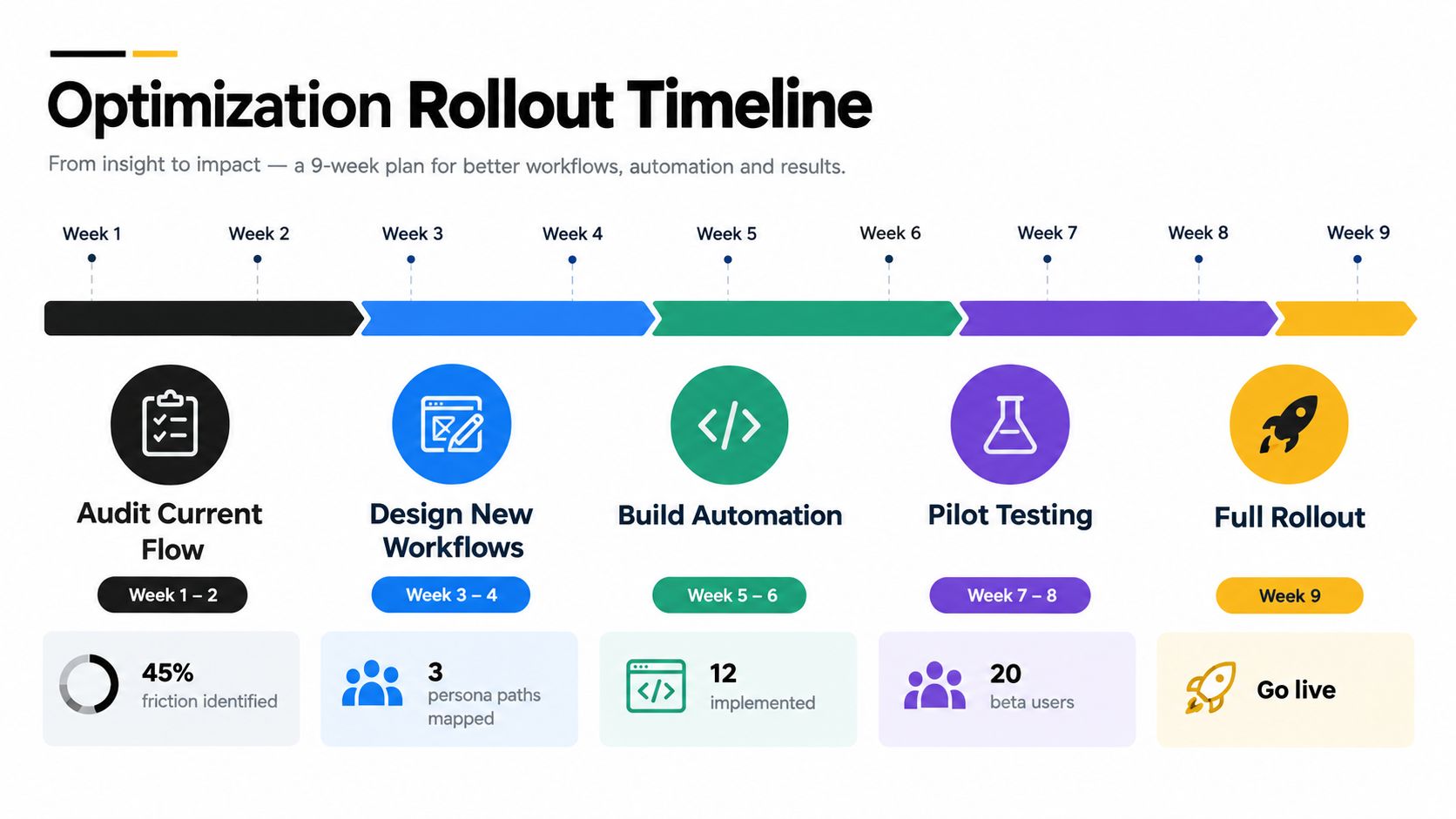
Phase three pilots the smallest useful change
Run the new sequence with a controlled group while similar accounts continue through the current process. Test one meaningful change at a time where possible, such as a shorter setup path, a different persona branch, or a trigger based on actual product behavior.
Review both customer outcomes and operational side effects. Did the customer reach the intended milestone? Did support volume become more complex? Did the owner receive useful context? Did automation create duplicate tasks or inappropriate messages?
Keep a written standard operating procedure for each workflow. Include screenshots, trigger definitions, escalation rules, and the manual fallback. New team members should be able to understand what happens when an event arrives and what to do when it doesn't.
Phase four expands with cohort review
After the pilot, compare the new and existing journeys qualitatively and quantitatively using your own baseline data. Review time to first value, milestone completion, stalled accounts, intervention volume, customer feedback, and workflow failures. Don't declare success because a sequence launched. Declare success when the process produces clearer progress and more reliable action.
Roll out by segment rather than switching every account at once. Keep a rollback path, communicate changes to internal owners, and review the first cohorts frequently enough to catch unexpected friction. Onboarding optimization is an operating discipline, not a one-time project.
The practical test is simple: can your team see which customers are progressing, understand why a customer is stuck, and trigger the right next action without reconstructing the account history manually? If not, keep refining the control system.
MakeAutomation helps B2B and SaaS teams document onboarding workflows, automate account provisioning and welcome sequences, assign ownership, and connect AI-enhanced operations to practical customer journeys. Visit MakeAutomation to discuss an onboarding workflow built around your needs, automation framework, or AI and voice agent implementation for your team.