
Payment Processing Automation: A B2B & SaaS Guide
Your finance lead is chasing approvals in email, someone exported a CSV from the ERP to “speed things up,” a vendor says they still haven't been paid, and month-end close turns into a forensic exercise. That's where a lot of B2B and SaaS companies start. Not with a grand automation strategy, but with friction that has become normal.
Payment processing automation matters because manual payment operations don't just waste time. They distort cash visibility, create control gaps, and force good people to spend their days on rework instead of judgment. The companies that get this right don't treat it as a finance-side convenience project. They treat it as operating infrastructure.
Why Manual Payments Are Costing More Than Just Money
Manual payment workflows look manageable right up until volume rises, headcount stays flat, or a key person goes on leave. Then the cracks show fast. Approvals stall, duplicate checks creep in, payment status lives in Slack threads, and reconciliation becomes a second job.
The direct cost case is already strong. Manual invoice processing is estimated at about $15 per invoice and can take 14.6 days end to end, while high automation levels can reduce invoice handling costs to $1.77 per invoice. In the same benchmark set, top performers spent $2.07 per invoice compared with nearly $10 for the lowest performers, with the gap tied closely to automation maturity, according to these AP automation benchmarks.
The hidden costs usually hurt more
The labor line item is only the visible part of the problem. The larger cost often sits in second-order effects:
- Approval drag: Finance teams wait on approvers, then pay late because the workflow lacked structure, not because cash was unavailable.
- Supplier friction: Vendors lose confidence when payment timing is unpredictable or remittance data is incomplete.
- Control weakness: Teams create side processes in spreadsheets when the system of record can't keep up.
- Poor forecasting: Treasury and finance leaders work with stale or partial status data, so cash planning gets less reliable.
Practical rule: If your team can't answer “what's approved, what's scheduled, what failed, and what posted back” without opening multiple systems, your payment operation is already too manual.
There's also a strategic cost. Manual payment handling teaches the company to tolerate operational ambiguity. People start building around the process instead of fixing it. That usually means more exceptions, more heroics, and less confidence in finance data.
A good first step is to compare your current workflow against a more structured model. If you're evaluating whether the problem is process design, tooling, or both, this guide on how to automate invoice processing gives a useful starting point. For a side-by-side look at where manual workflows break down in practice, you can also explore Suby for automated payments.
Failing to automate is still a decision
Many teams delay automation because the current process “works.” Usually it works because experienced staff are compensating for weak systems every day. That's expensive, brittle, and hard to scale.
Payment processing automation isn't only about speed. It's about replacing undocumented habits with a repeatable operating model that survives growth, audits, turnover, and product expansion.
Designing Your Payment Automation Blueprint
A lot of automation projects go wrong before implementation starts. The team buys software first, then tries to force the business into it. The better path is to design the operating model first, then fit technology to that model.
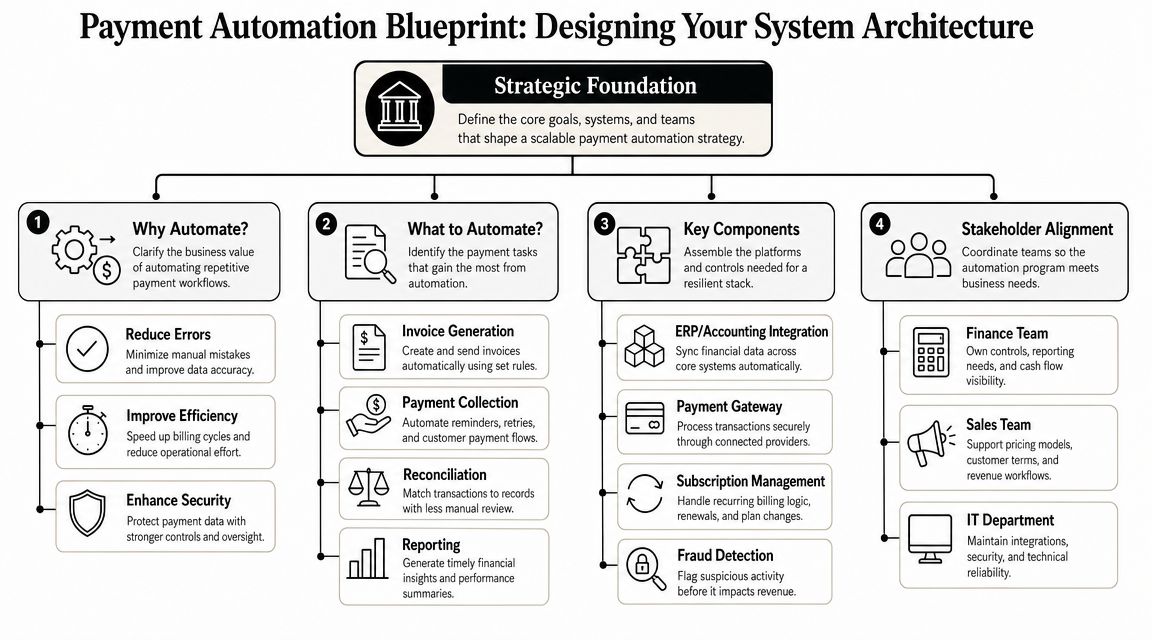
Start with the transaction lifecycle
A complete payment automation system should orchestrate the full transaction lifecycle. It should ingest invoices, route approvals, execute transfers, and post ledger updates without manual re-entry. A strong benchmark is whether the platform supports real-time reconciliation across multiple payment types and enforces security controls like encrypted data handling, as outlined in TreviPay's guide to B2B payment automation.
That sounds technical, but it's easier to understand if you think of the architecture as four connected layers:
| Layer | What it does | What usually breaks |
|---|---|---|
| Intake | Receives invoices or payment instructions | Fragmented channels and missing data |
| Decisioning | Applies approval rules and payment logic | Unclear ownership and exception routing |
| Execution | Sends payments through the right rails | Weak bank connectivity or limited payment coverage |
| Reconciliation | Posts outcomes back to finance systems | Manual matching and delayed status visibility |
If one layer is weak, the whole workflow leaks work back to humans.
Map systems before you map vendors
Most B2B and SaaS companies already have the core systems involved. The issue is that they weren't designed as one payment operation. You may have an ERP, a billing platform, a CRM, a bank portal, an AP tool, and several local workarounds.
Before anyone takes a vendor demo, map these questions:
- Where does a payable or payment instruction originate?
- Who approves it, and under what rules?
- What system executes the payment?
- Where does the final status land?
- How are exceptions handled when the workflow fails?
A clean architecture doesn't eliminate exceptions. It routes them deliberately instead of burying them in email.
This is also where “build versus buy” becomes practical, not philosophical. If your business has straightforward AP flows, standard approval routing, and common ERP requirements, a platform approach often makes sense. If you run subscriptions, marketplaces, partner payouts, multi-entity operations, or custom billing logic, you may need a more composable architecture.
For teams operating recurring revenue models, it helps to understand how orchestration decisions affect billing, collections, and retries across the stack. This piece on optimizing payments for subscription businesses is useful because it frames payment design as a business model decision, not just an integration task.
Design for scale, not just go-live
The architecture should support today's flows and next year's complexity. In practice, that means planning for:
- Multiple payment types: ACH, cards, bank transfers, and vendor-specific methods
- Entity growth: New subsidiaries, regions, and approval structures
- Operational visibility: Finance needs status, exceptions, and reconciliation data in one place
- Security boundaries: Sensitive payment data should stay controlled, encrypted, and auditable
- Fallback paths: Some counterparties will still require manual or paper-based handling at times
The blueprint should answer one hard question early: when transaction volume rises, will the system absorb the load, or will your team?
Selecting Your Payment Automation Technology Stack
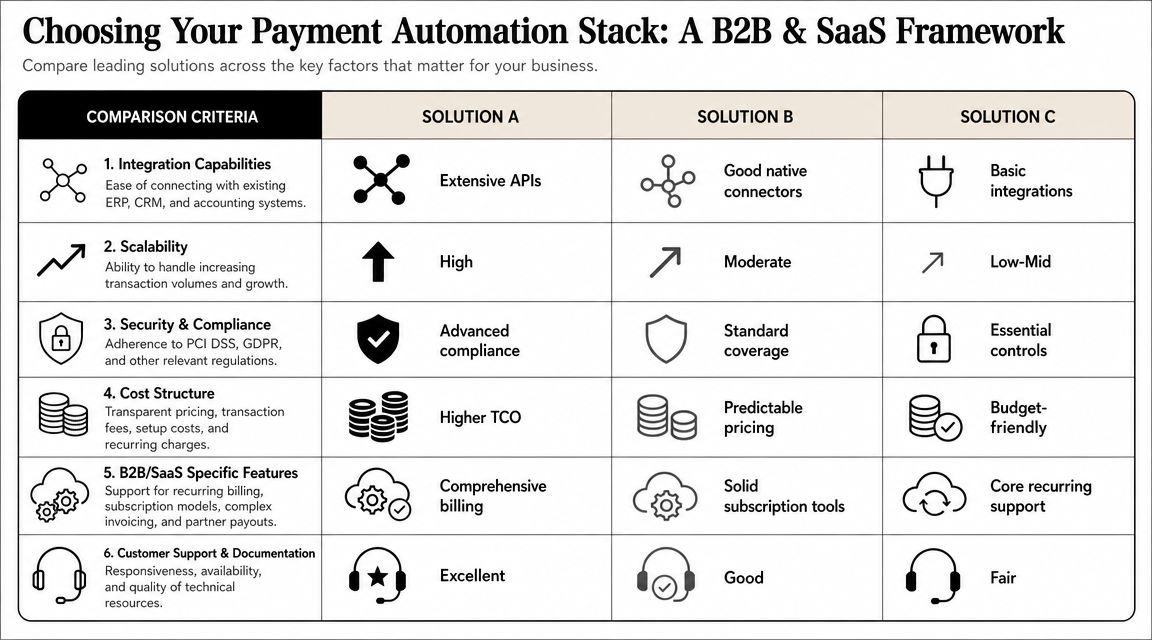
There are two common paths. The first is an all-in-one platform. The second is an API-first, composable stack. Neither is universally better. The right answer depends on process complexity, internal technical capacity, and how much control you need over the payment lifecycle.
When an all-in-one platform is the right call
Platforms such as Bill.com or Stampli are usually the right fit when the main problem is process discipline. They can standardize invoice intake, approval routing, payment execution, and AP visibility without requiring a large engineering effort.
That works well when your company has:
- Conventional AP workflows
- A small internal engineering team
- One or two core finance systems
- A need to move quickly with lower implementation burden
The downside is rigidity. If your billing logic, payout logic, or customer structure is unusual, platform assumptions can become constraints.
When API-first wins
Tools such as Stripe or Adyen fit better when payments are tied tightly to your product or you need custom orchestration across systems. API-first architectures usually give you more control over routing, event handling, product-level logic, and reporting consistency.
They fit companies with:
- Complex revenue models
- Product-led payment experiences
- Marketplace or partner payout needs
- Engineering resources that can own payment infrastructure responsibly
But flexibility has a cost. More moving parts mean more integration effort, more operational ownership, and more ways to misconfigure the system.
Use a selection framework, not a feature checklist
Most buying mistakes happen because teams compare feature grids instead of operational fit. Ask these questions instead:
| Decision area | What to ask |
|---|---|
| Integration | Does it connect cleanly to your ERP, accounting, billing, and bank stack without manual re-entry? |
| Workflow control | Can it support your approval logic, exception handling, and entity structure? |
| Reporting | Will finance get status, settlement, failure, and reconciliation data without exporting everything to spreadsheets? |
| Support model | Who helps when a payment fails, a sync breaks, or a bank format changes? |
| Roadmap fit | Will this stack still work when you add products, geographies, or payment methods? |
An overlooked question is whether the vendor thinks in terms of transactions only, or systems. If they can't explain how data flows back to your ledger and reporting environment, they're not solving the full problem.
What works: Choose the stack that reduces operational complexity for your actual business model.
What doesn't: Buying the most configurable tool when nobody internally can govern it.
For companies watching where payment infrastructure is headed, the idea behind the Machine Payments Protocol is worth understanding. It points toward a future where systems increasingly transact with less human intervention, which makes architecture and control design even more important now.
If your team is still comparing broad categories of tooling rather than specific payment vendors, this overview of business process automation tools helps frame where payment automation fits inside the larger operating stack.
The Implementation Playbook From Pilot to Production
Most payment automation failures are not software failures. They are rollout failures. The technology is capable, but the company underestimates data cleanup, training, workflow design, or pilot discipline.
Start with a phased plan.
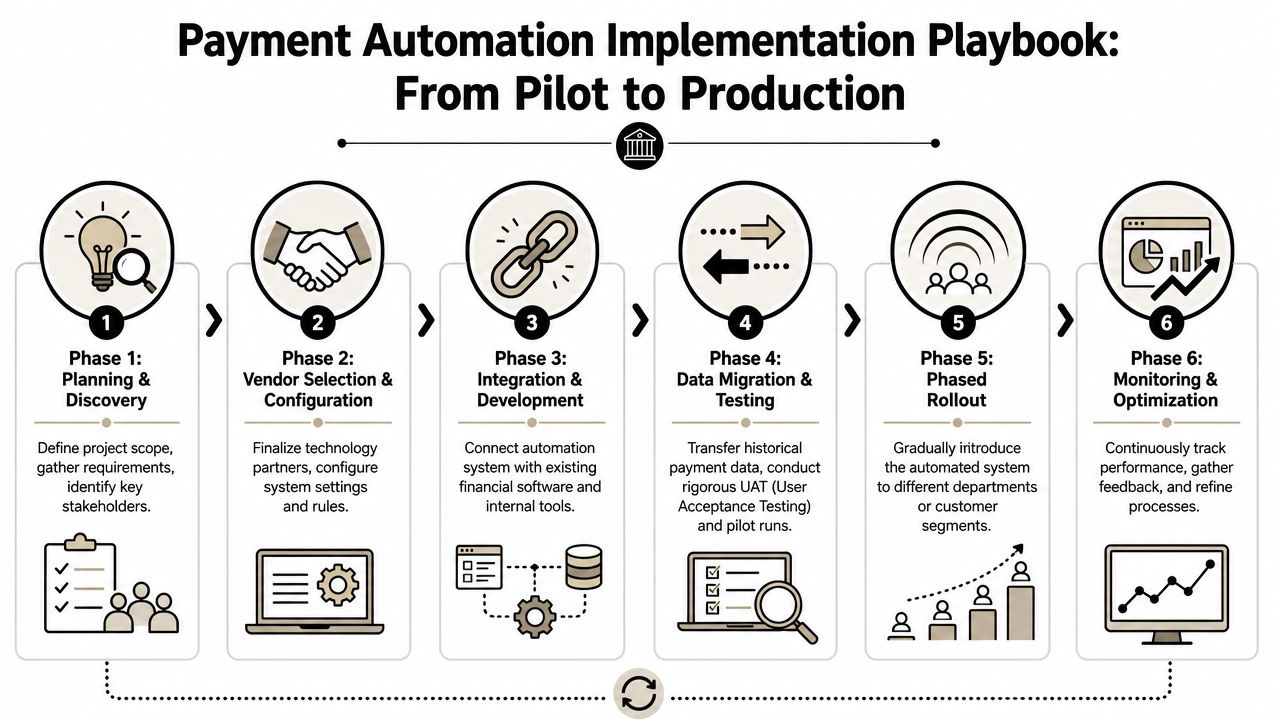
Follow the four stages without skipping the boring parts
A successful B2B payment automation rollout typically follows four technical stages: benchmark the current state, select a platform, configure workflows and data, and run pilot tests before full deployment. Practitioners also call out three recurring pitfalls: weak ERP integration, insufficient training, and skipping pilot validation, as covered in Stampli's rollout guidance.
Here's how that looks in practice.
Benchmark the current state
Don't start with software configuration. Start with measurement and process mapping.
Document:
- Current intake channels: email, portal uploads, paper, EDI, billing systems
- Approval patterns: who approves, what triggers escalation, where delays occur
- Execution points: bank portals, AP tools, treasury systems
- Posting logic: how payment outcomes return to the ERP or accounting platform
- Exception categories: duplicates, vendor master errors, failed payments, missing remittance details
This stage surfaces underlying bottlenecks. In many companies, the problem isn't payment execution. It's poor vendor data, fragmented approvals, or weak handoff between AP and accounting.
Select and configure for your real edge cases
Configuration is where teams often oversimplify. They set up the happy path and assume they're done.
You need workflows for normal volume and ugly situations:
- recurring payments
- batch payments
- foreign exchange scenarios
- approval delegation during leave
- partial failures
- vendor changes mid-cycle
- payment reversals or retries
A short video walkthrough can help teams align on what a staged rollout should look like in operational terms.
Treat integration as a control problem
ERP integration isn't just an IT task. It's the backbone of financial control. If the payment platform and ledger drift apart, your automation project becomes a reconciliation project.
Build explicit test cases for:
- Master data sync failures
- Approval status mismatches
- Duplicate invoice detection
- Failed payment posting
- Settlement timing differences
- Void or reversal handling
If your team says “we'll catch that in month-end close,” the integration design isn't finished.
Run a pilot that is narrow enough to learn from
The pilot is the most important stage because it's where workflow defects become visible while the blast radius is still small. Keep scope intentionally narrow, but not so narrow that you avoid complexity.
A good pilot includes a controlled mix of:
- Standard invoices
- Known exception scenarios
- At least one non-routine approval path
- A few vendors or entities with different payment requirements
What doesn't work is piloting with only your cleanest vendors and friendliest approvers. That gives false confidence.
Train roles, not just users
Most rollout training is too generic. “Here's the new system” is not enough. Train by responsibility:
| Role | What they need |
|---|---|
| AP staff | Exception handling, payment queues, reconciliation review |
| Approvers | Approval logic, delegation rules, SLA expectations |
| Accounting | Posting logic, failure states, correction paths |
| IT and systems owners | Integration monitoring, user provisioning, incident response |
When training is shallow, users recreate manual side processes outside the platform. Then leadership thinks adoption is fine because payments are moving, while the core work has just shifted.
Move to production with governance in place
Before full deployment, confirm who owns:
- vendor master governance
- workflow changes
- approval policy updates
- bank connection oversight
- incident response
- reporting and KPI review
Production isn't the finish line. It's when the system starts interacting with real organizational messiness. The teams that handle that well usually have clear owners, clean escalation paths, and a standing review cadence for exceptions.
Navigating Payment Compliance and Security
Security is not a layer you add at the end. In payment processing automation, it is the operating condition that determines whether the system deserves trust.
The common mistake is assuming automation automatically lowers risk. It can reduce some categories of manual error, yes. But that doesn't mean total risk falls. A key question is whether automation improves the net risk-adjusted economics across fraud, compliance, and labor. Automation can shift costs rather than eliminate them. Manual reconciliation work may fall, while new risks emerge from process misconfiguration or over-automation of approvals, according to this industry perspective on payment processing risk.
What risk shifts look like in the real world
Manual environments create obvious problems. People key data incorrectly. Approvals happen in inboxes. Payment evidence is scattered.
Automated environments create different ones:
- Workflow misconfiguration: An approval threshold is wrong, so payments bypass intended review.
- API trust assumptions: A connected system sends bad data, and the platform processes it at machine speed.
- Excessive access: Too many people can change vendor, bank, or rule settings.
- Weak exception governance: Failed or unusual transactions sit in queues without clear ownership.
That means your security posture has to be designed around the new process, not inherited from the old one.
Build controls around the automation, not inside wishful thinking
A secure payment automation program usually includes the following controls:
- Role-based access: Separate who can approve, who can configure, and who can release payments.
- Auditability: Every approval, change, and exception action should be traceable.
- Encrypted data handling: Sensitive payment data should be protected in transit and at rest.
- Change management: Workflow edits and integration changes should move through review, not ad hoc admin tweaks.
- Exception ownership: Every failed sync, payment rejection, and suspicious change needs an accountable team.
Security reviews should inspect business logic, not just infrastructure. A perfectly secure system can still approve the wrong payments if the rules are wrong.
For engineering and operations teams, secret handling is one of the practical weak points in automated payment stacks. API credentials, bank connection tokens, and integration keys need disciplined storage and rotation. This guide to DevOps secrets management is relevant because payment automation often fails through ordinary operational shortcuts, not exotic attacks.
A simple review checklist
Use this before go-live and after major changes:
- Can one person create, approve, and release a payment end to end? If yes, fix segregation.
- Can workflow logic be changed without review? If yes, tighten change control.
- Do exception queues have named owners? If no, issues will age unnoticed.
- Can finance trace a payment from instruction to ledger posting? If no, your controls are incomplete.
- Are access reviews scheduled and enforced? If no, privileges will drift.
Efficient payments matter. Trusted payments matter more. In B2B and SaaS environments, buyers and finance leaders rarely forgive control failures, even when the automation project looked successful on paper.
Measuring ROI and Scaling Your Automated System
The strongest ROI case for payment processing automation is rarely “we reduced keystrokes.” It's that the finance operation becomes faster, more accurate, and more scalable without turning every growth milestone into a staffing problem.
Automated systems can process invoices 3 to 5 times faster than manual methods, reducing error rates by up to 80%, according to Resolve Pay's AP automation summary. The same summary notes that 92% of respondents said automation would free teams for strategic priorities, and 29% of organizations now use AI in AP processes. That's the shift worth paying attention to. Automation isn't just accelerating the old workflow. It's changing what finance teams can spend time on.
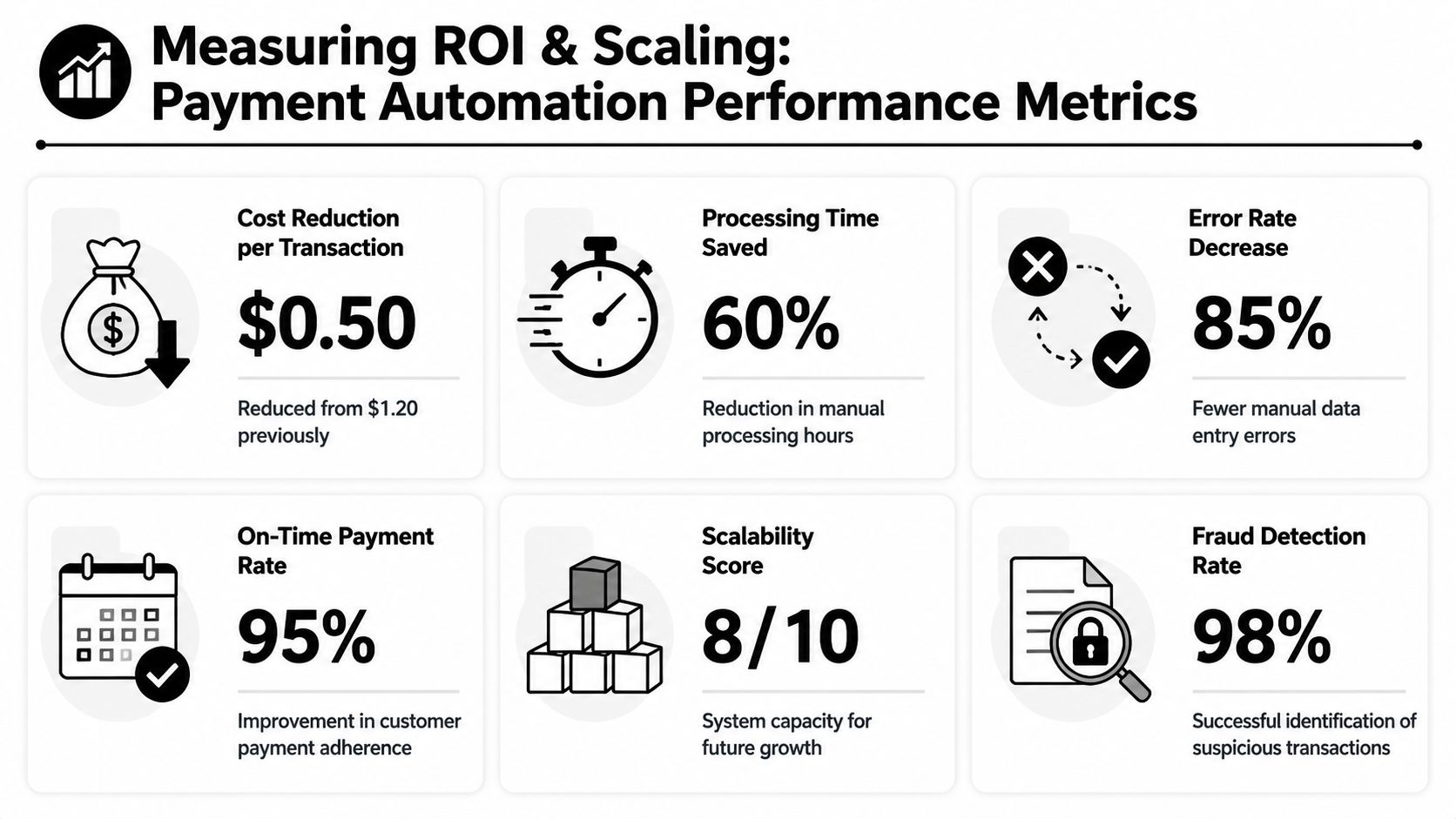
Measure outcomes in layers
Track ROI in three categories.
Operating efficiency
This is the baseline layer. Measure:
- Cost per invoice or payment processed
- Processing time from intake to completion
- Exception volume
- Reconciliation effort
- On-time payment performance
These metrics prove whether the workflow is becoming lighter to run.
Control quality
Automation that moves faster but creates opaque failure modes is not a win. Measure:
- Approval compliance
- Failed payment resolution time
- Duplicate prevention performance
- Audit trail completeness
- Exception aging
These are harder to celebrate in a board deck, but they determine whether savings are durable.
Strategic capacity
A common issue is that many teams under-report value. If automation removes repetitive processing work, what did the team do with the recovered time?
Look for signs like:
- finance spending more time on forecasting and vendor strategy
- faster close support
- fewer ad hoc status checks from leadership
- smoother expansion into new entities or payment methods
- cleaner inputs for AI-assisted analysis and anomaly review
A useful test: If the team is still busy but doing better work, the automation is creating value even before every cost line visibly falls.
A practical ROI formula
You don't need a complex model to start. Use a simple structure:
| ROI component | Basic formula |
|---|---|
| Labor savings | Hours reduced × fully loaded team cost |
| Error reduction value | Estimated rework and correction effort avoided |
| Speed value | Faster processing translated into better timing, fewer delays, or improved cash visibility |
| Control value | Reduced audit effort, fewer escalations, less exception chaos |
| Total ROI | Combined gains minus software, implementation, and operating costs |
Use conservative assumptions. That makes the case more credible internally.
Scaling without rebuilding
As volume rises, the questions change. You stop asking “does it work?” and start asking “can it absorb more complexity without adding operational drag?”
That usually means revisiting:
- Entity design: Can new subsidiaries slot into the same control model?
- Payment method support: Are new rails handled consistently?
- Analytics maturity: Can you spot exceptions and trends without manual extraction?
- AI usage: Are AI tools assisting classification, anomaly detection, or forecasting in ways finance can trust?
Scaling well doesn't mean adding more automation everywhere. It means extending the system where it improves throughput, control, and visibility together. If it only speeds up one step while creating cleanup somewhere else, that's not scale. That's displacement.
Conclusion The Future of Autonomous Finance
The companies that win with payment processing automation don't treat it like a narrow AP tool rollout. They treat it as a redesign of how money moves through the business. That changes how they choose vendors, how they build controls, how they measure ROI, and how they prepare for growth.
A solid system does four things well. It captures clean inputs, routes decisions predictably, executes payments reliably, and reconciles outcomes back to finance systems without manual patchwork. Everything else sits on top of that foundation.
The next phase is more autonomous finance. AI will increasingly support classification, exception triage, and decision support across payment operations. But automation still needs human judgment in the right places. Bad rules running faster do not create a better finance function.
There's also a broader design challenge that many teams ignore. The “last-mile” problem of financial inclusion still matters. Many automation programs assume every payer and payee has consistent digital access. In reality, effective automation often has to support mixed payment populations, including parties who intermittently rely on paper-based methods, as discussed in this perspective on the last-mile problem in payment automation. The best systems are efficient, but they're also adaptable.
If you're planning your first serious automation project, think bigger than workflow speed. Build for control, visibility, resilience, and scale. That's how finance stops acting like a back-office processing center and starts operating like infrastructure.
If you want help turning manual finance workflows into a practical automation roadmap, MakeAutomation helps B2B and SaaS teams design, document, and implement scalable systems that reduce operational friction and improve ROI without adding unnecessary complexity.