Build a PRD Template Agile Teams Actually Use
A good prd template agile teams can actually use is a living, breathing document. It’s not a list of commands; it's the glue that connects high-level strategy to the nitty-gritty of a sprint, making sure everyone from product to engineering understands the why behind the what.
Why Traditional PRDs Derail Agile Teams
Remember the old-school Product Requirements Document? It was usually a 50-page binder of specs, detailed down to the last pixel and signed off in blood before anyone wrote a single line of code. That beast was a relic of the Waterfall era, meant to be a fixed, unchanging contract. In the world of Agile, that approach isn't just old-fashioned—it’s a roadblock.
By their very design, static PRDs cause friction. They operate on the fantasy that we can know everything upfront, which is impossible when we're supposed to be responding to customer feedback and market changes. Handing a rigid document to a development team kills innovation on the spot. Your engineers stop being problem-solvers and turn into ticket-takers, just checking off a list instead of creating real value for the user.
The Real Cost of Being Inflexible
The damage from a traditional PRD really shows up mid-sprint. A developer hits a technical snag no one saw coming, or a stakeholder suddenly realizes a key user flow is completely missing. With a static document, you're stuck. Do you halt development? Kick off a painful, bureaucratic change-request process? Or just build the wrong thing and hope to fix it later? Every option wastes time and money.
This old way of working creates a few classic failure points:
- Communication Bottlenecks: The PRD becomes a wall between product and engineering. It replaces collaborative conversation with a one-way directive.
- Wasted Effort: Teams burn weeks perfecting a document that's probably obsolete by the time development even starts.
- Misaligned Priorities: Without the "why," engineers might make technical choices that meet the spec on paper but completely miss what the user actually needs.
A static PRD is a snapshot in time. An Agile PRD is a living conversation. The former documents decisions already made; the latter empowers the team to make better decisions together.
The sheer dominance of Agile frameworks today really highlights this disconnect. The 17th Annual State of Agile Report found that a massive 71% of organizations use Agile, making it the clear standard. The findings also show that Scrum is the top choice for 63% of teams, and it thrives on a flexible prd template agile teams can adapt—the kind that cuts down on the miscommunication that dooms 45% of traditional projects.
Shifting From a Static Blueprint to a Dynamic Guide
The solution isn't to just ditch requirements entirely. People have been debating this for years, with some even asking, Are PRDs Dead?. The real answer is no, but they’ve had to evolve. The goal is to transform the PRD from a rigid blueprint into a flexible guide.
To better understand the core differences, let's compare the two approaches side-by-side.
Traditional PRD vs Agile PRD at a Glance
| Attribute | Traditional PRD | Agile PRD |
|---|---|---|
| Nature | Static, comprehensive, "contract" | Dynamic, living, "guide" |
| Timing | Created once, upfront | Iterated on continuously |
| Detail Level | Highly detailed, prescriptive | High-level context, "just enough" detail |
| Focus | "What" and "How" | "Why" and "What" |
| Ownership | Product Manager | Collaborative (Product, Eng, Design) |
| Goal | Document all requirements | Facilitate conversation and alignment |
This table makes it clear: the Agile PRD is built for collaboration and speed, not for locking in decisions before work begins.
An Agile PRD serves as a single source of truth for context, goals, and how we'll measure success, but it deliberately leaves room for discovery. It connects business objectives to user stories without dictating every last implementation detail. For any company trying to stay competitive—especially in B2B and SaaS—this shift is essential. If you're weighing your options, our project management methodology comparison can help you see where Agile fits in the bigger picture.
This guide will walk you through building a PRD template that actually fuels your Agile team's momentum instead of holding it back.
The Essential Components of Your Agile PRD Template
A PRD that an Agile team will actually use isn't some exhaustive, fifty-page document. Forget that. It’s a compass, not a blueprint. Its job is to point everyone in the same direction, providing just enough structure to keep things clear without killing the adaptability that makes Agile work in the first place.
Think of it as a well-drawn map. It shows the destination, highlights a few key landmarks, and points out any treacherous terrain. From there, it trusts the team to find the best path forward.
Let’s walk through this with a real-world example. Imagine we're building a new feature for a SaaS product: an AI-powered analytics dashboard that automatically finds and flags important insights for our users.
The Problem Statement and Business Objectives
This is your "why." It's the most critical part of the entire document. If you can’t nail this, nothing else matters. Before you write a single line of code or a single user story, you have to be crystal clear on the pain point you're trying to solve. A fuzzy problem statement almost always leads to a solution that nobody actually wants.
For our AI dashboard, a powerful problem statement would be something like this: "Our users are drowning in data but starving for insights. They spend hours every week exporting reports and hunting for trends, a process that’s both tedious and often inconclusive. As a direct result, our 15% churn rate for new customers in their first 90 days is alarmingly high."
See what that statement does? It’s specific and hits three key points:
- It identifies the user: "Our users"
- It defines their pain: "spend hours… hunting for trends"
- It quantifies the business impact: "a 15% churn rate"
The business objectives flow directly from this. They translate the user's problem into a measurable goal for the company. For example: "Launch an AI-powered analytics dashboard to reduce new customer churn by 5% within six months of launch."
Success Metrics That Matter
So, how do you know if you’ve actually fixed the problem? That's where your success metrics come in. This is your scoreboard. They have to be tangible, measurable, and directly tied to your objectives. Fluffy goals like "improve user satisfaction" are worthless here.
For our AI dashboard, we'd want to track hard numbers:
- Adoption Rate: What percentage of our target users engage with the dashboard at least once a week?
- Time-to-Insight: Are we reducing the average time users spend on the analytics page before they do something meaningful?
- Churn Reduction: Can we show a measurable drop in the churn rate for the specific group of users who actively use the new dashboard?
Your metrics define what victory looks like. If you can't measure it, you can't manage it, and you certainly can't celebrate it. Pick metrics that prove you’re delivering real user value, not just chasing vanity numbers.
User Personas and Stories
Once the "why" is solid, we can shift focus to the "who" and the "what." User personas are fantastic for this because they prevent you from designing for a generic, faceless "user." A persona gives your team a real person to build for.
Let's meet "Data-Driven Diane." She's a marketing manager who needs to pull performance reports for her weekly leadership meeting. She’s smart and good with tech, but she's always short on time.
Her needs become the user stories that form the heart of an Agile PRD. The classic "As a…, I want…, so that…" format is popular for a reason—it forces you to connect every feature back to a real person and a tangible benefit.
- Story 1: "As Data-Driven Diane, I want to see a summary of my top-performing campaigns right on the dashboard so that I can prep for my weekly meeting in less than five minutes."
- Story 2: "As Data-Driven Diane, I want to get an automated alert when a campaign’s performance dips significantly so that I can jump on issues before they become huge problems."
These stories are the raw material for your development sprints. For a deeper dive into crafting these, our guide on Agile product requirements connects all these dots.
Assumptions and Constraints
No project happens in a perfect world. You have to be brutally honest about what you're assuming and what limitations you're stuck with. Getting this stuff out in the open early saves a world of pain later.
Assumptions are the things you believe are true but haven't actually proven yet. For our AI dashboard, a big assumption might be: "We assume users will trust the AI's insights without demanding to see all the raw data behind every recommendation." This is a hypothesis we'll need to test.
Constraints are the non-negotiable boundaries. These are the hard realities of the project.
- Technical: "This feature has to be built using our current data pipeline; we can't spin up a new database for it."
- Resource: "The core feature needs to be delivered by our existing team of four engineers in the next two sprints."
- Business: "The first version of the dashboard cannot show data from our enterprise-level integrations."
Defining What's Out of Scope
This might be the most underrated section of any PRD. Clearly stating what you are not building is your best defense against scope creep. It sets clear expectations with stakeholders and helps the team stay laser-focused.
For the initial launch of our AI dashboard, the "Out of Scope" list is crucial:
- Customizable dashboard layouts
- Exporting insights to PDF or CSV
- Integrating with any third-party data sources
By calling these out explicitly, you shut down ambiguity and prevent the feature from spiraling into a monster. This kind of clarity is what makes a PRD template something an Agile team can actually depend on.
Connecting Your PRD to Sprints and User Stories
Let's be honest: a PRD that just gathers dust in a shared drive is a failure. It doesn't matter how brilliant the strategy is if it never translates into actual code. The real work begins when you bridge the gap between your high-level vision and the day-to-day grind of a development sprint.
This is where your PRD earns its keep. It’s the critical link that transforms broad business goals into the tangible backlog items that engineers pull into their work queue. You have to create a clear, traceable line from the "why" in the PRD to the "what" in the sprint.
The journey from a big idea to a sprint-ready task isn't complicated, but it does require discipline. It starts with the core problem, flows into the metrics that will define success, and finally breaks down into the user stories that guide development.
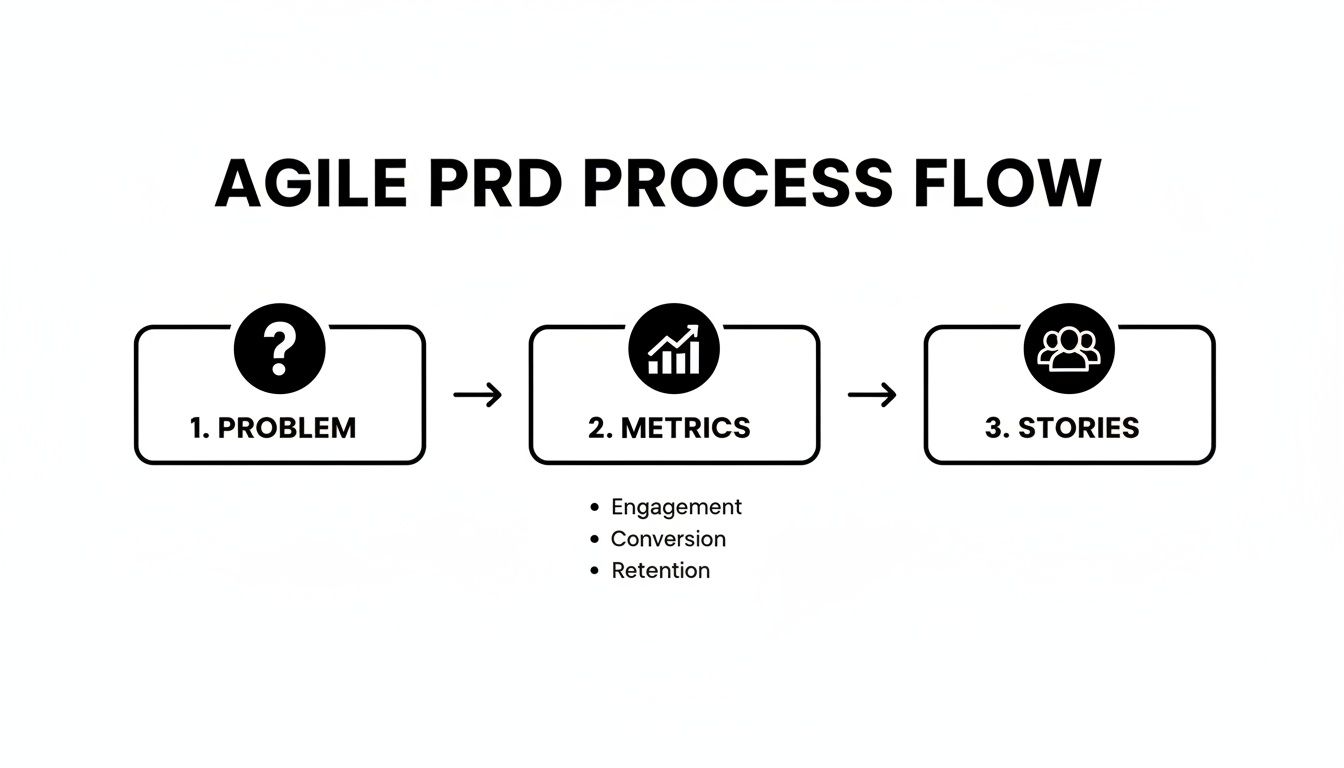
This flow isn't just a diagram; it's your roadmap for ensuring every piece of work directly serves the product's ultimate purpose.
From Feature to Actionable User Stories
A single feature outlined in your PRD, like our "AI-powered analytics dashboard," is way too big for a single sprint. In Agile terms, that’s an epic. Your first job is to slice that epic into smaller, more manageable user stories. Each story should represent a specific piece of value for the user that can be fully delivered within one sprint.
The classic "As a…, I want…, so that…" format is an industry standard for good reason. It’s a simple but powerful framework that forces you to define three essential elements:
- Who: The user persona getting the value (the "As a…").
- What: The specific action or capability they need (the "I want…").
- Why: The benefit or outcome they're trying to achieve (the "so that…").
Never, ever skip the "why." It's the most important part of the story. It connects the developer's work directly back to the core problem in the PRD and stops the team from building features that don't actually solve a real customer need.
A user story without a "so that" clause is a task without a purpose. It tells the team what to build but robs them of the context they need to build it well.
Let's see how this works by breaking down our AI dashboard epic:
- Epic: AI-Powered Analytics Dashboard
- User Story 1: "As a marketing manager, I want to see a summary of my top three performing campaigns on login so that I can get a quick status update in under a minute."
- User Story 2: "As a marketing manager, I want to click on a campaign to view its detailed trend graph so that I can investigate performance changes."
- User Story 3: "As a marketing manager, I need the system to flag campaigns with a >10% drop in conversions so that I can proactively address issues."
See how each story is a small, testable slice of the bigger feature? A team could realistically build, test, and ship any one of these in a typical two-week sprint.
Crafting Clear Acceptance Criteria
Once a user story is written, you need to spell out exactly what "done" looks like. This is where acceptance criteria (AC) come in. Think of ACs as a checklist of testable conditions that must be met for the story to be considered complete. They’re your best defense against ambiguity and the dreaded "that's not what I meant" conversation during the sprint review.
For "User Story 1" above, solid acceptance criteria might look like this:
- Given I am logged in, when I navigate to the dashboard, then I see a "Top Campaigns" widget.
- Given the widget is visible, then it displays the top three campaigns based on conversion rate.
- Given the campaigns are displayed, then each entry shows the campaign name, conversion rate, and a "View Details" link.
This "Given-When-Then" format, borrowed from Behavior-Driven Development (BDD), provides crystal clarity for developers and QA testers alike.
Linking It All with a Definition of Ready and Done
Your PRD should also be the source of truth for your team's Definition of Ready (DoR) and Definition of Done (DoD). These are essential agreements that set the quality bar for your entire team.
A story is Ready to be pulled into a sprint when:
- It clearly links back to a goal in the Agile PRD.
- It has unambiguous and testable acceptance criteria.
- All necessary designs are attached and approved.
- Dependencies on other teams or stories have been identified.
And a story is Done when:
- All acceptance criteria are met.
- The code has passed a peer review.
- All automated tests are passing.
- It has been formally accepted by the Product Owner.
Using a tool like Jira or Asana, you can create a digital thread that connects the high-level epic in the PRD all the way down to the individual code commits. This creates total traceability, giving everyone confidence that every task is directly pushing the product's strategic goals forward.
Mastering the Handoff and Versioning Process
That moment when a product manager hands the PRD over to the engineering team? It can make or break a feature. A sloppy handoff creates confusion, sparks rework, and kills morale. But a great one builds momentum, clarifies the mission, and creates a powerful sense of shared ownership.
Think of it less as a transaction and more as the start of a critical conversation.
Orchestrating a Seamless Handoff Meeting
Don’t just email a link and call it a day. The handoff deserves its own meeting—a real kickoff where you can present, debate, and refine the PRD together. Your goal isn’t to dictate terms; it’s to build a collective understanding of the customer problem you’re all there to solve.
I’ve found the best handoff meetings are structured but still have room to breathe. As the product manager, your job is to be the storyteller. Start with the why before you even get to the what. Walk the team through the problem statement, the user personas you’re targeting, and how you’ll measure success. This context is everything. It grounds every technical decision in a real human need.
Once the stage is set, you can dig into the user stories and acceptance criteria. This is where you want your engineers and designers to start poking holes in your logic.
- Are these acceptance criteria actually clear and testable?
- What edge cases have we completely missed?
- Are there technical hurdles or dependencies we haven't thought about?
This early feedback is absolute gold. It helps you catch misunderstandings before a single line of code gets written, saving everyone a ton of time and headaches later. Be ready to update the PRD live during this meeting, capturing key discussions and decisions as they happen.
The goal of the handoff isn't to get "sign-off." It's to achieve "buy-in." A team that feels ownership over the plan will move mountains to execute it.
This collaborative session completely changes the dynamic. The team goes from being ticket-takers just following a plan to becoming true problem-solvers united on a mission.
Treating the PRD as a Living Document
One of the biggest mistakes I see teams make is treating the PRD like a stone tablet. The second it’s "finished," it starts going out of date. In any truly Agile environment, change isn’t just likely—it's guaranteed. Your prd template agile teams use has to be built for this reality. It absolutely must be a living document.
This is where version control becomes non-negotiable. It doesn’t have to be some complex, heavy-handed process. Most modern tools like Confluence or Notion have page history built right in, which makes tracking changes easy. The real trick is establishing a clear and consistent process for how you manage those updates.
Here’s a simple versioning strategy that works wonders:
- Add a Version History Table: Just a small table at the top of the PRD can make a huge difference. Include columns for the version number (e.g., v1.0, v1.1), the date, a quick summary of what changed, and who made the update.
- Communicate All Changes: Never update a PRD in silence. If you make a significant change after the initial handoff—like adding a new user story or changing a success metric—shout it from the rooftops. Post a clear message in your team's main Slack channel.
- Highlight What's New: For smaller tweaks, use your tool's highlighting features to call out the modified text. This lets everyone quickly scan the document and see exactly what’s different since the last time they looked.
This simple discipline prevents the single most common source of error on fast-moving teams: developers building from outdated specs. An old PRD isn't just a document; it's a recipe for wasted sprints and costly mistakes. A little bit of process hygiene here pays off massively in team alignment and execution speed.
Automating Your Agile PRD Workflow with MakeAutomation
A solid prd template agile teams can rally around is a fantastic start, but let's be honest—the manual upkeep can be a real drag. Constantly creating new docs, pinging stakeholders, and copying details into other tools eats up time that could be spent on actual product strategy. This is where automation comes in to kill the administrative busywork and speed up your whole development cycle.
Imagine a world where you aren't the one playing telephone between your CRM, your wiki, and your project board. Instead, when a big new customer initiative gets marked "Approved," an automation platform like MakeAutomation can instantly spin up a new PRD from your template in Notion or Confluence. Right away, you've saved your team time and guaranteed everyone is starting from the same consistent place.

This is what a visual automation builder looks like. It’s a game-changer because it lets you connect all your different apps and build custom workflows without having to bug an engineer. Your product team can own and improve its own processes directly.
High-Impact Automation Scenarios
The real magic happens when you start automating the handoffs. You can build little "recipes" that handle all the tedious communication and data entry that so often lead to delays and dropped balls. For any B2B or SaaS company, this kind of speed and alignment is a massive competitive edge.
Here are a few ideas to get you started:
- Automated PRD Creation: A deal in Salesforce gets marked "Closed Won" with a "New Feature" tag. Boom! A workflow instantly creates a new PRD in Notion, pulling in customer details and assigning it to the right product manager.
- Smart Stakeholder Notifications: A PRD's status flips from "Draft" to "Ready for Review." Instantly, a message posts in a specific Slack channel, tagging the engineering lead and a designer so they know it's time to jump in.
- Jira Task Generation: Once that PRD is officially "Approved," another workflow can parse the "User Stories" section and automatically create skeleton tasks in Jira, all linked back to the parent epic. No more manual ticket creation.
Automation turns your PRD from a static document into a living, breathing hub of activity. It makes sure the right information gets to the right people at the right time, which cuts down on miscommunication and keeps the momentum going.
Building Your First PRD Automation
Getting this set up is probably easier than you think. The first step is to just map out your current manual process and pinpoint the most repetitive, mind-numbing steps. Those are your golden opportunities for automation.
Think about a common flow:
- A new feature idea comes in through a form or spreadsheet.
- A PM has to stop what they're doing and manually create a new PRD doc.
- Then, they have to go and message everyone to let them know it's ready for input.
Every single one of those steps can be automated. If you're looking for inspiration on what's possible, checking out some powerful Zapier automation examples can spark some great ideas. Even though it's a different tool, the fundamental concepts of triggers and actions are the same and can be applied anywhere.
This isn't just about shaving off a few minutes. It’s a strategic play to build a more efficient, reliable, and scalable product engine. When you remove that manual friction, your team gets to spend less time on admin and more time doing what they do best: building amazing products. If you want to dive deeper into the basics, take a look at our guide on how to automate business processes.
Got Questions About Agile PRD Templates?
Switching up your team's documentation process is a big deal, and it's bound to bring up some questions. Moving to a new PRD template built for Agile ways of working is a significant shift, but it doesn't have to be a painful one. Let's dig into some of the most common questions I hear from teams making this transition.
This is all about shifting from rigid, static documents to living, breathing conversations, and hopefully, these answers will help you navigate that change.
How Is an Agile PRD Different From Just Writing User Stories in Jira?
This is a great question because it cuts right to the core of why this matters. User stories in a tool like Jira are the lifeblood of any sprint, but they only tell you what needs to be built. The Agile PRD is what provides the strategic why behind those stories.
Think of it like this: your Jira backlog is a highly detailed, tactical to-do list for your engineering team. The PRD is the strategy brief that explains why those things are on the list in the first place.
It's the document that connects a bunch of user stories back to the fundamental customer problem you're trying to solve, the business goals you're aiming for, and the metrics you'll use to see if you succeeded. It makes sure everyone—from marketing to QA to the CEO—is looking at the same big picture.
How Much Detail Is Too Much for an Agile PRD?
The golden rule here is to provide "just enough" detail. Your real goal is to give the team the context they need to make smart decisions, not to micromanage every implementation detail. A good Agile PRD stays focused on the problem and the desired outcome, leaving the "how" to the engineering experts who live and breathe the code.
You've probably gone too far if your PRD starts dictating specific database schemas, which code libraries to use, or the exact structure of an API endpoint.
Your PRD should be a map, not a turn-by-turn GPS. Define the destination (the user outcome) and point out the key landmarks (acceptance criteria), but trust your team to find the best route.
Striking this balance is what gives your team a sense of ownership and lets them innovate.
Can We Use a PRD Template with Kanban?
Absolutely. The whole idea of a living, collaborative requirements document isn't locked into a specific framework like Scrum. A PRD built on Agile principles is flexible enough for any iterative workflow, and that definitely includes Kanban.
In a Kanban system, the PRD acts as the main source of truth for work items entering the backlog. When the team is ready to pull the next feature into their workflow, the PRD gives them all the background they need. It ensures that even without the formal ceremonies of Scrum, everyone stays aligned on the goals as they continuously ship value.
How Do We Handle Major PRD Changes After Development Starts?
Change isn't just a possibility in Agile—it's an expectation. When a big pivot is needed after the work is already underway, the key is to be transparent and collaborative. The product manager's first job is to update the PRD, clearly highlighting the changes and bumping up the version number.
But this can't just happen in a silo. You have to communicate the change to the entire team right away, ideally in a quick huddle or stand-up, not just a passive comment lost in a document. From there, the team can figure out the impact on the current work and the timeline. The PRD becomes the single source of truth for documenting and communicating that pivot, making sure everyone is working from the same updated playbook.
Ready to stop the busywork and build a more efficient product engine? MakeAutomation specializes in creating automated workflows that connect your tools, eliminate manual data entry, and give your product team back its most valuable resource—time.
Learn how to automate your PRD process and accelerate your development cycle today.