Scaling SaaS With Node JS and Microservices in 2026
Pairing Node.js with a microservices architecture has become the gold standard for building SaaS applications that can handle serious scale and performance. It’s a strategy that lets you break down a huge, complex system into a collection of smaller, independent services. The result? They’re far easier to build, deploy, and manage, giving your business the agility it needs to grow.
Why Node.js and Microservices Are a SaaS Growth Engine
Picture this: your SaaS platform blows up overnight. Thousands of users are hitting your system at once—running reports, processing payments, and syncing data. If you’re running on a traditional, all-in-one application (what we call a monolith), this sudden spike in traffic would bring the entire system to a crawl. That’s a massive bottleneck that kills user experience and can stop growth in its tracks.
This is exactly the scenario where Node.js and microservices shine.
Think of it like swapping a single, overwhelmed chef for a fully staffed kitchen with specialized stations. You've got one team on the grill, another on salads, and a third on desserts. Each station runs independently but works together seamlessly to get food out to the customers. That’s the core idea behind a microservices architecture.
The Strategic Edge for B2B and SaaS
This model gives you the power to scale specific parts of your application as needed. Let's say your new analytics feature is a huge hit. You can pour more resources into just that one service without touching anything else. For B2B founders and ops leaders, this kind of surgical scalability is a total game-changer.
The benefits here aren't just technical; they hit the bottom line:
- Ship Features Faster: Small, focused teams can work on different services at the same time, which means you can get new features out the door much quicker.
- Built-in Resilience: If one service goes down—say, payment processing has a hiccup—it doesn’t take the whole platform with it. Users can still log in and run reports.
- Tech Freedom: You’re not locked into one tech stack. You can pick the right tool for the right job. Maybe the reporting service needs a different kind of database than the user authentication service. That's fine.
- Simpler Maintenance: Finding and fixing a bug in a small, isolated service is worlds easier than digging through a tangled monolithic codebase.
This approach gives you a more agile and efficient way to build technology that scales right alongside your revenue. It's more than just a technical decision—it's a business strategy for cutting out friction and fueling growth.
A microservices architecture, especially when built with Node.js, enables teams to build and ship features independently, reducing deployment risks and shortening time-to-market. It directly translates engineering efficiency into a competitive business advantage.
The market has voted with its feet on this one. Node.js is the engine behind over 60% of microservices-based systems globally, making it the clear leader. For sales and ops leaders, this wide adoption means you're betting on a proven, low-risk path to scale—after all, over 40% of professional developers use it in production on more than 30 million websites. Explore more Node.js usage statistics and growth trends.
Designing a Modern Microservices Architecture
Moving from a monolithic app to a microservices architecture isn't something you do on a whim. It demands a completely different way of thinking. You’re not just managing one giant codebase anymore; you're building a whole system of small, independent services that have to talk to each other. The whole point is to draw clear lines in the sand, making sure each service has one job and does it well.
It’s a bit like restructuring a company. Your monolith is the scrappy startup where everyone pitches in on everything, all in one big room. It works for a while, but as you grow, it gets chaotic. Microservices are like creating dedicated departments—Sales, Marketing, Operations. Each team has a clear mission and can work without stepping on everyone else's toes.
Defining Service Boundaries with Domain-Driven Design
So, how do you figure out where to draw those lines? The best tool for the job is Domain-Driven Design (DDD). At its core, DDD is about modeling your software around the actual business it serves. You start by talking to the business experts and using their language to map out the different parts of your application.
For a typical SaaS product, you might end up with domains like these:
- User Service: The gatekeeper for all things user-related—accounts, authentication, roles, and permissions.
- Billing Service: The money-maker that handles subscriptions, processes payments, and sends out invoices.
- Reporting Service: The brains of the operation, crunching numbers to generate analytics and user reports.
- Notification Service: The messenger that dispatches all emails, push alerts, and in-app messages.
Each one of these is a prime candidate for its own microservice. By keeping these responsibilities separate, the entire system becomes easier to build, fix, and scale. Your billing team can push updates without any fear of accidentally taking down the user login page. For a deeper dive, checking out these Microservices Architecture Best Practices is a great next step.
This diagram really captures that fundamental shift from a single, rigid monolith to a more flexible system of distributed services.
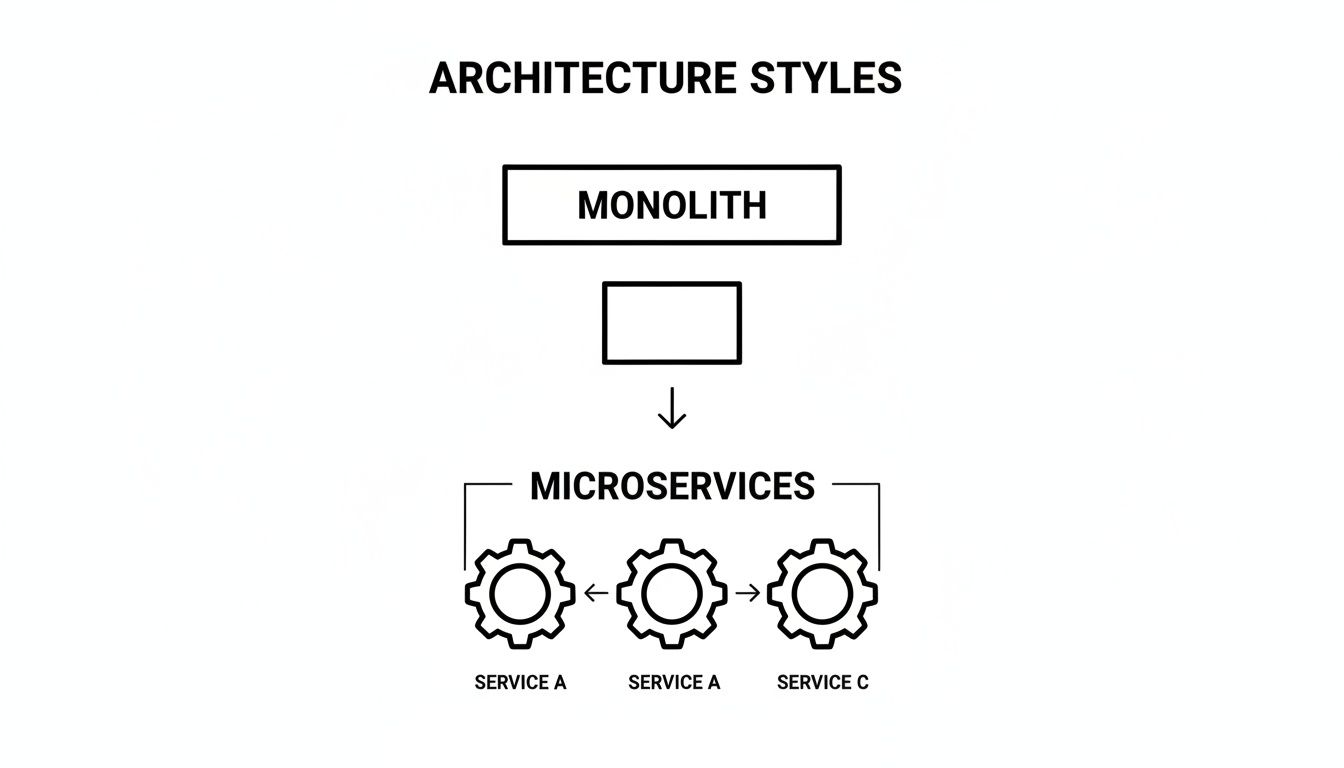
You can see how breaking that one big block into smaller, communicating pieces builds a more resilient and scalable foundation for the future.
Implementing Key Architectural Patterns
Once you've mapped out your services, you need a plan for how they'll handle requests from the outside world and from each other. Two patterns are absolutely essential when you're building with Node.js and microservices: the API Gateway and the Strangler Fig.
The API Gateway acts as the single front door for all client requests. It works like a reverse proxy, figuring out which backend service needs to handle a given request and sending it there. This gives you a central spot to manage cross-cutting concerns like authentication, rate limiting, and logging.
Think of an API Gateway as the receptionist at an office building. Instead of letting visitors wander around looking for the right department, the receptionist greets them, checks their credentials, and points them in the right direction. It’s organized, secure, and much more efficient.
Migrating Safely with the Strangler Fig Pattern
If you’re moving away from an existing monolith, trying to do a "big bang" rewrite all at once is a recipe for disaster. The Strangler Fig pattern is a much safer, more gradual alternative. The name comes from a type of vine that grows around a host tree, slowly and methodically, until it eventually replaces it entirely.
Here’s how you apply that idea to your software:
- Pick a Feature: Start small. Choose one piece of functionality to carve out of the monolith, like user profile management.
- Build the New Service: Create a brand new Node.js microservice that does just that one thing.
- Redirect Traffic: Tweak your API Gateway (or a proxy) to send all requests for that feature to your shiny new microservice instead of the old monolith.
- Rinse and Repeat: Keep doing this, feature by feature. Over time, your new services will have completely "strangled" the original application.
This approach lets you deliver value incrementally without the immense risk of a single, massive cutover. For any company dealing with complex data streams, understanding https://makeautomation.co/data-integration-best-practices/ is crucial during this kind of migration. It makes the huge task of modernizing your stack feel much more manageable.
Choosing Your Node JS Framework and Toolset
With your architectural blueprint laid out, it's time to pick the right tools for the job. The Node.js ecosystem is packed with excellent frameworks, but they all come with different philosophies and trade-offs. The key is to match the tool not just to the task, but also to your team's expertise.
Think of it like building a house. You wouldn't use a sledgehammer for delicate cabinetry. In the same way, the framework you choose for a simple API endpoint probably isn't the best fit for a service tangled in complex business logic. Let's look at the three main players you'll encounter when building with Node.js and microservices.
Express: The Minimalist Powerhouse
Express.js is the seasoned veteran of the Node.js world. It’s famous for being unopinionated and incredibly flexible, which is both its biggest selling point and a potential pitfall. Express hands you the absolute essentials and gets out of your way, letting you build your service precisely as you see fit.
This bare-bones approach is fantastic for small, single-purpose microservices—like one that does nothing but validate user tokens or reformat data for another service. The catch? That freedom means your team is on the hook for every architectural decision, from folder structure to error handling, which can introduce inconsistencies as your project grows.
Fastify: The Speed Specialist
Just like its name implies, Fastify is built for one primary goal: raw speed. It has one of the fastest routers out there and can chew through an enormous number of requests per second with incredibly low overhead. This makes it a clear winner for any service where performance is non-negotiable.
Imagine a SaaS feature that ingests real-time data from IoT devices or processes a flood of webhook notifications. In those situations, every millisecond is critical. Fastify’s performance-first design and its clean, plugin-based architecture make it the go-to for building microservices where throughput is everything.
NestJS: The Structured Enterprise Solution
NestJS charts a completely different course. It's a highly opinionated framework, built from the ground up with TypeScript and heavily inspired by Angular's structured approach. It gives you a complete application architecture right out of the box, organized neatly into modules, controllers, and services.
NestJS enforces a structured, predictable development pattern. This makes it an ideal fit for complex, enterprise-grade microservices that manage intricate business rules, such as a billing or subscription management service. The built-in structure helps maintain code quality and makes onboarding new developers much smoother.
This opinionated structure can feel a bit rigid for simple tasks. But for large teams building a complex web of interconnected services, that consistency is a massive advantage. It helps guarantee that every service is built to the same high standard, which is a core principle of effective continuous delivery. You can explore this relationship further in our guide to DevOps and continuous delivery.
To make the choice clearer, let’s compare these frameworks side-by-side based on what matters most when you're scaling a SaaS business.
Node JS Framework Comparison for Microservices
This table compares Express.js, Fastify, and NestJS across key criteria to help you choose the best framework for your SaaS microservices.
| Framework | Best For | Performance | Learning Curve | Key Features |
|---|---|---|---|---|
| Express.js | Simple, single-purpose APIs and teams who value complete flexibility. | Good | Low | Minimalist core, massive middleware ecosystem, unopinionated structure. |
| Fastify | High-throughput services like data ingestion, real-time APIs, and gateways. | Excellent | Moderate | Schema-based validation, high-speed router, low overhead, plugin architecture. |
| NestJS | Complex business logic, enterprise applications, and large development teams. | Good | High | TypeScript-first, modular architecture, built-in dependency injection, opinionated structure. |
Ultimately, there's no single "best" framework. A powerful and common strategy is to mix and match them within your architecture. You might use Express for a simple user authentication service, Fastify for a high-traffic analytics endpoint, and NestJS for the core billing and subscription logic.
This "right tool for the job" philosophy is one of the greatest benefits of the Node.js and microservices model. It empowers you to optimize each individual part of your system, leading to a more resilient, efficient, and scalable SaaS platform.
Mastering Communication Between Your Services
Your individual microservices are like specialized departments in a company. They're great at what they do, but they can't achieve much in a vacuum. To deliver real value, they have to talk to each other—clearly and reliably. This inter-service communication is the nervous system of your entire application.
In the world of Node.js and microservices, communication generally falls into two buckets: synchronous and asynchronous. Getting this choice right for each interaction is crucial for building a resilient SaaS platform that won't fall over when one part hiccups.
Synchronous Communication: The Direct Phone Call
Synchronous communication is exactly like making a phone call. One service calls another and then waits, completely blocked, until it gets a direct response. It’s a straightforward, predictable model that’s easy to understand.
You'll typically see two main approaches here:
- REST APIs (HTTP/S): This is the bread and butter of web communication. It’s familiar, uses standard HTTP methods (GET, POST, PUT), and just about everyone knows how it works.
- gRPC (Google Remote Procedure Call): A newer, high-performance option from Google. It uses Protocol Buffers instead of JSON, which makes it much faster and more efficient for internal, high-throughput communication.
This direct, request-response pattern is perfect for things that absolutely need an immediate answer. Think about a user logging in. The API Gateway makes a synchronous call to the User Service and has to wait for a "yes" or "no" on the credentials before letting them in. There’s no other way.
Asynchronous Communication: The Company Memo
Asynchronous communication is more like sending out a company-wide memo or an email. The sending service fires off a message and immediately moves on with its life, no waiting required. Another service—or even several—can then pick up that message and act on it whenever they’re ready.
This approach is fantastic because it decouples your services, making the whole system more resilient. If the receiving service is down for a few minutes, the message just sits patiently in a queue until it comes back online. This is where message brokers like RabbitMQ or Apache Kafka come in.
Asynchronous messaging is your secret weapon for building fault-tolerant systems. It allows services to operate independently, preventing a failure in one non-critical service from causing a domino effect that takes down your entire app.
Let's walk through a user signup. The User Service creates the new account with a quick synchronous call. But right after that, it can publish an asynchronous "UserCreated" event to a message queue.
Now, other services can listen for that event and react on their own time:
- The Notification Service sees the event and sends a welcome email.
- The Analytics Service logs the signup for the business dashboard.
- The CRM Service adds the new user as a lead in your sales system.
If the email server is offline, who cares? The user's signup isn't blocked. The message just waits, and the welcome email will go out later. This separation of concerns is a core strength of a mature Node.js and microservices architecture. As you work on mastering communication between your services, using the right API testing tools becomes essential for validating both sync and async patterns.
The trick is to analyze each business workflow. Use synchronous calls for immediate, blocking needs. Use asynchronous messages for background jobs, notifications, and events that can handle a little delay. This hybrid approach gives you the best of both worlds—the directness of a phone call and the resilience of a memo.
Deploying and Managing Your Microservices
So, you've built your Node.js microservices. That's a huge milestone, but it's really just the starting line. Now comes the real challenge: getting them to run, and keep running, in a production environment where real customers are depending on them. This is where the world of DevOps becomes your best friend for taming the complexity of a distributed system.
Successfully running your services means moving away from manual, one-off deployments and embracing an automated, repeatable process. You need a system that ensures every single service—from user accounts to billing—can be updated, scaled, or fixed without bringing everything else crashing down. The aim is to make deployments so routine they become boring.
To get there, we lean on two technologies that have become the bedrock of modern microservices: Docker and Kubernetes.
Packaging Services with Docker
Think of each of your microservices as a delicate, complex recipe. To make sure it tastes the same no matter who cooks it or in what kitchen, you'd want to package all the specific ingredients and instructions together. That's exactly what Docker does for your code.
Docker wraps up each Node.js service into a neat, self-contained, and portable unit called a container. This isn't just your code; it's everything the service needs to run—the Node.js runtime, system tools, libraries, and all its dependencies. It’s like a "hello fresh" box for your application.
This simple idea completely solves the age-old developer headache: "But it works on my machine!" A Docker container behaves identically whether it's on your laptop, a staging server, or a production cloud instance. Consistency is king.
Orchestrating It All with Kubernetes
Okay, so you've got all your application "meal kits" (your Docker containers) ready to go. Now you need a head chef to manage the entire kitchen, deciding what gets cooked when, how many dishes to make, and what to do if an oven breaks. That's Kubernetes.
Kubernetes (often called K8s) is a container orchestrator. It’s the brain of the operation, automatically handling all the difficult tasks that would be a nightmare to do by hand:
- Scheduling: It intelligently decides which server in your infrastructure is the best spot to run a container.
- Scaling: When a sudden wave of users hits your login service, Kubernetes automatically spins up more copies to handle the load. When things quiet down, it scales back down.
- Self-Healing: If a service container crashes or becomes unresponsive, Kubernetes notices immediately and restarts it or replaces it with a healthy one, often without any human intervention.
Docker and Kubernetes are a powerhouse duo. Docker gives you a standardized way to package the "what" (your service), and Kubernetes takes care of the "how" (running, scaling, and keeping it healthy).
Automating Releases with CI/CD Pipelines
The last piece of this puzzle is connecting your code repository to your live environment with an automated workflow. We call this a CI/CD (Continuous Integration/Continuous Deployment) pipeline.
Think of a CI/CD pipeline as an automated quality-control assembly line for your software. Every time a developer commits a change, it kicks off a series of predictable, automated steps.
- Commit: A developer pushes new code for a feature or bug fix.
- Build: A CI server grabs the code and builds a fresh Docker image from it.
- Test: A suite of automated tests—unit tests, integration tests, you name it—runs against the new build. If anything fails, the process stops.
- Deploy: Once all tests pass, the new, validated container is automatically rolled out to production.
This level of automation means your team can ship updates and fixes multiple times a day with a high degree of confidence. You're no longer holding your breath during deployments. By building out this workflow, you turn the journey from a line of code to a live feature into a smooth, reliable process. To go deeper on this topic, check out the fundamentals of cloud automation in our guide.
7. Keeping Your SaaS Application Secure and Healthy

Back in the monolith days, troubleshooting was pretty simple. When something went wrong, you had one big codebase to dig through. But with microservices, you're not dealing with a single application; you're managing a whole fleet of them talking to each other.
A hiccup in one service can create a domino effect, causing strange symptoms in a completely different part of the system. This makes finding the real source of a problem incredibly difficult. You can't just peek under one hood anymore.
This is where observability becomes your superpower. It's more than just basic monitoring—it's about having the tools to ask detailed questions about what's happening inside your system and getting clear, actionable answers. For any SaaS business that handles customer data, pairing great observability with top-notch security isn't just a good idea; it's the foundation of customer trust.
The Three Pillars of Observability
Think about how a doctor diagnoses an illness. They don't just take your temperature. They listen with a stethoscope, check your blood pressure, and maybe run an EKG to see the whole picture. In the same way, getting a complete view of your Node.js and microservices health requires a few different tools.
Logging: This is the most basic, but essential, pillar. Logs are the play-by-play commentary from each service. They're timestamped records of events, telling you exactly what was happening at a specific moment in time—things like "User 123 authenticated successfully" or "Failed to connect to database."
Metrics: If logs are the commentary, metrics are the scoreboard. These are the raw numbers collected over time, like CPU usage, response latency, or error rates. Metrics give you that high-level, at-a-glance view of your system's vital signs and help you spot trends before they become problems.
Tracing: This is where the magic happens for debugging distributed systems. A trace acts like a GPS tracker for a single user request, following it on its entire journey through your network of services. It shows you every stop it makes and exactly how long it spent at each one, making it ridiculously easy to find those hidden bottlenecks that are slowing everything down.
When you use these three pillars together, you get the deep visibility you need to find and fix issues fast—often before your customers even notice.
Security Isn't Optional
When you move to microservices, your security model has to change. You've gone from defending a single, large castle to securing a whole string of interconnected forts. The attack surface is much wider, and that demands a smarter, more layered approach to security.
Security can't be an afterthought you bolt on at the end. It has to be baked into every single service from the very beginning. A common and dangerous mistake is assuming that just because traffic is inside your own network, it's "safe."
Here are the security practices that are absolutely non-negotiable:
- Lock Down the API Gateway: Your gateway is the front door to your entire system. It needs to be a fortress, armed with strong authentication (OAuth 2.0 or JWTs), solid authorization rules, and strict rate-limiting to shut down abuse and DDoS attacks.
- Authenticate Service-to-Service Communication: Never trust a request just because it came from inside your network. Services need to prove their identity to each other, often using security tokens or mutual TLS (mTLS). This ensures a rogue or compromised service can't start making unauthorized calls to others.
- Centralize Your Secrets: Never, ever hardcode API keys, database passwords, or other credentials in your code or config files. It’s a recipe for disaster. Use a dedicated tool like HashiCorp Vault or AWS Secrets Manager to manage these secrets and inject them securely when a service starts up.
For a B2B SaaS company, a security breach isn't just a technical glitch—it can be an extinction-level event. Building these observability and security practices into your Node.js and microservices architecture is fundamental to creating a product that's not just scalable, but also resilient and trustworthy.
Frequently Asked Questions
When you're thinking about moving to a distributed system, a lot of questions pop up. Let's tackle some of the most common ones that B2B founders and tech leaders ask when considering Node.js and microservices for their SaaS platforms.
Is Node.js a Good Fit for Microservices?
Absolutely. Node.js is practically tailor-made for microservices, and it really comes down to its non-blocking, event-driven nature. This architecture is a powerhouse for handling tons of concurrent connections efficiently, which is exactly what you need for the small, independent services in a distributed system.
Its single-threaded model, which sounds like a limitation but is actually a strength, uses the event loop to manage operations without getting stuck. This makes it incredibly good at I/O-heavy work—think API calls, database queries, and real-time messaging—all common tasks in a SaaS app. Plus, the lightweight runtime means each microservice has a tiny footprint and spins up fast.
The magic of Node.js in a microservice setup is its combination of high performance for I/O tasks and a lightweight footprint. It lets teams build speedy, scalable, and resource-friendly services that you can deploy and scale on their own.
It's this blend of performance and efficiency that has made Node.js and microservices the go-to backend strategy for so many fast-growing companies.
When Are Microservices a Bad Idea?
Microservices are a powerful tool, but they aren't the answer to everything. In fact, jumping in too early can cause more problems than it solves. You should probably stick with a monolith in a few key situations.
- You're an Early-Stage Startup: If you're still chasing product-market fit, a monolith is your friend. It's faster to build and easier to change on the fly. The overhead of a distributed system will just slow you down when you need to be nimble.
- Your Team is Small or Inexperienced: A microservices architecture demands solid experience with DevOps, tools like Docker and Kubernetes, and the nuances of service-to-service communication. Without that expertise, the operational complexity can quickly become overwhelming.
- The Application is Simple: For products with a narrow scope and straightforward logic, microservices are overkill. A well-organized monolith is simpler to develop, test, and deploy, and it will get the job done just fine.
The right time to move to microservices is when the growing pains of your monolith—like slow deployments and tangled code—start to hurt more than the cost of managing a distributed system. It's a strategic shift, not a starting point.
At MakeAutomation, we live and breathe scalable backend systems that fuel business growth. If you’re ready to ditch manual processes and build a solid foundation for your SaaS, we can help you get the right architecture in place. Discover how our automation frameworks can accelerate your journey to 7-figures at makeautomation.co.