
How to build node js app for B2B Automation
You’re probably not trying to build another demo app.
You’re trying to stop sales reps from copying leads between tools. Or you need webhooks from a form provider to enrich contact data, score intent, and push clean records into a CRM before the next follow-up fires. Or your ops team has stitched together a fragile set of zaps, scripts, and spreadsheets that worked at ten customers and now break under real usage.
That’s why people search for build node js app. They don’t need another tutorial that stores blog posts in a JSON file. They need a service that survives bad third-party APIs, delayed webhooks, duplicate events, retry storms, and the slow drift of a growing codebase.
Why Build Another Node JS App
A sales team imports leads from three ad platforms. The form vendor fires duplicate webhooks. The enrichment API times out on half the requests. The CRM accepts one update, rejects the next, and gives you just enough error detail to waste an afternoon. That is a normal B2B integration problem, and it is the kind of problem a serious Node.js app should solve.
Beginner tutorials rarely cover that workload. They teach routes, templates, and CRUD screens. Useful skills, but they do not prepare you to run a service that sits between revenue systems and has to keep data accurate under retries, partial failures, and uneven third-party behavior.
Node.js fits this job well because many automation services spend more time waiting on APIs, queues, databases, and webhooks than doing heavy CPU work. It is also a common production choice. According to ElectroIQ’s Node.js statistics roundup, Node.js was the preferred tech stack for 52% of professional developers for web app development, 85% used it specifically for creating web applications, and teams have reported loading time improvements of 50 to 60%.
The gap is not whether Node.js can power production software. It can. The gap is that many tutorials stop before the hard parts start.
Netlify’s Node.js fundamentals article points to the scaling demands behind modern applications. In B2B work, those demands show up fast. A CRM sync is not just another POST request. It needs retry rules, deduplication, audit trails, rate-limit handling, and enough observability for someone on call to explain what happened at 2 a.m.
The app you actually need
A production B2B automation service usually needs a few properties from day one:
- Idempotent processing: Duplicate events should not create duplicate records, duplicate tasks, or duplicate outbound messages.
- Clear failure boundaries: One failed enrichment call should not block intake, corrupt state, or hide the original payload.
- Traceable decisions: Support, ops, and engineering need a record of why data was accepted, rejected, routed, retried, or skipped.
- Defensive third-party integration: External APIs will timeout, drift in schema, and return partial success. Your code has to expect that.
I use a simple rule here. If the app writes to a CRM, billing platform, ERP, or messaging provider, assume the integration will fail in ways the docs do not describe.
Why Node.js fits this kind of work
Node.js is a strong option for integration-heavy systems because it handles concurrent I/O well, keeps the language stack simple across APIs and workers, and gives you a mature package ecosystem. Express and Fastify both work. The trade-off is that the runtime will not save you from poor architecture. If you mix business rules, transport concerns, and retry logic in the same handler, the app will still become fragile.
That matters more in B2B automation than in tutorial apps. A to-do list can survive weak validation and broad error handling. A lead router, contract sync service, or billing reconciliation worker cannot. The failure cost is concrete: lost records, duplicate outreach, broken handoffs between teams, and support tickets that are hard to reproduce because the original event context was never stored.
Laying a Scalable Project Foundation
The first version of a Node app usually feels clean because it has almost no history. The mess appears later, when package versions drift, one environment behaves differently than another, and a small helper script becomes business-critical.
That’s why the foundation matters more than the first endpoint.

Start with repeatable environments
Use a version manager such as nvm from day one. That sounds boring until one developer runs one Node version locally, CI uses another, and production uses a third. Small runtime differences turn into long debugging sessions.
A practical baseline looks like this:
- Create the project with
npm init -y. - Set the Node version in
.nvmrc. - Commit both
package.jsonand the lockfile. - Add scripts for
dev,start,test,lint, andaudit.
I prefer a structure organized by feature, not by technical layer alone. That keeps automation logic close to the routes, services, validators, and tests that belong to it.
A feature-based layout that holds up
A simple pattern:
| Folder | Purpose |
|---|---|
src/modules/leads |
Webhook intake, lead validation, enrichment orchestration |
src/modules/crm |
CRM client wrappers, sync services, mappers |
src/modules/auth |
JWT logic, guards, tenant context |
src/shared |
Logger, config, errors, reusable utilities |
src/jobs |
Queue processors, scheduled work, retries |
src/db |
ORM setup, migrations, repository helpers |
This layout is less stylish than some architecture diagrams, but it tends to age better. When business logic changes quickly, feature boundaries are easier to maintain than broad folders like controllers, services, and utils spread across the whole codebase.
Dependency discipline matters early
The npm ecosystem is powerful, but it punishes carelessness. Outdated npm packages account for 85% of breaches in Node.js app builds, and the 2024 lodash vulnerability affected 30% of applications, according to AltexSoft’s analysis of Node.js web app development.
That changes how you should build.
- Pin intentionally: Keep dependency ranges under control in
package.json. Don’t let semver drift rewrite production behavior without review. - Use
npm ciin CI and deployment: It installs exactly what the lockfile specifies.npm installis fine for local package changes, but it’s not what you want in a reproducible pipeline. - Audit on a schedule: Run
npm auditand review the results weekly. Automated update tools such as Dependabot are useful, but they still need human review. - Question every package: A tiny helper library can become a security liability. If core Node can handle the job cleanly, skip the extra dependency.
The easiest package to secure is the one you never installed.
A lot of teams also underestimate transitive dependencies. You may install five top-level packages and still pull in a much larger tree underneath. That’s another reason to keep the stack lean.
Baseline tooling worth adding
Before writing core business logic, add the tools that keep a growing app stable:
- ESLint and Prettier: Keep style debates out of pull requests.
- dotenv or a typed config layer: Load environment variables in one place, validate them, fail fast on missing values.
- Pino or Winston: Structured logs beat
console.logonce requests move across queues and external services. - Jest or Vitest: Add the test runner before the first complex workflow lands.
- TypeScript if the team can support it: It adds friction up front, but helps a lot once payloads from third-party services become central to the app.
This walkthrough is a useful companion if you want a visual setup flow before you wire the rest of the stack:
What a solid foundation prevents
The benefit isn’t elegance. It’s avoiding predictable failure modes.
- Environment drift: One machine works, another doesn’t.
- Hidden dependency risk: A minor update changes runtime behavior.
- Unclear ownership: Nobody knows where lead routing logic belongs.
- Unsafe deploys: The lockfile and runtime no longer match what was tested.
When you build node js app for B2B automation, the setup work isn’t overhead. It’s insurance against the kind of defects that only appear when the system starts handling real business traffic.
Building the Core Application Logic
At this point, the app should stop looking like a tutorial and start looking like a service.
For most B2B automation cases, Express is still a practical choice. It’s familiar, flexible, and good enough for a clean API layer when paired with strict boundaries. The trick is not the framework itself. It’s how you divide responsibilities.

Keep routes thin and services opinionated
A common mistake is putting all business logic in controllers. That works for a weekend project and becomes painful once rules start branching by tenant, source system, or campaign type.
A cleaner pattern is:
- Route: accepts request, applies middleware
- Controller: translates HTTP concerns into app calls
- Service: enforces business rules
- Repository or ORM layer: handles persistence
- Integration client: talks to external APIs
A minimal lead intake route might look like this:
const express = require('express');
const router = express.Router();
const { ingestLead } = require('./lead.controller');
const { verifyWebhook } = require('../shared/middleware/verifyWebhook');

router.post('/webhooks/leads', verifyWebhook, ingestLead);

module.exports = router;
And the controller stays small:
const leadService = require('./lead.service');

async function ingestLead(req, res, next) {
  try {
    const result = await leadService.ingestWebhook(req.body, req.headers);
    res.status(202).json({ status: 'accepted', leadId: result.leadId });
  } catch (err) {
    next(err);
  }
}

module.exports = { ingestLead };
That leaves the service to decide things like duplicate detection, mapping, and whether to queue downstream work.
Model the workflow, not just the data
In B2B systems, a lead isn’t just a row in a table. It has a lifecycle. It arrived from somewhere, may need normalization, could fail enrichment, may sync partially to a CRM, and might need a retry.
That means your database design should reflect workflow states.
A practical schema often includes:
| Entity | Why it exists |
|---|---|
lead_events |
Raw webhook payloads for traceability |
leads |
Normalized lead records your app owns |
sync_attempts |
Outbound CRM sync logs and statuses |
integration_accounts |
Credentials and tenant-specific config |
job_runs |
Background job results and retry context |
For the ORM, Prisma is a good fit when you want typed models, migrations, and readable database access. If you want a deeper walkthrough, this guide on Node.js ORM patterns is useful for comparing how to structure data access cleanly.
Middleware that actually matters
Most tutorials show middleware for parsing JSON and logging requests. In production, the more important middleware usually handles trust boundaries.
Use middleware for:
- Authentication and authorization: protect internal and tenant-specific endpoints
- Request correlation: attach a request ID so logs can be traced across retries and queue jobs
- Payload validation: reject malformed webhooks before they touch business logic
- Centralized error handling: keep response shapes consistent
A basic error handler is enough to start:
function errorHandler(err, req, res, next) {
  req.log?.error(err);
  const status = err.statusCode || 500;

  res.status(status).json({
    error: err.code || 'internal_error',
    message: err.publicMessage || 'Unexpected server error'
  });
}

module.exports = { errorHandler };
The important part is consistency. Ops teams need predictable responses, and developers need logs that point to a real failure boundary.
Don’t let external API exceptions leak directly to clients. Translate them into your own error model.
Integrations deserve their own layer
If your app talks to HubSpot, Salesforce, Slack, Twilio, or OpenAI, don’t call those SDKs directly from controllers. Wrap them.
That wrapper layer should handle:
- auth headers
- retries where appropriate
- response normalization
- rate-limit awareness
- integration-specific logging
This is also where you isolate vendor churn. If one CRM changes a field name or response shape, you update one client module instead of rewriting business logic in several places.
For a concrete example of a focused, event-driven integration, this write-up on an SMS to Slack bridge with Node.js is worth reading. It shows the kind of boundary-focused thinking that matters more than framework trivia.
Build for business actions
A useful first API for B2B automation might include endpoints like:
POST /webhooks/leadsPOST /integrations/hubspot/syncGET /jobs/:idGET /healthPOST /contacts/:id/enrich
That’s a better starting point than generic blog routes because it mirrors the actual jobs the system has to perform. It also gives you clearer test cases. A webhook should validate signatures, persist the raw event, normalize the payload, and schedule follow-up actions. That’s a business flow, not just a database write.
Node.js remains a strong fit here because responsive API handling still matters under data-heavy workloads. The broader ecosystem support is one reason it’s become the default choice for many teams shipping these services.
Securing and Testing Your B2B Application
B2B buyers don’t care how elegant your code is if the app leaks credentials, accepts bad payloads, or breaks on a routine release.
Security and testing are the parts teams postpone when they’re moving fast. They’re also the parts that decide whether the app is trustworthy.
Secure the API surface first
Start with JWT-based authentication for client-facing or service-to-service API access when stateless auth fits your architecture. Keep token creation and verification in one module. Don’t scatter secret usage through controllers.
Use middleware to enforce access control per route, and keep tenant context explicit. In a B2B app, one customer seeing another customer’s records is far worse than a generic 500 error.
A practical checklist:
- Store secrets in environment variables: never hardcode them
- Load config centrally: validate required values on startup
- Use route guards: protect sensitive endpoints early in the request path
- Limit payload size: webhooks and form endpoints shouldn’t accept unbounded input
- Verify webhook authenticity when supported: trust the sender only after signature validation
Treat .env files as local development tools
A .env file is convenient for local work. It’s not a secret management strategy by itself.
Use .env locally, add it to .gitignore, and make production inject variables from the deployment platform or secret store. Keep one config module that reads environment values, validates them, and exports a typed or structured object. That way, missing configuration fails on boot instead of midway through a queue job.
Validation closes a lot of holes
Don’t pass raw request bodies into service logic. Validate inputs at the edge with a schema library such as Zod, Joi, or Ajv.
That matters for three reasons:
- It protects the app from malformed or unexpected payloads.
- It documents what the endpoint expects.
- It prevents downstream code from compensating for bad input in inconsistent ways.
For webhook-heavy apps, schema validation is also how you detect upstream changes before they corrupt data.
A rejected request with a clear validation error is cheaper than a corrupted CRM record you discover a week later.
Test behavior, not just functions
Unit tests are useful, but they’re not enough for automation systems. A B2B app usually fails at the boundaries between modules. Database writes, queue dispatch, auth, webhook parsing, and external client wrappers are where real defects surface.
Use a mix of tests:
- Unit tests: cover pure business rules, mappers, validators
- Integration tests: exercise routes, middleware, database access, and error handling
- Contract-style tests for integrations: assert how your wrappers behave against mocked vendor responses
A good early target is the lead ingestion path. Test cases should include:
| Scenario | Expected result |
|---|---|
| Valid webhook payload | request accepted and event stored |
| Duplicate webhook | safe no-op or idempotent update |
| Invalid signature | request rejected |
| CRM client failure | lead preserved, sync marked for retry |
| Missing required field | validation error returned |
Use Jest and Supertest for API confidence
A clean stack for many Node teams is Jest plus Supertest. That gives you endpoint coverage without needing a running browser or an external API in the loop.
A route-level test might verify that:
- the route returns the right status code
- invalid payloads never reach the service layer
- auth middleware blocks unauthorized calls
- error middleware formats failures consistently
What doesn’t work is writing only happy-path tests. Production traffic spends a lot of time in edge cases. Third-party payloads are incomplete. Retries arrive out of order. One integration succeeds while the next one fails. Those are the paths your tests need to cover first.
Automating Deployment with CI CD
A manual deployment process usually works right up until the moment the app becomes important.
Then someone forgets an environment variable, pushes untested code, or deploys from a machine that doesn’t match CI. That’s how “it worked locally” turns into an outage.
Docker gives you a consistent unit of deployment
Containerizing the app solves one specific problem very well. It makes the runtime explicit. Your machine, CI, and production all build from the same instructions.
A standard Node Dockerfile should aim for a few things:
- install dependencies predictably
- avoid copying unnecessary files
- run the app as a non-root user when practical
- keep build and runtime concerns separate
If you’re working through the details, this walkthrough on how to dockerize a Node.js app is a practical reference for packaging the service cleanly.
CI should prove the app is shippable
Your CI pipeline doesn’t need to be fancy. It needs to be reliable.
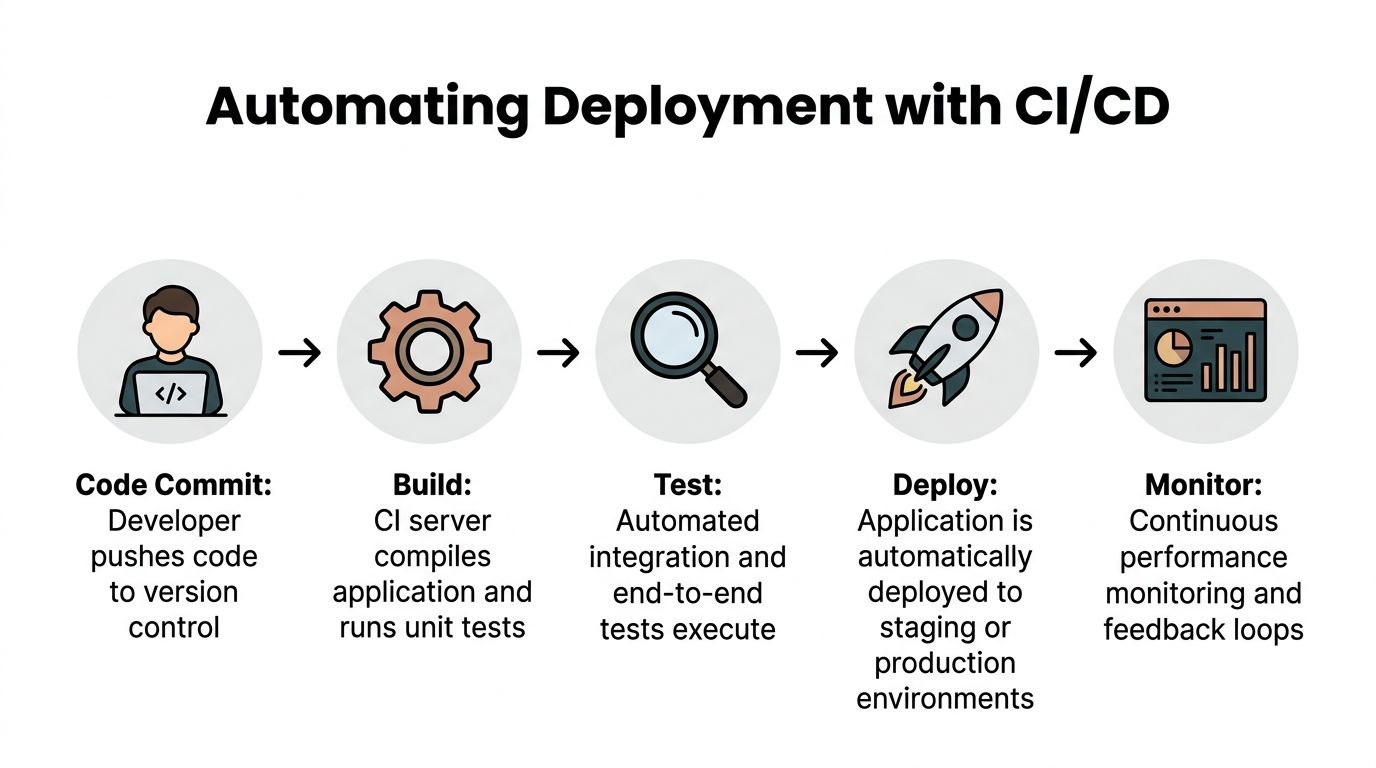
A straightforward GitHub Actions pipeline usually does this:
- Check out the repository
- Install dependencies with
npm ci - Run linting
- Run unit and integration tests
- Build the Docker image
- Push the image or deploy it to the target platform
That sequence catches most avoidable deployment mistakes before they reach production.
Multi-stage builds help, but they’re not enough
A lot of tutorials stop at “use a multi-stage Docker build.” That’s useful, but it doesn’t solve runtime visibility.
An underserved angle in Node.js tutorials is production reliability. 55% of apps fail initial scale tests, and many guides omit observability stacks such as OpenTelemetry and Prometheus that ops teams need to support 99.99% uptime SLAs, according to GoSquared’s discussion of vital aspects of building a Node.js application.
That’s the part many junior developers miss. Deploying the app isn’t the finish line. Knowing what it’s doing under load is part of deployment.
Add observability as part of the release path
At minimum, production should expose enough signals to answer these questions:
- Is the API healthy?
- Which routes are failing?
- Which integration is timing out?
- Are background jobs backing up?
- Which tenant or workflow is noisy?
That usually means:
- Structured logs: searchable by request ID, tenant, job ID
- Metrics: request duration, error counts, queue depth
- Tracing where useful: especially across API calls and worker jobs
- Health checks: shallow for load balancers, deeper for internal diagnostics
Shipping without metrics is like pushing code with your eyes closed. The app may be running, but you can’t tell if the workflow is healthy.
Hosting choices depend on the workload
For a standard API, platforms such as Render or a managed container service can be enough. For heavier queue usage, multi-service deployments, or stricter networking needs, AWS ECS or Kubernetes may make more sense.
Use decision criteria that reflect the actual app:
| Need | Better fit |
|---|---|
| Simple API and low ops overhead | Managed app platform |
| Separate API and worker services | Container platform |
| Fine-grained networking and scaling control | ECS or Kubernetes |
| Heavy compliance or internal infra standards | Existing enterprise platform |
The wrong hosting choice usually isn’t catastrophic at the start. The more common problem is delaying automation. Teams deploy by hand for too long, then fear releases because every push feels risky.
A CI/CD pipeline fixes that by turning deployment into a repeatable system. Every commit follows the same path. Every test runs the same way. Every image is built from the same instructions.
That consistency is what makes a production Node.js app dependable in a B2B setting.
Scaling for B2B Workflows and AI Integrations
Once the API is stable, the primary work starts. B2B automation apps rarely stay request-response only. They evolve into orchestration systems.
A lead arrives from a webhook. The app normalizes it, checks for duplicates, enriches the company and contact, asks an AI model to classify intent or draft metadata, writes results to the database, syncs to a CRM, and alerts a sales channel if the account looks important. That chain can’t all run inside a single synchronous HTTP request.

Respect the event loop
Node.js handles concurrency well, but it’s still easy to misuse. Event loop blocking causes 70 to 80% of production performance issues in Node.js automation systems, and offloading CPU-bound tasks to worker threads can produce 3 to 5x throughput gains on multi-core cloud instances, according to AppSignal’s guide to Node.js architecture pitfalls.
That matters in B2B automation because “small” CPU work adds up fast. Examples include:
- parsing large payloads
- generating documents
- heavy transformation logic
- AI post-processing
- bulk CSV import handling
If those tasks run on the main thread, API responsiveness drops for unrelated requests too.
Split fast paths from slow paths
A healthy pattern is:
- Fast path: accept the webhook, validate it, store the raw event, return quickly
- Slow path: queue the expensive work for a worker process
That separation improves reliability. The intake endpoint does one thing well. Background workers handle enrichment, CRM syncs, notifications, and retries.
You can implement this with BullMQ, RabbitMQ, SQS, or another queue system. The exact product matters less than the discipline around job design.
Good jobs are:
- idempotent
- retry-safe
- traceable
- small enough to reason about
- explicit about side effects
Worker threads are for CPU work, not everything
Queues solve timing and orchestration. Worker threads solve CPU pressure.
If your process needs to do expensive transformations, use Node’s worker_threads module so the main event loop keeps handling I/O. For teams dealing with heavy processing, this guide on multithreading in Node.js is a useful reference for when worker threads help and when they don’t.
Use worker threads for things like:
| Use worker threads for | Don’t use worker threads for |
|---|---|
| expensive parsing | simple DB reads |
| document or file processing | standard HTTP requests |
| large data transformation | ordinary CRUD handlers |
| AI output post-processing | quick validation logic |
A practical B2B automation flow
Consider a common scenario. A paid ad form submits a new lead. Your Node app should do roughly this:
- Receive the webhook and verify authenticity.
- Persist the raw event so you never lose the original payload.
- Normalize the lead into your internal schema.
- Check idempotency using an external event ID or a deterministic key.
- Queue enrichment work rather than doing everything inline.
- Run AI classification to label account type, urgency, or routing hints.
- Sync to the CRM through a dedicated integration layer.
- Record outcomes so an operator can inspect success or retry state.
That architecture gives you better control over partial failure. If the CRM is down, the lead still exists in your system. If the AI step times out, you can retry it without replaying the original webhook blindly.
The app should own the workflow state, not outsource it to a chain of hopeful API calls.
Plan scaling as a system decision
As load grows, the question becomes whether to scale up individual machines or spread work across more instances. That’s where the trade-off between vertical and horizontal growth matters. This overview of Horizontal vs Vertical Scaling is a useful framing for deciding when to add larger instances, more worker replicas, or both.
For most automation platforms, scaling isn’t one decision. It’s several:
- API containers may scale horizontally.
- Worker processes may need separate tuning.
- CPU-heavy tasks may need worker threads or isolated services.
- Database capacity becomes its own constraint.
- Rate-limited third-party APIs can become the bottleneck before your app does.
That’s why simple “just add clustering” advice often disappoints. The system only scales cleanly when each workload has the right execution model.
There’s also a practical operations angle here. Some teams use in-house workflows, queues, and service wrappers. Others use a partner that already works on AI and automation systems for CRM automation, lead generation, outreach, SOPs, or Voice AI implementation. MakeAutomation is one such option for teams that need hands-on implementation support rather than just code examples.
If you build node js app for serious B2B automation, the job isn’t shipping an endpoint. It’s designing a system that can keep processing revenue-critical workflows when APIs fail, traffic spikes, or business rules change next week.
If you’re building a Node.js application for CRM sync, lead routing, AI-assisted outreach, or queue-driven back office automation, MakeAutomation works with B2B and SaaS teams on implementation, workflow design, and production-ready automation systems.