Database in Node JS: A SaaS Founder’s Guide
You’re probably at the point where the first version of your app no longer feels simple. The product works. Customers are using it. Your team is shipping quickly. Then the data layer starts pushing back.
Queries that felt instant in staging slow down in production. Reporting gets awkward. Background jobs compete with API traffic. A schema decision you barely discussed six months ago now affects pricing, onboarding, and whether your team trusts the data in the CRM.
That’s why “database in node js” isn’t a setup question. It’s an operating model question. The database you choose, the way Node.js connects to it, and the guardrails you put in place will shape how your SaaS behaves under load and how expensive it becomes to maintain.
Your Database The Foundation of Your SaaS
Most early SaaS products don’t start with a bad database choice. They start with an incomplete one. The team picks whatever is easy to launch, then discovers that billing data, customer records, product events, and internal analytics all have very different demands.
In a growth-stage product, your database stops being a backend detail. It becomes the system that determines whether support can trust account history, whether sales can trust lead ownership, and whether operations can automate anything without constant cleanup. That’s why schema design matters as much as framework choice. If your tables, relationships, and constraints are messy, every workflow built on top of them stays messy too. A good primer on this thinking is database normalization, especially if your team has started duplicating fields across features.
A practical database in node js stack should answer three business questions:
- Can the team trust the data? Billing, subscriptions, permissions, and CRM ownership need consistency.
- Can the product stay responsive? Slow reads and lock-heavy writes hurt onboarding and retention.
- Can engineering change the system safely? New features shouldn’t require risky manual data fixes every sprint.
Your database is where product decisions become operational reality.
There’s also a reason strong Node.js teams keep using it for data-heavy work. NASA used Node.js to streamline database access and consolidate legacy databases, achieving a 300% improvement in database access time, which let users access needed datasets in seconds rather than hours, according to Radixweb’s Node.js usage statistics summary.
That example matters because it reframes the decision. This isn’t about picking the most fashionable datastore. It’s about choosing a database and access pattern that can support the next few years of product growth without forcing repeated rewrites.
SQL vs NoSQL The Core Decision for Your Data
A team usually feels this choice for the first time during a product change that touches money and access at the same time. A customer upgrades, seats increase, a webhook arrives twice, and support asks why permissions no longer match the invoice. That is the moment database style stops being an abstract architecture debate.

SQL databases store data in defined tables with explicit relationships, constraints, and transactions. NoSQL databases usually optimize for flexible records, easier horizontal distribution, and high-volume write patterns. Both work well with Node.js. The better choice depends on what must stay correct under concurrency, what will change fastest, and how much operational complexity the team is willing to absorb.
For growth-stage SaaS, SQL is usually the safer first bet. Billing, entitlements, account hierarchies, approval flows, and audit history all depend on relationships staying intact while multiple requests hit the same records. If your app needs to update several related entities as one unit, transactional behavior saves a lot of cleanup work later.
NoSQL earns its place when shape changes faster than relational design can keep up. Product analytics events, activity feeds, content metadata, cached projections, and tenant-specific configuration often fit better as documents or key-value data. The trade-off is that the application often carries more responsibility for consistency, idempotency, and cross-record coordination.
That trade-off shows up in operations, not just schema diagrams.
A relational system usually gives the team cleaner migrations, predictable reporting, and fewer surprises when finance asks for a backfill across six months of customer history. A document store can reduce friction early, but teams often pay for that speed later with custom validation, duplicate fields, and harder-to-debug edge cases around partial updates. Once a SaaS product reaches meaningful revenue, those edge cases stop being minor.
When SQL reduces risk
Choose SQL first if any of these are already on the roadmap:
- subscriptions, invoicing, or usage-based billing
- role-based permissions and account membership
- CRM ownership, routing rules, and audit trails
- workflows that update several records in one request
- reporting screens that join data across customers, teams, and time ranges
SQL also fits better when the team needs disciplined change management. Schema migrations can be reviewed, staged, and rolled out with backward-compatible application code. That matters in Node.js systems where several app instances may be serving traffic during deploys. Additive migrations first, code second, cleanup last is still the pattern that causes the fewest outages.
When NoSQL is the better fit
Choose NoSQL when document shape is legitimately variable and joins are not central to the product. Good examples include event ingestion pipelines, user-generated content with uneven fields, large denormalized read models, and feature areas where each tenant stores different metadata.
This path can scale well, but it needs stronger application discipline. Teams need clear rules for document versioning, duplicate-event handling, background repair jobs, and how derived data gets rebuilt after bugs. Without those guardrails, flexibility turns into long incident threads.
Infrastructure choice matters too. If the team expects read scaling, frequent failover testing, or managed replication on AWS, compare service behavior before locking in the engine. This AWS Aurora vs RDS breakdown is a useful reference because operational differences affect connection limits, failover behavior, and cost as much as query performance does.
If the product will depend on joins, transactions, and auditability within the next year, start with SQL.
Node.js does not force either direction. What matters more is how the app manages database connections, retries, and write patterns under load. A poor pooling setup can take down a healthy Postgres cluster. A weak migration process can break a solid schema. A document model can perform well for years if the team treats consistency rules as part of the application contract instead of an afterthought.
A short overview helps if you want a visual walkthrough before deciding:
A simple decision filter
Use this filter when the team is stuck:
| Need | Better fit |
|---|---|
| Billing, CRM, subscriptions, permissions | SQL |
| Flexible documents with changing shape | NoSQL |
| Complex reporting and joins | SQL |
| Rapid schema experimentation on loosely related data | NoSQL |
If this is the first serious database decision for a standard SaaS app, SQL is usually the starting point with the lowest long-term cost.
Top Database Contenders for Node JS Apps
A team usually feels this choice for the first time during growth, not at launch. Signups rise, background jobs pile up, customer success wants account-level reporting, and a database that felt fine at 5,000 records starts showing its limits once every request opens more joins, more writes, and more concurrent connections.
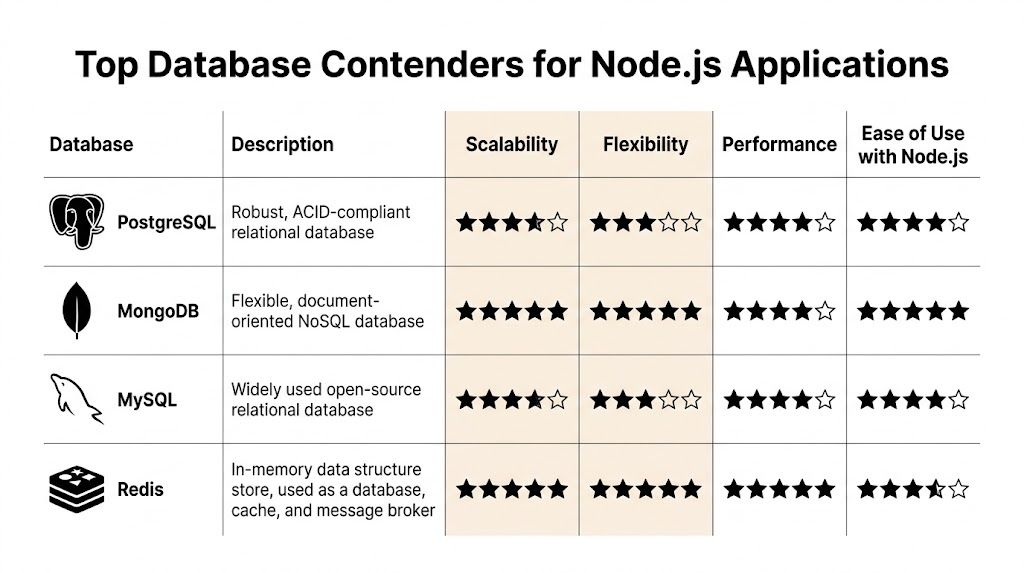
The shortlist for a Node.js SaaS app is usually PostgreSQL, MySQL, MongoDB, and Redis. They serve different roles. Treating them as interchangeable leads to expensive rewrites, awkward reporting layers, or scaling problems that look like app bugs but are really storage choices.
PostgreSQL for core product data
PostgreSQL is the best default for growth-stage SaaS. It handles transactional workflows well, models relationships cleanly, and keeps working once the product grows beyond CRUD into billing logic, audit history, permissions, and internal operations.
That range matters. The same database can back your signup flow, your admin tools, and the reporting queries finance asks for six months later. In practice, that reduces architectural sprawl and lowers the odds of introducing a second datastore before the team is ready to operate one.
PostgreSQL also gives teams room to mature their stack. You can start with straightforward schemas and basic indexes, then add read replicas, partitioning, and stricter migration controls as traffic grows. If your team plans to use an ORM, this guide to Node.js ORM choices helps frame where PostgreSQL tends to work well with both high-level tooling and raw SQL for critical paths.
MySQL for predictable operations and hiring ease
MySQL remains a solid option for standard SaaS workloads. Teams often pick it because they already know how to run it, troubleshoot slow queries, and hire engineers who understand its behavior. That familiarity has real value when incidents happen at 2 a.m.
It fits well for transactional web apps with conventional relational models. The trade-off is less about capability and more about where your team already has muscle memory. If you are comparing managed AWS options, this breakdown of AWS Aurora vs RDS is useful because failover behavior, replica handling, and connection limits affect day-to-day reliability as much as engine choice.
MongoDB for document-heavy products
MongoDB works well when the product revolves around flexible documents, nested objects, or records that change shape often. Content platforms, event capture pipelines, and some product analytics use cases fit that pattern.
The trouble starts when a team stores relational business data in MongoDB because early development feels faster. Later, product asks for cross-account reporting, finance needs stronger consistency around subscriptions, and support wants a reliable history of who changed what. Those requirements are common in SaaS. They push teams toward joins, transactions, and stricter schema rules, even if the first version of the app did not need them.
Field note: I have seen teams recover from a poorly planned cache layer faster than from a document database chosen for a relational product.
Redis for hot paths and operational relief
Redis belongs in many Node.js stacks, but usually beside the primary database, not in place of it. It is a strong fit for caching expensive reads, storing sessions, rate limiting, short-lived coordination data, and queue-backed workflows.
Used well, Redis cuts pressure on the primary database and reduces latency on high-traffic endpoints. Used carelessly, it becomes a second source of truth with missing durability guarantees and hard-to-debug consistency issues. Keep business records in your system of record. Use Redis to make that system breathe under load.
Node.js database comparison for SaaS
| Database | Type | Best Use Case for SaaS | Key Advantage |
|---|---|---|---|
| PostgreSQL | Relational SQL | Core product data, billing, CRM, analytics | Transactions, joins, and long-term flexibility |
| MySQL | Relational SQL | Standard web app backends with broad hosting support | Familiar operations and wide ecosystem support |
| MongoDB | Document NoSQL | Flexible content models, variable documents | Fast iteration on document-shaped data |
| Redis | In-memory data store | Caching, sessions, queues, real-time state | Low-latency access for hot data |
What usually works in production
For a typical SaaS app with growth ambitions, the pattern that holds up is simple:
- PostgreSQL as the source of truth: Keep customers, subscriptions, permissions, and workflow state there.
- Redis as a supporting layer: Offload hot reads, session storage, and queue or rate-limit use cases.
- MongoDB only for a clear document-driven need: Choose it because the workload demands it.
- MySQL when team experience is a business advantage: Operational confidence shortens outages and lowers implementation risk.
For a first serious database in node js stack, PostgreSQL is usually the safest default. It gives a new team lead fewer unpleasant surprises once traffic rises, reporting gets more demanding, and the cost of downtime becomes real.
Connecting Node JS with ORMs and Drivers
After choosing the database, the next decision is how Node.js will talk to it. You have two broad options: raw drivers and ORMs.
A raw driver like pg for PostgreSQL gives you direct control. You write SQL, manage queries yourself, and stay close to the database’s actual behavior. That’s good for performance-sensitive paths and for teams that already think in SQL.
An ORM like Prisma or Sequelize gives you a higher-level interface. You work with models and objects instead of hand-writing every query. That improves development speed and reduces repetitive code, especially on a small team. If you want a practical overview of the trade-offs, this guide to Node.js ORM choices is a good companion.
Raw driver example with pg
import pg from 'pg';

const { Pool } = pg;

const pool = new Pool({
  connectionString: process.env.DATABASE_URL,
});

async function getAccount(id) {
  const result = await pool.query(
    'SELECT id, name, plan FROM accounts WHERE id = $1',
    [id]
  );
  return result.rows[0];
}
This is close to the metal. You control the SQL, the joins, and the execution pattern. That usually means fewer surprises when debugging performance.
ORM example with Prisma
import { PrismaClient } from '@prisma/client';

const prisma = new PrismaClient();

async function getAccount(id) {
  return prisma.account.findUnique({
    where: { id },
    select: {
      id: true,
      name: true,
      plan: true,
    },
  });
}
This is easier to read and easier to hand to a growing team. It also gives you schema tooling, migrations, and safer query composition.
The real trade-off
The mistake is treating this as ideology. It isn’t. It’s workload-specific.
Using a raw driver like pg requires careful optimization. Honeybadger’s SQL in JavaScript guide notes that adding a composite index on frequently queried columns in a table with 1M+ rows can cut SELECT latency by 70% to 90% under concurrent load. The same source also notes that ORMs can add 10% to 20% overhead.
That doesn’t mean ORMs are wrong. It means they’re best for the majority of application code, while raw SQL often belongs on the hot path.
Use the ORM for most business logic. Drop to raw SQL for reporting queries, bulk operations, and the endpoints everyone hits all day.
A practical split that works
- Prisma for standard application development: Good for CRUD, relations, schema evolution, and onboarding new engineers.
pgfor performance-sensitive endpoints: Good for complex reporting, batch updates, or carefully tuned SQL.- Shared conventions matter more than tool purity: Teams suffer when half the codebase uses generated abstractions and the other half uses ad hoc query strings with no standard.
In a scaling SaaS, consistency of approach matters almost as much as the library itself.
Advanced Patterns for Scalable SaaS Applications
Most downtime stories don’t start with dramatic architecture failure. They start with small operational shortcuts that held up in staging and collapsed under real traffic.

Connection pooling is not optional
Opening a new database connection for every request is one of the fastest ways to damage a growing Node.js app. In single-process demos, it may appear fine. In clustered apps, worker-based deployments, or bursty traffic patterns, it becomes a leak factory.
One source highlighting this operational gap points to over 15,000 unresolved queries on “Node.js database connection leak” since 2023, and notes that poor pooling strategies cause 20% to 30% of downtime in unoptimized SaaS apps, as summarized in this discussion on connection pooling pitfalls.
That’s why you should create one pool per process, initialize it once, and pass data access through a shared layer instead of opening connections inside route handlers.
Migrations need to be boring
If schema changes happen through manual console edits, the team is already in trouble. Migrations should be versioned, reviewed, and deployed the same way application code is deployed.
A stable process usually looks like this:
- Define the schema change in code. Use Prisma Migrate, Knex, or your chosen migration tool.
- Review the operational impact. Check locks, indexes, backfills, and rollback options.
- Deploy predictably. Run migrations through CI or a controlled release workflow, not from someone’s laptop.
When migrations are boring, releases stay boring. That’s a good sign.
Production reliability often comes from routines that feel unexciting. Pooled connections, reviewed migrations, and repeatable deploys save more teams than “clever” architecture does.
Security basics that prevent expensive mistakes
Database security doesn’t need a long checklist to deliver value. It needs discipline.
- Use environment variables for credentials: Don’t hard-code secrets in app code or config checked into version control.
- Prefer parameterized queries: Whether through Prisma or
pg, avoid string-built SQL. - Scope database permissions carefully: Your app usually doesn’t need every privilege available.
- Audit access paths: Background jobs, admin scripts, and internal tools often become the weakest point.
Patterns that age well
As the app grows, these habits keep paying off:
| Pattern | Why it works |
|---|---|
| Shared connection pool | Prevents runaway connection creation |
| Versioned migrations | Keeps schema changes traceable |
| Query reviews on hot paths | Catches expensive joins and scans early |
| Clear data ownership | Reduces duplicate fields and conflicting writes |
The advanced part isn’t the technology. It’s the discipline to put these patterns in place before the fire starts.
Hosting Scaling and Maintaining Your Database
Where your database runs changes your team’s day-to-day workload. That decision is often underestimated.
Self-hosting gives you control. You can tune more aggressively, choose your own upgrade windows, and sometimes reduce direct infrastructure spend early on. You also own backups, patching, failover planning, monitoring, and every sharp edge that appears during incidents.
Managed databases usually make more sense for a growth-stage SaaS because they buy back engineering time. Automated backups, easier failover, built-in monitoring, and cleaner upgrade paths let the team focus on product work instead of babysitting infrastructure. If you’re running inside AWS and expect bursty app traffic, a service like RDS Proxy for AWS is worth understanding because connection management becomes part of application stability, not just infrastructure convenience.
How to think about scaling
Use simple categories.
- Vertical scaling: Move to a larger instance when compute, memory, or storage is the bottleneck and the app is still architecturally simple.
- Horizontal scaling: Add read replicas, partition workloads, or separate hot paths when one node starts doing too much.
- Operational scaling: Improve backups, recovery drills, alerting, and maintenance processes before traffic forces the issue.
The practical recommendation
For teams building their first durable database in node js stack, a managed PostgreSQL or managed MySQL service is often the right call. You’ll spend more on the database bill than on a self-managed box, but less on distraction, late-night incidents, and avoidable operational mistakes.
That’s usually the better trade.
Conclusion Your Path to a Scalable Database
If you need a default answer, start with managed PostgreSQL.
It gives most SaaS teams the right balance of transactional safety, query power, and operational maturity. Use an ORM like Prisma to move quickly, but keep room for raw SQL on the endpoints and jobs that need tighter control. Set up connection pooling from day one. Treat migrations like production code. Don’t wait for incidents to make operational discipline feel important.
The best database in node js setup usually isn’t exotic. It’s a stack your team can understand, change safely, and run under pressure.
That’s what scales. Not the cleverest architecture. The one that keeps working while the company grows.
Frequently Asked Questions About Node JS Databases
Should a SaaS app use more than one database
Yes, sometimes. The common version is one primary database plus one specialized store.
PostgreSQL often holds the source-of-truth business data, while Redis handles caching, sessions, or queue-related state. That split works because each tool does a different job well. Problems start when teams duplicate durable business logic across both systems and lose clarity about which one owns the truth.
Does serverless change how Node.js should connect to a database
Yes. Serverless functions can create connection pressure quickly because many short-lived executions may try to connect at once.
That means pooling strategy matters even more. Don’t let every invocation open unmanaged connections. Use providers and patterns designed for bursty execution, and test the connection lifecycle under realistic concurrency. The failure mode isn’t usually query logic. It’s connection exhaustion.
In serverless systems, database access is often limited by connection behavior before it’s limited by raw query speed.
What should I use for real-time features
For real-time dashboards, ephemeral state, and fast-changing counters, Redis is often the first tool to evaluate. It’s a good fit for transient data and fast access patterns.
If the feature also needs durable history, permissions, or complex reporting, keep the core record in your primary relational database and use Redis as an acceleration layer. Real-time features usually work best when you separate “fast state” from “permanent record” instead of asking one system to do both poorly.
If your team is redesigning its data layer, cleaning up CRM logic, or building a more scalable automation stack around your SaaS operations, MakeAutomation can help you turn messy workflows into systems your team can run. They work with B2B and SaaS companies on automation architecture, AI-enhanced operations, documentation, and implementation support that removes manual bottlenecks before they slow growth.