
ReactJS Dynamic Component Patterns for SaaS UIs
You’re probably dealing with one of two situations right now. Either your React UI started simple and now you’re buried in if statements, or your product team wants a configurable dashboard where different customers see different widgets, forms, and layouts from the same codebase.
That’s where the core reactjs dynamic component problem shows up. Basic tutorials teach how to swap one component for another. They rarely deal with what happens when the list is sortable, the registry comes from config, the dashboard has dozens of widget types, and a bad key choice subtly preserves the wrong state in production.
Enterprise React work is less about “can this render dynamically?” and more about “can this stay maintainable, predictable, and fast when the product gets messy?” That’s the standard worth building for.
The Foundations of Dynamic UIs in React
A configurable dashboard usually fails in ordinary places first. A widget disappears for one role, a reordered table keeps the wrong row expanded, or a filter change reuses stale local state. The rendering logic looks harmless in code review. The bugs show up later, under real data and real user behavior.
That is why the foundation matters. Dynamic React UIs depend on two patterns that look simple in demos and become expensive at scale: conditional rendering and list rendering.

Choosing the right conditional pattern
Conditional rendering is not just syntax choice. It affects readability, testability, and how safely a component can absorb new product rules over time.
Use a ternary for a clean either-or branch.
return isAdmin ? <AdminPanel /> : <UserPanel />;
Use && when a branch is optional and the missing case renders nothing.
return (
  <div>
    {hasErrors && <ErrorBanner />}
  </div>
);
The trade-off is maintenance. Ternaries are explicit, but nested ternaries turn permission logic and loading logic into a puzzle. && is concise, but it can hide a missing state that matters later, especially in B2B screens where "no access," "no data," and "still loading" mean different things.
A practical rule works well here. If a teammate has to trace the branch with their finger, pull that logic into a variable or a small helper component.
For example:
let content;

if (isLoading) content = <Spinner />;
else if (!data.length) content = <EmptyState />;
else content = <ResultsTable rows={data} />;

return <section>{content}</section>;
This version is easier to extend when product asks for one more state, then another, then tenant-specific behavior behind a feature flag.
List rendering is where identity starts
Most dynamic interfaces are lists, even when they do not look like lists at first glance. Widget grids, activity streams, kanban columns, tabs, notification centers, and schema-driven form blocks all depend on the same rendering model.
The basic pattern is familiar:
<ul>
  {products.map((product) => (
    <li key={product.id}>
      {product.name} - {product.price}
    </li>
  ))}
</ul>
The map() call is straightforward. The harder part is preserving identity as items move, appear, disappear, or switch order based on sorting, filtering, permissions, or saved user preferences. React's own documentation on rendering lists and preserving and resetting state both point to the same underlying rule: React uses keys to decide whether something is the same component instance or a different one.
That decision affects more than performance. It controls whether local state stays attached to the correct item.
Why the key prop is more critical than it appears
A key tells React how to match the current render tree to the previous one. Get that wrong, and React can preserve the wrong component instance in the wrong place.
Here is the classic bug:
{tasks.map((task, index) => (
  <TaskRow key={index} task={task} />
))}
If a user inserts a task at the top, every index after it shifts. React may keep the expanded row state, focus state, or inline edit state attached to the wrong task. In a dashboard, that turns into the kind of bug users describe as "the table is acting weird."
Use stable IDs instead:
{tasks.map((task) => (
  <TaskRow key={task.id} task={task} />
))}
A few rules hold up well in production:
- Use stable backend IDs first: They survive sorting, filtering, and refetches.
- Do not generate keys during render:
Math.random()forces React to treat every item as new. - Use index keys only for static lists: Fine for fixed content. Risky for anything users can reorder, insert, remove, or filter.
- Inspect stateful children carefully: Inputs, accordions, popovers, and row actions reveal key problems quickly.
Bad keys rarely fail with a clear stack trace. They fail as misplaced state, broken focus, unnecessary remounts, and support tickets that are hard to reproduce.
For dynamic component systems, that is the starting point. Before a registry, lazy loading, or schema-driven layout can stay maintainable, the UI has to render the right thing and preserve the right identity under change.
Building a Scalable Component Registry
Once your UI stops being a few local conditionals and starts being driven by config, switch statements turn into debt. They’re manageable at first. Then the product adds tenant-specific widgets, custom form blocks, role-based layouts, and optional modules. Now every new variant changes core rendering code.
That’s the point where a component registry beats ad hoc branching.
Why a registry scales better than branching
A registry is just an object that maps a string or type from config to a React component.
const componentRegistry = {
  text: TextField,
  select: SelectField,
  checkbox: CheckboxField,
  date: DateField,
};
Then you render from configuration:
function DynamicField({ field }) {
  const FieldComponent = componentRegistry[field.type] || UnsupportedField;
  return <FieldComponent {...field.props} />;
}
This matters in B2B software because the UI often becomes partially data-driven. A form builder, onboarding flow, analytics dashboard, or client-specific portal may receive schema from an API rather than hard-coded JSX.
The component mapping object strategy can reduce code duplication by 60-70% compared to conditional rendering approaches and improve maintainability in systems with over 15 component variants, according to this write-up on dynamic component mapping.
What a good registry looks like
A registry works best when it’s boring and centralized.
import { TextField } from "./fields/TextField";
import { SelectField } from "./fields/SelectField";
import { CheckboxField } from "./fields/CheckboxField";
import { UnsupportedField } from "./fields/UnsupportedField";

export const fieldRegistry = {
  text: TextField,
  select: SelectField,
  checkbox: CheckboxField,
};
And then:
export function FormRenderer({ schema }) {
  return schema.map((field) => {
    const Component = fieldRegistry[field.type] || UnsupportedField;

    return (
      <Component
        key={field.id}
        label={field.label}
        name={field.name}
        options={field.options}
      />
    );
  });
}
That fallback matters. In enterprise systems, config drifts. APIs change. Feature flags go out of sync. You want a safe default that fails visibly, not a blank area that nobody notices until a customer reports it.
Comparison of the common patterns
| Pattern | Best For | Complexity | Performance Impact |
|---|---|---|---|
| Inline ternary | Small local UI switches | Low | Minimal |
switch statement |
A few known variants | Low to medium | Minimal |
| Component registry | Config-driven dashboards and forms | Medium | Good when components are organized well |
| Dynamic import registry | Large feature sets with infrequent usage | Higher | Strong when paired with lazy loading |
The registry pattern isn’t free. It adds indirection. A developer can’t just search for a JSX tag and see all usages. The codebase now depends more on naming discipline and shared conventions.
Where teams usually get this wrong
The first mistake is over-engineering too early. If you have four variants, a registry may be more ceremony than value.
The second mistake is making the registry too magical. If components require wildly different props, the mapping layer becomes fragile. That’s a sign your configuration model is weak, not that React is the problem.
A better approach is to normalize the schema before rendering. Convert raw API payloads into a consistent UI contract.
- Normalize upstream: Convert backend field definitions into predictable frontend props before render time.
- Keep the registry flat: Don’t hide business logic inside the map itself.
- Use an explicit fallback:
UnsupportedWidgetis better thannull. - Split by domain: Keep
widgetRegistry,fieldRegistry, andlayoutRegistryseparate.
A registry should remove branching from rendering. It shouldn’t become a second application framework hidden inside an object literal.
For reactjs dynamic component systems in SaaS products, this pattern is often the difference between “configurable” and “barely controllable.”
Advanced Patterns for Dynamic Behavior
Rendering a different component solves only half the problem. Large applications also need to share behavior dynamically. Authentication checks, data fetching, permission filtering, feature gating, modal orchestration, and analytics hooks often need to wrap or influence multiple components.
That’s where Higher-Order Components and Render Props still earn their place.

When an HOC is the better tool
A Higher-Order Component takes a component and returns an enhanced component.
function withAdminView(Component) {
  return function WrappedComponent(props) {
    if (!props.user?.isAdmin) {
      return <AccessDenied />;
    }

    return <Component {...props} />;
  };
}
Usage:
const AdminDashboard = withAdminView(Dashboard);
This works well when the behavior should be applied consistently and externally. Access control is a good example. So is injecting audit logging, tenant context, or feature flag checks.
The downside is that HOCs hide behavior behind wrapping. If you stack several of them, debugging gets annoying. Component trees become harder to read, and prop origins get murky.
Render Props are explicit, but noisier
Render Props pass a function as a prop so the parent controls rendering with access to shared logic.
function ModalController({ children }) {
  const [open, setOpen] = React.useState(false);

  return children({
    open,
    show: () => setOpen(true),
    hide: () => setOpen(false),
  });
}
Usage:
<ModalController>
  {({ open, show, hide }) => (
    <>
      <button onClick={show}>Open</button>
      {open && <CustomModal onClose={hide} />}
    </>
  )}
</ModalController>
This pattern is more explicit than an HOC. The trade-off is verbosity. Nested render functions can make JSX harder to scan.
Use HOCs when the concern belongs around the component. Use Render Props when the parent needs direct control over how that logic affects the UI.
That distinction matters. If you’re building a role-aware dashboard shell, an HOC is often cleaner. If you’re building a reusable modal, popover, or async state controller where the parent decides the output, Render Props are often the better fit.
Don’t confuse behavior sharing with component mapping
A registry answers “which component should render?” HOCs and Render Props answer “how should shared logic be applied?”
Teams often mix them together too early. Keep them separate until the need is obvious. If your dashboard is config-driven but also role-sensitive, use the registry for component selection and a behavior pattern for auth or state orchestration.
If your team also works across browser-level integrations, web components with React can be useful when React components need to coexist with framework-agnostic UI elements or embedded systems.
Optimizing Load Times with React Lazy and Suspense
A configurable SaaS product usually ships more UI than any single user sees in one session. Admin pages, analytics widgets, onboarding flows, billing screens, advanced filters, and tenant-specific modules all compete for bundle size.
If all of that lands in the initial JavaScript payload, the app feels slow before the user clicks anything.
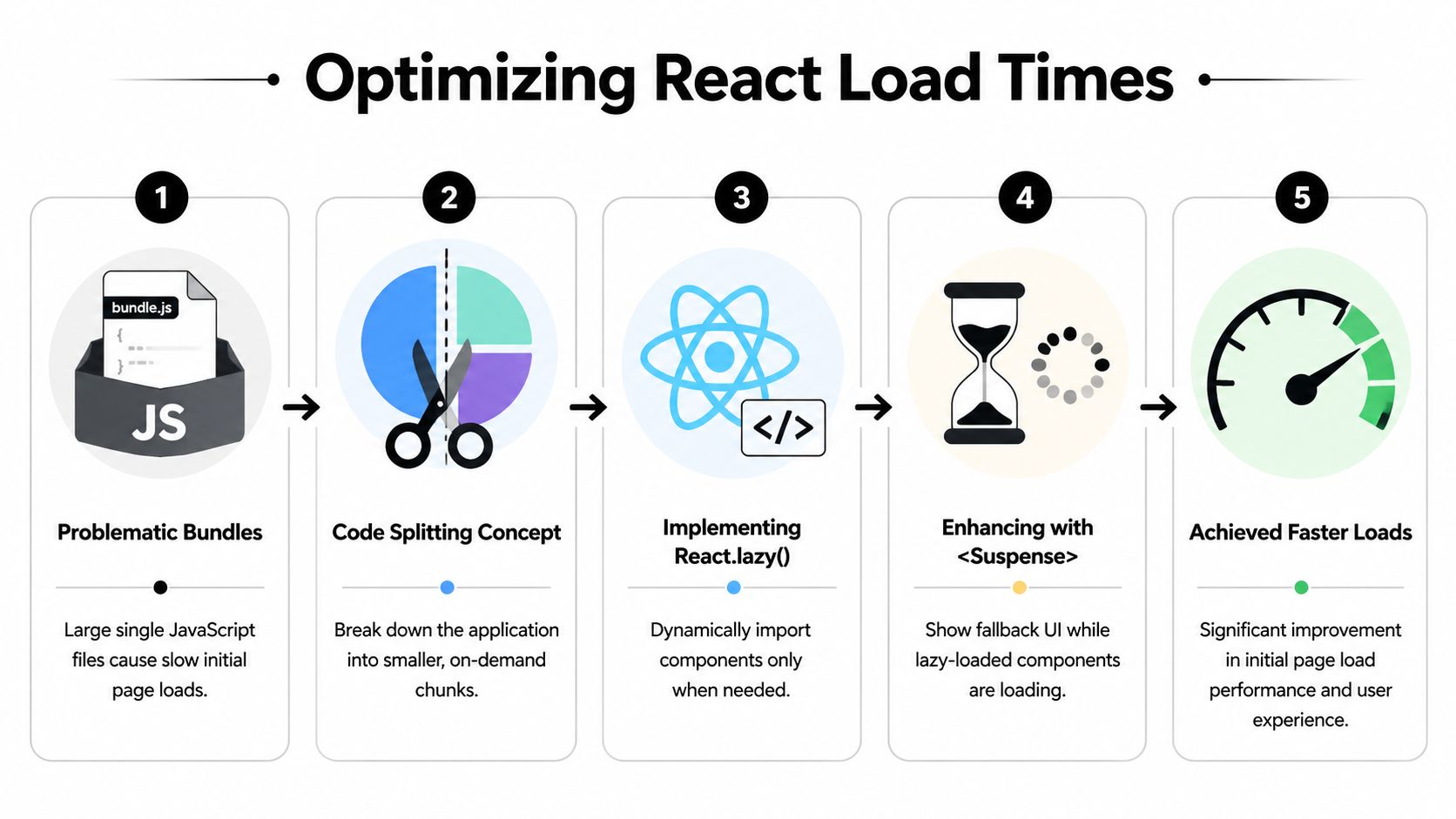
Using React.lazy() with dynamic import() statements and .catch() handlers can reduce initial bundle size by 40-60% and significantly improve Time to Interactive, according to DigitalOcean’s explanation of loading React components dynamically.
The core pattern
Start with a lazy import:
const ReportsPage = React.lazy(() => import("./ReportsPage"));
Render it inside Suspense:
<React.Suspense fallback={<PageSkeleton />}>
  <ReportsPage />
</React.Suspense>
That’s the entry point. It’s enough for demos, but not for production dashboards.
Here’s the upgrade:
const ReportsPage = React.lazy(() =>
  import("./ReportsPage").catch(() => import("./FallbackReportView"))
);
Now you have a degraded path if the import fails.
Why loading states matter
A blank screen during async component loading feels broken, even when the network is functioning correctly. Good fallback UI keeps the layout stable and tells the user what’s happening.
Use different loading states for different contexts:
- Page skeletons: Best for route-level lazy loading.
- Widget placeholders: Best for dashboard cards that load independently.
- Inline spinners: Best for small interactive controls.
- Null fallback: Use sparingly, usually for optional enhancements.
A useful walkthrough sits below if you want a visual refresher before implementing this pattern.
Error handling is not optional
Network failures, stale deployments, and bad chunk references happen. If a lazy-loaded component fails and you don’t isolate the error, the user can lose an entire screen.
Pair lazy loading with an Error Boundary:
class ErrorBoundary extends React.Component {
  constructor(props) {
    super(props);
    this.state = { hasError: false };
  }

  static getDerivedStateFromError() {
    return { hasError: true };
  }

  render() {
    if (this.state.hasError) {
      return <div>Module failed to load.</div>;
    }

    return this.props.children;
  }
}
Usage:
<ErrorBoundary>
  <React.Suspense fallback={<WidgetSkeleton />}>
    <LazyWidget />
  </React.Suspense>
</ErrorBoundary>
This is especially important when component availability depends on API responses or tenant configuration. A dynamic widget area should degrade gracefully, not crash the page because one optional module failed.
Where teams misuse lazy loading
The common mistake is lazy-loading everything. That can fragment the app into too many chunks and increase coordination overhead. Route-level modules, heavy visualization panels, rich text editors, and advanced admin tools are good candidates. Core layout primitives are not.
The second mistake is ignoring render churn after the chunk has loaded. If a dynamic dashboard still re-renders excessively, code splitting won’t save the interaction model. That’s where techniques like memoization in JavaScript help keep loaded components from doing unnecessary work.
Lazy loading fixes delivery cost. It doesn’t fix bad render behavior after the code arrives.
That distinction matters in every reactjs dynamic component system that’s grown beyond a prototype.
Real-World Dashboards Performance and Accessibility
A real B2B dashboard combines all of these patterns at once. It has config-driven widgets, conditional states, dynamic lists, async modules, and role-based behavior. The challenge isn’t choosing one pattern. It’s combining them without making the interface unpredictable.

Think about a CRM analytics screen. The left rail changes by role. The main area renders widgets from tenant config. Tables reorder based on filters. Some charts load on demand. Some cards are hidden behind feature flags. Small mistakes often accumulate under these conditions.
React’s key prop is a foundational mechanism for optimizing dynamic components in lists, and in B2B SaaS applications handling scalable data like CRM records, proper key usage can reduce re-render overhead by 30-50% in list-heavy UIs, as explained in this analysis of why React keys are important.
A practical dashboard stack
A solid setup usually looks like this:
- Registry for widget selection: The API provides widget types and layout metadata. The frontend resolves types through a registry.
- Stable keys for widget instances: Use tenant widget IDs, not array positions in the grid.
- Lazy loading for heavyweight modules: Charts, report builders, and admin panels shouldn’t inflate the initial bundle.
- Memoization for expensive children:
React.memo()helps when widget props are stable and rendering is expensive.
If you memoize everything blindly, you can make the code harder to reason about without meaningful wins. Memoization works best when props are stable and the child is expensive.
SSR and Next.js trade-offs
Server-side rendering complicates dynamic component strategies. Some components depend on browser APIs, layout measurement, or client-only libraries. If you render them too early, hydration mismatches show up.
That doesn’t mean dynamic rendering is the problem. It means you need a clear client/server boundary. Keep browser-only widgets isolated. Treat lazy loading and client-only rendering as architectural choices, not fixes you sprinkle in after bugs appear.
Hydration issues usually come from inconsistent rendering assumptions, not from React being bad at dynamic UI.
In practice, teams get cleaner results when they define which widgets are server-safe and which are client-only at the registry level.
Accessibility is part of dynamic behavior
Dynamic UI often breaks accessibility first. A screen reader user doesn’t care that your component registry is elegant if focus disappears after a modal opens or new content appears with no announcement.
Handle the basics every time dynamic content changes:
- Move focus intentionally: When a dialog opens, send focus into it. When it closes, return focus to the trigger.
- Announce important updates: Use live regions for success messages, loading completion, or dashboard changes that aren’t otherwise obvious.
- Preserve semantic structure: Dynamic cards still need headings, labels, buttons, and landmarks.
- Keep keyboard order sane: Reordering UI visually is one thing. Breaking tab flow is another.
If your team needs a deeper accessibility review process around dynamic interfaces, web accessibility consulting is relevant because dynamic dashboards often fail in interaction details rather than obvious markup issues.
The enterprise standard
Professional React dashboards don’t just render dynamic components. They preserve identity, isolate cost, and remain usable under changing data.
That’s the bar. Not “it works on my machine.” Not “the config loaded.” A strong reactjs dynamic component architecture supports scale without turning every new widget into a regression risk.
Your Dynamic Component Playbook
A configurable dashboard usually starts simple. One team adds a conditional for a tenant-specific widget. Another adds a config-driven panel. A few quarters later, the page is assembling dozens of components with different data needs, bundle costs, and interaction models. That is the point where dynamic UI stops being a rendering trick and becomes an architecture decision.
Use the simplest pattern that still matches the source of change. Plain conditional rendering works well when the decision stays local to one screen and one developer can reason about it quickly. A component registry fits screens assembled from API payloads, feature flags, or tenant configuration, because it gives the system a controlled place to map config to actual UI. HOCs and render props still have value when you need to share dynamic behavior across multiple components, but they add indirection, so they should solve a specific cross-cutting concern rather than become the default abstraction. React.lazy() and Suspense belong in the plan when dynamic flexibility starts increasing your initial JavaScript cost.
The important habit is choosing patterns by constraint, not by preference. A registry helps with configurability, but it can also hide ownership and make debugging harder if every widget looks the same from the outside. Lazy loading improves first-load performance, but it can make user interactions feel uneven if the loading boundary appears at the wrong moment. Shared behavior abstractions reduce duplication, but they also make stack traces and component trees harder to read.
That is why dynamic component work in B2B dashboards needs a playbook, not a bag of isolated examples.
The playbook is straightforward. Keep rendering decisions close to the UI when they are local. Centralize them in a registry when product configuration needs consistency and control. Split code where bundle size is the bottleneck, not everywhere. Add shared behavior patterns only after the duplication is real enough to justify the extra abstraction. Review every choice against three pressures that basic tutorials usually skip: runtime cost, operability for the team, and the ability to add another tenant-specific variation without rewriting the page.
Treat reactjs dynamic component architecture this way and the dashboard stays configurable under real product pressure. New widgets stop feeling like exceptions. They become additions to a system your team can still understand six months later.
If your team is building configurable SaaS dashboards, AI-assisted workflows, or automation-heavy internal tools, MakeAutomation can help you design and implement the underlying systems cleanly. That includes UI architecture, workflow automation, AI integration, and operational tooling that scales without piling up one-off fixes.