User Provisioning Automation: A B2B & SaaS Growth Guide
A lot of founders don't notice the access problem until it starts slowing revenue down.
A new hire joins on Monday. HR has the signed offer. The manager expects them in Slack, GitHub, HubSpot, Notion, and the product analytics stack by lunch. Instead, someone from ops is chasing login requests across email threads, IT is assigning permissions by memory, and the employee spends the first two days waiting, asking, and improvising. That delay doesn't just waste salary. It slows product work, sales follow-up, support coverage, and customer delivery.
The same mess shows up on the way out. A contractor rolls off. A salesperson changes territories. An engineer moves into a team that handles production systems. If access updates depend on a ticket queue and whoever happens to be available, your company is running on trust and luck, not process.
That's where user provisioning automation stops being an IT term and becomes an operating model. It means your business can grant, change, and remove access based on rules instead of manual cleanup. For a SaaS company, that affects hiring speed, audit readiness, customer trust, and how confidently you can scale.
The Onboarding Bottleneck You Cannot Afford
The pattern is familiar in growing SaaS companies. You hire fast, add tools faster, and assume someone “owns” access until a problem proves otherwise.
A startup might begin with a few core apps. Then the stack expands. Slack, Google Workspace, GitHub, HubSpot, Salesforce, Jira, Linear, Notion, Zendesk, Stripe dashboards, cloud consoles, BI tools, customer environments. Each app has its own admin panel. Each role change creates another round of manual updates. Each departure creates one more opportunity to forget something important.
Where the friction starts
Manual onboarding usually breaks in three places:
- Requests are scattered: Access comes through Slack messages, HR notes, spreadsheets, and manager emails.
- Roles are inconsistent: One manager asks for “standard sales access,” another asks for named apps, and nobody means exactly the same thing.
- Offboarding is incomplete: People remove the obvious tools first and leave edge systems untouched.
Founders often treat this as normal startup mess. It isn't. It's a scaling constraint.
The first access system in many startups is memory. That works until the company adds enough people and apps that memory becomes a security risk.
The issue gets worse when outside vendors, agencies, and implementation partners need limited access too. If you're already tightening controls around partners, this guide to enterprise supplier management is useful context because third-party access creates many of the same governance problems as employee access.
Why this hits growth, not just IT
Every delayed login pushes back time-to-productivity. Every incorrect permission creates rework. Every former employee with lingering access increases audit stress.
The companies that handle onboarding well usually standardize it the same way they standardize customer operations. They define a source of truth, map roles clearly, and automate repetitive steps. The thinking is similar to strong client onboarding best practices. You reduce handoffs, make responsibilities explicit, and remove avoidable waiting.
User provisioning automation is that discipline applied to internal access. Done well, it gives new hires the right tools on day one, changes permissions when roles change, and shuts access off cleanly when someone leaves.
Why Automation Is a Growth Multiplier
For leadership, the business case isn't “IT gets a nicer workflow.” It's faster execution, cleaner control, and less operational drag as headcount and software spend increase.
One market report projects the global user provisioning market to grow from USD 5.45 billion in 2026 to USD 10.16 billion by 2035, with a projected 7.2% CAGR, and says it is expected to reach USD 8.25 billion by 2032. That matters because it shows provisioning is now a mainstream operational investment, not a niche admin task in enterprise IT (user provisioning market outlook).
Security gets more consistent
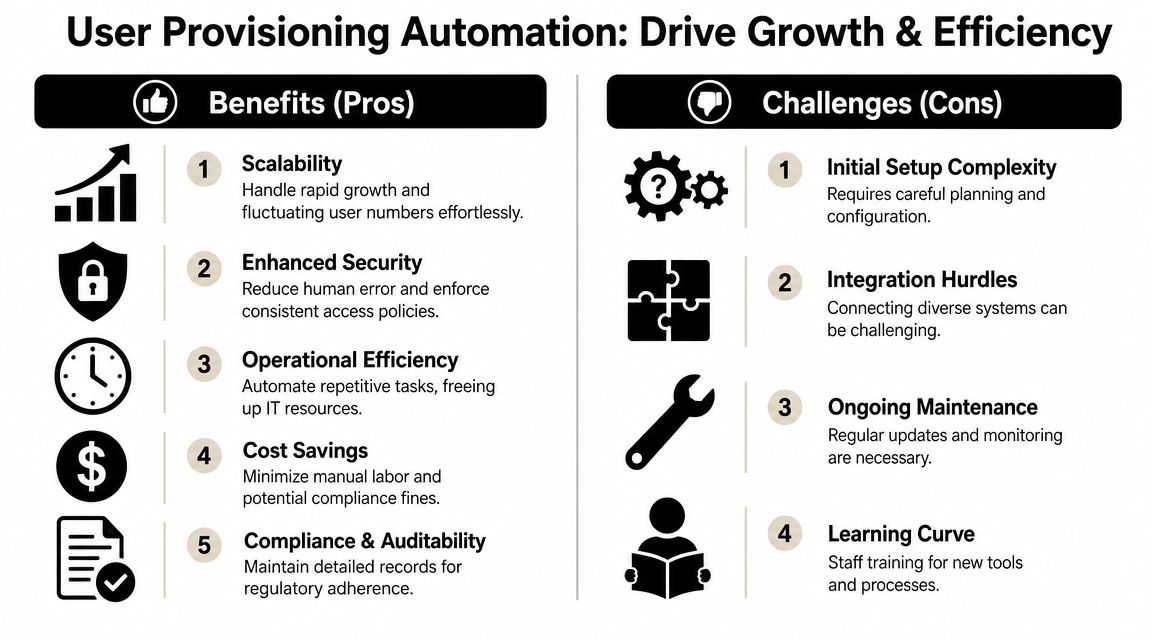
Most access incidents inside growing companies don't happen because somebody had bad intentions. They happen because a manual process was inconsistent.
A manager asks for broad access “for now.” Nobody revisits it later. An employee transfers teams and keeps old permissions. A departure happens late on Friday and offboarding waits until Monday. Automation reduces this kind of drift by tying access to roles, groups, and lifecycle events instead of individual memory.
That consistency matters when customers ask hard questions in security reviews. If your team can explain who gets access, when they get it, and how it's removed, you look operationally mature. If the answer is “we usually handle that through tickets,” buyers hear risk.
Hiring speed improves in a way people actually feel
When onboarding works, employees don't talk about it much. They log in and start working. When it fails, everyone notices.
This is why provisioning belongs in growth conversations. Faster access means sales hires can enter CRM activity sooner. Engineers can start shipping sooner. Support agents can respond sooner. The gain isn't theoretical. It shows up in the first week of work, when momentum matters most.
Compliance becomes less painful
Audit readiness improves when access changes follow predictable rules. The same discipline helps during customer due diligence, internal reviews, and offboarding.
Here's the practical benefit:
- Joiners start cleanly: New hires receive the systems tied to their role, not an improvised bundle.
- Movers stay aligned: Promotions and team changes update access without leaving old privileges in place.
- Leavers are contained: Access removal happens as part of the workflow, not as an afterthought.
Operator view: Good automation doesn't remove governance. It makes governance repeatable.
Automation has trade-offs, and that's fine
There are real costs. Initial setup takes work. Connectors need maintenance. Teams have to agree on role design. Some applications won't fit a neat policy on the first pass.
That doesn't weaken the business case. It makes it more credible. Provisioning automation pays off when a company treats it as a control system for growth, not as a one-time IT cleanup task.
How User Provisioning Automation Actually Works
At a high level, modern provisioning works like a digital master key system.
Your company has a central identity layer. That's usually an IAM or identity platform such as Microsoft Entra, Okta, or JumpCloud. That platform stores who the user is, what team they belong to, and what role they should have. Connected applications then trust that identity layer to create accounts, update permissions, or disable access when status changes.
Modern provisioning is built around lifecycle management. Microsoft Entra describes app provisioning as maintaining identities as roles or status change, while supporting automatic account creation and deactivation across SaaS apps such as Dropbox, Salesforce, and ServiceNow from a single source (Microsoft Entra app provisioning).
The simple architecture
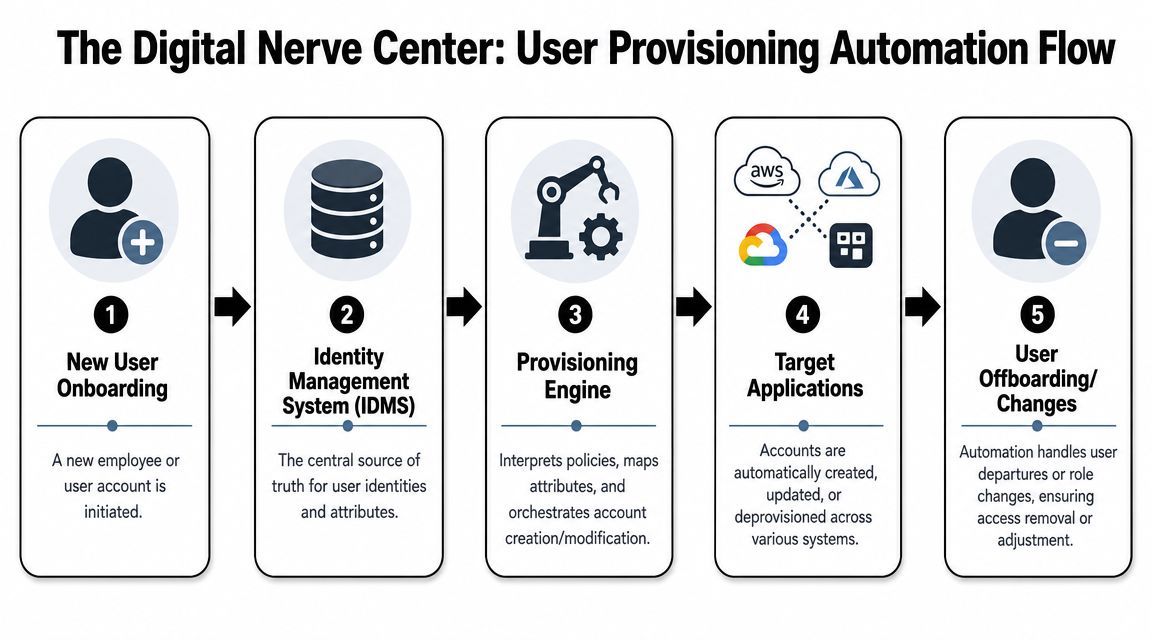
There are usually four parts:
A source of truth
This is often your HR system or primary directory. It knows who joined, who changed roles, and who left.An identity platform
This acts as the control layer. It reads user data, applies rules, and decides what access each person should get.A provisioning standard
Many modern systems use SCIM 2.0, which gives apps a standardized way to create, modify, and remove user accounts automatically.Connected business apps
Slack, Google Workspace, Salesforce, GitHub, ServiceNow, and other systems receive the changes.
If you're trying to understand how HR and IT data are increasingly managed together, this look at the future of HR and IT management gives useful context for why these workflows are converging.
What SCIM actually changes
For years, companies managed access through tickets, spreadsheets, and one-off admin actions. Standardized provisioning changed the model.
Technical overviews of automated provisioning explain that modern tools can create, modify, and remove accounts automatically, often triggered by HR events, and can reduce provisioning time from days to minutes because the workflow no longer depends on manual handoffs (automated provisioning tools and SCIM 2.0).
That speed matters, but the bigger shift is control. If your identity platform applies the same logic every time, you stop negotiating access person by person.
A short walkthrough helps:
The Joiner Mover Leaver model
Most founders don't need protocol details. They need to understand the operating flow.
Joiner
A new employee is added in the HR system. Their department, manager, location, and role are recorded. The identity platform reads that information and provisions the right apps. A sales rep gets CRM, email groups, forecasting tools, and call software. An engineer gets source control, issue tracking, and relevant cloud access.
Mover
Someone changes teams or receives a promotion. In these instances, manual processes often fail because the company adds new access but forgets to remove old access. A policy-based system updates both sides. It grants what the new role requires and withdraws what no longer fits.
Leaver
The user is marked inactive or terminated in the source system. The identity platform disables or removes access across connected apps. This is one of the most security-sensitive moments in the entire lifecycle.
Provisioning is not just about getting people in. It's also about making sure old access doesn't linger after the business no longer needs it.
Where founders should focus
You don't need to choose every connector personally. You do need to force clarity on three questions:
- What system is the source of truth
- Which roles are standard enough to automate
- Which apps are too sensitive for fully automatic changes
That's the difference between buying software and building a working access model.
Your Phased Implementation Roadmap
A founder approves three hires on Friday expecting them to start selling on Monday. Monday arrives, one rep still cannot access the CRM, another has the wrong territories, and the manager is asking IT for manual fixes in Slack. That is not an IT inconvenience. It is lost ramp time, avoidable security risk, and a process that stops scaling once hiring picks up.
The fix is a phased rollout with clear ownership and recovery steps. User provisioning automation works best when teams start with high-volume, low-ambiguity cases, prove the controls, and then expand into harder systems.
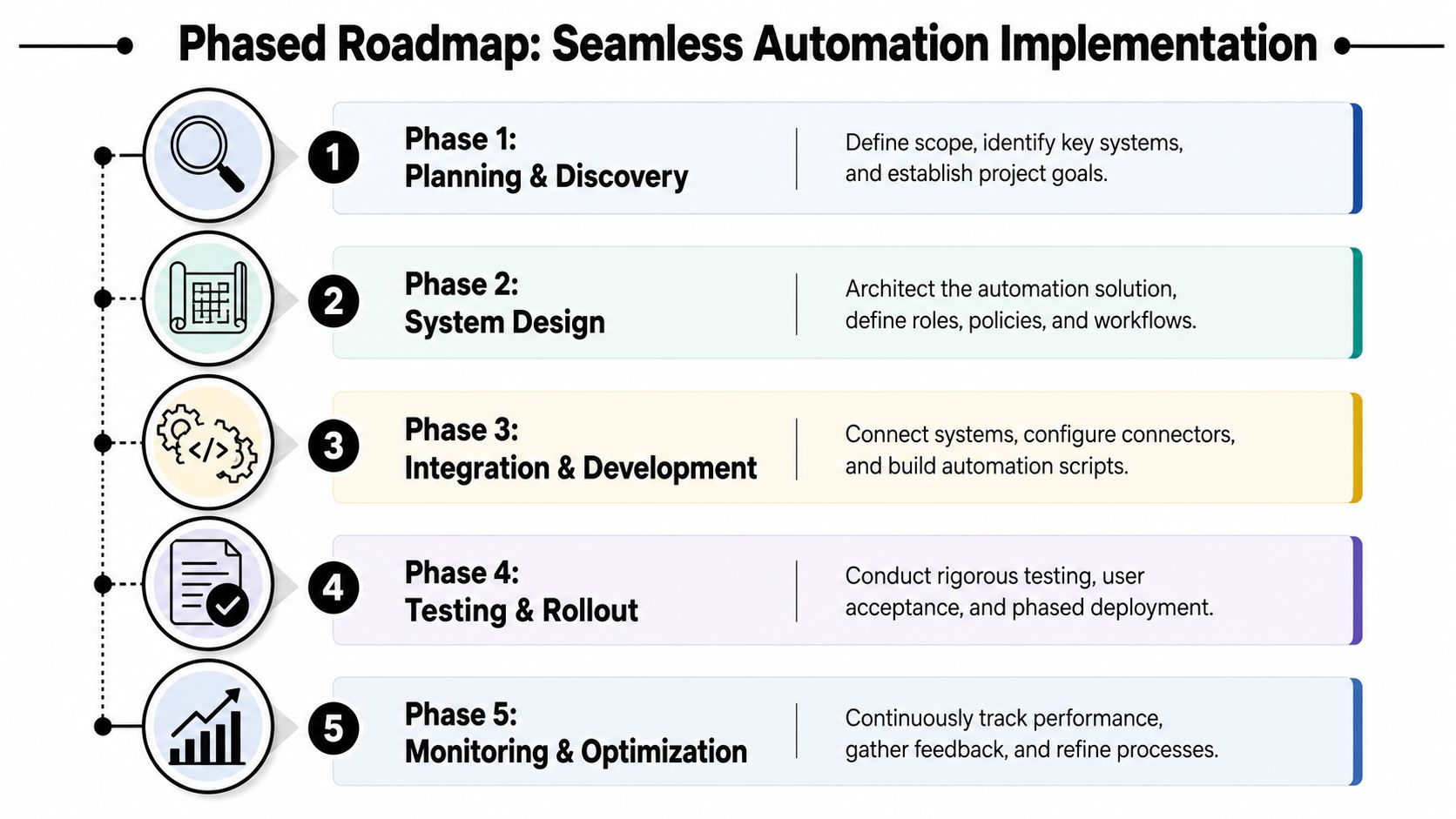
Phase 1 Planning and discovery
Before any integration work, document how access is granted today and where it breaks.
List each application, who approves access, what event should trigger provisioning, and which system owns employment status. This usually exposes underlying blockers. Shared admin accounts, approvals that live in inboxes, contractors mixed with employees, and software no one formally owns.
The goal in this phase is simple. Decide what should happen automatically for joiners, movers, and leavers, and what should still require a person to approve it.
A practical discovery list includes:
- Core systems: Email, chat, CRM, ticketing, project management, source control, cloud platforms
- Identity attributes: Department, title, manager, location, employment type
- Role patterns: Sales, engineering, support, finance, contractors, agencies
- Exception cases: Privileged admin access, production systems, finance approvals
- Failure points: Missing manager data, duplicate identities, delayed HR updates, app connectors that frequently fail
Phase 2 System design
Here, business policy becomes machine-readable.
Define standard roles in plain language first, then map them to groups, apps, and permission levels. If "Customer Success Manager" means different things across teams, the automation will reflect that confusion. Tight definitions reduce rework, shorten onboarding, and make audits easier because access decisions follow a visible rule set.
NIST guidance on digital identity and lifecycle management is useful here because it reinforces a practical point: identity systems work best when organizations define roles, attributes, and approval boundaries before automating account changes (NIST digital identity guidelines).
Practical rule: If a role needs a spreadsheet and a long Slack thread to explain, keep refining it before you automate it.
Phase 3 Integration and pilot
Run the first pilot in a team where access patterns repeat often and privileged access is limited.
Good candidates include marketing, customer success, or SDR teams. Connect the source system, map user attributes, and test the full workflow in a controlled group. That means new account creation, role changes, offboarding, and exception handling. A pilot is not only about proving the happy path. It is where teams learn how the system behaves when HR data is wrong, a connector times out, or an app rejects an update.
A structured roadmap to implementing business process automation helps here because provisioning succeeds when scope, approvals, exception handling, and rollback steps are defined before rollout.
Phase 4 Testing and rollout
Testing should mirror real operating pressure.
Run scenarios that reflect how people join and move through the company:
- New starter with a standard role
- Promotion that adds and removes access
- Department transfer
- Contractor end date
- Immediate termination
- Source data error and correction
- Provisioning job failure and manual recovery
Roll out in waves by function or risk level. Start with common SaaS apps. Add sensitive systems after the team can show that approvals, logging, and rollback are working as expected. This protects the business while still improving onboarding speed.
Phase 5 Monitoring and optimization
Automation needs an operating model after launch.
Assign an owner for failed jobs and exception queues. Set a review cadence for stale accounts, role drift, and manual overrides. Decide in advance what happens when automation fails. Should access retry automatically, create a ticket, alert a manager, or pause until someone reviews the record? Teams that answer those questions early recover faster and avoid the worst outcome: partial access that looks complete but leaves a new hire blocked or a departed employee active in one system.
Trust is the end state. Managers should believe new hires will get the right access on time, and leadership should see fewer delays, fewer access tickets, and cleaner offboarding.
A concise implementation checklist
| Checkpoint | What to confirm |
|---|---|
| Source of truth chosen | One system owns employment status and core identity fields |
| Roles defined | Standard roles map to groups, apps, and permissions |
| High-risk systems flagged | Sensitive access requires extra control where needed |
| Pilot group selected | Team has repeatable access patterns |
| Test cases documented | Joiner, mover, leaver, and exception scenarios are covered |
| Failure recovery defined | Retries, alerts, escalation paths, and manual fallback are documented |
| Monitoring set | Failures, sync issues, and manual overrides are visible |
Measuring Your Automation Success and ROI
A founder usually notices provisioning ROI in two moments. A new hire starts and is productive on day one, or an auditor asks for access history and the team can produce it without a scramble. Those outcomes matter more than the workflow itself.
If leadership only hears that provisioning is "automated," the project gets filed under IT maintenance. Measure it as an operations improvement with a clear business impact. The strongest scorecard ties access automation to speed, security, and labor cost.
The KPIs that matter
Start with a short list. If you track too much, teams stop reviewing the numbers.
- Time-to-productivity: How long it takes a new hire to get the systems needed to do real work, not just receive an account.
- Deprovisioning time: How quickly access is removed after a departure or contract end.
- Access-related helpdesk tickets: Especially tickets tied to onboarding, role changes, and missing app access.
- Manual override rate: How often IT has to step outside the standard workflow to fix, approve, or bypass automation.
- Provisioning failure rate: The share of joiner, mover, and leaver events that fail, stall, or require recovery.
- Audit retrieval time: How long it takes to pull approvals, role mappings, and access change logs during a review.
- Manager confidence: Whether department leads trust the system enough to stop chasing IT for status updates.
That fifth metric gets overlooked too often. A workflow that succeeds on the happy path but fails unobserved in edge cases will create rework, access gaps, and management distrust. Track failures and recovery time as closely as you track successful provisioning.
Sample user provisioning automation playbooks
| Trigger Event | Automated Actions | Key Systems Involved | Success KPI |
|---|---|---|---|
| New employee created in HR system | Create identity, add groups, provision core apps, send onboarding access notice | HRIS, IAM platform, Slack, email, CRM, project tools | Time-to-productivity |
| Department transfer | Remove old group access, apply new role-based permissions, update app entitlements | HRIS, IAM platform, GitHub, CRM, ticketing | Manual override rate |
| Employee termination | Disable sign-in, revoke app access, remove group membership, log event for review | HRIS, IAM platform, SaaS apps | Deprovisioning time |
| Contractor end date reached | Deactivate temporary access, notify owner, preserve audit trail | IAM platform, file storage, collaboration tools | Access-related helpdesk tickets |
| Manager change for privileged user | Trigger review of elevated permissions before confirming access pattern | HRIS, IAM platform, admin systems | Audit retrieval time |
A simple ROI lens
A practical ROI model has three inputs. Labor saved by reducing manual account work. Faster employee ramp-up because people get the right tools without waiting on tickets. Lower risk exposure from cleaner offboarding and better audit evidence.
Then subtract the costs. Software licenses, implementation time, connector maintenance, exception handling, and the operating time required to review failures and role changes. That last item matters. Automation that no one owns becomes expensive in a different way.
For teams that want a structured framework, this guide on how to calculate return on investment is a useful companion.
Measure the baseline before rollout, then review the same KPIs 30, 60, and 90 days after launch. That gives leadership a clear answer to the only question they care about. Did this help the business hire faster, reduce access risk, and spend less time fixing avoidable account issues?
Common Pitfalls and Proactive Solutions
The biggest mistake teams make is thinking provisioning is “set it and forget it.” It isn't. It's an automated control system that still needs oversight.
The most common failure starts upstream. A title changes in the HR system. A department label is inconsistent. A connector schema changes in a downstream app. Suddenly the provisioning logic applies the wrong rule, or stops applying any rule at all.

Guidance on automated provisioning failures points out that changes in the HR source of truth or downstream app connectors can cause upstream data errors to cascade across the stack, which is why effective monitoring is essential (handling provisioning failures and monitoring).
Failure recovery needs a real plan
Most companies document the happy path and ignore the recovery path. That's backwards.
When provisioning fails, you need to know:
- How the failure is detected
- Who gets alerted
- Which systems are affected
- What the temporary manual fallback is
- How to confirm recovery without creating duplicate or conflicting access
A practical recovery model includes an exception queue, named owners, and a short runbook for urgent cases. If a critical hire can't access core systems, the manager should know exactly who can authorize a safe temporary fix.
Over-automation creates its own risk
Not every access decision should be fully automatic.
In regulated environments, finance systems, production infrastructure, customer data tools, and privileged admin access often need extra control. Automation should prepare the request, apply standard checks, and route approvals where appropriate. It shouldn't blindly grant privileged access because one field changed in the source system.
Many startups overcorrect in this area. They automate low-risk SaaS access and assume the same pattern fits everything. It doesn't. Good governance keeps RBAC, periodic reviews, and human approval in high-impact areas.
Dirty data will break clean workflows
Founders often buy an IAM tool before fixing their identity data. That creates a faster version of the same mess.
If job titles are inconsistent, departments are vague, and managers use shared accounts or undocumented exceptions, automation won't solve the problem. It will just reproduce it more efficiently.
Clean up these items first:
- User records: One person, one identity, consistent naming.
- Employment states: Active, leave, contractor, terminated, and similar statuses must be unambiguous.
- Role definitions: Broad enough to scale, specific enough to control access.
- Application ownership: Every app needs a business or technical owner.
Automation amplifies process quality. If the inputs are weak, the errors arrive faster.
Legacy migration takes patience
Moving from manual provisioning to automated provisioning usually reveals old accounts, unused groups, and access packages nobody can justify. Resist the urge to migrate all of it as-is.
Archive what you can. Remove stale roles. Rebuild only what still serves the business. Migration is the best moment to simplify.
A founder doesn't need to become an identity engineer to lead this well. They need to insist on ownership, clean source data, role clarity, and monitoring. Those four habits matter more than whatever tool logo appears on the invoice.
If user provisioning is slowing hiring, creating audit friction, or leaving offboarding gaps, MakeAutomation can help design and implement the workflow around your actual stack. That includes mapping roles, cleaning source data, connecting systems, documenting exceptions, and building automation that your ops, HR, and IT teams can trust in daily use.