
Marketing Automation Integration: B2B/SaaS Guide 2026
Your CRM has one version of the lead. Your email platform has another. Product usage data lives in the app database. Sales reps keep notes in call recordings, Slack threads, and whatever custom fields they invented last quarter. Then someone asks a simple question like, “Which trial users looked sales-ready this week?” and nobody trusts the answer.
That's usually the moment a founder decides they need marketing automation integration.
The mistake is thinking the project starts with connectors, webhooks, or API docs. It doesn't. A first major integration succeeds when the business decides how revenue should flow, which system owns what data, and when automation should hand off to a human. Everything else is implementation detail.
Laying the Foundation for Integration Success
Most early integration projects get framed as a tooling problem. Connect HubSpot to Salesforce. Sync form fills. Push lifecycle stages. Ship it.
That approach creates brittle systems because it starts with apps instead of operating rules. In practice, marketing automation integration is revenue architecture. The strongest evidence for that comes from CRM and automation programs that are tightly aligned around revenue outcomes, not just connectivity. Organizations with rigorous integration report 15–25% higher lead-to-opportunity conversion rates and 10–20% shorter sales cycles for marketing-sourced opportunities, according to Logarithmic's analysis of CRM and marketing automation revenue alignment.

Start with revenue questions, not platform features
A founder usually wants faster growth, cleaner attribution, and less manual work. Those are valid goals, but they're too broad to guide architecture. The better move is to translate them into operating questions:
- Lead ownership: Who owns a prospect at each stage, marketing, sales, or customer success?
- Stage progression: What behavior moves someone from inquiry to qualified lead to pipeline?
- Response model: Which actions should trigger automation, and which require a human follow-up?
- System authority: Where does the official record live for contacts, accounts, deals, and lifecycle stages?
If these answers aren't settled first, your tools will enforce confusion at scale.
Practical rule: If sales and marketing can't agree on lead definitions in a meeting, software won't fix it after launch.
Build a single source of truth
Growing B2B SaaS companies often have multiple “important” systems. The CRM matters. The product database matters. Billing matters. Support matters. But only one system should own each critical record.
A workable model looks like this:
| Data domain | Recommended owner | Why it matters |
|---|---|---|
| Contacts and accounts | CRM | Sales needs one trusted record |
| Campaign activity | Marketing automation platform | Engagement logic lives here |
| Product usage events | Product data source or warehouse | Raw behavior should stay close to origin |
| Opportunity status | CRM | Pipeline reporting breaks when this is duplicated |
| Subscription status | Billing system | Revenue state must stay authoritative |
Founders save themselves months of cleanup. Don't let two systems “share ownership” of the same lifecycle field. That almost always turns into overwrite conflicts, delayed syncs, and arguments in forecast meetings.
Audit the current stack before touching anything
A useful integration audit isn't a software inventory. It's a flow map.
Document:
- Which tools collect lead data such as forms, chat, ads, webinar platforms, and outbound systems.
- Where data gets enriched or changed by SDRs, RevOps, support, and product.
- Which handoffs fail today like trial users never reaching sales, or disqualified leads re-entering nurture by mistake.
- Which manual fixes people rely on because those are often the hidden process requirements your integration must support.
A spreadsheet is enough at this stage. The point is to expose silent dependencies before automation amplifies them.
Define guardrails early
Automation creates speed, but speed without rules creates damage faster. Set guardrails before buildout:
- Field governance: Lock down who can create lifecycle fields and status values.
- Naming standards: Keep campaign, list, and workflow names predictable.
- Sync rules: Decide whether updates are one-way or two-way.
- Human override: Give sales and success teams a way to pause or suppress automation for sensitive accounts.
Founders who do this upfront build systems. Founders who skip it build incidents.
Choosing Your Integration Architecture
Once the operating model is clear, the next decision is structural. How should the systems connect?
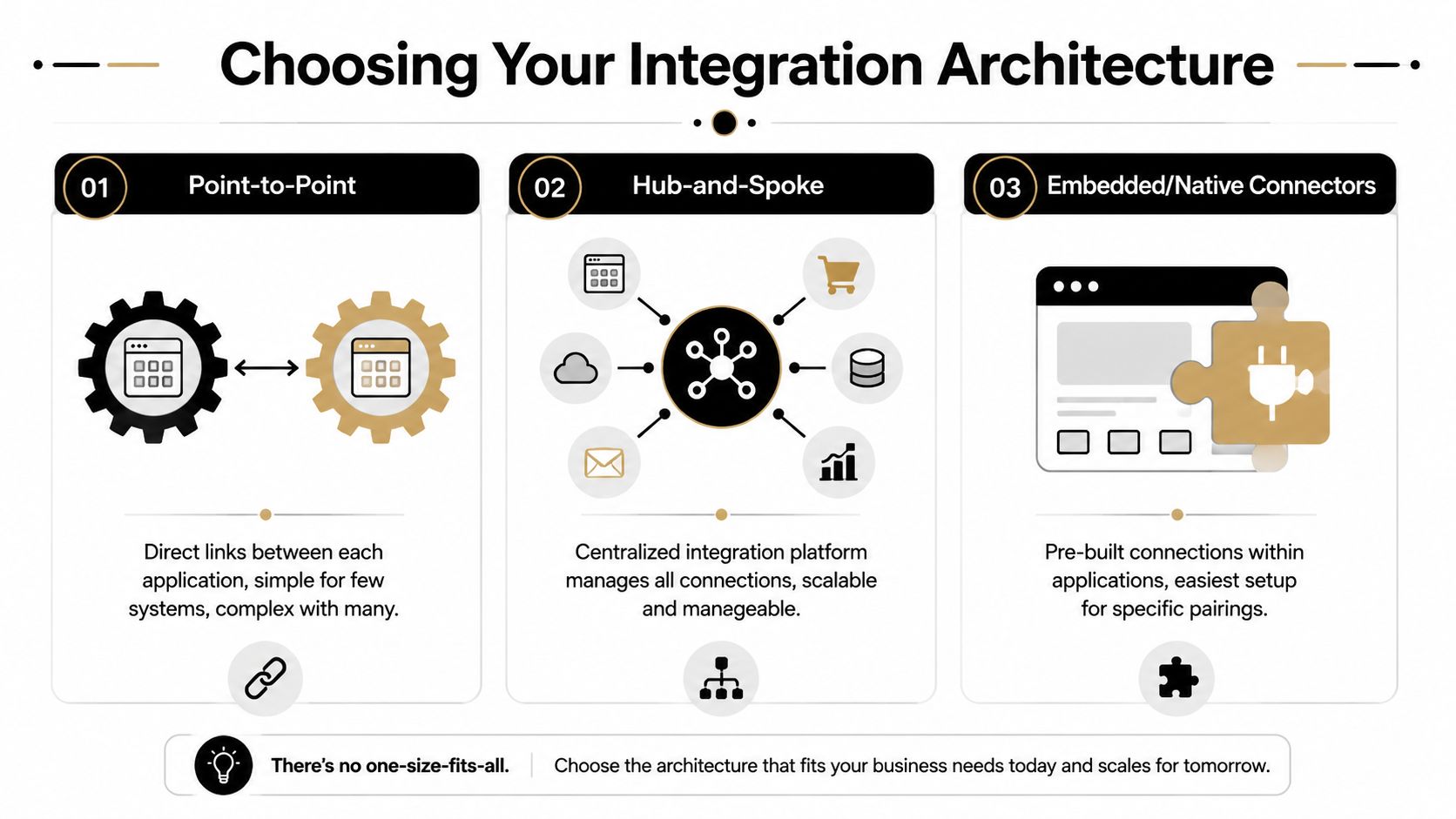
The right answer depends less on hype and more on the job the integration needs to do. A startup with a simple HubSpot to Salesforce sync shouldn't build a custom event bus. A product-led SaaS company with complex usage events and account-level routing shouldn't rely on a thin native connector and hope for the best.
Native integrations
Native integrations are the default starting point. Think HubSpot for Salesforce, Marketo for Salesforce, or built-in connectors between ad platforms and CRMs.
They're attractive because setup is fast, support is usually documented, and non-technical teams can often launch the basics without engineering.
They also have limits. Native connectors tend to be opinionated. They sync standard objects well, but custom objects, nuanced routing, and event-level logic often get messy fast. When a founder says, “We just need one extra condition,” that's usually where the native path starts to strain.
Middleware and iPaaS
Middleware platforms like Zapier, Make, or Workato sit in the middle and orchestrate flows between systems. For many growth-stage teams, this is the practical middle ground.
Use this model when you need flexibility without committing engineers to every change. It's especially useful when your stack includes apps that don't share a common data model or when you want branching logic, formatting, retries, and multi-step actions across tools. If you're comparing options, this guide to marketing automation tools comparison is a useful starting point.
Here's a quick visual explanation before the comparison table:
Custom API-first architecture
Custom API-first work is the right call when your workflows are part of your competitive advantage. That usually means proprietary product events, account hierarchies, custom scoring inputs, or strict compliance requirements.
This route gives maximum control. It also creates the highest maintenance burden. Every API change, auth issue, payload shift, or edge case becomes your team's responsibility. Founders often underestimate the long-term ownership cost, not the initial build cost.
Integration Architecture Comparison
| Architecture | Best For | Pros | Cons |
|---|---|---|---|
| Native connectors | Early-stage teams with standard CRM and marketing use cases | Fast setup, lower complexity, vendor-supported | Rigid logic, limited custom workflows, weak fit for complex event models |
| Middleware or iPaaS | Growth-stage B2B SaaS teams with multiple apps and evolving processes | Flexible orchestration, faster iteration, less engineering dependency | Can become tangled without governance, still constrained by connector limits |
| Custom API-first | Companies with proprietary workflows, custom objects, or product-led event complexity | Full control, deep customization, strong fit for unique business logic | Highest maintenance load, slower implementation, requires technical ownership |
The best architecture is the one your team can operate six months after launch, not the one that looks most sophisticated in a diagram.
A simple decision filter helps:
- Choose native if your process matches the vendor's model.
- Choose middleware if your process is changing and you need adaptable orchestration.
- Choose custom if the workflow itself is strategic and generic connectors can't represent it cleanly.
Mapping Data and Defining Event Triggers
At this stage, most integrations either become useful or become noisy.
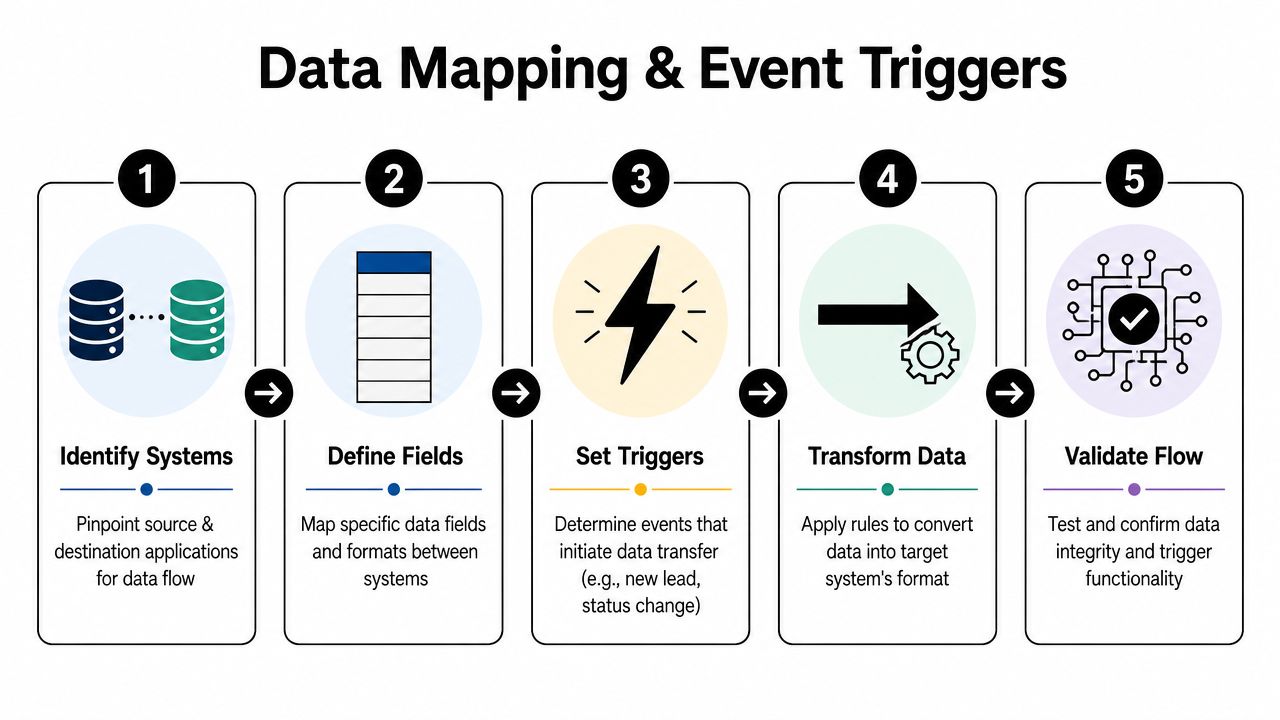
A clean architecture still fails if the wrong data moves between systems or if workflows fire on shallow signals. “Lead created” is rarely enough context for a B2B SaaS motion. You need to know what happened, where it happened, and what the business should do next.
Define your core objects first
Start with the records you manage. For a typical SaaS company, those are usually:
- Contact: Individual user or buyer
- Company or account: The organization tied to that user
- Deal or opportunity: The active sales motion
- Subscription or plan: Commercial state
- Support record: Service interactions that affect expansion or churn risk
The mistake is mapping fields one app at a time. Map them one object at a time instead. Decide which fields are required, which are nice to have, and which system owns each one. Keep names consistent wherever possible.
A founder should be able to answer, without hesitation, where “lifecycle stage,” “trial status,” “owner,” and “last meaningful product action” are mastered.
Build an event schema around behavior
Demographic data tells you who a lead is. Events tell you what they're doing.
For a free-trial SaaS journey, useful event triggers often include:
Trial started
This marks intent. It should create or update the contact, attach the account, and enroll the lead into the correct onboarding path.Pricing page viewed
This can indicate commercial evaluation, especially if it happens after setup activity or multiple product sessions.Key feature adopted
This matters more than generic login activity. Product-qualified motion depends on behavior tied to activation, not just presence.Support ticket created
This event can signal friction, urgency, or risk. It should often suppress certain promotional sequences until the issue is resolved.Demo requested or sales meeting booked
Once this happens, marketing should usually stop broad nurture and let the sales motion lead.
For a practical framework on structuring these flows, this article on data integration best practices is worth reviewing.
Map field logic before workflow logic
Teams often jump straight into building emails and branches. Don't. First map how each event updates records.
A simple event map should answer:
| Event | Source system | Record updated | Key fields touched | Downstream action |
|---|---|---|---|---|
| Trial started | Product app | Contact and account | Trial date, plan, lifecycle stage | Start onboarding sequence |
| Pricing page viewed | Website or product analytics | Contact | Interest signal or score field | Flag for qualification review |
| Key feature adopted | Product app | Contact and account | Activation marker | Shift messaging toward value and upgrade |
| Support ticket created | Help desk | Contact and account | Support status | Pause upgrade pressure if needed |
Good event design doesn't try to capture everything. It captures the few behaviors that actually change what your team should do next.
Validate edge cases early
A strong event model handles awkward realities:
- A user starts a trial with one email, then books a demo with another.
- A lead belongs to an account already in pipeline.
- A support issue opens while a sales sequence is active.
- A product event arrives before the CRM record exists.
These aren't exceptions. They're normal. If your mapping logic ignores them, the workflow will look fine in tests and fail in production.
Building Resilient Automation Workflows
The workflow build is often the initial focus, but it should come after architecture and event design because workflows are where bad assumptions become customer-facing errors.
Take a common B2B SaaS case. A user starts a free trial. Marketing wants onboarding emails. Sales wants alerts for high-intent accounts. Product wants activation nudges. Support wants visibility if the user gets stuck. That's not one automation. It's a coordinated system with branches, suppression rules, and fallback behavior.
Build around decision points, not just actions
A weak workflow reads like this: if trial started, send email one, wait a day, send email two, notify sales if score is high.
A resilient workflow asks better questions at every stage:
- Is this the first user from the account or an additional user?
- Is there already an open opportunity in the CRM?
- Has the user completed the activation event that matters most?
- Has support opened a ticket that should pause commercial messaging?
- Has a rep manually marked this account for human-only follow-up?
Those decisions matter because automation shouldn't just move. It should adapt.
A practical nurture workflow often includes:
- Entry logic tied to a high-signal event like trial started
- Qualification branch based on account type, segment, or existing pipeline status
- Behavior branch that changes messaging if key product adoption happens
- Sales handoff branch that alerts the right rep and suppresses overlapping messages
- Exit criteria that remove the contact once they convert, churn, or enter a human-managed path
Design for failure before launch
Experienced teams separate themselves from enthusiastic teams.
Failures in marketing automation integration don't always look dramatic. Sometimes the contact sync fails and a rep misses context. Sometimes a delay step duplicates because an event fired twice. Sometimes one field mismatch causes a VIP account to enter a generic nurture path.
A structured approach to workflow architecture with clear triggers and decision logic, followed by pilot programs, can produce a 14.5% boost in sales productivity, according to Encharge's marketing automation practices overview. The gain comes from streamlining high-impact processes. The hidden lesson is that discipline matters more than volume.
Put safeguards into every important workflow
Here's what I insist on for any workflow that affects pipeline:
- Dead-end detection: Create a branch for records that don't fit expected logic. Don't let them vanish unnoticed.
- Duplicate protection: Check whether the contact is already active in a conflicting workflow before enrollment.
- Suppression lists: Exclude active opportunities, sensitive accounts, current customers, and manually paused records.
- Failure alerts: Notify ops when API calls fail, fields reject updates, or expected syncs don't complete.
- Safe mode: Give ops a fast way to pause sends or downstream actions without dismantling the workflow.
The most damaging automation errors are rarely about one broken email. Instead, they're about trust. Sales stops trusting lead status. Success stops trusting lifecycle tags. Leadership stops trusting attribution.
Pilot with a narrow segment
Don't launch your biggest workflow across the entire database on day one.
Use a contained pilot. Pick one segment, one journey, and one handoff pattern. For example, run the workflow only for new trial accounts in a single market or one acquisition source. Watch what happens in the CRM, inboxes, reporting, and rep behavior.
A workflow is production-ready when you understand how it fails, not just how it performs in the happy path.
The point of the pilot isn't just bug hunting. It's operational learning. You'll find naming issues, ownership disputes, stage conflicts, and edge cases that no workflow builder catches for you.
The Pre-Launch Checklist for Deployment and Maintenance
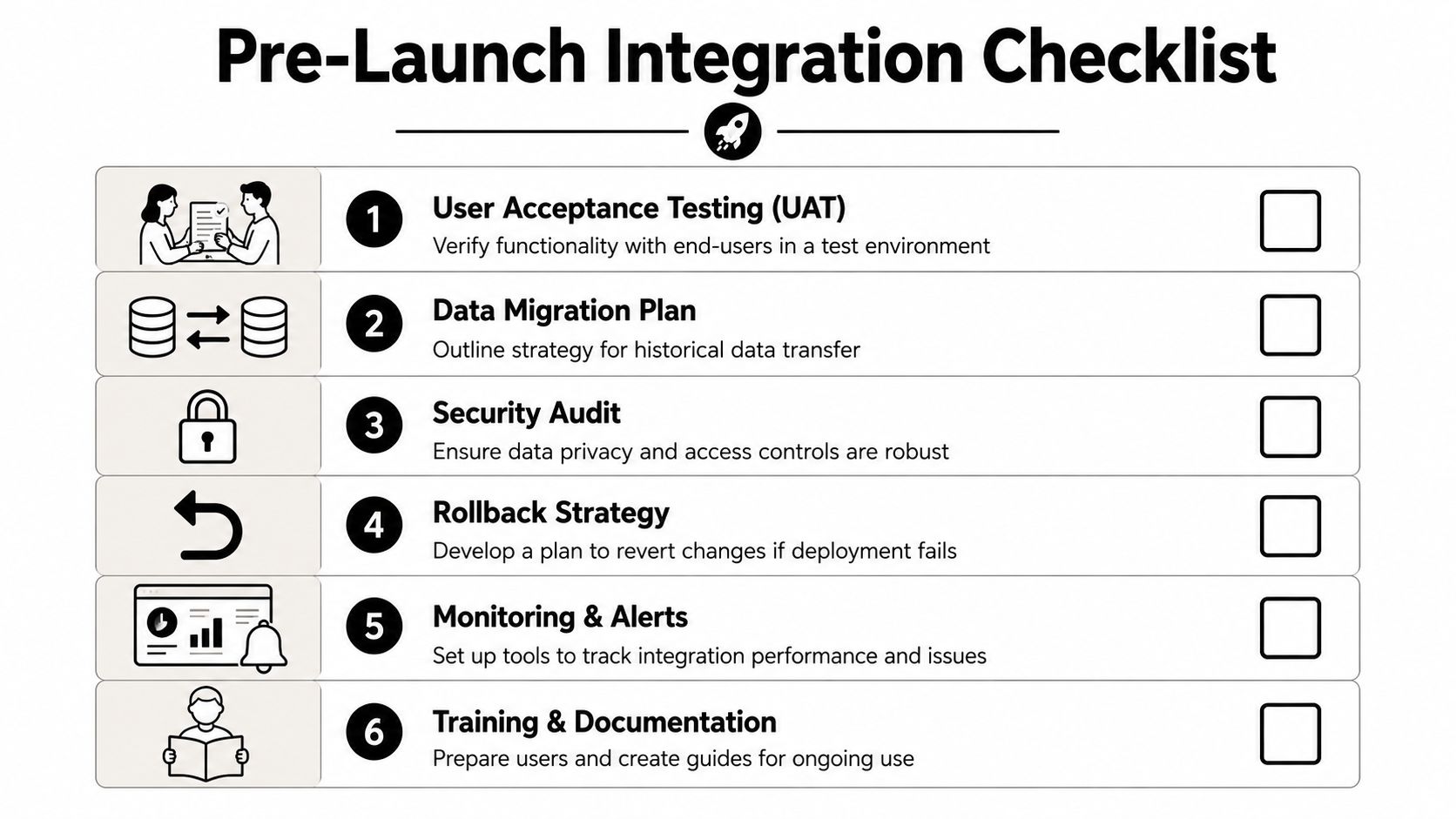
A go-live without a checklist is how teams turn a well-designed integration into a cleanup project.
By this point, the architecture may be sound and the workflows may be tested. But deployment introduces a different kind of risk. Real records sync. Reps click the wrong thing. API limits appear. Hidden duplicates show up from systems everyone forgot about.
Run user acceptance testing with the people who live in the system
User acceptance testing isn't a formality. It's where sales, marketing, and ops confirm that the integration behaves the way the business works.
Ask end users to test scenarios that matter:
- Sales reps should verify lead ownership, activity history, and task creation.
- Marketing should confirm segmentation, suppression rules, and enrollment logic.
- Customer success or support should check whether service events pause or reroute messaging correctly.
Don't let only admins test. Admins know the intended design. End users expose where the design collides with reality.
Validate data end to end
A record appearing in the destination system doesn't mean the integration is healthy. Check the whole path.
Review:
- Field accuracy so values land in the right fields and formats.
- Timing so sync delays don't break follow-up expectations.
- Ownership rules so records route to the correct person or queue.
- Update behavior so later changes don't overwrite better data with older data.
Poor data hygiene can cause a 30% drop-off in engagement rates, and failure to properly integrate CRM and automation tools can reduce lead conversion by 25%, according to Cazoomi's marketing automation best practices guide.
Document rollback before launch
Teams often document how to go live. Fewer document how to back out cleanly.
Your rollback plan should identify:
| Checkpoint | Question to answer |
|---|---|
| Trigger control | How do we pause new enrollments immediately? |
| Sync control | Which connections can be disabled without damaging core records? |
| Data recovery | Which fields or records might need correction if a sync misfires? |
| Team communication | Who tells sales, marketing, and support what changed? |
If you can't answer those questions in writing, you're not ready to launch.
Treat maintenance as part of the build
Integrations drift. Fields get added. reps create workarounds. Vendors update APIs. Someone adds a “temporary” workflow that becomes permanent.
Use a standing maintenance rhythm:
- Monthly checks for sync failures, duplicate trends, and workflow anomalies
- Quarterly reviews for business logic, stage definitions, and field sprawl
- Change control for any new workflow that touches lifecycle stages, routing, or customer messaging
- Ownership clarity so one person or function is accountable for integration health
A stable system doesn't stay stable on its own. Someone has to manage it.
Measuring Success and Proving ROI
Many can tell you whether the integration launched. Fewer can tell you whether it improved the business.
That gap usually comes from measuring activity instead of outcomes. Open rates, click rates, and workflow counts may help operators troubleshoot, but founders need to know whether the system improved pipeline quality, sales efficiency, and revenue performance.
Build two layers of reporting
The first layer is integration health. This tells you whether the system is operating correctly.
Track things like failed syncs, delayed updates, records stuck in error states, and workflows with unusually high exception counts. Keep this view operational. It helps RevOps and automation owners spot issues before the business feels them.
The second layer is business impact. This tells leadership whether the integration changed results.
Useful metrics usually include:
- Qualified lead volume
- Lead-to-opportunity conversion
- Sales cycle behavior
- Speed of lead handoff
- Pipeline influenced by product or marketing events
A strong dashboard ties these metrics to the goals defined before implementation. If the original objective was cleaner handoff from trial to sales, then report on that handoff quality. Don't hide behind channel metrics that don't answer the actual business question.
Use ROI data carefully
When marketing automation is implemented well, the upside can be substantial. Companies that successfully implement it see a 451% increase in qualified leads and can achieve $5.44 for every $1 spent, with 76% realizing positive returns within the first year, according to Cazoomi's 2025 and beyond marketing automation statistics roundup.
Those numbers are useful for setting expectations, not for promising outcomes to your board. Your own ROI will depend on process maturity, data quality, sales follow-up, and how disciplined the rollout was. For a practical planning view, this resource on the ROI of marketing automation can help frame what to measure.
Don't present vendor dashboards as proof of business impact. Prove that the integration changed how revenue moves.
Connect reporting to decisions
A dashboard should trigger action, not just create visibility.
If qualified leads rise but sales acceptance falls, revisit scoring or routing. If trial activity is strong but opportunity creation stalls, check handoff rules and rep response. If automation volume rises but conversion doesn't, the problem may be message quality, event selection, or human follow-up.
This is the purpose of measurement. Not applause after launch. Course correction after reality shows up.
Frequently Asked Integration Questions
Founders usually ask better questions after they understand the mechanics. These are the questions that tend to matter most in a first serious implementation.
FAQ
| Question | Answer |
|---|---|
| Should CRM or the marketing platform lead the integration design? | Neither should lead by default. The business process should. Then assign ownership by record type and decision point. In most B2B setups, CRM owns contacts, accounts, and opportunities for revenue reporting, while the marketing platform owns campaign orchestration and engagement logic. |
| When should we stop automating and involve a human? | High-value leads, active deals, sensitive support situations, and strategic accounts usually need explicit human intervention rules. This isn't optional. A key challenge in automation is balancing efficiency with relationship quality. Numerous.ai's discussion of marketing automation challenges notes that automating critical touchpoints without a strategy for human intervention can damage relationship health. |
| Is an all-in-one platform better than a best-of-breed stack? | It depends on complexity tolerance. All-in-one setups reduce integration overhead. Best-of-breed stacks can fit advanced use cases better, but only if you have strong governance. If your team already struggles with field ownership and lifecycle definitions, adding more tools usually makes the problem worse. |
| How much should we automate in the first phase? | Less than you think. Start with one or two high-value journeys where the trigger, owner, and business outcome are obvious. Trial onboarding, lead routing, or sales handoff are common first candidates. Broad, multi-journey rollout too early usually creates hidden conflicts. |
| What's the most common early mistake? | Teams automate motion before they define meaning. They build workflows without agreeing on what qualifies a lead, which events matter, or which system owns the truth. That creates fast-moving confusion instead of scalable growth. |
The real trade-off founders need to manage
The technical work matters, but the strategic trade-off is more important. Every integration project sits between efficiency and control.
More automation gives scale. More human checkpoints protect context. More tools give flexibility. More systems also create failure points. The strongest integration programs don't chase maximum automation. They build selective automation around moments where the decision logic is stable and the business value is clear.
That's what keeps the stack from turning into tech debt with nicer dashboards.
A good sign you're ready
You're ready for a first major marketing automation integration when your team can answer three questions clearly:
- Which system owns each critical record?
- Which events should change the customer journey?
- Where must a human override the machine?
If those answers are still fuzzy, pause the build and fix the operating model first.
MakeAutomation helps B2B and SaaS teams turn messy manual operations into reliable automation systems. If you need support designing your architecture, mapping workflows, cleaning up CRM logic, or implementing AI and automation across sales and operations, MakeAutomation can help you build it properly the first time.