Personalization at Scale: A B2B Implementation Playbook
Most advice on personalization is stuck in the email era. It treats personalization as inserting a first name, swapping a company field, or sending a slightly different nurture sequence to a broad segment. B2B buyers see through that immediately. It doesn't feel relevant. It feels automated in the worst way.
Real personalization at scale is operational, not cosmetic. It means your CRM, product analytics, sales activity, support history, and lifecycle stage all shape what a buyer sees next. It means a trial user who hit a product limit gets a different message than an idle evaluator. It means an expansion account with heavy usage gets a different in-app prompt than a low-fit lead who downloaded one checklist six months ago.
That sounds expensive and complicated. It can be, if you try to orchestrate everything on day one. The better path is narrower. Start with one or two revenue-linked journeys. Prove lift. Fix the data problems those journeys expose. Then expand.
Moving Beyond First Name Personalization
A lot of B2B teams still confuse token replacement with strategy. They add a first name to the subject line, mention an industry in the intro, and call it personalization. That approach doesn't just underperform. In many cases, it signals that the company knows very little about the buyer beyond a form fill.
Buyers want relevance, not theatrics. In B2B SaaS, relevance usually comes from context: account stage, role, product behavior, commercial intent, support friction, renewal timing, and buying committee dynamics. When teams get that right, the impact is material. When executed correctly, personalization at scale boosts revenue by 15%, reduces acquisition costs by up to 50%, and improves marketing spend efficiency by 30% according to SuperOffice's personalization analysis.
What buyers actually notice
A founder doesn't care that your email says “Hi Sarah.” They care that your follow-up recognizes they invited three teammates, visited the pricing page twice, and stopped short of booking a demo. A VP of Sales doesn't care that your ad mentions their industry. They care that your site experience reflects the maturity level of their team and the problem they're actively trying to solve.
That's why account context matters more than surface-level tokens. If you're already thinking in terms of target accounts, this ties directly into a stronger account-based marketing approach. Personalization at scale becomes the execution layer that makes ABM feel intelligent instead of generic.
Practical rule: If the message would still make sense after replacing the contact with any other lead in the same segment, it probably isn't personalized enough.
What this looks like in practice
In B2B SaaS, strong personalization usually shows up in a few places first:
- Trial onboarding: Different paths for evaluators, champions, and likely admins.
- Sales assist: Outreach triggered by high-intent product actions, not arbitrary campaign dates.
- Expansion motions: Upsell prompts based on usage depth, team adoption, or plan constraints.
- Customer education: Content matched to the features an account hasn't adopted yet.
The same principle applies outside SaaS. A niche operator such as a franchise lead generation agency often performs better when inquiry handling, nurture timing, and follow-up content adapt to buyer intent and location, rather than forcing every prospect through one static funnel.
The shift founders need to make
Stop asking, “How do we personalize more messages?” Start asking, “Where does relevance change buying behavior?”
That question leads to better systems. It pushes you toward behavioral data, account signals, and journey-specific decision rules. It also keeps you honest. If a personalization idea doesn't improve timing, fit, or decision support, it's probably just extra work wearing a modern label.
Building Your Unified Data Foundation
Most personalization projects fail before the first campaign launches. Not because the copy is weak or the tools are missing, but because the data lives in five places and none of them agree.
The fix isn't adding another enrichment app. The first technical move is building a unified customer profile. The core method is data integration through a CDP. According to InsiderOne's guide to personalization at scale, the primary technical step is data integration via a Customer Data Platform (CDP), which aggregates online and offline sources, and companies using behavioral data to group customers into precise segments see 40% more revenue from personalization.
Audit what you already have
Before choosing tools, list your real sources of truth. Most B2B SaaS teams have more signal than they think, but it's trapped in isolated systems.
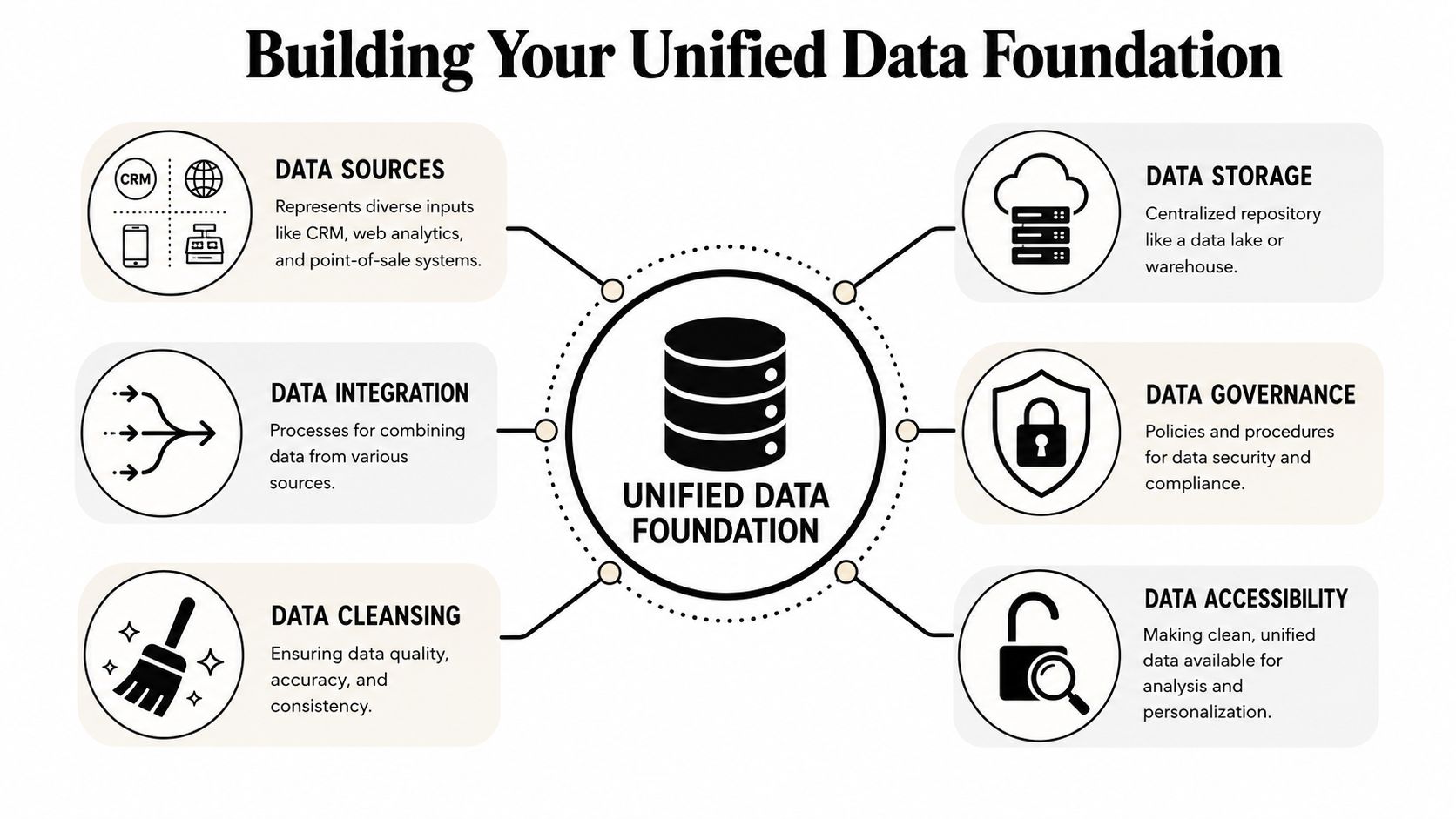
Start with a source map like this:
| System | What it usually contains | Why it matters |
|---|---|---|
| CRM | Accounts, contacts, deal stage, owner | Commercial context |
| Marketing automation | Form fills, campaign engagement, lead source | Acquisition history |
| Product analytics | Logins, feature use, invite activity, usage milestones | Behavioral intent |
| Support platform | Tickets, themes, urgency, satisfaction notes | Friction and risk |
| Billing system | Plan, contract dates, expansion potential | Revenue timing |
That table is simple on purpose. Overcomplicating this stage is a common pitfall. You don't need a perfect schema first. You need a clear inventory.
Define the profile before you sync the data
A CDP won't rescue a messy data model. Decide what your unified profile must contain for the first journey you want to personalize.
For a B2B SaaS founder, I usually want these fields available at the account and contact level:
- Firmographic data such as company size, industry, region, and business model
- Lifecycle fields like lead status, opportunity stage, customer stage, and renewal window
- Behavioral events including trial activation, feature adoption, seat invites, and pricing visits
- Commercial signals such as demo requested, contract value band, or upgrade eligibility
- Relationship metadata like account owner, CSM, open support issues, and buying role
If your team is still battling duplicate accounts, stale lifecycle fields, or broken source attribution, fix that before building journeys. In these situations, focused work on improving data quality pays off.
Bad personalization usually starts as bad identity resolution. If the platform can't tell whether two records belong to the same account, every downstream journey gets weaker.
Build for decisions, not storage
Founders often ask whether they need a full CDP, a warehouse, or a reverse ETL layer. The practical answer is this: use whatever stack lets you make reliable decisions across channels.
A usable data foundation supports questions like:
- Did this account activate but stall?
- Has usage grown enough to justify an upgrade conversation?
- Did support friction spike right before renewal?
- Is sales already working this opportunity?
- Should marketing hold back because success needs to step in first?
That's what a unified profile is for. Not reporting alone. Decisioning.
What to fix first
Don't try to normalize every field in the business. Prioritize the data that powers your first two journeys.
A strong sequence for the first pass looks like this:
- Clean identity records first. Merge duplicate accounts and standardize key identifiers.
- Map lifecycle ownership. Decide when marketing hands off to sales, and when success takes over.
- Pull product events into the profile. Behavior changes message relevance faster than static demographics.
- Add exclusion logic early. Prevent customers from receiving prospect messaging and stop sales collisions.
- Create a minimum viable taxonomy. Define a small set of statuses and event names your whole team will use.
Teams get into trouble when they build a broad data program without a commercial use case. Build the profile around the journey. Then expand the profile because the journey earned it.
Developing Your Audience and Content Engine
Once the data foundation is stable enough to trust, the next bottleneck appears fast. Teams realize they don't have audiences worth targeting or content worth adapting.
That's where most AI-heavy personalization programs go sideways. The issue usually isn't the model. It's that the audience logic is vague, the source data is inconsistent, and the system starts generating polished nonsense at scale.

According to SalesHive's breakdown of personalization tools and techniques, 70% of B2B personalization fails due to poor data hygiene, not AI limitations. Their framing is the right one: AI should “research and draft, not spray”, with humans in the loop.
Build audiences from behavior, not just profile fields
Many SaaS companies segment by industry, company size, and persona, then stop there. Those fields matter, but they don't tell you what a buyer is trying to do right now.
A practical audience model usually blends three layers:
Who they are
Industry, team size, use case, role in the buying process.Where they are
Lead, active trial, stalled proof of concept, expansion candidate, renewal-risk customer.What they did
Viewed integration docs, used a premium feature, invited teammates, stopped after setup, opened a support ticket.
That gives you segments with commercial meaning. “Mid-market healthcare companies” is broad. “Mid-market healthcare trials with admin activity but no team invites” is actionable.
Create modular content blocks
The content problem isn't solved by asking AI to write hundreds of complete emails. That creates governance issues fast. The better system is modular.
Think in reusable blocks:
| Content block | What changes | What stays fixed |
|---|---|---|
| Intro | Role, use case, trigger event | Brand voice |
| Proof angle | Operational pain, revenue angle, risk angle | Core positioning |
| CTA | Book demo, activate feature, invite team | Offer structure |
| Objection handling | Security, implementation effort, adoption concern | Product truth |
This approach gives your team control. It also makes review easier. Legal, sales, and product marketing can approve core blocks once, then adjust selected variables by segment or trigger.
The safest use of AI in personalization is upstream. Let it summarize accounts, surface likely objections, and draft variant ideas. Keep final messaging tied to approved claims and real customer context.
Where AI helps and where it hurts
AI is useful when the work is expensive but bounded. Good use cases include:
- Research support: Summarizing account notes, support themes, and product usage patterns
- Drafting variants: Creating first-pass intros or subject lines for specific audience groups
- Message QA: Checking whether copy matches the intended segment and lifecycle stage
Bad use cases are the obvious ones. Fully automated outbound based on weak signals. Dynamic web copy with no content governance. Long-form sequences generated from stale CRM fields.
The line is simple. Use AI where a human can review and improve the output quickly. Don't use it where the model can invent context, overstate product value, or create conflicting messages across channels.
Keep your audience taxonomy small
Founders often ask how many segments they need. Early on, fewer is better. If you can't explain the revenue logic behind a segment in one sentence, the segment is probably too abstract.
A solid starting set might include:
- New trial accounts with no activation
- Active evaluators showing team-level intent
- Existing customers nearing plan limits
- Customers showing adoption friction after onboarding
Those groups create pressure in the business. That makes them worth personalizing for. Everything else can wait until the operating model is stable.
Architecting Your Automation Tech Stack
Most founders buy personalization tools in the wrong order. They start with the shiny delivery layer, then wonder why messages conflict, timing feels random, and reporting can't explain what happened.
A working stack has to behave like a system. I think about it in three functional layers: data, decisioning, and delivery. When those layers connect properly, the business stops sending disconnected campaigns and starts orchestrating relevant actions.
A simple visual helps frame the architecture.
The commercial payoff for getting this right is substantial. According to Involve.me's personalization statistics roundup, companies that excel at executing personalization at scale generate 40% more revenue from those activities compared to average players, and that advantage comes from deep data integration and real-time decisioning capabilities.
The three layers that matter
Data layer
Identity, events, account attributes, and lifecycle status converge. This convergence can be within a CDP, warehouse-first setup, or hybrid stack. Consistent access to trusted profile data is the key requirement.
If your CRM says an account is a customer but your email platform still treats it as a prospect, the rest of the architecture is already compromised.
Decisioning layer
This is the brain. It decides who gets what, when, and through which channel. In practical terms, this can sit inside tools like HubSpot, Customer.io, Braze, Segment Personas, or a custom rules engine connected through your orchestration layer.
This layer should handle:
- Eligibility rules so only the right accounts enter a journey
- Priority logic so upgrade prompts don't collide with churn-risk outreach
- Suppression rules when sales or success owns the conversation
- Timing controls that account for recency, frequency, and stage
If your current stack can't coordinate those decisions, it's worth reviewing your marketing automation integration strategy.
Delivery layer
The decision is seen in: Email, in-app messages, website personalization, paid retargeting, SDR alerts, even direct mail in some enterprise motions.
The delivery layer shouldn't invent its own logic. It should execute what the decisioning layer already decided.
A founder-friendly evaluation test
Ask your stack these questions:
| Capability check | Good sign | Red flag |
|---|---|---|
| Identity | One account can unify multiple contacts and events | Every tool stores its own truth |
| Triggering | Product events can launch journeys quickly | Everything waits for nightly batch syncs |
| Coordination | Channels suppress each other cleanly | Sales and marketing overlap constantly |
| Measurement | Journey results tie back to revenue stages | Reporting stops at clicks |
For teams in specialized verticals, the best examples often come from adjacent industries that rely on lifecycle timing and member engagement. This expert guide for golf club marketing is useful for seeing how operational automation and audience-specific delivery can work together without overcomplicating the stack.
A practical benchmark matters here too. If a trial user hits a usage ceiling, the stack should be able to capture the product event, check account fit, suppress messaging if sales is active, and trigger the right upgrade motion. That's not a campaign. That's orchestration.
Later in your evaluation process, this walkthrough gives useful implementation context:
Your Phased Rollout Plan From Pilot to Scale
The most common mistake in personalization at scale is trying to launch a complete system before the business has earned the complexity. Teams map every channel, buy too many tools, create dozens of segments, and then stall because nobody trusts the data or owns the decisions.
The smarter move is narrower and less glamorous. Start with one or two journeys that sit close to revenue. Build them well. Learn where the operational friction is. Then scale from a working model.
That approach is supported by iCrossing's five-step guide to personalization at scale, which notes that starting with 1–2 key journeys yields higher ROI than over-engineering complex MarTech stacks, especially when only 19% of marketers have successfully enabled personalization at scale due to operational silos.
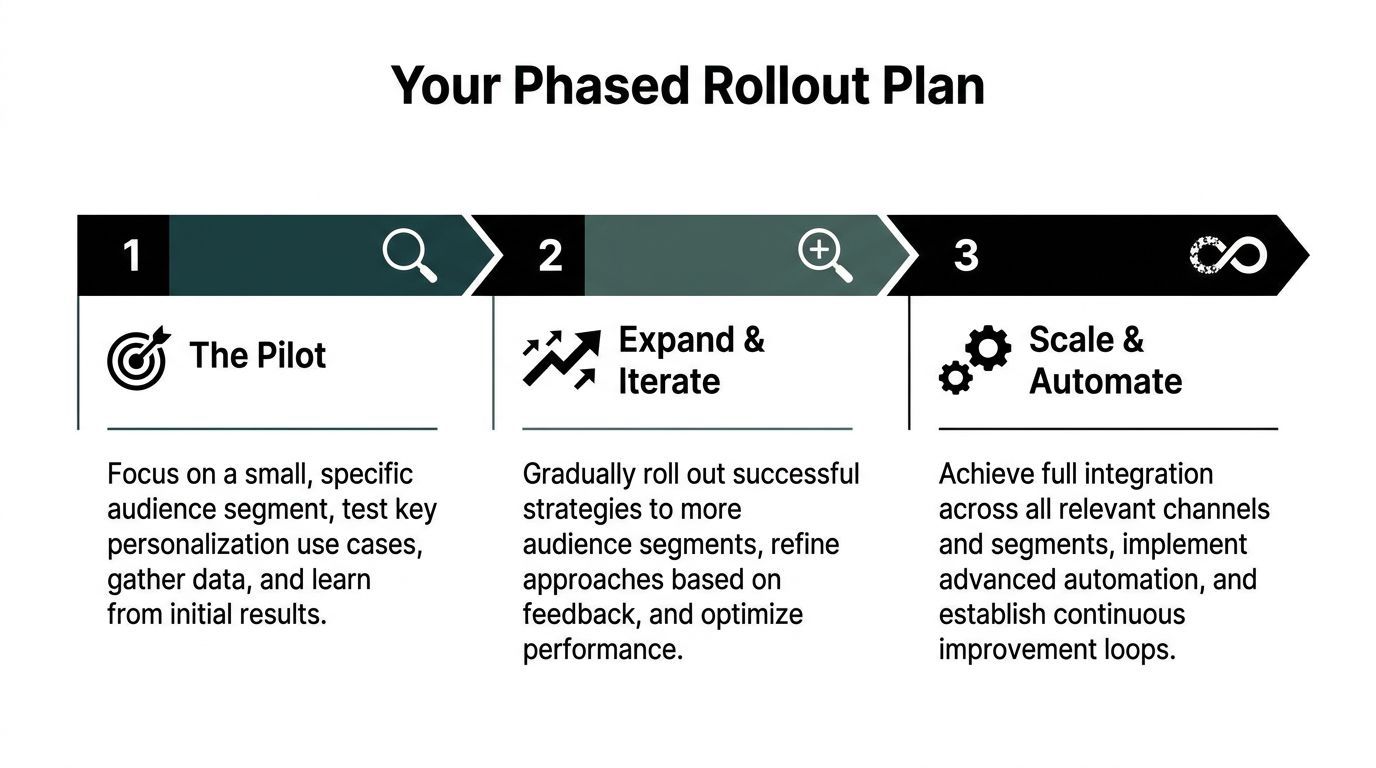
Phase 1 The pilot
Pick one journey with clear commercial value and limited dependencies. For most B2B SaaS companies, the best pilot is usually one of these:
- New trial onboarding
- Sales-qualified lead follow-up
- Expansion prompt for accounts hitting product limits
- Reactivation for stalled proof-of-concept accounts
I prefer trial onboarding first because the inputs are usually available, the audience is easy to define, and the business impact is visible quickly.
A good pilot has tight boundaries:
- One audience
- One core trigger
- One owner
- One success metric tied to business movement
For example, a trial onboarding pilot might include:
- role-based onboarding emails
- in-app prompts based on setup progress
- sales alerts only when usage crosses a clear threshold
- suppression if support issues are open
Start with the journey your revenue team already talks about every week. If it creates friction in meetings, it probably deserves automation attention.
Phase 2 Expand and iterate
Once the pilot is live, resist the urge to add more channels immediately. First, clean up what the pilot revealed.
Teams usually discover:
- lifecycle fields that aren-t maintained
- product events that fire inconsistently
- content gaps for specific roles
- handoff confusion between marketing, sales, and success
Fix those before launching journey two.
The second journey should be adjacent to the first. If the first pilot was onboarding, the second might be:
- activation recovery for stalled accounts
- expansion outreach for high-usage customers
- customer education tied to underused features
That adjacency matters because you can reuse parts of the audience logic, content library, and measurement setup instead of rebuilding from scratch.
Phase 3 Scale and operationalize
Scaling doesn't mean creating dozens of journeys overnight. It means building a repeatable production model for new journeys.
At this stage, your team should have:
| Operating component | What mature looks like |
|---|---|
| Intake process | New journey requests require business case, owner, and data readiness |
| Audience design | Segments use shared definitions, not ad hoc logic |
| Content workflow | Modular assets with review and approval steps |
| QA process | Triggers, suppressions, and edge cases are tested before launch |
| Reporting | Each journey maps to a revenue or lifecycle outcome |
Personalization at scale ceases to be a project and transforms into a capability.
The rollout logic that actually works
Founders often ask how long each phase should take. The truthful answer depends on data readiness and team alignment, so I won't pretend there's a universal timeline.
What matters more is progression logic:
- Pilot only after the profile is trustworthy enough
- Expand only after one journey produces clear operational lessons
- Scale only after governance exists
If you skip those gates, complexity outruns confidence. Then personalization gets blamed for problems that came from weak process discipline.
A phased rollout protects against that. It forces the team to earn the next layer of sophistication. It also helps secure buy-in because stakeholders can see one journey working before they commit to a broader program.
Measuring Success and Establishing Governance
If you measure personalization by opens, clicks, or surface-level engagement alone, you'll build a busy system that looks active and doesn't reliably move the business.
The better approach is to separate business outcomes from operational indicators.
Track business impact first
Primary KPIs should sit close to revenue. In B2B SaaS, that usually means movement through the lifecycle:
- Pipeline progression from qualified lead to opportunity
- Activation outcomes for trial and onboarding journeys
- Expansion movement for accounts with commercial upside
- Retention signals near renewal or after support friction
Operational metrics still matter, but they should support the business view, not replace it. Use them to diagnose execution:
| KPI type | Examples | Why it matters |
|---|---|---|
| Primary | Revenue movement, conversion to next lifecycle stage, expansion outcomes | Shows whether the journey changed the business result |
| Secondary | Message engagement, page conversion, in-app interaction, response quality | Helps explain why a journey did or didn't work |
For journeys where impact isn't obvious from a single metric, run controlled comparisons. As noted in the earlier data foundation discussion, A/B testing a personalized experience against a non-personalized one is often the cleanest way to quantify real value.
Governance isn't bureaucracy. It's what prevents one team from sending a clever message that breaks trust across the whole account.
Put rules around data, content, and deployment
Personalization at scale creates risk if nobody owns the rules. You need lightweight SOPs in three places.
Data governance
Define source-of-truth systems, field ownership, update cadence, and rules for identity resolution.Content governance
Approve reusable message blocks, claims, tone boundaries, and escalation paths for sensitive audiences.Campaign governance
Document trigger logic, exclusion rules, channel priority, QA steps, and rollback procedures.
This discipline matters because the upside is large. According to Envive's personalization statistics roundup, 70% of retailers investing in scalable personalization strategies achieve at least a 400% return on investment, which reinforces the link between unified profiles and profitability.
If you want that upside in B2B SaaS, don't run personalization as a collection of smart experiments forever. Run it like an operating system. The winners aren't the teams with the most workflows. They're the ones with the clearest rules, the cleanest data, and the discipline to tie every journey back to revenue.
If you're ready to turn personalization at scale from a slide deck into an operating system, MakeAutomation can help you design the data flows, automation logic, SOPs, and rollout plan that make it work in a real B2B or SaaS environment.