CRM Data Cleansing: A B2B Guide for 2026
Your CRM doesn't become unreliable all at once. It decays in small, expensive ways until teams stop trusting it.
B2B contact data decays at a rate of 22% to 30% annually, meaning nearly one-third of customer records in a CRM become inaccurate or obsolete within a single year without active intervention, according to ZoomInfo's CRM hygiene guidance. That's the right way to frame CRM data cleansing in a SaaS or B2B environment. Not as database housekeeping. As revenue protection.
Many teams still treat CRM cleanup like an emergency project. They wait until routing breaks, bounce rates spike, reports stop lining up with reality, and sales complains that enrichment “doesn't work.” Then they run a cleanup sprint, fix the visible mess, and go back to business as usual. The problem is that a one-time cleanup never fixes the system that created the mess.
A better model is simple. Clean what already exists. Then build controls that prevent the same issues from re-entering the CRM. If you're still deciding on the right foundation, Credit for Startups' CRM tool guide is a useful starting point for comparing options before you lock in processes around a platform. And if your team is already dealing with adoption friction, workflow complexity, or integration gaps, these common CRM implementation challenges usually show up alongside poor data quality.
Why Your CRM Is a Ticking Time Bomb
A dirty CRM doesn't fail loudly at first. It fails subtly in the background.
Reps work the wrong contact. Marketing sends campaigns to stale records. RevOps reviews a dashboard that looks precise but rests on duplicate companies, missing titles, and dead emails. Leadership thinks they have a pipeline visibility problem when they have a data integrity problem.
Entropy is built into B2B data
B2B records change constantly because people change jobs, companies restructure, domains change, teams reassign ownership, and manual entry introduces inconsistent formatting. None of that requires a dramatic operational mistake. It's normal business movement.
That's why CRM data cleansing has to be treated as an operating discipline, not an occasional project. If your system depends on contact accuracy for lead routing, account scoring, personalization, or forecasting, then stale data isn't just annoying. It weakens every downstream automation that depends on it.
Practical rule: If a workflow assumes your data is current, your team needs an explicit process for proving that it is.
The cost isn't only bad outreach
A common perception is that dirty CRM data is a sales problem. It's broader than that.
- Forecasting gets distorted when duplicate records or obsolete opportunities stay in active views.
- Automation misfires when required fields are blank, mislabeled, or inconsistent.
- Segmentation degrades when “United States,” “US,” and “USA” all mean the same thing but live as separate values.
- Ops loses time because every broken workflow turns into manual cleanup.
The core shift is strategic. Strong teams stop asking, “When should we do our next cleanup?” They ask, “What should never be allowed into the CRM again?”
That's the difference between reactive maintenance and a scalable data quality system.
Your Pre-Cleanse Audit and Data Health KPIs
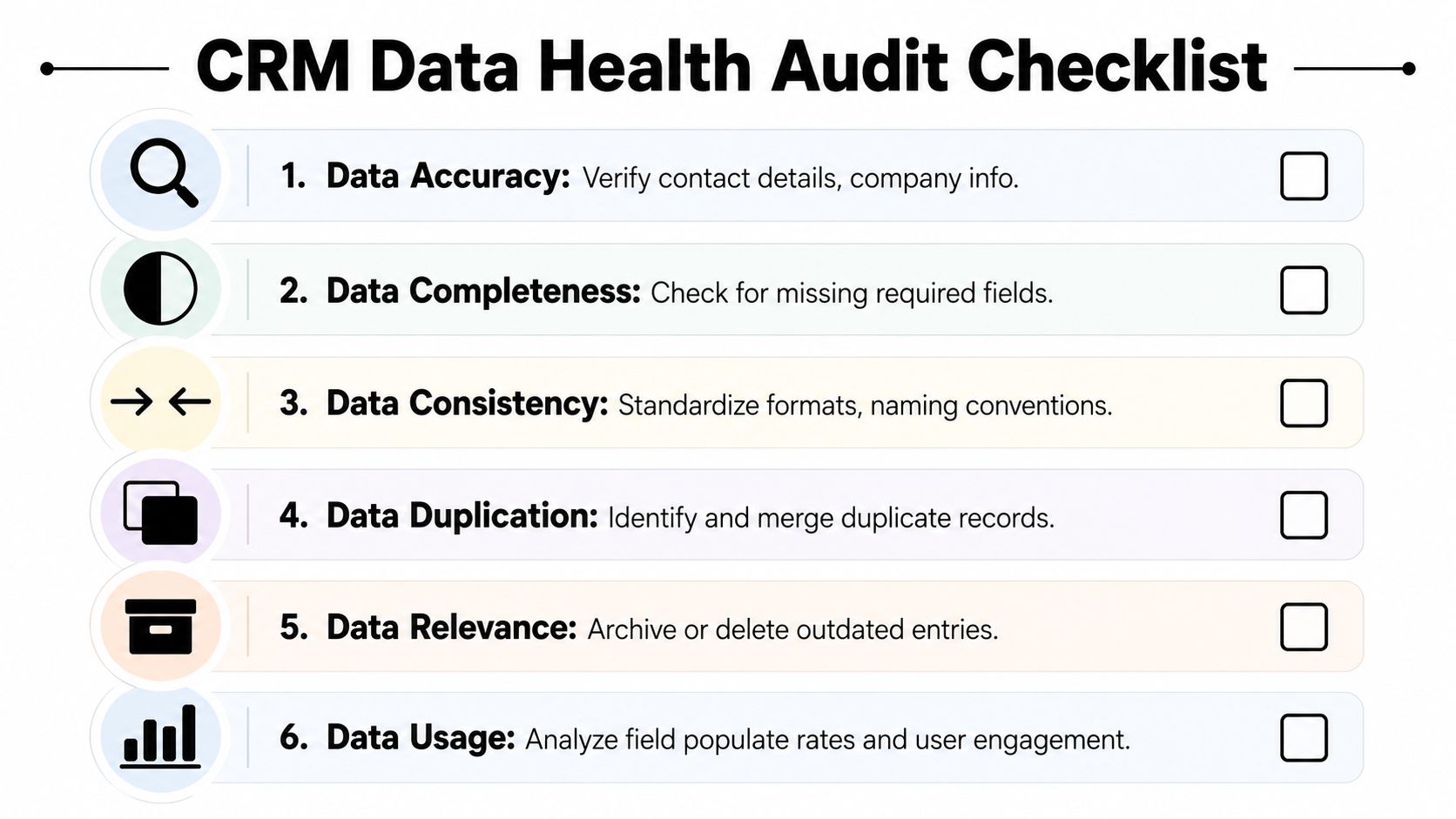
Before you merge, enrich, archive, or delete anything, you need a baseline. CRM data cleansing without an audit is guesswork. Teams often start with duplicates because duplicates are visible. That's not always the most urgent issue.
Industry benchmarks for CRM data quality audits recommend measuring specific metrics such as the percentage of records with valid email addresses, the current duplicate rate, and the percentage of contacts missing critical fields like job title or company name before initiating any cleansing process, as outlined by nRev's CRM data cleansing guidance.
What to measure first
A useful audit focuses on operational impact, not vanity metrics. Start with the fields and conditions that affect routing, deliverability, segmentation, enrichment, and reporting.
| KPI | What It Measures | Good | Needs Improvement |
|---|---|---|---|
| Valid email coverage | Share of active contacts with a valid work email | Most active records can support outreach | Large portions of active records can't be contacted reliably |
| Duplicate rate | Frequency of duplicate contacts, accounts, or companies | Duplicates are isolated and reviewable | Duplicates interfere with ownership, reporting, or routing |
| Critical field completion | Missing values in fields like job title, company name, country, lifecycle stage | Core fields are populated for active workflows | Key fields are often blank or inconsistent |
| Stale contact volume | Contacts with no meaningful engagement or updates inside your defined review window | Stale records are clearly separated from active ones | Old records clutter active pipeline and campaign views |
| Standardization quality | Consistency in naming, formatting, and picklist usage | Controlled values are used consistently | Free-text variants break filters and automation |
| Bounce and unsubscribe status hygiene | Whether suppressed records remain eligible for outreach | Suppression logic is enforced consistently | Inactive or disqualified contacts remain in sends |
That table matters because not every problem deserves the same priority. A missing phone number on a low-priority lead is inconvenient. An invalid email on a strategic account contact can break outbound and skew campaign analysis at the same time.
For teams trying to tighten processes before the cleanse starts, this guide on how to improve data quality is a practical companion to the audit phase.
How to define stale records
The stale-record question trips up a lot of teams because they mix up inactivity with irrelevance. A contact who hasn't replied recently might still belong in the system. A contact with no meaningful engagement, no updates, and no valid outreach activity for a sustained period belongs in review.
A strong profiling report should separate records into buckets such as:
- Active and trusted with recent engagement or verified updates
- Active but incomplete where records are still in play but missing critical fields
- Suspected duplicate where ownership or history could split across records
- Stale and archive-ready where records no longer belong in active pipeline views
- Suppressed for hard bounces, unsubscribes, or similar exclusions
The point of the audit isn't to find every flaw. It's to identify which flaws are damaging revenue operations right now.
What good teams do differently
Experienced RevOps teams don't jump straight from audit to mass edits. They tag issue classes, estimate business impact, then sequence remediation in the order that prevents collateral damage.
A practical order usually looks like this:
- Protect reporting first by identifying duplicate accounts and contacts tied to live workflows.
- Protect outreach second by reviewing validity and suppression-related issues.
- Protect segmentation third by normalizing core fields used by automation.
- Clean long-tail issues last such as optional field completeness or low-risk formatting drift.
That approach keeps the cleanse aligned with business risk instead of making it an abstract data project.
The Core Data Cleansing Framework
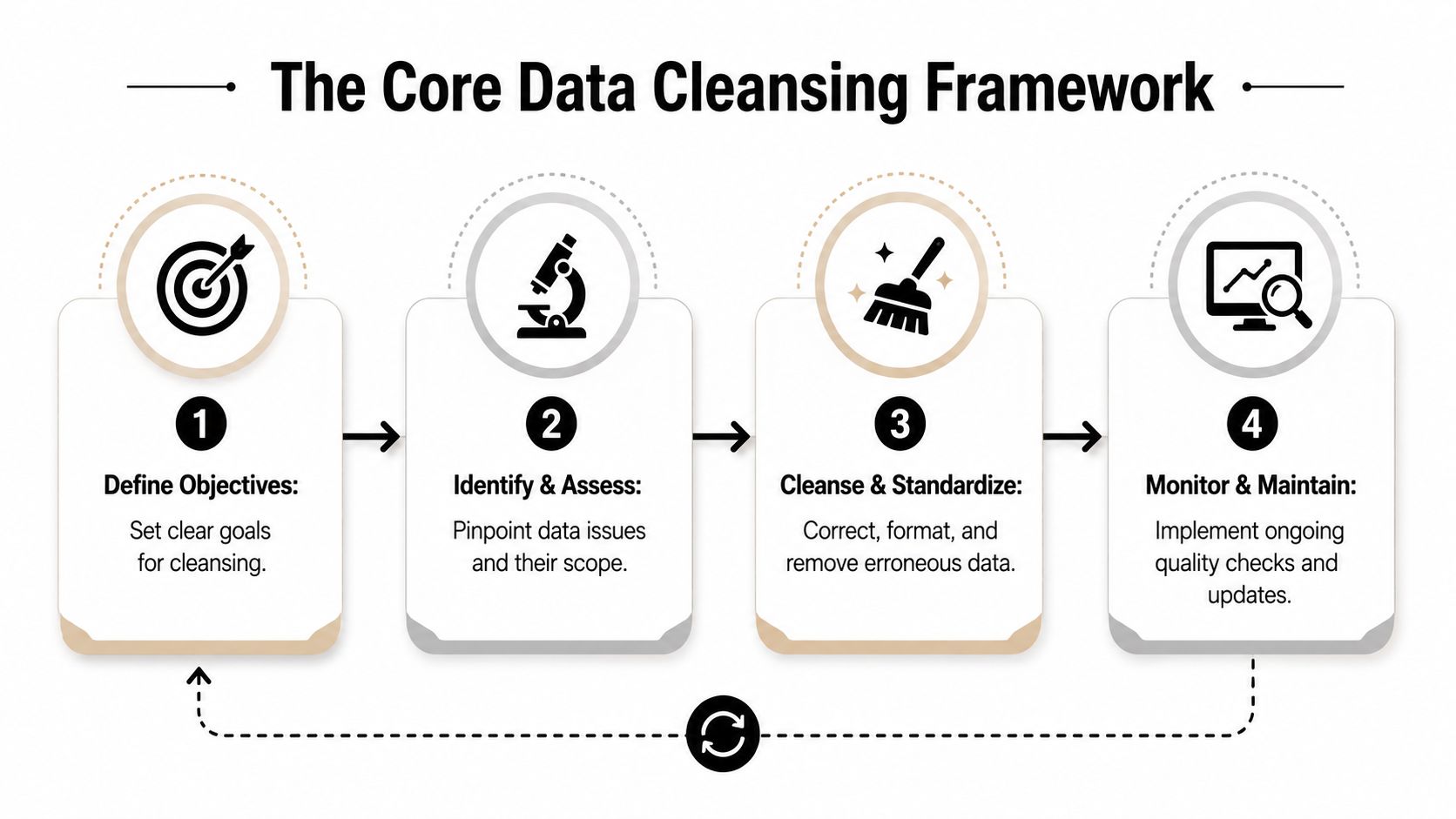
Once the audit shows where the damage sits, the cleanup itself should follow a controlled framework. Not a random sequence of exports, manual edits, and merge attempts.
A reliable methodology for CRM data cleansing follows a structured path. Backup all data, reports, workflows, and configurations first. Then identify and merge duplicates, standardize formats, complete missing information, validate critical fields, and finally remove or archive obsolete records, based on SyncMatters' CRM cleansing methodology.
Start with backup, not bravery
The biggest mistake in CRM cleanup is overconfidence. Teams assume they can reverse a bad merge or reconstruct field history later. Often they can't.
Before any significant change, preserve:
- Object data exports for contacts, accounts, leads, and opportunities
- Current reports and dashboards so you can compare before and after
- Workflow and automation logic that depends on field values
- Field mappings and ownership rules that could be disrupted by merges
If your dedupe process touches large volumes, rollback planning isn't optional. It's part of the cleanse.
Deduplicate with judgment
Deduplication is where teams create the most accidental damage. Exact matching is safe when unique fields line up cleanly. Fuzzy matching is powerful, but it can collapse records that only look similar.
Examples from B2B SaaS are common:
- “Acme Inc” and “Acme, Inc.” probably belong together.
- “Jane Smith” at the same domain with one old title and one current title might be a safe contact merge.
- Two “Alex Lee” records at a large company may not be the same person at all.
That's why auto-merging everything is a bad practice. Use automation to flag likely duplicates, then let a data steward or designated owner review the ambiguous cases. If your team is comparing options, these data deduplication tools are useful for deciding where exact rules end and human review should begin.
Operational advice: Automate duplicate detection aggressively. Automate duplicate merging selectively.
Standardize before you enrich
Standardization sounds boring until you see how often it breaks segmentation.
If country values appear as “USA,” “US,” and “United States,” your filters won't behave consistently. If job titles alternate between “VP Sales,” “Vice President Sales,” and “Vice President of Sales,” your role-based messaging becomes less reliable. If company names carry different suffixes or punctuation, account matching gets messy fast.
Good standardization usually covers:
- Country and region values through controlled lists
- Phone number formats in one preferred structure
- Company naming conventions with suffix handling rules
- Lifecycle stage labels that map to actual process states
- Industry and team fields with governed picklists instead of free text
Enrich only what matters operationally
Enrichment is where teams waste money if they don't set priorities. Not every blank field needs filling.
Focus on fields that improve execution:
- Job title for routing and persona targeting
- Company name and website for account matching
- Country or region for assignment logic
- Work email and phone when those channels are active in your motion
Manual research still has a place for high-value accounts, but broad enrichment should support workflows, not satisfy curiosity. If a field doesn't improve routing, scoring, segmentation, personalization, or reporting, it probably doesn't belong in the first enrichment wave.
Validate before records return to active use
Validation is the gate between “cleaned” and “trusted.” A record that looks complete but contains unverified contact details still creates operational risk.
Use validation to confirm critical fields such as work email, phone, and core company details. Then separate records by outcome:
- Verified and usable
- Needs manual review
- Suppress from outreach
- Archive from active operations
That final classification matters more than perfection. The goal isn't to make every record beautiful. The goal is to make active records trustworthy enough for automation and team execution.
Building Your Proactive Automation Engine
Reactive cleanup keeps your CRM usable. Prevention keeps it scalable.
Recent guidance for 2026 stresses that reactive cleaning alone isn't enough. Teams need real-time enrichment triggers and validation rules to prevent decay before it happens, according to Fundraise Insider's CRM data cleanup guidance.

Build controls at entry points
Most dirty CRM data enters through a small number of channels. Forms, imports, syncs from third-party apps, manual rep creation, and enrichment overlays. If you don't control those entry points, every cleanup has an expiration date.
The strongest prevention patterns are simple:
- Validation rules reject malformed emails, incomplete required records, and unusable values at creation.
- Controlled picklists replace free-text entry for fields that drive automation.
- Duplicate checks on create force users and systems to reconcile likely matches before new records are saved.
- Real-time enrichment triggers fill in key missing fields as records enter, not weeks later.
Many CRM data cleansing projects fail. Teams focus on the database they have, not the process that keeps rebuilding the same mess.
Use automation for routine checks and AI for fuzzy judgment
Traditional automation is good at deterministic logic. If field X is blank, do Y. If email format is invalid, block submission. If company domain matches an existing account, flag for review.
AI becomes useful where certainty drops. For example, when a new contact enters with a company name variation, an unusual title, or conflicting website data. A rules engine may not know what to do. An AI-assisted workflow can help classify the record, assess whether it looks genuine, and route edge cases for review instead of forcing a bad decision automatically.
That doesn't mean handing your CRM to an unsupervised agent. It means using AI where ambiguity exists and standard workflows become brittle.
A practical setup often looks like this:
| Function | Best handled by |
|---|---|
| Required fields and format checks | Validation rules |
| Simple duplicate prevention | Native CRM logic or dedupe tool |
| Standard field mapping | Workflows and field rules |
| Real-time basic enrichment | Enrichment provider trigger |
| Ambiguous record review | Human steward with AI-assisted recommendations |
| Ongoing anomaly spotting | Scheduled automation plus AI review queues |
Turn monthly cleanup into continuous hygiene
Numerous groups still operate on a “we'll clean it later” model. That guarantees the CRM stays in a cycle of decay and repair.
A better operating model uses layers:
- At entry block invalid or incomplete records.
- Post-creation enrich and standardize immediately.
- Daily or scheduled checks identify duplicates, formatting drift, and suppression issues.
- Human review queues handle edge cases where automation shouldn't merge or overwrite data.
- Periodic governance review confirms that rules still match the business.
The win isn't just cleaner data. It's lower operational drag. Reps stop fixing records mid-workflow. Marketing stops exporting lists just to repair segmentation. Ops stops firefighting every time a sync introduces junk.
For a visual walk-through of how automation fits into modern CRM workflows, this overview is useful:
Clean data is not the output of a quarterly project. It's the output of a system that rejects bad inputs and repairs weak ones before they spread.
Phased Implementation and Quality Assurance
A CRM cleanup can improve trust quickly, but it can also break assignment logic, reports, and automations if you roll it out carelessly. The safest path is phased.
Benchmarks from Affinity's CRM data hygiene best practices indicate that regular data hygiene reviews every 3–6 months are essential, with special focus on removing contacts who have hard-bounced, unsubscribed, or shown zero engagement for 18+ months. That cadence works best when it sits on top of continuous automation, not in place of it.
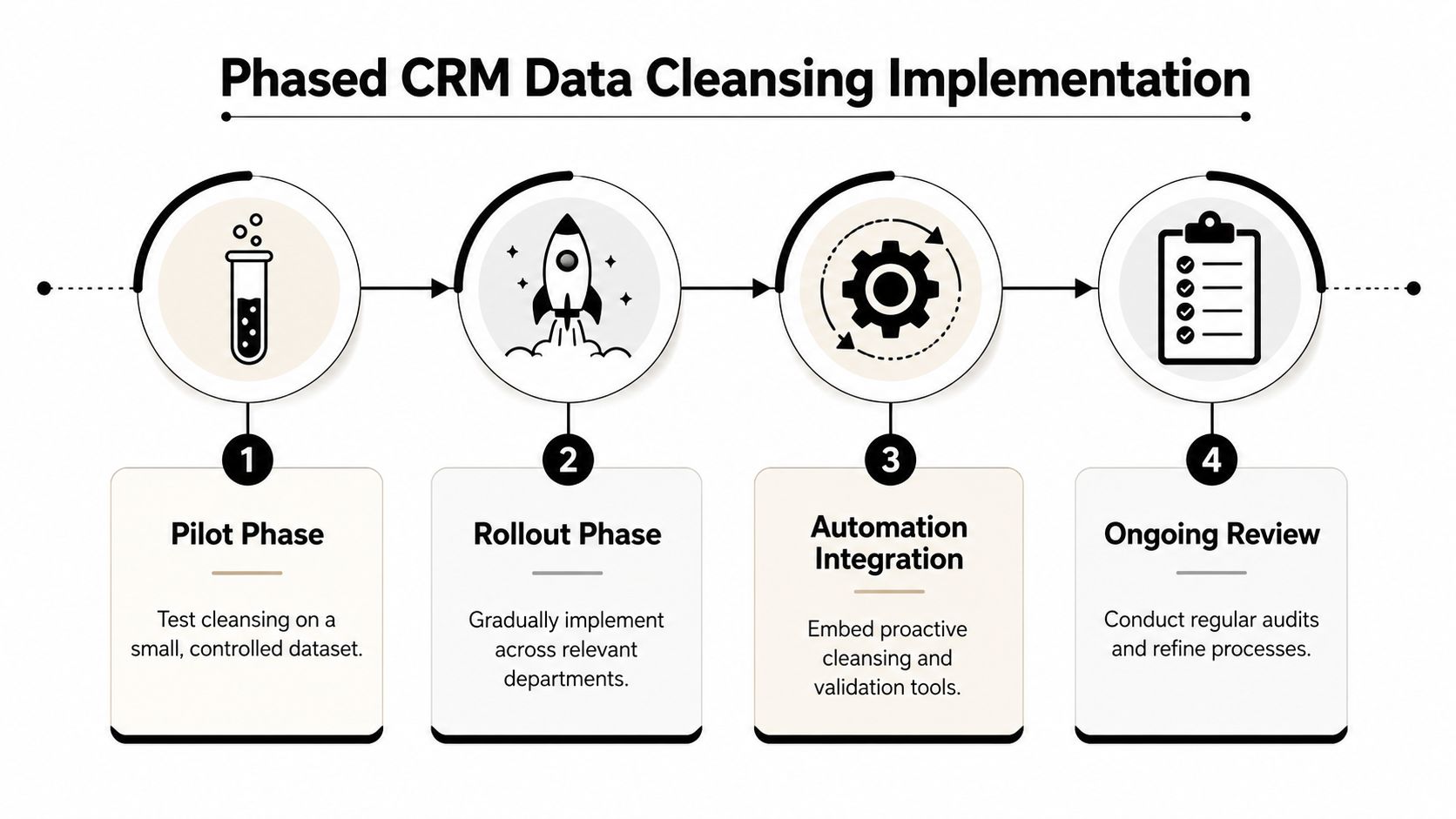
Phase one with a controlled pilot
Don't start with your whole CRM. Start with a segment where risk is manageable and the learning is useful.
Good pilot candidates include:
- A regional sales team with clear ownership
- One lifecycle stage such as inbound leads or customer contacts
- A non-critical business unit where workflow complexity is lower
The pilot should test more than cleansing logic. It should test reporting impact, merge review flow, stakeholder communication, and rollback readiness.
Assign ownership before scale
CRM data cleansing fails when everyone assumes someone else owns quality. Sales thinks RevOps owns it. RevOps thinks systems admins own it. Marketing assumes enrichment covers it.
Name a data steward role, even if it's not a full-time title. That person should review flagged duplicates, approve edge-case merge rules, monitor exceptions, and act as the final decision-maker when automation isn't enough.
A practical quality assurance checklist includes:
- Pre-change backups of records, workflows, and reports
- Sample-based testing before full batch actions
- Side-by-side report comparisons before and after major changes
- Exception queues for unclear merges and validation conflicts
- Post-launch monitoring for routing, assignment, and suppression errors
Establish the right cadence
The cadence matters as much as the cleanup method. Quarterly deep reviews are useful because they catch what automation misses. Between those reviews, continuous checks should watch the data at the point where it enters and changes.
A balanced model usually includes:
| Layer | Purpose |
|---|---|
| Real-time controls | Prevent invalid records and obvious duplicates at entry |
| Scheduled hygiene tasks | Catch drift, stale values, and suppression issues |
| Quarterly deep review | Audit duplicate rate, validity, completeness, and archive candidates |
| Steward review process | Resolve edge cases and update governance rules |
That rhythm keeps the CRM from swinging between neglect and overcorrection.
If your cleanup plan depends on one heroic project, it will fade. If it becomes part of operating cadence, it will stick.
From Data Janitor to Data Strategist
The companies that get the most from their CRM don't treat data quality as clerical work. They treat it as infrastructure.
That's the mindset shift behind effective CRM data cleansing. You clean the existing mess once, with discipline. Then you build validation, enrichment, duplicate prevention, stewardship, and review processes that keep quality high without constant manual rescue work.
When that system is in place, the benefits stack across teams. Sales works cleaner territories and accounts. Marketing segments with more confidence. Ops trusts dashboards again. Leadership gets a clearer picture of pipeline health because the CRM reflects current reality instead of accumulated noise.
The role changes too. The person managing CRM data stops acting like a janitor cleaning up after everyone else. They become a strategist who shapes how revenue systems behave, what automation can safely do, and which signals leadership can trust.
That's where the return sits. Not in having a prettier database, but in having a CRM that can support growth without creating drag every quarter.
If your team wants to turn CRM data cleansing into a repeatable, automation-first operating system, MakeAutomation can help design the workflows, validation layers, AI-assisted review logic, and governance process that keep your CRM accurate as you scale.