Workflow Orchestration Software: A Practical Buyer’s Guide
The workflow orchestration market was valued at US$90.8 billion in 2024 and is projected to reach US$399.5 billion by 2030, implying a 28.0% CAGR, according to the cited workflow orchestration market analysis. That scale changes the buying question. Workflow orchestration software isn't just another automation tool for moving data between applications. It's becoming the control layer for how modern companies execute work across systems, people, and increasingly, AI agents.
Growth-stage SaaS companies feel the need before they have the headcount to absorb more operational complexity. The right platform coordinates dependencies, preserves execution state, exposes failures, and gives leaders a clear answer when a process breaks. The wrong platform adds another connector library, another dashboard, and another system someone must maintain.
Why Growth-Stage B2B Teams Are Reaching for Orchestration
A growth-stage company rarely has one automation problem. It has a collection of local fixes that gradually become an operating model. A form sends data to a CRM, the CRM triggers enrichment, enrichment determines routing, the sales platform creates tasks, billing provisions an account, and customer success starts onboarding. Each automation may work independently. The full process becomes fragile because nobody owns the handoffs.
That problem often becomes visible as teams grow from roughly 50 to 500 employees, not because a particular headcount creates a technical limit, but because more departments begin building workflows independently. RevOps owns CRM logic, finance owns billing, recruiting owns the ATS, and engineering owns internal services. A revenue process that touches four SaaS tools can fail in several places while still appearing healthy inside each individual application.
Practical rule: If nobody can answer which system owns the workflow state, you don't have orchestration. You have a chain of triggers.
The market's expansion reflects that broader need. Another forecast estimates workflow orchestration at US$7.8 billion in 2025, rising to US$56.2 billion by 2034 at a 22.4% CAGR, while a separate projection reaches US$22.71 billion by 2034 at a 10.8% CAGR. The estimates differ, but the comparative market research consistently describes double-digit expansion as companies connect cloud, on-premise, and hybrid environments.
The control-layer test
Before buying another point solution, ask your operations lead four questions:
- What starts the process? A webhook, scheduled job, queue message, human approval, or data change?
- What must happen first? Identify dependencies, parallel steps, and approval gates.
- Where does state live? You need a durable record of what ran, what failed, and what remains pending.
- Who owns recovery? A process isn't production-ready if failure creates a manual scavenger hunt.
Workflow orchestration software should decide what runs, in what order, with which data, under which policy, and with which escalation path. That's the standard to use before your next tool purchase. If a vendor can only show how to create a trigger, it hasn't demonstrated orchestration.
What Workflow Orchestration Software Does
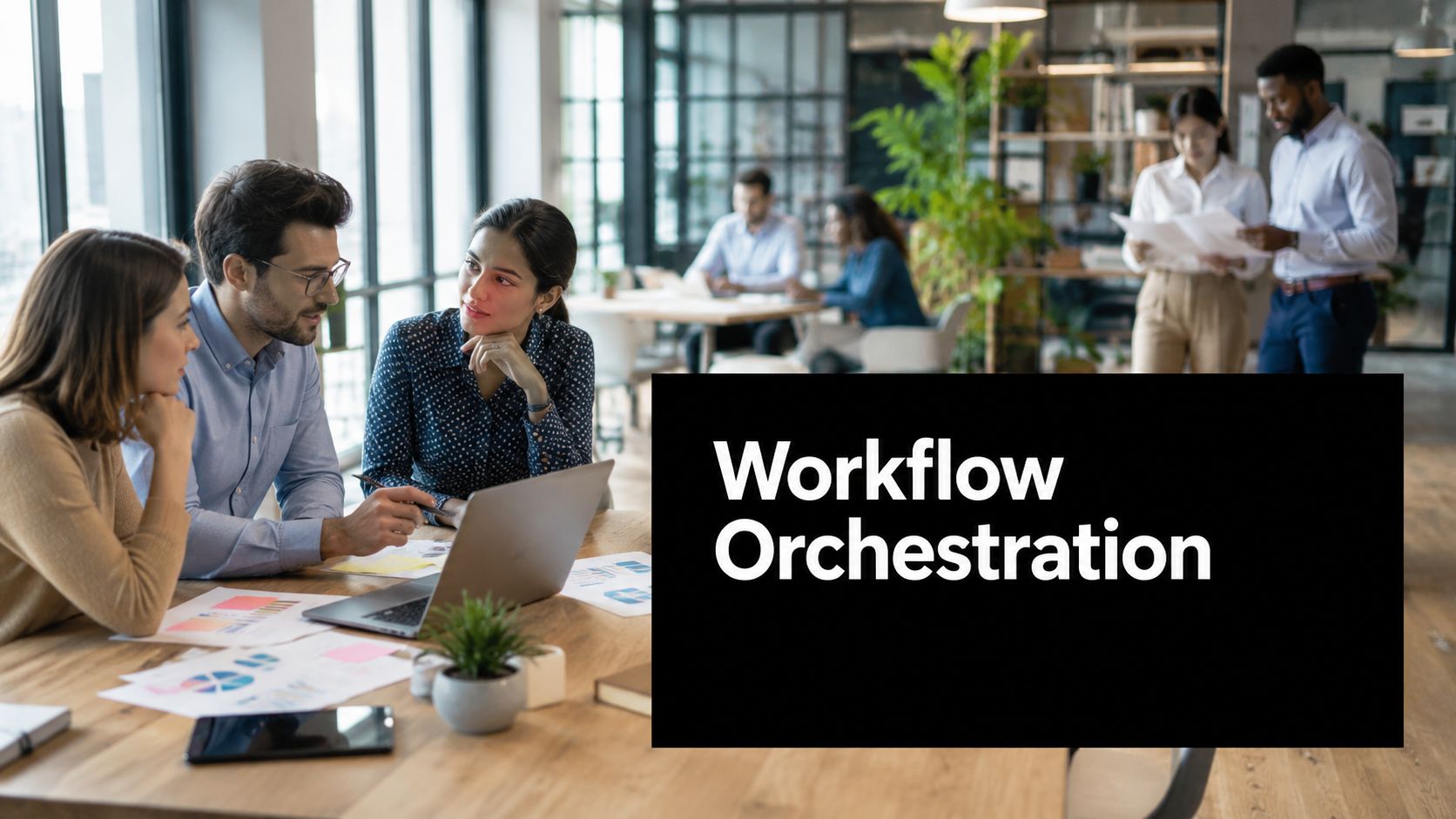
Workflow orchestration is the control layer above individual applications. Each system still handles its own task, while the orchestration platform determines sequence, dependencies, handoffs, and recovery. Automation moves one plane. Orchestration manages the airspace.
A production platform typically includes these components:
- Orchestration engine: Executes the process graph and resolves dependencies.
- State store: Records progress, inputs, outputs, retries, approvals, and terminal failures.
- Scheduler: Starts time-based work and manages deadlines, timers, and recurring runs.
- Event listener: Receives API calls, queue notifications, database changes, and webhooks.
- Connectors: Communicate with HubSpot, Salesforce, Stripe, NetSuite, Slack, ATS platforms, and internal APIs.
- Observability layer: Shows execution history, latency, errors, retries, and bottlenecks.
- Policy module: Enforces permissions, approval rules, data handling, and segregation of duties.
A task automation tool might create a CRM record after a form submission. Orchestration owns the broader lead-to-revenue process, including enrichment, routing, duplicate checks, contract synchronization, approvals, and recovery when a service is unavailable. It can pause for a human decision, resume after an external event, and retain the audit trail.
For a growth-stage SaaS team, require a visual workflow graph, durable retries, idempotency controls, SLA timers, versioning, and audit trails before approving a platform. A visual workflow builder for mapping dependencies helps teams design the process before implementation. Reject diagrams that remain static documentation. The workflow must become executable, governed, and observable.
What buyers should see on day one
Ask the vendor to demonstrate a failed execution, not only a successful path. The demonstration should show how the platform prevents duplicate actions, how an operator locates the failed step, how a retry uses the correct input, and how a manager reviews the complete history.
Require clear ownership for state and recovery. If the vendor cannot show where a waiting, failed, or approved process resides, the product is functioning as a collection of triggers rather than a control layer.
State management separates orchestration from simple task automation. Once a process can wait, retry, branch, fan out, fan in, or involve a person, the platform must remember its position and preserve the information needed to continue safely. That requirement should guide whether your company consolidates process control in one platform or governs several specialized tools under a defined orchestration layer.
Orchestration vs Automation, BPM, and iPaaS
These categories overlap in marketing language, but they solve different problems. A B2B SaaS buyer should compare them on process scope, state management, human participation, governance, and deployment burden, not on the number of connectors listed on a pricing page.
Task automation is the right tool for a contained action. It can create a record, send a notification, transform a payload, or update a field. It becomes unreliable when several automations must coordinate across dependencies and preserve state through delays or failures.
BPM suites are designed for formal, governed business processes, often with extensive modeling, case management, and enterprise controls. They make sense when regulatory process design or complex departmental governance justifies the implementation effort. For many sub-500-employee companies, they introduce more platform than the team can operate.
iPaaS products are strong at integration. They move and transform data between applications, expose reusable connections, and can support event or batch patterns. Their weakness appears when the business needs a durable owner for the end-to-end process state rather than a reliable data transfer.
Workflow orchestration software sits above those execution mechanisms. It coordinates automations, integrations, services, and people around a business outcome.
Comparison matrix
| Dimension | Task Automation | BPM Suite | iPaaS | Workflow Orchestration |
|---|---|---|---|---|
| Scope | One task or short trigger chain | Formal enterprise process | Data movement and transformation | End-to-end cross-system process |
| State management | Limited execution history | Strong case and process state | Usually integration-focused | Durable workflow state and dependencies |
| Human-in-the-loop | Basic approvals or notifications | Deep roles, forms, and case work | Often limited | Approvals, handoffs, and escalation paths |
| Governance | Lightweight | Extensive | Integration and access governance | Execution, policy, audit, and recovery governance |
| Time to value | Fast | Long and implementation-heavy | Fast to moderate | Moderate, starting with a focused workflow |
| Best signal | “When X happens, do Y” | “We need formal process management” | “Move data between these systems” | “This process spans systems and can fail between steps” |
Use automation when the trigger phrase is “make this repetitive task disappear.” Choose iPaaS when the phrase is “keep these systems synchronized.” Choose orchestration when the phrase is “own this process from initiation through resolution.” Choose BPM when the phrase is “we need formal case governance, process modeling, and enterprise controls across regulated operations.”
Don't buy a BPM suite to solve a handful of fragile integrations. Don't buy iPaaS alone when nobody can explain what happens after a downstream failure. Buy the smallest control layer that can own the process you need to govern.
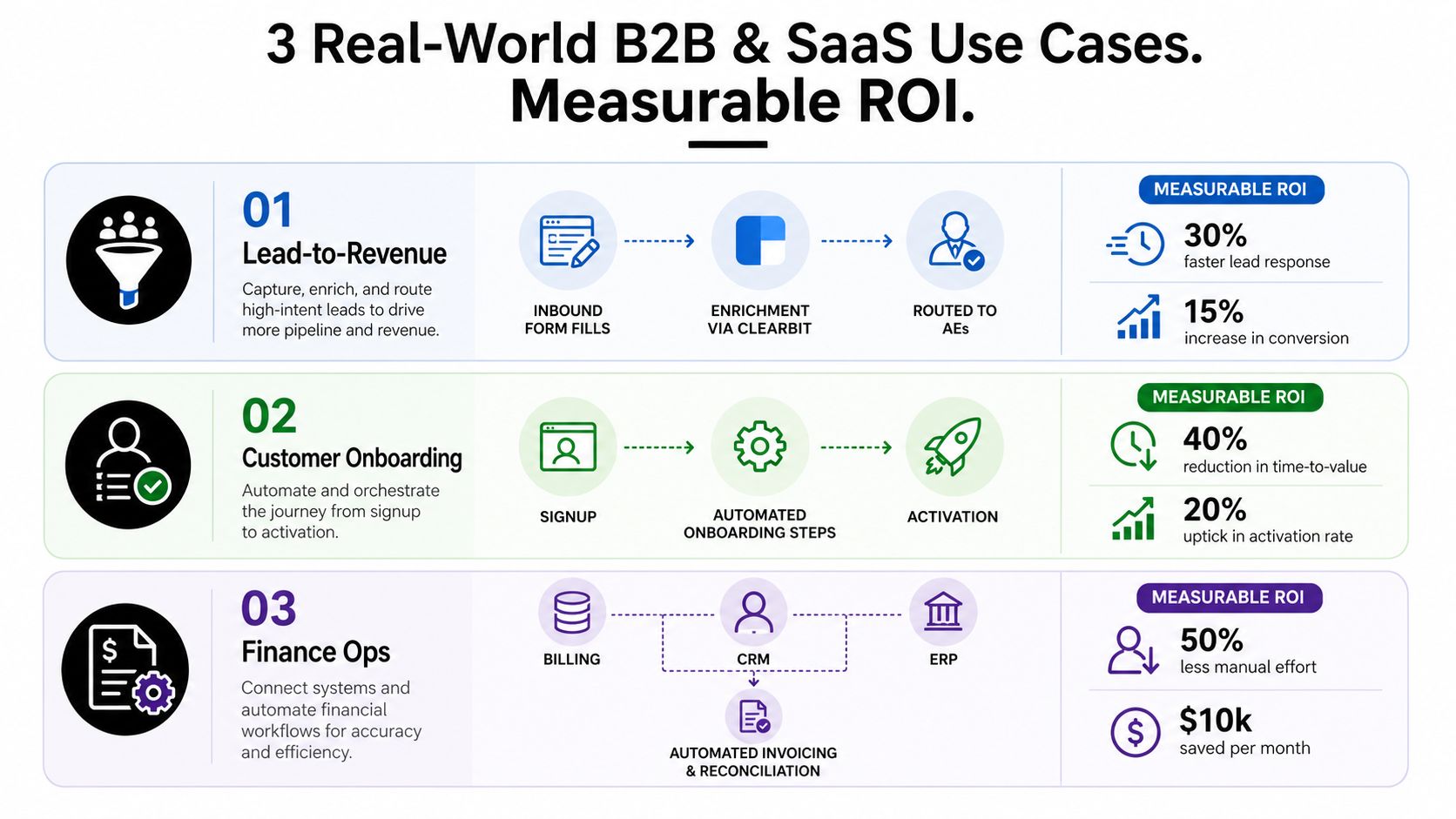
Real B2B and SaaS Use Cases With Measurable ROI
ROI doesn't come from drawing a polished workflow graph. It comes from removing delay, reducing rework, and making ownership visible. Start with a process where leaders already feel the cost and where one metric can prove whether the orchestration layer earned its place.
Lead to revenue
A practical graph looks like this:
Inbound form fill → enrichment through Clearbit → qualification rules → AE routing in HubSpot → opportunity creation → contract synchronization back to CRM → customer handoff.
The orchestrator should enforce duplicate handling, record the enrichment result, route exceptions to RevOps, and prevent contract data from overwriting a newer CRM value. The proving metric is lead response time or sales velocity, selected before the pilot begins.
Don't claim a conversion lift until the baseline and comparison method exist. Leadership needs to know how quickly qualified leads receive attention, how often records require manual correction, and where prospects stall between capture and ownership.
Customer onboarding
The workflow can begin with a paid signup or signed order:
Signup or contract event → tenant provisioning → permissions and product configuration → ERP record creation → welcome sequence → enablement task → activation review.
This process usually crosses product, finance, customer success, and support. Orchestration earns its cost by making the handoff explicit, pausing safely when required information is missing, and escalating an account that approaches its onboarding SLA.
Use time to first value as the primary metric. Pair it with activation or onboarding completion only if those definitions are stable. A shorter process that creates incomplete tenants isn't a win, so include provisioning errors and rework in the measurement plan.
Recruitment and finance operations
Recruitment provides another clear orchestration pattern:
ATS application → screening decision → background-check request → recruiter review → Slack approval → interview scheduling → offer workflow → HRIS update.
The success measure is recruiting cycle time, with exception volume as a supporting indicator. The workflow should protect sensitive candidate data, restrict approvals by role, and make every decision traceable.
Finance operations can use a similar structure:
Billing event → CRM validation → ERP invoice creation → reconciliation check → exception queue → finance approval.
Orchestration must respect accounting close windows and reconciliation rules rather than fire blindly on every event. Measure manual effort removed, exception resolution time, and invoice accuracy, but don't attach savings claims until finance validates the baseline.
Payback discipline
Set the payback window from actual labor, delay, error, and tool costs. A vendor that promises a generic return without inspecting your current process is selling a demo, not an investment case. Build the business case around one workflow, one owner, one baseline, and one leadership metric.
A Vendor Evaluation Checklist Built for Buyers
Evaluate vendors with a scorecard, not a sequence of impressive demos. Every finalist should run the same workflow, demonstrate the same failure scenarios, and disclose the commercial assumptions behind retries, waiting time, executions, users, environments, and support.
I'd score ten criteria, then apply a hard stop to any security requirement the vendor can't document.
Suggested scoring criteria
- Native connectors, 12%: Confirm the systems you need, authentication methods, webhook support, pagination, rate-limit handling, and connector ownership.
- Versioning and deployment controls, 12%: Require draft, test, approval, rollback, and environment promotion workflows.
- Observability, 14%: Inspect execution graphs, structured logs, correlation IDs, replay controls, latency views, and alert routing.
- RBAC, SSO, and SAML, 12%: Confirm least-privilege roles, identity-provider integration, user lifecycle controls, and service-account governance.
- Audit logs, 10%: Require immutable history for configuration changes, approvals, data access, retries, and administrative actions.
- Security assurance, 12%: Ask for SOC 2 Type II documentation and the vendor's control scope, not only a badge on a webpage.
- Secret management, 8%: Verify vault integration, rotation, masking, scoped credentials, and emergency revocation.
- Deployment options, 8%: Evaluate SaaS, private cloud, VPC, and on-premise requirements against your data and network boundaries.
- Pricing transparency, 7%: Model workflow volume, waiting states, retries, environments, support, and overages.
- Implementation support, 5%: Demand named responsibilities, delivery milestones, training, and exit assistance.
Use the same template for each finalist:
| Criterion | Weight (%) | Must-Have | Vendor A Score | Vendor B Score |
|---|---|---|---|---|
| Native connectors | 12 | Required systems supported | ||
| Versioning | 12 | Rollback and promotion | ||
| Observability | 14 | Failure trace and replay | ||
| Identity and access | 12 | RBAC and SSO/SAML | ||
| Audit logs | 10 | Admin and execution history | ||
| Security assurance | 12 | Documented SOC 2 Type II scope | ||
| Secret management | 8 | Rotation and masking | ||
| Deployment options | 8 | Required hosting model | ||
| Pricing transparency | 7 | Predictable usage model | ||
| Implementation support | 5 | Named delivery plan |
For technical teams comparing durable execution approaches, review whether an open workflow engine such as Temporal's open-source orchestration approach fits your appetite for operating infrastructure.
Security gates and red flags
Require encryption at rest, regional data residency options, PII redaction in logs, tenant isolation, incident notification procedures, and documented retention controls. A platform that can't explain where execution data goes shouldn't process customer, employee, or financial records.
Reject vendors that can't demo a real failover, hide retry behavior, bill unpredictably per task, lack exportable audit history, or require vendor engineers for every workflow change. Those conditions predict operational dependence, not agility.
Implementation Roadmap From Pilot to Scale
A successful rollout starts narrow and expands only after the team can operate one workflow under failure. The following 90-day plan gives a founder or operations leader concrete checkpoints without requiring them to inspect every technical detail.
Days 1 to 30, establish the baseline
Choose one high-volume workflow with a visible owner and a measurable business outcome. Map the current state, including manual touches, systems, approvals, exceptions, and timing. Integrate two SaaS sources, then run a shadow pilot that observes and compares behavior without immediately replacing the existing process.
Demand three things from the vendor before continuing:
- Demo evidence: Show a failed step, duplicate event, timeout, retry, and manual intervention.
- Sandbox access: Let your team build and test the workflow without relying entirely on vendor services.
- Reference calls: Speak with customers that run cross-system workflows, not only simple automations.
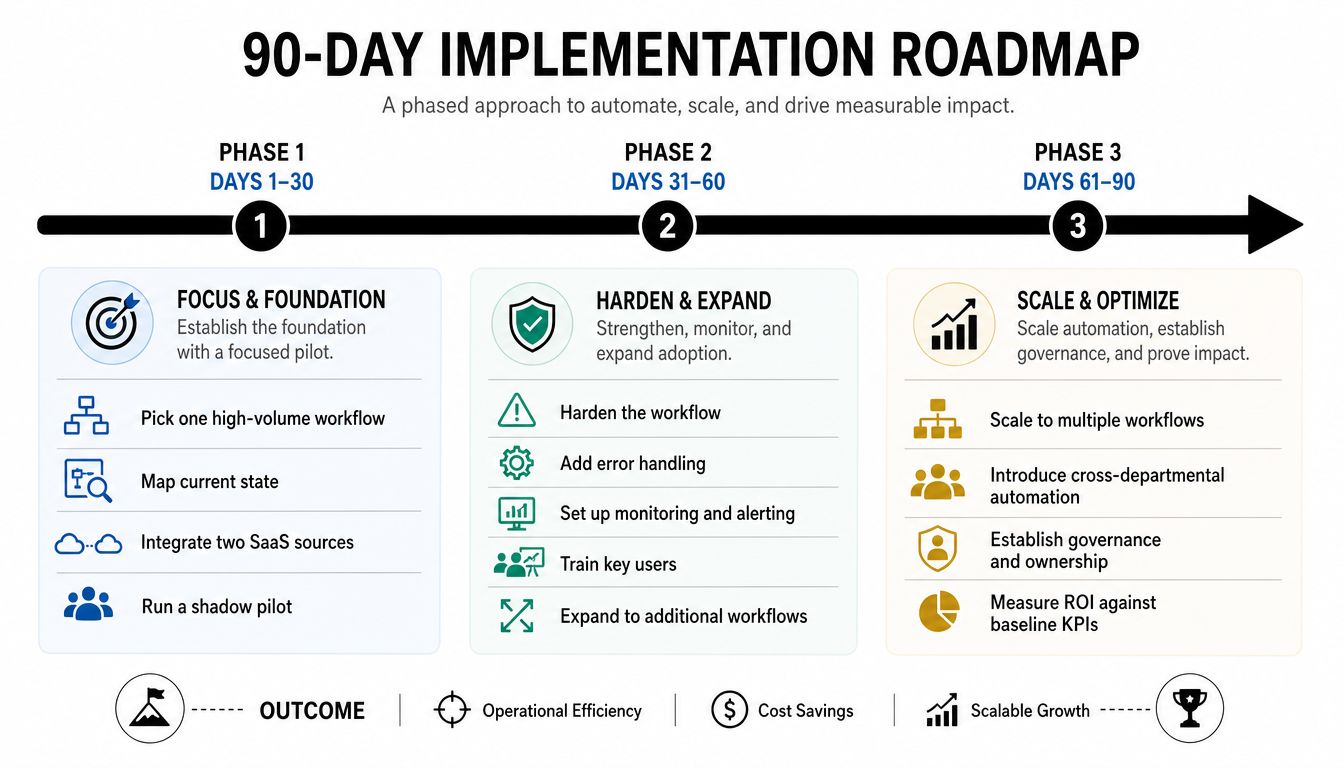
Days 31 to 60, harden the operation
Move from a successful pilot to a supportable production workflow. Configure SSO, rotate secrets, restrict roles, and enable audit logging. Add dashboards for latency, error rate, queue or wait states, and SLA breaches.
Train the people who will own exceptions. The vendor should provide a runbook covering replay, rollback, credential failure, upstream schema changes, and escalation. If only the implementation consultant knows how to recover a run, you haven't completed the phase.
Days 61 to 90, expand ownership
Add three more workflows only after the first one has a stable operating rhythm. Choose adjacent processes that reuse connectors, policies, or data contracts. Document naming conventions, change approval, testing, ownership, and decommissioning rules.
Stand up a lightweight Center of Excellence with representatives from operations, security, engineering, and the business teams using the workflows. It doesn't need bureaucracy. It needs a clear intake process, an architectural standard, and a decision about when teams may build locally versus when the control layer must own the process.
Before renewal, ask for evidence against the original baseline. Require the vendor to show production run history, exception resolution, support response, and the cost model under actual usage. The renewal should follow operational proof, not enthusiasm from the initial demo.
The Event-Driven Trade-off Most Buyers Miss
Event-driven orchestration is powerful because a webhook, queue notification, API call, or database mutation can start downstream work without constant polling. The design decouples the trigger from execution, which can improve resilience and reduce tight coupling. One comparative study reported 99.99% uptime for event-driven systems versus 97.5% for traditional systems, while asynchronous processing reduced response latency by 75% and infrastructure costs by 25–30%, as reported in the event-driven orchestration study.
But event-driven doesn't mean lower latency in every architecture. A benchmark reported 211 ms P95 end-to-end latency for an event-driven cloud design versus 149 ms for a synchronous model, including 72 ms of queue waiting and 49 ms of orchestration overhead, according to the event-driven cloud architecture benchmark. The trade is straightforward. You may accept higher tail latency to gain fault isolation, scalable throughput, and better recovery.
Use events when the business value depends on immediate reaction:
- Realtime billing reconciliation
- Churn signal routing
- Security incident response
Prefer schedules or hybrid execution for processes that need a controlled accounting window:
- Batch finance close
- Monthly usage rollups
- Reconciliation jobs requiring a complete source period
| Workflow | Recommended Pattern | Reason |
|---|---|---|
| Security alert routing | Event-driven | Response begins as soon as the signal arrives |
| Churn-risk notification | Event-driven with approval gates | Fast routing, controlled customer action |
| Billing exception handling | Hybrid | Events surface issues, scheduled checkpoints reconcile |
| Finance close | Scheduled | Completeness and period control matter more than immediacy |
| Usage rollup | Scheduled with checkpointing | Prevents partial or out-of-order aggregation |
If a downstream system can't tolerate out-of-order delivery without explicit sequencing, don't choose pure event-driven orchestration. Use a hybrid scheduler-plus-event design with checkpointing, and validate replay and idempotency before production. Guidance on designing real-time automation workflows is useful here, but your own downstream data contracts remain the deciding factor.
Your 30-Day Next Steps and Decision Framework
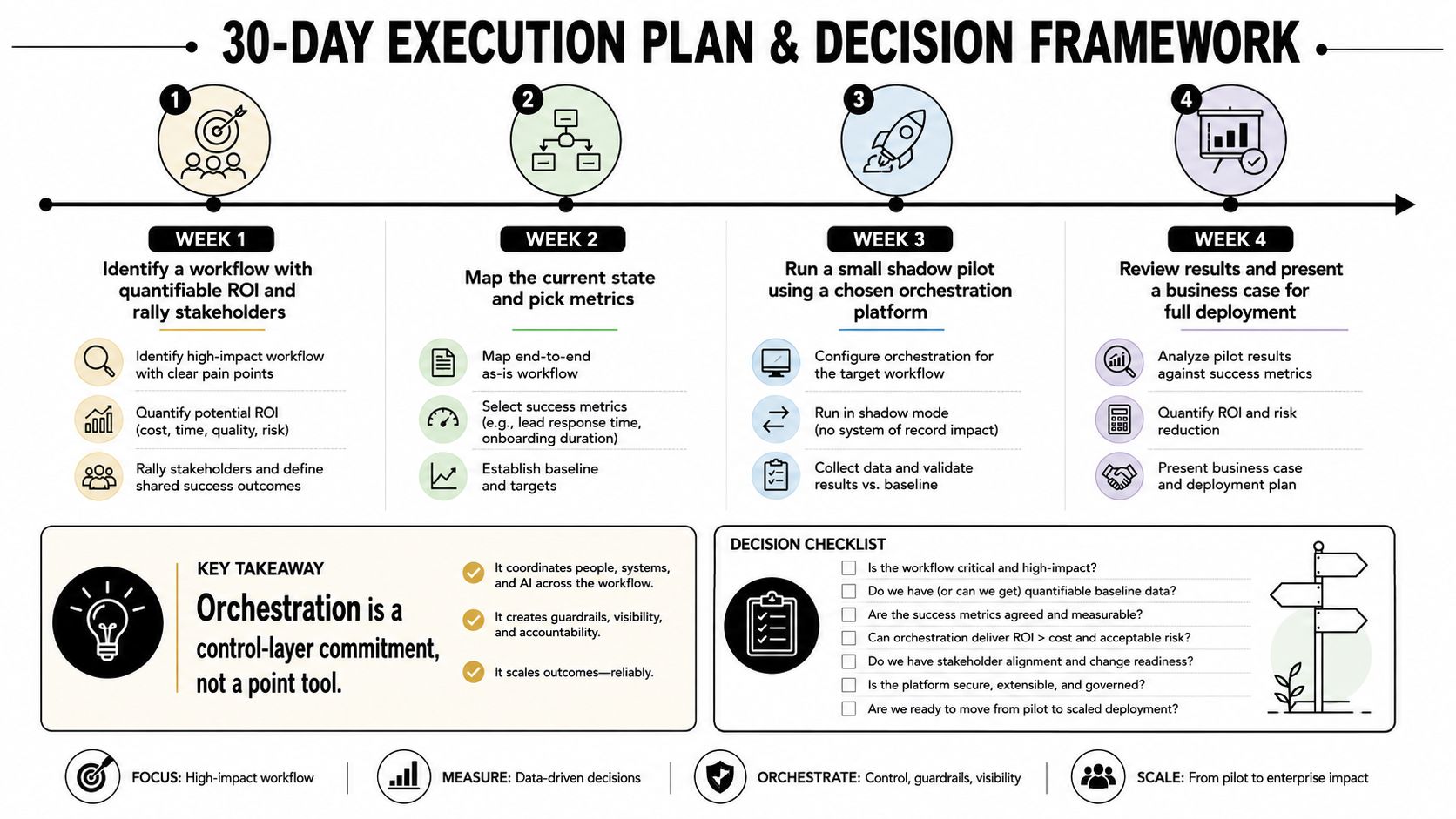
Treat orchestration as a control-layer commitment. The first move isn't booking vendor demos. It's inventorying the automations you already run, the owners responsible for them, and the failures nobody tracks.
The market's fragmentation makes this especially important. Stonebranch's 2026 report found that 89% of respondents manage multiple automation platforms, while 69% want additional functionality such as self-service portals, modern interfaces, SaaS delivery, and AI workflow creation. The report also found that 50% plan to invest in workload automation or service orchestration and automation platforms in 2026, with self-service portals named by 44%, modern UIs by 38%, and SaaS deployment by 37% as modernization features. These findings come from Stonebranch's Global State of IT Automation Report.
A four-week buying cadence
Week 1: Inventory revenue, onboarding, finance, recruitment, and support workflows. Name the process owner, systems involved, manual steps, failure modes, and current measurement.
Week 2: Score vendors against the weighted checklist. Decide whether you need consolidation or central governance. Consolidate when multiple tools duplicate state, ownership, credentials, and monitoring. Govern many when existing platforms are embedded, technically sound, and cheaper to coordinate than replace.
Week 3: Run a paid pilot on one revenue-critical workflow. Require sandbox access, production-like data handling, failure demonstrations, and an agreed baseline.
Week 4: Review results with finance, operations, security, and the workflow owner. Negotiate around measured value, implementation obligations, support response, data export, and exit clauses.
At the 90-day review, track cycle-time reduction, error rate, and human touchpoints removed. Don't substitute activity metrics such as the number of workflows built. The most important vendor question is simple:
What does failure look like, and how fast will you tell me about it?
MakeAutomation helps B2B and SaaS teams map processes, design AI and workflow systems, and implement automation across lead generation, CRM, operations, recruitment, and client delivery. Visit MakeAutomation to turn one high-value workflow into a governed control-layer pilot, with the documentation and hands-on support needed to scale it safely.