SOP Development Process: A Practical 2026 Playbook
Most advice about SOPs starts with a template. That's backwards. A polished document can still fail if nobody owns it, operators weren't involved, exceptions live in private messages, or the approved version never reaches the person doing the work.
The SOP development process is better understood as an operating control. It turns working knowledge into an approved procedure, connects that procedure to training and execution, and creates a clear path for revision when systems, policies, or customer expectations change. The U.S. EPA describes an SOP as documentation for routine or repetitive administrative and technical activities, prepared by knowledgeable staff, reviewed by qualified individuals, and approved by supervision and quality assurance before use (U.S. EPA guidance on preparing SOPs).
That distinction matters most after a tooling migration. A library can look complete while containing orphaned pages, contradictory revisions, and “happy path” instructions that break at the first unusual customer request. The practical question isn't whether your team can write clearly. It's whether your governance system can keep procedures accurate, findable, approved, practiced, and retired.
Why Most SOP Initiatives Quietly Fail
The popular assumption is that SOP initiatives fail because employees dislike documentation or because writers make procedures too complicated. Those problems exist, but they're usually symptoms. The deeper failures are unclear ownership, vague boundaries, weak review discipline, and missing governance.
An orphaned SOP has no named person accountable for its accuracy. A copy-pasted checklist may resemble a useful procedure but omit the conditions that make the work safe or repeatable. A document without revision history gives users no way to understand what changed, while a procedure without an exception path pushes judgment back into tribal knowledge.
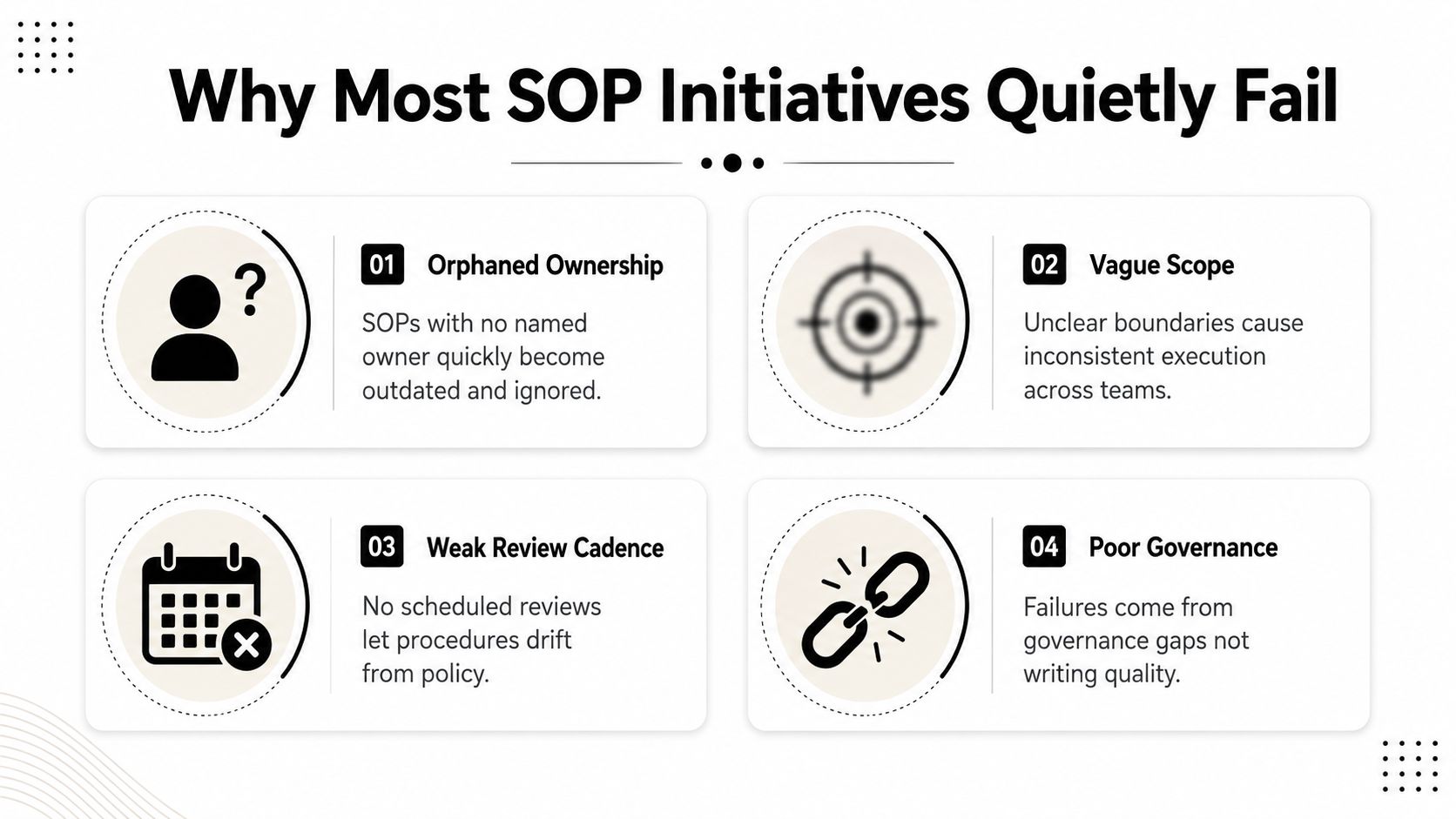
The four failure patterns
- Orphaned ownership: The person who wrote the SOP leaves, changes roles, or stops using the process. Nobody then checks whether the procedure still matches the system.
- Vague scope: A document says what to do but not where the procedure starts, where it ends, which teams are involved, or which cases are excluded.
- Weak review cadence: Teams publish an SOP and assume it will remain valid. Product changes, policy revisions, and workflow workarounds gradually create drift.
- Poor governance: The library has pages, but not a reliable control system for approval, training, access, change tracking, and retirement.
The problem after a migration is especially visible. A button name changes, a workflow moves from one system to another, or a finance rule changes, yet the old instructions remain searchable. New hires follow the page they find first. Experienced staff rely on memory. Managers answer the same questions repeatedly because the canonical procedure no longer reflects actual execution.
Practical rule: Treat every SOP as a controlled operational asset, not a piece of content.
The operational cost appears in several places. McKinsey-referenced coverage reports productivity improvements of 50–60% from process standardization, while other summaries cite 20–30% gains from standardization and optimization (Trainual's summary of documented process benefits). The same source references McKinsey Global Institute findings that knowledge workers spend about 19% of the work week searching for information that's undocumented or difficult to find. Those figures make documentation accessibility a capacity issue, not merely an administrative concern.
The contrarian thesis is simple: writing is only the creation event. The SOP development process continues through validation, approval, training, monitoring, revision, and retirement. Templates, documentation platforms, and AI capture tools can accelerate drafting, but they can't compensate for an owner who never reviews the procedure or a manager who never links it to training.
For B2B SaaS teams, drift creates more than internal frustration. It can produce inconsistent customer outcomes, audit exposure, duplicated work, and onboarding drag. A library that isn't governed becomes a historical archive of how work used to happen.
The Full SOP Development Lifecycle at a Glance
A durable SOP lifecycle has a defined start, a controlled release, and an intentional end. Treating it as a writing task creates documents that look finished but lack ownership, version control, or a response to exceptions. Peer-reviewed SOP writing guidance describes a sequence that moves from defining scope and audience through drafting, user testing, distribution, training, review, and updating. Each phase needs an explicit exit criterion before the work advances.
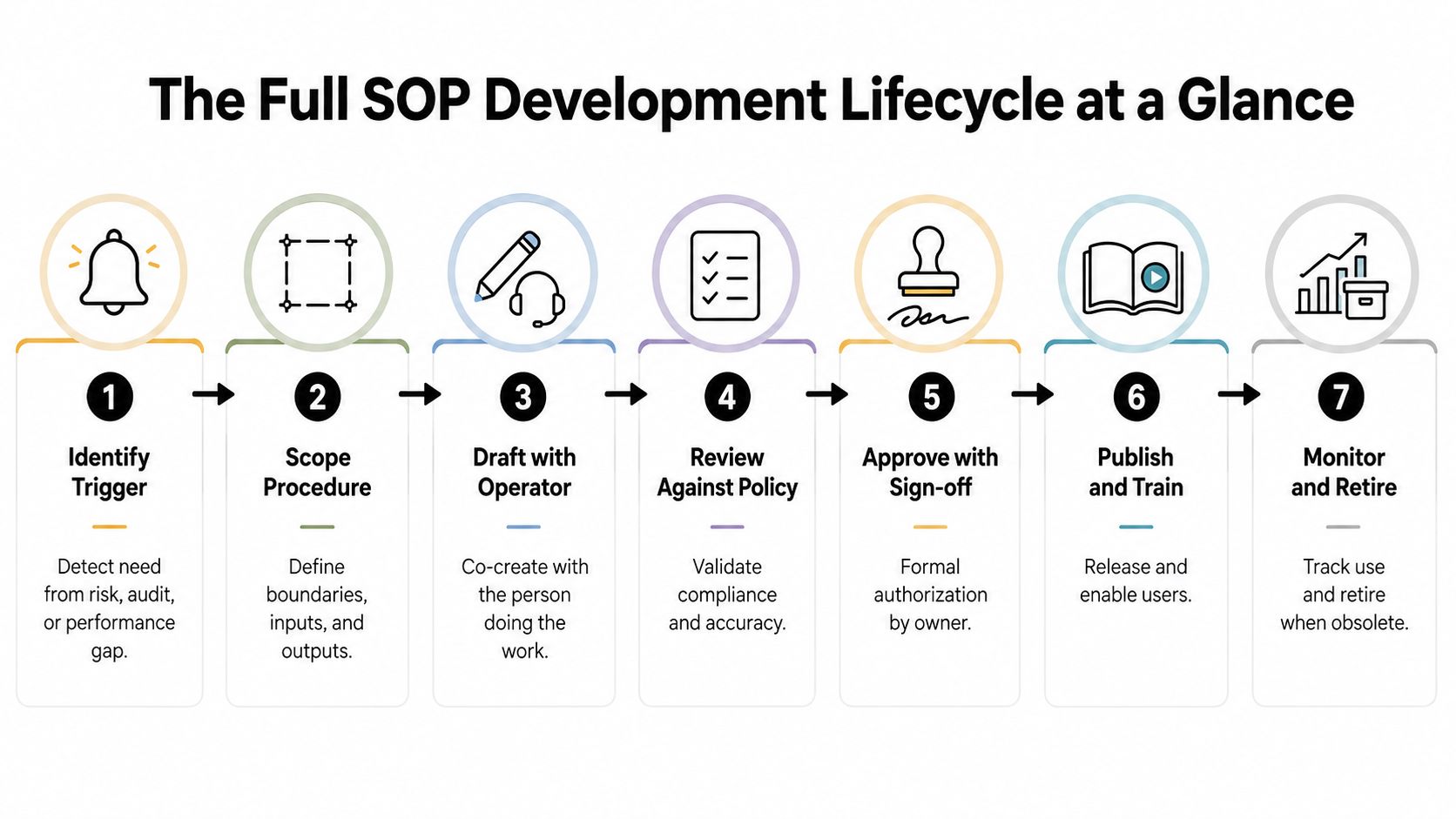
Seven phases that keep the process moving
Identify the trigger. Begin with the event that requires controlled documentation, such as an audit finding, recurring error, system implementation, customer-risk pattern, or repeated escalation.
Exit criterion: A sponsor records why the SOP is needed and which risk or outcome it addresses.Scope the procedure. Define the start and end conditions, audience, inputs, outputs, dependencies, and exclusions. Clear boundaries stop one document from absorbing adjacent processes.
Exit criterion: The process boundary and accountable Process Owner are agreed.Draft with the operator. Work with the person performing the task, not only the manager receiving its output. Capture actual system behavior, judgment calls, workarounds, exception points, and moments when the operator seeks help.
Exit criterion: A usable draft reflects the workflow and lists unresolved questions.Review against policy. Subject-matter reviewers check accuracy, compliance, security, financial controls, and cross-functional dependencies. They should test whether the documented method is permissible and correct, rather than rewrite the operator's work from memory.
Exit criterion: Required changes are resolved, with approvals or objections recorded.Approve with sign-off. Approval changes a working draft into a controlled version. The approver accepts responsibility for releasing it under the organization's governance rules.
Exit criterion: The SOP has an owner, revision identifier, effective date, approver, and change record.Publish and train. Put the approved version where users perform the work, then connect it to onboarding, role training, or release communication. The EPA also emphasizes that SOPs should be written, reviewed, and approved before use. Operational guidance also recommends testing the procedure as written and training and retraining users on the approved version.
Exit criterion: Intended users can find the current version and have completed the required enablement.Monitor and retire. Collect feedback, inspect exceptions, review process outcomes, and retire the SOP when a replacement procedure or system makes it obsolete. Preserve the historical record while removing the obsolete version from active use.
Exit criterion: The owner records whether the SOP was revised, superseded, or archived, and identifies the next review trigger.
The lifecycle gives teams a practical way to manage the SOP backlog. A request without scope is not ready for drafting. A draft without operator testing is not ready for approval. An approved SOP without training has not been implemented. Teams mapping dependencies can apply these business process mapping techniques before documenting the procedure.
The same control logic supports efforts to build SOPs that actually work. Short procedures still need an owner, a release decision, a current version, an exception path, and a retirement rule. That is how an SOP becomes an executable operational control instead of a static reference document.
Choosing the Right SOP Template and Format
A single company-wide template sounds efficient, but it usually creates friction. A short customer-support procedure doesn't need the same structure as a regulated financial control or an incident-response runbook. Mature teams tend to maintain a small format library, then choose the format that matches process complexity, audit exposure, and rate of change.
Every format should still carry a minimum control layer:
- Purpose and scope: State what the procedure accomplishes and what it excludes.
- Owner and audience: Name the accountable role and intended users.
- Trigger and inputs: Explain when the procedure starts and what information or access is required.
- Outputs and handoffs: Define the expected result and the next responsible party.
- Exceptions: Document branch conditions, escalation paths, and override handling.
- Revision data: Show the current version, effective date, approver, and change history.
Match format to the work
A step-by-step checklist suits a stable, repeatable task with limited judgment. It's fast to scan and easy to train, but it becomes weak when users must choose between different outcomes.
A decision tree works when the process depends on explicit conditions. It surfaces branching logic clearly, although it can become difficult to maintain if every exception is drawn into one enormous diagram.
A runbook with sub-procedures fits technical operations, incident response, customer escalations, and other workflows where the main procedure calls specialized instructions. It takes more effort to structure, but linked modules prevent the canonical document from becoming unreadable.
A policy-linked procedure is appropriate when the team must demonstrate that execution follows an approved rule. The procedure should explain how to act, while the policy defines the governing requirement. Mixing both into dense prose makes updates harder because a policy change may require edits across many operational steps.
| Format | Best For | Audit Readiness | Maintenance Burden |
|---|---|---|---|
| Step-by-step checklist | Short, stable routine work | Moderate when control fields are present | Low |
| Decision tree | Work with clear conditions and outcomes | Strong when branches and approvals are logged | Moderate |
| Runbook with sub-procedures | Technical, cross-functional, or exception-heavy work | Strong when linked procedures are versioned | Moderate to high |
| Policy-linked procedure | Controlled or compliance-sensitive execution | Strong when policy references remain current | High if dependencies aren't managed |
A flowchart should usually sit alongside the prose, not replace it. The visual shows sequence and ownership; the written steps explain system fields, evidence requirements, warnings, and what to do when the normal route fails. Teams building a documentation library can also use this SOP documentation example to compare how purpose, responsibilities, and execution details fit together.
The right question isn't “Which template should everyone use?” It's “Which format lets this audience execute correctly and lets the owner maintain the procedure without fear?”
A Real B2B Example of the SOP Development Process
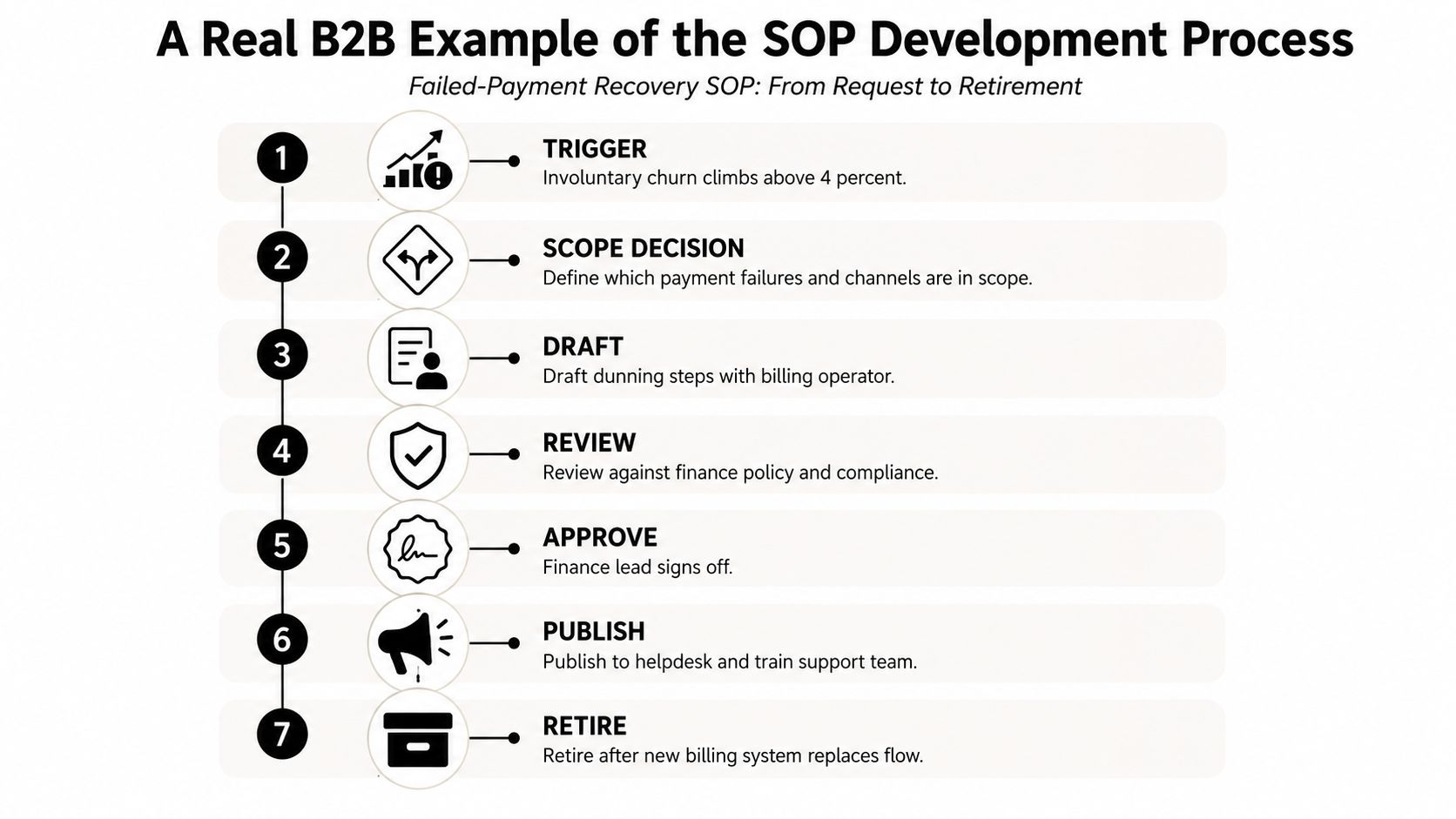
Consider a failed-payment recovery workflow at a B2B SaaS company. The trigger is a rise in involuntary churn above four percent, the threshold specified in this scenario. The operations lead doesn't immediately start writing. First, they decide which payment failures and customer segments belong in scope, which team owns each handoff, and which cases require finance or legal review.
Recovering the process from memory
The existing method lives mostly in a senior CSM's head. The operations lead conducts a structured interview and asks the CSM to perform the workflow while recording a click-through walkthrough. That combination exposes details a retrospective conversation often misses, such as which billing screen opens first, what customer context gets checked, and when the CSM stops following the standard sequence.
The first draft separates the work into a default recovery path and unresolved branches. It identifies the trigger, required account information, customer communication steps, internal handoffs, evidence to record, and completion condition. It also marks questions rather than guessing. For example, the draft can flag whether a particular customer segment should receive a different escalation route.
Finance reviews the procedure against collection policy and approval requirements. Engineering checks whether the described billing events and system states exist. The senior CSM tests the draft by following it without relying on memory. That test reveals where the instructions sound clear to the author but remain ambiguous to another operator.
Release, observation, and retirement
The approved version is published in a Notion workspace with a Loom walkthrough for the support team. The document includes an owner, approver, revision identifier, effective date, and change log. Training doesn't end with a link in a team channel. The manager assigns the walkthrough, discusses the exception rules, and checks that operators know where to record deviations.
After thirty days, the operations lead reviews the workflow and finds two exception branches that weren't visible during the initial draft. One concerns a customer situation that needs a different recovery path. The other concerns a billing-system response that changes the available next step. The owner updates the SOP, records why the branches were added, and routes the revision through the same review path.
The governance test is what happens when the process stops behaving like the draft.
Eventually, a new billing system replaces the old recovery flow. The owner doesn't delete the SOP. They mark it superseded, link the replacement, remove the old procedure from active search results, and retain its history for traceability. That final action prevents a familiar failure after migrations, where an old document remains available and competes with the new process.
Ownership, Versioning, and Review Cadence
A useful SOP library assigns responsibility at two levels. The Document Owner keeps the instructions accurate and manages revisions. The Process Owner remains accountable for the business outcome. Those roles can belong to the same person, but separating them is often valuable when a process crosses departments.
Reviewers represent the functions that can invalidate the procedure. Finance may review payment controls, security may review access steps, legal may review customer language, and engineering may verify system behavior. The Approver authorizes release after the required reviews are complete.
A practical control model
| Role | Responsibility | Risk Tier | Cadence | Version Bump |
|---|---|---|---|---|
| Document Owner | Maintains accuracy, change log, and review status | All | Owns the assigned schedule | Patch for wording, minor for step changes |
| Process Owner | Owns outcome, scope, and operational fit | All | Reviews when outcomes or dependencies change | Minor or major based on impact |
| Department Reviewer | Validates functional, policy, or technical requirements | Relevant department | At release and scheduled review | No direct bump, recommends change |
| Approver | Authorizes controlled release | High-risk or cross-functional | At every approved revision | Confirms final version |
| Library Administrator | Controls archive, metadata, access, and findability | All | Ongoing | Records status changes |
Use a simple three-level version scheme. A major revision changes the process, system, owner, or control requirement. A minor revision adds or changes a step without changing the fundamental purpose. A patch corrects wording, links, labels, or other low-risk details.
Every revision needs a dated log entry with the author, reason, affected steps, reviewer, approver, and effective date. Without that record, users can't distinguish a harmless clarification from a material control change.
Set cadence by risk rather than convenience. Customer-facing revenue procedures deserve a monthly review. Internal operational procedures can use a quarterly cycle. Stable back-office procedures can use an annual review. Those cadences are governance choices for this operating model, not universal compliance requirements.
A retirement checklist should confirm that the replacement exists, affected users were notified, training links were updated, integrations or automations were redirected, the obsolete version was archived, and search visibility was removed. If an exception appears repeatedly, the Document Owner should escalate it to the Process Owner. A recurring exception is usually a permanent branch waiting to be governed.
Teams operating in regulated environments can use compliance documentation guidance to connect SOP records with broader evidence and control requirements. The platform matters less than the discipline. Someone must be accountable for noticing that reality has changed.
Tools and AI Options for SOP Development
Tool selection should follow the control model, not lead it. A B2B operations team usually weighs fast authoring against access control, integration with systems of work, audit evidence, exception handling, version comparison, and total cost of ownership.
Notion and Confluence are flexible starting points for teams that need to create and connect procedures quickly. Guru and Tettra focus more on delivering knowledge within the employee experience. Hyperproof and Vanta fit organizations with stronger audit and compliance requirements. Scribe, Trainual, and Tango can accelerate capture by turning screen activity or guided work into a draft.
Compare the real trade-offs
| Tool | Access Control | Integration | Audit Trail | AI Capture | Version Diffing | TCO |
|---|---|---|---|---|---|---|
| Notion | Flexible workspace permissions | Broad through integrations | Usable, but configuration-dependent | Limited to assisted drafting and connected workflows | Basic to moderate | Low to moderate |
| Confluence | Strong enterprise permissions | Strong Atlassian and enterprise connections | Stronger administrative history | Available through ecosystem options | Moderate | Moderate |
| Guru | Knowledge access by role and context | Strong in-app delivery options | Moderate | Assisted knowledge creation | Moderate | Moderate |
| Tettra | Team-oriented permissions | Useful for workplace tool stacks | Moderate | Limited to assisted workflows | Basic to moderate | Low to moderate |
| Hyperproof | Control-oriented access | Built for evidence and compliance workflows | Strong | Not primarily a capture tool | Strong for controlled records | High |
| Vanta | Compliance-centered permissions | Strong connections to compliance evidence | Strong | Not primarily a capture tool | Strong for evidence workflows | High |
| Scribe | Access depends on workspace setup | Captures browser and desktop procedures | Moderate | Strong screen-based capture | Moderate | Low to moderate |
| Trainual | Role and training-oriented access | Connects procedures with enablement | Moderate | Assisted procedure creation | Moderate | Moderate |
| Tango | Workspace permissions | Useful for guided software workflows | Moderate | Strong step capture | Moderate | Low to moderate |
AI capture helps with the first draft, especially when an operator demonstrates a repetitive system task. It doesn't decide whether the process is correct, whether a customer exception needs escalation, or whether a policy reference remains valid. A human owner still has to verify the steps, test the procedure, approve the release, and maintain the branches.
The practical trade-off is speed versus control. A lightweight tool can help a small team publish quickly, but audit-heavy teams may need stronger approval records, access restrictions, and historical evidence. Many organizations use a combination, such as a controlled knowledge repository for canonical procedures and an in-app guidance tool for execution.
Teams evaluating AI-assisted operations can also review LunaBloom AI insights for broader context on how AI may support knowledge work. The same governance rule applies: generated content is a draft until a named operator and accountable owner validate it.
MakeAutomation is another option for B2B and SaaS teams that need workflow documentation, automation planning, implementation support, and training connected to how work is performed. It can sit alongside the documentation and systems your team already uses rather than replacing the governance responsibilities described above.
Designing SOPs That Survive Exceptions and Change
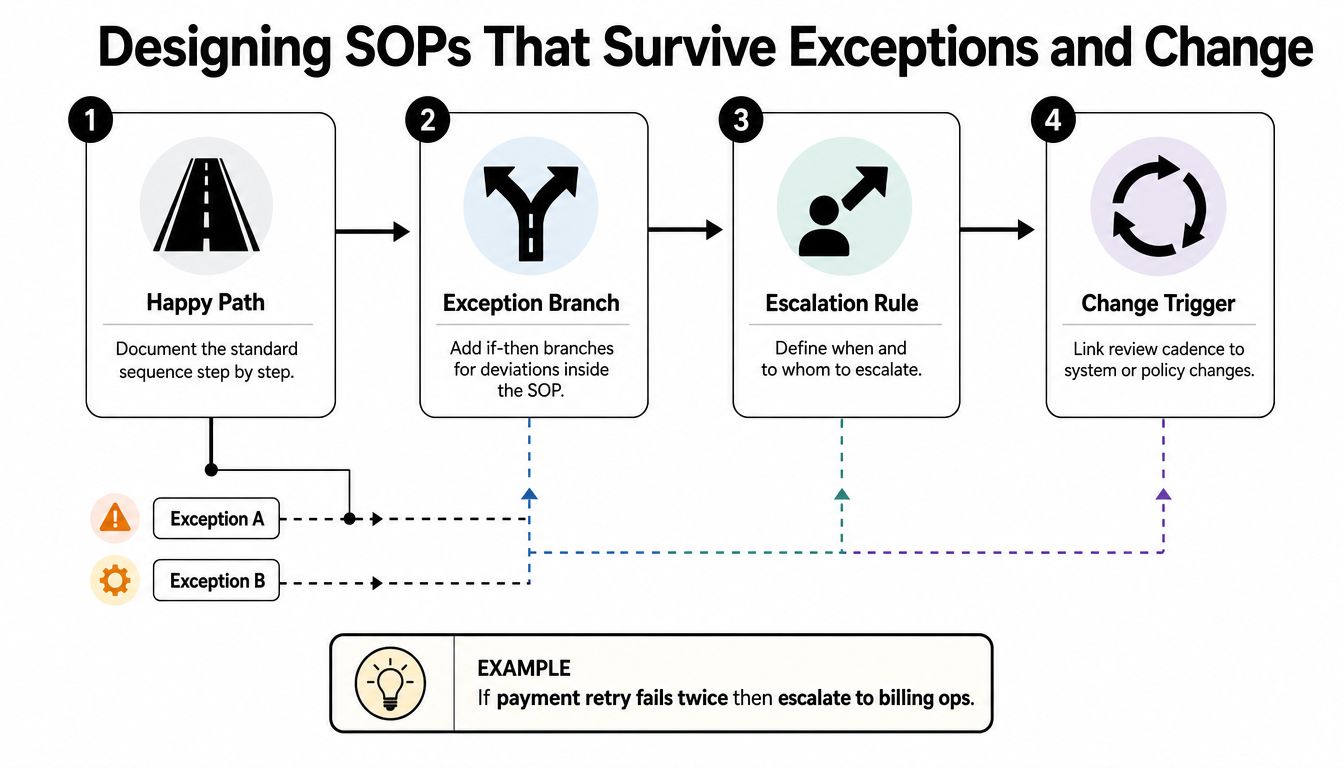
Most SOPs document the happy path because it's easy to observe and easy to write. Users need the opposite. They need to know what happens when a payment retry fails, a customer requests a refund outside the normal authority, a regional rule conflicts with the default process, or a connected system returns an unexpected state.
Exception handling belongs inside the controlled procedure, even when the detailed branch lives in a linked sub-procedure. A useful pattern has four parts: define the default flow, name the trigger that creates a branch, state who decides, and define how the operator returns to the main process.
Make branching logic explicit
Write the default sequence in short, executable steps. Then add conditions in a consistent form:
- Trigger: If the payment retry fails twice, route the case to billing operations.
- Decision owner: The billing operations lead decides whether to continue recovery, pause outreach, or escalate.
- Evidence location: Record the decision and supporting context in the designated account or exception log.
- Re-entry point: After resolution, return to the customer-notification step or close the case according to the documented outcome.
That structure prevents operators from improvising. It also gives the Document Owner a source of change signals. If the same exception appears repeatedly, the main flow or a linked branch may need revision.
An exception that only exists in chat is not governed. It's an undocumented operating rule.
The move toward executable SOPs extends this idea. Instead of leaving instructions as passive reference text, teams can connect steps to actions in the systems where work occurs. A procedure might prompt an approval, create a task, require evidence, or route a case when a condition is met. Academic work has proposed LLM-based agentic workflows for automating SOPs, while recent commentary frames the opportunity as moving from static files toward active process instances. The control requirement remains unchanged: automation must have an owner, an approval boundary, and a way to inspect exceptions.
Keep the canonical SOP readable
Use linked sub-procedures for complex branches rather than placing every possibility in the main page. Maintain one exception log with the trigger, decision, owner, outcome, and whether the branch should become part of the standard flow.
A durable SOP should also follow a few writing rules:
- One action per step: Start with a clear verb and avoid combining unrelated tasks.
- Named branch ownership: Assign a person or role to every decision point.
- Time-bound overrides: State when an exception expires or requires renewed approval.
- Visible re-entry: Tell the operator exactly where to resume the main procedure.
- Change-linked review: Trigger review when a system, policy, control, or recurring exception changes.
This is how an SOP survives real operations. It doesn't attempt to predict every scenario in advance. It gives operators a safe default, makes deviations visible, and turns repeated deviations into governed improvements.
MakeAutomation helps B2B and SaaS teams map workflows, document SOPs, connect procedures to automation, and train the people responsible for execution. Visit MakeAutomation to discuss a practical SOP development system built around ownership, version control, exception handling, and scalable operations.