
Scaling Automation in B2B SaaS: A Step-by-Step Framework
You've probably seen the pattern already. A RevOps team launches a lead-enrichment workflow, an outbound sequence, and a CRM cleanup automation. The first results look promising, so leadership approves a wider rollout. A few months later, records are duplicating, alerts are going nowhere, API credentials have expired, and nobody can say which workflow owns the revenue-critical step.
The problem usually isn't a lack of automation tools. Teams stall because they automate unstable processes without assigning operational ownership, testing cross-system behavior, or measuring what happens after deployment. Scaling automation is an orchestration and governance problem first, and a tooling problem second.
The framework below focuses on readiness, architecture, ownership, CI/CD, observability, ROI, and practical rollout playbooks. It also reflects a simple principle behind the documented business process automation benefits: automation creates durable value only when the surrounding process is clear, maintained, and connected to business outcomes.
The Real Reason Automation Pilots Stall at Scale
The most common scaling mistake is automating a broken process. A workflow builder can move data faster, trigger more actions, and remove manual clicks, but it won't decide whether the underlying rules are contradictory, the source data is trustworthy, or exceptions have a responsible owner.
That's why successful pilots often deteriorate during expansion. A small workflow can survive informal knowledge held by its builder. A portfolio of workflows cannot. Once several teams, systems, and data owners are involved, undocumented assumptions become production failures.
Three failure patterns appear repeatedly
No named owner. The person who built a workflow may move teams, lose access, or assume another department is monitoring it. Without a business owner and a technical owner, failures sit unresolved. The workflow remains “live” while its output becomes unreliable.
Brittle point-to-point integrations. A direct connection between HubSpot and a spreadsheet may work for a narrow use case. Add Salesforce, Stripe, an enrichment provider, and a support platform, and the workflow becomes a chain of hidden dependencies. One changed field or authentication policy can break downstream actions.
No observability after deployment. Builder interfaces show whether a step ran, not always whether the business outcome was correct. A workflow can complete successfully while writing the wrong lifecycle stage, assigning a lead to the wrong territory, or leaving records stale.
Practical rule: If nobody can explain who owns a workflow, what it changes, and how to reverse it, it isn't ready to scale.
Treat automation as an operating model decision before choosing a vendor. Define how teams approve changes, maintain shared schemas, handle exceptions, and review value. Then select tools that support those decisions rather than allowing a platform's defaults to become your governance model.
The right question isn't “Which builder should we buy?” It's “Which workflows deserve automation, who is accountable for them, and how will we know they still work?”
Run a Readiness Assessment Before You Touch a Tool
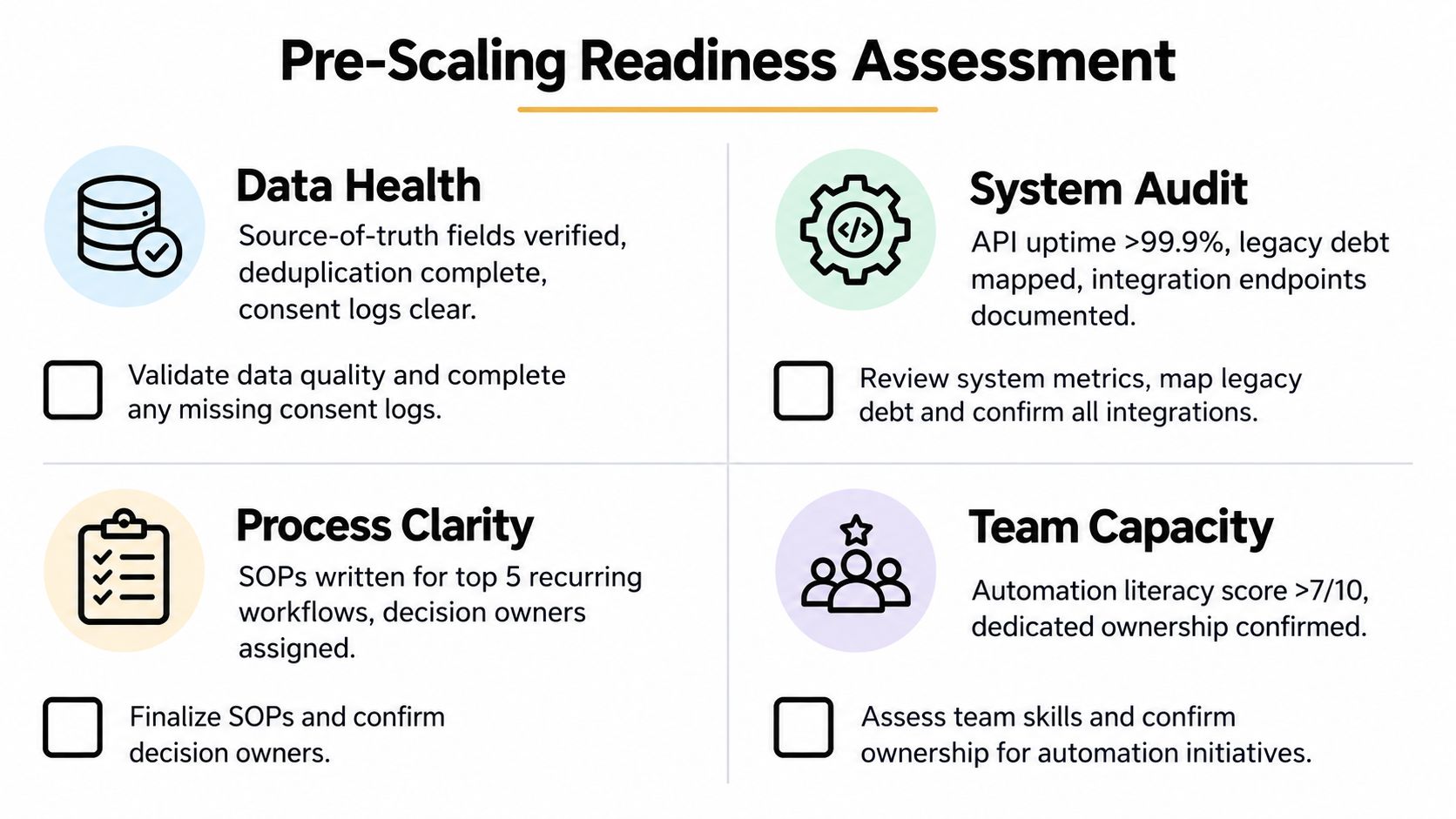
Run a readiness assessment in one working session with the process owner, a system administrator, and the person who'll support the workflow after launch. Score each question from 0 to 2:
- 0: No evidence or unresolved risk.
- 1: Partially defined, inconsistent, or dependent on one person.
- 2: Documented, tested, and assigned.
A low score in any bucket is a stop signal. Fix the upstream weakness before you automate it.
Data readiness
Ask whether the process has defined source-of-truth fields, a documented deduplication rule, clear consent records, and a known policy for missing values. If two systems disagree about account ownership, automation will spread the disagreement faster.
The pass condition is evidence. Point to the field definition, the dedupe rule, and the consent record. “The team usually knows” is not a control.
Systems readiness
Check whether each connected system has stable APIs, documented authentication, known rate limits, and a usable sandbox or test environment. Also record legacy dependencies that can't support reliable event delivery or safe retries.
A system that only works through browser clicks may still be automatable, but it belongs behind a deliberate risk review. Don't disguise an unstable interface as a production integration.
Team readiness
Confirm a named workflow owner, a technical maintainer, an escalation route, and a documentation habit. The owner should be able to approve business-rule changes, while the maintainer handles credentials, deployments, and failures.
If support depends on the builder's personal laptop, the score is not ready for scale. Use a structured automation readiness assessment to formalize the review and preserve the result.
Process readiness
Require a written process, measurable inputs and outputs, defined exception paths, and evidence that the process is stable through a complete operating cycle. A process that changes weekly may need standardization before automation.
Re-run the assessment quarterly and after major system changes. Treat the score as a leading indicator of scaling risk, not as a one-time approval form.
Choose an Automation Stack That Survives Growth
The stack decision should follow the workflow's risk and complexity. No-code platforms are useful for fast iteration and familiar business ownership. Code-first frameworks provide stronger control over testing, deployment, and reusable logic. Hybrid setups often fit growth-stage SaaS companies because they let operators own straightforward flows while engineers control shared services and sensitive execution.
| Criterion | No-code | Code-first | Hybrid |
|---|---|---|---|
| Version control | Platform history may be limited | Native repository workflows | Code and exported workflow definitions |
| Testing | Basic step tests and manual checks | Unit, contract, and integration testing | Layered testing by risk |
| Error handling | Built-in retries and branches | Custom retries, queues, and fallbacks | Standard error service plus local rules |
| Cost per execution | Predictable at low volume, can rise with task usage | Engineering and infrastructure cost | Shared infrastructure with selective platform usage |
| Talent availability | Broad operator access | Requires software engineering skills | Operators and engineers share responsibility |
| Best fit | Simple, low-risk workflows | Complex, high-volume, regulated workflows | Multi-team portfolios with mixed complexity |
Build the stack in layers
Start with an orchestration engine that can represent state, retries, approvals, and dependencies. Add an integration layer, either an iPaaS such as Workato, Tray.io, or Make, or maintained in-house connectors where control matters more than convenience.
Keep operational records in a dependable warehouse or operational store, rather than treating a workflow platform as the only system of record. Manage credentials through a proper secrets manager, centralize logs and alerts through observability tooling, and maintain a workflow registry with owners, dependencies, risk classification, and rollback instructions.
For Series A through C B2B SaaS companies, a hybrid default is usually sensible. Let RevOps use a governed no-code layer for bounded workflows, while engineers provide shared connector services, validation endpoints, queueing, and reusable business rules. Teams evaluating the integration layer can use a practical reference on API automation tools.
Know when to migrate
Move logic from no-code into code-first services when execution volume becomes expensive, workflows require complex state, retries need durable queues, testing must run in CI, or several teams depend on the same rule. Don't migrate because code feels more professional. Migrate when the operational requirements justify it.
Keep business logic portable. Platform lock-in hides inside proprietary field mappings, embedded expressions, and undocumented branching. Store schemas, decision rules, and transformation logic in a form another system can understand.
Governance, Ownership, and CI/CD for Automations
Governance, ownership, and CI/CD are one discipline. A reviewer can't assess a workflow without a specification, an owner can't support it without deployment history, and a deployment process is incomplete if nobody can approve or reverse a change.
Use a small RACI model:
- Builder: Creates the workflow and maintains its implementation.
- Reviewer: Checks data contracts, permissions, test coverage, and failure behavior.
- Owner: Accepts business risk, defines the expected outcome, and approves material changes.
- Operator: Monitors execution and handles incidents, which may be the builder or a separate support role.
The same environment progression used for application code works for automations: development, staging, production. Keep a workflow definition, configuration, test data, and dependency notes together. If the platform doesn't support repository-based versioning, export definitions or place critical business logic in a service that does.
A CRM lead-routing change in practice
Suppose marketing adds a new region field and wants routing rules to use it. Don't edit the live workflow while leads are arriving. Check the YAML or JSON specification into a repository, validate the schema and data contract, and run tests against records that represent existing regions, missing values, duplicate accounts, and conflicting ownership.
Deploy the candidate version to staging. Run smoke tests across the CRM, enrichment provider, notification system, and sales assignment queue. Promote only after the reviewer confirms the result, then enable audit logging and retain the previous version for rollback.
Lightweight guardrails beat a large review board. Require stronger approval only when an automation touches revenue, customer data, permissions, or external communications. Executive guidance such as AI governance for executives can help align risk ownership, but the operating controls must live inside the workflow lifecycle.
Minimum governance artifacts
| Artifact | Owner | Update Cadence | Purpose |
|---|---|---|---|
| Automation registry | Portfolio owner | At creation and quarterly review | Lists purpose, systems, owner, risk, and status |
| Change log | Builder or release owner | Every production change | Records what changed, why, and who approved it |
| Decision log | Business owner | Whenever a rule or exception is decided | Preserves rationale and prevents repeated debates |
| Runbook | Operator | After incidents and material changes | Explains monitoring, triage, and rollback |
| Data contract | System owner | With schema changes | Defines fields, formats, and acceptable values |
Testing, Monitoring, and Exception Handling
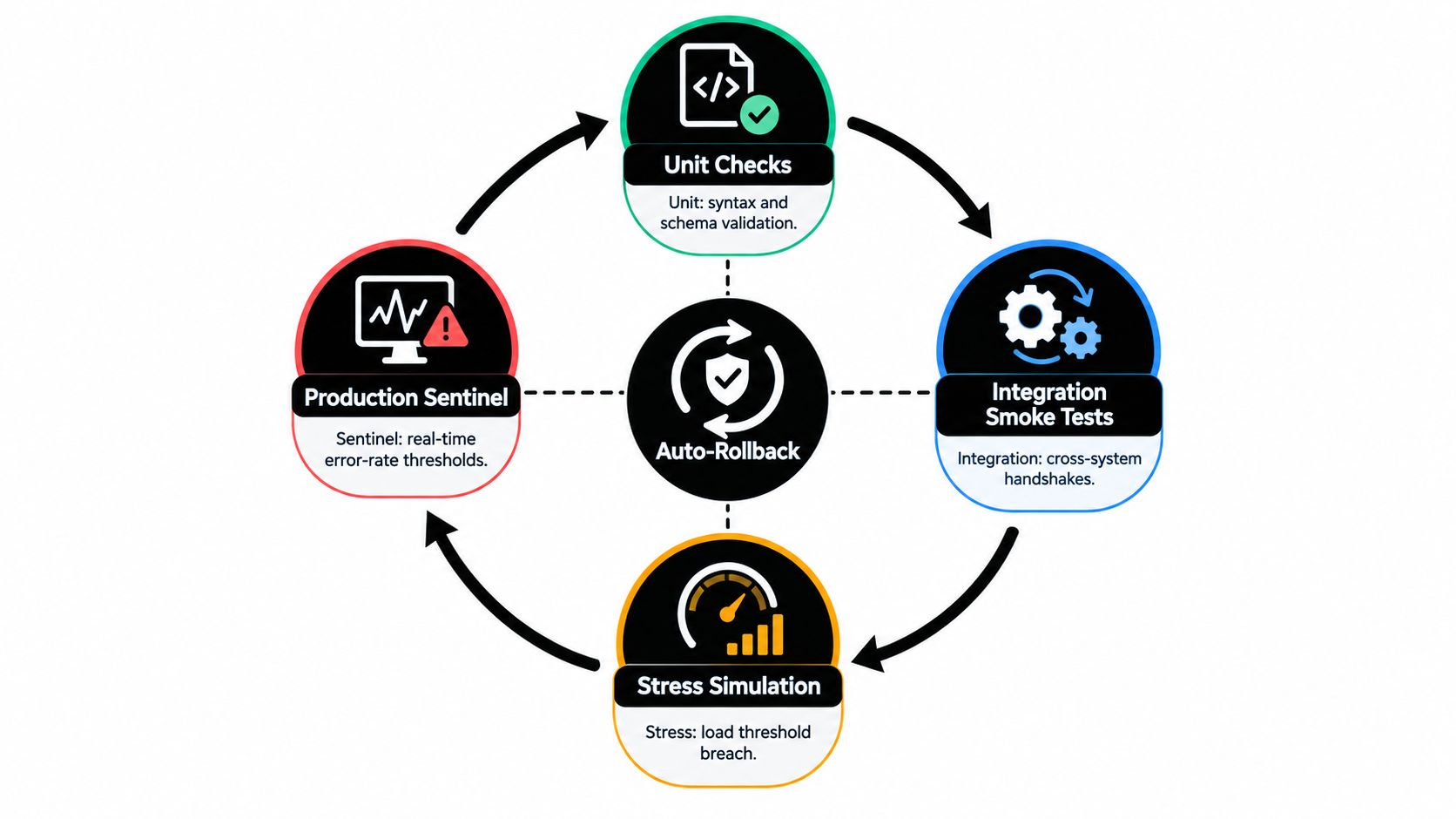
Testing, monitoring, and exception handling form a feedback loop. Tests prevent known defects, monitoring detects drift, and exception queues reveal where the process or integration still needs redesign.
Use four layers:
- Unit-style checks validate individual nodes, expressions, mappings, and transformations.
- Contract checks compare incoming data against CRM, billing, HRIS, and other source schemas.
- End-to-end smoke tests run the happy path across connected systems in a sandbox.
- Synthetic transactions exercise a controlled path on a schedule after deployment.
Monitoring should track business and technical signals together. Watch execution latency, success rate, retry rate, and downstream staleness. For a workflow with an agreed threshold, alert when the success rate falls below 98 percent over a rolling hour or when lead-routing latency exceeds 30 seconds. These thresholds belong in the service definition, not in someone's memory.
Turn failures into managed work
Send alerts to a shared channel, then create a triage item with the workflow name, failed step, affected record, owner, severity, and response target. A Slack alert without a queue is noise. A queue without an owner is a backlog.
Design exceptions deliberately. Retry transient network failures, quarantine malformed records, request human approval for ambiguous decisions, and stop execution after repeated failures. Don't retry validation errors indefinitely, because that can duplicate side effects and obscure the original defect.
For teams formalizing this layer, a guide to workflow exception handling is useful when defining queues and escalation rules. Hold a weekly tuning ritual: review the top three failure modes, ship one fix, retire one brittle step, and document one newly discovered edge case.
Change Management and ROI in One Operating Cadence
Adoption and ROI should be reviewed together every week. A workflow that saves time but nobody trusts is underused. A workflow with strong adoption but weak controls creates operational risk.
Map user adoption through four practical stages: awareness, first use, habit, and advocacy. At awareness, run a short enablement session. During first use, pair users with a shadow operator. Once the workflow becomes habitual, embed instructions in the operating playbook. At advocacy, recruit internal champions to surface adjacent use cases and edge cases.
Use one formula for every workflow:
ROI = (hours saved × loaded cost) + pipeline or retention lift − build and run cost
Add a confidence rating based on the quality of the evidence. Time estimates from user interviews deserve less confidence than measured execution logs. Pipeline influence should be separated from direct revenue attribution rather than presented as a guaranteed return.
One-page operating view
| Block | Example Metric | Cadence | Owner |
|---|---|---|---|
| Adoption | Active users, completed runs, training completion | Weekly | Functional owner |
| Time recovered | Manual steps removed, reviewed time sample | Weekly | Operations analyst |
| Revenue impact | Qualified handoffs, influenced pipeline, retention signal | Monthly | Revenue leader |
| Risk | Failed runs, unresolved exceptions, permission changes | Weekly | Technical owner |
Use a ten-minute demo outline: the old process, the trigger, the automated path, the human decision points, and the rollback route. Follow it with a stakeholder update that states what changed, what evidence exists, what remains uncertain, and what decision is needed.
For governance reviews, retain audit logs and KPIs for changes so adoption claims can be connected to actual system activity. A quarterly business review should fit on one page and show adoption, recovered capacity, commercial impact, open risk, and the next proposed workflow.
If the team can't defend an automation's ROI in under five minutes, the governance model isn't ready for the next wave.
Field-Tested Playbooks and Your 30-60-90 Rollout Plan
Use a fixed design card for every workflow: trigger, data sources, sequence, ownership, success metric, and failure modes. The format keeps teams from jumping straight into connector selection.
Lead enrichment and routing
- Trigger: A new qualified form submission or inbound lead.
- Data sources: LinkedIn data, Clearbit, HubSpot, CRM account records, and consent status.
- Sequence: Normalize the email and company, check for duplicates, enrich only when consent permits, match the account, apply territory rules, and route the lead.
- Ownership: Marketing operations owns enrichment rules; RevOps owns routing; sales operations handles exceptions.
- Success metric: Correct assignment, complete required fields, and a traceable audit record.
- Failure modes: Duplicate accounts, stale enrichment, missing territory data, and conflicting ownership.
Intent-based outbound
Branch on intent signals and CRM stage instead of sending a static sequence to every contact. Check suppression rules first, then select a message path, create the next task, and write the decision back to the CRM. The owner is Sales Development, while marketing approves messaging and compliance rules.
Watch for stale intent, contacts already in active opportunities, unsubscribes, and conflicting campaign membership. A successful run is not merely an email sent. It's a correctly qualified next action with a clear stop condition.
CRM hygiene
Trigger on stage changes, missing required fields, inactive opportunities, or approaching service-level timers. Validate the record, update only fields covered by the data contract, notify the responsible owner, and flag churn risk for human review.
Sales operations owns the rules, account teams own commercial decisions, and customer success owns retention signals. Common failures include overwriting legitimate exceptions, creating notification fatigue, and treating a risk flag as a conclusion.
Recruitment sourcing
Use a configurable rubric to score inbound applicants, record the criteria applied, and schedule interview loops in Ashby or Greenhouse after recruiter review. Keep the human decision visible, especially where a score could affect candidate progression.
Recruiting operations owns the workflow, talent leaders own the rubric, and HR systems administrators maintain integrations. Watch for biased criteria, incomplete applications, duplicate profiles, calendar conflicts, and score drift.
The 30-60-90 rollout
Days 1 to 30, foundation: Inventory workflows, score readiness, assign owners, define schemas, create the registry, choose the stack, and document rollback paths.
Days 31 to 60, first scaled workflow: Select one cross-system process, build it in staging, run manual and automated executions side by side, add contract tests, establish alerts, and publish the runbook.
Days 61 to 90, governed portfolio: Add the next workflows only after reviewing the first one's exceptions and ROI. Formalize the weekly operating view, repository promotion process, quarterly readiness review, and portfolio-level risk register.
MakeAutomation provides workflow design, repair, documentation, and scaling support for B2B and SaaS processes, including CRM, lead generation, outreach, recruitment, and AI-assisted operations. Visit MakeAutomation to discuss a governed path from pilot workflows to a maintainable automation portfolio.