CRM with Workflow Automation: A Practical Buyer’s Guide
You already know the pain. A rep gets a lead, someone forgets to route it, the follow-up sits for a day, the deal goes cold, and the CRM still looks “organized” because the records are technically there. That's the trap with CRM with workflow automation, it can either run the operating system for revenue work, or it can become a prettier place to store broken process.
| Criterion | Native CRM Automation | External Orchestration Layer | Custom-Built Layer |
|---|---|---|---|
| Speed to first workflow | Fastest if the process is standard | Fast if the integration already exists | Slowest |
| Governance surface area | Smaller, easier to control | Larger, more places to break | Largest, most moving parts |
| Cost at scale | Usually predictable | Can rise with volume and connectors | Rising engineering and maintenance load |
| Recovery from failure | Better visibility inside the system of record | Often fragmented across tools | Depends on internal monitoring discipline |
| Depth of native CRM context | Deepest | Depends on sync quality | Can be deep, if built well |
What Counts as a CRM with Workflow Automation
A real CRM with workflow automation doesn't just store contacts and log activities. It takes a trigger, evaluates a condition, performs an action, and leaves a trail someone can audit later. If a tool can't do that, it's a database with a nicer sales pitch.
The older model, common in the 1980s and 1990s, was mostly about contact databases and sales-force automation for storing records, tracking opportunities, and standardizing follow-up. The modern model is different. A lead can be captured, assigned, scored, contacted, and moved through a pipeline without repeated manual intervention, which is why workflow automation now sits closer to operations infrastructure than to simple sales admin, as described in the historical overview of CRM evolution from contact databases to orchestration in the CRM statistics and evolution summary.
The minimum anatomy of a real workflow engine
A serious system needs triggers, conditions, multi-step actions, delays, branching, and a named owner for the automation itself. That means it can react to a form fill, check whether the lead meets your criteria, route it, wait, escalate, or update another record without someone babysitting the process.
If a workflow only sends an email, it's not really doing operational work. It's just a notification rule.
The old sales-force automation mindset stopped at record keeping. The modern standard is different because routing, scoring, follow-up, and handoff now have to happen across marketing, sales, customer success, and operations. That's why trigger-based orchestration should be table stakes in 2026, not a premium feature.
How to separate real automation from marketing language
Ask four blunt questions. Can it start from a business event, not just a manual click? Can it branch based on record data? Can it update related objects, not only the record in front of you? Can someone own the workflow when it breaks?
If the answer to any of those is “no,” the product may still be useful, but it isn't the operating layer you need.
For a compact primer on the mechanics, the MakeAutomation CRM automation overview is a clean reference. For broader context on tooling overlap, the AI CMO's guide to CRM tooling is worth reading because it shows how automation sits alongside integration and data movement.
The Capabilities Worth Evaluating First
Don't start with branding. Start with the capabilities that decide whether automation helps or hurts. Teams often get distracted by glossy demos, then discover that the core problem is weak logic, poor visibility, or a system that breaks without warning.
Score the workflow engine, not the interface
The first filter is simple. Can the system handle trigger coverage, entry conditions, branching, delays, cross-object updates, approval gates, exception handling, audit logs, and rollback? Those are the mechanics that matter when a lead routing rule, onboarding sequence, or renewal workflow touches real revenue work.
The hidden failure mode is silent breakage. Demos usually show a workflow firing correctly under ideal conditions. They rarely show what happens when data is incomplete, an integration lags, or volume spikes and the platform starts dropping events. That's why rate-limit handling and silent-failure visibility matter more than another shiny automation template.
A workflow that fails loudly is annoying. A workflow that fails quietly corrupts pipeline data.
The practical question is whether the CRM surfaces exceptions in a way your team will use. If it can't show failed events, retries, and ownership for remediation, your automation program will eventually rot from the inside.
Judge readiness before you judge features
There's a bigger problem underneath the feature checklist. In a 2025 survey of 602 CRM users and administrators across the U.S., U.K., and Australia, 45% said their CRM data wasn't ready for AI, 37% reported revenue loss from data-quality problems, and companies lost an average of 16 sales deals per quarter because of poor data, according to the Validity report shared in PR Newswire. That's the key warning sign.
If data is dirty, automation doesn't fix it. It scales the mess faster.
For a broader feature scan across platforms, the AY Automate roundup of workflow automation platforms is useful as a market map. Use it after you've defined what your process needs, not before.
Build Versus Buy Versus Integrate
This is the decision many teams avoid until they've already made it badly. Either you keep automation inside the CRM, use an external orchestration layer, or build your own logic on top of the stack. There isn't a universally correct answer, but there is a wrong one, and it's common: bolting an external automation tool onto a CRM with weak governance.
| Criterion | Native CRM Automation | External Orchestration Layer | Custom-Built Layer |
|---|---|---|---|
| Best fit | Standard revenue workflows | Cross-system handoffs | Unique or regulated process logic |
| Governance | Centralized | Split across tools | Fully internal, but heavy |
| Failure recovery | Easier to inspect in one system | Often requires two consoles | Depends on engineering maturity |
| Context depth | Deep CRM context | Depends on sync quality | Can be excellent if built well |
| Long-term burden | Lower | Medium to high | Highest |
My recommendation is direct
If the process lives mostly inside one CRM, keep it native. If the process spans multiple systems and ownership boundaries, integrate carefully. If the process is strategic, unusual, and core to your moat, build only if you can support it operationally.
External orchestration looks attractive because it's fast. The problem is that it often creates a governance gap. The CRM says one thing, the automation layer says another, and nobody wants to own the mismatch when pipeline data goes sideways.
Native automation is the safer default because it keeps the system of record and the logic in the same place. That matters for lead routing, stage updates, onboarding handoffs, and renewal triggers, where the cost of a bad write is higher than the cost of a slower rollout.
Where each path breaks
Native tools break when the CRM's own logic gets too rigid or too shallow. External layers break when teams treat them like a shortcut around process discipline. Custom code breaks when leaders underestimate how much monitoring, documentation, and exception handling a workflow engine really needs.
A 2026 benchmarking study from Charles Schwab covering 1,236 firms and more than $2.5 trillion in assets under management found that top-performing firms spent 25% less time on operations than peers, and used AI to automate time-consuming manual workflows 31% of the time versus 19% among other firms, as reported in InvestmentNews. Different industry, same lesson. Operational discipline and automation go together. They don't substitute for each other.
Implementation Considerations Most Buyers Underestimate
The rollout usually fails before the workflow does. Teams skip readiness checks, publish automations too early, and then spend months explaining away bad routing, missing fields, and broken handoffs. That's not an automation problem. It's an operating-model problem.

Treat readiness as a gate, not a vibe
Before launch, define who owns each workflow, where exceptions go, and what happens if the system can't complete the action. Then test the workflow in a sandbox, not on live records. For high-risk actions, keep a manual fallback path until the automation proves itself.
The cleanest benchmark set I've seen for this kind of program comes from Apollo's workflow guidance: trigger coverage above 90%, workflow failure rates below 5%, post-trigger required-field accuracy above 95%, on-time completion of automatically created tasks above 80%, and monthly data decay below 10% are all useful operating targets, as outlined in Apollo's CRM workflow benchmark guidance.
Use observability like an operator, not a marketer
A workflow isn't successful just because it fired. Track whether it fired in the right place, wrote the right data, and created the next action without human cleanup. If that sounds strict, good. Automation without observability is just unreviewed risk.
Measure the exception queue, not just the happy path.
That means you should watch trigger coverage, failure queues, required-field completion, and task completion. If those numbers drift, the workflow needs maintenance, not more optimism.
The biggest mistake is automating on top of poor data hygiene. A 2025 mixed-methods study of CRM-driven sales automation in retail reported an average 12.8% reduction in operational costs and an 18.2% increase in productivity after CRM implementation, according to the study published at BPAS Journals. Useful signal, but only if the process is already clean enough to measure.
Real-World Use Cases by Workflow Type
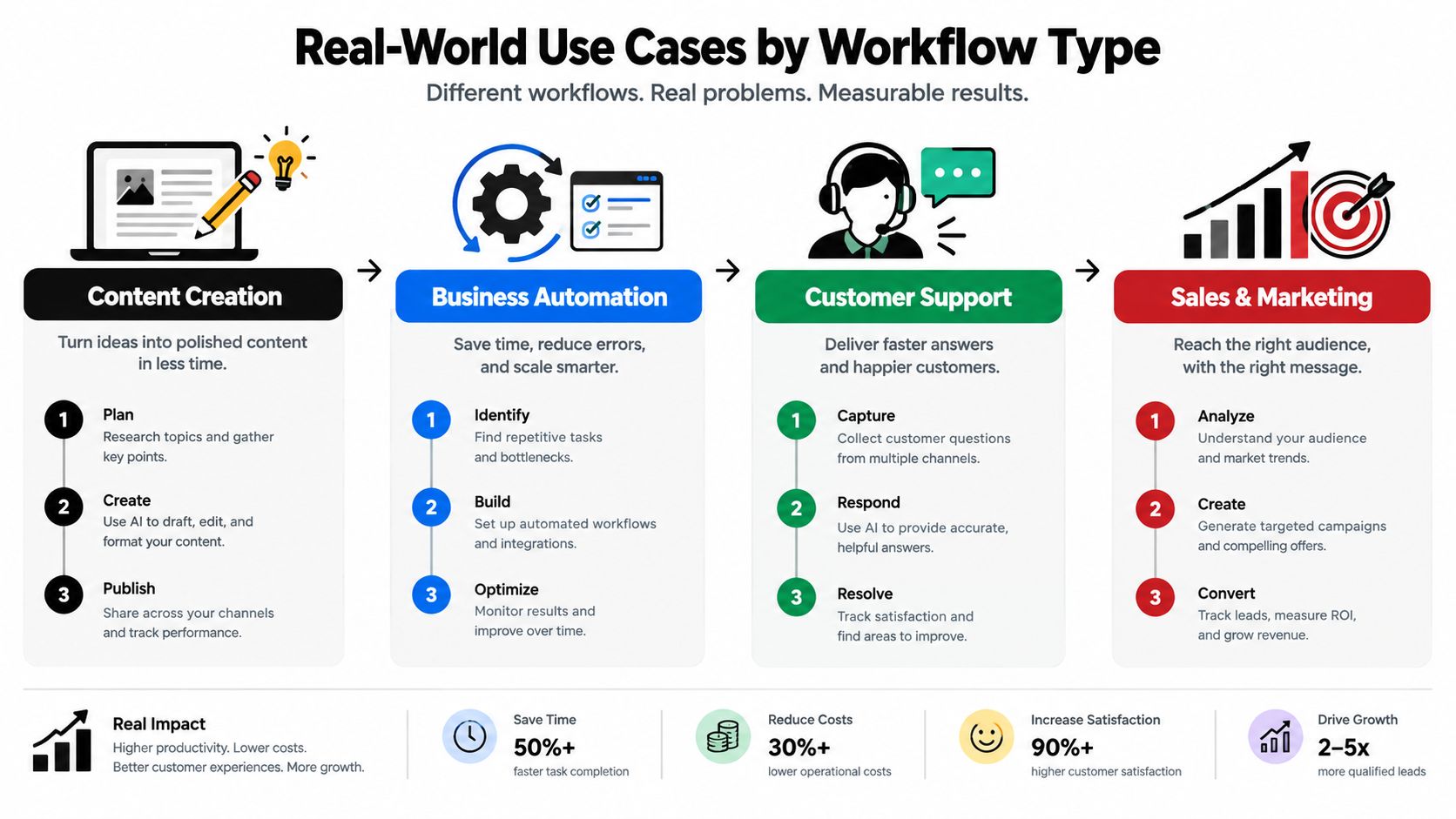
Many revenue teams don't need a hundred automations. They need four or five that remove the worst friction from revenue work. The key is matching the workflow type to the business problem, then choosing the lightest structure that can still survive contact with reality.
Inbound routing and qualification
The trigger is usually a demo request, a form fill, or a high-intent inbound event. The workflow should check firmographic fields, assign the lead, and create the next task immediately. If company size or industry is missing, the workflow needs an exception path, not a guess.
That's the use case where external orchestration is often unnecessary. Keep it native unless you're enriching from multiple sources or syncing across platforms in real time. Routing is too central to pipeline hygiene to scatter across tools.
Opportunity transitions and forecast updates
This workflow starts when a deal stage changes or a key activity lands in the record. The minimum fields are stage, close date, owner, and a reason for movement if the stage is high risk. The failure mode is stale reporting, which is worse than no reporting because managers start trusting bad forecasts.
Use this pattern when your reps already work inside one CRM and the stage logic is standard. Build only if your deal motion is unusual or if multiple systems must update at once.
Client onboarding and customer success handoff
The trigger is a closed-won record or signed contract. The workflow should create the onboarding tasks, notify customer success, and prefill the basics so the post-sale team doesn't retype the same information. The failure mode is a sloppy handoff, where sales closes the deal and customer success inherits a blank record.
For this pattern, native CRM automation is usually the right first move. If you need document generation, billing sync, or product data from elsewhere, integrate carefully rather than rebuilding the CRM into a custom middleware stack.
Renewal and expansion triggers
This pattern starts from contract dates, usage signals, or account review milestones. The workflow should flag the owner, prepare the renewal record, and route any exception to a human before the customer feels ignored. The failure mode is silence, which is expensive because it turns a process problem into a relationship problem.
For example, teams that manage multiple client systems, like agencies, often need integration plus documentation. The CRM workflow examples from MakeAutomation are useful here because they show how lead capture, enrichment, scoring, and follow-up logic connect in practice.
Cost, ROI, and the Questions Vendors Dodge
A CRM can look affordable at purchase and expensive in operation. License fees are only one part of the bill. Budget for user seats, automation limits, integration charges, administration, and the labor required to correct poor data before it triggers more bad workflows.
What you actually pay for
User seats are the visible cost. Automation volume is less predictable. A workflow may work during a pilot, then hit execution limits as lead capture, renewals, and handoffs increase. Integration maintenance adds another recurring cost once the CRM exchanges data with marketing, finance, support, or product systems.
Data quality deserves its own budget line. Duplicate records, missing fields, and unclear ownership force staff to repair exceptions manually. That work reduces the capacity you expected automation to create and can weaken confidence in the system. Before signing, ask who owns field definitions, duplicate management, failed runs, and access reviews.
ROI should be measured in work removed
The benchmarks cited earlier, including the reported 12.8% lower operational costs and 18.2% higher productivity, are directional reference points, not default outcomes. Your payback depends on five inputs:
- Volume: monthly leads, deals, renewals, or handoffs
- Time saved per item: minutes removed from each completed process
- Labor value: the internal value of that recovered time
- Error reduction: broken handoffs, missed follow-ups, or incorrect updates prevented
- Adoption drag: manual review and cleanup that remain after launch
Calculate the result by workflow, not across the entire CRM. A sales-routing automation may save rep time, while a renewal workflow may create value by surfacing risk earlier. Keep those benefits separate so a strong process does not hide a weak one.
Set an adoption threshold and a rollback point before launch. If users bypass the workflow, data quality falls, or exception handling grows, pause expansion and restore the last workable process. That reversibility protects the business while you test whether the system improves operations rather than merely adding another layer of administration.
Choosing the Right Path for Your Stage
Stage should determine the operating model, not vendor brand. A young SaaS team, a growth-stage revenue organization, an agency, and an operations leader replacing a legacy CRM face different risks. Copying a company three stages ahead usually creates governance work before the business has the capacity to manage it.
Match the system to the motion
Early SaaS founders with one outbound segment should keep the stack small. Native automation can cover lead assignment, follow-up, and stage updates. Add integrations only when manual exception handling consumes meaningful rep time. Until then, extra tools create more fields, permissions, and failure points than the team can maintain.
Growth-stage B2B teams crossing ownership boundaries need stronger governance. Marketing, sales, customer success, and operations must share clear definitions for lifecycle stages, ownership, and handoffs. Native automation plus targeted integrations is usually the right structure. Revisit the design when workflow failures or field-quality problems begin affecting forecasts, renewals, or customer follow-up.
Agencies managing several client CRMs should favor documented integrations over clever workflows. Their recurring problem is consistency across accounts, not a shortage of automation features. Set common naming, logging, and exception-handling standards, then measure repeated human cleanup across clients. Rising cleanup is the redesign signal.
Legacy-CRM replacements require the strictest controls. Score data readiness before migration, define rollback paths, and retain human approval for actions that could create customer or revenue risk. Measure adoption by completed work in the new system, not licenses purchased or logins recorded. The PLANADVISER report on CRM adoption found that only 34% of teams fully used their CRM. It also reported that 40% of decision-makers prioritized features over ease of use and 38% rushed CRM selection. Those findings support a practical rule: usability and operating discipline deserve as much attention as feature coverage.
The adoption gap reported earlier is a stage signal. Automation is a complexity-handling system, and your stage determines how much complexity you can safely delegate. Start with workflows the team can govern, measure, and reverse. Expand only after the data and adoption evidence support the next layer.
For teams that need CRM automation frameworks, workflow documentation, and hands-on rollout support, MakeAutomation can serve as an implementation partner. Visit MakeAutomation when you need help turning CRM processes into a governed operating system for revenue work.