B2B Lead Generation Landing Pages Blueprint
The most popular landing-page advice is incomplete: increase the conversion rate at all costs. A page that produces more form fills can still damage revenue if sales receives people with no buying intent, no authority, or no relevant problem. For B2B teams, the actual job of a landing page isn't to collect the largest possible number of contacts. It's to create a clear exchange of value that attracts prospects who can become viable opportunities.
B2B lead generation landing pages work best when the offer, message, form, and follow-up process all qualify demand without creating unnecessary friction. That requires a different scorecard, one that connects conversion activity to qualified pipeline, sales acceptance, opportunity creation, and revenue, rather than stopping at the thank-you page.
Rethinking Conversion Rates for Pipeline Growth
A high conversion rate looks impressive in a dashboard, but it says very little about pipeline on its own. A visitor may submit a form to access a general checklist, browse a follow-up email, and never have a serious need for the product. Meanwhile, a narrower page for a technical audit may convert less often while producing conversations with people who already understand the problem and have a reason to act.
Benchmark content places most B2B landing pages in the 1% to 3% conversion range, while broader landing-page benchmarks sit around a 6.6% median. That gap doesn't automatically mean B2B pages are underperforming. It reflects differences in audience, buying complexity, traffic intent, and the level of qualification expected from a lead. The more useful question is how to improve intent and commercial relevance without inflating low-quality submissions, as discussed in B2B landing page statistics and benchmarks.
The metric that matters after the form
A landing page should be judged as part of a revenue system. Track what happens after submission:
- Lead acceptance: Does sales agree that the contact matches the target customer profile?
- Qualification rate: Does the person have a relevant use case, buying role, and credible reason to engage?
- Opportunity creation: Does the lead progress into a genuine sales opportunity?
- Pipeline velocity: How quickly does the opportunity move from capture to a meaningful sales stage?
- Revenue contribution: Does the page generate customers, not just contacts?
This changes how you make decisions. Removing a form field may increase submissions, but the change is only valuable if the additional contacts don't overwhelm sales or reduce the proportion of leads that become opportunities. Likewise, adding a qualification question may lower form completion while improving the quality of the sales queue.
Practical rule: Optimize for the next valuable sales action, not the cheapest possible form fill.
Good CRO practices still matter. Message clarity, relevant proof, focused calls to action, fast load times, and friction reduction can all improve the path to conversion. A useful reference for proven landing page CRO techniques can help teams audit those fundamentals, but the techniques should support a commercial objective rather than replace one.
A practical review of ways to increase conversion rates should therefore sit alongside a lead-quality review. Ask whether the page attracts the right company, the right role, and the right problem. If it doesn't, a higher conversion rate may just make an inefficient acquisition channel more productive at creating noise.
Matching Offers to Buyer Intent and Traffic Sources
A landing page can't compensate for a mismatch between the visitor's intent and the offer. Someone searching for a specific implementation problem needs a different next step from someone encountering a brand for the first time in a social feed. Sending both visitors to the same “book a demo” page forces one audience to move too quickly and gives the other too little direction.
Start by classifying the traffic before writing the page. Use the source, campaign, search query, audience definition, and previous interactions to estimate what the visitor already knows and what they might be ready to do.
Match the offer to the moment
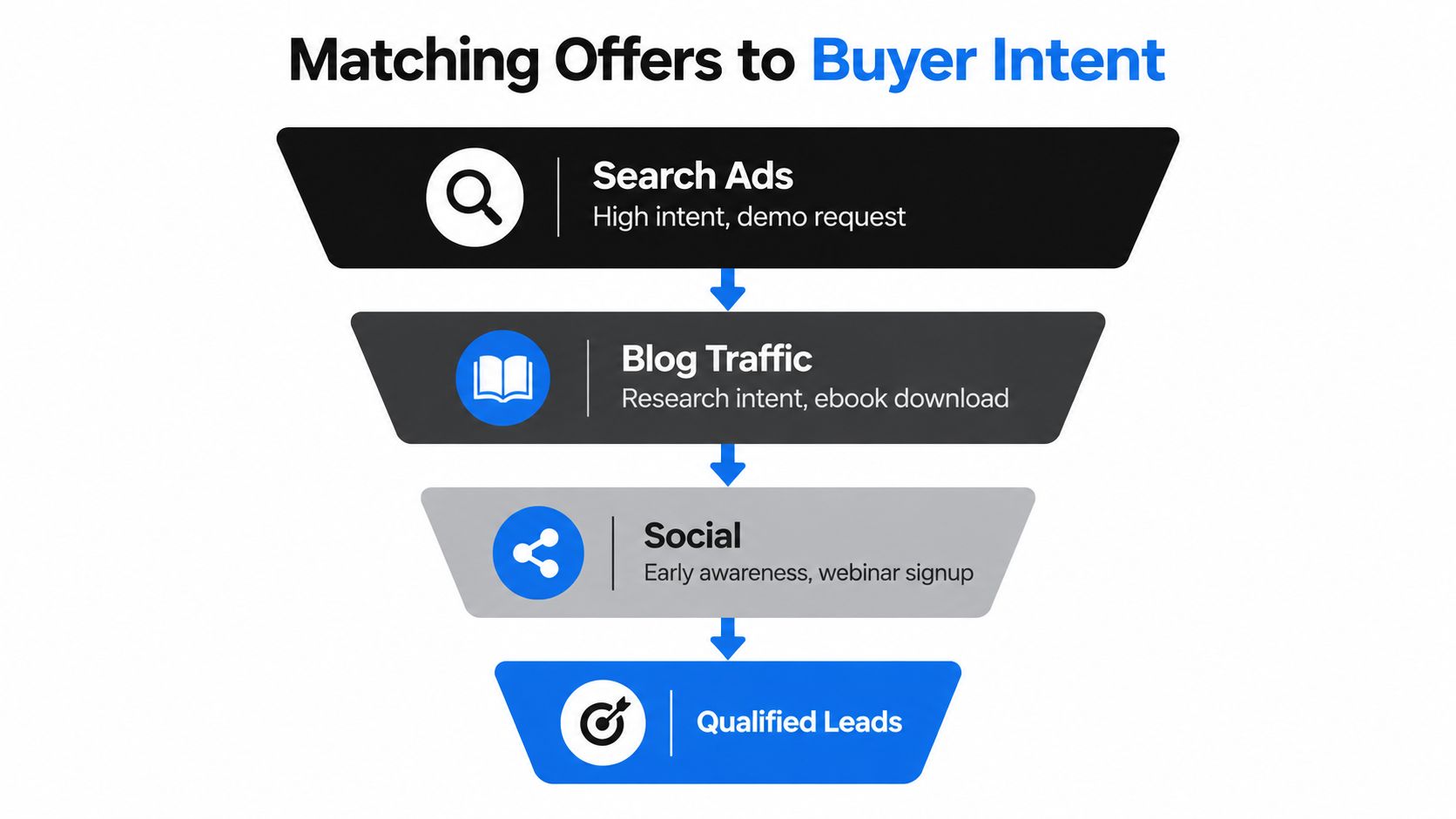
High-intent search traffic often deserves a direct commercial offer. A visitor searching for a CRM migration service, an automation audit, or a solution to a defined operational problem may be ready for a consultation, assessment, or demo. The page should reflect the language of the query and explain what happens after the conversion.
Research-oriented organic traffic usually needs a useful reason to continue the investigation. A technical guide, benchmark report, implementation framework, or diagnostic worksheet can capture interest without pretending the visitor has already selected a vendor. The landing page should show what the asset helps them decide, not merely list its format.
Early-awareness social traffic requires more context. A webinar, educational session, or practical introduction can create a lower-pressure entry point. The content should establish the problem and demonstrate expertise before asking for a sales conversation.
Cold PPC traffic is reported at roughly 2% to 5%, while warm email or retargeting traffic is reported at about 10% to 25%, according to lead generation statistics by channel and intent. Treat those ranges as a reason to segment analysis, not as universal targets. A retargeting audience that already knows the brand shouldn't set the performance expectation for a cold search campaign.
Build source-specific page variants
Create a distinct page experience when the visitor's context changes materially. That doesn't always require a completely different design. It may mean changing the headline, proof, offer, form, and follow-up sequence while preserving the underlying template.
- For cold search: Repeat the problem from the query, explain the relevant solution category, and use proof that reduces uncertainty.
- For warm email: Continue the promise made in the email and make the conversion feel like the obvious next step.
- For retargeting: Address objections, implementation concerns, switching costs, or questions that prevented the first conversion.
- For social audiences: Lead with education and a specific outcome before introducing a commercial conversation.
Use source and campaign data in the CRM so sales can see why the person converted. A lead who requested an ROI calculator has expressed a different kind of interest from someone who registered for an introductory webinar. That distinction should shape routing and follow-up.
Teams building a LinkedIn lead pipeline should also align the landing page with the promise made in the post, message, or sponsored content. LinkedIn visitors may respond to a role-specific operational challenge, while search visitors may expect a direct answer to a product or service question.
Intent recognition can make this segmentation more systematic. A practical intent recognition workflow can combine source, page behavior, form responses, and campaign context to determine whether a lead needs education, qualification, or immediate sales attention.
Structuring High-Converting Page Layouts
A strong B2B landing page doesn't make the visitor work to understand the offer. It establishes relevance immediately, supports the claim with evidence, answers the most likely objections, and presents one clear action. Every block should either increase confidence or reduce decision friction.

Start with a promise the buyer recognizes
The first screen should answer three questions quickly:
- What is this? Name the offer in language the audience already uses.
- Why should I care? State the business problem or outcome.
- What happens next? Make the call to action specific and credible.
“Improve your operations” is too broad for a specialist page. “Identify the manual workflows slowing your sales handoff” gives the reader a problem they can recognize and a reason to continue. The supporting copy can then explain who the assessment is for, what it includes, and what the prospect receives after submitting the form.
Avoid stacking competing actions above the fold. A demo, newsletter, resource download, contact request, and social follow may all be reasonable marketing activities, but placing them together weakens the page's decision path. Use one primary CTA, then repeat it at natural points as the visitor gains confidence.
Use proof to answer commercial objections
B2B buyers need more than an attractive layout. They need evidence that the provider understands their environment and can deliver without creating new risk. Place proof close to the claim it supports rather than hiding all trust signals at the bottom.
Useful proof can include:
- Specific customer context: Identify the industry, operational challenge, or use case when permission allows.
- Process evidence: Show what the audit, consultation, or implementation includes.
- Expertise signals: Explain the team's relevant experience without relying on vague self-praise.
- Risk reduction: Clarify timelines, deliverables, access requirements, and what the buyer isn't committing to.
- Operational detail: Describe how information moves from the landing page into the next sales or delivery step.
A logo strip may create familiarity, but it rarely answers the buyer's most important question: “Can this work in a business like mine?” Short testimonials, outcome-focused examples, and transparent process explanations usually carry more decision value.
The page should also make scanning easy. Use descriptive subheadings, short paragraphs, restrained bullet lists, and visual emphasis for the phrases a busy decision-maker will look for. Don't bury the qualification criteria. If the offer is intended for SaaS companies with a specific operational challenge, say so. Clear exclusions can improve lead quality because they prevent unsuitable visitors from converting under false expectations.
A video can support the page when it explains the offer or demonstrates the experience, rather than repeating the headline.
Remove leaks without removing reassurance
Removing the main website navigation often helps keep attention on the conversion path, but don't remove information buyers need to assess legitimacy. Provide privacy details, company information, relevant policies, and a way to understand who will handle the request. These elements can sit below the primary CTA or open in a new context without competing with the main action.
Mobile layout deserves the same strategic attention as desktop. Check tap targets, form behavior, page speed, sticky CTA placement, and the order in which proof appears. The best layout is not the one with the fewest blocks. It's the one that answers the buyer's questions in the order those questions arise.
Balancing Form Friction and Lead Quality
Short forms usually win the first conversion. Long forms usually give sales more information before the conversation begins. Neither is automatically correct, because the right form depends on the offer, the sales motion, and the cost of handling an unqualified lead.
Independent benchmark reporting summarizes a sharp relationship between field count and completion. Forms with one field can convert around 12.4%, while forms with six or more fields can fall to about 3.1%, as reported in a benchmark study of landing-page forms. Those figures support a sensible starting point, but they don't mean every B2B company should use an email-only form. The question is whether each additional field creates enough qualification value to offset the lost submissions.
Compare the information you request
| Form Field | Conversion Impact | Qualification Value |
|---|---|---|
| Work email | Low friction when the offer is relevant | Identifies and enables follow-up with the contact |
| Name | Usually limited friction | Supports personalization and record matching |
| Company name | Moderate friction | Helps identify account fit and research context |
| Job role | Moderate friction | Indicates influence, responsibility, and likely use case |
| Primary challenge | Depends on the question design | Reveals intent and supports useful routing |
| Phone number | Can create substantial hesitation early in the journey | Useful when immediate sales contact is part of the offer |
| Budget or company size | Often increases perceived commitment | Helps prioritize enterprise or high-complexity opportunities |
Use the minimum viable capture set for low-commitment offers such as an educational download. A concise form can be appropriate when the next step is automated nurturing and sales doesn't need to intervene immediately.
A consultation, technical audit, or implementation assessment may justify more information. Even then, ask only for details that change routing, preparation, or qualification. A field that nobody uses should be removed, regardless of how useful it looked in the original form design.
Add friction deliberately
Qualification can happen in stages. Capture a small amount of information first, then use a thank-you page, progressive profiling, conversational form, or follow-up email to learn more. This approach reduces the initial barrier while giving the team a richer record before a sales handoff.
Intentional friction makes sense when the sales process is expensive, capacity is limited, or the offer requires preparation. For example, a request for a complex systems audit might ask about the operational problem and desired outcome before scheduling time. That isn't friction for its own sake. It sets expectations and filters out people who aren't ready to engage.
Phone fields deserve particular care. If a sales representative calls every qualified contact, the number may be commercially useful. If the field exists only because it has always been present, it may deter serious buyers who aren't ready for an unsolicited call. The same test applies to budget, employee count, technology stack, and dropdown qualification questions.
Quality test: Keep a field only when the information changes what happens next.
Review forms with sales, not just marketing. Compare the contacts generated by each version, examine which fields correlate with accepted leads, and remove questions that create inconvenience without improving decisions. A smaller form can produce a stronger pipeline when the offer and follow-up process carry more of the qualification burden.
Connecting Landing Pages to CRM Automation
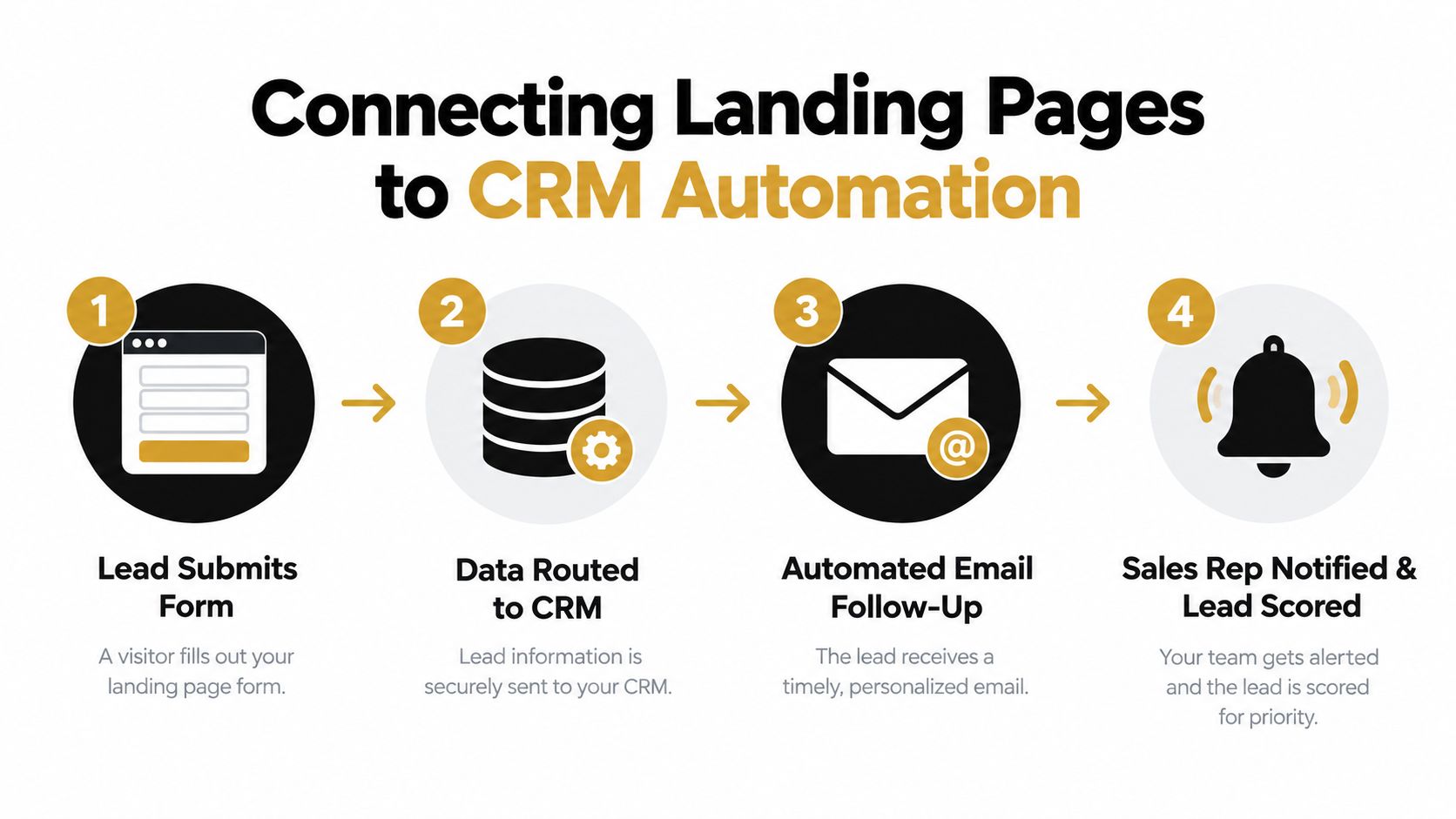
The landing page is only the capture point. Pipeline impact depends on what the company does with the submission immediately afterward. If the record remains in an inbox, arrives without source data, or enters the CRM with incomplete properties, the business loses context before a sales conversation begins.
Start with a field map. Every form field should have a defined destination, owner, and purpose in the CRM. A work email might identify the contact, while the company name creates or matches an account. The selected challenge can set a lead category, trigger a relevant email sequence, or route the record to a specialist.
Pass context with the submission
Hidden fields can preserve campaign and source information without asking the visitor to type it. Capture the relevant UTM values, landing-page variant, offer name, and referring context, then write them to stable CRM properties. This gives marketing and sales a shared explanation for why the contact arrived and what promise the page made.
Keep the data model clean. Don't create a new property for every campaign variation if a standard campaign field can hold the value. Define naming conventions before launching multiple pages, and test whether the form passes accurate data when a visitor arrives through paid search, email, social, or an internal link.
The confirmation experience should also reflect intent. A request for a high-intent consultation may trigger a scheduling option and a sales notification. A content download can deliver the asset, offer a related resource, and place the contact into a nurture path that develops the problem before asking for a meeting.
Route urgency instead of treating every lead equally
Automation should prioritize action, not merely send messages. Establish routing rules based on account fit, offer type, stated challenge, and engagement signals. A prospect who requests an implementation assessment may need a human response, while a visitor who downloads an introductory guide can receive educational follow-up first.
Useful workflow components include:
- Immediate confirmation: Tell the prospect what they requested and what happens next.
- Source-aware nurture: Send content that matches the original offer and traffic context.
- Sales notification: Alert the appropriate owner when the submission meets defined criteria.
- Record enrichment: Add account and contact context where the process permits it.
- Lifecycle updates: Move the record through agreed stages instead of leaving it as an unclassified lead.
- Failure monitoring: Flag rejected submissions, duplicate records, and integration errors for review.
A CRM integration should make the handoff visible. Sales needs to know the page, offer, source, responses, and prior interactions, not just the person's name. Marketing needs closed-loop feedback on which offers create accepted opportunities. A marketing automation integration can support that connection when the workflow is designed around clear ownership and data rules.
Testing and Optimizing for Pipeline Growth
Launching a page doesn't prove that the page works. It only creates a baseline. Optimization becomes useful when the team forms a clear hypothesis, changes a meaningful variable, and evaluates the result by traffic quality and downstream sales behavior.
Start with the largest potential constraint. A button-color test won't rescue an irrelevant offer, weak positioning, or a form that asks for sensitive information before the visitor trusts the company. Test the elements that influence the decision itself.
Prioritize meaningful experiments
A practical sequence looks like this:
- Test the offer: Compare a demo, audit, assessment, calculator, or educational resource when each represents a different level of intent.
- Test the message: Vary the problem framing, audience specificity, desired outcome, and proof near the primary CTA.
- Test the form: Compare the minimum viable capture set with a deliberately qualified version.
- Test the page path: Examine navigation, CTA placement, proof order, scheduling flow, and confirmation experience.
- Test follow-up: Compare immediate sales routing with nurture-first sequences for different intent groups.
Define the primary conversion before the experiment starts. Then define the quality signals that determine whether the result is commercially positive. A variation that increases submissions but lowers accepted leads may be a failed test, even if the landing-page report shows a lift.
Unbounce's analysis of 41,000 landing pages found a 6.6% median conversion rate, while the top 10% exceeded 15%. The associated benchmark discussion describes the potential for rigorous testing to create a threefold to fivefold lift in lead-capture efficiency when a page moves from a lower performance level to a higher one, as summarized in landing-page conversion benchmarks. Use that gap as evidence that disciplined improvement matters, not as a universal target for every B2B page.
Segment the result before changing the page
Never judge a landing page from blended traffic alone. Break performance down by source, campaign, device, offer, audience, and intent. A page may look healthy overall because warm retargeting traffic offsets poor cold acquisition. The blended number hides the problem and encourages the wrong optimization.
Track a funnel that reaches beyond conversion:
- Visitor to lead: Measures capture efficiency.
- Lead to accepted lead: Measures basic fit and sales usefulness.
- Accepted lead to opportunity: Measures commercial intent.
- Opportunity to customer: Measures the quality of the acquisition path.
- Cost per qualified lead: Connects spend to usable demand.
Give each test enough time and traffic to support a reliable decision, but don't declare a winner from a small fluctuation or a short-lived spike. Record the hypothesis, audience, change, launch date, and decision rule. Then review the result with sales, because the CRM often reveals quality problems that analytics can't see.
Pipeline principle: The winning variation is the one that creates more valuable opportunities, not necessarily the one that captures the most names.
A monthly optimization rhythm works well when it combines page analytics, CRM outcomes, sales notes, and customer feedback. Retire weak offers, refine high-intent pages, and create new variants for distinct segments. Over time, the portfolio of pages becomes more valuable than a single “perfect” template because each page can serve a specific problem, source, and buying context.
MakeAutomation helps B2B and SaaS teams connect landing-page forms with CRM automation, lead routing, follow-up workflows, and broader AI-enabled operations. If you want to turn your landing pages into a measurable pipeline system instead of isolated capture forms, visit MakeAutomation to explore the available frameworks and implementation support.