
Discover orm in node js: Boost Your App Development Fast
An Object-Relational Mapper (ORM) is essentially a powerful translator that sits between your Node.js application and its database. Instead of forcing your developers to write raw, complex SQL, an ORM lets them work with the data using familiar JavaScript objects and methods. The result is faster development and far fewer bugs.
Why an ORM in Node.js Is Your Automation Superpower

As a founder in the B2B or SaaS space, your primary goal is to build features that deliver value, not to get bogged down in technical minutiae. An ORM is a strategic piece of your tech stack that helps you do just that.
Think of it this way: your database is like a massive, perfectly organized warehouse. The catch is that it only speaks one, very specific language—SQL. Without an ORM, your developers have to become fluent in SQL, spending a huge amount of their time writing, testing, and debugging commands just to get data in and out of the warehouse.
An ORM in Node.js creates a layer that handles all that translation for you. Your developers can simply work with intuitive objects like User or Project in their code, and the ORM figures out the correct SQL to run in the background.
What this really means is a massive shift in focus. Your engineering team is freed from the tedious work of managing database queries. Instead, they can pour that energy into what truly matters: building the value-driving features your customers are waiting for, whether that's a new CRM integration or an AI-powered analytics dashboard.
The Business Case for Using an ORM
The benefits go well beyond making life easier for your developers. They have a direct impact on your business, which is especially critical for any company focused on automation.
Here’s how adopting an ORM translates to real-world advantages:
- Accelerate Time-to-Market: When your team can build features without hand-crafting every database query, development speed picks up significantly. You can ship updates faster and stay ahead of the competition.
- Reduce Bugs and Improve Reliability: Most modern ORMs include built-in security measures and data validation. This helps you sidestep common pitfalls and vulnerabilities, like SQL injection attacks, right out of the box.
- Simplify Maintenance and Onboarding: A clean, object-oriented codebase is much easier to navigate. New hires can get up to speed faster, and your existing team can maintain the application with less friction.
Leveraging a Mature and Growing Ecosystem
By building on Node.js, you're already tapping into a powerful and stable platform. The ecosystem is massive; recent data shows that over 45% of professional backend developers now rely on Node.js for their production applications. This popularity gives you a huge advantage—access to a deep talent pool, countless tools, and battle-tested scalability patterns.
This maturity is a key factor when designing complex applications. For example, many high-growth companies use Node.js to build a microservices architecture to keep their systems scalable and easy to maintain.
At the end of the day, using an ORM in Node.js isn't just a technical decision. It’s a strategic one that helps you build faster, more secure, and more scalable applications from the ground up.
Understanding the Building Blocks of an ORM
To really get what an orm in node js brings to the table, you have to break it down into its core parts. These aren't just abstract concepts; they are the tools that work together to handle all the tedious database busywork, freeing up your team to build features that matter.
Think of an ORM's components like a specialized crew building your app's data foundation. Each member has a very specific and crucial job.
Models: The Blueprints for Your Data
At the heart of any ORM, you'll find Models. A Model is simply a class in your code (usually JavaScript or TypeScript) that represents a single piece of your application's data. For any SaaS app, you'd almost certainly have a User model, a Subscription model, and maybe a Workspace model.
Each Model lays out the structure for that piece of data—what fields it has and what type of data goes in them. Your User model, for example, would probably define fields like email (a string), createdAt (a date), and isActive (a boolean).
This gives you a single source of truth for your data's structure. Instead of second-guessing what a user object should look like, you have a clear blueprint your entire app can rely on.
Mapping: The Automated Connector
So you've defined your data's blueprints. Now what? This is where Mapping comes in, and it's where much of the ORM's "magic" happens. Mapping is the process of automatically connecting your code-defined Models (like User) to the actual tables in your database (like users).
The ORM looks at your Model, figures out its structure, and then generates the right SQL to manage the corresponding database table. It acts as the translator, making sure the email field in your code maps perfectly to the email column in the database.
This is the part that saves you from manually writing
CREATE TABLEstatements or constantly worrying if your database schema is in sync with your code. The ORM becomes the bridge, ensuring your code and your database are always speaking the same language.
This automatic connection is a massive productivity boost. As your product evolves, you just update the Model in your Node.js code, and the ORM handles reflecting that change in the database.
Migrations: Version Control for Your Database
Your application won't stay static for long. Sooner or later, you'll need to add a lastLoginAt field to your User model or introduce a whole new Team model. This is exactly what Migrations are for.
Think of migrations as a version control system (like Git) but for your database schema. They are simple script files that outline a specific change to your database structure.
- Up Migration: Applies a new change, such as adding a column or creating a new table.
- Down Migration: Reverts a change, giving you a safe way to roll back if something goes wrong.
This system creates a structured and repeatable process for evolving your database. It’s absolutely critical for teams, as it guarantees every developer’s local database schema matches what's in staging and production. Managing your schema this way is a cornerstone of data integrity, touching on the same principles you'd find when you learn more about database normalization forms.
Transactions: A Safety Net for Complex Operations
Finally, let's talk about Transactions. A transaction is a powerful feature that bundles multiple database operations into a single, all-or-nothing unit. If even one step in the group fails, the entire set of operations is automatically rolled back.
Imagine a new user signing up. That single action might require several distinct writes to the database:
- Create a new record in the
userstable. - Create an associated record in the
subscriptionstable. - Generate a new entry in the
invoicestable.
If step 3 fails but the first two succeeded, you're left with messy, inconsistent data—a user exists without a corresponding invoice. By wrapping all three operations in a transaction, the ORM ensures that either all of them succeed or none of them do. This keeps your database clean and reliable.
Comparing the Top Node.js ORM Libraries
Picking the right Object-Relational Mapper is one of those foundational decisions that can shape your entire Node.js project. This isn't just about a library; it's about defining how your team will interact with the database, which directly impacts development speed, code maintainability, and even how easy it is to squash bugs.
With so many solid options out there, it’s easy to get stuck in analysis paralysis. Let's cut through the noise and compare the top contenders—Prisma, Sequelize, TypeORM, and Objection.js—by looking at them through the lens of real-world B2B and SaaS applications. There's no single "best" ORM, only the best fit for your project's needs and your team's expertise.
This flowchart offers a quick way to orient yourself, helping you see which ORM in Node.js might be a good starting point based on where your project is today.
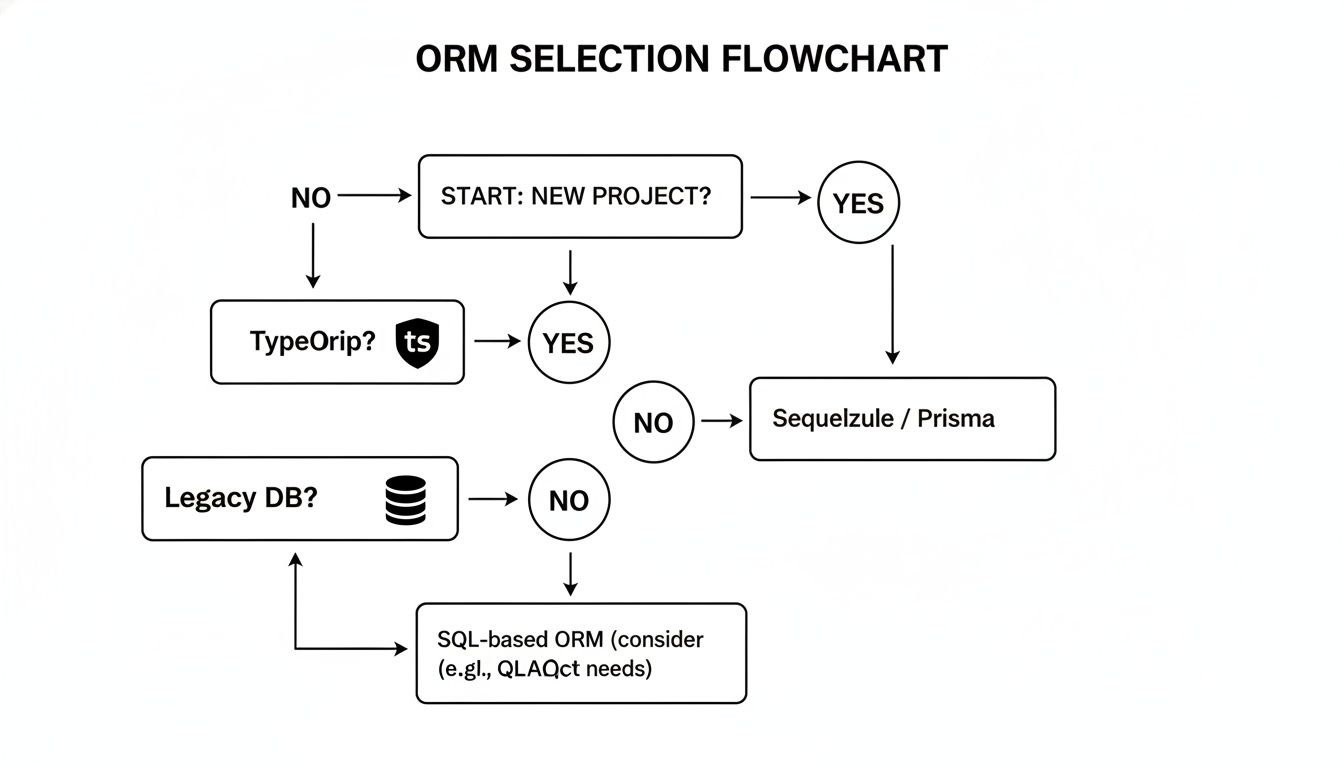
As you can see, the path often starts with a simple question: are you building something from scratch or working with an established database? From there, factors like your team's comfort with TypeScript can point you in the right direction.
To help you dig deeper, this comparison table breaks down the key features, strengths, and ideal use cases for the leading ORM libraries in the Node.js ecosystem. It's designed to help you choose the right tool for your specific B2B or SaaS application.
Feature Comparison of Top Node.js ORMs for 2026
| Feature | Prisma | Sequelize | TypeORM | Objection.js |
|---|---|---|---|---|
| Primary Paradigm | Next-gen ORM (schema-first) | Traditional ORM (Data Mapper/Active Record) | Traditional ORM (Data Mapper/Active Record) | Relational Query Builder |
| Type Safety | Excellent, auto-generated | Good (with manual typings) | Excellent (decorator-based) | Good (with TypeScript) |
| Migration Style | Declarative (schema-based) | Imperative (programmatic) | Imperative (programmatic) | Imperative (via Knex.js) |
| Learning Curve | Low | Medium to High | Medium | Medium (requires SQL knowledge) |
| Database Support | PostgreSQL, MySQL, SQL Server, SQLite, CockroachDB | PostgreSQL, MySQL, MariaDB, SQLite, MSSQL | Wide range via drivers | PostgreSQL, MySQL, SQLite3, Oracle, and more via Knex.js |
| Best For… | New greenfield projects, TypeScript-first teams, high developer velocity. | Legacy projects, complex queries, need for broad database and plugin support. | TypeScript projects where developers prefer decorators and the Active Record pattern. | Teams who love SQL and want more control over queries without writing raw SQL strings. |
Ultimately, each of these tools is a fantastic piece of engineering. The "right" choice depends entirely on your team's philosophy and the specific technical challenges you need to solve.
Prisma: The Modern, Type-Safe Leader
Prisma has taken the Node.js world by storm, especially for new projects built with TypeScript. It doesn't just call itself a "next-generation" ORM for marketing—it genuinely feels different to use. Its killer feature is a completely type-safe, auto-generated client.
You start by defining your data models in a simple, declarative schema.prisma file. Run a command, and Prisma generates a client that understands your entire database structure, including all its relationships. This gives you incredible editor autocompletion and, more importantly, catches data-related errors as you type, not when your application crashes in production.
For a startup building a SaaS product, this is a game-changer. It dramatically speeds up development and reduces the number of common bugs that slip through the cracks, letting small teams build more reliable software, faster.
However, Prisma isn't a traditional ORM. It uses its own query engine (written in Rust) that sits between your app and the database. While it's fantastic for common CRUD operations, this abstraction can sometimes get in the way if you need to run highly specific, custom SQL.
The TypeScript-first approach has clearly resonated. As of 2026, Prisma is the most downloaded ORM for Node.js, hitting an impressive 4 million downloads weekly. This momentum is fueled by JavaScript's overall dominance, with 98.7% usage across websites and 92% of developers wanting to continue using it. You can read more about Prisma's growth on their official blog.
Sequelize: The Battle-Tested Veteran
Sequelize is the original heavyweight champion of Node.js ORMs. It’s been around for years, has been tested in countless production applications, and supports a massive range of SQL databases like PostgreSQL, MySQL, MariaDB, SQLite, and Microsoft SQL Server.
Its age and maturity are its biggest assets. If you're inheriting a legacy project or need a tool with a vast ecosystem of plugins for every imaginable edge case, Sequelize is often the most reliable choice. It has seen it all.
Key benefits of Sequelize include:
- Broad Database Support: Simply unmatched compatibility with different SQL dialects.
- Promise-Based API: A modern and easy-to-use API for asynchronous code.
- Solid Transaction Support: Powerful and reliable features for ensuring data stays consistent.
- Huge Community: When you get stuck, there’s a good chance someone has already solved your exact problem.
The trade-off for all this power is a steeper learning curve and more boilerplate code compared to something like Prisma. While it does support TypeScript, the integration isn't as seamless or "magical" as what you get with newer, TypeScript-native libraries.
TypeORM: The Decorator-Based Contender
TypeORM takes its inspiration from popular ORMs in other languages, like Hibernate (Java) and Doctrine (PHP). It leans heavily on decorators, allowing you to define models and columns right inside your TypeScript classes. Many developers find this approach very clean and intuitive.
As the name suggests, TypeORM was designed for TypeScript from day one. It offers great type safety and feels right at home in a modern Node.js stack. It’s also flexible, supporting both the Active Record and Data Mapper patterns, so you can choose the architecture that best fits your style.
The project has had some history of inconsistent maintenance, which caused some developers to look for other options. While it's still a very capable ORM, it's wise to check on the project's recent activity and community health before choosing it for a brand-new, long-term project.
Objection.js: The "Un-ORM"
Objection.js offers a fascinating middle ground. It bills itself as an "un-ORM"—or more accurately, a relational query builder. It's built on top of Knex.js, a fantastic SQL query builder, and adds a powerful layer for handling models and relationships without all the heavy abstraction of a full ORM.
This makes Objection.js a perfect choice for teams that are already comfortable with SQL and want fine-grained control over their database queries. You get the best of both worlds: you write code that looks a lot like SQL, but you also get helpers for managing models, validations, and fetching complex nested data.
If your team prioritizes performance and wants to avoid the "magic" that can sometimes make traditional ORMs feel opaque, Objection.js is an excellent compromise. It keeps you close to the database so you can write highly optimized queries, but without the mess of managing raw SQL strings all over your codebase.
Choosing Your Database Interaction Strategy
While an ORM in Node.js is a fantastic tool, it’s not your only option for talking to a database. Picking the right strategy is a foundational decision for any SaaS app, directly impacting how fast you can build and how well you can scale down the road. You've basically got three main ways to go.
To wrap your head around them, think about building a piece of custom furniture.
Raw SQL is like being a master carpenter, hand-carving every joint. You get total control and can optimize for perfection, but it’s slow, requires a ton of skill, and one slip-up can ruin the whole project.
A Query Builder is your set of professional power tools—a table saw, a router, a sander. You're still in control and can be very precise, but you're working much faster and more safely than you could by hand.
An ORM is like a high-end, flat-pack furniture kit. Assembly is incredibly fast, and the pre-drilled holes guarantee everything fits together perfectly. The trade-off? You can’t easily deviate from the original design.
There’s no single "best" choice here. The right tool depends entirely on your project, your team's expertise, and how quickly you need to get things done.
The Power and Peril of Raw SQL
Writing Raw SQL queries puts you directly in the driver's seat. You can fine-tune every single query for peak performance and use every unique feature your database offers. There's literally no layer between your application and your data.
But that power comes with some serious strings attached. It demands deep SQL knowledge from everyone on your team, which can slow development to a crawl. Worse, it throws the door wide open to security holes like SQL injection if you're not incredibly careful. For a B2B SaaS company that needs to move fast, the development bottleneck alone usually makes raw SQL impractical for day-to-day work.
Query Builders: The Flexible Middle Ground
This is where query builders, like the very popular Knex.js, really shine. They strike a great balance by giving you a JavaScript API to build SQL queries piece by piece. It's far more structured and secure than mashing strings together, and it comes with built-in protection against SQL injection.
Your team still gets to think in terms of SQL, but they're using clean, chainable methods like .select(), .where(), and .join(). This approach keeps developers close to the metal without exposing them to the most tedious and dangerous parts of writing SQL. It’s an excellent option for teams who want more control than a full ORM offers but still value safety and a bit of structure.
ORMs: The Path to Rapid Development
As we've been discussing, an ORM in Node.js is all about developer productivity and code safety. By treating database tables like familiar JavaScript objects (Models), your team can often build entire features without writing a single line of SQL. This makes development cycles drastically shorter and makes it much easier for new engineers to get up to speed.
The core trade-off with an ORM is giving up some control for a massive boost in speed and safety. For the majority of business logic in a SaaS application—creating users, updating subscriptions, fetching project data—this is an incredibly valuable exchange.
This approach is gaining traction as Node.js continues to prove itself in large-scale systems. The platform's real-world footprint is massive, with 5.9% of all websites using Node.js for their web server, according to data from W3Techs. This includes heavy-hitters like Netflix, PayPal, and Amazon, so you know the ecosystem is more than ready for enterprise scale. When you're thinking about your tech stack, it’s worth exploring different perspectives on leveraging technology for startup success, scaling strategies, and tech choices.
Choosing between these three isn't just a technical decision; it's a business one. You have to weigh how fast you need to ship features against the need for raw performance and long-term maintainability to find the path that best fits your company's goals.
Best Practices for Implementing Your ORM

Picking an orm in node js gives you a fantastic running start, but if you want that initial velocity to last, you need some discipline. A few smart practices can make the difference between an ORM that accelerates your work and one that slowly turns into technical debt.
Think of these tips as the bridge from theory to a battle-tested B2B or SaaS application. It’s all about building a foundation that can handle real-world growth, not just getting a prototype out the door quickly.
Establish a Robust Migration Strategy
As your application and team grow, your database schema will change. It’s a fact of life. Without a solid process for managing those changes, you're inviting chaos—developers with mismatched database versions, mysterious bugs, and wasted hours. A clear migration strategy isn't just nice to have; it's essential.
Your ORM’s built-in migration tools are the perfect place to start. The key is to treat your migration files with the same respect you give your application source code:
- Version Control Everything: Commit every migration file to Git. This gives you a clear, historical log of every single change made to your database schema.
- One Change Per Migration: Keep your migrations small and focused. A single file should do just one thing, like adding a new column or creating an index. This makes debugging and, if necessary, rolling back changes much, much easier.
- Automate Deployments: Weave migrations right into your CI/CD pipeline. Your deployment script should automatically run new migrations before the application code goes live. This is how you guarantee consistency across all your environments.
This approach stops "database drift" in its tracks. It ensures that every environment, from a new hire’s laptop to your production servers, is on the exact same page.
When you treat your database schema with the same rigor as your application code, you build a system that's both reliable and predictable. It's the ultimate cure for the dreaded "but it works on my machine" problem that plagues so many teams.
Master Performance Optimization
One of the biggest misconceptions about ORMs is that they're inherently slow. The truth is, performance problems are almost always a result of how the ORM is used, not a flaw in the tool itself. By understanding a few common pitfalls, you can keep your application feeling snappy.
The classic performance trap is the N+1 query problem. It happens when your code fetches a list of items (that’s 1 query) and then loops through that list to fetch related data for each item (that’s N more queries). So, if you fetch 50 products, you might accidentally trigger 51 separate trips to the database instead of one or two efficient ones.
Thankfully, modern ORMs offer a straightforward fix: eager loading. You just tell the ORM upfront which related data you'll need, and it intelligently bundles everything into a single, optimized query. Make a habit of using eager loading whenever you're fetching lists of things and their associated data.
You should also lean on connection pooling to manage how your app talks to the database. Instead of opening a new connection for every single query—which is expensive—a pool keeps a set of connections open and ready to be reused. This massively cuts down on overhead, especially when your app is under heavy load. For many SaaS apps, containerizing the environment is the next logical step; you can learn more about how to dockerize your Node.js application to standardize your setup even further.
Structure Your Models for Clarity
Your ORM models are the blueprint for your data layer. If they become a messy dumping ground for random business logic, your entire codebase will suffer. Keeping them clean and focused is key to long-term sanity.
Try to stick to these organizational ground rules:
- Separate Models from Business Logic: A model should only define the data's structure and relationships. The code that acts on that data—the business logic—belongs in dedicated "service" or "helper" modules. This separation of concerns makes your code far easier to understand and test.
- Use a Consistent Naming Convention: Settle on a clear and predictable naming scheme for your models, fields, and relationships. When everyone on the team knows what to expect, the codebase becomes much simpler to navigate.
- Validate Data at the Model Level: Use your ORM's built-in validators to enforce data integrity right where the data is defined. Rules like
email must be a valid formatorstatus must be one of 'active' or 'pending'should live directly in the model.
To make sure your ORM implementation is a net positive for the project, it helps to zoom out and consider the top software engineering best practices. Following these principles ensures your ORM in Node.js becomes a source of clarity, not a tangled mess.
Answering Your Top ORM Questions
When you're thinking about adding an ORM to your Node.js stack, a few big questions always pop up. I hear these all the time from founders, dev leads, and engineers who are trying to make the right long-term choice for their product. Let's dig into the most common concerns and get you some straight answers.
Will an ORM Slow Down My Application?
This is the big one, isn't it? The fear that an ORM will bog down your app. And it's a fair question—an ORM is an extra layer between your code and the database, which technically adds a sliver of overhead.
But here’s the reality for most B2B and SaaS applications: that overhead is almost always negligible. In my experience, performance bottlenecks rarely come from the ORM itself. They come from how you use it, like accidentally creating an N+1 query that hammers the database, or simply forgetting to add the right indexes.
The productivity boost and reduction in bugs you get from a good ORM far outweigh the tiny performance cost. For 99% of business apps, your team's time is better spent on business logic and proper indexing, not hand-tuning raw SQL.
Which ORM Is Best for a Startup Using TypeScript?
If you're a startup spinning up a new project with TypeScript in 2026, my go-to recommendation is Prisma. Its killer feature is a fully type-safe client that's automatically generated from your schema. This isn't just a minor convenience; it wipes out a whole class of bugs before you even run the code.
This focus on developer experience means small teams can move faster and with more confidence. While TypeORM is another strong contender in the TypeScript world, Prisma's modern design and fantastic tooling have made it the default choice for many new projects. Catching data errors at compile-time instead of when a customer is clicking a button is a massive advantage when you're building a reputation.
How Hard Is It to Switch ORMs Later?
Let's be clear: migrating from one ORM to another is a significant and costly project. This isn't like swapping out a small utility library. You’re talking about rewriting every single database query and data model in your application.
Each ORM has its own distinct API and way of thinking about data. A migration project can easily pause all new feature development for weeks, if not months. This is why getting the initial choice right is so important.
- Choosing a full-featured ORM like Prisma or Sequelize means you're buying into its way of doing things.
- Opting for a query builder like Objection.js keeps you closer to the SQL and offers more flexibility, but at the cost of writing more code by hand.
Think hard about what you might need down the road. If you foresee needing a lot of highly specific, complex database features, a more flexible tool might save you a painful rewrite later.
Can I Use an ORM with a NoSQL Database?
The term "ORM" is traditionally tied to relational databases that speak SQL, like PostgreSQL or MySQL. When you're working with a NoSQL database like MongoDB, you'll use a similar tool called an Object Document Mapper (ODM). The most popular one in the Node.js world is by far Mongoose.
The idea is exactly the same: an ODM maps your JavaScript objects to documents in the database, giving you a clean, structured way to interact with your data. Interestingly, these lines are beginning to blur. Modern tools like Prisma are now adding support for both SQL and some NoSQL databases, giving you a single interface for different database backends.
At MakeAutomation, we help B2B and SaaS companies build scalable and efficient systems from the ground up. Whether you're making critical tech stack decisions or looking to integrate powerful AI and automation, we have the expertise to help you grow faster. Find out how we can help at https://makeautomation.co.