

Project Management Standard Operating Procedures Guide
63% of project leaders said they maintained a personal library of past documents to help create project documentation, according to a 2024 Rebel's Guide to Project Management survey of 570 project managers. That's a useful habit, but it raises an operational question: does your team share an approved way to run projects, or does each manager assemble a different one?
Project management standard operating procedures should provide that shared foundation without scripting every decision. Treat them as a modular operating system: lock approvals, handoffs and evidence requirements, while leaving discovery, estimation and problem-solving open. For AI-assisted workflows, extend those controls into production rather than stopping at permission to use a tool.
What Every Project SOP Must Contain
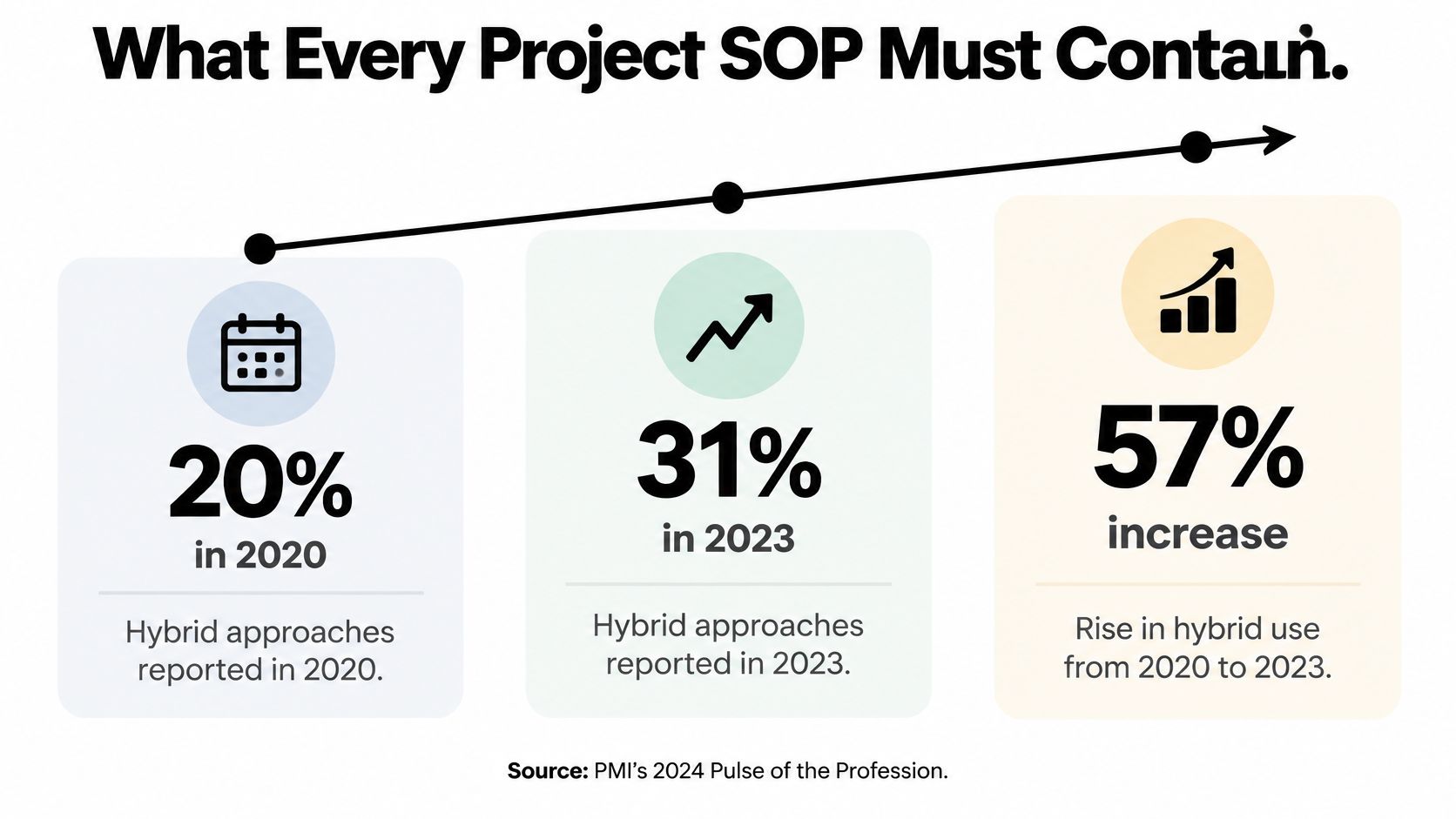
Hybrid project approaches rose from 20% in 2020 to 31% in 2023, according to the PMI Pulse of the Profession findings summarized by PMwares. A useful SOP supports that mix by making the required controls clear while leaving teams room to choose how they do the work.
A project management SOP defines how to run a recurring project type or workflow. Start with a process card that tells operators when work begins, what must happen and what evidence shows it is complete. For a wider set of project records and templates, see these project management documents.
Required fields in a project management SOP
| Field | What to write | Failure it prevents |
|---|---|---|
| Purpose | One sentence naming the outcome the procedure protects | A checklist with no decision |
| Trigger | The event that starts the work, such as a signed statement of work | Work starting from a chat message |
| Inputs | Documents, data and approvals required before the first task | Rework from missing access or scope |
| Outputs | The artifact the next role must receive | Untestable handoffs |
| Responsible role | A role title, not a person's name | The procedure breaking when someone leaves |
| Required evidence | The record that proves the step happened | No audit trail for retrospectives |
| Decision point | The question, the options and who chooses | Hidden approvals inside meetings |
| Escalation route | Who is told, by when, and with what facts | Stalled work with no owner |
| Revision owner | The role that accepts changes and the trigger for review | An annual rewrite nobody uses |
A project SOP works like a kitchen rail: it shows what has started, what is waiting and what has been sent back. It gives the team shared visibility without prescribing every specialist's method.
Walk the fields through client onboarding
For a SaaS client onboarding, the purpose might be a production account that meets agreed acceptance criteria. The trigger is a signed statement of work, so a chat promise alone cannot start delivery.
The inputs are the approved scope, access list and customer success metric. The outputs are a configured workspace and an acceptance note for the customer success handoff. A project board marked complete does not prove those deliverables are ready.
The responsible role is the Implementation Lead. Evidence might include the approval timestamp, configuration test result and customer acceptance record. The decision point asks whether the workspace passes the agreed tests. The lead either authorizes handoff or sends the failed configuration for correction.
The escalation route should specify who needs to know and what information they need. For example, the Implementation Lead can notify the Account Owner when a blocked access request threatens the committed launch, stating the missing permission, customer impact and decision required. Set the response deadline in the workflow.
Finally, the revision owner decides which suggested changes become part of the procedure. Contributors can comment, but comments alone do not change the operating rule.
Match the format to the consequences
ISO guidance on documented information distinguishes information used to operate a process from records kept as evidence. It also says documentation should reflect process complexity, organizational size and personnel competence. A prose manual is not required for every task.
Use a checklist for a familiar, low-risk status update. For a client handoff with branching approvals, use a flowchart and retain acceptance records. Store evidence in the relevant ticket, CRM record or controlled repository, then link to it from the SOP.
Practical rule: Write instructions for the operator and evidence requirements for the person verifying the result.
Specialized workflows need supporting references suited to their work. For federal contracting, teams can use guidance on how to qualify and submit federal proposals before documenting the relevant approval stages.
Copy the nine fields into your template before drafting a stage narrative. Empty cells expose unresolved operating decisions.
Controls That Stay Fixed Across Delivery Methods
| Control | Fixed requirement | Method that may flex |
|---|---|---|
| Business-case approval | Named approver and minimum go criteria | Length and format of the case |
| Roles | One accountable owner per deliverable | Where the RACI is displayed |
| Scope baseline | Written in-scope and out-of-scope | Work breakdown or backlog |
| Risk escalation | Threshold, path and response time | Register tool |
| Status reporting | Cadence and audience | Dashboard or written note |
| Change control | Named approver for scope, date or cost | Change form or sprint replan |
| Acceptance | Definition of done agreed before build | Demo, checklist or UAT script |
| Closure | Handover pack and a lessons record | Retrospective format |
| Iterative planning | Used only when uncertainty is stated | Sprint length and backlog tool |
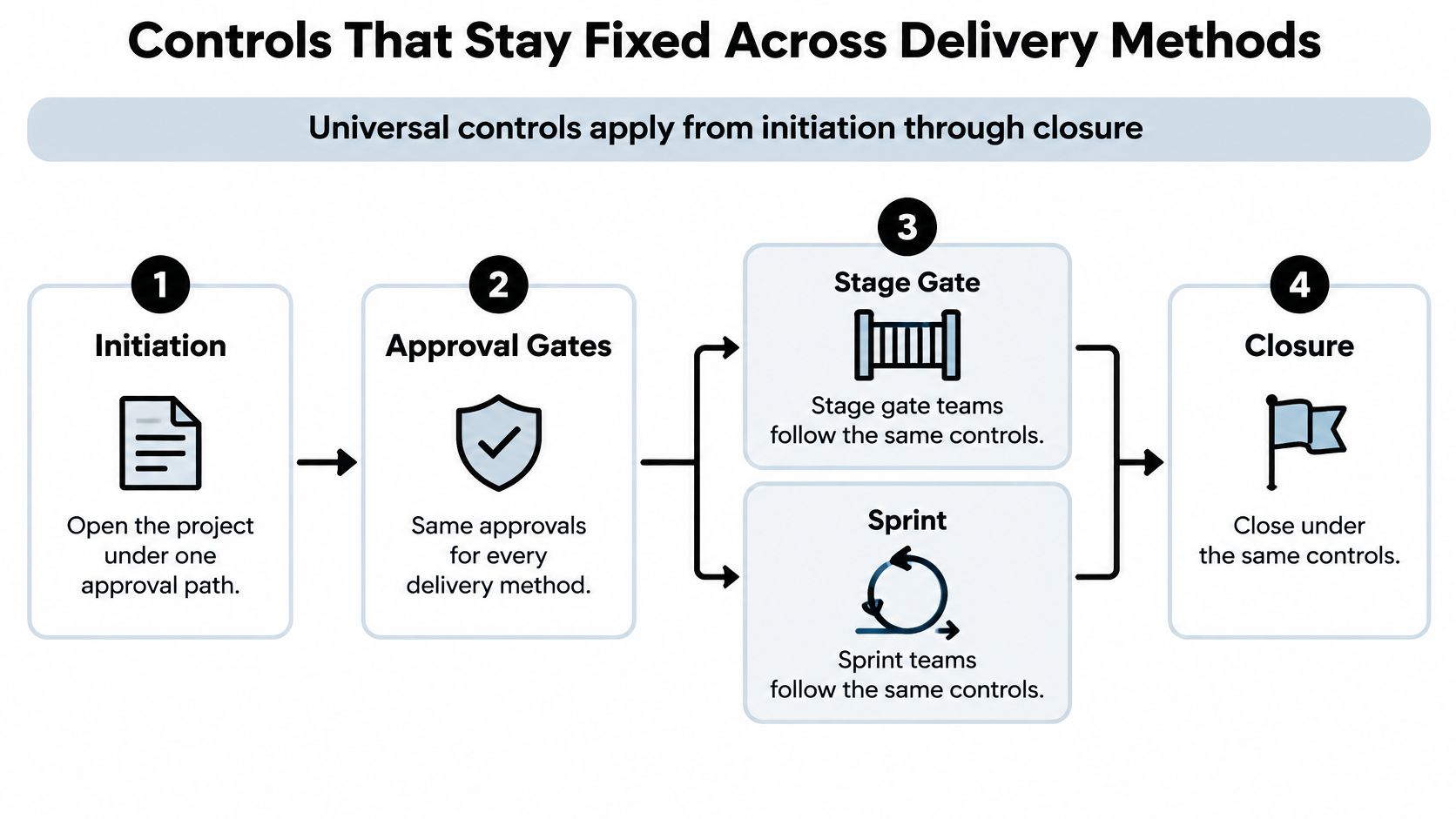
Hybrid work becomes difficult to govern when every delivery method invents its own approval rules. A team can use Jira for development and a milestone plan for client rollout, but neither tool should determine who may approve a commercial commitment.
A scope baseline can be a work breakdown or an approved backlog. Either way, the team must distinguish included work from excluded work. Likewise, a sprint replan can record a proposed change, but moving a backlog item doesn't automatically authorize a new delivery date or budget.
These controls should remain visible across the delivery path.
Follow a release through both paths
Say a product team is building a reporting feature while an implementation team prepares its client rollout. Developers use iterative planning because customer feedback may change filters, layouts and export behavior. Their sprint review tests whether the feature solves the intended problem.
That review isn't contractual client acceptance. Before rollout, the Implementation Lead still needs the agreed test results, security approval and customer authorization. The project therefore passes both a learning-oriented review and a fixed acceptance gate.
Suppose the client requests a new export format during the demo. The Product Owner can assess it and revise the backlog, but the SOP's named commercial approver must authorize any resulting scope, date or cost change. The team retains the decision alongside the updated plan.
Choose the module for the decision
Use iterative planning when the project has a stated uncertainty, a learning goal or requirements likely to change after customer feedback. Keep a fixed stage gate where the decision concerns contractual acceptance, security clearance or spending beyond an agreed authority limit.
A project management methodology comparison can help select the delivery approach. Your SOP should then translate that choice into instructions for the people doing the work.
Don't require a change-request form merely because another department uses one. Require a traceable proposal, an authorized decision and an updated commitment.
Standardize the decision and the evidence, not the tool or every step in the sequence.
Where Expert Judgment Still Belongs
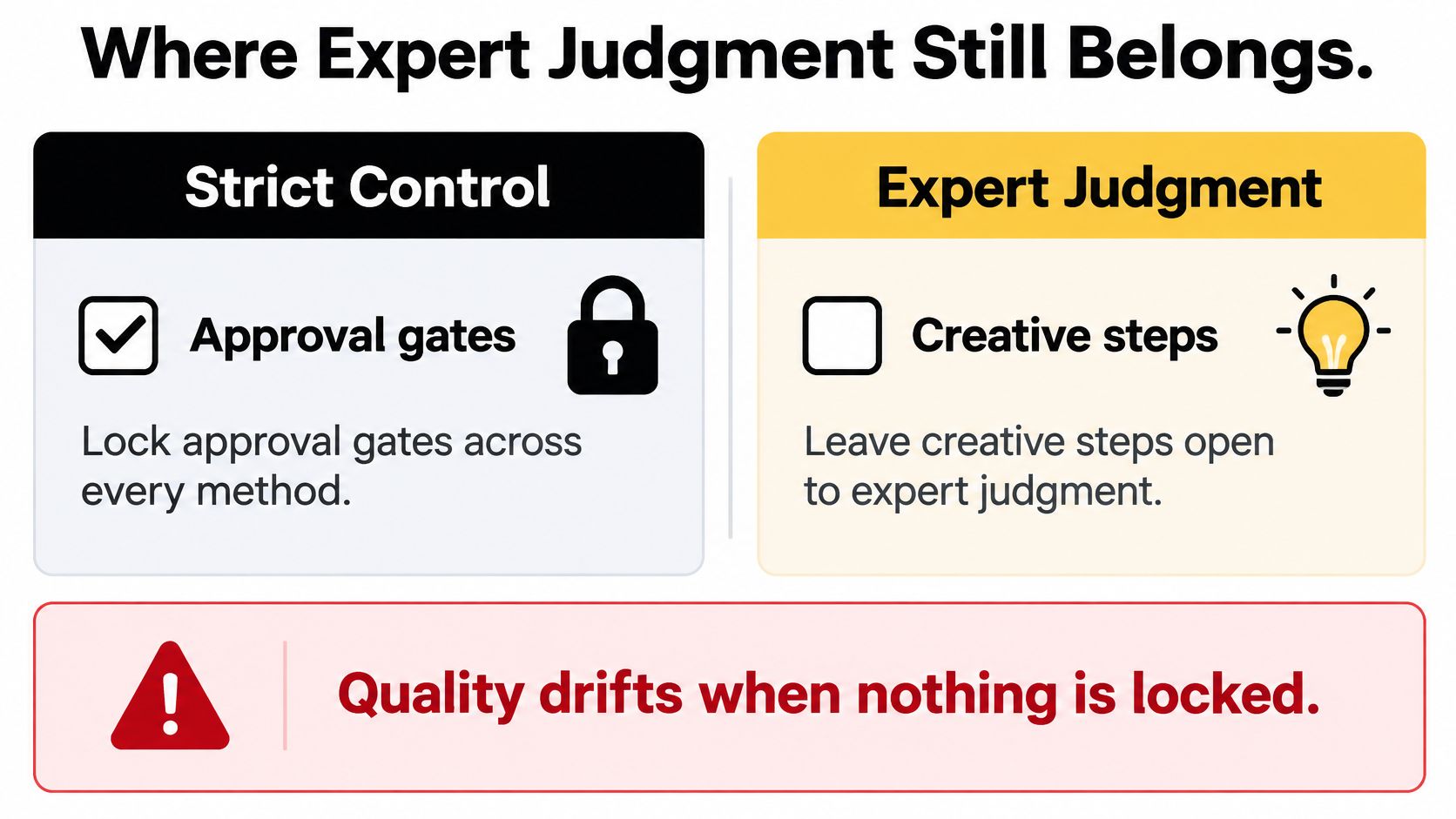
People experience SOPs as bureaucracy when managers lock every creative step. Quality becomes inconsistent when nobody locks anything. A GEPROS literature review on SOP implementation identifies this tension between repeatability and autonomy, alongside administrative complexity and resistance to change.
The answer isn't to choose between control and expertise. It's to define which decisions require permission and which belong to the practitioner.
Keep strict control over approval gates, security and privacy review, client handoffs, production changes and change logging. Leave discovery, experimentation, estimation and problem-solving flexible, provided their outputs satisfy the next gate.
Make deviations authorized and visible
Use an exception path that operators can follow without negotiating a new process each time:
- Authorize the deviation. Only the accountable role named in the SOP may approve an exception within its authority. An internal waiver can't override a legal obligation or a customer's contractual rights.
- Record the rule being bypassed, why the normal path won't work, the alternative action and the risk accepted. Attach the relevant evidence rather than writing only that the work was urgent.
- Notify the revision owner. Make the exception visible within the established reporting cadence so it doesn't remain buried in a private conversation.
- Require review when similar exceptions recur. Set the recurrence threshold explicitly in the SOP and treat it as an internal operating rule, not an industry benchmark.
For example, an agency estimator may switch from story-point sizing to a discovery workshop when integrations are poorly understood. That's a professional method choice. The estimator still can't skip client acceptance or authorize shipment without the agreed evidence.
Treat resistance as diagnostic information
A bypass isn't automatically a discipline problem. Ask what the operator encountered: an unavailable approver, a duplicated check, an unclear role boundary or a decision rule that doesn't cover the actual case.
Bring the people who execute that step into its redesign. Ask them to demonstrate the awkward case, then test whether the proposed revision lets them proceed safely. Explain the reason for the change and train the new version before enforcing it.
Keep the distinction clear: specialists can challenge an impractical rule, but they can't remove it. A good SOP makes the safe path fast and makes every shortcut visible.
Governing AI Work After Go-Live
45% of respondents identified speed-to-market pressure as the primary obstacle to advancing AI governance, while 34% cited insufficient budget and 33% insufficient internal knowledge, according to the 2025 Pacific AI governance survey. Under that pressure, approving a tool is easier than designing the controls needed to operate it.
An approved-tool policy doesn't control a live agent. Put an AI workstream inside the project's delivery milestones, with production responsibilities assigned before launch.
AI controls inside a project SOP
| Control | Before launch | After launch |
|---|---|---|
| Approved-use boundary | Tasks the agent may and may not perform | Reapproval if the task expands |
| Data and prompt handling | Which customer data may enter a prompt | Who can read logs and for how long |
| Human review threshold | Impact or confidence level that needs a person | Production sample rate |
| Output verification | Test set and pass bar | Review of escaped defects |
| Incident escalation | Owner, fallback process and disable rule | Time allowed to take the agent offline |
| Change or retirement | Version owner and release note | Periodic reapproval date |
Design controls around possible harm
A drafting assistant whose output a person always edits needs different controls from a voice agent that speaks directly to customers. Classify the workflow by what an error could cause, who would be affected and whether an operator can reverse the action.
Name a business owner who is accountable for the outcome, not only an IT administrator or legal reviewer. That owner must approve the use boundary, production review arrangements and fallback process.
Specify actual review instructions. Don't write that someone should monitor quality. Identify which outputs reviewers sample, how they label defects, where they record findings and what requires immediate escalation.
Keep those instructions beside the agent's configuration and release history through structured documentation for AI agents.
Apply the boundary to lead qualification
Say an agent scores inbound leads and drafts the first reply. Its approved boundary allows it to use authorized CRM fields, but prohibits promising pricing, changing commercial terms or exporting contact lists.
Separate lead suitability from confidence in the assessment. A low-suitability lead isn't necessarily an uncertain decision; missing or conflicting information is. Route uncertain assessments and consequential actions to a salesperson under the SOP's review rule.
After deployment, the Sales Operations owner reviews sampled scores against human assessments and records escaped errors. If the agent sends an unauthorized promise, the incident path should let an operator disable outbound actions and return the workflow to manual handling.
A support agent follows the same pattern: answering approved questions may be allowed, while account changes require authorization. Reapprove either workflow when its task, data sources or model changes, and retire versions that no longer meet the approved boundary.
Fit these controls into executable SOP fields: a launch or change trigger, retained test evidence, an incident escalation route and a named revision owner.
Choose One Fragile Workflow to Document First
Choose the project type that's slow, fragile or trapped between tools, not the one that's easiest to describe. Client onboarding, a release with a manual handoff, lead qualification and a recruiting screen built around copy-and-paste are useful candidates.
Apply these selection checks:
- Repetition: The workflow recurs often enough to test the procedure again while the learning is still useful.
- Shared ownership: Multiple roles touch the work, especially across a departmental boundary.
- Visible consequences: A missed step affects a customer, a delivery commitment or revenue.
A complicated workflow isn't automatically the best starting point. Prefer a bounded path with an identifiable beginning, an observable result and an owner who can run a pilot.
Leave a tested procedure behind
For a client-onboarding pilot, follow an actual account from the approved sales handoff to customer acceptance. Capture where the operator has to ask an undocumented question, chase access or reconstruct a decision from messages.
Write the process card, attach the relevant controls, and record deviations during use. Add AI controls only if an agent is involved. Don't turn the first procedure into a speculative policy for tools the team hasn't deployed.
Start small: The first useful deliverable is a procedure somebody has successfully operated, not a folder full of approved drafts.
If the workflow also requires systems integration, test the combined path rather than documenting each application in isolation. Confirm what happens when a CRM update fails, a notification isn't delivered or the receiving role rejects the handoff.
At MakeAutomation, launch includes deployment, a client walkthrough, documentation or SOPs, and training for the people who'll operate the system. The client owns the workflows, custom code, configurations and project documentation created for their project.
You can start with a defined project and then continue with ongoing optimization, new automation requests or a maintenance retainer. That keeps the initial decision bounded without preventing later improvements.
The decision isn't whether to build a complete SOP library immediately. It's whether the next repeating project will leave a tested procedure behind it.
How to Write, Review and Improve Each SOP
A study of standardization-based coordination mechanisms found that standardizing work processes had a significant effect on project performance, with the relationship influenced by project and organizational conditions. Use standardization to reduce avoidable variation, not to assume every project has identical needs.
Build from observed work
Map the current path from trigger to closure. Watch operators perform the work and mark where tasks wait, return for correction or depend on a particular person. Include unofficial spreadsheets and private messages if people rely on them.
Measure the loss before rewriting the process. Capture active work time separately from waiting, and count defects and corrections using consistent definitions. Our Discovery & Audit phase maps current workflows, identifies bottlenecks and quantifies the time and money lost to manual processes.
Prioritize the pain worth fixing. At MakeAutomation, we score processes on time saved, error reduction and business impact. Use that assessment to choose a bounded improvement rather than starting with whichever procedure attracts the most complaints.
Fill the process card and label each control fixed or flexible. Write observable actions: attach the acceptance result and request the authorized decision, rather than coordinate approval. Put instructions where operators need them, such as the relevant Jira transition or CRM task template.
Add the failure and exception paths. Test missing inputs, rejected approvals and unavailable systems, including the AI production controls where relevant. Operators need to know whether to pause, retry, escalate or switch to manual handling.
Pilot, version and train. Have the people who do the work use the procedure, then resolve unclear instructions before making it mandatory. Publish the approved version in a shared library and mark superseded versions as retired, with a note explaining their replacement.
Review when operations change, not only when a calendar reminder arrives. Assign each trigger to an observable signal and give the revision owner responsibility for deciding whether the procedure needs correction.
Connect review triggers to evidence
Use a compact review log rather than relying on general impressions.
| Review trigger | Concrete signal to inspect |
|---|---|
| Material process change | A new integration, approval role or required input |
| Repeated exceptions | Recurring waivers for the same step or condition |
| Customer-impacting defect | An acceptance failure, incorrect output or missed handoff |
| Worsening performance | Longer waits, more reopened work or slower change decisions |
Track handoff age, approval latency, reopened tasks, defect escape rate, change-request cycle time and exception frequency alongside schedule variance, cost variance and customer acceptance. Define when each clock starts and stops so reviewers compare like with like.
When an indicator worsens, inspect the work before blaming the operator. An unrealistic step, fuzzy responsibility, missing automation or absent decision rule may explain the pattern.
Keep the revised instructions connected to the live workflow, and show operators what to do when the normal path breaks. Stop expanding the library until the first procedure is in use and its owner can demonstrate how it's maintained.
MakeAutomation maps project workflows, identifies automation opportunities, tests failure paths and hands over documented systems with operator training. Visit MakeAutomation to discuss a fragile workflow and define a practical project scope, including the approvals, evidence and exception handling your team needs to run it.