
Workflow Optimization Services: What They Include and Why
About 60% of occupations contained activities that were at least one-third automatable, according to McKinsey's workforce-transition analysis. That reframes the opportunity: you don't need a fully automated business to remove a meaningful amount of repetitive work.
The harder question is whether those activities should exist in their current form. Workflow optimization services should simplify the connected process first, eliminate unnecessary handoffs, and then automate what remains. Otherwise, you can end up moving incorrect information between disconnected tools faster than before.
What Workflow Optimization Services Include
A workflow optimization service maps how work moves between people and software, then removes manual steps, duplicate entry, and slow handoffs across the whole flow. Unlike a standalone automation build, it considers what happens before a task starts and after it finishes.
Say a prospect submits a demo request. Sending an acknowledgment is straightforward, but the complete workflow also needs to identify an existing account, assign the right salesperson, record consent, and stop inappropriate follow-ups. A useful service designs those connections around how your team works.
Core components of a workflow optimization service
| Component | What it covers | Typical tools |
|---|---|---|
| CRM and customer records | Keeping contact, deal and account data in sync across systems | Custom APIs, PostgreSQL, MySQL, Supabase |
| Lead handling and follow-up | Routing new leads and sending personalized outreach sequences | n8n, Make.com, Zapier |
| Notifications and documents | Status alerts, generated documents and follow-up reminders | n8n, Make.com, Zapier |
| API glue and middleware | Connecting tools, transforming data formats and combining API calls | Custom APIs, middleware |
| Webhook event processing | Handling payment and shipping events with retries and monitoring | Webhooks, Redis, MongoDB |
At MakeAutomation, we use n8n, Make.com, and Zapier for workflow builds, alongside custom APIs, webhooks, middleware, and supporting databases. The choice should follow the process requirements, not determine them.
A visual builder suits workflows that staff need to inspect and adjust. Middleware is useful when tools exchange incompatible formats, require caching, or need several API calls combined into a single endpoint. Webhook processing needs additional care because payment notifications and shipping updates can arrive late, repeat, or fail.
Find the right starting point
Think of a city retiming traffic lights, lanes, and signs together. Repainting a junction won't resolve congestion if drivers still meet a blocked road immediately afterward.
For founders also researching funding options for automation, the Gritt.io automation investor search offers a separate resource for exploring investors in the category. Funding research and operational design serve different decisions, so don't let a fashionable tool dictate your process.
Check which components your team still runs manually:
- Records: Staff copy contact or account details between tools.
- Follow-up: Someone checks a spreadsheet before sending the next message.
- Documents: People rebuild proposals or status reports from existing information.
- Events: Staff verify payments or shipping updates before another team can proceed.
Start where these activities connect, rather than treating each as an unrelated task.
Business Problems That Optimization Fixes
The scale of the opportunity is substantial: McKinsey Global Institute's January 2017 analysis found that about half of paid activities worldwide could technically be automated using technologies demonstrated at the time. Technical potential isn't an implementation promise, though. The practical opportunity is to redesign tasks while retaining human judgment where it matters.
Consider an illustrative e-commerce scenario. An operations coordinator opens each order, checks payment status, copies delivery details, and asks the warehouse to confirm availability. When a customer changes an address, the coordinator must locate every copy and update it.
The visible problem is typing. The deeper problem is that nobody has defined which record controls fulfillment or how an amendment reaches the warehouse. Automating the copying without resolving that ambiguity makes mistakes harder to untangle.
Recognize the recurring symptoms
The same pattern appears across B2B and SaaS operations:
- Duplicate entry: Sales and delivery teams maintain separate versions of customer details.
- Delayed responses: New leads wait while someone decides who should reply.
- Memory-based follow-up: Promises disappear when the responsible employee is away.
- Inbox approvals: Requests sit without a visible owner or escalation route.
- Manual reporting: Staff reconstruct operational history instead of reviewing current information.
- Fragile onboarding: A knowledgeable employee becomes the unofficial instruction manual.
Hiring doesn't automatically solve these problems. Each new employee inherits the existing handoffs and needs colleagues to explain undocumented exceptions.
Where the friction spans marketing, sales, and customer success, Revenue Nomad's guide to when to hire a RevOps consultant helps clarify whether you need broader revenue-process ownership alongside implementation support.
Diagnostic question: Which recurring activity stops moving when its usual owner takes leave?
Don't assume everyone else has already solved this. Workato's 2024 Work Automation Index found that business operations teams automated 27.7% of their processes in 2023, the highest share among the business and IT groups measured.
For your own self-check, list the tasks that consume the most time and depend most heavily on a particular person. Bring the actual forms, messages, and records involved, not just a description of the frustration.
Metrics That Prove Efficiency and Scalability Gains
Measurement separates optimization from additional tooling. A workflow can produce more automated runs without delivering completed work more quickly or accurately.
Process mining helps establish what really happens. The technical overview of process mining describes reconstructing workflows from event logs, rather than relying only on interviews or intended procedures. Timestamped CRM, ticketing, ERP, and project-management events can reveal where cases wait, repeat steps, or change owners.
Metrics to baseline before and after optimization
| Metric | What it reveals | How to measure it |
|---|---|---|
| Cycle time | Total elapsed time from trigger to completion | Timestamp of completion minus timestamp of trigger |
| Waiting time | Time work sits in a queue before anyone acts on it | Gap between a handoff event and the first action |
| Throughput | Cases completed per day or week | Count of completed cases per period |
| Rework rate | Share of cases returned for correction | Cases reopened or re-entered divided by total cases |
| Handoff frequency | How many times a case changes owner | Count of owner changes per case |
| Exception rate | Share of automated runs that need human action | Failed or flagged runs divided by total runs |
Define a case before calculating anything. It might be a lead, support ticket, recruitment application, or onboarding request, but its identity must remain consistent across systems.
Also distinguish a technical retry from a case requiring correction. Otherwise, a harmless connection retry and a customer-facing mistake can appear equivalent in your reporting.
Read the measures together
Suppose a quote takes little active work but spends most of its elapsed time awaiting approval. Faster document generation won't fix the delay. Delegated approval, clearer eligibility rules, or better routing may be more useful.
Conversely, faster processing can conceal deteriorating quality. If throughput increases while exception and rework rates rise, employees may be correcting mistakes elsewhere.
Our guide to operational efficiency metrics provides additional context for choosing measures that match the business decision.
Measure completed outcomes, not just successful automation executions.
Establish a representative baseline and segment it by channel, customer tier, geography, or team where those differences matter. Compare equivalent groups after launch, using the same start and completion definitions.
For scalability, look for increasing throughput with stable cycle time and handoff frequency, then check staffing and working hours separately. Those process measures alone don't prove that headcount stayed unchanged.
Choose a small set of metrics before making changes. Record enough normal activity to capture routine cases and exceptions, rather than selecting an unusually quiet period that makes later comparisons misleading.
How an Optimization Engagement Runs Step by Step
A credible engagement produces more than a working automation. You should receive a clear design, an accountable launch process, and enough information to operate the result.
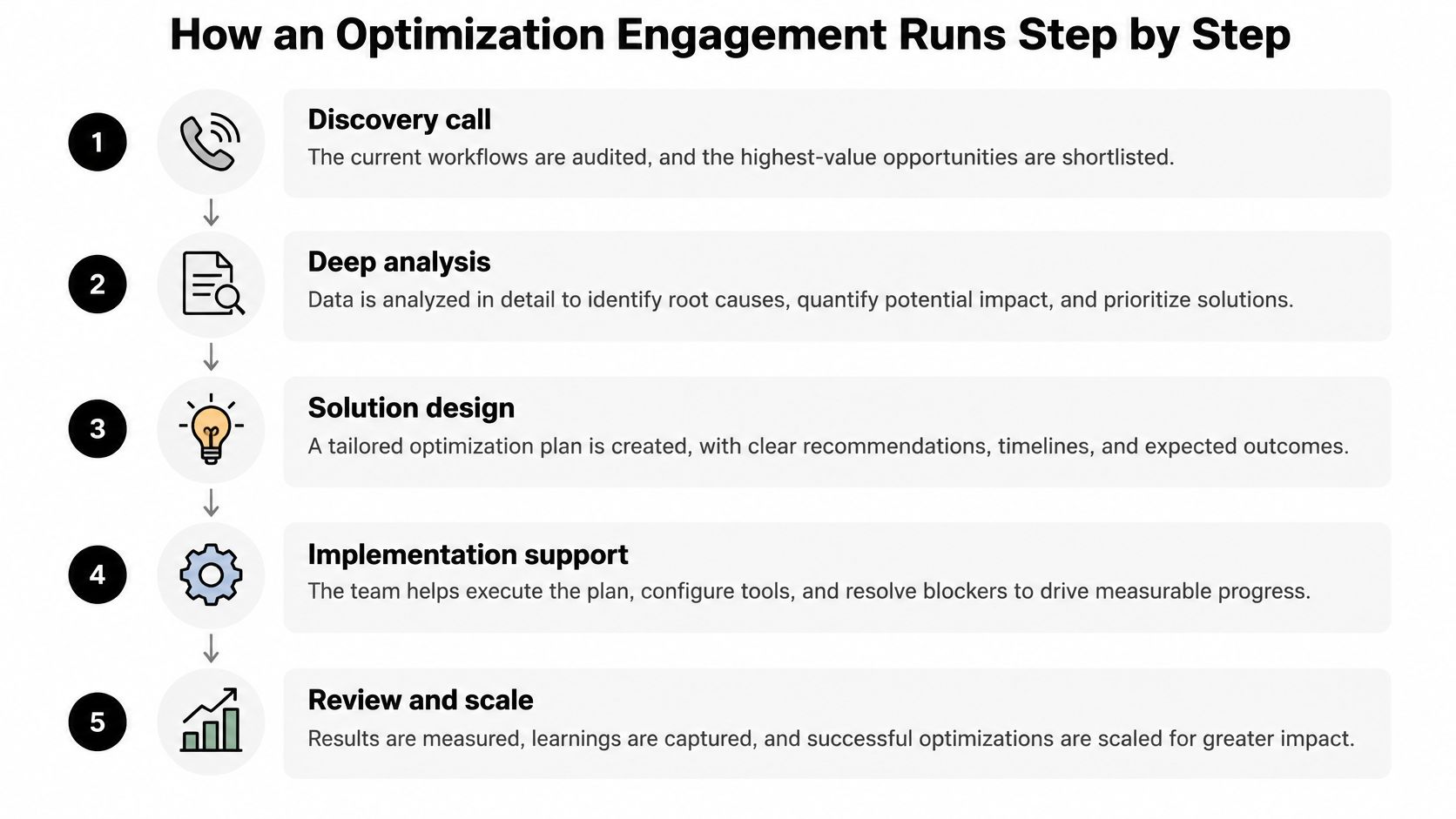
The process visual offers a high-level orientation before the detailed engagement checklist.
From discovery to an agreed design
Discovery call. We audit current workflows and shortlist the highest-value opportunities, then provide scope, timing, and pricing. You should leave with a defined problem and proposed boundaries, rather than an open-ended list of software purchases.
Process mapping. We draw the current flow and identify failure points where people retype data, approvals stall, or tools disagree. The deliverable should show triggers, owners, decision branches, and completion conditions; these business process mapping techniques help make those details visible.
Prioritization. We assess opportunities by time saved, error reduction, business impact, and implementation effort. You receive a practical build sequence that accounts for dependencies, so an attractive task doesn't jump ahead of the data cleanup it requires.
A process map should describe exceptions as carefully as the normal route. For example, an onboarding workflow needs a path for an incomplete contract, not just a signed agreement with every field populated.
That detail also prevents scope disagreements. Both parties can distinguish an agreed exception from a new requirement before development begins.
From implementation to ownership
Build with safeguards. Error handling, input validation, and monitoring belong in the implementation from the start. Our API builds include authentication, rate limiting, request logging, and load testing against expected volume, with testing that covers missing data and unavailable services.
Launch and monitor. We monitor performance, gather feedback, and tune the workflow after deployment. The useful deliverables are visible status, a way to report problems, and a comparison between actual behavior and the agreed design.
Handover. Documentation and training allow your team to modify maintainable workflows themselves. Alternatively, a maintenance retainer covers updates, performance monitoring, and issue response when you'd rather retain technical support.
For an additional video resource, use the player below.
Timing needs a defined scope. Simple workflows can often be completed in 1–3 business days, while email sequences and basic automations can take 1–2 weeks. Treat these as different scope categories, not interchangeable guarantees.
We handle strategy, deployment, and ongoing optimization without requiring customers to hire developers or learn new platforms. Your team still needs a named business owner who can approve changes and accept the handover.
Where Optimization Goes Wrong and How to Prevent It
More tools aren't necessarily the answer. IBM's discussion of application and agent sprawl, drawing on 2026 integration findings, reports an average of 957 applications per organization, with only 27% connected.
The practical risk is fragmentation: each additional trigger can create another place where records disagree or responsibility becomes unclear.
The image below captures the human burden of managing that complexity.

Repair the architecture before adding autonomy
Common failure patterns include speeding up intake until fulfillment becomes overloaded, allowing separate tools to create competing customer records, and leaving failed events without an accountable owner. Decide which steps to eliminate and which system controls each business record before connecting more actions.
Production readiness matters too. An Axis Intelligence automation statistics compilation cites a 2026 global survey in which only 21% of organizations had reached enterprise-wide production, with integration complexity, governance readiness, and skills shortages slowing progress.
Use these prevention rules:
- Authoritative records: Assign a source of truth for lead and customer data.
- Necessary work only: Remove duplicate entry before automating transfer.
- Approval boundaries: Require human authorization for sensitive customer-facing or money-related actions.
- Traceable decisions: Keep audit logs and a workable rollback path.
- Separate execution types: Distinguish deterministic rules from probabilistic AI judgments.
Our operations consulting case study offers another resource for evaluating operational improvement. In our delivery work, we audit failure points and rebuild with validation, error handling, and monitoring, then provide documentation and training for maintainability.
Watch for rising exception counts, duplicate records, and logic nobody can explain. Pause expansion until someone can account for the cause and the recovery procedure.
How to Choose a Workflow Optimization Provider
Choose the delivery route before comparing individual offers. The right arrangement depends on who can maintain the workflow after its original builder finishes.
Routes to optimized workflows compared
| Route | Best for | Main trade-off |
|---|---|---|
| In-house team | Companies with developers and steady change requests | Hiring can take time, and specialist skills may be difficult to secure |
| Freelance builder | One-off builds with a clear, fixed scope | Key-person risk when the builder leaves |
| Optimization service with retainer | Teams without developers that want an accountable builder | Ongoing monthly cost |
| Self-serve automation platform | Technical staff who will own every build | The team carries monitoring and fixes |
Compare the proposal, not the demonstration
An impressive demo only proves that a selected example works. The proposal should explain how the service will handle your actual records, exceptions, and operating responsibilities.
Evaluate the offer against these questions:
- Starting method: Does the work begin with mapping and a baseline, or a predetermined tool?
- Operational ownership: Is a named business owner responsible after launch?
- Failure coverage: Are validation, auditability, recovery, and escalation included?
- Commercial clarity: What does setup cover, and what belongs in recurring support?
- Portability: Will your team retain usable documentation, data, and access?
We support both client-managed changes through documentation and training, and provider-managed changes through retainer or per-request work. Choose according to your team's capacity rather than assuming either arrangement is better.
Request a sample scope naming the outcome measures and their review dates. Be cautious when someone guarantees a fixed improvement before examining the process, or can't explain how an exception reaches a person.
A working demonstration is evidence of a build. Clear ownership and recovery procedures are evidence of a service.
Start With a Free Audit of One Workflow
Pick one workflow with a visible problem, a known owner, and measurable activity. Lead assignment, customer onboarding, or recurring reporting can make a useful starting point when the boundaries are clear.
Keep the first decision narrow. You're not committing to replace your operating systems; you're deciding whether a specific flow can become simpler and more dependable.
MakeAutomation's free discovery call audits current workflows, identifies the highest-ROI automation opportunities, and provides a custom implementation plan with a clear timeline and pricing. Workflow Automation pricing starts at $1,500 setup plus $300 per month.
Prepare something concrete
Bring enough detail to distinguish a process problem from a software limitation:
- The workflow: Its trigger, intended outcome, and current failure points.
- Baseline measures: Cycle time, throughput, and a quality measure suited to the work.
- Approval authority: Who can authorize changes to records, messages, and business rules.
- Existing infrastructure: The tools, databases, and integrations already involved.
- Exceptions: Examples of incomplete inputs, unusual requests, and failed handoffs.
An anonymized record and a walkthrough of its journey are more useful than a broad request to automate operations. They let the discussion focus on what should change and what must remain under human control.
Choose the support model deliberately
You can begin with a defined project and continue with ongoing optimization, new automation requests, or a maintenance retainer. Per-request work suits a team with an internal owner who can decide what needs changing and coordinate access.
A retainer suits a team that wants continuing technical responsibility for updates, performance monitoring, and issue response. It doesn't remove the need for business decisions, but it gives your team a builder to implement them.
Book the audit for a workflow this month and judge the proposed plan against your baseline. A worthwhile proposal should make the next operational decision clearer, including when the best answer is to remove a step instead of automating it.
MakeAutomation offers workflow audits, connected-system design, implementation, and ongoing support for B2B and SaaS teams. Visit MakeAutomation to arrange a free discovery call, bring a workflow that's causing friction, and get a scoped plan for improving it.