SOP Development Software: A 2026 Guide for B2B Teams
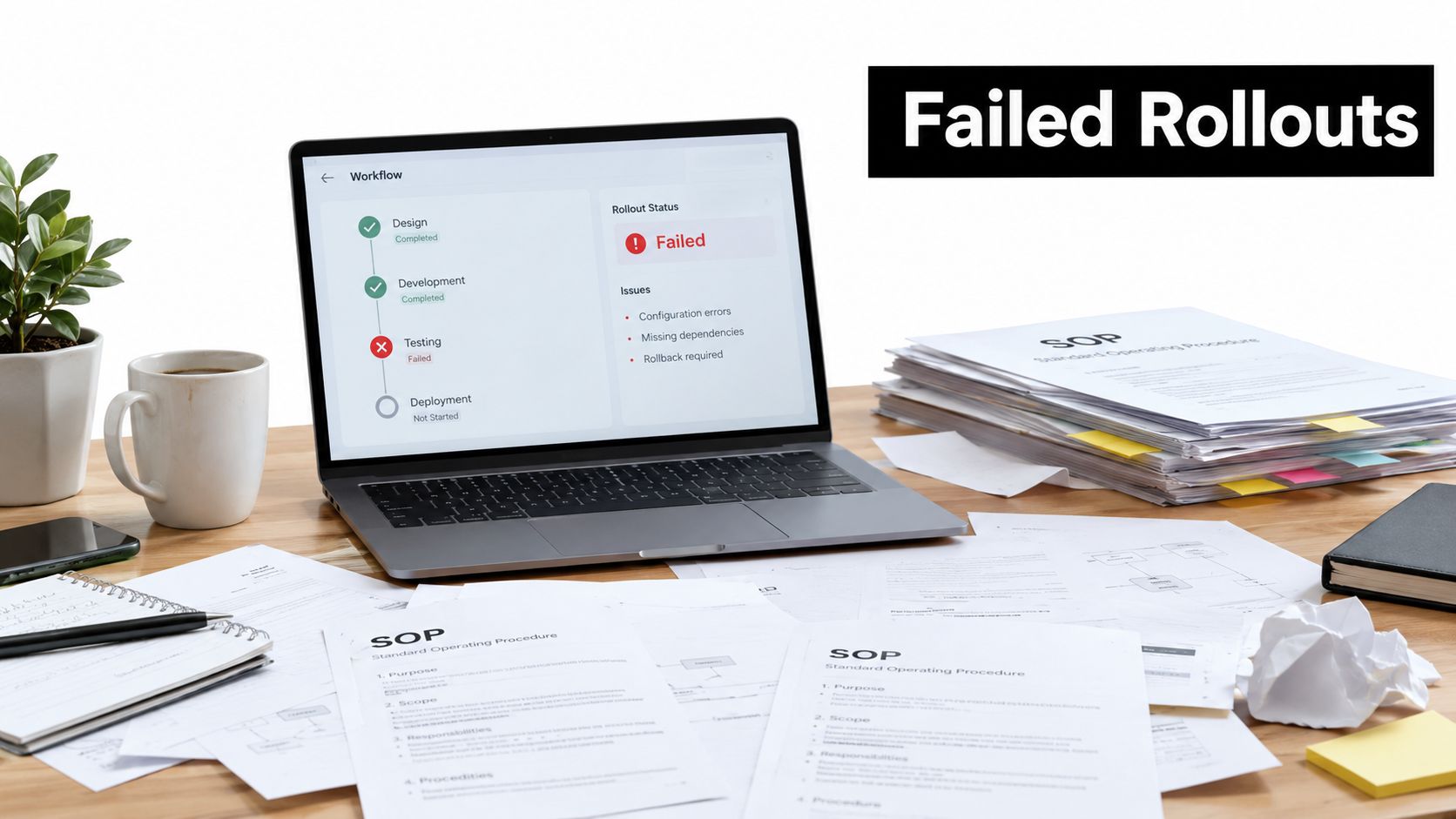
35–45% of SOP digitization projects fail or significantly underdeliver, and 60% of those failures are linked to change-management issues rather than tool capabilities. The practical answer is to choose sop development software that measures adoption and embeds procedures into workflows, not just software that produces polished documents.
That finding changes how operations leaders should evaluate the category. A fast recorder, a large template library, or an impressive AI writer can help create an SOP, but none of those features guarantees that employees will use the procedure when work gets busy. The true test is whether the platform connects instructions to ownership, approvals, exceptions, automation triggers, and evidence of completion.
A useful SOP is more than a page in a knowledge base. It can be a training asset, a controlled record, an operational checklist, and a trigger for the next action. This guide focuses on the difference between documenting work and making work repeatable.
The Hidden Failure Rate in SOP Digitization Projects
A revenue operations team can spend weeks documenting lead routing, client handoffs, and renewal procedures. The finished library looks organized. Each page has an owner, screenshots, and a consistent template. Yet representatives continue asking managers the same questions because the SOP lives in a separate system from the CRM, isn't assigned to anyone, and doesn't record whether the process was completed correctly.
That pattern explains why 35–45% of SOP digitization projects fail or significantly underdeliver, with 60% of those failures attributed to change-management issues according to APQC research on knowledge-management implementation. The problem isn't necessarily poor writing or weak software. Teams often introduce a documentation destination without changing the surrounding behavior.
Why polished documentation goes unused
Buyers commonly judge tools by the quality of their templates, the speed of AI drafting, or how attractive the published guide looks. Those criteria matter, but they answer the creation question, not the adoption question.
Ask instead:
- Point of use: Does the employee see the SOP inside the CRM, project tool, ticketing system, or other place where the task happens?
- Accountability: Does a named owner receive the assignment, and can a manager see whether the procedure was followed?
- Reinforcement: Does the system prompt review, re-attestation, or retraining after a policy change?
- Exceptions: Can the process handle the real-world branch where a customer, candidate, or incident doesn't follow the standard path?
A shared folder can store a procedure. It can't reliably show whether the current version was used during a handoff or whether an exception was escalated correctly. Teams beginning with basic documentation can use these free standard operating procedure PDFs to structure their thinking, but a template alone won't create operational discipline.
Practical rule: Treat the SOP as part of the workflow, not as the destination of the workflow.
The strongest business case connects SOP usage to outcomes leaders already care about, such as shorter cycle times, less rework, fewer stalled handoffs, and fewer repeated employee questions. Before selecting a platform, identify one process where adoption can be observed directly. If the proposed tool can't show whether people used the process correctly, its documentation features are doing only half the job.
Four Capabilities That Separate Tools That Work From Ones That Do Not
SOP development software isn't one uniform category. Independent testing of 13 tools found clear specialization across four capabilities, including process capture, controlled knowledge publishing, executable workflow management, and adoption analytics, as documented in The Digital Project Manager's SOP software evaluation.
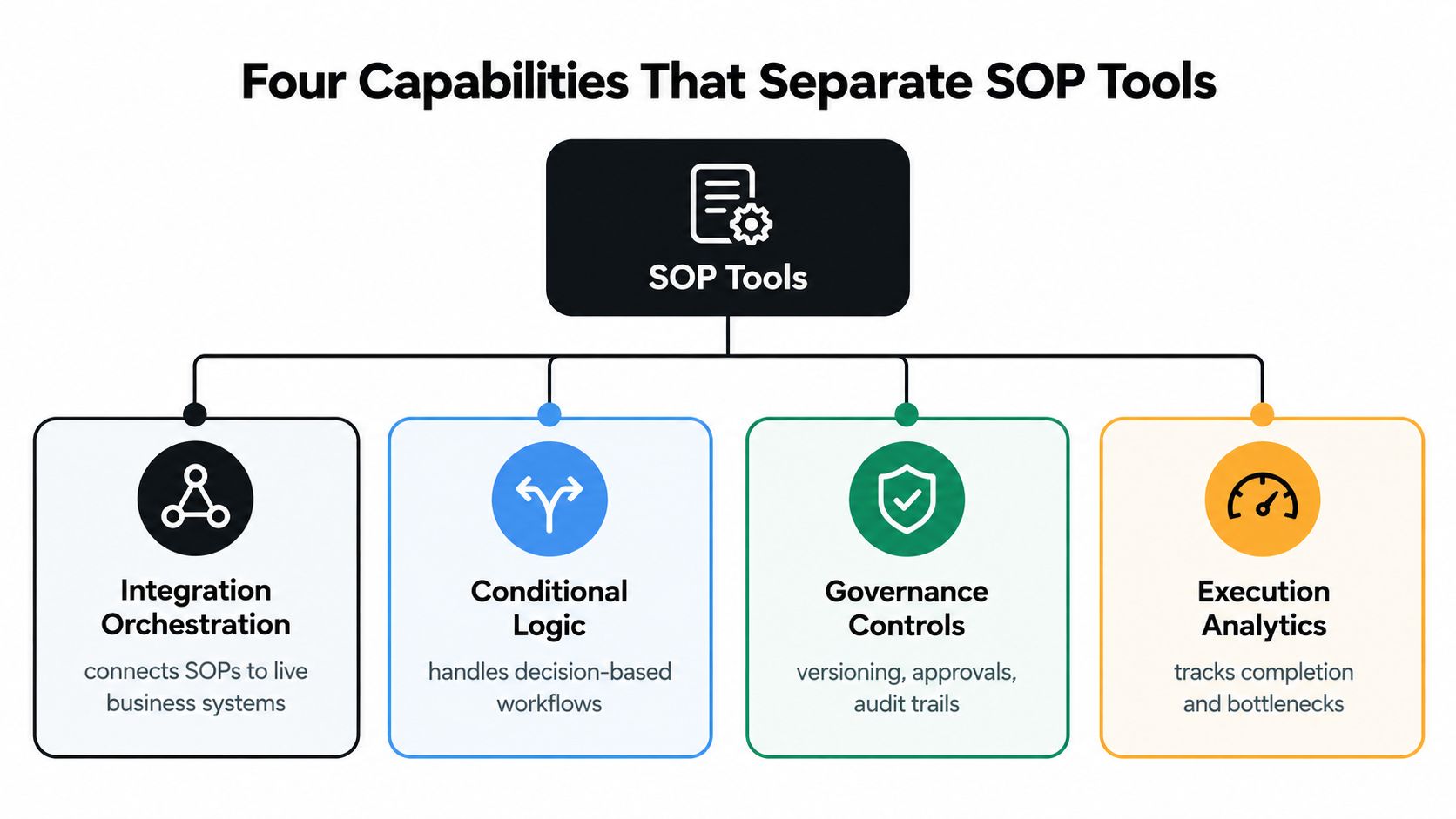
Process capture
Capture tools turn observed work into a first draft. Screen-recording products document clicks and actions, browser-guidance tools provide instructions while someone works, and AI-assisted systems can convert notes or recordings into a structured sequence.
This capability matters when subject-matter experts hold the process in their heads. It reduces the burden of starting from a blank page. It doesn't guarantee accuracy, however. A captured workflow may miss the reason behind a decision, the permission needed for a step, or the exception that experienced operators handle manually.
Measure capture time, editing effort, and the accuracy of the recorded steps. A tool that creates a draft quickly but requires extensive correction may not save much operational time.
Controlled knowledge publishing
Publishing capabilities determine how people find, read, and trust a procedure. Look for search, structured navigation, permissions, version states, review dates, and clear separation between draft and published content.
A knowledge base is often the right answer for stable reference material. It becomes less effective when employees must prove completion, follow recurring checklists, or submit evidence for an audit. Searchability is valuable, but retrieval isn't the same as execution.
Executable workflow management
Workflow systems turn instructions into assigned work. They can add approval gates, conditional logic, recurring tasks, deadlines, and audit trails. An SOP then begins to function as an operational control rather than a reference document.
Test whether the system can route a client onboarding process to different owners, pause for approval, and follow a different path when required information is missing. A static page can describe that logic. An executable platform can enforce it.
Adoption analytics
Analytics reveal whether the procedure changed behavior. Useful signals include completion rates, missed steps, drop-off points, adherence trends, and the questions employees continue to ask.
Score each platform across the full lifecycle:
- Capture: How quickly can a subject-matter expert create a usable draft?
- Publication: How long does review and approval take?
- Execution: Can the system assign, schedule, and record the work?
- Maintenance: Can an owner update every affected instruction after a process change?
- Analysis: Can operations leaders distinguish documentation volume from actual adoption?
A polished library without execution analytics can create false confidence. It shows what the company wrote, not what the company does.
Comparing Tool Categories by Execution Model and Governance Strength
The most useful comparison isn't a list of vendor features. It's a view of how each category behaves during real work. A static knowledge base may be excellent for finding a policy, while a workflow-centric platform may be better for managing a recurring client handoff with approvals and exceptions.
| Tool Category | Primary Strength | Governance Capability | Best Fit Scenario |
|---|---|---|---|
| Static knowledge base | Searchable, structured information retrieval | Usually supports permissions and revision history, but execution evidence may be limited | Stable policies, internal reference content, and broad knowledge libraries |
| Browser-guidance tool | Real-time instruction during software tasks | Can guide users, but may offer limited workflow ownership or audit depth | Onboarding users to CRM, support, and browser-based applications |
| Screen-capture automation | Fast creation from observed user actions | Often depends on manual review and manual maintenance | Capturing repeatable digital tasks and creating first drafts |
| Workflow-centric platform | Assignments, approvals, conditional logic, recurring procedures, and audit trails | Strongest fit for governed execution and accountability | Client onboarding, compliance workflows, incident response, and cross-functional operations |
The categories overlap, but their trade-offs remain important. A knowledge base usually creates less implementation friction because the team can publish pages and organize them into sections. That simplicity becomes a limitation when a process needs a required approver or a recorded completion event.
Browser-guidance tools reduce the distance between instruction and action. They work well when the user is already inside a web application, but they may not coordinate a process that crosses a CRM, project-management system, email approval, and billing platform.
Screen-capture automation helps subject-matter experts get moving. Its weakness is long-term governance. When a user interface changes, screenshots and step descriptions may become inaccurate unless someone owns the review and republishes the content.
Workflow-centric tools generally require more design work. Someone must define roles, branches, ownership, and escalation rules. That extra effort is justified when the process carries revenue, customer, security, or compliance risk.
The right category depends on whether the employee needs an answer, guidance, or a controlled sequence of actions.
Use the matrix to define the dominant execution model before comparing individual products. A team choosing a knowledge base for a process that requires approvals is solving the wrong problem. A team choosing a complex workflow engine for a simple internal reference page may create unnecessary adoption friction.
Use Cases Where Specific SOP Platforms Deliver Measurable Outcomes
The best platform becomes clearer when the process is specific. A CRM lead-routing SOP, a client onboarding playbook, a recruitment workflow, and an incident response procedure may all be called SOPs, but they place different demands on the software.
CRM lead routing
Lead routing needs ownership, timing, and exception handling. The platform should assign the next action to a named person, require the right qualification fields, and record what happens when a lead falls outside the normal routing rules.
A screen-capture tool can explain where to click in the CRM. A workflow platform is more appropriate when the SOP must trigger a task, notify a manager, or move a qualified lead to another stage. Measure the time from intake to assignment, the number of manual handoffs, and the frequency of incomplete routing records.
Client onboarding
Client onboarding crosses sales, delivery, finance, and customer success. Role-based access prevents every participant from seeing sensitive information, while approval gates stop the project from advancing before contracts, requirements, or access details are confirmed.
The key test is whether the platform can show the status of each milestone and identify the owner of the next step. Track delayed handoffs, incomplete kickoff information, and the time a new team member needs to complete the process without manager intervention.
Recruitment handoffs
Recruitment SOPs benefit from structured decision points. Screening, interview scheduling, feedback collection, and offer preparation each involve different owners and may branch according to role, location, or candidate status.
A searchable knowledge base can explain the policy, but an executable workflow can assign interview feedback, flag missing approvals, and create a repeatable record. Evaluate the accuracy of captured steps, the rate of missed tasks, and the questions recruiters still escalate to operations.
Incident response
Incident response exposes weak SOP design quickly. The process must branch according to severity, customer impact, system availability, and escalation requirements. It also needs timestamps and an auditable record of decisions.
Choose a platform that supports conditional paths, escalation ownership, and completion evidence. A static document can remain useful as background guidance, but it shouldn't be the only control for a high-consequence response.
The common thread is measurement. Don't judge the tool by how many SOPs the team publishes. Judge it by whether the selected workflow becomes easier to execute, easier to audit, and less dependent on individual memory.
A Practical Evaluation Framework Using Representative Workflows
Vendor demos are curated. Your evaluation should be uncomfortable enough to expose the gaps. Give every shortlisted platform the same representative process and ask it to handle the parts that marketing screenshots often avoid.
Start with a process that contains an approval, an exception branch, and a recurring task. CRM lead routing, client onboarding, recruiting handoffs, and incident response all work well because they include real ownership and decision points.
Build the test
Document the process as it really runs, including manual workarounds. Don't give the vendor a simplified version that hides the handoffs and exceptions. Then ask the platform to represent the workflow without changing the business rules.
Check for:
- Access control: Can internal employees, contractors, clients, and administrators receive different permissions?
- Version states: Can the team distinguish draft, approved, published, and retired content?
- Ownership: Can every procedure have an owner and a scheduled review date?
- Revision history: Can an auditor see what changed, who approved it, and when it became effective?
- Execution evidence: Does each run produce a usable completion record?
- Reporting access: Can the team export data or use an API for operational reporting?
A platform that handles the happy path but fails at the exception branch isn't ready for a critical workflow.
Record comparable evidence
Use the same evaluation notes for every candidate. Record setup time, manual handoffs, the share of executions that produce an auditable record, and the time needed to update all affected instructions after a policy change.
Have a non-technical employee complete the procedure without coaching. Their experience exposes unclear language, hidden dependencies, and navigation friction that an administrator may overlook. Then ask the employee what they would do if the standard path didn't apply.
For broader guidance on maintaining clear, usable process documentation, refer to software documentation best practices. The important point is to test behavior, not just authoring speed.
Score the result
Create a weighted score based on process risk. A regulated workflow should give governance and evidence more weight than visual polish. A simple onboarding reference may give ease of use and search more weight.
Don't accept a platform because it produces attractive instructions in a demo. Accept it when a representative user can find the current procedure, complete it correctly, handle an exception, and leave behind evidence that the process ran as intended.
Why Executable Workflows Outperform Static Knowledge Bases for Growth Teams
Growth teams rarely struggle because they lack another document. They struggle when a decision has no owner, a handoff has no required data, or nobody can see whether the next action happened. A static knowledge base can explain how a sales representative should route a lead. An executable workflow can assign the lead, require qualification data, request approval for an exception, trigger the next task, and record the outcome.

The difference becomes clear when work crosses departments and systems. Sales operations, client delivery, recruitment, and compliance-sensitive processes need named owners and visible status. Role-based access, version states, revision history, and evidence of completion support accountability. Adoption analytics add another layer: teams can identify abandoned steps, repeated exceptions, and procedures that employees routinely bypass. Those signals show whether an SOP changed behavior or merely added another page to search.
A static tool still suits a short policy, product reference, or rarely changing procedure without completion tracking. The risk comes from applying that model to work that depends on handoffs, approvals, deadlines, or system actions. In those cases, a template library can document the intended process while the unofficial workaround remains faster.
Weight governance according to risk
Some independent rankings use a model that assigns approximately 40% to feature depth, 30% to ease of use, and 30% to value, as described in Document360's SOP software evaluation framework. That model gives teams a starting point, but the weighting should reflect the consequences of failure.
For a low-risk internal reference, ease of use may matter most. For incident response or compliance evidence, governance, auditability, integration, and adoption data deserve greater weight. A pleasant interface cannot compensate for unclear approval status, missing execution records, or an inability to distinguish current instructions from drafts.
Selection principle: The more accountable the process, the less you should optimize for documentation aesthetics alone.
Executable workflows connect SOPs to automation triggers. Completing a client onboarding step can create a delivery task. Approving a recruitment stage can notify the hiring manager. Resolving an incident can start a post-incident review and assign an SOP update. These triggers reduce the gap between knowing the process and performing it.
That connection makes documentation part of the operating layer. A production AI knowledge base can support structured retrieval, but retrieval should reinforce governed execution rather than replace ownership, approvals, or completion evidence.
The visual above represents the collaboration needed to define ownership, exceptions, and system actions. Once those decisions are clear, the platform should make the approved route easier to follow than the workaround, while showing where adoption breaks down.
AI-Generated SOPs Require Governance and Privacy Controls, Not Just Speed
AI can turn a recording, transcript, or prompt into a first SOP quickly. The draft may still contain incorrect steps, expose confidential information, or describe an outdated process in language that sounds authoritative. Speed reduces drafting effort. It does not establish trust.
Only 36% of surveyed organizations report strong generative-AI documentation capabilities, while 51% describe their capability as moderate and 13% as weak, according to the 2025 AI Governance Benchmark Report. The figures show that drafting capacity is developing faster than the controls required to review, approve, and maintain AI-generated procedures.
Require human review where errors matter
Approval should match the risk of the procedure. A basic navigation instruction may need a quick subject-matter review. A workflow involving customer data, access rights, financial decisions, hiring, or incident escalation needs explicit human approval before publication.
Record the source used for the draft, the reviewer, the approval date, and the version that became effective. Without that history, a team may be unable to explain why a procedure was published or identify which instructions an employee followed.
Test the draft against the live process. Ask an operator to perform the workflow and compare each step with the generated SOP. Differences often expose an undocumented workaround, a permission dependency, or a decision rule that the recording failed to capture.
A clean draft is only a starting point. The workflow must also show who can approve an exception and what happens when execution stops.
Protect data before it reaches a model
Data protection was the leading AI concern for 64% of respondents in a separate 2025 compliance survey. The report also found that 26% reported having no employee-AI policy but planning to create one. These findings place privacy controls at the beginning of AI-assisted documentation, before employees upload source material.
Define what employees may submit. Customer records, employee details, credentials, proprietary operating methods, and regulated information may require redaction or exclusion. Permissions should differ for internal operators, contractors, and clients. A generated SOP can reveal more context than the person performing the task needs.
The platform should support data classification, access restrictions, and a record of who viewed or changed the procedure. Those controls reduce the chance that a useful workflow becomes an unnecessary disclosure.
Trigger review when the process changes
Maintenance turns AI governance into daily operating practice. Connect major workflow, product, policy, or automation changes to an SOP review trigger. If a CRM field changes, an approval rule disappears, or an automation route is redesigned, affected procedures should enter a review queue.
Use AI governance best practices to define approval rules, data classification, and accountability before expanding AI-generated documentation across the company. The goal is controlled use, with drafts that remain auditable, privacy-aware, and maintainable.
AI can reduce documentation effort while increasing the need for version control, approval history, access management, data classification, and process monitoring. Adoption analytics should show whether employees follow the published route, where they abandon it, and which changes require a new automation trigger.
The fastest drafting tool is not automatically the safest operational tool. Choose a platform that helps people verify, execute, and update procedures after publication.
MakeAutomation helps B2B and SaaS teams implement documented automation workflows, create SOPs for deployed systems, and support adoption with recorded walkthroughs and team training. Visit MakeAutomation to discuss a representative workflow and turn it into a governed process your team can execute and measure.