The Form of a Product: A Founder’s Guide to Scaling
You probably know the feeling. A customer problem is clear, demand sounds real, and the product idea makes sense in a sales call. Then the hard question shows up: should you sell this as a service, package it into software, offer a recurring platform, or expose it through an API and let clients build around it?
That decision looks tactical at first. It isn't. The form of a product shapes who buys, how they buy, what they expect after purchase, and how much operational complexity lands on your team. Founders often treat form as packaging. In practice, it's closer to infrastructure.
A strong product in the wrong form creates friction everywhere. Sales has to over-explain it. Onboarding becomes custom. Support carries preventable load. Ops teams build workarounds instead of repeatable systems. A weaker product in the right form often scales faster because buyers understand it, teams can deliver it consistently, and the business can automate around it.
Your Product's Form Is Your Company's Blueprint
A founder starts with a useful capability. Maybe it's outbound lead qualification with Voice AI. Maybe it's SOP automation for agency operations. Maybe it's recruitment workflow coordination across Airtable, LinkedIn, and HubSpot. The next move feels simple: package it and sell it.
That's where many companies choose their future operating model.
If you offer the same capability as a done-for-you service, you need strong delivery management, clear handoffs, and margin discipline. If you turn it into SaaS, you need onboarding, product analytics, support coverage, and a roadmap that can serve many customers without constant exceptions. If you sell it as an API, you're no longer only solving the end problem. You're also supporting developers, versioning, authentication, and implementation risk.
The importance of form isn't new. In retail, product form influenced buying behavior long before software teams started debating pricing pages and onboarding flows. A landmark POPAI study found that 76% of purchase decisions were made in-store, with product form attributes influencing up to 24% of those impulse buys, according to this review of product attributes and form effects.
That principle carries over to software. Buyers don't only evaluate what your product does. They evaluate how it arrives in their workflow.
Form drives the whole business
A founder who chooses product form is also choosing:
- Sales motion. Self-serve trial, founder-led sales, partner implementation, or procurement-heavy enterprise selling.
- Operational design. Manual delivery, semi-automated onboarding, or fully standardized fulfillment.
- Customer expectation. Advice, outcomes, control, flexibility, or speed.
- Scalability path. More headcount, better systems, or stronger infrastructure.
Practical rule: If your sales process needs one form but your delivery model needs another, the business will feel unstable even when revenue is growing.
Design teams often frame this as the relationship between form and function. Founders should too. The strongest businesses align the delivery format with the job the buyer needs done, the team's execution capacity, and the process discipline required to scale. That alignment is what makes the form and function in design conversation a commercial decision, not just a design one.
The Core Categories of Product Form
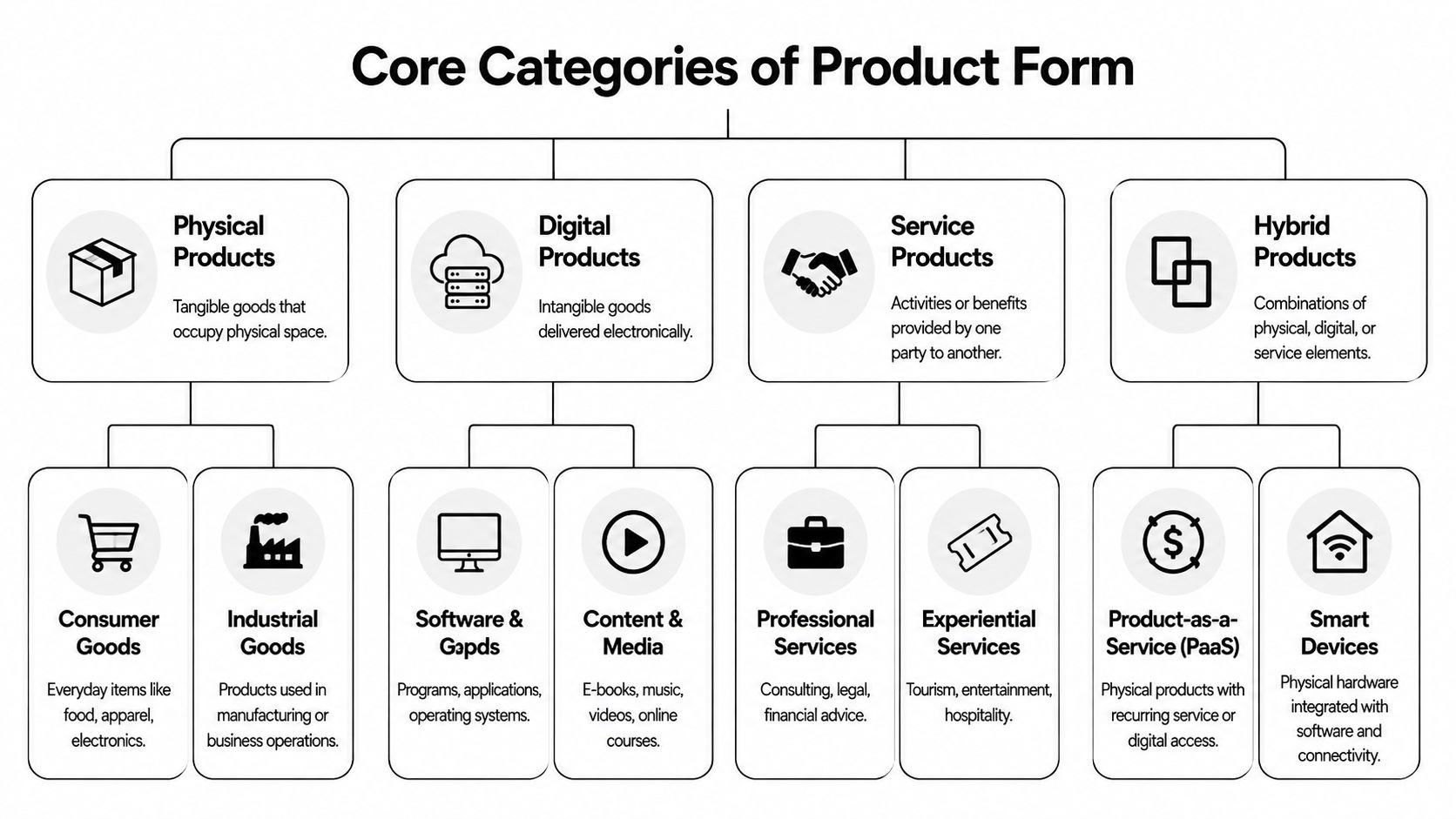
Most products fall into a small set of forms. Once you can name them clearly, strategic decisions get easier. You stop arguing about features and start evaluating delivery models.
Physical products
Physical products are tangible goods. They take up space, require production or sourcing, and create logistics overhead. In consumer markets, this includes packaged goods and electronics. In business settings, it includes equipment, office devices, and specialized hardware.
The key feature of physical form is that value is embedded in the object itself. A buyer receives the thing, owns it, and expects it to perform reliably.
For founders in automation-heavy sectors, physical form usually matters when hardware is part of the workflow. Think scanners in warehouses, call devices in field operations, or smart access tools tied to software.
Digital products
Digital products are delivered electronically and usually have low marginal delivery cost. This category includes software, templates, playbooks, media, online courses, and downloadable assets.
A digital product behaves like a reusable blueprint. You build once, distribute repeatedly, and improve over time. That sounds efficient, but it creates a different burden: usability, documentation, onboarding, and retention matter more than physical delivery.
A founder selling SOP libraries, workflow templates, CRM automation packs, or training modules is operating in digital product form even if consulting helped create the initial version.
Services
A service is expert labor packaged around an outcome. The client pays for execution, judgment, or access to capability they don't want to build internally.
Services work well when the problem is messy, implementation is high-stakes, or the buyer wants speed without hiring. They break down when every engagement is bespoke and no standard delivery method exists.
Common examples in B2B include:
- Advisory work such as process audits, GTM consulting, or automation strategy.
- Implementation services like HubSpot migration, Zapier workflow setup, or AI agent deployment.
- Managed operations where a team runs parts of outreach, reporting, or recruiting on the client's behalf.
SaaS and subscriptions
SaaS is a recurring software utility. The buyer isn't purchasing a one-time asset. They're paying for continuous access, updates, hosting, and support.
This form works best when the customer has an ongoing workflow. CRM, analytics, project management, recruiting pipelines, and support systems fit naturally here because the job never really ends. The work repeats, the data accumulates, and customers want continuity.
Subscription models can also sit on top of non-software products. A founder may package recurring reporting, content, or managed monitoring as a subscription without building full SaaS.
APIs and platforms
An API or platform is a set of building blocks. Instead of delivering a finished end-user experience, you provide capabilities that other teams integrate into their systems.
This is powerful but demanding. Developer-facing products need strong docs, predictable behavior, authentication, version control, and implementation support. The user often isn't the buyer, and the buyer often isn't the daily operator.
A surprising number of “software ideas” are actually one of three things in disguise: a service with a dashboard, a workflow product with human setup, or an API that still needs a service wrapper.
Hybrid models
Many strong companies are hybrid by design. They combine forms to match how buyers adopt change.
Examples include:
- Service plus software where onboarding and setup are done for the client, then handed into a recurring platform.
- Software plus API where non-technical users get dashboards and technical teams get extensibility.
- Digital product plus community or coaching where templates alone aren't enough to drive implementation.
If you want to see how markets classify and surface different categories of tools, directories like the PeerPush discovery platform can be useful because they show how products are grouped by buyer intent rather than by internal company org charts.
Strategic Implications for Each Product Form
Choosing the form of a product changes the business long before it changes the website copy. It determines what your team has to get good at and where mistakes become expensive.
SaaS rewards clarity and punishes ambiguity
For B2B SaaS, form becomes concrete inside the spec. A proper Product Specification defines the technology stack, performance expectations such as <200ms API response time, and integration points. It also limits confusion before engineering starts. According to Product School's guidance on product specifications, 42% of engineers cite ambiguous specs as a top reason for project failure, and scope creep inflates development costs by 25% on average.
That has practical consequences. If your SaaS promise is standardization but your internal spec is vague, support tickets pile up, implementation gets custom, and roadmap discipline slips.
Common SaaS trade-offs look like this:
- Advantage. Recurring revenue and standardized delivery.
- Cost. Ongoing product maintenance, support burden, and pressure to keep adoption high.
- Failure mode. Shipping broad features without defining the exact workflow they support.
Services sell trust but strain margin
Service form makes sense when the buyer needs judgment more than tooling. A founder can close revenue faster with a service than with a fully built platform because the client is buying expertise and execution.
But service businesses absorb variability. One client wants weekly strategy calls. Another needs Slack access. Another expects custom reporting and process design. Unless the delivery model is standardized, the business grows by adding people rather than by improving systems.
A well-run service business productizes its own operations. It doesn't sell “whatever the client wants.” It sells a defined engagement with repeatable inputs, milestones, outputs, and escalation rules.
Field note: The more premium the service, the more important boundaries become. High-touch doesn't mean undefined.
APIs create leverage and implementation risk
An API can become deeply embedded in a client's operations. That's an advantage because replacement becomes harder once integration is complete.
The trade-off is that value realization often depends on someone else's engineering team. If adoption stalls, it may not be because the product is weak. It may be because integration wasn't prioritized, documentation was thin, or the buyer underestimated internal effort.
That's why API companies often add support layers such as sandbox environments, implementation help, and starter apps. Pure technical flexibility isn't enough if the customer needs speed.
A useful explainer on product form and delivery choices can help frame these trade-offs in more practical terms, and this video does that well:
Hybrid models win when adoption is the bottleneck
Hybrid form often works best in B2B because most buyers don't just need access. They need implementation.
A dashboard plus setup help. An automation tool plus SOP design. A Voice AI workflow plus call scripting and CRM mapping. Hybrid models reduce time-to-value because they absorb the messy transition period that self-serve products often ignore.
The caution is operational sprawl. If hybrid becomes an excuse for endless custom work, margins disappear. The best hybrid businesses define exactly which parts are fixed, which parts are configurable, and which requests fall outside scope.
Choosing Your Product Form with Jobs-To-Be-Done
Founders often choose product form based on what they want to build. That's backward. The better question is: what job is the buyer trying to get done in their actual workday?
The Jobs-To-Be-Done lens is useful because it forces you to study the operating context, not just the problem statement. A team may say they need “better project visibility,” but the underlying job might be to route urgent issues fast enough that client delivery doesn't slip. In that case, a dashboard alone may not solve the problem.
That mismatch is common. According to a 2025 Gartner report, 68% of SaaS firms struggle with format mismatch in automation stacks, where dashboard-only tools fail jobs requiring real-time voice interaction, which leads to 40% lower adoption rates, as summarized in this Jobs-To-Be-Done market need discussion.
Start with the job, not the category
A buyer rarely wakes up wanting “a SaaS tool.” They want fewer missed follow-ups, faster recruiting coordination, less manual CRM cleanup, or a reliable outbound calling process.
Use a simple sequence:
Define the job clearly
Write the job in operational language. “Qualify inbound leads and push clean records into HubSpot” is better than “improve lead management.”Map the current workflow
Identify where people switch tools, wait for approvals, retype data, or depend on memory.Match the form to the workflow reality
If the job requires expert interpretation, service may fit first. If the job repeats at scale with stable rules, SaaS or API may be better. If users need fast adoption across mixed skill levels, hybrid form often wins.
A contrarian but useful view
A lot of founders overestimate the value of self-serve software and underestimate the value of guided adoption. They assume software is more scalable, so software must be the right first form.
That isn't always true.
If the buyer's workflow is fragmented, politically sensitive, or cross-functional, the first product they can adopt may be a service layer, a guided implementation, or a voice-first interface rather than a dashboard. Founders who ignore that often build elegant products that customers understand only after a long sales cycle.
The wrong form doesn't just reduce conversion. It teaches the market to misunderstand your product.
A disciplined ICP process helps here because the same product can require different forms for different customer segments. A lean startup may want done-for-you setup. An enterprise ops team may want controls, permissions, and integration flexibility. That's why defining the customer before locking the product form matters, and this guide to what is an ideal customer profile is useful in that decision.
Automating Operations Based on Your Product Form
Once the form is chosen, automation should follow that structure. Many companies waste effort at this stage. They automate random tasks instead of building systems around how the product is sold and delivered.
A strong technical spec helps keep that discipline. According to Monday.com's technical specification guidance, specs that include delivery requirements and explicit non-goals can reduce deployment risks by 35%, achieve a 2x faster go-live, and help reclaim 20+ hours per week in manual work.
What to automate first
Different forms create different operational bottlenecks.
| Product Form | Primary Automation Focus | Key SOP to Develop |
|---|---|---|
| Service | Client intake, project creation, status reporting | Handoff SOP from signed proposal to delivery kickoff |
| SaaS | Trial onboarding, user activation, support routing | New account onboarding SOP with event-based triggers |
| API | Key provisioning, developer onboarding, issue escalation | Integration launch SOP with test and rollback steps |
| Digital product | Purchase fulfillment, access delivery, update notifications | Content release and version control SOP |
| Hybrid | Sales-to-implementation orchestration across tools | Scope definition SOP with fixed and configurable components |
The point isn't to automate everything. The point is to automate the repetitive transitions that break consistency.
Practical automation by form
For services, automate intake and setup first. A signed agreement should trigger project creation in Asana or ClickUp, client data capture in Airtable or HubSpot, kickoff scheduling, and a standardized checklist for assets and approvals.
For SaaS, focus on activation. Trigger onboarding emails based on product events, route stalled users to support, and flag accounts that fail to complete core setup steps. If the product integrates with HubSpot, Slack, or Zapier, make those setup moments visible and documented.
For APIs, provision access cleanly. New accounts should receive credentials, docs, sample requests, environment guidance, and support paths without waiting on manual intervention. Implementation friction kills momentum early.
For hybrid offers, your biggest risk is confusion around who owns what. Build SOPs that separate standard setup, optional customization, and unsupported requests. That one move prevents profitable projects from becoming open-ended delivery work.
SOPs matter more than tools
Teams often ask whether they need Zapier, Make, n8n, HubSpot workflows, Airtable automations, or custom scripts. The answer depends on the process maturity, not the logo list.
Before choosing tools, define:
- Trigger points such as signed contract, form submission, status change, or failed integration event.
- Required fields that must exist before work moves forward.
- Owner changes at each stage.
- Exception paths for incomplete data, client delays, or technical failures.
Good automation isn't clever. It's predictable, documented, and easy for a second operator to manage.
If your revenue team is building outbound and enrichment workflows around productized services or SaaS sales, looking at an optimized Clay setup for revenue teams can help clarify how prospect data, qualification logic, and handoff rules should fit inside a broader operating system.
A practical way to structure the overall rollout is to treat automation as process architecture first and tooling second. This overview of how to automate business processes is useful because it keeps attention on repeatability rather than on feature-hunting.
Optimizing and Evolving Your Product Form
A product's form should change when the market keeps telling you the current format creates friction. Founders often hear that signal but misread it as a pricing issue, a feature gap, or a sales problem.
The signal usually appears in patterns. Prospects ask for a demo because the interface feels unclear. Customers request help that sits outside your stated product. Teams stall in onboarding because the format assumes a workflow they don't have. Support keeps translating the same concept for the same segment.
Where to look for form friction
Look closely at:
- Sales objections that repeat across otherwise qualified deals.
- Onboarding drop-offs where users stop before first value.
- Support conversations that reveal confusion about how the product should fit into daily work.
- Expansion requests that suggest a different delivery model would fit better.
One underserved opportunity is accessibility across language and context. According to Harvard Business Review's discussion of underserved markets and accessibility, 62% of growth-stage B2B leaders in APAC and EMEA face form friction from English-only UIs, driving 35% churn. The same source notes that simple video demos can boost trust and sales by 25 to 30%.
That has direct product implications. A text-heavy dashboard may work for power users and still fail for distributed ops teams. A short demo video, localized onboarding layer, or guided setup flow can change adoption without rebuilding the core product.
Evolve by adding form, not just features
Many founders think evolution means shipping more capabilities. Often it means changing the wrapper.
A consulting offer can become a digital toolkit plus implementation package. A self-serve SaaS product can add guided onboarding for larger accounts. An API can gain a lightweight operator dashboard. A recruitment workflow can shift from static CRM records to conversational interfaces when speed matters more than manual data entry.
If you're evaluating operating changes around accessibility, support load, or workflow redesign, it can help to review practical examples of implementing AI automation for operations because the format of automation matters just as much as the logic behind it.
Products don't only compete on capability. They compete on how much organizational change they require from the buyer.
Common Questions on Product Form Strategy
Can you change the form of a product after launch
Yes, but it gets harder once sales, onboarding, and support are built around the original model. The cleanest approach is to add a new layer first. For example, keep the core software but introduce implementation services, or productize a service into a repeatable digital offer before trying to remove custom work entirely.
Is freemium a product form
No. Freemium is a pricing model. The underlying form might still be SaaS, a digital product, or a platform. Don't confuse how people pay with how value is delivered.
What's the sharpest difference between a service and a subscription
A service sells human execution. A subscription sells ongoing access to a standardized asset, system, or experience. Some subscriptions include service elements, but if delivery depends heavily on custom human labor each month, you're still running a service business with recurring billing.
Which form scales fastest
The one that matches the customer's workflow with the least adoption friction. That could be SaaS. It could also be a tightly scoped service or hybrid model. Scale comes from repeatability and fit, not from copying what other startups call themselves.
If your team is stuck between service, software, API, or hybrid delivery, MakeAutomation helps B2B and SaaS companies design the right operational model, document the SOPs behind it, and implement AI automation that makes the chosen product form scalable instead of chaotic.