Angular Service Worker: A Guide for SaaS PWAs
You're probably dealing with one of two situations right now. Either your Angular app already works well online and you're trying to make it resilient without turning the frontend into a science project, or your team added PWA support once, saw confusing cache behavior, and then backed away.
That hesitation is reasonable. An Angular Service Worker can make a SaaS product feel fast and reliable, but it can also create stale dashboards, odd deployment behavior, and support tickets if you cache the wrong thing. The difference isn't whether you enabled PWA mode. It's whether you treated the service worker as a cache policy system instead of a checkbox.
Why Your SaaS App Needs an Angular Service Worker
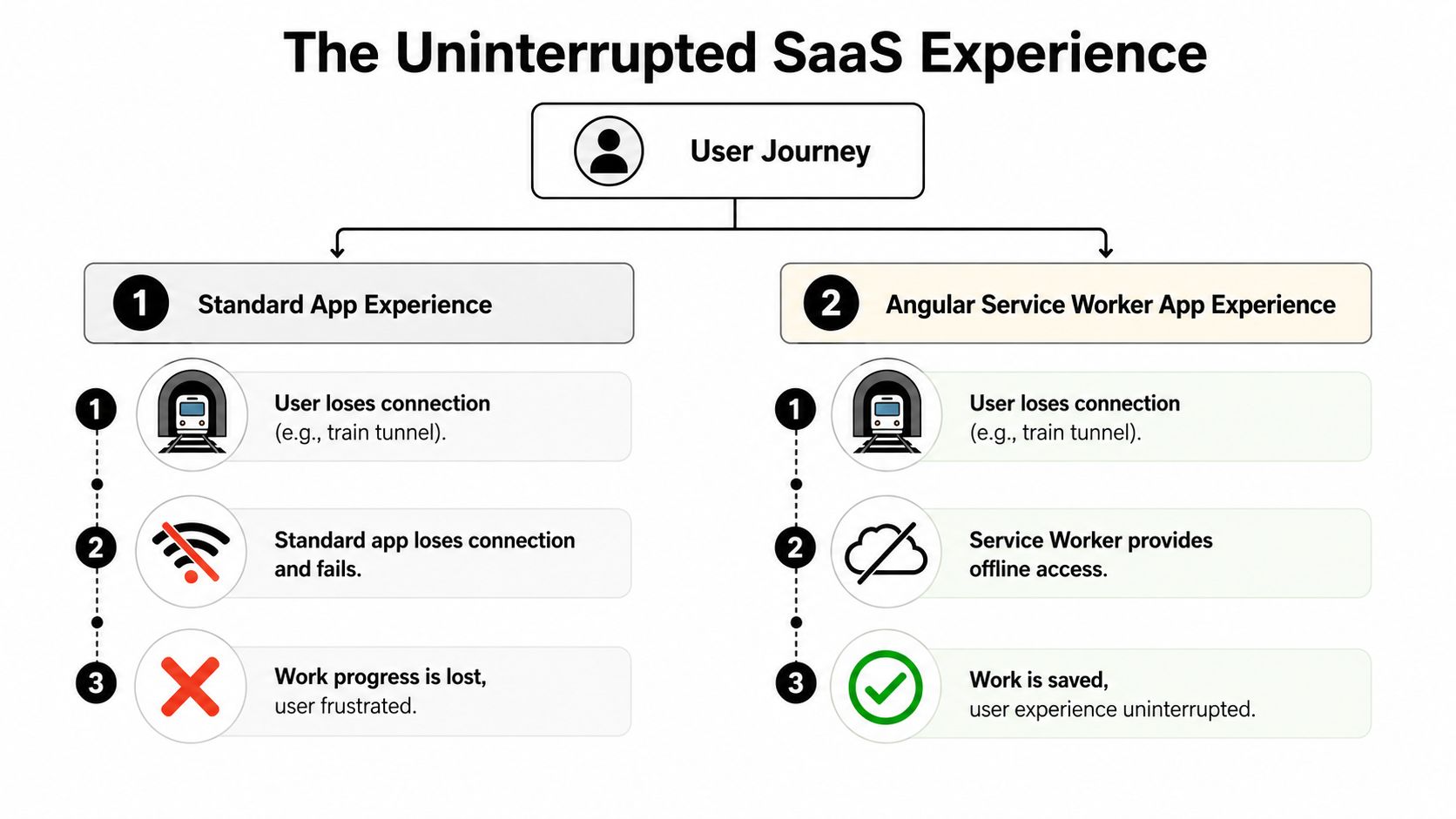
A B2B app rarely fails in perfect lab conditions. It fails when a sales rep opens a record from a parking garage, when a customer success manager switches networks during a call, or when a field team loses signal halfway through a workflow. In those moments, users don't care that the backend is healthy. They care that the screen in front of them still works.
Angular made service worker support a first-class part of its PWA tooling in Angular 6, and its official implementation works as a network proxy that intercepts outgoing HTTP requests, serves cached content when appropriate, and requires HTTPS in supported modern browsers except Internet Explorer, as described in Angular's service worker documentation. For SaaS teams, that matters because the framework gives you a built-in way to keep the app shell responsive on repeat visits and under weak connectivity.
The business value is reliability, not just offline mode
Most tutorials talk about PWAs as if installability is the main event. For SaaS products, its core value is operational. A good Angular Service Worker setup reduces repeat-load friction, keeps core UI available when connectivity degrades, and lowers the chance that users abandon a task because the app went blank at the wrong time.
That's especially relevant in products with heavy navigation patterns. Admin panels, dashboards, CRMs, and internal tools often reuse the same shell, layout code, and route assets again and again. Caching those predictably gives users a steadier experience than re-downloading them on every visit.
Practical rule: Cache the interface aggressively. Cache business data carefully.
There's also a backend benefit. When the browser can serve previously cached shell assets locally, your servers don't need to deliver the same frontend files on every repeat visit. That won't solve infrastructure issues by itself, but it does reduce unnecessary traffic for resources that almost never need a network round trip after initial install.
Why this matters more in B2B than in brochure sites
A marketing site can tolerate a reload hiccup. A SaaS app often can't. Users are editing records, reviewing approvals, comparing reports, or moving through multi-step processes. If your product strategy includes strong web based application development, service worker support fits naturally because it extends the reliability of the browser-based model rather than forcing a separate native app path.
If your frontend already follows a single-page app architecture, this becomes even more practical. The patterns behind a SPA with Angular pair well with an app-shell caching model, where the shell stays responsive even when the network becomes the unreliable part of the stack.
Your First Step to an Offline-Ready App
The right way to start is simple. Use the Angular CLI and let it scaffold the standard path instead of hand-rolling registration code.

Run:
ng add @angular/pwa
That command installs the Angular service worker package, adds ngsw-config.json, updates angular.json, and wires up registration. The important operational detail is that this only becomes effective in a production build, not your normal development server flow, as noted in this Angular PWA setup guide.
What the CLI gives you
After ng add @angular/pwa, you should inspect the generated files instead of treating them as magic.
ngsw-config.jsoncontrols what gets cached and how.angular.jsonis updated so the build includes service worker support in production output.- Service worker registration is wired so the browser can start controlling the app once you deploy the built files in the right environment.
- Manifest and icons support installability, but in most SaaS apps the caching rules matter more than the install prompt.
The common mistake is assuming none of this matters until late in the project. It matters immediately, because the generated config becomes your baseline cache policy. If you leave it generic and then add a complex API layer later, you'll have to untangle stale data behavior under pressure.
Test it the way users will actually hit it
A lot of mid-level Angular developers lose time because they expect offline support while running ng serve. That's the wrong environment for this feature. Build the app for production and test the static output from a served build over HTTPS, or use a localhost setup that mirrors production behavior closely.
Don't debug service worker behavior from the dev server and assume the result means anything in production.
Once the app is built, keep your first policy narrow:
- Prefetch the shell. Put
index.html, main CSS, and JavaScript bundles in anassetGroupsentry withinstallMode: "prefetch". - Keep large assets out of the first install. Move infrequently used media, large images, and optional assets into a lazy group.
- Stay skeptical of API caching at first. A shell-only win is still a win, and it carries less risk than caching live business data too early.
A walkthrough helps if you want to see the setup flow in context:
That conservative start is what works best in SaaS. You get offline-capable navigation and faster repeat visits without immediately creating consistency problems in authenticated workflows.
Mastering Caching with ngsw-config.json
ngsw-config.json decides whether your Angular service worker helps your SaaS app or creates support tickets.
In a B2B product, caching rules are product rules. If a cached response can change what a user is allowed to see, what state a record appears to be in, or whether a dashboard looks current, that rule deserves the same scrutiny as an API contract.
Start with a clear boundary. assetGroups cache versioned app files that ship with the build. dataGroups cache responses fetched at runtime, usually from APIs. Mixing them causes the kind of stale behavior that only shows up after release, when one customer has an old shell, another has new code, and both are hitting authenticated endpoints with different expectations.
Build the shell to survive bad network conditions
For most SaaS apps, the shell is small and predictable. It includes index.html, compiled JavaScript, CSS, the favicon, and a few shared assets that every signed-in user needs. Cache that aggressively. Keep everything else on a shorter leash.
{
  "index": "/index.html",
  "assetGroups": [
    {
      "name": "app-shell",
      "installMode": "prefetch",
      "resources": {
        "files": [
          "/favicon.ico",
          "/index.html",
          "/*.css",
          "/*.js"
        ]
      }
    },
    {
      "name": "non-critical-assets",
      "installMode": "lazy",
      "updateMode": "prefetch",
      "resources": {
        "files": [
          "/assets/images/**",
          "/assets/fonts/**"
        ]
      }
    }
  ]
}
This split holds up well in production for a few reasons.
prefetchfor the shell gets the files needed to boot the app onto the device during service worker install.lazyfor heavier assets avoids making first install expensive, which matters if users open the app from hotel Wi-Fi, mobile tethering, or locked-down corporate networks.- Separate asset groups make review easier during releases. If install time grows, you can see which files are inflating it instead of treating all static assets as one blob.
That last point matters more than it sounds. In SaaS teams with frequent deployments, asset growth tends to happen gradually through marketing images, chart libraries, PDF viewers, and admin-only UI bundles. A clean assetGroups layout gives you somewhere to trim without guessing.
Treat dataGroups as a risk surface
Static assets are usually safe. API responses are not.
The common mistake is broad matching such as /api/** with a cache-first strategy. That can work for public content sites. In a SaaS app, it can leave a sales rep looking at an old opportunity stage, an ops user seeing stale queue counts, or an admin viewing data that no longer matches their current role permissions.
A safer baseline is to cache only data that is both slow-changing and low-risk.
{
  "dataGroups": [
    {
      "name": "reference-data",
      "urls": [
        "/api/countries/**",
        "/api/plan-tiers/**"
      ],
      "cacheConfig": {
        "maxSize": 10,
        "maxAge": "30m",
        "strategy": "performance"
      }
    },
    {
      "name": "live-business-data",
      "urls": [
        "/api/**"
      ],
      "cacheConfig": {
        "maxSize": 10,
        "maxAge": "30m",
        "strategy": "freshness",
        "timeout": "10s"
      }
    }
  ]
}
Even here, I would not ship that second group unchanged unless the API surface is tightly understood. /api/** is often too broad for a real product. It can catch authenticated profile endpoints, search results, tenant-scoped resources, or endpoints whose response shape changes by feature flag. In production, explicit URL patterns are safer than convenience.
Choose the strategy by business impact
Angular gives you two caching strategies that are particularly useful.
| Strategy | Behavior | Best For | SaaS Example |
|---|---|---|---|
| Performance | Serves from cache first when possible | Stable data that doesn't change often | Country lists, subscription plan labels, UI lookup tables |
| Freshness | Tries the network first, falls back to cache | Data where recency matters | Account dashboards, task lists, approval queues, customer records |
The practical rule is simple. If stale data would confuse a user, trigger a wrong action, or create a support incident, prefer freshness. If the endpoint returns supporting data that rarely changes and mostly affects perceived speed, performance is usually the better choice.
timeout matters too. A long timeout makes users wait on a slow network before Angular falls back to cache. A short timeout improves perceived responsiveness, but it also increases the chance that users see older data during temporary latency spikes. For internal tools used on corporate VPNs, I usually keep that trade-off visible during testing instead of copying example values blindly.
Be selective with authenticated endpoints
Authenticated does not automatically mean uncachable. It means you need a tighter policy.
Good candidates for caching:
- Reference data tied to the account but updated rarely
- Read-only lookup tables
- Static configuration used to render forms
Bad candidates for broad caching:
- Dashboards with counts, totals, or alerts
- Search results with filters and permissions
- Record detail pages that users edit in multiple tabs
- Anything affected by role changes, feature flags, or recent writes
Write operations need special caution. After a mutation, users expect the next read to reflect what they just changed. If your service worker serves a cached GET after a successful POST or PATCH, the UI looks broken even when the backend is correct. That mismatch is one of the fastest ways to lose trust in an internal enterprise app.
One useful pattern is to keep service worker caching narrow and handle repeated computation in memory inside the app itself. Techniques like memoizing repeated client-side calculations in JavaScript can reduce render-time work without introducing cross-session data staleness. That keeps performance tuning separate from API cache policy, which is usually the safer line in SaaS systems.
Review cache rules the same way you review routes and permissions
By the time a team reaches production, ngsw-config.json is no longer just a performance file. It affects data consistency, supportability, and release safety.
Review each cached URL pattern with three questions:
- Can this response differ by user, tenant, or role?
- Would stale data change what action the user takes?
- After a deployment or write, how long can this data be wrong before someone notices?
If the answers make you uneasy, do less. In SaaS, a smaller cache with predictable behavior usually beats an ambitious cache that is fast on paper and unreliable under real account activity.
Managing Application Updates and Data Freshness
Frequent deployments are normal in SaaS. The confusing part is that a successful deploy doesn't mean every user sees the new version immediately.
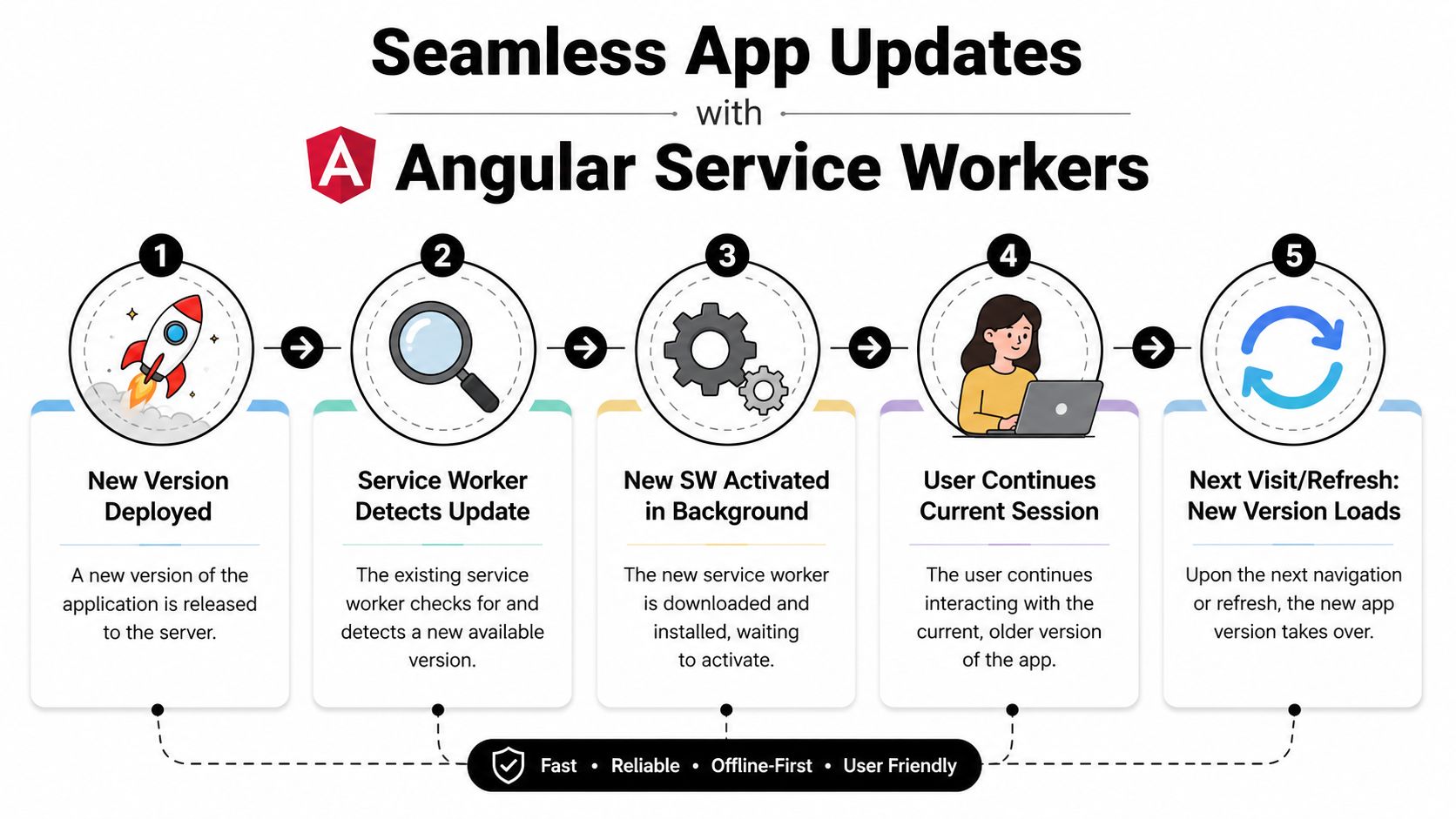
Angular's update model is intentionally cautious. When a new build changes ngsw.json, the service worker detects that change on the user's next visit, downloads the new version in the background, and keeps serving the current version for that session. The new version becomes visible on the following visit or second reload, according to Angular's documented update behavior.
Why users sometimes see old code after deployment
This catches teams all the time. A developer deploys a fix, refreshes once, and still sees the previous app. That isn't necessarily a broken rollout. It's often the expected two-step lifecycle.
That behavior is useful in enterprise apps because it avoids replacing files underneath an active session. If a user is in the middle of editing a record or running a workflow, a sudden swap to a new app version can create mismatched code and state. Angular's model favors consistency during the session over instant visual turnover.
Use update prompts instead of surprise refreshes
For production apps, the best practice is to surface update availability deliberately. Angular gives you SwUpdate, which you can use to listen for version events and notify the user that a new release is ready.
A simple pattern looks like this:
import { inject } from '@angular/core';
import { SwUpdate } from '@angular/service-worker';

const swUpdate = inject(SwUpdate);

if (swUpdate.isEnabled) {
  swUpdate.versionUpdates.subscribe(event => {
    // show a toast or modal:
    // "A new version is available. Refresh now?"
  });
}
This approach works well in admin tools, dashboards, and internal SaaS products because it lets the user finish what they're doing. For lower-risk screens, you might offer a refresh button in a toast. For high-stakes workflows, you might wait until navigation or logout.
A service worker update is a release-management event. Treat it with the same care you give database migrations and feature flags.
Keep code updates separate from data freshness
Teams often mix these concerns together. The app version lifecycle controls when new frontend assets become active. Your dataGroups policy controls whether API responses are fresh enough for the screen.
Those are related, but they're not the same problem. You can have a newly activated frontend still showing stale cached data if the API strategy is too permissive. You can also have fresh network data inside an older shell while the new version waits for activation. Once you accept that split, the behavior becomes much easier to reason about.
Advanced Techniques and Common Pitfalls
A typical SaaS failure looks like this. The app shell loads fast, the dashboard works offline in a demo, then production users start switching accounts, opening five tabs, exporting reports, and hitting permission-sensitive endpoints all day. The Angular service worker can still help, but only if you treat it like part of your application architecture instead of a checkbox on the PWA checklist.
Push, debugging, and controlled inspection
SwPush is useful for operational alerts, approval reminders, or account events that matter in B2B products. Add it after cache behavior is predictable. Push on top of stale data creates confusion fast, especially when a notification says one thing and the UI still shows yesterday's state.
Start debugging in the browser, not in your app code.
Use the Application tab to inspect the current registration, confirm the worker is active, verify that the page is controlled, and look at cache contents after a real production build. Check what happens after a hard refresh, after a second tab opens, and after a new deploy reaches the browser. Those checks catch issues that never show up in local dev.
Authenticated APIs need stricter rules
The biggest mistake in SaaS apps is caching authenticated GET requests as if they were public content. Many of those responses depend on tenant context, role assignments, feature flags, or writes that happened seconds ago. A cache hit can be technically valid and still be wrong for the person using the screen.
Be careful with these endpoints:
- Approval queues that change during active work
- Tenant settings that admins update while other users are online
- Role-based navigation or entitlements that can change mid-session
- Billing, profile, or audit data where stale state creates support issues
A safer default is simple. Cache the app shell and stable reference data. Keep volatile authenticated endpoints network-first, or leave them out of service worker caching entirely. If your team wants more aggressive caching, require a clear reason for each route and test it against tenant switching, role changes, and recent writes.
Frequent releases expose weak cache assumptions
B2B SaaS teams deploy often. That changes the risk profile.
A cache policy that feels fine with monthly releases can become painful with daily deployments, because users keep old assets longer than you expect and multiple tabs may run different versions at the same time. If your product has long-lived sessions, support agents, finance teams, or operations staff may sit on one tab for hours. That is where mismatched frontend versions and cached API responses create hard-to-reproduce bugs.
Treat service worker behavior as part of release design. Teams that already formalize release checks through software development models should apply the same discipline here. In practice, that means reviewing cache scope during feature work, testing version skew across tabs, and adding PWA verification to an Auto DevOps pipeline for frontend releases.
Edge cases break polished demos
File streaming, resumable downloads, and third-party asset requests deserve explicit testing. Angular's issue tracker documents a bug in v20.0.5 where the service worker could enter an infinite loop when handling external URLs with an HTTP Range header, as shown in this Angular issue about Range request handling.
That matters for products with video training, exported reports, signed file URLs, or CDN-hosted content. A rule that works for hashed JavaScript bundles may fail badly once Range requests enter the picture.
Test the odd paths on purpose. Stream a file. Resume a download. Open two tabs. Switch accounts without closing the browser. Log in as an admin, then as a standard user, and confirm cached responses do not bleed across contexts.
Angular's built-in service worker also has limits. The documentation describes it as a limited-feature caching utility for simple offline support, with no new features planned beyond security fixes, as noted earlier. That is usually fine for dashboards, internal tools, and field apps that need reliable asset caching. It is a poor fit for products that need custom background sync, conflict resolution, or highly specialized fetch logic.
Deployment Strategies for CI/CD Environments
A service worker doesn't end at ng build. It becomes part of your release process, and if your pipeline treats it like any other static asset, you can get unpredictable rollouts.
The essential baseline is this. Generate the worker through the standard Angular production build, verify the build output, and test the served artifact in an environment that matches production behavior as closely as possible. If your team is formalizing release discipline, it helps to align the PWA rollout with broader software development models so frontend cache behavior is considered part of delivery quality, not an afterthought.
What your pipeline should validate
A useful CI/CD checklist looks like this:
- Production build completed correctly. Use
ng build --configuration productionand confirm that service worker artifacts were generated. - HTTPS assumptions still hold. External assets and runtime dependencies should be served in a way that won't break secure-context requirements.
- Cache policy still matches the app. New API routes, renamed asset paths, or changed auth flows should trigger a review of
ngsw-config.json. - Deployment verification exists. Someone, or something automated, should confirm the worker registers and the app is controllable after deploy.
If your team already automates release checks, this belongs in that system. A mature Auto DevOps pipeline should validate frontend delivery artifacts the same way it validates tests and build status.
Frequent releases require discipline
SaaS teams deploy often. That's exactly why casual service worker management creates trouble. A broad cache policy that feels fine during monthly releases can become painful when the frontend changes constantly and users keep multiple tabs open all day.
Keep these habits:
- Treat
ngsw-config.jsonlike code, because it is. - Review cache changes in pull requests, especially anything touching
/api/**. - Test the previous version upgrading to the new one, not just a clean load.
- Keep rollback in mind. If a release goes wrong, your cache behavior should be understandable enough that support and engineering can reason about what users are seeing.
A predictable Angular Service Worker setup gives you a more resilient SaaS frontend. A sloppy one gives you ghost bugs that only appear after deploy. In CI/CD environments, that difference comes down to process.
If your team wants help turning frontend reliability, release workflows, and operational automation into a cleaner system, MakeAutomation works with B2B and SaaS companies to design scalable processes around delivery, automation, and growth.