Temporal Open Source: A Practical Guide for 2026
Your team probably already has this problem, even if nobody calls it a durability problem.
A customer signs up. Your app needs to create an account, provision tenant resources, notify billing, send a welcome message, wait for the first login, and maybe trigger a sales handoff if the account looks promising. Each step is simple on its own. The mess starts when one of them fails halfway through, times out, or succeeds but never reports back.
That's where Temporal Open Source gets interesting. It isn't just another queue, scheduler, or automation tool. It's a durability layer for business processes that have to survive crashes, restarts, retries, and long waits without losing track of what already happened. That's why teams use it for onboarding, payments, fulfillment, approvals, and other workflows where “just retry it” is not a serious operating model.
The hype around Temporal usually focuses on elegant APIs and durable execution. The harder question is whether self-hosting Temporal Open Source is the right strategic bet for your team over time. That decision has less to do with whether the programming model is good, and more to do with whether you want to own a durable platform in production.
Why Modern Applications Break Without Durability
Most modern SaaS systems are built from services that are individually reliable enough. The failure shows up in the gaps between them.
A signup flow might call your app database, Stripe, an email provider, a CRM, and an internal provisioning service. If the email provider is briefly unavailable, or the provisioning worker crashes after creating half the resources, the customer ends up in an ambiguous state. One system thinks the job is done. Another thinks it never started. Ops gets a ticket. Engineering writes a patch script.
What usually goes wrong
Without a durable execution layer, teams often stitch together reliability from a pile of partial tools:
- Queues handle delivery, not business state. A message broker can redeliver work, but it won't naturally tell you that step three succeeded yesterday and step four should resume now.
- Cron jobs poll for recovery. That works until recovery logic becomes its own system.
- Database flags become orchestration. A few status columns turn into a fragile state machine hidden across app code and support scripts.
- Retries multiply side effects. If an external call isn't idempotent, a retry can create duplicates or charge twice.
Temporal Open Source solves this class of problem by treating the workflow itself as a durable program. The platform stores execution state and event history so a process can continue after crashes or outages, instead of starting from scratch.
Practical rule: If a business process spans multiple systems and can't be safely rerun from the beginning, you need durability, not just retries.
Why Temporal matters now
This isn't a niche project that only appeals to distributed systems purists. Temporal Technologies reported that its open-source community grew by over 50,000 new developers in the year leading up to February 2022, and it added over 300 new customers in the same period, according to Contrary's company research on Temporal Technologies.
That adoption matters because it signals where teams have hit the limits of ad hoc orchestration. Once workflows become long-running and business-critical, durability stops being a nice abstraction and becomes part of the reliability budget.
Understanding Temporal Core Concepts
Temporal makes more sense when you stop thinking about it as “workflow software” and start thinking about it as a very disciplined separation of responsibilities.
The easiest mental model is a project manager. The Temporal Cluster is the project manager that never forgets what has happened, what is waiting, what should retry, and what should happen next. Your code still does the work. Temporal coordinates it.
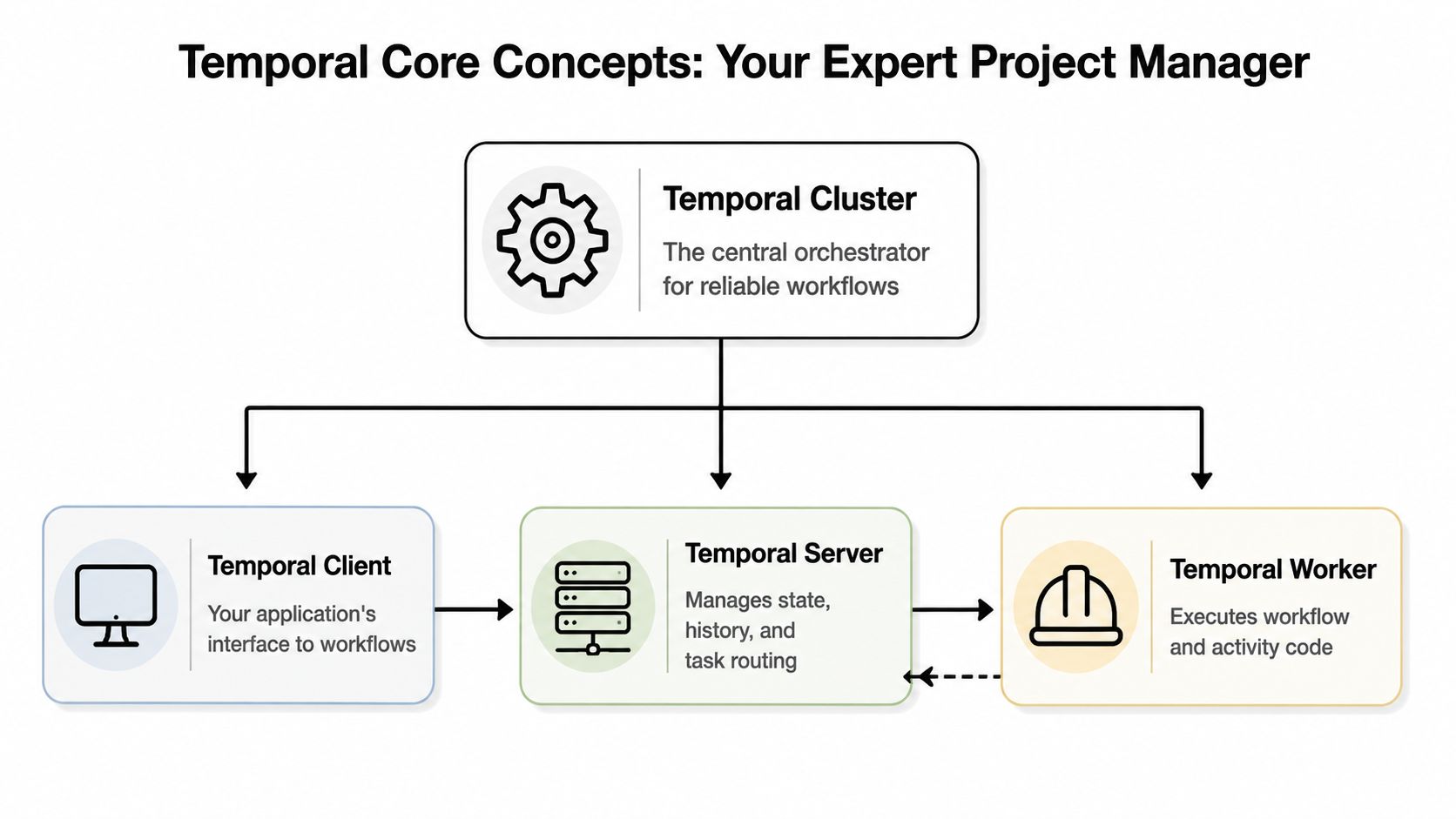
The four parts that matter
- Client. Your application starts or signals workflows through a Temporal client.
- Workflow. This is the durable definition of the business process. It describes ordering, waiting, branching, compensation, and timeout behavior.
- Activity. This is the unit of real side-effecting work, such as calling Stripe, writing to Salesforce, or sending an email.
- Worker. This is your process that executes workflow and activity code.
The important architectural split is this: developers run workflow and activity code in workers, while the Temporal service handles state management, queuing, timers, retries, and event history, as described in Temporal's architecture overview.
Why this separation changes reliability
In ordinary application code, the process that holds execution state is also the process that can die. If the machine restarts during a long-running operation, you rebuild state from logs, database rows, or manual inspection.
Temporal flips that. The worker executes code, but the service owns the durable record of progress. That means a workflow can pause and resume after crashes, network failures, or infrastructure outages without losing its place.
A useful way to think about the split:
| Component | What it owns | What it should not own |
|---|---|---|
| Workflow code | Business logic and sequencing | Durable infrastructure concerns |
| Activity code | External calls and side effects | Orchestration state |
| Temporal service | History, timers, retries, task routing | Your domain logic |
| Workers | Execution capacity | Long-term workflow memory |
A quick visual walkthrough helps if your team is new to the model:
What Temporal is really buying you
Temporal's promise is that you can write code for long-running processes without rebuilding your own orchestration engine. That doesn't mean failures disappear. It means the platform gives failures a controlled place to live.
The win isn't “no failure.” The win is that failure becomes part of the workflow model instead of a pile of edge-case code.
That's why Temporal is especially strong for order fulfillment, onboarding, payment processing, approval chains, and any process where waiting is normal and recovery must be exact.
Temporal Open Source Versus Temporal Cloud
The biggest mistake teams make is comparing these options as if the only variable is license cost.
Temporal Open Source gives you control. Temporal Cloud gives you delegation. Both can be valid. The harder part is being honest about what your team is signing up to operate.
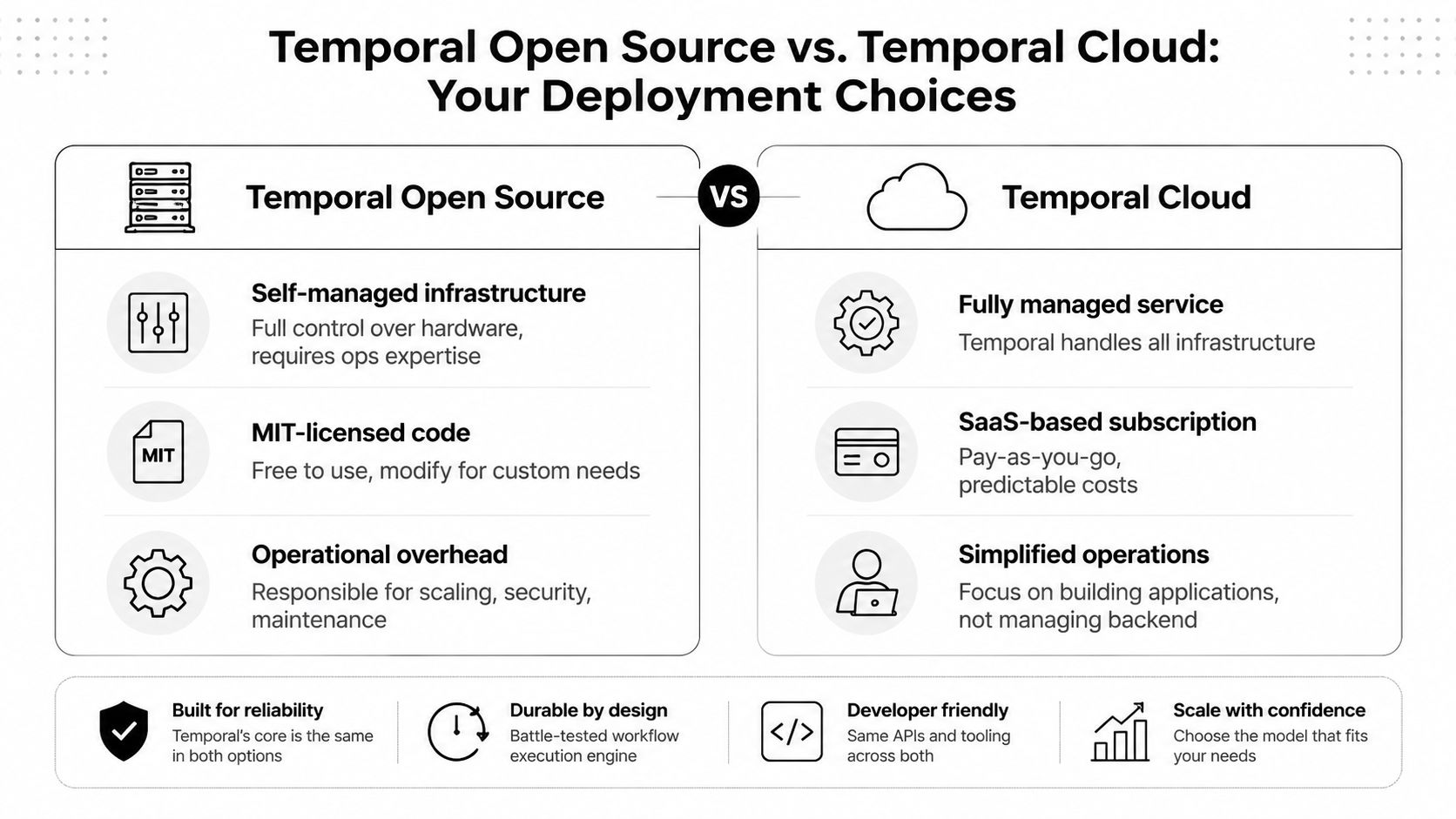
Where open source looks cheaper than it is
A lot of teams see “open source” and mentally translate that into “low TCO.” That's the wrong model for Temporal.
Even early technical coverage pointed out that a Temporal environment isn't just an OSS package. It's a multi-component runtime to operate and scale, which means the cost often shifts into infrastructure ownership, SRE time, upgrades, observability, and incident response, as discussed in this analysis of Temporal open-source workflows as code.
Self-hosting means your team owns questions like these:
- Capacity planning. How many workers, how much persistence capacity, and how much headroom for spikes?
- Operational recovery. What happens when the cluster degrades or a dependency backs up?
- Security controls. Who manages certificates, service-to-service trust, and data handling?
- Upgrade choreography. How do you roll changes safely when workflows may live for a long time?
Side by side decision view
| Decision area | Temporal Open Source | Temporal Cloud |
|---|---|---|
| Control | Maximum control over infrastructure and configuration | Less infrastructure control, more managed guardrails |
| Team load | Your team runs the platform | Vendor runs the platform layer |
| Time to production | Slower if you're building operational maturity in parallel | Faster if your goal is shipping workflows |
| Compliance posture | Useful when you need strict environment ownership | Useful when managed service constraints fit your requirements |
| Long-term burden | Ongoing ownership of scaling, upgrades, and operations | Ongoing vendor dependency, but lower ops load |
This is the same kind of trade-off leaders evaluate in broader infrastructure decisions. If you're weighing the governance and cost implications of hosted versus self-managed systems more generally, this breakdown of how to compare cloud and on-premise IT gives a useful framing.
Operating insight: Temporal Open Source is a good fit when platform ownership is a deliberate strategy. It's a poor fit when self-hosting is just a reflex against subscription pricing.
A practical rule of thumb
Choose Temporal Open Source when infrastructure control is itself part of the business requirement. Choose Temporal Cloud when durable execution is the requirement and infrastructure ownership is a distraction.
That sounds simple, but it's a recommended initial step.
Deploying and Scaling Your Own Cluster
If you self-host Temporal, your first deployment choices matter more than many realize.
Local development is easy enough with Docker Compose. Production is where the shape of the system becomes real. You're not deploying a library. You're deploying a service layer that coordinates durable workflows across workers and persistence.
What you are actually deploying
A self-hosted Temporal cluster includes multiple server responsibilities, commonly discussed as Frontend, History, Matching, and Worker services. You also need durable persistence behind it. Depending on how much visibility you want, you may add supporting components for search and operational insight.
For local experiments, many teams begin with a Compose-based setup before moving to Kubernetes. If your team needs a quick refresher on image-based local orchestration patterns, this guide on Docker Compose build from image is a handy baseline.
The decision you can't casually undo
One of the most important early configuration choices is the History service shard count. Temporal's documentation notes that this setting affects throughput, latency, and resource use, and can't be changed after initial cluster deployment, as described in the Temporal docs.
That one detail tells you a lot about Temporal in production. It's not a toy runtime. It's infrastructure with decisions that have a long operational half-life.
A practical deployment checklist should include:
- Persistence first. Treat database durability and performance as part of the platform, not as an afterthought.
- Namespace planning. Separate environments and tenants in a way that matches your operating model.
- Worker topology. Decide whether you want shared workers, service-specific workers, or isolated queues for sensitive paths.
- Failure testing. Kill workers, pause dependencies, and watch what resumes.
- Upgrade discipline. Long-running workflows make versioning and rollout strategy a production concern, not just a release note.
What scaling looks like in practice
Scaling Temporal isn't only about adding worker replicas. You have to think about queue pressure, persistence latency, workflow history growth, and the operational behavior of long-lived workflows.
Teams that struggle usually make one of two mistakes. They either under-design the cluster because the developer experience feels simple, or they overfit the deployment before they understand actual workflow behavior.
Start with a realistic production model, not a demo model. Temporal rewards clean architecture, but it punishes casual platform assumptions.
Practical Integration Patterns for SaaS
Temporal is at its best when a business process unfolds over time, crosses system boundaries, and needs exact recovery.
Two patterns show up constantly in SaaS. The first is customer onboarding. The second is transaction coordination with external confirmations. Both are awkward in stateless microservices. Both fit Temporal naturally.
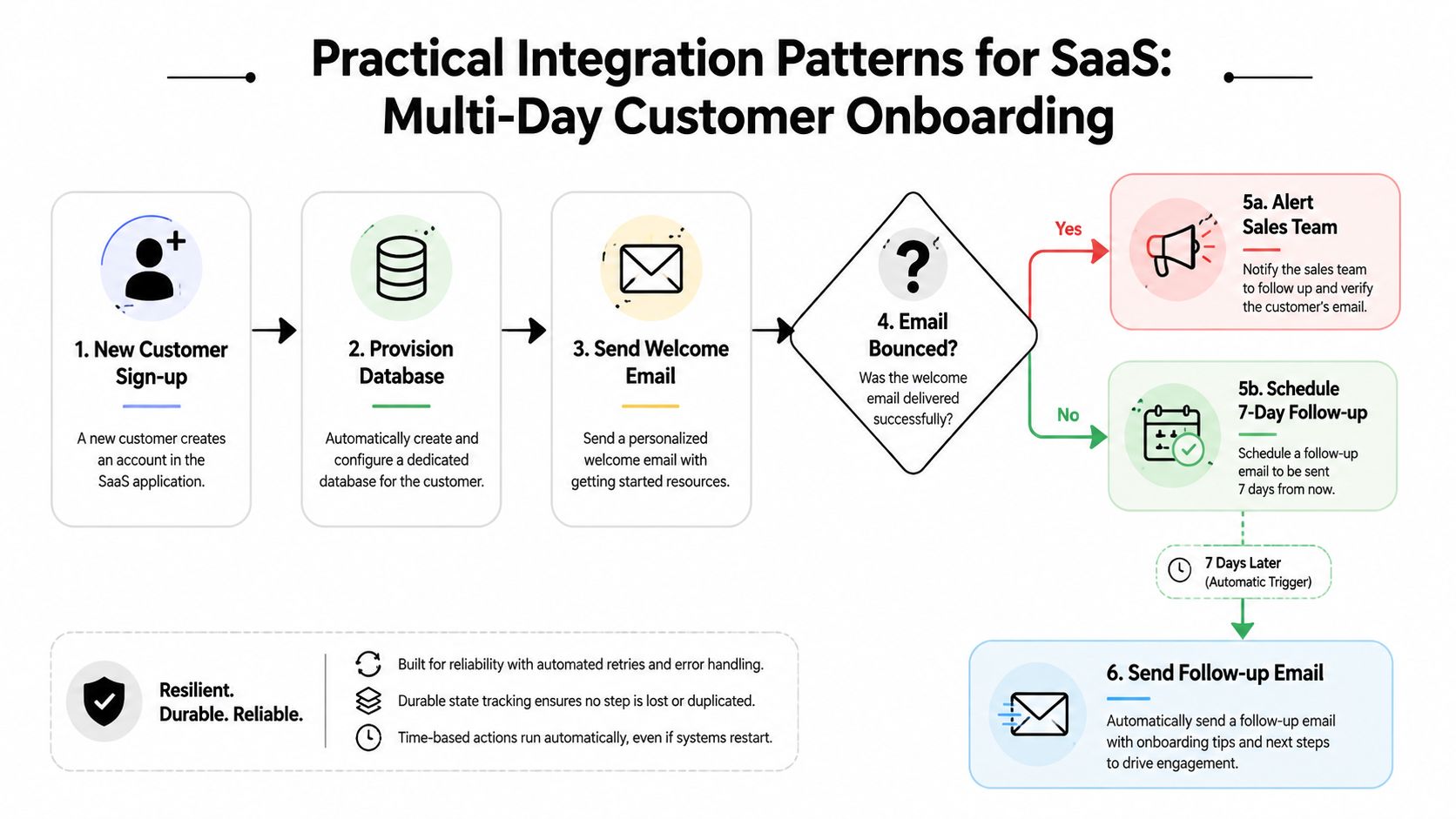
Pattern one for onboarding that spans days
A typical onboarding flow might:
- provision tenant resources
- send a welcome email
- wait for the first login
- branch if the user never activates
- notify sales for high-value accounts
- schedule a follow-up days later
That process is a poor fit for request-response code. It's also awkward when stitched across cron jobs and messaging retries.
A simplified Python-style sketch looks like this:
from datetime import timedelta

@workflow.defn
class CustomerOnboardingWorkflow:
    @workflow.run
    async def run(self, account_id: str):
        await workflow.execute_activity(
            provision_tenant,
            account_id,
            start_to_close_timeout=timedelta(minutes=10),
        )

        await workflow.execute_activity(
            send_welcome_email,
            account_id,
            start_to_close_timeout=timedelta(minutes=2),
        )

        activated = await workflow.wait_condition(
            lambda: check_activation_signal(account_id),
            timeout=timedelta(days=7),
        )

        if not activated:
            await workflow.execute_activity(alert_sales_team, account_id)
        else:
            await workflow.execute_activity(schedule_success_path, account_id)
What matters here isn't the syntax. It's the operating model. Waiting for seven days is normal. Worker restarts are normal. Partial failure is normal. The workflow remains coherent.
For teams designing broader application connectivity around this kind of process, these powerful SaaS integration strategies are useful context because they highlight the surrounding integration concerns Temporal often sits inside.
Pattern two for payment and confirmation flows
Payments often involve a local intent, a processor call, a webhook callback, reconciliation, and retry behavior when the external system is slow or ambiguous.
A Go-style sketch might look like this:
func PaymentWorkflow(ctx workflow.Context, orderID string) error {
    err := workflow.ExecuteActivity(ctx, CreatePaymentIntent, orderID).Get(ctx, nil)
    if err != nil {
        return err
    }

    err = workflow.ExecuteActivity(ctx, ChargeCard, orderID).Get(ctx, nil)
    if err != nil {
        return err
    }

    var confirmed bool
    workflow.Await(ctx, func() bool { return confirmed })

    return workflow.ExecuteActivity(ctx, FinalizeOrder, orderID).Get(ctx, nil)
}
The real implementation would handle timeouts, duplicate webhooks, and compensating actions. The value of Temporal is that all of that logic stays in one durable process instead of being fragmented across controllers, queues, and scheduled jobs.
If your integration estate is already messy, it helps to tighten the basics before you add durable orchestration. This overview of data integration best practices is a good companion read.
Where AI and agent workflows fit
There's growing interest in using Temporal for AI and agentic systems, but teams should be careful not to force-fit it.
Recent commentary notes that Temporal is being pushed toward agentic systems and durable execution for AI, while guidance is still thin on when it's better than schedulers or graph-oriented agent frameworks, as discussed in this comparison of Temporal alternatives.
That's the right caution. Temporal is strong when AI workflows are long-running, stateful, human-in-the-loop, or dependent on reliable recovery. It's less compelling when you mostly need lightweight graph traversal or short-lived prompt pipelines.
Observability and Security Best Practices
Once Temporal is in production, you own two things every day. You own confidence that workflows are progressing, and you own trust that the platform is safe to run.
Those responsibilities are bigger in the open-source deployment model because nobody else is operating the control plane for you.
What to monitor first
Start with signals that reveal whether work is flowing or piling up:
- Workflow latency. How long are workflows spending from start to useful completion?
- Activity latency. Which external dependencies are slowing the system down?
- Task queue health. Are workers polling successfully and keeping up with demand?
- Persistence behavior. Is your backing store becoming the bottleneck?
- Retry patterns. Are retries masking an outage or normalizing an integration bug?
You don't need a perfect dashboard on day one. You do need enough telemetry to answer three questions fast during an incident: Is work starting, is work progressing, and where is it stuck?
Healthy worker CPU is not enough. Temporal can look “up” while business workflows are quietly degrading.
Security layers that actually matter
Security for Temporal Open Source is mostly about reducing trust assumptions between components.
A sensible production baseline includes:
- mTLS for service communication so internal gRPC traffic isn't implicitly trusted
- Secret isolation for activities because workers often touch payment systems, CRMs, and internal APIs
- Encryption in transit and at rest across persistence and supporting infrastructure
- Least-privilege worker roles so one queue's credentials don't become everyone's credentials
- Audit-friendly boundaries between workflow execution, app services, and human operators
If your activity layer talks to many third-party systems, secret handling becomes a real operational discipline. This primer on DevOps secrets management is a good practical reference for building that layer correctly.
What strong operators do differently
Good teams don't just monitor the cluster. They monitor workflow classes with business context.
For example, they separate alerts for onboarding delays, payment confirmation stalls, and approval workflows waiting too long. That makes incidents actionable for application owners, not just for platform engineers.
They also drill failure recovery on purpose. Restart workers. Delay dependencies. Revoke a credential in staging. Temporal's whole value proposition is recoverability, so test it as an operational property, not as a theoretical feature.
Making the Right Choice for Your Business
Temporal Open Source is a strategic commitment, not a free shortcut.
It's a strong choice when you have a team that already thinks in terms of platform ownership. That usually means mature SRE or DevOps practices, clear compliance or environment-control requirements, and enough workflow volume or criticality to justify owning durable infrastructure over the long term.
Temporal Cloud is the better choice for many teams, even very capable ones. If your advantage comes from shipping business logic faster than competitors, handing off the infrastructure layer is often the cleaner move. You still get the durable execution model without turning your team into operators of yet another distributed system.
A simple decision filter helps:
- Choose open source if control, customization, and self-managed infrastructure are essential.
- Choose cloud if speed, lower operational burden, and focus on product delivery matter more.
- Wait on both if your workflows are still simple enough that a queue plus idempotent jobs is simply sufficient.
The main point is to decide intentionally. Temporal can be excellent. Self-hosting it can also become an expensive side quest if your team wanted reliability benefits but not platform responsibility.
Pick the model that matches how your business operates, not the one that looks cheaper in a procurement spreadsheet.
If your team is evaluating durable workflows, AI automation, or the operational design behind self-hosted orchestration, MakeAutomation can help you map the trade-offs, design the right architecture, and implement automation systems that scale without turning reliability into a maintenance burden.