Automate Interview Scheduling: Your 2026 Playbook
Your recruiting team is probably already feeling this. A candidate clears the screen. The recruiter reaches out with three possible time slots. The hiring manager rejects two. The candidate replies from a phone during a commute and asks for next week. Someone forgets to update the calendar. A reschedule request lands after hours. By the time everyone lines up, the candidate has gone quiet.
That problem looks administrative on the surface. It isn't. When you automate interview scheduling well, you remove a conversion leak in the hiring funnel. In a mobile-first market, candidates expect to book quickly, reschedule easily, and receive clear confirmations without friction. If that flow breaks, they don't experience your company as "busy." They experience it as disorganized.
The strongest systems don't stop at calendar syncing. They combine self-booking, stage-based workflow logic, communication automation, exception handling, and governance. That's what turns scheduling from a messy coordinator task into a reliable operating system for hiring.
Beyond Calendars The Strategic Case for Automation
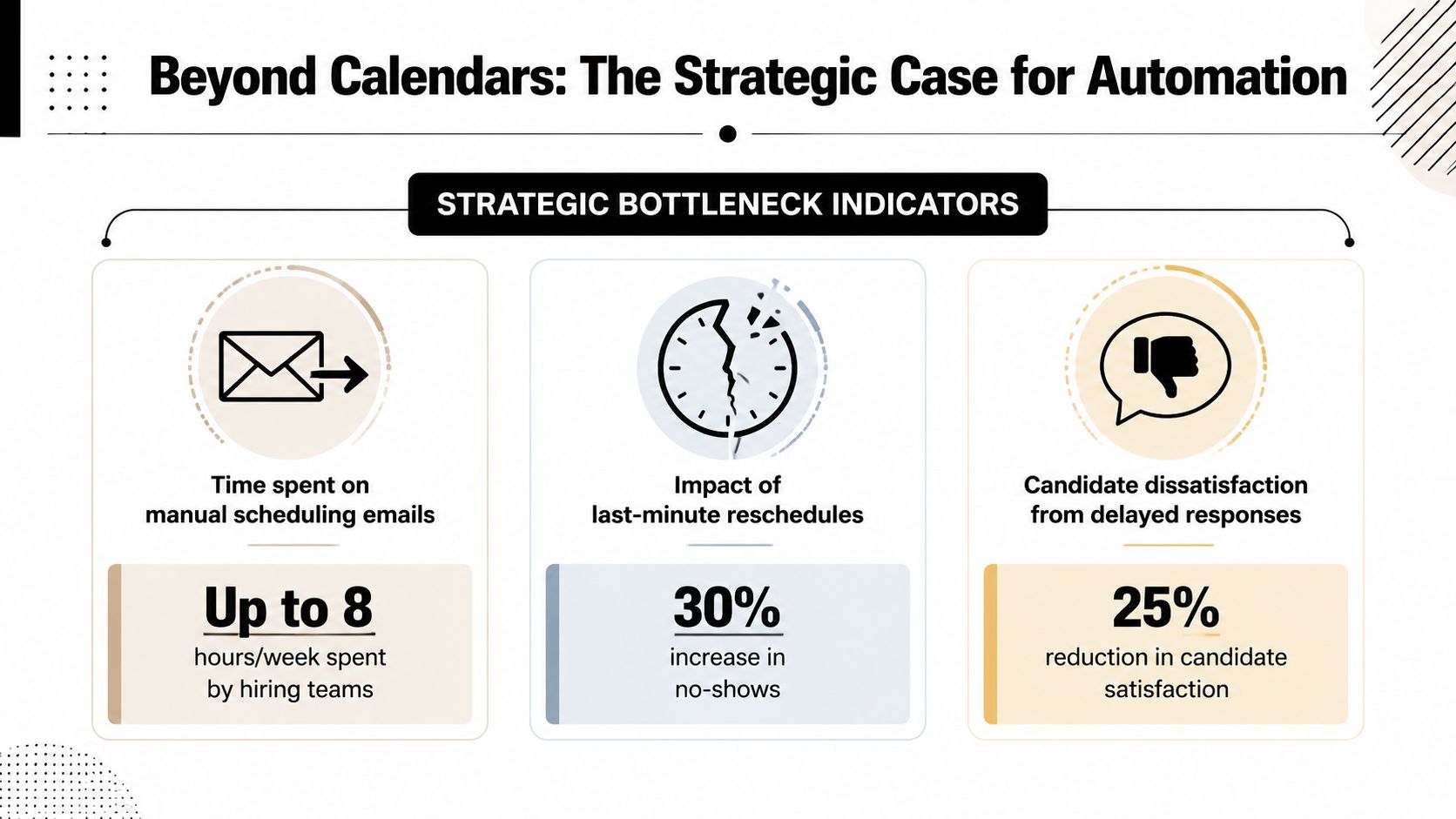
The old scheduling loop is familiar. Email the candidate. Wait. Check the hiring manager's calendar. Wait again. Send alternatives. Realize one interviewer is out next Tuesday. Start over. That cycle steals time from recruiters, but the bigger cost sits closer to revenue and growth. Every extra handoff gives a candidate another reason to disengage.
One reason automated scheduling became mainstream is simple. Manual coordination takes up a lot of recruiter capacity. Joveo reports that the back-and-forth of scheduling can account for about 35% of a recruiter's workload, and robust automation can reduce planning time by up to 91% through calendar matching, slot selection, confirmations, and reminders in one flow (Joveo on interview scheduling tools).
The real problem is candidate friction
Organizations frequently justify automation by highlighting recruiter efficiency. That's valid, but it's incomplete. Scheduling is the last operational hurdle before the interview happens. If a candidate can't confirm a time from a phone in under a minute, if the link fails, if the timezone looks wrong, if rescheduling requires another email chain, your process creates avoidable drop-off.
A lot of founders underestimate this because the failure doesn't always show up as a formal rejection. The candidate stops responding, books with a competitor first, or deprioritizes your process.
Practical rule: Treat scheduling as a candidate-conversion workflow, not an admin task.
That shift changes what you optimize. Instead of asking only, "How many recruiter hours can we save?" you also ask, "How many qualified candidates are we losing between stage advancement and attendance?"
Speed changes hiring outcomes
Automation also matters because it changes throughput. X0PA notes that companies using automated scheduling tools can schedule up to 8x more interviews and complete the interview process days or weeks earlier than with manual coordination. The same source highlights how recent manual methods still were, with 41% of recruiters scheduling interviews over the phone (X0PA on automated interview scheduling).
For B2B and SaaS leaders, this has a direct operating implication. Hiring speed isn't just a talent metric. It affects product delivery, sales capacity, customer success bandwidth, and leadership focus.
If you're tightening the rest of your hiring engine, resources like this founder's guide to hiring faster can help frame where scheduling fits inside a broader speed-to-hire strategy. Candidate experience matters just as much. If you're diagnosing where friction shows up across the funnel, this guide on how to improve candidate experience is worth reviewing alongside your scheduling flow.
Designing Your Automated Scheduling Workflow
Most scheduling automations fail before the software goes live. The team buys a tool, connects Google Calendar or Outlook, and assumes the workflow is done. It isn't. The tool only reflects the logic you define.
ModernLoop's guidance gets this right. An effective workflow should be a deterministic sequence, and the most useful KPIs are Average Time-to-Schedule, the number of scheduling attempts per candidate, and cancellation or rescheduling rates because they show where friction lives (ModernLoop's scheduling strategy guide).
Start with stage mapping, not software
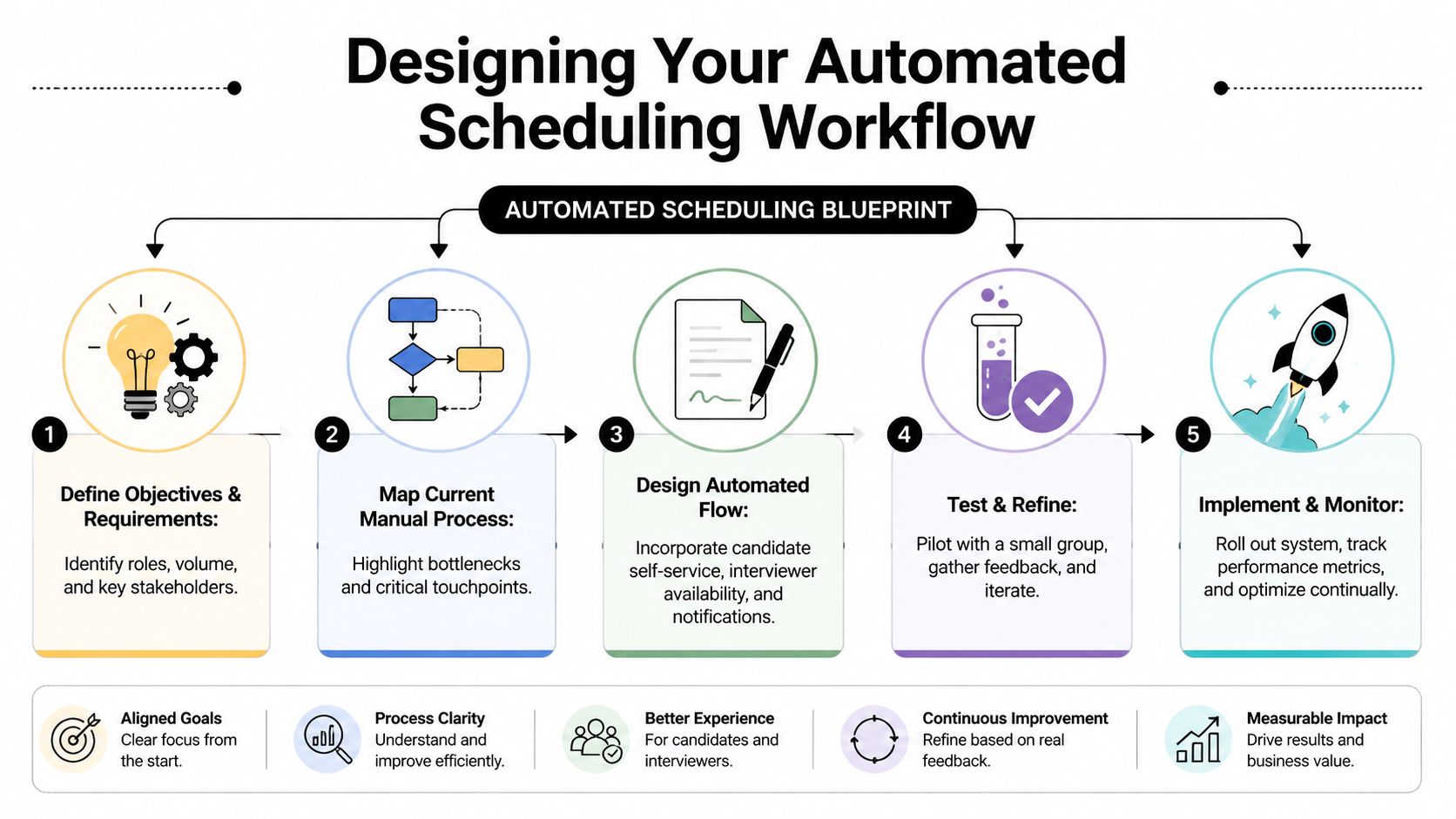
List every interview stage for each role family. Sales, engineering, customer success, and leadership hiring rarely share the same structure. If you don't separate them early, you'll end up with brittle rules and confusing booking links.
Map these items for each stage:
Trigger event
Candidate moved to phone screen in Greenhouse, Lever, Ashby, Workday, or your custom ATS.Eligible interviewers
Specific recruiter, hiring manager pool, panel members, or backup interviewers.Booking constraints
Meeting length, minimum notice, daily cutoffs, working hours, and protected no-meeting times.Candidate communication
Self-booking email, SMS option, WhatsApp option if supported, confirmation message, and reminder sequence.Fallback path
Manual review if no slots appear, panel conflict occurs, or an accommodation request needs a custom setup.
Build the rules before the automation
The method of calendar exposure distinguishes effective systems from less capable ones. A scheduling engine shouldn't expose every open calendar gap. It should expose only the windows you've approved.
Use rules such as:
- Buffer protection between interviews so interviewers aren't stacked all day.
- Minimum lead time so candidates don't book a slot too soon for the team to prepare.
- Regional working windows to avoid offering times that look fine in one timezone and unreasonable in another.
- Panel logic so the system knows when one interviewer is mandatory and another can rotate.
- Manual override conditions for executive hiring, accommodations, or unusual travel schedules.
After the blueprint is clear, this walkthrough is useful for seeing how the moving pieces fit in practice:
Don't automate a broken sequence. Freeze the process, define the rules, then let the tooling execute them.
Instrument the workflow from day one
Organizations often track time-to-hire and stop there. That's too blunt. Scheduling needs narrower operational metrics.
A practical measurement set looks like this:
| KPI | What it tells you | What usually causes problems |
|---|---|---|
| Average Time-to-Schedule | How quickly a stage becomes a booked interview | weak availability rules, not enough interviewer capacity |
| Scheduling attempts per candidate | How much effort it takes to land one slot | poor self-booking setup, unclear communications |
| Cancellation and rescheduling rate | Whether candidates and interviewers stick to the original slot | timezone confusion, weak reminders, low slot quality |
If those numbers move in the wrong direction, don't blame the tool first. Look at the workflow design.
Choosing Your Scheduling Automation Tech Stack
A weak stack shows up first on the candidate side. Someone opens your scheduling link on a phone between meetings, sees no sensible times, gets a broken timezone conversion, or receives three conflicting reminders. They drop. Recruiters feel the pain later, but the loss starts with candidate friction.
Tool choice matters because scheduling now sits at the intersection of conversion, compliance, and operational control. In our experience, many companies pick a solution that only solves one part of the problem, then discover they still need ATS triggers, messaging logic, audit history, exception routing, and failure alerts. Calendar syncing alone does not give you a reliable hiring system.
The baseline is higher than many teams expect. iCIMS notes that interview automation at scale depends on ATS and calendar interoperability, candidate self-booking, automatic timezone alignment, and real-time confirmation messaging (iCIMS on recruiting process automation). For larger teams, I would add permission controls, logging, and a clear fallback path when AI or automation makes the wrong call.
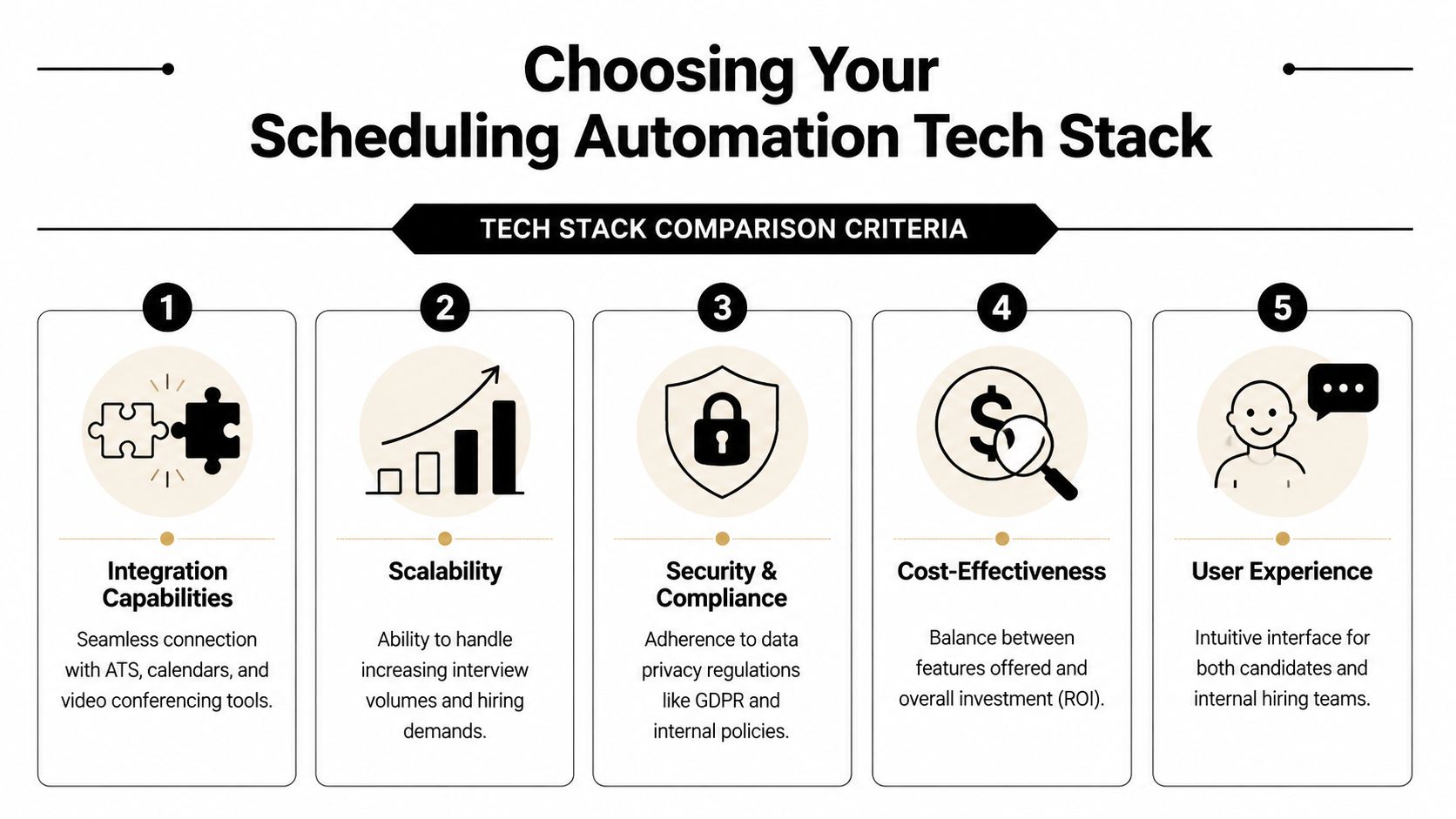
Three stack options that most teams evaluate
The practical split usually looks like this:
| Category | Examples | Best fit | Main limitation |
|---|---|---|---|
| ATS-native scheduling | Greenhouse, Lever, Ashby, Workday modules | Teams with standard stage-based scheduling and limited exceptions | Less flexibility for custom messaging, branching logic, and cross-tool workflows |
| Dedicated scheduling tools | Calendly, GoodTime, ModernLoop, Cronofy | Teams with heavier interviewer coordination, panel complexity, or pooled availability | Adds another system to govern, and weak ATS sync can create manual cleanup |
| Automation platforms | Make, Zapier, Workato | Teams that need orchestration across ATS, calendars, email, SMS, Slack, video, and internal databases | Requires clear ownership, testing discipline, and ongoing maintenance |
When ATS-native is enough
ATS-native scheduling fits teams that hire through a small set of repeatable interview patterns. If recruiters mainly book phone screens, hiring manager calls, and a few standard panels, keeping scheduling inside the ATS reduces training and keeps reporting cleaner.
The trade-off is control. Once you need mobile-friendly reminders by SMS, region-specific templates, interviewer rotation rules, or separate logic for confidential searches, ATS-native features can become restrictive fast.
When a dedicated scheduler earns its place
Dedicated scheduling tools are stronger when coordination is the hard part. That often shows up in engineering, enterprise sales, and executive hiring, where panel matching, interviewer load balancing, and multi-calendar availability need more precision than an ATS module can usually provide.
These tools can improve candidate experience because they present better slot options and reduce back-and-forth. But they also introduce governance questions. Who owns the scheduling rules? Where is the source of truth? What happens if a reschedule updates the scheduler but not the ATS? Those are not edge cases. They become recurring data quality problems at scale.
When you need an automation layer
An automation layer makes sense when scheduling has to trigger and document actions across multiple systems. A stage change in the ATS might need to send an email from Outlook or Gmail, text a reminder through Twilio, post an alert in Slack, generate a Zoom or Google Meet link, write back to the ATS, and log the event in Airtable or HubSpot.
That setup supports more than recruiter efficiency. It protects candidate conversion in a mobile-first process where speed, clarity, and reminder quality directly affect whether people show up or disappear. It also gives operations teams better control over retries, audit trails, and exception handling.
If your team is comparing options, this guide to best interview scheduling software is a useful starting point. Teams that expect to build custom flows on Zapier should also review this piece on mastering Zapier automation, especially if they need branching logic across recruiting and communication tools.
What to test before you commit
Do not buy from a polished demo alone. Run live tests with your own workflows, your own calendars, and your own edge cases.
Test these scenarios before signing:
- Stage-triggered scheduling from your ATS, with the correct template and owner assignment
- Candidate self-booking on mobile, including page load speed and form usability
- Timezone conversion across regions, including daylight saving changes
- Rescheduling and cancellation without duplicate invites, orphaned calendar events, or broken ATS records
- Real-time confirmations and reminders to both candidates and interviewers
- Permission and audit controls so your team can track who changed rules, messages, or availability settings
A platform that handles the happy path but fails on retries, panel edits, or compliance logging will cost more than it saves. The right stack reduces recruiter effort, but the bigger win is lower candidate drop-off and fewer operational failures under hiring pressure.
Building Your Automation Recipes and Templates
A scheduling system breaks or scales at the template layer.
This is the point where strategy turns into repeatable operations. Good recipes reduce recruiter effort, but the bigger business outcome is lower candidate drop-off. On mobile, every extra step, vague message, and broken reschedule flow gives candidates a reason to disengage. Strong templates also protect the business. They keep communication consistent, limit manual errors, and create a predictable record of who was invited, when, and under what rules.
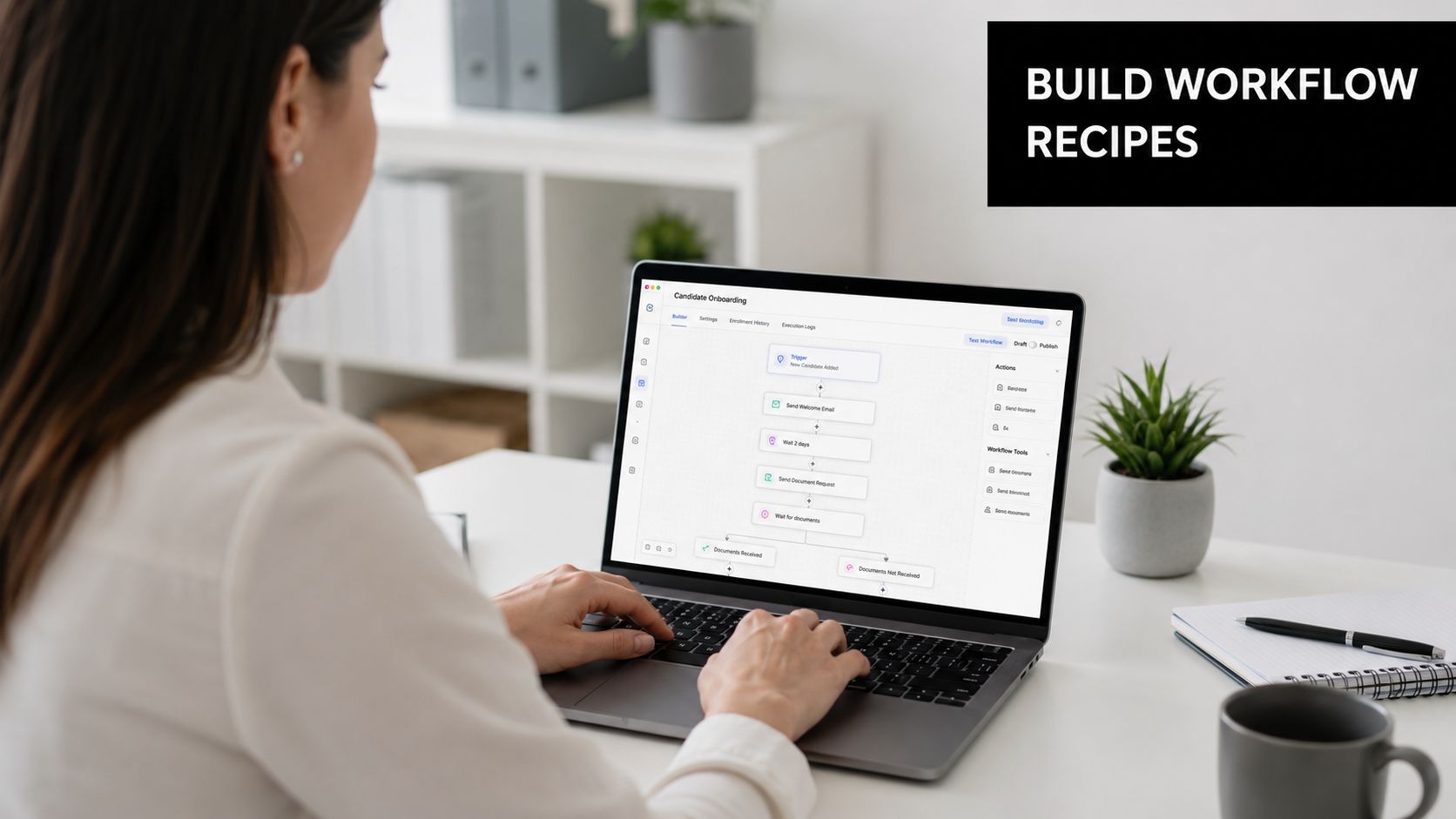
Start with a small library of recipes tied to real hiring patterns. Three to five well-tested workflows usually cover the bulk of scheduling volume. Beyond that, complexity rises fast. Every extra branch adds failure points, makes audits harder, and increases the chance that a candidate gets the wrong message or a dead booking link.
Recipe one for stage-triggered self-booking
Use this for repeatable stages such as phone screens, recruiter screens, and first-round interviews.
Trigger: candidate enters "Phone Screen" in Greenhouse, Lever, Ashby, or a custom ATS via webhook.
Automation path: Make or Zapier receives the event, checks role, region, interviewer pool, and message template, then creates the booking request.
Candidate action: candidate opens the link on their phone and selects from approved times.
System action: the scheduler confirms the slot, writes the event back to the ATS, notifies the recruiter, and logs the activity for audit purposes.
Build this one first. It usually delivers the fastest return because it handles high-volume scheduling without recruiter back-and-forth. If you're building this in Zapier instead of Make, this guide on mastering Zapier automation is a solid reference for designing stable trigger-action flows.
Keep the logic strict. Only send booking links when the stage, role family, and interviewer assignment are valid. If required data is missing, route the record to review instead of letting the automation guess. That choice improves reliability and avoids candidate-facing errors that are hard to recover from.
Recipe two for reminders and no-show prevention
The reminder flow deserves its own recipe. It is not a small add-on to booking.
Candidates often schedule from a phone during a work break, then switch devices later. Confirmation details get buried. Timezone context is forgotten. Interview format gets lost. A reminder sequence reduces those failure points and gives candidates a low-friction way to reschedule instead of dropping out.
A practical reminder sequence looks like this:
- Immediate confirmation with date, time, timezone, interview format, interviewer name, and reschedule link
- Day-before reminder by email with the same core details in plain language
- Short-notice reminder by SMS or WhatsApp if your stack supports consented messaging
- Post-reschedule confirmation every time the slot changes, so stale invites do not stay in circulation
For regulated teams or companies hiring across regions, template control matters here. Define which channels are allowed, what personal data can appear in each message, and how consent is captured for text-based reminders. The goal is not just speed. The goal is a reliable process that stands up to compliance review.
A candidate should never need to search old emails to figure out the interview type, local time, or next action.
Recipe three for recruiter review when automation should pause
Some workflows need human approval by design. Senior hiring, confidential searches, accommodation requests, and cross-functional panels often have constraints that should not be resolved by a generic booking engine.
Create a review branch for cases such as:
- the role is marked confidential or executive
- no approved slots exist within the target SLA
- a required interviewer is unavailable
- the candidate requests an accommodation or a nonstandard format
- the automation detects conflicting data between the ATS and calendar system
The handoff matters. Send the recruiter a structured summary with candidate name, stage, role, blocker, and the next action required. Include links to the ATS record and scheduling console if your stack supports them. Do not forward raw error logs to Slack and expect a recruiter to decode them.
That design keeps exceptions contained. It also prevents the worst outcome in scheduling automation. A candidate receives an invitation that looks valid, taps in, and discovers the system cannot honor it.
Copy templates that work
Good copy reduces confusion and cuts reply volume. It also improves booking completion on mobile, where candidates scan fast and abandon faster.
Use plain language, short paragraphs, and one clear action per message.
Initial invitation email
Subject: Choose your interview time
Hi [First Name],
You're ready for the next step in our process for [Role]. Use the link below to choose a time that works for you.
[Booking Link]
If none of the options fit, reply to this message and we'll help directly.
Thanks,
[Recruiter Name]
Confirmation message
Your interview is confirmed for [Date] at [Time] in [Timezone].
Format: [Video/In person/Phone]
Interviewer: [Name]
If you need to reschedule, use this link: [Reschedule Link]
Short reminder
Reminder: your interview for [Role] is coming up at [Time] [Timezone]. If anything changes, use your reschedule link or reply here.
Standardize the variables across every template. If one message says "Video interview" and another says "Virtual meeting," teams create unnecessary ambiguity. Use one naming convention, one timezone format, and one support path. That consistency helps candidates and makes QA easier when you update templates at scale.
Design the booking page for phones first
The booking page has one job. Get the candidate to a confirmed slot with as little friction as possible.
Show the role, interview type, local timezone, available times, and a visible support option. Remove everything else unless it serves an operational purpose. Long forms, heavy branding, and unnecessary fields hurt completion rates, especially on mobile networks and smaller screens.
Common mistakes include:
- Too many visible slots that make choice harder instead of easier
- Weak timezone labeling near the selected time
- No fallback contact path when no listed slot works
- Extra required fields that belong in the ATS, not the booking page
- Brand-heavy layouts that slow load time and distract from the booking action
The best template set is fast, clear, and controlled. It helps candidates book quickly, gives recruiters fewer exceptions to clean up, and gives operations leaders a scheduling system they can trust under hiring pressure.
Advanced Rules for Coordination and Error Handling
Simple one-on-one scheduling is easy to automate. The cracks show up when the process gets real. A panel needs three interviewers. One manager blocks afternoons. A candidate needs a short-notice change. Another asks for an accommodation that shouldn't be forced into a standard booking page.
Without defined control rules, AI-driven scheduling can become risky. Phenom highlights the importance of edge cases such as interviewer load balancing, protected availability for managers, and candidate accommodation requests, warning that without clear rules and governance, automation can create fairness and reliability issues (Phenom on interview scheduling tool benefits).
Panel interviews need hard constraints
For panels, don't let the system "find time" loosely. Give it a ranked structure:
- mandatory interviewers
- optional or rotating interviewers
- approved panel blocks
- fallback escalation when no compliant slot exists
That keeps the automation deterministic. If the hiring manager must attend, say so. If any one of three engineers can fill the technical seat, define the pool. If the candidate is remote, lock the timezone behavior so the system doesn't expose slots that are technically open but practically unreasonable.
Load balancing protects your best interviewers
A common failure is overusing the most responsive people. The engineer who always accepts invites quickly becomes the default interviewer for half the pipeline. That hurts the hiring process and the person's actual job.
Use scheduling rules that rotate interviewer pools, respect protected focus blocks, and cap how much interview load any one person absorbs. If your tool can't enforce that directly, build the logic in the layer that prepares availability.
Reliability in scheduling doesn't mean filling the first open slot. It means assigning the right slot without creating downstream damage.
Error handling should look operational, not technical
Most automation failures aren't dramatic. They show up as duplicate invites, wrong timezones, stale calendar data, or no available slots. If your fallback is "someone checks the logs," the process isn't mature.
Use explicit exception states such as:
- No compliant availability
- Calendar sync mismatch
- Candidate requested custom handling
- Interviewer removed from eligible pool
- Reschedule outside rule set
Each state should route to a person with context. Include the candidate, stage, role, cause, and next action. Recruiters shouldn't need to decode webhook payloads or cross-reference five systems to recover a missed interview.
Scaling Your System with SOPs and Governance
A scheduling system becomes durable when it stops living inside one recruiter's memory. That's where SOPs matter. You need the workflow, but you also need the operating manual for the people who run it, monitor it, and step in when exceptions appear.
Document the system in layers. Start with the candidate-facing journey. Add the internal actions by recruiter, coordinator, hiring manager, and recruiting ops. Then document the exception paths. If no slots are available, who owns the fix? If a senior leader needs protected availability, who can approve changes? If a candidate requests a scheduling accommodation, how does the team respond consistently?
What your SOPs should include
A practical SOP set should define:
- Workflow ownership so someone is accountable for rule changes
- Stage-by-stage logic for booking, confirmations, reminders, and reschedules
- Escalation paths for failed syncs, candidate complaints, or executive scheduling
- Audit expectations for who changed rules and why
- Data handling rules covering ATS updates, calendar visibility, and message retention
If your team doesn't already document workflows well, this guide on how to create SOPs is a useful operational reference.
Governance is what keeps AI scheduling trustworthy
Scheduling automation often gets sold as neutral because it runs on availability data. In practice, bias and compliance issues can still show up through the rules. Protected executive calendars may get favored. Certain interviewers may be overassigned. Accommodation requests may get pushed into a manual queue without urgency. Regional privacy expectations may be ignored if message logs and candidate data spread across too many systems.
That means governance can't sit outside the workflow. It has to be built into it. Define who can change availability rules. Define what data the automation can read and write. Define when human review is required. Review KPI trends regularly, especially the friction indicators covered earlier, because reliability problems often appear there before they become hiring complaints.
Frequently Asked Questions on Scheduling Automation
How do you handle scheduling for international candidates across many time zones
Use a scheduling engine that presents slots in the candidate's local time and converts interviewer availability automatically. The workflow only works if interviewer working hours, holidays, and location settings are maintained accurately. For global panels, it's often better to publish separate region-friendly blocks instead of pretending one set of hours works for everyone.
What is the best way to schedule high-priority or executive roles
Don't force executive hiring into the same fully self-serve flow you use for standard screens. A better pattern is curated automation. The recruiter or executive assistant selects a controlled set of approved slots, then sends a personalized booking link. The system still handles confirmations, reminders, and calendar updates, but the slot selection stays high-touch.
Can these automations integrate with custom-built applicant tracking systems
Yes, if the ATS can trigger events through an API or webhook. In practice, that means your custom ATS tells an automation platform when a candidate changes stage, and the automation then handles scheduling, messaging, and status updates across the rest of your stack. The integration challenge is usually less about whether it's possible and more about whether the payloads are consistent enough for reliable branching and error handling.
The broader principle is simple. If you want to automate interview scheduling well, don't start with the calendar. Start with the candidate journey, the operational rules, and the governance model. The calendar is only the execution layer.
If you want help designing or implementing a reliable scheduling system, MakeAutomation helps B2B and SaaS teams turn messy recruiting workflows into documented, scalable automations with the right controls, integrations, and SOPs in place.