Boost B2B SaaS: Improve Customer Engagement with AI
Most advice on how to improve customer engagement is built around visible activity. More opens. More clicks. More comments. More app logins. Those signals are easy to report, but they don't tell a growth-stage SaaS team what moves pipeline, adoption, renewal, or expansion.
That approach breaks down fast in B2B. A user can open every lifecycle email and still never activate. A champion can attend a webinar and still fail to get internal buy-in. A customer can log in often because they're confused, not because they're succeeding. If you're serious about growth, the job isn't to create more activity. It's to create higher-quality engagement and automate it without stripping out context or trust.
Moving Beyond Vanity Engagement Metrics
Organizations often define engagement too loosely. They count what their tools make easy to count, then optimize around those numbers. That usually means email metrics, website visits, and social interactions. Useful inputs, yes. Reliable indicators of revenue impact, not always.
The more practical definition is this. Engagement is any customer behavior that increases the probability of conversion, retention, expansion, or advocacy. Anything else is background noise until proven otherwise.

Why the old definition fails
The standard playbook says to celebrate attention. But attention without movement is expensive. Sales follows up on weak signals. Customer success chases accounts that look busy but aren't healthy. Marketing keeps pushing campaigns that generate responses without producing qualified demand.
Personalization is a good example of the difference between surface engagement and commercial impact. In 2026 reporting, 76% of consumers are more likely to purchase from brands that personalize, while personalized emails achieve a 29% open rate and a 41% click-through rate, far above the typical email campaign CTR of 2.6%, according to VWO's customer engagement statistics. The takeaway isn't "send more personalized emails." It's that engagement improves when teams use behavior and context to deliver the right message at the right moment.
Practical rule: If a metric doesn't help your team decide who to assist, what to automate, or where revenue risk sits, it isn't a core engagement metric.
What engagement quality looks like in SaaS
In SaaS, high-quality engagement usually shows up as behaviors tied to progress. Examples include:
- Activation actions such as completing setup, connecting integrations, or importing data
- Collaborative usage like inviting teammates, assigning roles, or sharing dashboards
- Adoption depth through repeated use of key features that produce outcomes
- Commercial readiness when a buyer requests security docs, pricing detail, or admin access
- Retention signals such as steady product usage tied to realized value, not just session count
Low-quality engagement isn't useless. It just shouldn't carry the same weight. A content download may indicate interest. A completed onboarding milestone is stronger. A customer who expands product use across a team is stronger still.
That's the reset. To improve customer engagement, stop asking, "How do we get more people to interact?" Start asking, "Which interactions change the business outcome?"
How to Define Your Core Engagement Metrics
A workable engagement system starts with one decision. Pick the business outcome first, then work backward to the user actions that predict it. If you skip that order, your CRM fills up with events that look impressive and don't drive action.
Many teams often get stuck. A systematic methodology that integrates real-time analytics with CRM data can boost revenue by 123%, yet 40% of organizations fail to engage effectively because they lack a comprehensive data strategy, based on the verified data provided for this article. The problem usually isn't tool availability. It's a missing metric hierarchy.
Build the scorecard from the outcome backward
Start with one primary business goal per motion. Don't mix everything together.
For example:
- Trial to paid
Focus on actions that show setup completion, first value, and buying intent. - Paid account retention
Focus on feature adoption, team usage, support friction, and executive visibility. - Expansion
Focus on usage limits, multi-team adoption, advanced feature use, and admin behavior.
Once the goal is clear, sort behaviors into tiers. This makes automation cleaner and prevents weak signals from triggering heavy-handed follow-up.
Mapping engagement actions to business impact
| Engagement Action | Engagement Tier | Potential Business Impact |
|---|---|---|
| Opens a lifecycle email | Low | Indicates awareness, but weak on its own |
| Clicks to a help article | Low to Medium | May signal interest or friction, depends on context |
| Completes profile or workspace setup | Medium | Suggests activation progress |
| Connects a core integration | Medium to High | Increases product stickiness |
| Uses a key feature repeatedly | High | Signals adoption and realized value |
| Invites teammates | High | Correlates with account expansion potential |
| Reviews pricing, admin, or security pages | High | Indicates commercial intent |
| Submits product feedback after active use | High | Shows investment in the product relationship |
That table isn't universal. A vertical SaaS product for compliance teams will value different actions than a PLG collaboration tool. The point is to create a ranked model your revenue and ops teams use.
Weak signals should inform scoring. Strong signals should trigger action.
Keep the metric set small enough to operate
An engagement scorecard should be narrow enough to be useful. If every event matters, none of them matter. In practice, teams should typically define:
- A few leading indicators tied to progress, such as setup completion or repeated use of a core workflow
- A few friction indicators such as help-center loops, stalled onboarding, or unresolved support patterns
- A few commercial indicators like buyer research behavior, team invites, or usage patterns tied to plan limits
If your reporting layer is fragmented, fix that before layering on automations. A clean operating model depends on unified visibility across product, marketing, sales, and success. If your team is still stitching reports together manually, a guide on business intelligence reporting is a useful next step because it frames how to centralize operational data before you automate decisions from it.
One test for every metric
Ask one blunt question about each metric: If this number rises or falls, what will the team do differently this week?
If nobody has an answer, remove it from the core scorecard.
Map the Customer Journey for Engagement Triggers
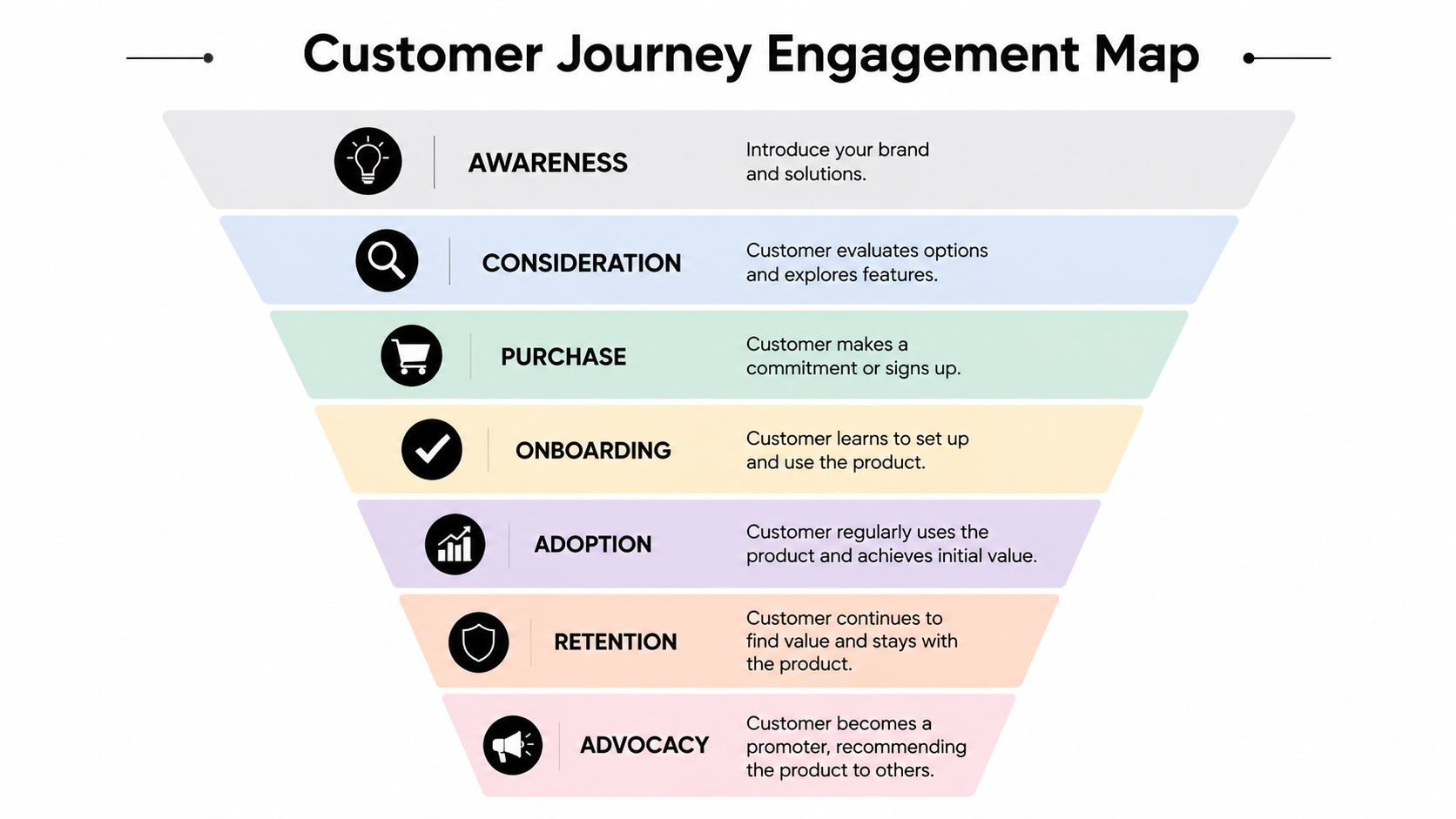
A scorecard tells you what matters. The journey tells you when it matters. That's where most engagement systems either become effective or become annoying.
Consider a fictional SaaS company selling workflow software to mid-market operations teams. The product has a self-serve trial, optional sales assistance, a structured onboarding path, and account management for larger customers. The team already tracks product events. What's missing is trigger logic tied to the customer journey.
Trial and early evaluation
A prospect signs up and lands in the product. Many teams send the same onboarding email sequence to everyone. That's simple, but it ignores intent.
The better move is to trigger based on observed behavior. If the user explores the product but doesn't connect a key integration, send setup help. If the user reaches an advanced feature quickly, route them toward a use-case walkthrough. If they revisit pricing or invite a colleague, flag sales to support the buying process.
Interactive touchpoints matter here because they create both momentum and clearer intent signals. According to Involve.me's customer engagement statistics, interactive content generates about 52.6% more engagement than static content. The same source reports that integrating gamification features can increase trial usage by 54% and boost buy clicks by 15%.
Onboarding and activation
At this stage, passive guidance often fails. A tooltip isn't enough when a user is setting up permissions, importing data, or configuring workflows that affect their whole team.
Use participation to shorten time to value:
- Checklists help users see progress and complete setup in sequence
- Interactive walkthroughs teach by doing, not by explaining
- Feature prompts should appear when the user reaches a decision point, not three screens earlier
- Short in-app questions can segment the experience without forcing a form-heavy process
The key is context. A first-time admin needs setup guidance. An end user needs task-level clarity. A power user may need deeper examples or an invitation to expand usage across teams.
Static content informs. Interactive content qualifies intent and accelerates behavior.
Adoption, retention, and advocacy
Once the account is live, the strongest engagement triggers often come from pattern changes. A healthy account starts using fewer features. A champion stops inviting teammates. Admin activity spikes around billing or export behavior. Those aren't vanity events. They're operational signals.
Here, human timing matters as much as automation. If the system detects friction around a complex feature, a proactive success touch can prevent a silent stall. If a customer is getting clear value, that's the moment to request a review, a referral, or a case study conversation.
The common mistake is treating every stage with the same channel and the same tone. The journey should narrow your response, not broaden it. Trial users need momentum. New customers need confidence. Mature accounts need relevance.
Automate Meaningful Engagement with AI and CRM
Automation works when it reacts to real signals, not when it blindly follows a calendar. In growth-stage SaaS, that usually means combining product usage data, CRM records, support activity, and AI-assisted decisioning into one operating layer.
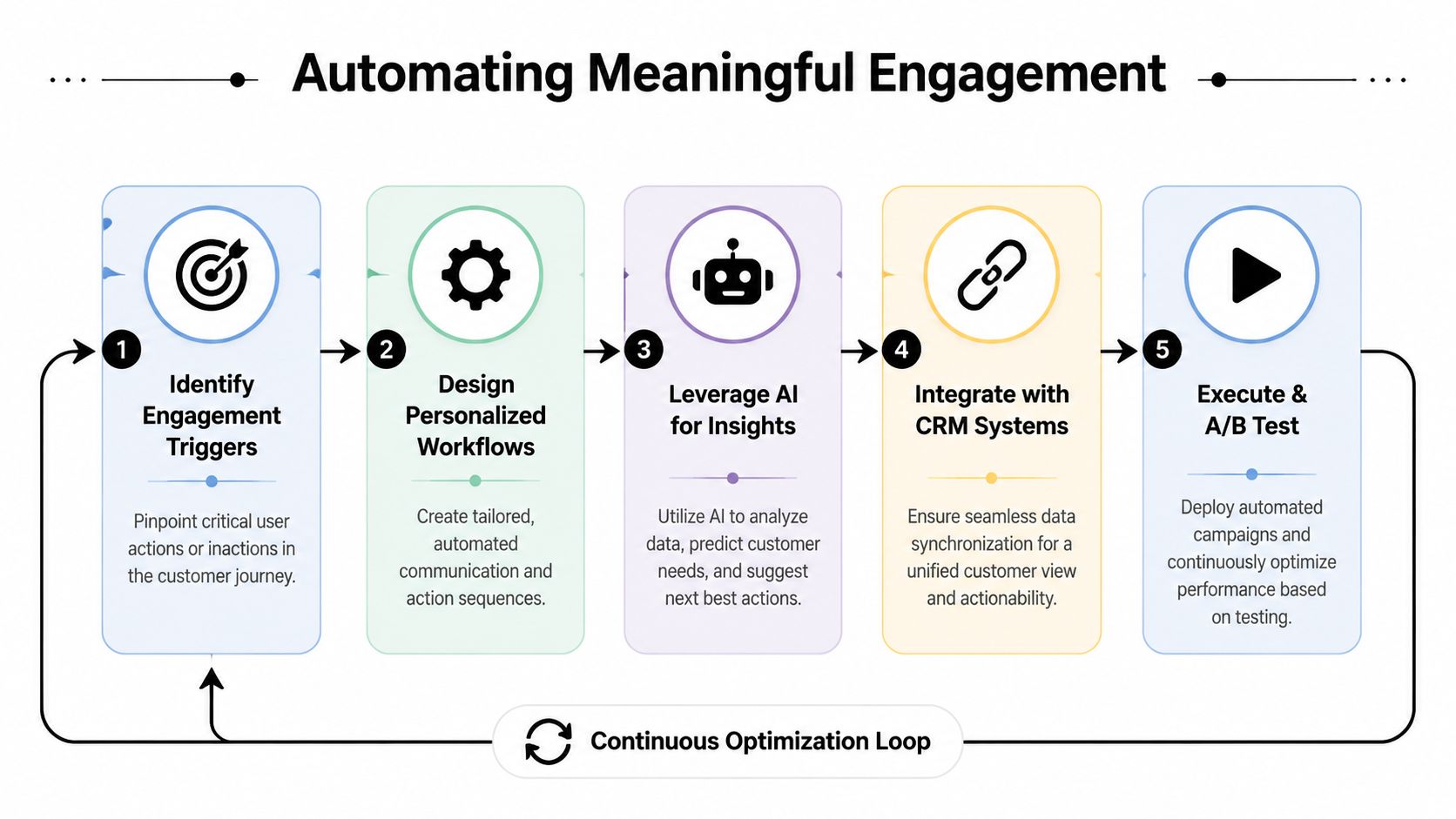
The commercial reason to do this is straightforward. Businesses using predictive analytics for engagement see a 25% reduction in churn rates and a 15% increase in Net Promoter Score, based on the verified data provided for this article. The strongest approaches refine predictive models weekly, yielding a 40% improvement in engagement quality over time.
Workflow one for onboarding friction
A strong onboarding workflow doesn't fire because a user signed up. It fires because the user stalled at a meaningful milestone.
If trigger: user creates an account, starts setup, but doesn't complete a key activation task within your expected onboarding window.
Then action:
- Send a behavior-based email with one next step, not a product tour
- Create a CRM task for customer success if the account matches your ideal customer profile
- Show an in-app walkthrough the next time the user logs in
- Suppress all generic nurture emails until the activation task is complete
AI can help prioritize. Instead of escalating every stalled account, score the account based on fit, activity depth, and buying signals. The team spends time where intervention has a higher commercial payoff.
Workflow two for support-led engagement
Support data is one of the most underused engagement inputs in SaaS. Repeated help-center visits, unresolved ticket themes, and sentiment from conversations often show risk earlier than renewal reporting does.
Use a simple pattern:
- Signal cluster: repeat visits to the same help topic, failed attempts at a key feature, or multiple support interactions around one workflow
- Automation layer: tag the account as friction risk in the CRM
- Response path: trigger a specific help sequence, then route to a human if the issue persists
This is a good place for AI agents and voice workflows, especially when response speed matters. Teams can use systems such as HubSpot, Intercom, Salesforce, or AI agents for customer service to classify intent, route conversations, and handle routine check-ins while preserving full context for human handoff.
A short video on AI-driven customer engagement fits here:
Workflow three for expansion readiness
Expansion should not rely on a generic quarterly upsell campaign. It should be triggered by evidence that the account is outgrowing its current state.
If trigger: a customer repeatedly uses advanced features, adds collaborators, or shows admin-level interest in governance, permissions, or usage boundaries.
Then action:
- Send a personalized message tied to the exact usage pattern
- Surface a relevant upgrade path inside the product
- Alert the account owner with a short summary of why the account looks expansion-ready
- Queue a human conversation if the account value or complexity is high
Automation should handle pattern detection and first response. Humans should handle ambiguity, negotiation, and trust-building.
Where automation should stop
Over-automation creates a different problem. Customers feel observed but not understood. They receive fast messages that miss the actual issue. They get pushed into upsell flows while still dealing with adoption gaps.
Use human touch when the signal is emotionally loaded, commercially important, or unclear. That includes churn risk, implementation friction for strategic accounts, executive stakeholder alignment, and any conversation where trust matters more than speed.
If you want to improve customer engagement, automate the repeatable parts. Don't automate empathy.
Measure Your Impact and Scale with SOPs
Most engagement programs fail at the same point. The team launches workflows, sees a burst of activity, and assumes the system is working. Then nobody can clearly answer whether the automations improved retention, accelerated activation, or expanded account value.
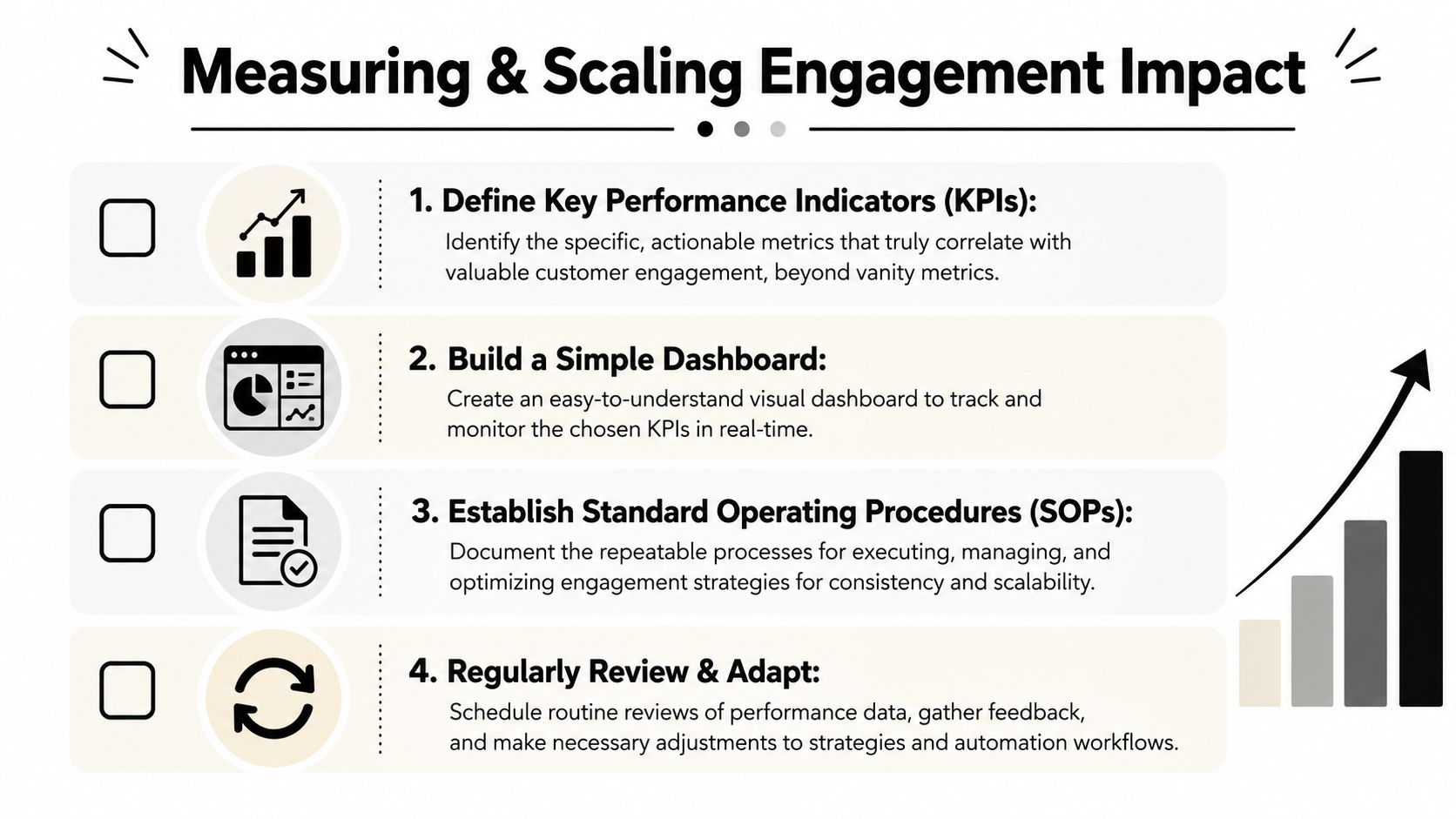
That failure is avoidable if the dashboard measures quality, not just throughput. A major gap in most advice is exactly this problem. The most effective strategies focus on signals that predict retention or revenue, connecting product adoption and customer health to downstream outcomes rather than surface-level interactions, as noted by Insiderone's customer engagement strategies overview.
Build a dashboard that helps teams act
A useful engagement dashboard isn't a giant wall of charts. It should answer a handful of operating questions:
- Activation quality
Which accounts are reaching first value, and which are stalling? - Adoption depth
Which features correlate with healthy usage and team-level expansion? - Risk concentration
Which accounts show friction patterns, declining engagement quality, or support-heavy behavior? - Commercial movement
Which product behaviors line up with conversion, renewal, or upsell outcomes?
Use your CRM and analytics stack to tie those signals to account records, not just anonymous event streams. If sales, success, and ops don't share the same customer picture, your automation will stay fragmented.
Add a bot versus add a human
This decision deserves its own operating rule set. Use automation when the issue is common, repetitive, and easy to classify. Use a person when the issue is strategic, emotionally sensitive, or hard to interpret.
A practical decision filter looks like this:
| Situation | Better first move |
|---|---|
| User forgot a setup step | Automated reminder or in-app prompt |
| Account shows repeated friction on one feature | Automated assist, then human follow-up if unresolved |
| Customer requests pricing clarification for a larger rollout | Human conversation |
| Renewal risk appears across multiple signals | Human outreach with full account context |
| New user asks a standard support question | Bot or AI assistant |
The fastest response isn't always the best response. The right response is the one that preserves trust and moves the account forward.
Turn wins into SOPs
Once a workflow consistently improves outcomes, document it. Otherwise the result stays locked inside one operator's head.
A simple SOP should include:
Trigger definition
What exact event or account condition starts the workflow?Data inputs
Which systems provide the signal? CRM, product analytics, support platform, call transcripts, survey data?Automation logic
What message, task, routing rule, or suppression rule fires next?Human intervention point
When does the workflow escalate to sales, success, or support?Success measure
Which quality metric determines whether the workflow is working?
If your team needs a structure for documenting repeatable processes, this guide on how to create SOPs is a practical reference.
Building Your Customer Engagement Flywheel
Customer engagement works better as a flywheel than as a campaign. One useful interaction creates data. That data improves targeting. Better targeting improves timing and relevance. Better timing increases conversion, adoption, and retention. Then the system learns again.
The companies that improve customer engagement consistently don't treat it as a messaging problem. They treat it as an operating model. They define which behaviors matter, map those behaviors to journey stages, automate around meaningful triggers, measure business impact, and formalize what works so the team can repeat it.
What the flywheel needs to stay healthy
Three things keep the system from degrading over time:
- Signal discipline
Keep trimming vanity events from the scorecard and promoting signals that predict outcomes. - Workflow review
Revisit automation logic regularly so it reflects how customers buy and adopt now, not how they behaved last year. - Human judgment
Protect moments where nuance matters. If a message needs context, don't force it through a bot.
A lot of AI engagement programs go sideways. Teams automate too early, over-message, and mistake speed for relevance. The better approach is narrower and more deliberate. Detect strong signals. Trigger focused actions. Hand complex moments to people.
The operating mindset that scales
A healthy engagement flywheel isn't louder. It's sharper. Sales sees better intent. Success sees risk earlier. Marketing stops rewarding shallow clicks. Product teams learn which behaviors lead to stickier accounts.
That shift changes the economics of growth. You stop paying for noise and start investing in actions that compound.
If your current setup still revolves around campaign calendars, disconnected reports, and generic follow-up sequences, don't rebuild everything at once. Start with one journey, one scorecard, and one workflow tied to a real business outcome. Prove it. Document it. Then expand.
If you want help designing that system, MakeAutomation works with B2B and SaaS teams to map engagement signals, connect CRM and product data, build AI-powered workflows, and document the SOPs needed to scale without turning customer experience into generic automation.