A Founder’s Product Design Consultation Guide for SaaS
You've probably lived some version of this already. The product works. Your engineers can demo the logic. Early prospects say the feature set is strong. Then the pipeline stalls after trial signup, onboarding drags, support keeps answering the same “where do I find this?” questions, and customers describe the experience with words no founder wants to hear: confusing, clunky, hard to use.
At that point, many teams think they need a UI refresh. Better screens. Cleaner branding. A sharper dashboard.
Sometimes they do. More often, they need a product design consultation that fixes the decisions underneath the screens. The issue usually isn't that the interface looks dated. It's that the product, the onboarding path, the data capture, and the downstream CRM or automation logic were never designed as one system. In SaaS, that disconnect costs more than aesthetics. It hurts activation, sales handoff, retention, and reporting.
A good design engagement closes that gap. It helps you decide what users should see, what they should do next, what data should be captured at each point, and how those actions should trigger the right sales, success, or marketing workflow. That's where the return comes from.
Beyond a Pretty Interface What a Consultation Delivers
A founder hires a designer after hearing the same feedback for months. “The setup is hard.” “I'm not sure what to do next.” “We like the product, but adoption is uneven across the team.”
The first instinct is usually visual. Update the layout. Tighten spacing. Improve the empty states. Those things matter, but they rarely fix the root problem by themselves. In B2B SaaS, friction usually starts earlier. The product asks for too much too soon, hides important actions, labels workflows using internal team language, or sends users into dead ends that break the buying journey.
What the work actually changes
A solid product design consultation looks at the product the way a buyer and operator experience it. That means the consultant isn't only asking whether a screen is attractive. They're asking:
- Where users hesitate: Which steps create uncertainty during signup, onboarding, and everyday use.
- What the business needs: Which actions should map to activation, expansion, or handoff to sales or customer success.
- How teams make decisions: Whether product, engineering, sales, and support are aligned on the same user journey.
- What happens after the click: Whether in-app behavior flows into the CRM, support desk, lifecycle emails, and reporting.
That's why treating design as a cosmetic layer usually disappoints founders. You get nicer mockups, but the product still leaks revenue.
The market has already moved past that shallow view. The global product design and development services market was valued at USD 17.06 billion in 2023 and is projected to reach USD 32.93 billion by 2030, expanding at a CAGR of 10.08%, according to Grand View Research on product design and development services. Companies don't keep investing in external design help because they want prettier software. They do it because product ecosystems got more complex and internal teams often need outside structure.
Practical rule: If users call your product confusing, assume the problem spans positioning, workflow logic, UI, and handoff to downstream systems. Don't assume a visual redesign alone will fix it.
What founders should expect instead
The best engagements produce decisions, not decoration. You should come out with sharper user flows, clearer priorities, and a product experience that supports how revenue happens in your company.
That often includes outcomes like these:
- Sharper onboarding paths: Different user types don't all get shoved through the same generic setup.
- Cleaner feature hierarchy: Core jobs are easier to find, and low-priority options stop competing for attention.
- Better internal alignment: Product, sales, and support stop arguing about what the experience is supposed to do.
- Usable artifacts for execution: Wireframes, prototypes, testing notes, and implementation guidance that engineering can build from.
A mature founder stops asking, “Will design make the app look more polished?” and starts asking, “Will this engagement make the product easier to buy, easier to adopt, and easier to grow?”
That's the right question.
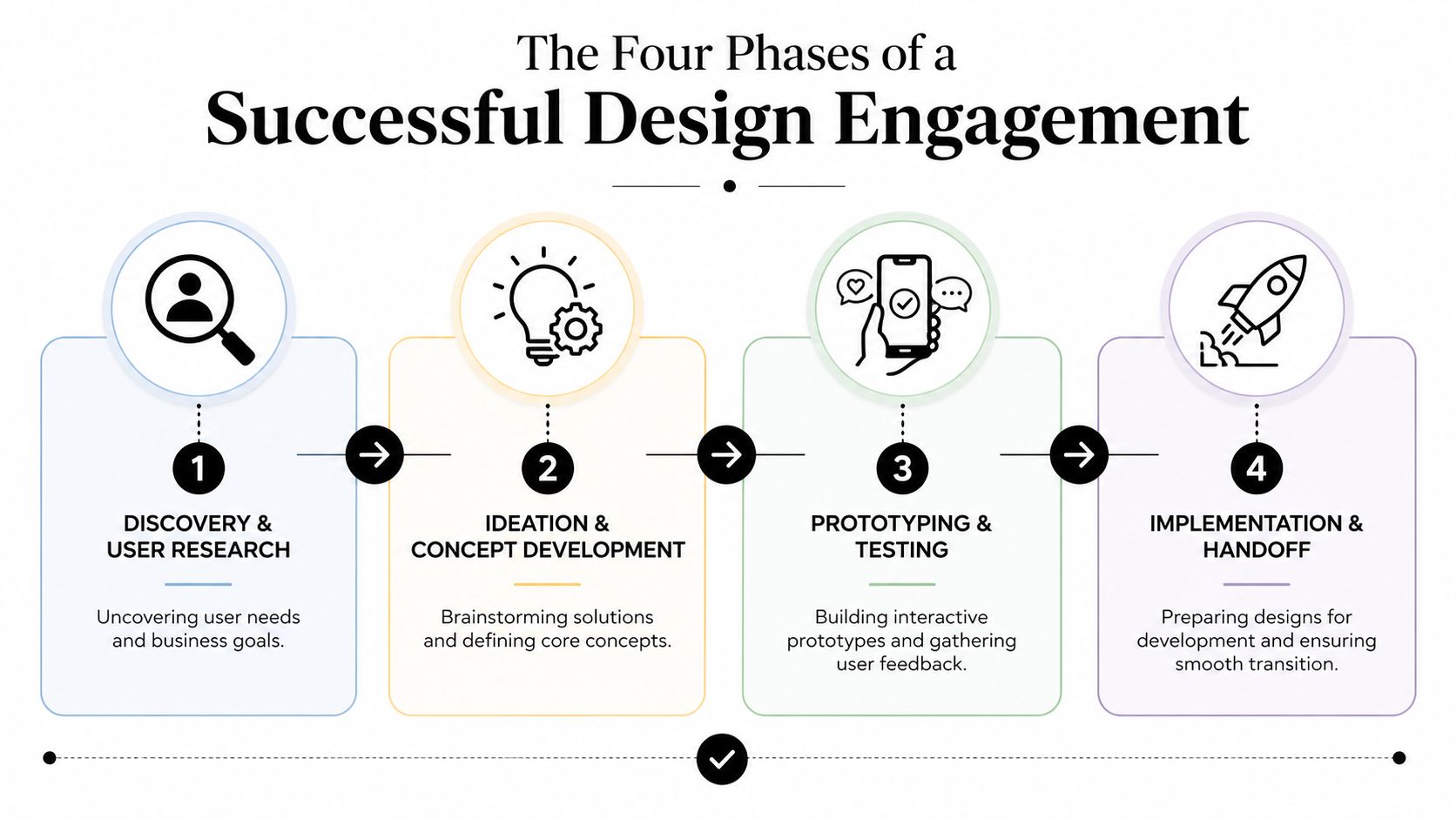
The Four Phases of a Successful Design Engagement
Weak engagements jump straight to screens. Strong ones earn the screens by doing the work before them.
The gap in results is real. Best-performing companies achieve an average product success rate of about 76%, compared with around 51% for the average firm, and the difference is tied to how rigorously they execute discovery, definition, prototyping, and testing, according to StudioRed's product development statistics summary.
Discovery and user research
At this point, the engagement either becomes strategic or stays superficial.
In discovery, the consultant studies your current product, your buyer journey, and the internal assumptions behind both. That usually means stakeholder interviews, product walkthroughs, support ticket review, sales-call analysis, funnel review, and user interviews or usability sessions. In a SaaS company, this phase should include looking at live product behavior in tools like Mixpanel, Amplitude, Hotjar, HubSpot, Intercom, or Zendesk if you use them.
Founders often want to speed past this because they already “know the user.” That's usually overstated. Organizations typically understand their intended buyer. They know much less about where that buyer gets stuck between first touch and repeat usage.
Your role here is simple but important. Show the mess. Let the consultant see the onboarding debt, the exception-heavy workflows, the old screens your team apologizes for on demos, and the workarounds your customer success team uses to keep accounts alive.
Strategy and roadmapping
After discovery, the consultant should narrow the problem. Not every usability issue deserves equal attention. Some issues hurt key flows. Others are annoying but low impact.
This phase turns raw findings into decisions. Which user journey matters most right now? What should be redesigned first? Where does the company need consistency versus speed? If your product has started to sprawl, this is also where a consultant may recommend component standards or a more formal system. If that's your bottleneck, a useful companion resource is this guide to building a design system.
A good roadmap usually separates work into buckets such as:
- Revenue-critical flows: Trial signup, demo request, activation, upgrade, seat expansion.
- Adoption-critical flows: Onboarding, setup, first-value actions, team invites.
- Operational friction: Repetitive support issues, admin complexity, edge cases that require manual intervention.
Good consultants don't say yes to every screen request. They tell you which design problems are worth paying to solve now and which should wait.
Iterative design and prototyping
Now the screens show up, but they should be grounded in evidence and priorities, not opinion.
This stage usually starts with low-fidelity wireframes and flow options. Then it moves into interactive prototypes in Figma or a similar tool so users and stakeholders can respond to behavior, not just static layouts. Founders often make the mistake of asking for polished visuals too early. That slows learning because teams become attached to high-fidelity work before validating the workflow itself.
The founder's job is to react at the right altitude. Don't spend review meetings debating icon style if the underlying question is whether the onboarding path should ask for company data before or after the first meaningful action.
A productive review sounds like this:
- Business lens: Does this flow support self-serve, sales assist, or both?
- User lens: Is the next action obvious to a first-time user?
- Data lens: Are we capturing the right signals for segmentation and follow-up?
- Technical lens: Can engineering build this without hidden complexity exploding the scope?
Validation and handoff
Too many design projects end with a shiny prototype and vague developer notes. That's where execution breaks.
The final phase should test the proposed experience with users, refine it based on observed behavior, and package the work for implementation. That includes annotated screens, edge-case notes, interaction states, content guidance, and clear acceptance criteria. For SaaS teams, it should also define what events need tracking and what behaviors should feed downstream systems.
The handoff is successful when product, engineering, growth, and customer-facing teams can all answer the same question: what should happen, for whom, and why?
How to Prepare for Your First Consultation
The fastest way to waste money on a product design consultation is to show up with opinions and no evidence. You don't need perfect data. You do need a usable briefing package.

Build a founder briefing doc
Before the first working session, prepare a short document that gives the consultant context they can act on. Keep it practical. Avoid aspiration-heavy language like “become category leader” unless you can tie it to a product decision.
Include these inputs:
- Current product access: A working login, sample accounts, and permission levels for different user roles.
- Business context: What you sell, to whom, how deals close, and where self-serve versus sales-led motions intersect.
- Known friction points: Support themes, churn reasons, onboarding complaints, and sales objections linked to product experience.
- Available evidence: Session recordings, analytics dashboards, Gong call snippets, support conversations, CRM notes, NPS comments, and onboarding drop-off observations.
- Constraints: Upcoming launch dates, engineering bandwidth, compliance limitations, or legacy architecture that affects flow design.
If you're still shaping the product itself, this guide on MVP and tech stack for SaaS helps frame the technical decisions that often affect what a design consultant can realistically recommend.
Decide what success means before the work starts
Founders often say they want “better UX.” That's not specific enough to guide decisions.
A better brief names one or two business outcomes and one or two product outcomes. For example, you might want a smoother onboarding experience for multi-user accounts, clearer setup for admins, stronger feature adoption in the first month, or fewer support requests around permissions and configuration.
Keep the targets directional if you don't have strong baseline data. The point is to create a shared definition of what improvement looks like.
Bring the consultant your unresolved trade-offs, not just your wishlist. “We need shorter onboarding, but sales wants richer qualification data” is a useful design problem. “Make it intuitive” is not.
Prepare your team, not just your files
The consultant will learn more from one candid conversation with the head of customer success than from a deck full of internal assumptions. Choose a small group of stakeholders who see different parts of the journey: product, engineering, support, sales, and customer success.
Tell them two things in advance. First, the goal isn't to defend current choices. Second, the engagement will surface conflicts between teams, and that's useful.
Later in the process, you'll likely need a structured way to validate proposed changes before build. When that moment comes, a practical template for a usability test plan keeps feedback focused on tasks and behavior instead of taste.
A concise explainer can also help your team align on what a modern product design workflow looks like in practice:
Decoding Pricing Models and Core Deliverables
Pricing confusion creates bad engagements. Founders buy the cheapest option, then discover they purchased output without strategy. Or they agree to an open-ended arrangement with no clarity on what “done” means.
The right pricing model depends on how defined your problem is, how much internal alignment you already have, and whether you need a one-time redesign or ongoing product support.
Product Design Consultation Pricing Models
| Model | Best For | Pros | Cons |
|---|---|---|---|
| Hourly | Early-stage exploration, advisory work, audits, small workflow improvements | Flexible, good when scope is still emerging, easier to start quickly | Cost can drift, founders may hesitate to ask needed questions, weak providers can stay vague |
| Fixed project fee | Clearly defined redesigns, onboarding overhauls, specific workflow projects | Stronger scope control, easier budgeting, cleaner milestone planning | Requires tight definition up front, scope changes can create friction |
| Monthly retainer | Ongoing product evolution, embedded support for growth-stage SaaS, repeated testing and iteration | Better continuity, consultant learns the product deeply, easier cross-functional collaboration | Can become passive if priorities aren't actively managed, not ideal if you only need a bounded engagement |
How to choose without overbuying
If your team can clearly name the workflow to improve, fixed fee is often the cleanest option. If your product problem is still fuzzy and you need diagnosis first, hourly or a short discovery sprint is safer. If your team ships continuously and needs design tied to product ops, experimentation, and revenue workflows, a retainer can work well.
What doesn't work is paying for a full redesign when your real issue is poor onboarding architecture or weak internal alignment. That's like renovating a lobby when the pipeline is broken in the walls.
When reviewing proposals, ask what is included in communication, revisions, user testing, implementation support, and developer collaboration. Also ask whether accessibility review is included or separate. If your product serves enterprise buyers or procurement-sensitive teams, it helps to understand related compliance work such as accessibility audit costs before the engagement is scoped.
The deliverables that matter
A founder should know what each artifact is for. Deliverables aren't ceremonial. They should support decision-making and implementation.
Common outputs include:
- User personas: Useful when they reflect real roles, goals, and constraints. Useless when they read like marketing fiction.
- Journey maps: Helpful for exposing handoff gaps between product, sales, and support.
- Wireframes: Best for aligning on structure and flow before anyone debates aesthetics.
- Interactive prototypes: Critical for testing behavior and task completion before engineering commits build time.
- UI library or style guide: Valuable when the team needs consistency and speed across multiple screens.
- Design specs for handoff: Necessary if you want developers to build the intended experience without guesswork.
For software teams, it's also smart to ask for documentation that connects product behavior to requirements and release logic. A lightweight agile PRD template helps translate design decisions into build-ready product language.
A useful deliverable changes what your team does next. If the consultant hands over files that nobody references during build, you bought artifacts, not progress.
Connecting Product Design to Your Automation Engine
Many design engagements fall short. They improve the interface but ignore the systems that turn product behavior into pipeline movement, sales follow-up, onboarding logic, and retention activity.
That gap matters more in B2B SaaS than in simpler consumer products. By 2025, 75% of B2B buyers are projected to use digital channels to research and purchase, yet many design consultations still treat interfaces in isolation instead of connecting them to CRM, marketing automation, and sales workflows, as noted in BCG's discussion of digital buying behavior and product context.
Design decisions that affect revenue operations
A signup form isn't just a form. It determines what gets into your CRM, what can be scored, how accounts are routed, and whether lifecycle campaigns can personalize the next step.
A dashboard isn't just a dashboard. It determines which features are discovered, which events are tracked, and whether customer success gets a usable signal that an account is healthy or at risk.
A few examples make this concrete:
- Signup flow design: If you hide company size, role, or use case until much later, sales and lifecycle systems may not have enough context to route or nurture correctly.
- Onboarding path design: If the product doesn't distinguish admin setup from end-user setup, activation data becomes muddy and follow-up sequences become generic.
- Feature placement: If core actions are buried, users won't trigger the events your lead scoring or product-qualified-account model depends on.
- Empty states and prompts: If these don't guide users toward the next meaningful task, your automation platform has less signal to work with.
What to map during the consultation
A capable consultant for SaaS should ask what each meaningful user action should trigger outside the interface. If they don't, you're getting UI work, not product system design.
Map these relationships explicitly:
- User action to event: What gets tracked when a user completes setup, invites a teammate, imports data, or uses a core feature.
- Event to CRM update: Which actions should update lifecycle stage, lead score, account status, or owner assignment.
- Event to messaging: Which behaviors should trigger onboarding emails, in-app prompts, success outreach, or sales follow-up.
- Behavior to support workflow: Which failure states should create alerts, help prompts, or internal tasks for your support team.
Questions founders should ask their consultant
The fastest way to expose whether a consultant understands SaaS operations is to ask operational questions, not aesthetic ones.
Ask things like:
- What product events should we instrument before redesigning this flow?
- Which fields in this experience need to exist for CRM segmentation later?
- How should onboarding differ for evaluator, admin, and day-to-day user?
- Where should in-app behavior trigger a human follow-up instead of another automated message?
The best product design consultation doesn't stop at “make this easier to use.” It answers, “How should this product experience produce cleaner data, better routing, and stronger customer progression?”
That's what ties design to revenue.
Measuring ROI and Choosing the Right Partner
Founders usually evaluate design spend the wrong way. They compare the invoice to development cost or agency alternatives. The better comparison is this: what business friction does the engagement remove, and what compounds after that friction is gone?
The broader business case for design is strong. A McKinsey study found that companies with the highest design performance achieved 32% faster revenue growth and 56% higher total returns to shareholders, as summarized by DesignRush's roundup of product design statistics. That doesn't mean every engagement pays off automatically. It means design performs when companies treat it as a managed business lever, not a decorative service.
What to measure after launch
Track a small set of product, business, and operational indicators tied to the workflow you redesigned.
- Product signals: Task completion, user error patterns, onboarding progression, and feature adoption within the intended journey.
- Business signals: Trial conversion quality, expansion readiness, churn risk signals, and sales progression for product-originated accounts.
- Operational signals: Repeated support issues, manual intervention during setup, and internal confusion during handoff between teams.
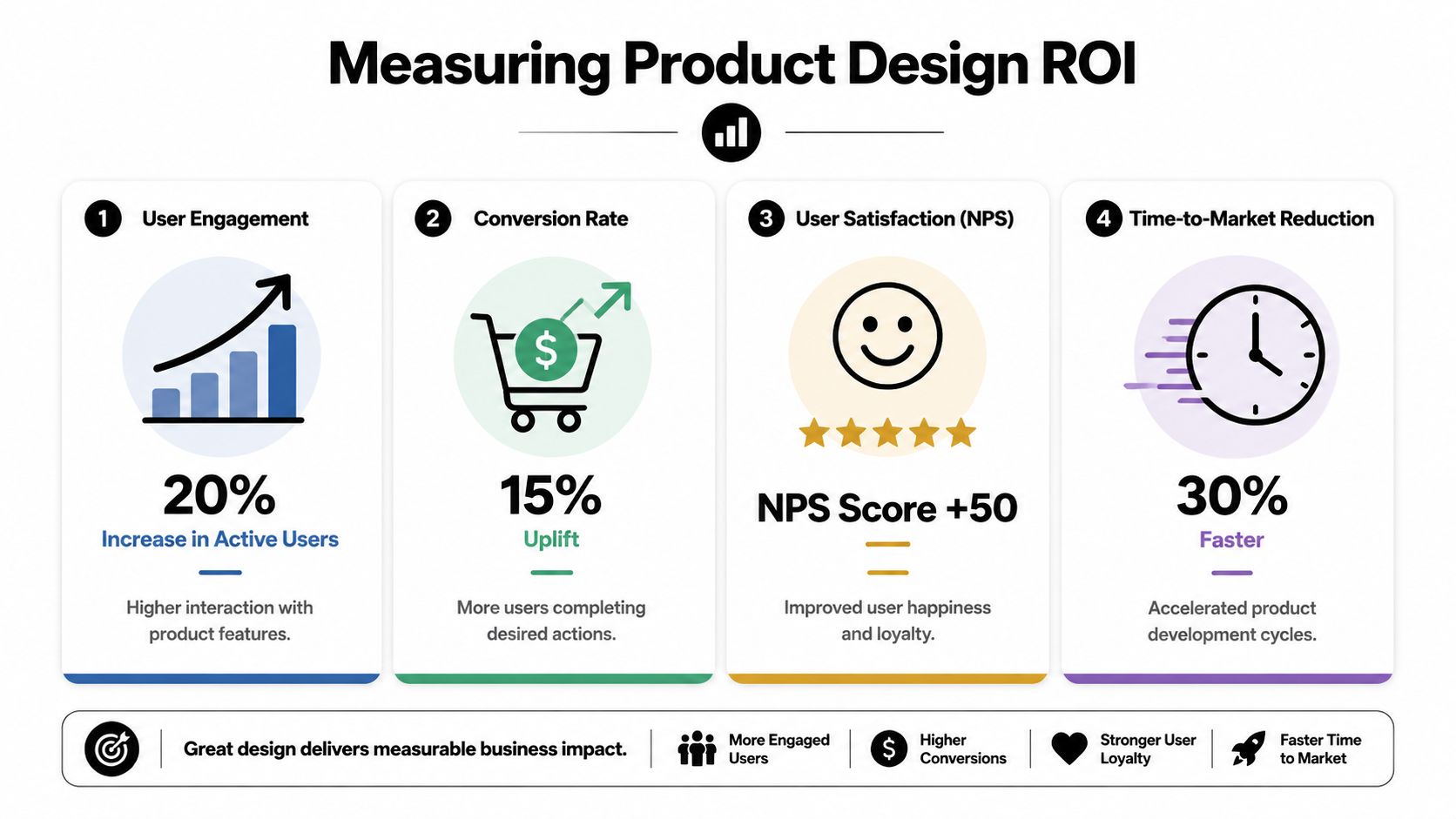
Don't dump all of this into one dashboard and hope insight appears. Pair each metric with a specific question. Did the new onboarding path help the right users reach first value sooner? Did support tickets about setup decline? Did better segmentation improve follow-up quality for sales or success?
The cleanest proof of ROI is when a product change reduces friction for users and removes manual work for your team at the same time.
How to choose a consultant without getting burned
A polished portfolio isn't enough. You need evidence that the consultant understands B2B buying complexity, role-based workflows, and the operational systems around the product.
Use this filter:
- Relevant experience: Look for B2B or SaaS work, not just consumer apps with polished visuals.
- Process clarity: Ask how they run discovery, testing, prioritization, and handoff.
- Operational thinking: Ask how they connect product behavior to CRM, onboarding, and support workflows.
- Evidence of judgment: Good consultants can explain what they would not redesign yet.
- Pilot option: A short paid discovery or workflow audit is often a better starting point than a large blind commitment.
The wrong partner gives you files. The right partner helps you make better product decisions, then makes those decisions executable.
If your product experience needs to do more than look better, and you want the user journey tied cleanly to CRM logic, automation triggers, onboarding, and revenue operations, MakeAutomation can help you connect those pieces. They work with B2B and SaaS teams to turn product behavior into scalable systems, with practical support across automation design, AI workflows, documentation, and implementation.