Marketing Automation for SaaS: Boost Growth 2026
Marketing automation for SaaS isn't a nice-to-have anymore. The global market reached $6.7 billion in 2024 and is projected to reach $15.5 billion by 2030, according to Thunderbit's marketing automation statistics roundup. That framing matters because too many SaaS teams still treat automation like a set of email templates instead of an operating system for growth.
The bigger shift is practical, not theoretical. Basic lead capture and drip campaigns are table stakes. Maximum impact is achieved when your automation responds to what users do inside the product, and when your reporting can still tell you where revenue came from after AI channels start initiating conversations on their own. That's where most setups break.
Charting Your Course for Automation Success
Teams that start with software selection usually end up with disconnected workflows, weak attribution, and a reporting stack nobody fully trusts. SaaS automation works when the operating model comes first: lifecycle stages, product signals, ownership, and revenue attribution.
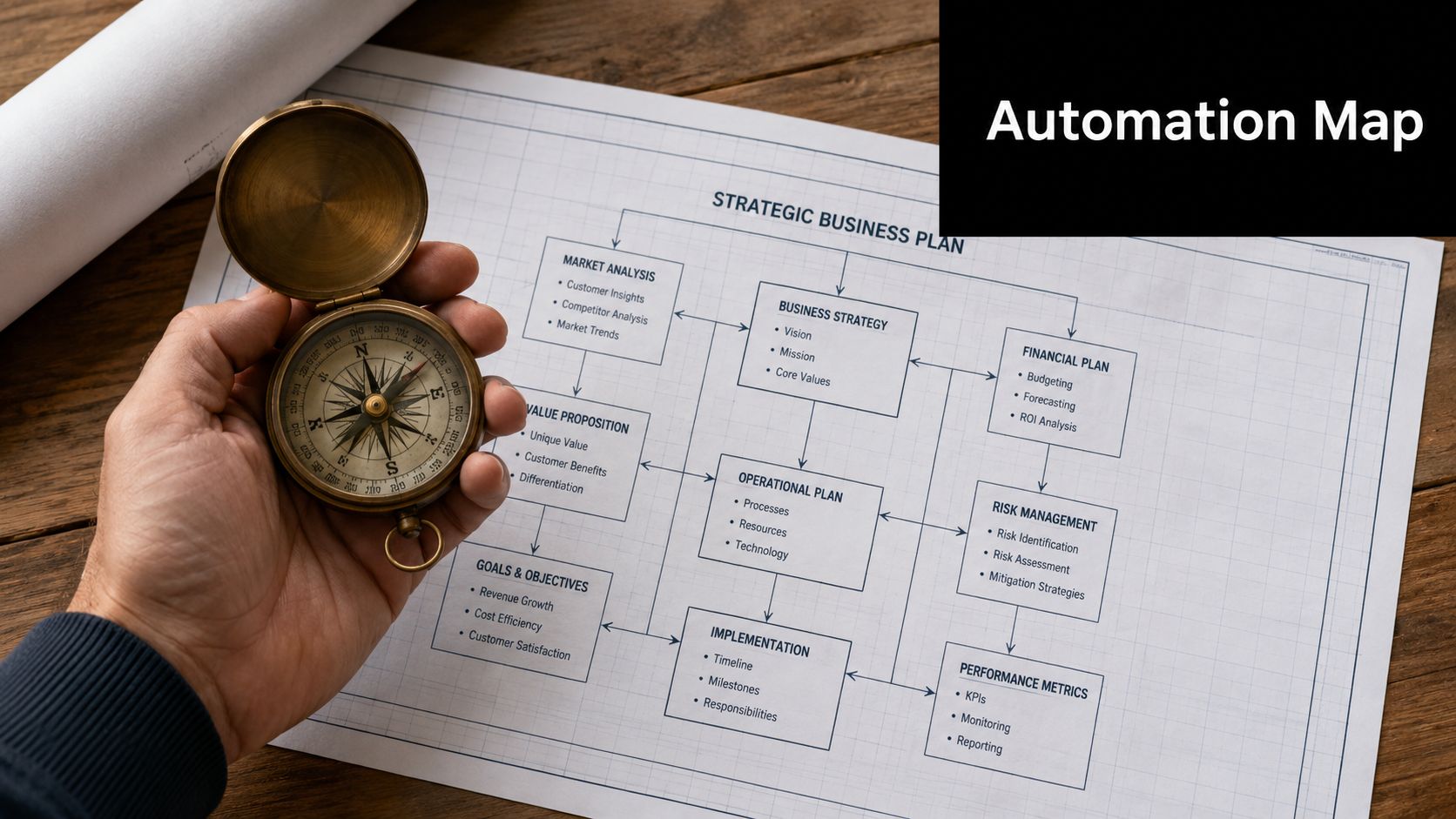
That planning step matters more in SaaS because your highest-value triggers rarely live in your email platform. They live in the product. If your automation cannot react to events like workspace creation, teammate invites, feature adoption, usage drops, or plan-limit pressure, you are still running campaign automation, not growth automation.
Start with lifecycle definitions
A reliable system separates marketing intent from product intent.
Use two frames from the start:
| Lead type | What it means | What automation should do |
|---|---|---|
| MQL | A contact showing marketing intent | Educate, qualify, route to the right sequence |
| PQL | A user showing product intent or product value realization | Accelerate activation, conversion, or expansion |
An MQL may engage with pricing content, register for a webinar, or request a guide. A PQL has crossed into behavior that suggests real value or buying momentum. They created a project, connected an integration, invited teammates, returned multiple times in a short window, or used a feature that correlates with retention.
That distinction changes workflow design. MQL automation should reduce uncertainty and improve qualification. PQL automation should remove friction between first value and paid conversion.
Practical rule: If a workflow does not support a clear stage change, do not build it yet.
Define triggers before you define messages
Many SaaS teams write emails first and sort out triggers later. That creates generic sequences that fire on a schedule instead of responding to user behavior.
Start with a trigger map. For each workflow, document five things:
- Trigger: the event or threshold that starts the automation
- Audience: who qualifies, and who should be excluded
- Action: the message, task, audience sync, or handoff
- Owner: which team manages the logic and follow-up
- Success metric: the business outcome you expect
If you are tightening that operating layer, these marketing automation best practices are useful because they focus on workflow design, governance, and execution quality.
Pick KPIs tied to revenue movement
Email engagement can diagnose copy or deliverability issues. It should not be the reason a workflow exists.
In SaaS, stronger automation KPIs sit closer to commercial outcomes:
- Lead stage progression
- Trial activation
- Time-to-first-value
- Sales-qualified pipeline created
- Expansion signal volume
- Retention risk resolved
I also recommend one extra measurement layer that many teams miss: attribution rules for AI-assisted and AI-initiated touchpoints. If a voice agent books the meeting, an AI chat experience qualifies the account, or an assistant helps recover a stalled trial, your model needs to record that influence without breaking source-of-truth reporting. Teams exploring marketing automation strategies with AI should decide that attribution logic before those channels scale.
Build the roadmap around system constraints
The hard part is rarely the workflow itself. The hard part is getting event data, CRM fields, billing signals, and campaign logic to agree with each other.
A good roadmap is specific. It names the trigger, the event source, the field updates, the fallback if data fails, the handoff owner, and the KPI. It also forces trade-offs. Real-time product-event automation can drive better conversion and retention, but it adds implementation work across engineering, data, and GTM systems. That trade is usually worth making for activation, expansion, and churn prevention workflows. It is usually not worth making for every top-of-funnel campaign.
Build the few workflows that map directly to revenue motion first. Depth beats volume.
Building Your Lead Capture and Segmentation Engine
Most automation problems start before the first workflow fires. Bad form logic, duplicate records, and vague segmentation poison everything downstream. If your database is messy, your personalization won't feel personal. It will feel wrong.
Oracle reports that 80% of marketing automation users see improved lead generation and 77% see increased conversion rates when they follow a framework built on data cleaning and behavior-based segmentation in its marketing automation statistics overview. That's the part teams skip because it isn't glamorous.
Capture leads with intent in mind
A SaaS lead capture system shouldn't dump every contact into one master list. It should preserve the context of how that person arrived and what they cared about.
Use multiple intake paths, each with a job:
- Website forms for demo requests, newsletter subscriptions, and trial signup enrichment.
- Content download forms for higher-intent educational offers like guides, comparison pages, or implementation checklists.
- Chatbots or live chat routing for real-time qualification when someone lands on pricing, integrations, or enterprise pages.
The key isn't adding more forms. It's deciding what each form should collect and what should happen next. Ask only for what you'll use. For example, company size may matter for routing. Job title may matter for messaging. A generic “tell us more” field usually doesn't.
Segment by signals, not just profile fields
Basic segmentation by industry or company size helps, but it won't carry a SaaS funnel on its own. Good segmentation combines static data with observed behavior.
A useful segmentation model often includes:
- Firmographic segments such as startup, mid-market, or enterprise
- Acquisition source such as organic search, paid search, partner, or outbound
- Intent signals such as pricing page visits, feature page depth, or case study downloads
- Lifecycle state such as lead, trial user, active customer, champion, or at-risk account
Here's a simple operating view:
| Segment layer | Example | Why it matters |
|---|---|---|
| Who they are | SaaS company with a small team | Shapes positioning and complexity |
| How they arrived | Organic comparison page | Reveals initial buying context |
| What they did | Viewed pricing twice | Signals urgency or evaluation |
| Where they are now | Trial active, no setup complete | Determines next message |
Segmentation isn't about making lists. It's about deciding what message should be impossible to send to the wrong person.
Clean data before you automate it
Three cleanup rules prevent most downstream issues:
- Standardize fields: Make sure lifecycle stage names, source naming, and owner fields are consistent.
- Merge duplicates: A contact who exists three times can trigger three conflicting workflows.
- Control entry points: Set rules for which forms create records, update records, or enrich records.
If your lead capture and segmentation layer is disciplined, automation becomes easier to trust. If it isn't, every workflow becomes a patch for broken inputs.
Crafting High-Converting Nurture and Onboarding Flows
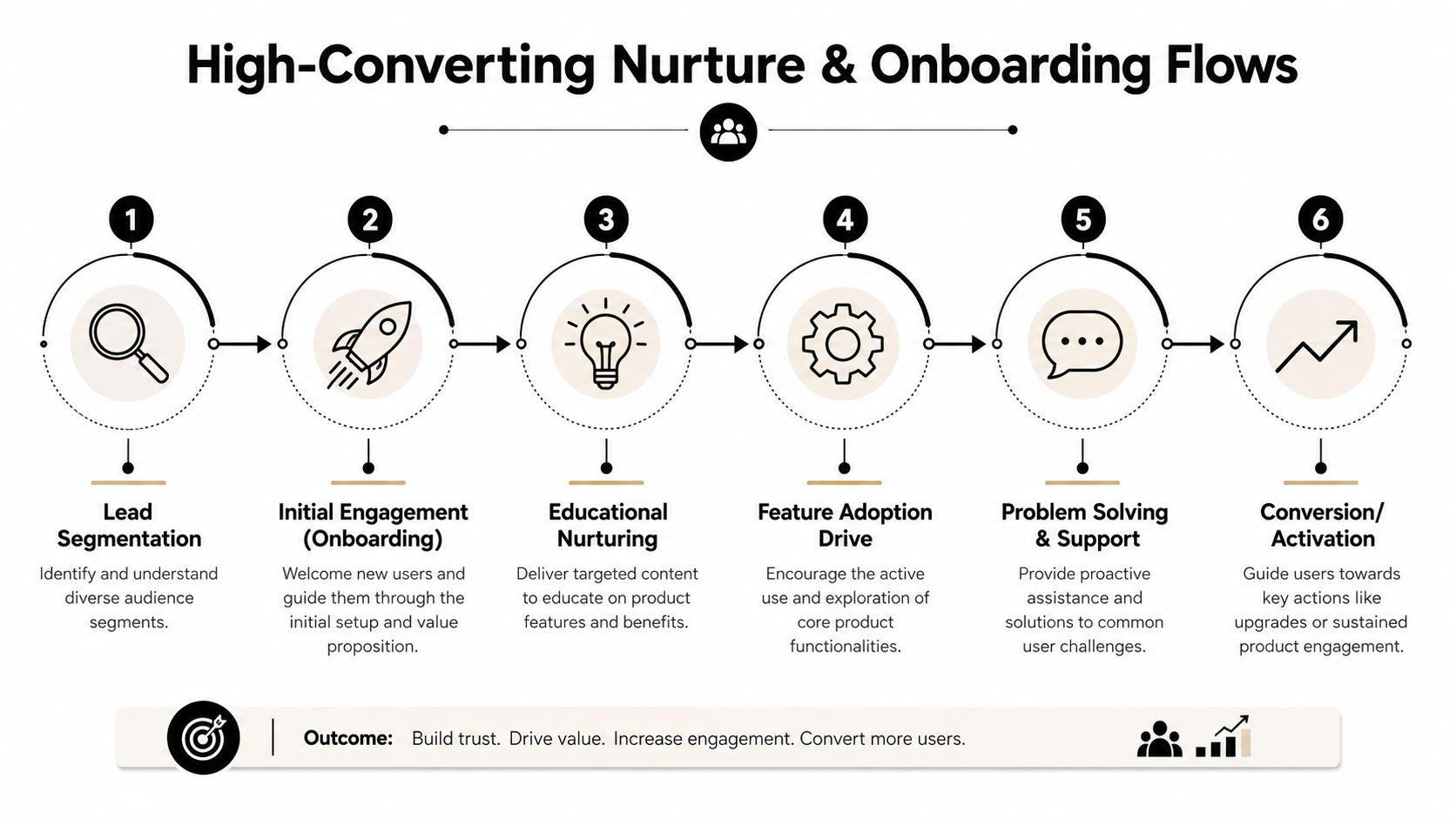
The highest-converting SaaS automations rarely feel “automated.” They feel timely because they match the user's current job, current friction, and current level of intent.
GetResponse reports that implementing marketing automation for lead nurturing in B2B SaaS can produce a 451% increase in qualified leads when teams use audience segmentation and value-based email flows, as outlined in its marketing automation best practices guide. The phrase to pay attention to is value-based. That's the difference between nurture and spam.
A useful reference before building these systems is this guide on how to nurture leads, especially if you're trying to tighten handoffs between educational messaging and product-led conversion.
Trial nurture done properly
A trial nurture sequence should help users reach meaningful product value fast. It should not read like five versions of “book a demo.”
Here's a practical pattern.
Day 0 welcome email
The user signs up. The first email should do three things only:
- confirm what happens next
- point to the fastest path to initial value
- remove setup uncertainty
Example copy:
Subject: Start here and get value from [Product] fast
You're in. The quickest win is to complete these first steps:
- Connect your account
- Create your first workflow
- Invite one teammate
If you get stuck, reply to this email and we'll point you in the right direction.
Day 2 guidance based on behavior
Now branch the flow.
| User behavior | What to send |
|---|---|
| No setup started | Simple setup walkthrough and one low-friction action |
| Setup started but stalled | Troubleshooting help and a short checklist |
| Core action completed | Next-best action tied to deeper adoption |
That branching is where most nurture systems improve. A user who already completed setup doesn't need another setup tutorial. They need a reason to keep moving.
Here's a useful walkthrough on flow structure and timing:
Late-trial conversion push
Toward the end of a trial, the messaging should change. At that point, the user needs clarity on fit, outcomes, and what happens if they upgrade.
Use email and in-app prompts to answer:
- what they've already accomplished
- what they'll achieve next
- why delaying the decision creates friction for their team
New customer onboarding should reduce buyer's remorse
Winning the conversion doesn't mean the job is done. In SaaS, a weak onboarding sequence can erase a strong acquisition engine.
A new customer onboarding flow should feel like a guided rollout, not a receipt.
What the first sequence should include
- Welcome and expectation setting: Tell users what good onboarding looks like.
- Role-based education: Admins need setup help. End users may need usage examples.
- Feature introduction in sequence: Don't dump the entire product map on day one.
- Support and rescue logic: If a user stalls, trigger help before frustration builds.
Good onboarding messages answer the next question before the user asks it.
A simple decision tree works well:
- Customer purchases plan.
- Send welcome and setup path.
- If admin completes workspace setup, send team invite guidance.
- If team invites are sent, trigger collaboration use cases.
- If no setup progress appears, trigger help content or a human check-in.
Write for momentum, not volume
The strongest nurture and onboarding flows are short, specific, and behavior-aware. They don't flood the inbox. They create momentum.
What doesn't work:
- generic product tours sent to every segment
- fixed sequences with no branch logic
- heavy sales messaging before users see value
- measuring success only by opens
What does work:
- emails triggered by meaningful behavior
- copy that reflects the user's stage
- one clear next step per message
- ongoing testing of subject lines, timing, and content emphasis
Automating for Retention and Account Expansion
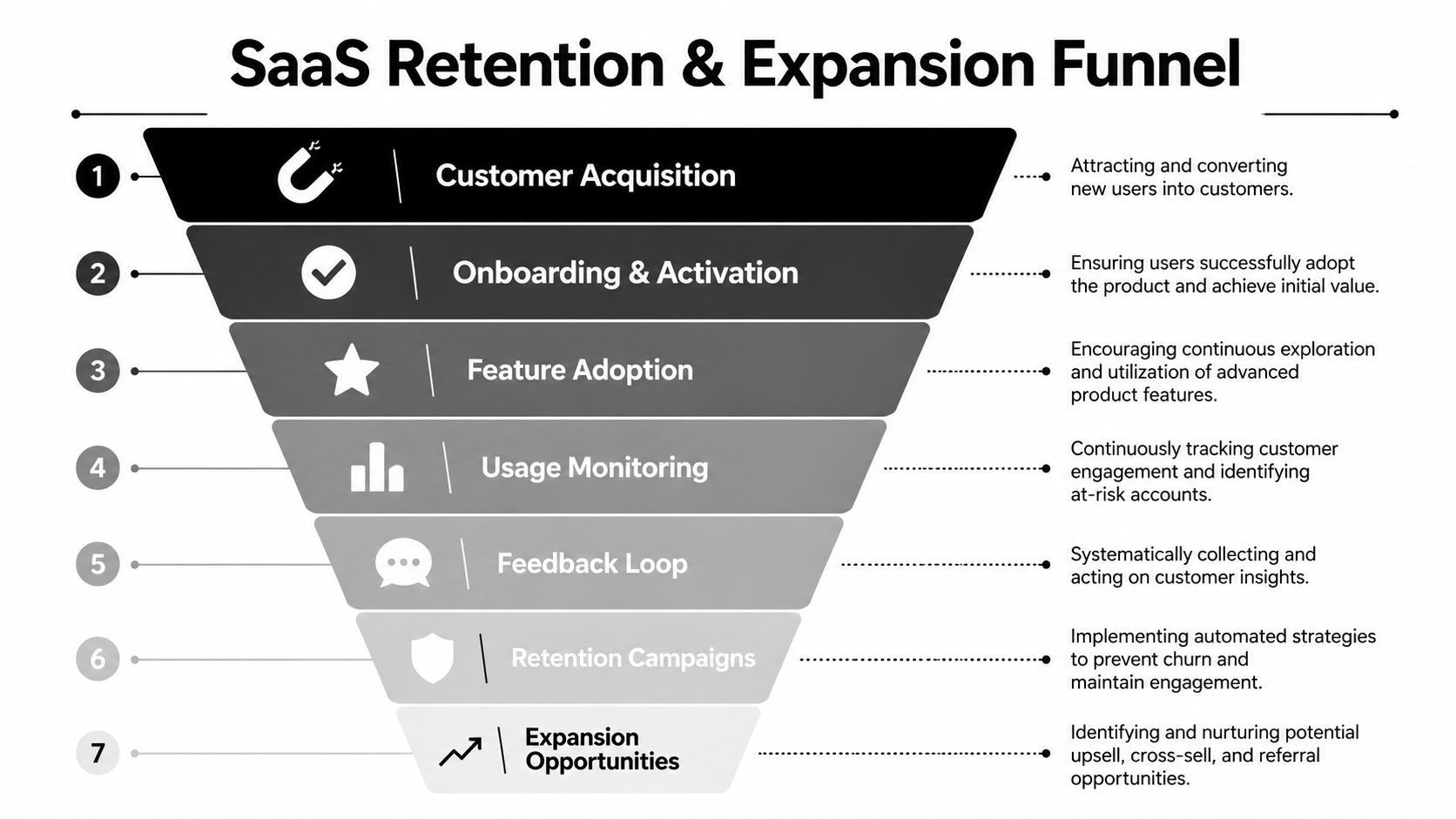
Acquisition workflows get most of the attention. In mature SaaS operations, the bigger win often sits after the sale. Retention and expansion automations turn your customer data into an early-warning system and a growth engine at the same time.
The mistake is treating churn prevention, product adoption, and upsell identification as separate programs run by separate teams. In practice, they're connected. The same signals that tell you an account is healthy also tell you when it may be ready for a bigger plan, more seats, or an add-on.
Build a customer health score you'll actually use
A customer health score doesn't need to be fancy. It needs to be operational. If nobody knows what actions follow a low score or a rising score, it's just dashboard decoration.
Most useful health models combine a few signal families:
- Product usage: login frequency, feature depth, completion of core actions
- Support patterns: unresolved issues, repeated tickets, implementation friction
- Feedback inputs: survey responses, renewal concerns, stakeholder sentiment
- Commercial context: plan fit, seat utilization, contract stage
A simple working model is enough to trigger action.
| Health signal | Interpretation | Automation response |
|---|---|---|
| Usage falling | Adoption may be weakening | Send recovery content or trigger CSM review |
| Support friction rising | User is stuck | Route help resources and alert owner |
| Advanced features growing | Account may be expanding | Introduce upgrade path or add-on use case |
| Team adoption broadening | Product is becoming embedded | Promote admin controls, governance, or higher tier features |
Treat churn prevention as a workflow, not a meeting
At-risk accounts usually show signs before they cancel. The problem is that those signs often live in different systems. Product events sit in one tool, support tickets in another, billing status somewhere else, and nobody has stitched them together.
A practical churn prevention workflow looks like this:
- Detect a negative pattern, such as declining engagement or stalled usage.
- Segment by likely cause. Setup friction, missing use case fit, support issue, or pricing concern.
- Trigger the right intervention. That might be education, support content, a success check-in, or an escalation to customer success.
- Suppress irrelevant expansion messaging until the account stabilizes.
Retention automation works best when it protects the customer from receiving the wrong message at the wrong time.
Expansion should be behavior-led
Upsell emails sent on a calendar tend to underperform because they ignore context. Expansion automations work better when they're tied to evidence that the customer is ready.
Examples of strong expansion triggers include:
- usage reaching plan limits
- repeated use of advanced functionality
- multiple users collaborating inside the account
- admin behavior that suggests broader rollout
Instead of leading with “upgrade now,” lead with the operational reason the upgrade matters. More capacity, better governance, more automation, deeper reporting, or fewer manual steps.
Retention and expansion function as a unified system. Healthy users adopt more. Adopting users see new use cases. Those use cases create natural expansion opportunities. Automation should reflect that progression.
Integrating Your Marketing Stack for a Single Source of Truth
Disconnected systems create expensive mistakes. Marketing keeps sending trial education to paying customers, sales works accounts without product context, and finance ends up reconciling revenue in a spreadsheet after the fact.
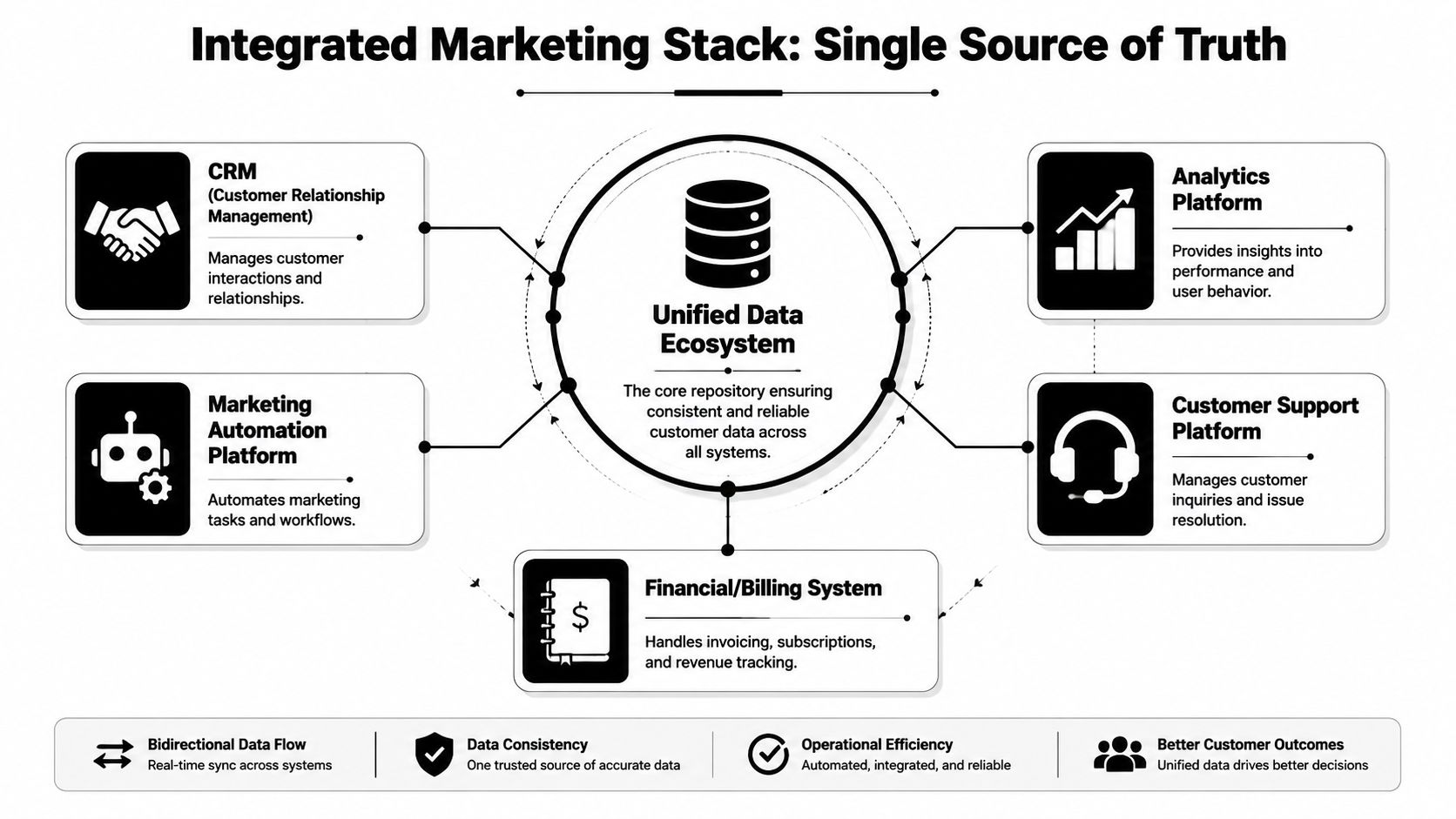
A single source of truth fixes that only if it combines three inputs in one operating model: relationship data from the CRM, behavior data from the product, and commercial data from billing or the warehouse. Many SaaS teams connect the first one and stop there. The result is cleaner lead routing, but weak automation. You still cannot tell the difference between a curious evaluator, an activated account, and a customer expanding through actual usage.
CRM integration is a required foundation
Your CRM and automation platform need a clean two-way sync. Marketing needs to see pipeline changes and ownership. Sales needs to see campaign history, key behaviors, and trial status before outreach starts.
At minimum, sync:
- lifecycle stage
- lead owner
- acquisition source
- major engagement signals
- trial or customer status
This is basic operational hygiene. Without it, marketing keeps pushing nurture emails after an opportunity opens, and sales steps into conversations without knowing what the account has already seen.
Product usage data creates relevant automation
The biggest advantage comes from product data. SaaS buyers and users reveal intent inside the app long before they reply to an email or book a meeting.
Useful events often include:
- account created
- workspace configured
- feature used
- invite sent
- integration connected
- usage dropped
- billing action taken
Those signals let you build behavior-based automation instead of relying on page views and form fills. If a user starts setup but never connects a core integration, send setup help. If an account repeatedly uses advanced functionality across multiple seats, shift messaging toward rollout, governance, or plan fit.
That same event stream matters for attribution. AI channels such as voice agents and conversational assistants are adding touches that often never show up in standard last-click reports. If your stack cannot pass product events, lead source updates, and downstream revenue back into one model, you will undercount influenced pipeline and misread which channels are producing customers.
Keep the architecture simple enough to maintain
Teams do not need a perfect stack. They need a stack that passes the right data reliably.
A practical integration pattern looks like this:
| Layer | Role |
|---|---|
| Product analytics or event source | Captures real user behavior |
| CRM | Stores relationship and pipeline context |
| Automation platform | Executes messaging and workflow logic |
| Reporting layer | Reconciles outcomes across systems |
In early-stage SaaS, low-code connectors are often enough if event naming is consistent and ownership is clear. As complexity grows, a warehouse-first model gives you more control over identity resolution, attribution, and historical reporting. If you are planning that foundation, this marketing data warehouse guide gives a useful framework for how the data should flow. For an operational walkthrough of connecting systems and workflows, this guide to marketing automation integration is worth reviewing.
Integration quality shows up in message quality
Copy rarely fixes a broken data model. If your automation cannot tell whether an account is stuck in onboarding, active in one team, expanding across a department, or influenced by a new AI touchpoint before conversion, the message will always lag behind reality.
Good integration makes timing sharper, segmentation cleaner, and revenue reporting more credible. That is what turns automation from a campaign tool into a system you can trust.
Measuring ROI and Optimizing Your Automation Engine
Revenue is the metric that decides whether automation deserves more budget, more headcount, and more system complexity. Opens, clicks, and form fills still matter, but as diagnostics. In SaaS, useful reporting ties automation to activation, pipeline creation, expansion, and retention.
That standard gets harder once product usage signals and AI-assisted conversations enter the mix.
Track business movement, not message activity
A good measurement setup answers a practical question: did this automation change user or account behavior in a way that improved revenue outcomes?
For SaaS teams, that usually means tracking four things across the full journey:
- Are qualified leads progressing to the next stage?
- Are users reaching activation faster?
- Which workflows influence pipeline, conversion, retention, or expansion?
- Where do handoffs fail across marketing, product, sales, and success?
That gives you reporting you can use. Instead of saying a campaign performed well, you can say a usage-triggered onboarding flow increased activation among admins, or a re-engagement sequence recovered logins without improving account health. Those are very different outcomes, and they lead to different decisions.
A practical dashboard usually includes:
- Stage progression by segment
- Time to activation milestone
- Pipeline and revenue influence by workflow
- Retention or health movement after intervention
- Drop-off points across onboarding, trial, and expansion paths
- Product event completion tied to automation entry
That last point gets missed often. If your automation only reports email engagement, you are blind to the product behaviors that matter most. For SaaS, workflow performance should be tied to events like workspace created, integration connected, first report generated, seats added, or billing upgraded.
If a dashboard cannot tell your team what to change this week, it is too abstract.
Review workflows at the branch level
Top-line workflow reporting hides failure points. I have seen nurture flows with acceptable overall conversion rates where one segment was moving well, one branch was dead, and a third was creating low-quality pipeline that sales ignored.
Review performance by:
- trigger source
- segment or persona
- product behavior
- message path
- timing delay
- downstream conversion outcome
Then test one variable at a time. Entry criteria, wait times, CTA framing, and branch logic usually create bigger gains than subject line tests. Subject lines are easy to test, but they rarely fix a workflow that enters users too early, sends the wrong prompt after a key product event, or routes accounts into the wrong lifecycle path.
Measure AI and voice attribution with explicit rules
AI attribution is a significant challenge for SaaS teams adopting voice agents, AI chat, and hybrid human handoff models. Revsure calls out the lack of clear guidance on AI-based attribution in its whitepaper on best practices for marketing automation. That gap creates reporting disputes fast, especially when marketing, SDRs, and sales all touch the same deal.
The fix is operational, not theoretical. Set attribution rules before launch.
Minimum requirements:
- define whether AI channels can be a source, an assist, or both
- log whether the first meaningful interaction was AI-initiated or human-initiated
- capture handoff timestamps between AI, sales, and success teams
- store that metadata in the CRM or reporting layer
- separate conversation volume from qualified pipeline and closed revenue
Click-based attribution will miss part of this picture because some AI interactions begin without a trackable click. A voice agent may start the conversation, qualify the buyer, book the meeting, and pass context to a rep. If that chain is not recorded, revenue credit will drift toward the last human touch, and your ROI model will understate the value or cost of the AI channel.
Use ROI reviews to improve the system
The best teams treat ROI reviews as operating reviews. They look at what entered, what advanced, what stalled, and where the automation logic created noise, delay, or bad routing.
That pushes optimization toward the right fixes. Sometimes the problem is weak copy. More often, it is poor trigger logic, missing product-event data, loose stage definitions, or attribution rules that were never agreed across teams.
When reviews are done this way, automation becomes easier to trust and easier to scale.
Your First Three Automation Recipes to Build Today
If your current setup is thin, don't start with ten workflows. Start with three that create immediate operational value.
1. Five-day welcome series
Trigger: New signup or new trial creation.
Sequence:
- Day 0: Welcome email with one clear setup path
- Day 1: Short tutorial tied to the first meaningful action
- Day 3: Use-case email based on role or segment
- Day 5: Help email for anyone who stalled
Why it works: It reduces first-session confusion and keeps early momentum high.
Example line:
Subject: Your first win with [Product] starts here
2. Inactive user re-engagement flow
Trigger: User hasn't logged in for a defined inactivity window.
Sequence:
- Email 1: Reminder tied to unfinished value
- Wait for product activity
- If still inactive, send a simpler restart path
- If activity resumes, suppress the rest of the sequence
Why it works: It addresses drift before the account feels lost.
Example line:
You were close to finishing setup. Here's the fastest way back in.
3. Feature adoption push
Trigger: User matches the right segment but hasn't used a valuable feature.
Sequence:
- Introduce the feature in plain language
- Show the use case it solves
- Link to a short tutorial or in-app action
- If used, move the user into the next-stage education flow
Why it works: It increases product depth, which often supports retention and expansion later.
Example line:
You're already doing the hard part. This feature removes the manual step.
Build these with branch logic from day one. If a user takes the desired action, stop talking them through the basics. Relevance is the whole game.
If you want help designing or implementing marketing automation for SaaS, MakeAutomation helps B2B and SaaS teams build practical systems across lead generation, CRM automation, AI workflows, and voice AI operations, with the process documentation and hands-on support needed to make the setup stick.