AI for Operational Efficiency: A Practical B2B Playbook
Your ops dashboard looks healthy, but the team still spends Monday morning untangling the same mess. Approvals sit in Slack for days, onboarding tasks bounce to the wrong owner, support escalations ping-pong between CS and engineering, and everyone is “busy” without anything moving faster. That's the problem ai for operational efficiency needs to solve, not just another layer of automation theater.
The shift to AI in operations is already broad. McKinsey's State of AI 2025 survey, covering 1,993 respondents across 105 countries, found 88% of organizations using AI in at least one business function, up from 78% the year before, and Canada's business data shows AI use to produce goods or deliver services rising from 6.1% in Q2 2024 to 12.2% in Q2 2025 (AI workflow automation statistics). That matters because the question isn't whether AI is showing up in operations, it's whether it's shrinking waiting time, exception queues, and handoff drag.
Practical rule: If a workflow feels “slow,” don't start by asking what model to buy. Start by asking where the work waits.
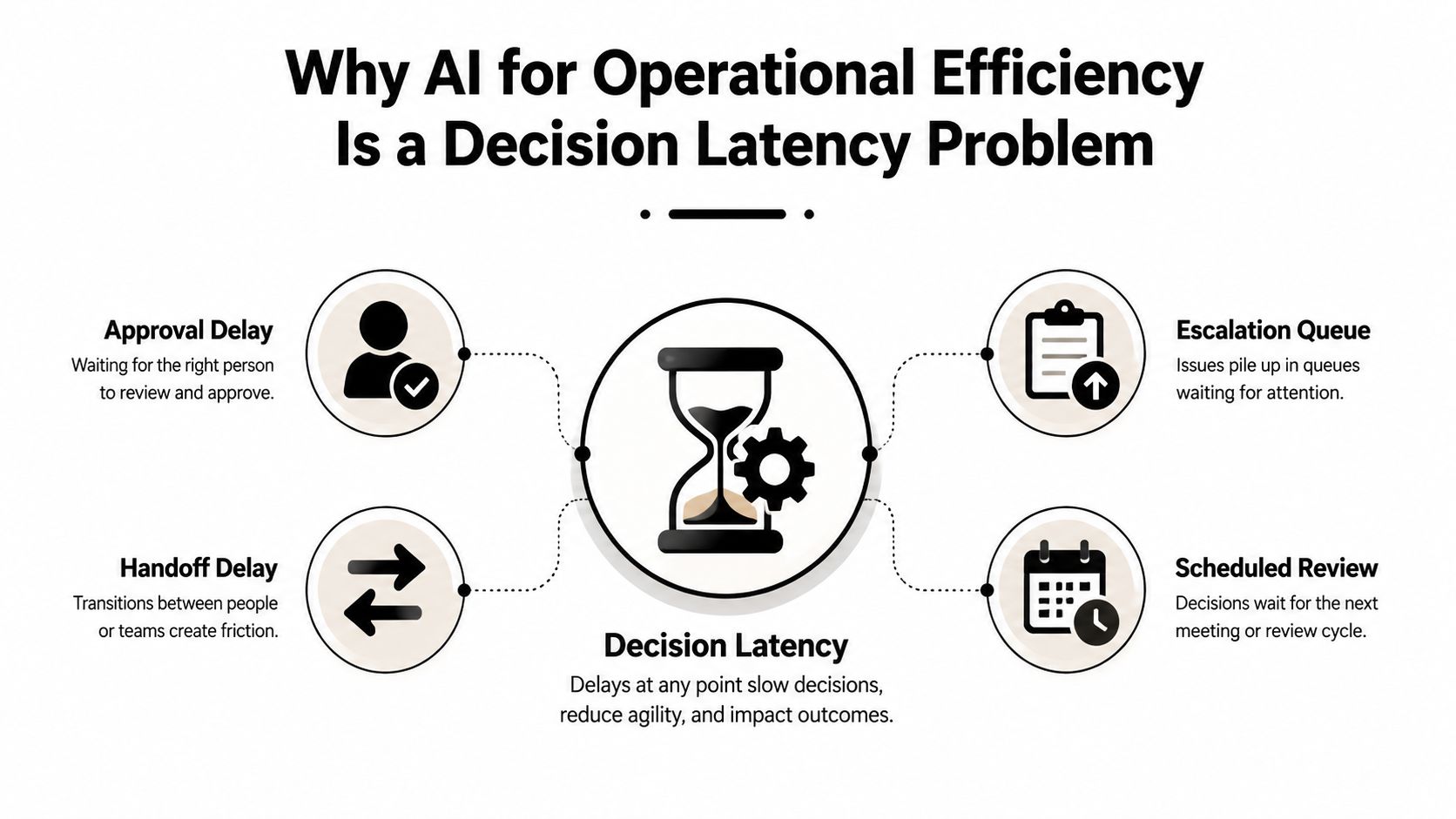
A useful way to frame the problem is to think in terms of decision latency. For a mid-market SaaS team, that can mean quote approvals stuck in finance, onboarding tickets routed to the wrong specialist, or customer escalations looping because no one owns the final call. Charter Oak Strategic Partners has a useful discussion of operations bottlenecks at mid-market firms, and the pattern is familiar, people already know where the bottleneck lives, they just haven't instrumented it well enough to prove it.
The most important shift is to stop treating AI like a replacement for humans wholesale. In operations, AI usually works best as a compression layer, it routes, summarizes, verifies, and surfaces the next decision faster. When that's done well, the visible “productivity gains” show up later, after the drag has already been removed.
If you're trying to understand where that drag lives in your own stack, cycle time reduction guidance is only useful after you can name the queue that's slowing work down.
Why AI for Operational Efficiency Is a Decision Latency Problem
The clearest sign that a team's operations are broken is not low output, it's time spent waiting. A quote gets approved, but only after three reminders. A customer issue gets escalated, but the handoff lands in the wrong inbox. A task moves across teams, yet nobody can say who owns the final decision. In a growth-stage SaaS company, that's what inefficiency looks like in practice, not a lack of effort, but a pileup of delayed calls and unresolved exceptions.
AI helps most when it shortens those pauses. Conventional dashboards often track completed tickets, closed deals, or tasks marked done, but those numbers can hide problem: work that sits untouched before anyone can act on it. The more hands a request passes through, the more likely the delay is caused by a missing decision, not a missing tool.
What the bottleneck usually looks like
In the field, the pattern repeats. A CS leader thinks the issue is support volume, but the actual slowdown is engineering triage. An ops manager thinks onboarding is slow, but drag is approvals and missing ownership. A RevOps team thinks lead response is weak, but the bottleneck is routing logic that sends high-intent deals to the wrong rep.
That's why process visibility matters before model selection. AI can't fix a queue it can't see, and it definitely can't fix a queue the team has normalized.
The best operational use cases don't start with “What can AI automate?” They start with “Where does work stall, where does it get reworked, and where do humans keep making the same call?” In my experience, that framing keeps teams from building flashy automations on top of weak process design.
Why this matters for B2B teams
B2B companies feel this especially hard because so much work crosses systems. Sales hands off to implementation. Support hands off to engineering. Finance hands off to leadership. Every handoff adds friction, and every exception creates another waiting loop. That's where AI earns its keep, by compressing the time between signal and decision.
This is also why the strongest AI deployments I've seen don't try to “AI everything.” They target the one place where waiting time creates cascading cost. Once that queue shrinks, the rest of the workflow starts to breathe.
Diagnosing Your Operations Before You Touch a Model
A process audit is the first real test of whether AI will help or just speed up the wrong thing. Pull the last 90 days of tickets, approvals, exceptions, and handoffs, then map the work from intake to resolution. Don't stop at throughput. You need to see where requests age, where they idle, and where human judgment is repeatedly required.
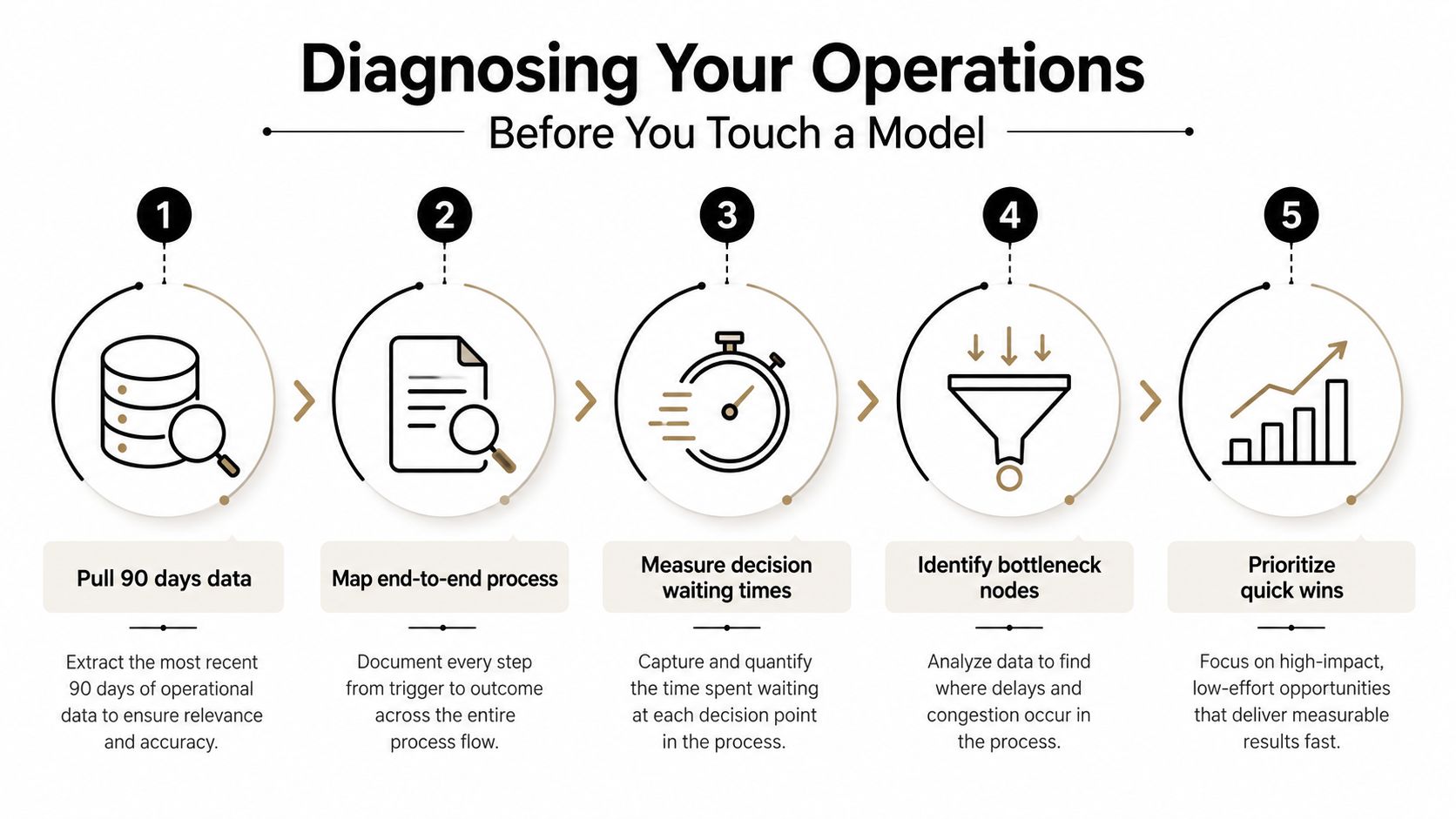
The reason for this sequence is simple. If you automate a broken process, you don't get efficiency, you get faster breakage. Teams often rush into tooling because a workflow looks repetitive, but repetition alone isn't enough. You want a workflow that is repetitive, rule-based, and expensive when it waits.
Practical rule: Don't rank workflows by how annoying they are. Rank them by how much delay, rework, and exception volume they create.
A lean audit that actually works
Start with the workflow map, then layer in the operational data. You're looking for handoff count, backlog aging, idle time between steps, and the share of work that needs judgment rather than a fixed rule. That combination tells you whether a workflow is suited to automation, assisted routing, or just better documentation.
A simple internal scorecard is enough:
- Volume: How often does the workflow occur?
- Decision intensity: How often does a human need to approve or interpret something?
- Exception rate: How much of the work deviates from the standard path?
- Delay cost: What happens when the request waits?
- Rework frequency: How often does the same item come back for correction?
If a workflow scores high on volume and exceptions, that's usually a stronger AI candidate than a workflow that's merely repetitive. If it scores high on delay cost and approval count, even better.
For teams that need a tighter way to visualize the flow itself, business process mapping techniques can help turn guesswork into an actual bottleneck map.
One more thing matters here. If your team can't name the owner of each step, the process isn't ready for AI. Ownership clarity comes first, because AI can route work, but it can't magically create accountability.
Prioritizing Use Cases Where AI Pays Back Fastest
The fastest payback rarely comes from the most glamorous use case. It usually comes from the one with the ugliest exception pile. Lead routing, invoice exception handling, ticket triage, and SOP lookup all look different on the surface, but they can be scored with the same lens, volume, rules-density, error cost, and cycle-time impact.
| Dimension | What to measure | High-score signal |
|---|---|---|
| Volume | How often the workflow runs | Repeats daily, across multiple teams |
| Rules-density | How many decisions follow clear logic | Most cases follow a predictable path |
| Error cost | What happens when the workflow goes wrong | Mistakes trigger revenue loss, rework, or escalation |
| Cycle-time impact | How much waiting time the workflow creates | Delays block downstream work |
| Exception load | How often humans need to step in | The workflow spends a lot of time in manual review |
Why exception-heavy work is often the best target
People tend to avoid exception-heavy workflows because they look messy. In reality, messiness can be a clue that the workflow has a lot of latent value. If teams are already spending time sorting, rerouting, and verifying edge cases, AI can remove a large chunk of the waiting time without removing human control.
Lead routing is a good example. If the routing logic is clear, AI can classify and assign quickly. If it's messy, AI can still help by summarizing the context and flagging what needs review. Invoice exceptions work the same way. The goal isn't full autonomy, it's reducing the time a finance team spends figuring out what to do next.
A shortlist usually beats a big roadmap
A practical pilot list should usually stay narrow. Two or three use cases is enough if they're chosen well. If a candidate use case looks exciting but depends on poor data, changing policies, or three departments agreeing on a new process, it's probably a bad first move.
This is also where many teams get seduced by vanity wins. SOP lookup feels helpful, but if it doesn't move a bottleneck, it's just convenience. Ticket triage feels impressive, but if the unresolved backlog still ages in the same place, the root problem hasn't changed.
For teams comparing mature options, enterprise-grade AI use cases can help you sanity-check which patterns are operationally real versus merely demo-friendly.
An Implementation Playbook for the First 90 Days
The first quarter should read like an operational rollout, not a science project. Days 1 to 30 focus on data readiness checks, workflow instrumentation, and process audit. Days 31 to 60 are for choosing the narrowest workable solution and shipping a pilot in one lane. Days 61 to 90 are for monitoring impact, tightening the workflow, and deciding whether to expand.
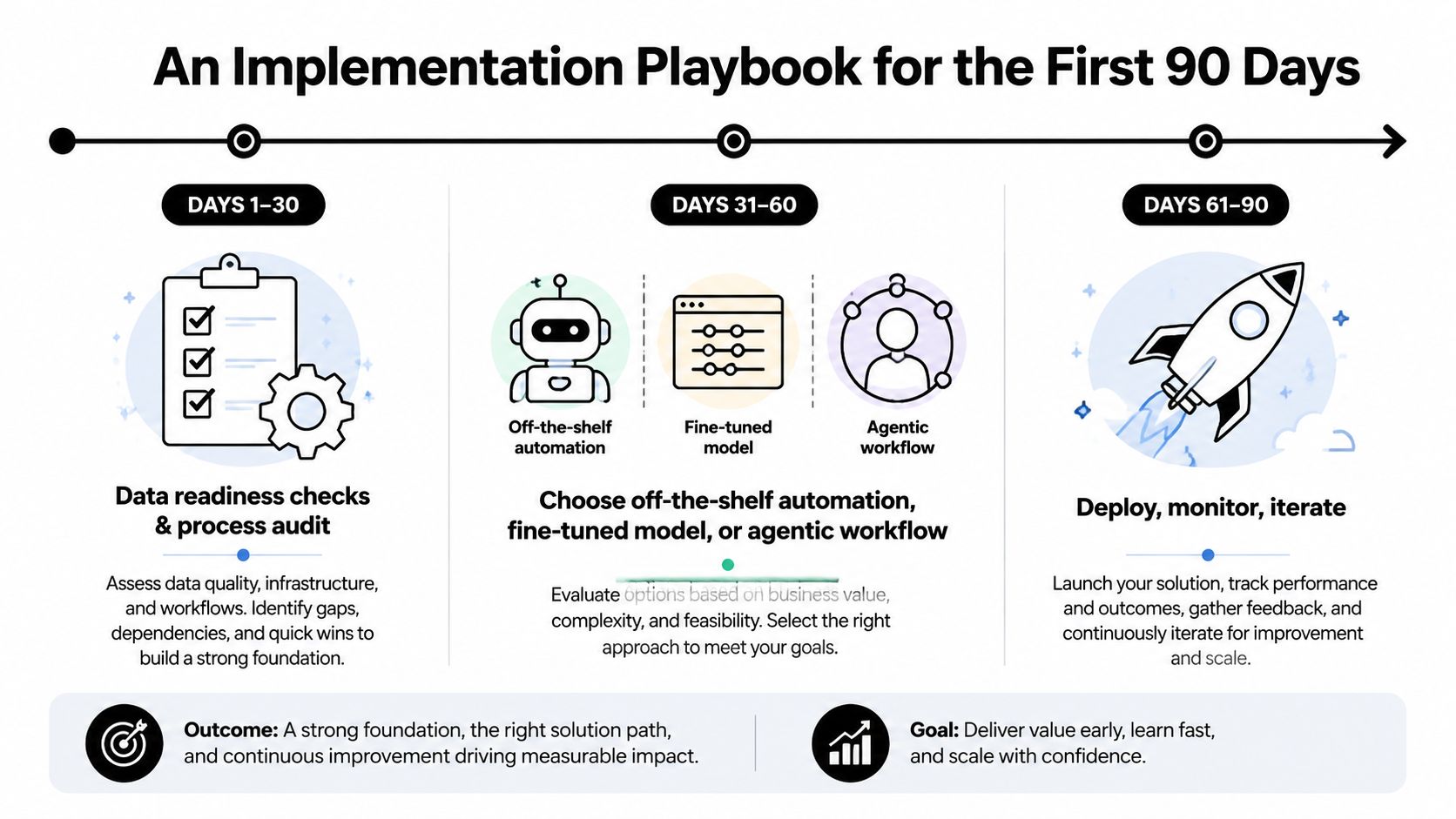
The first architectural decision should stay practical. Some workflows only need off-the-shelf automation, especially when the steps are clean and deterministic. Other workflows need a fine-tuned model because the language is messy or the classification is subtle. A smaller set benefits from agentic workflows, especially when the system has to route, summarize, and trigger follow-up actions across tools.
What to build first
Start with the simplest version that can move the bottleneck. If the workflow is mostly rule-driven, keep the automation simple. If it requires judgment and text interpretation, use the model to assist the human rather than replace the step. If the work spans multiple systems, focus on orchestration and handoff cleanup before anything else.
A practical pilot also needs documentation from day one. Write the SOP, define the exception rules, create a small eval set, and document who can override the workflow. That paperwork sounds boring, but it keeps the system usable when the original builders move on.
Use this test: if the pilot cannot survive one staffing change, it is not operational yet.
For teams that want examples of how these patterns show up in real deployments, enterprise-grade AI use cases can help you sanity-check which patterns are operationally real versus merely demo-friendly.
A simple 0 to 90 day cadence
- Days 1 to 30: Instrument the workflow, define the baseline, and confirm where decisions wait.
- Days 31 to 60: Launch one narrow automation or assisted routing path, then review exceptions daily.
- Days 61 to 90: Compare the pilot against baseline, refine the exception rules, and decide whether to scale.
Teams that move fastest do not start broad. They pick one queue, one owner, and one metric that matters.
Measuring Real ROI Beyond Vanity Productivity Numbers
Most AI projects get judged on the wrong scoreboard. Tasks automated sounds good, but it doesn't tell you whether the bottleneck moved. Hours saved can be real, but if the approval queue still ages in the same place, the business didn't become more efficient.
The stronger measurement stack is more operational and less glamorous. Track decision latency, backlog aging, rework loops, exception resolution time, and approval cycle time. Those numbers tell you whether AI changed the flow of work or just made the dashboard busier.
Proving causality instead of telling a nice story
Baseline first. Then compare the pilot workflow against a holdout group, a before-and-after window, or another controlled comparison that your team can defend in a budget review. Without that discipline, every improvement gets credited to the AI even when seasonality, staffing, or process cleanup did the heavy lifting.
The CFO conversation also gets easier when you stop talking about “productivity” and start talking about avoided delay, reduced rework, and headcount pressure that never had to be added. That's a much cleaner story for margin, because it connects the workflow change to a real operating outcome.
What to show leadership
A board deck doesn't need a dozen charts. It needs a short line from problem to impact. Show the original queue, the approval path, the change you made, and the metric that moved. If the pilot reduced waiting time but didn't change throughput, say that plainly. It's still useful if it removed a bottleneck the team used to fight every week.
A useful metric is one that changes because the workflow changed, not because people got better at updating a dashboard.
Many teams overclaim. If the system only saves visible admin time, call it that. If it cuts exception handling, say that. If it improves service levels because requests stop aging in backlog, that's a win.
Governance, Change Management, and the Exception-Heavy Edge Cases
The best AI use cases are often the ones with the most accountability attached. Onboarding compliance, contract review, support escalations, finance close, and similar workflows are messy, regulated, and full of exceptions. They're also where AI can create real advantage, because the work is routing, verification, and assistance, not blind automation.
That only works if governance is built in. Human-in-the-loop checkpoints, clear decision rights, audit trails, and continuous monitoring aren't optional extras. They're the reason the workflow can be trusted in the first place.
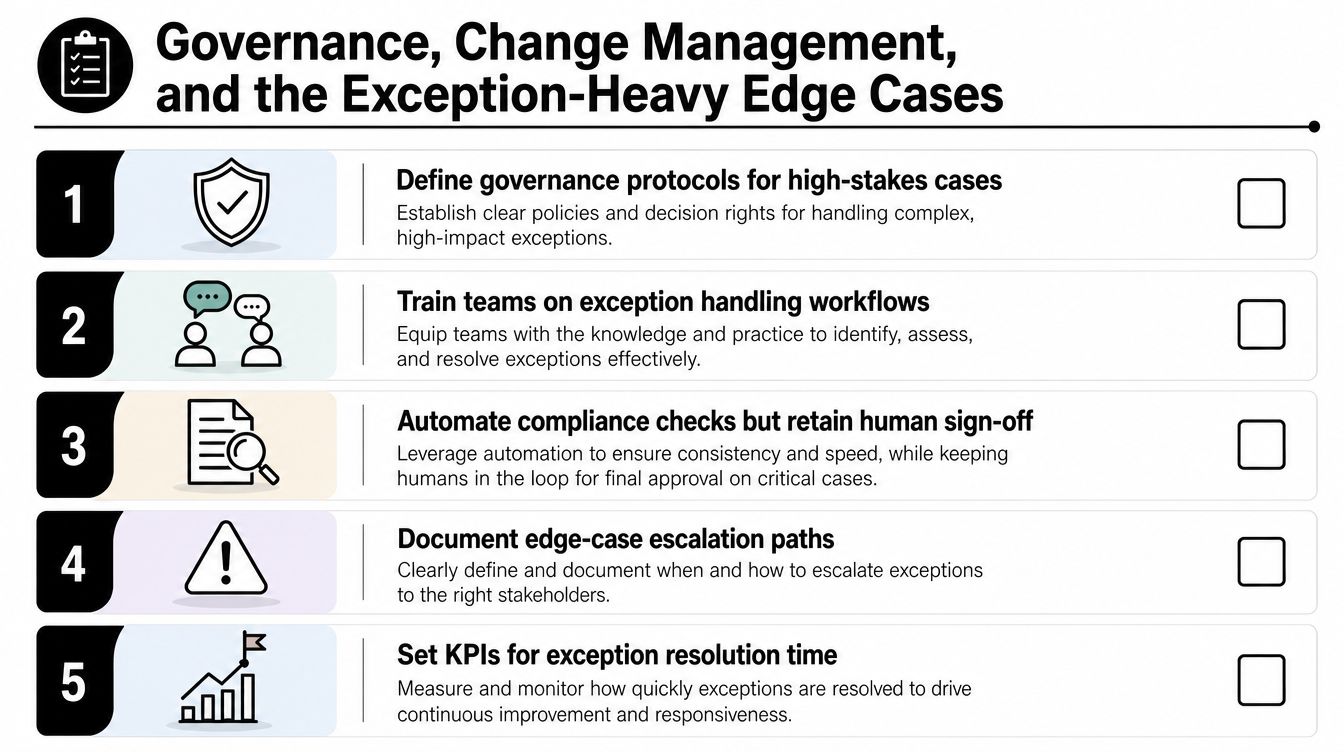
The most common failure in these environments isn't model quality. It's that no one updates the SOP, so the team keeps using old habits around a new workflow. Change management has to live inside the operating model, not in a separate announcement after launch.
What safe scaling looks like
In practice, the safest deployments keep humans in charge of the irreversible step. AI can pre-screen, classify, route, and flag issues, but a person should own the final call in high-stakes cases. That keeps accountability clear and makes audit reviews much easier.
For teams dealing with platform rollouts or internal process changes, change management for platform teams is a useful reference point for the habits that make adoption stick. If you're formalizing the operating model, how to implement change management can also help teams translate process change into an actual rollout plan.
Signals that adoption will stick
- People ask for exceptions: That means the workflow is getting used, not ignored.
- Managers review overrides: That shows accountability is still visible.
- SOPs get updated after launch: That's a sign the process is learning.
- Support escalations get faster, not noisier: That usually means the routing logic is working.
The cultural tell that worries me most is silence. If nobody complains, asks questions, or updates the process after launch, the team probably doesn't trust the system enough to use it. That's not stability, it's underuse.
A 90-Day Action Plan and the Mistakes to Avoid
Week one is the audit. Pull the data, map the queues, and identify where decisions wait. Weeks two to four are for ranking use cases by volume, rules-density, error cost, and cycle-time impact. Weeks five to eight are for a narrow pilot in one workflow lane. Weeks nine to twelve are for measuring impact, cleaning up exceptions, and deciding whether to expand.
The big mistakes are consistent. Teams automate a broken process, chase vanity productivity metrics, skip governance, or treat AI like a one-time deployment instead of an operational capability. Each of those mistakes creates the same outcome, a demo that looks good and a workflow that still stalls.
If you want the shortest possible version of the playbook, it's this. Find the queue that wastes the most time. Instrument the decision latency. Pilot one narrow fix. Prove the bottleneck moved. Then scale with governance already in place.
If you want help turning this into a working operations system, MakeAutomation builds AI automation workflows, SOPs, and process rollouts for B2B and SaaS teams that need real efficiency, not just software experiments. Visit the site if you want a partner for mapping bottlenecks, designing the rollout, and putting the workflow into production without losing accountability.