
How to Improve Customer Service in 2026
You're probably staring at a support queue that keeps growing while the team insists it's “doing fine.” Response times are slipping, CSAT is drifting down, and customers who used to renew without drama are now opening tickets, escalating, and asking the same questions twice. That's not a morale problem. It's a workflow problem, and the fix starts with measuring where the work is breaking down.
The Customer Service Problem Most B2B Teams Get Wrong
Most B2B and SaaS teams still treat support like a reaction function. Tickets arrive, agents answer, a manager watches the queue, and everyone hopes volume settles down next week. That model survives only when customer complexity is low, product friction is minimal, and the same issue doesn't recur in three different channels.
The harder truth is that customer service quality shows up in retention before it shows up in vanity dashboards. Zendesk notes that 73% of consumers will switch to a competitor after multiple bad experiences and Wavetec cites research showing 89% of consumers are more likely to make another purchase following a positive customer service experience (Zendesk customer service statistics). In B2B and SaaS, that same pattern shows up as churn pressure, renewal friction, and stalled expansion because unresolved service problems bleed trust out of the account.
Stop Treating Headcount as the Default Fix
Hiring more agents can reduce pressure for a while, but it doesn't remove the bottleneck that created the pressure. If the team lacks context, if ticket handoffs are messy, or if the knowledge base is stale, more people just means more people making the same mistakes faster. The service desk feels busier, but the customer experience barely moves.
A better approach is to manage service as a measurable system. Fullview recommends focusing on 5–7 core metrics tied to the primary goal, then watching 8–12 additional metrics quarterly while comparing current performance to benchmarks and fixing one gap at a time because continuous incremental improvement compounds (Fullview customer support metrics). For B2B teams, that usually means tightening a few bottlenecks first, not redesigning everything at once.
Practical rule: if a change can't be tied to a measurable reduction in repeat contacts, resolution time, or backlog, it's probably a cosmetic fix.
Before changing tooling or rewriting scripts, answer four questions. Where do customers wait longest? Where do they repeat themselves? Which issues create the most repeat contacts? Which workflows can be automated without hurting resolution quality? If those aren't clear, the team is guessing.
A useful companion resource on improving first contact resolution is this Australian small business FCR tips guide from Hosted Telecommunications. The point isn't to copy the advice blindly, it's to see how much of the problem sits in ownership, escalation, and repeat-contact handling rather than in “better attitude.”
Diagnose Before You Fix Anything
Most service programs fail because the team starts with fixes, not facts. Someone spots a bad CSAT trend, launches a training push, changes a macro set, or buys a new chatbot, then discovers months later that the original problem was a backlog spike or a broken routing rule. That's why a diagnosis-first loop matters more than enthusiasm.
Build the baseline before you touch the process
The first move is simple. Pull the historical CSAT or NPS trend, then benchmark first response time, average resolution time, first contact resolution, and ticket backlog against your current reality. Fullview's guidance is to track a small set of core metrics, then compare performance against benchmarks so the team can identify the biggest gaps and work through them one by one (Fullview customer support metrics).
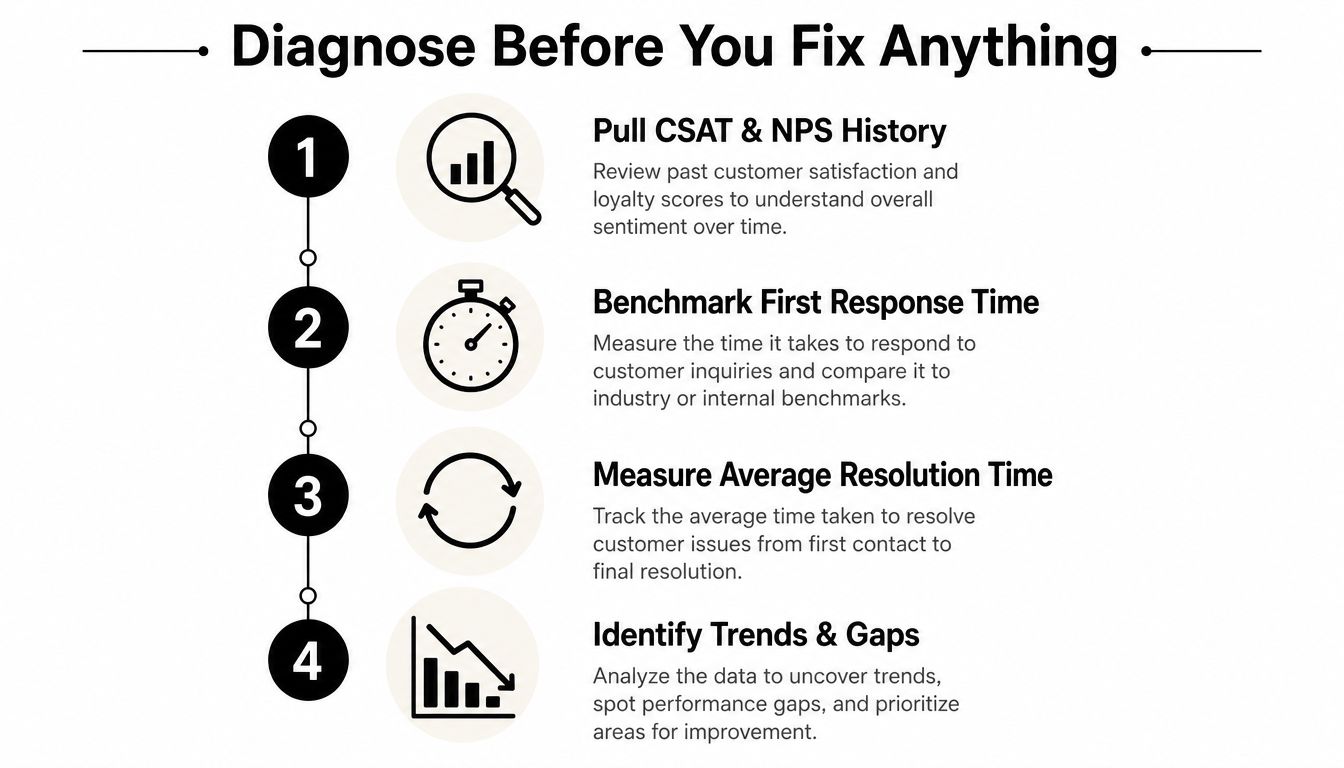
A clean diagnosis report should answer four things in plain language. What are the baseline scores? Which metric is most off target? Which contact reasons appear most often? What changed most recently in staffing, policy, or product behavior? That last question matters because support teams often chase symptoms created upstream in product or operations.
Rank the work by frequency and business impact
Once the baseline is visible, classify the top five contact drivers by volume and pain. A password reset issue is not the same as a billing dispute, and a routing failure is not the same as a product bug, even if they all create tickets. The job is to isolate the bottleneck that creates the most repeat contact or the longest delay, then tie that bottleneck to an owner.
Kaizo's improvement sequence is useful here because it starts with the first 1–14 days as a measurement window, then pushes response-time outliers out early, gives agents authority over common exceptions in week one, and uses evidence-based coaching in the first month while attacking the top contact drivers in quarter one (Kaizo customer service performance strategies). That sequencing works because it keeps the team from spreading effort across every ticket type at once.
Operational insight: if the team can't name the top three reasons customers contact support, it doesn't yet have a service strategy. It has a queue.
A closed-loop diagnosis also means feedback isn't the endpoint. Smartsurvey's improvement guidance frames service as a cycle of listening, analyzing themes and root causes, prioritizing by frequency and business impact, assigning ownership, and checking whether repeat contacts fell after the fix (Smartsurvey customer experience improvement). That's the standard to aim for, because comments are only useful when they trigger operational change.
Building the Prioritized Improvement Backlog
Diagnosis always produces too many problems. That's normal. If the backlog feels overwhelming, the answer isn't to cut harder at random, it's to sort the work into buckets the team can execute.
Use three buckets, not one giant list
The fastest wins are the quick wins, things you can configure in days, not weeks. Those usually include routing tweaks, macro cleanup, better ticket tagging, or tighter SLA timers. The next layer is structural fixes, which usually involve policy, workflow, or cross-functional handoff changes. The longest-horizon items are AI-led automation and deeper system redesign, which take longer but can remove recurring load from the queue.
Here's a simple scoring matrix you can use in a planning meeting.
| Improvement Lever Scoring Matrix | Example | Frequency | Business Impact | Time-to-Value |
|---|---|---|---|---|
| Quick win | Update routing rules for billing tickets | High | Medium | Days |
| Structural fix | Remove one approval step in exception handling | Medium | High | Weeks |
| AI-led automation | Automate intake and triage for repetitive FAQs | High | High | Longer |
The scoring doesn't need to be mathematical to be useful. It just needs to force trade-offs into the open. A low-frequency issue with high visibility can still wait if it doesn't affect retention or create repeat contact. A small workflow change that hits a high-volume driver should usually move up the list.
Prioritize by friction, not by opinion
The levers that consistently matter in B2B and SaaS are pretty consistent. Unify customer history so the agent sees the account context, eliminate unnecessary handoffs, expand agent authority for common exceptions, and route by intent instead of by channel. Those changes are boring compared with a shiny AI launch, but boring often wins because it reduces repeat work.
The practical output should be a one-page backlog with owner, deadline, expected outcome, and dependency. If a fix can't be assigned to a person and reviewed on a date, it's not an initiative. It's a wish.
One service-guidance angle that stays relevant here is omnichannel design. For teams dealing with mixed channel demand, this omnichannel customer engagement for DTC piece from Exerta is useful as a reminder that channel sprawl only helps if the handoff logic is clear. Otherwise, you just create more places for context to disappear.
Automating the Right Workflows with CRM and AI
Automation goes wrong in two familiar ways. Some teams automate the wrong layer and damage resolution quality. Others automate nothing, keep manual triage everywhere, and drown in repetitive work. The right answer is more selective than either camp wants to admit.
Give CRM the repetitive work first
CRM automation should handle the parts of service that are predictable and low-context. That usually includes ticket routing, tagging, SLA timers, follow-ups, and status updates. If a request can be classified from structured fields, recent history, or a known workflow path, it's a good automation candidate.
A practical triage SOP should be short and specific. Start with intake source, customer segment, intent, urgency, ownership rule, escalation trigger, and closure criteria. Then define what the system does automatically, what the agent must confirm, and when the case moves to a human specialist. The point is to remove ambiguity at the front door.
Let voice AI handle intake, not judgment
Voice AI agents are better for after-hours intake, qualification, appointment booking, and routine FAQs than for messy, emotionally charged cases. That's where the workflow should be ruthless about escalation. Complex account disputes, high-emotion complaints, and product edge cases still need a human who can interpret context and negotiate a path forward.
Design rule: automate repetitive, low-context tasks first, keep humans on complex or high-emotion interactions, and always include a clean escalation path.
If you're mapping the service desk around AI, a useful reference is MakeAutomation's own AI agent for customer service page, which fits naturally into a workflow design conversation. The important bit isn't the brand name, it's the operating principle, AI should reduce repetitive load and surface context, not replace judgment where judgment matters.
The internal mechanics need a feedback loop too. Knowledge base articles should be updated from recurring contact themes, SLA timers should flag drag before the queue spikes, and routing rules should be reviewed when repeat-contact patterns change. If you want omnichannel support to work without chaos, the service desk has to treat automation as an operational system, not a set of disconnected tools.
You can also use this embedded walkthrough for implementation thinking.
Training, Coaching, and the 90-Day Rollout
Tools don't fix support teams by themselves. Agents have to trust the new process, managers have to reinforce it, and the rollout has to avoid breaking live service while everyone is still learning. A 90-day plan works better than a big-bang launch because it gives the team a chance to absorb changes without losing control of the queue.
What a 50-person SaaS team does in the first month
In a 50-person support team, days 1–30 should focus on triage rules, authority levels, updated SOPs, and the few service scenarios that matter most. That's also the window to train on interpersonal handling where it changes outcomes. For a grounded reference on that side of the work, this interpersonal skills training tips resource from Acheloa Wellness, Inc. is a useful complement to process training, because tone still matters once the workflow is fixed.
The first month should also include evidence-based coaching. Use real tickets, not hypothetical role-play only. If three issues keep surfacing, score those cases together, compare what the best agents did differently, and turn the findings into a short coaching note. That keeps coaching tied to actual customer behavior instead of generic “be more empathetic” advice.
Phase the rollout so service doesn't wobble
Days 31–60 are for structural changes and selective automation. That's when the team can adjust routing logic, add CRM rules, and introduce AI or voice-assisted workflows in limited lanes. Days 61–90 are for calibration, QA, and tightening the handoffs that still create repeat work.
The rollout should be visible enough to measure but not so broad that every issue changes at once. Weekly QA reviews keep the team honest, monthly calibration keeps managers aligned, and quarterly root-cause reviews stop the same problems from reappearing under a different label.
Change-management signal: the rollout is sticking when escalations become more consistent, repeat contacts start falling in the right categories, and frontline managers stop improvising exceptions every day.
If the team needs documentation support, this how to create training manuals guide from MakeAutomation fits the operational side of the rollout. The manual itself is only useful if it reflects the actual workflow, the actual escalation path, and the actual metrics the team is expected to improve.
The Metrics That Actually Predict Retention
Fast replies are useful, but they don't tell you whether the issue got fixed. That's why service leaders who track only response speed usually miss the signal that matters most in B2B and SaaS, repeat contact behavior. A quick reply can feel efficient while still leaving the customer frustrated and the ticket unresolved.
Pair satisfaction with resolution, not just speed
The better metric design is paired. Keep CSAT or NPS alongside first contact resolution, repeat contact rate, and resolution time. The reason is simple, customers stay loyal when the issue is solved and they don't have to chase the same problem through the queue again.
For operational visibility, the monthly review should also include ticket backlog, knowledge base deflection, and escalation rate. Those tell you whether the system is absorbing demand or just shifting work around. Lagging indicators like NPS movement, renewal behavior, and expansion conversations belong on the same review because service quality doesn't stop at the support queue.
Adjust the model for global and after-hours support
Cross-time-zone teams need a different operating model than a single-office help desk. After-hours demand, multilingual queues, and asynchronous support change what “good” looks like. In those cases, voice AI agents and well-designed handoffs can keep intake moving while humans handle the issues that require judgment and context.
A service program built only around speed often misses the more important question, did the interaction reduce future friction? That's where first-contact resolution and repeat-contact reduction carry more weight than the initial reply clock. For teams interested in how predictive thinking fits into that analysis, this what is predictive modeling page from MakeAutomation is a useful conceptual bridge, especially when service leaders want to forecast load or identify likely bottlenecks before they hit the queue.
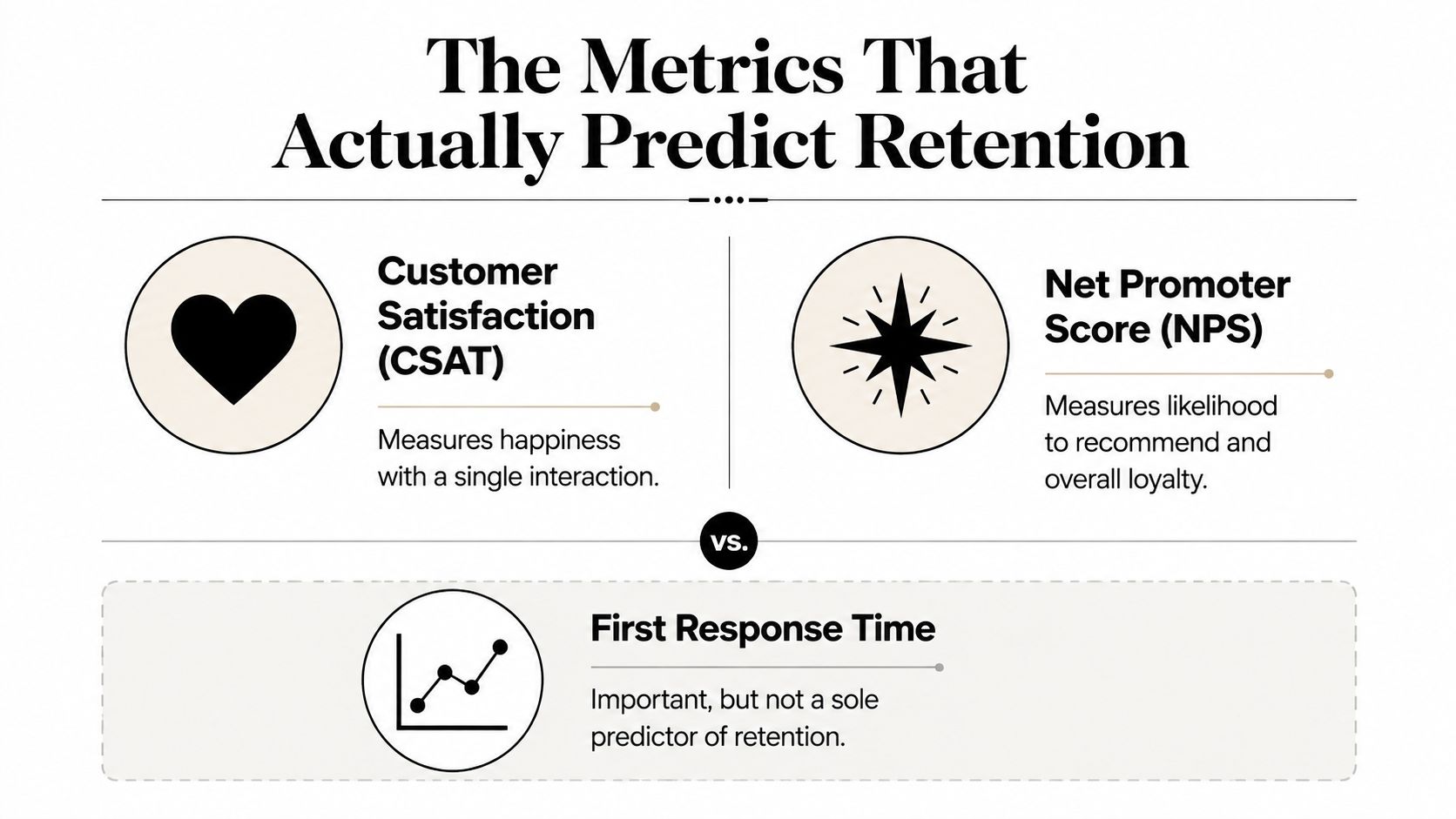
The leadership question is not, “Did we reply quickly?” It's, “Did we resolve the issue cleanly enough that the customer stopped coming back for the same problem?” That's the metric that usually tells the story.
Your 30-60-90 Day Customer Service Improvement Plan
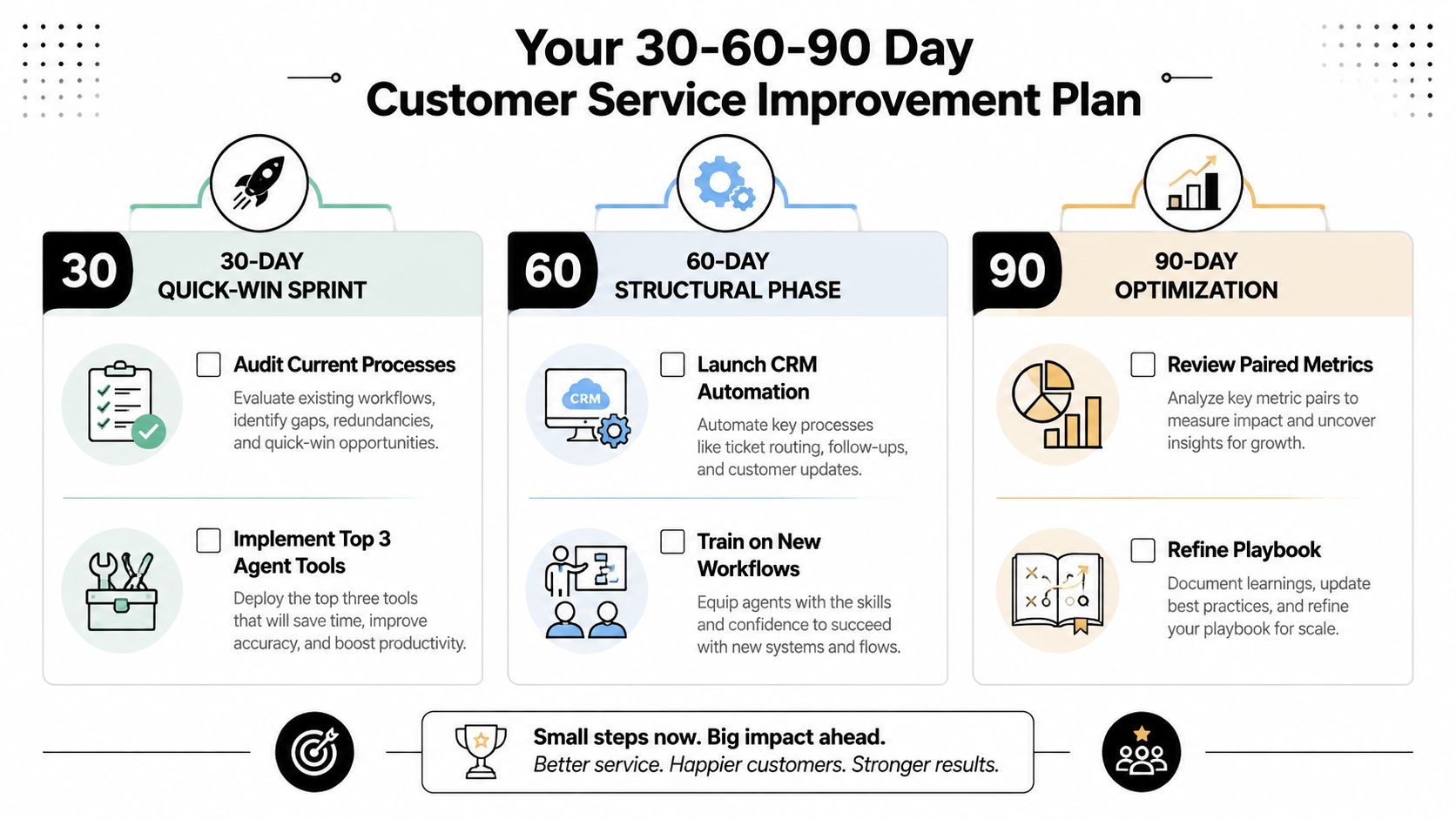
A good service program starts with the queue you have, not the org chart you wish you had. In the first 30 days, audit the current process, establish a baseline dashboard, and fix the top response-time outliers. In days 31–60, launch CRM automation for routing, tagging, and status updates, then train the team on the new workflows. By day 90, review the paired metrics, refine the playbook, and decide whether the next constraint is hiring, better automation, or a product fix.
The weekly dashboard should stay short. Track CSAT or NPS, first contact resolution, repeat contact rate, first response time, resolution time, and the top contact drivers. If backlog rises while speed improves, the team is probably optimizing the wrong thing. If repeat contacts fall and satisfaction rises, the system is moving in the right direction.
If the program stalls, the warning signs are obvious. Managers keep overriding the workflow, agents ignore the new triage rules, or the same ticket types keep reappearing with different labels. That's the moment to step back, fix the process, and stop adding surface-level coaching.
If you want a team that improves service without bloating headcount, MakeAutomation can help build the routing logic, CRM automation, AI-assisted intake, and SOPs that make the workflow easier to run. Visit MakeAutomation if you want to turn support from a manual queue into a measurable operating system.