Hyperautomation Benefits: A Practical Guide for B2B and SaaS
The biggest hyperautomation benefits often come from work that happens before the first bot is deployed. A Forrester Total Economic Impact study of Microsoft Power Automate found that employees in high-impact RPA use cases gained about 200 hours per year, roughly 10% of their time, while medium-impact use cases saved about 20 hours per employee annually. Across three years, the composite organization realized $13.2 million in employee time savings from automating tasks, as documented in the Forrester Total Economic Impact analysis.
Those results don't mean every workflow deserves AI, RPA, or orchestration. They show what happens when a company selects the right processes, simplifies them, and then automates them with enough control to handle exceptions. In B2B and SaaS, the practical question isn't whether hyperautomation sounds efficient. It's which workflows can produce measurable capacity, speed, accuracy, or customer value without creating a more complicated system than the manual process it replaces.
What Hyperautomation Actually Means for B2B and SaaS
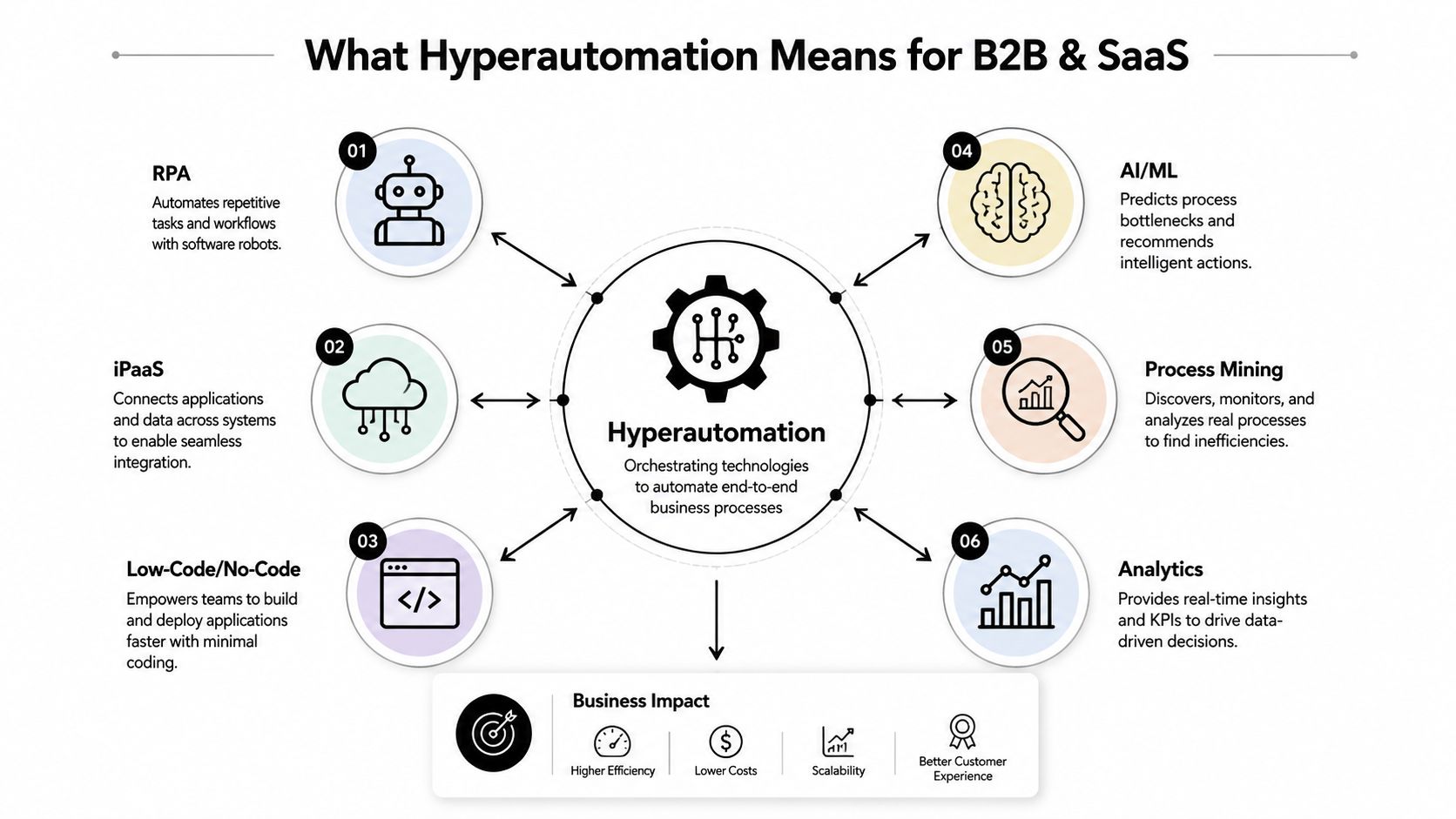
Hyperautomation is the coordinated use of multiple technologies to automate as much of a business process as technology can safely handle. A typical stack may combine robotic process automation, iPaaS connectors, low-code workflow orchestration, AI and machine learning, process mining, analytics, and the systems where work already happens, such as Salesforce, HubSpot, Stripe, NetSuite, Zendesk, Jira, or Slack.
Plain RPA usually performs a narrow job. It may copy information from one application to another, click through a predictable screen, or create a record when a defined trigger appears. Hyperautomation operates at a broader level. It maps the full workflow, connects systems, applies decision logic, routes exceptions, measures outcomes, and uses human judgment where inputs remain ambiguous.
That distinction matters because B2B processes rarely stay inside one application. A quote may begin in Salesforce, require pricing logic from a CPQ tool, pass through legal review, create a contract in DocuSign, trigger billing in Stripe, and open implementation work in a project system. A bot that handles only one screen can remove keystrokes while leaving the core bottleneck untouched.
The operating model behind the technology
A useful hyperautomation workflow has five practical layers:
- Discovery: Process mining and interviews reveal how work moves, not how the SOP says it moves.
- Execution: RPA, APIs, and low-code automation perform repeatable tasks.
- Decisioning: AI and ML classify documents, predict bottlenecks, or recommend next actions.
- Orchestration: An iPaaS or workflow layer coordinates events across applications.
- Control: Analytics, approvals, audit trails, monitoring, and human escalation keep the process reliable.
The human role doesn't disappear. People still review unusual contracts, approve sensitive financial actions, resolve uncertain customer requests, and decide how policy should change. Hyperautomation is strongest when it removes repetitive execution and gives employees cleaner context for the decisions that remain.
For founders, that translates into practical outcomes: faster quote-to-cash, shorter onboarding cycles, cleaner revenue operations data, and less headcount drag as transaction volume grows. The plain-language explanation of hyperautomation is useful for aligning commercial, operations, and technical stakeholders before selecting tools.
The Core Benefits Broken Down With Evidence
The phrase hyperautomation benefits covers several economic effects, and they do not all come from the technology. Faster machine execution creates capacity, while process redesign removes unnecessary approvals, duplicate entry, and inconsistent data. Separating those sources makes the business case more reliable.
Cost and capacity
A separate Forrester analysis of SS&C Blue Prism found that each automated RPA process saved between 200 and 4,000 hours annually. Total time saved rose from 138,048 hours in Year 1 to 496,864 hours in Year 3, while improved productivity was valued at $2,488,846, according to the SS&C Blue Prism study.
The practical lesson is that capacity gains compound when teams reuse orchestration patterns across processes. A single workflow may free one team from repetitive work. A connected set of workflows can absorb higher transaction volume without requiring the same administrative expansion.
Speed, accuracy, and scale
Hyperautomation can shorten a process by removing queues between manual steps. Onboarding, provisioning, billing checks, and quote preparation may all move faster, provided the workflow has clear rules and accessible system data. If inputs remain inconsistent, automation can move bad information through the process more quickly.
The technical advantage over isolated RPA is end-to-end coordination. By combining AI, ML, and orchestration, a workflow can support cognitive decisioning, exception handling, and self-healing behavior rather than executing fixed clicks alone. This operating model is examined in the research on hyperautomation's operating model.
The practical question is which workflows can produce measurable capacity, speed, accuracy, or customer value while avoiding a system more complicated than the manual process it replaces.
Customer experience and workforce design
Customers see the benefit when internal automation reduces waiting, limits repeated questions, and gives support or account teams current information. Employees gain time when they stop reconciling records and focus on exceptions, analysis, and relationship work.
A separate enterprise-focused study reported up to a 50% reduction in process cycle time, more than a 40% reduction in operational costs, and an average 40% ROI increase within the first 18 months. The findings connected these improvements with administrative workflows such as invoicing, reporting, and customer support, as described in the enterprise hyperautomation study.
| Benefit Category | Typical Pre-Automation Baseline | Realistic Post-Hyperautomation Range |
|---|---|---|
| Cost | Manual handling, repeated reconciliation, and queue-based work | Lower operating cost when process redesign and automation work together |
| Speed | Sequential handoffs across CRM, finance, support, and delivery tools | Faster completion through event-driven routing and fewer approvals |
| Accuracy | Re-keying, inconsistent classifications, and missed updates | More consistent structured-data handling, with human review for ambiguity |
| Scale | Volume growth creates pressure to hire | Higher transaction capacity without proportional administrative expansion |
| Customer experience | Status requests and delays caused by internal handoffs | Faster responses, clearer ownership, and more reliable updates |
| Workforce | Skilled employees spend time on repetitive execution | More capacity for exception management, analysis, and customer-facing work |
Technology contributes to these gains, but process design often determines whether they appear. Remove unnecessary steps, clarify ownership, and standardize inputs before automating. The resulting workflow is easier to measure, maintain, and extend.
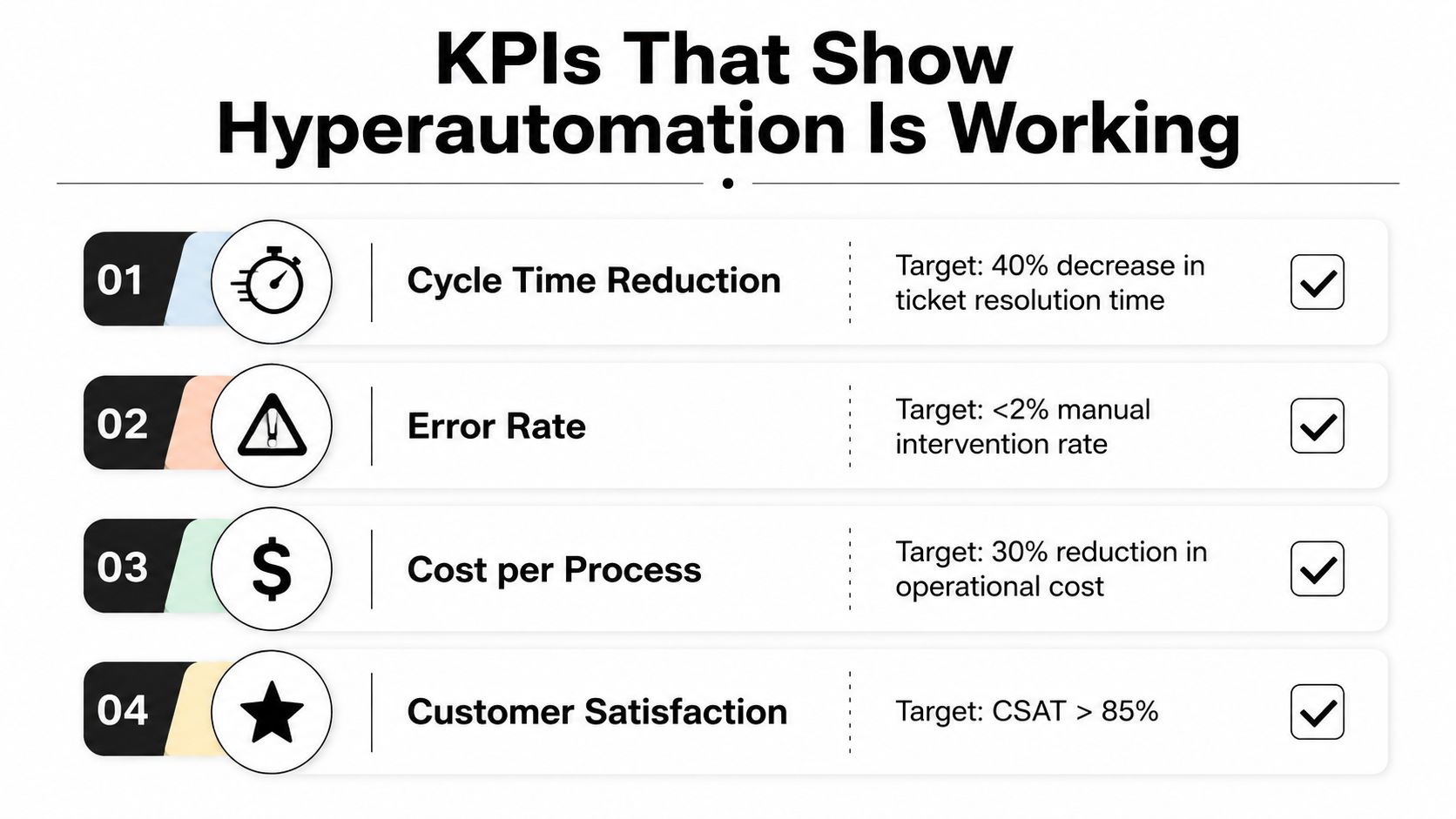
KPIs That Show Whether Hyperautomation Is Working
A workflow is delivering value only when its business outcome improves without unacceptable risk. Counting deployed bots won't tell a founder whether customers receive answers faster, finance closes more cleanly, or operations can absorb growth.
Start with a baseline taken from the live process. Measure cycle time, cost per transaction, exception rate, and straight-through processing, then add the revenue or customer metric that explains why the process matters. A support workflow should connect to resolution quality and churn-affecting ticket volume. A quote workflow should connect to quote-to-cash time and approval delays.
Build a balanced scorecard
Track the metrics in groups rather than optimizing one number in isolation:
- Process health: Cycle time, cost per transaction, exception rate, and straight-through processing reveal execution efficiency.
- Revenue operations: Quote-to-cash duration, onboarding completion, renewal readiness, and customer-impacting ticket volume connect automation to growth.
- Reliability: Bot failure rate, automation utilization, time to detect, and time to recover show whether the workflow can be trusted.
- Human workload: Manual review volume, escalation age, and time spent on exception handling expose whether automation is removing work or merely shifting it.
A high straight-through rate can hide poor exception handling. If the workflow automatically processes easy cases but sends every difficult case to an unmanaged queue, the headline metric looks healthy while customers wait longer. A low bot failure rate can also mislead if the automation skips records or produces incomplete outputs that employees discover later.
The operational efficiency metrics framework can help teams define a scorecard before implementation. Set an owner for every metric, review trends rather than isolated snapshots, and establish a rule for pausing the workflow when control metrics deteriorate.
Measurement rule: The primary KPI should reflect the customer or business outcome. Reliability and human-workload metrics should act as guardrails.
Highest-ROI Use Cases for B2B and SaaS Teams
The best first workflow is rarely the most impressive one. It's usually high-volume, low-judgment, well-defined, and already painful enough that teams have created workarounds.
Fast wins
Lead enrichment can start when a form submission or inbound lead enters a CRM. An iPaaS connector can retrieve firmographic information, an AI model can classify the account, and a workflow can assign ownership in Salesforce or HubSpot. The failure mode is dirty source data. If account records are duplicated or territories are ambiguous, automation distributes bad information faster.
Quote-to-cash is another strong candidate. A closed-won event can trigger contract checks, billing setup, provisioning, customer success handoff, and implementation tasks. The process breaks when pricing exceptions, bespoke contract terms, or missing approvals aren't represented in the rules.
Support triage can classify inbound tickets, identify urgency, link related records, and route work to the correct queue. Churn-risk alerts can combine product usage, support sentiment, billing status, and account activity, but they need transparent thresholds and human review. SOC 2 evidence collection can also produce value by gathering recurring artifacts from approved systems, provided the control owner still validates the evidence.
Medium-effort workflows
Billing reconciliation, partner onboarding, and security incident enrichment usually require more system access and more exception design. They can be worthwhile because finance and security teams often spend significant time collecting, matching, and documenting information. They fail when ownership is unclear or when source systems disagree about the authoritative record.
High-strategic plays, such as AI-augmented product analytics or contract analysis, deserve a later stage. These workflows can influence product and commercial decisions, but ambiguous inputs and legal or strategic judgment make them harder to govern. A specialist partner may also be useful during evaluation, alongside an automation fundraising investors list for founders researching the automation ecosystem and potential capital sources.
| Use Case | Typical Effort | Payback Period | Primary Benefit |
|---|---|---|---|
| Lead enrichment and CRM routing | Low | Often short when data is clean | Faster response and better ownership |
| Support triage and churn-risk signals | Low to medium | Often short for high-volume teams | Reduced queue friction and earlier intervention |
| Quote-to-cash orchestration | Medium | Often short to medium | Fewer handoff delays and cleaner activation |
| Billing reconciliation | Medium | Commonly medium term | Lower reconciliation effort and stronger controls |
| Partner onboarding | Medium | Commonly medium term | Consistent data collection and enablement |
| Security evidence collection | Medium | Commonly medium term | Less manual audit preparation |
| Contract analysis and product analytics | High | Longer and less predictable | Decision support and strategic insight |
Use this rule when priorities conflict: automate first where volume is high, judgment is limited, inputs are stable, and failure can be caught before it reaches a customer or financial ledger.
Pitfalls and Implementation Considerations Most Guides Skip
Most failed hyperautomation programs don't fail because an API connector was unavailable. They fail because the company automated a process nobody had properly defined, gave a bot authority it shouldn't have, or measured activity instead of value.
The most common mistake is scaling a broken process. If sales representatives enter incomplete fields, finance corrects records in a spreadsheet, and customer success maintains a separate version of the account, orchestration won't solve the ownership problem. It will move inconsistent information between systems with greater speed and make the resulting errors harder to trace.
Where implementations go wrong
- Broken process design: Automation preserves redundant approvals, duplicate data entry, and unclear responsibility.
- Brittle exception handling: The happy path works, but unusual inputs disappear into a human queue without an owner or response target.
- Shadow automation: Individual teams build disconnected workflows in tools such as Zapier, Power Automate, or native CRM automation, creating conflicting rules and weak documentation.
- Activity-based measurement: Leaders celebrate the number of automations launched instead of tracking cost, cycle time, reliability, or customer outcomes.
Process mining can expose actual volume, variation, rework, and wait states before the build begins. Interviews still matter, but event logs often reveal that the documented process and the lived process differ materially.
Controls to establish before launch
Define human-in-the-loop gates for legally sensitive decisions, unusual financial transactions, uncertain classifications, and customer-facing actions that could damage trust. Select an orchestration layer that can tolerate API changes, maintain logs, retry safely, and expose failures instead of hiding them.
Create a small governance group with representatives from operations, IT or engineering, security, and the affected business function. Give it written standards for access, ownership, monitoring, change approval, and bot retirement. A workflow that no longer produces value should have a clear path to decommissioning.
Governance principle: Every automation needs an owner who can explain what it does, what happens when it fails, and when the company should turn it off.
Don't automate first where inputs are still being standardized. Be especially cautious with legally binding actions and customer-facing workflows in regulated industries. Those processes may eventually benefit from orchestration, but they need validated rules, auditability, and deliberate human oversight before a machine is allowed to act.
A Realistic B2B Rollout From Intake to Measurable Result
Consider a representative growth-stage SaaS company whose product team struggled to extract useful feedback from a support queue. The company received a backlog of 800+ unstructured tickets per month, and its opportunity review found that feature request tags were misclassified 40% of the time. Product leaders were missing recurring demand because the intake process treated each ticket as an isolated support event.

The team first redesigned intake rather than immediately connecting a language model to the existing queue. It clarified the taxonomy, separated product feedback from incident reporting, defined confidence thresholds, and assigned ownership for uncertain classifications. The delivery team included one operations lead, one engineer, one product liaison, and MakeAutomation as the delivery partner.
The eight-week build
During the first phase, NLP tagging classified inbound tickets and attached structured metadata. The workflow then created or updated issues in the product tracker, linked the support conversation to the relevant account, and assembled a weekly digest for product leadership. A later step closed the loop by notifying customers when a requested feature shipped.
The team used the business case development guidance to connect the workflow to measurable operational and commercial outcomes rather than reporting only technical completion. It defined the baseline before launch, recorded manual triage effort, and reviewed false classifications with the people responsible for support and product decisions.
After eight weeks, the representative rollout produced a 40% reduction in triage time and a 22% faster product feedback turnaround. The company also measured a lift in expansion-qualified leads from previously ignored tickets, although the commercial effect depended on sales follow-up after the signal reached the right account owner.
The operational lesson is more valuable than the individual result. The team didn't win by adding AI to a messy queue. It won by simplifying intake, defining exception rules, connecting the support and product systems, and creating a feedback loop that gave customers and internal teams a reason to trust the automation.
The implementation sequence is also shown in the following walkthrough.
How MakeAutomation Helps You Operationalize the Value
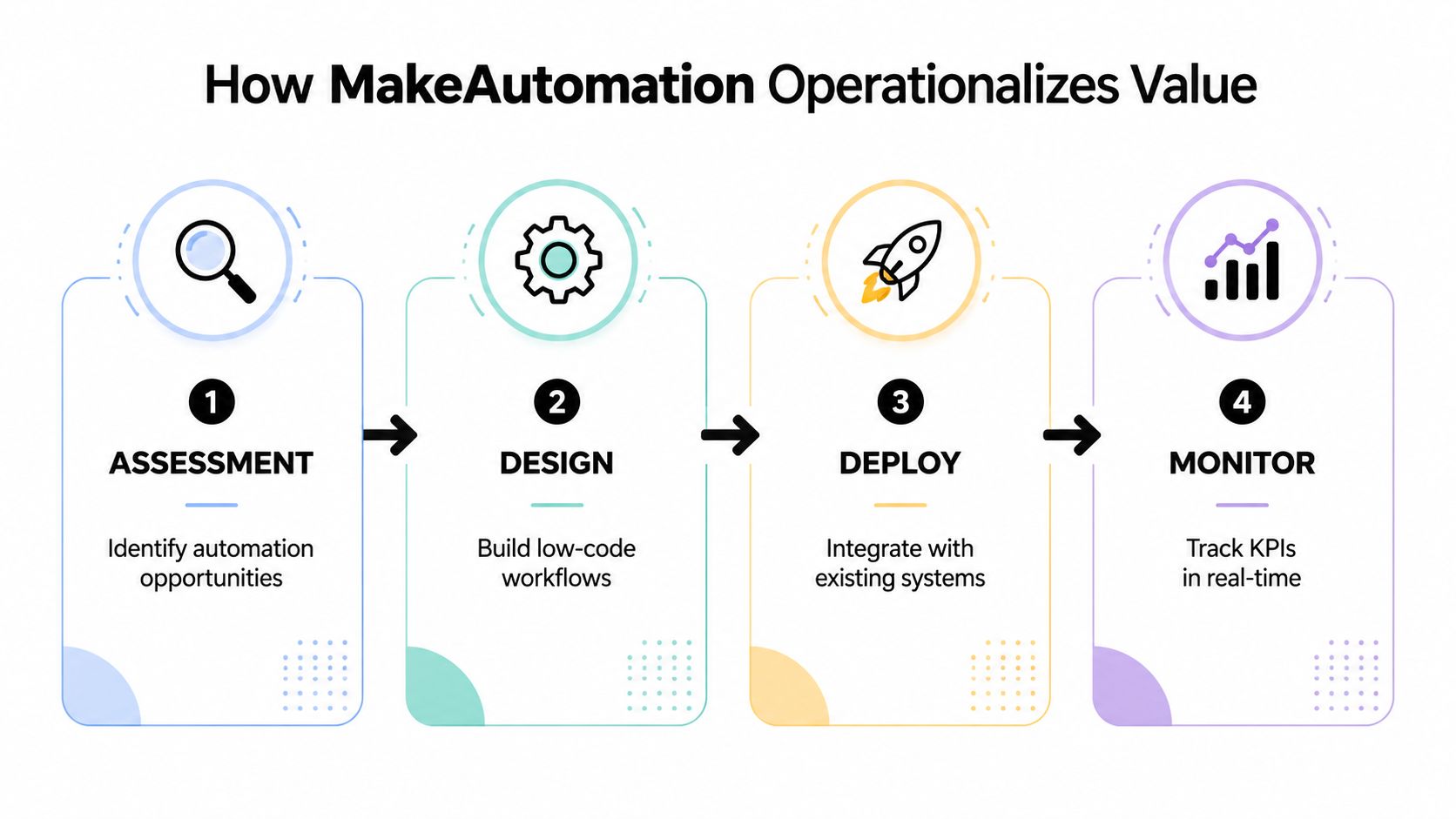
Operationalizing hyperautomation means turning a strategy document into a production workflow with an owner, a baseline, a monitoring plan, and a clear handoff. A specialist partner such as MakeAutomation can support that work through a structured sequence.
From candidate to controlled workflow
The engagement should begin with intake and qualification. The team identifies candidate processes, checks volume and variability, documents systems and owners, and rejects workflows where inputs or rules are too unstable. A discovery sprint then maps the current process, estimates manual effort, identifies control points, and defines the KPIs that will determine whether the pilot is worth scaling.
The pilot connects the required components, which may include RPA for screen-based work, iPaaS integrations for system events, low-code orchestration for routing, and AI for classification or decision support. The build isn't complete until the team has tested normal cases, exceptions, retries, permissions, audit trails, and failure notifications.
Stabilization follows deployment. The delivery team should provide documentation, runbooks, dashboards, escalation paths, and training, while the client owns day-to-day process decisions, data quality, access approvals, and change management after launch. Those responsibilities matter because adoption determines whether the measured benefit survives beyond the pilot.
If your team has a workflow that is high-volume, rule-based, and failing under manual load, bring its current cycle time, exception volume, systems, and owner to a short scoping conversation. MakeAutomation can help assess the candidate, redesign the process, build the connected workflow, and define the KPIs needed to judge its value.