Real-Time Data Processing for B2B SaaS Growth
A hot prospect visits your pricing page, opens a product comparison, and submits a request for a sales call. Your sales team doesn't know any of it because the CRM still reflects yesterday's CSV export. By the time a rep follows up, the buyer has spoken with a faster competitor.
That gap is where real-time data processing becomes a growth lever. It moves events from websites, CRMs, forms, Voice AI agents, calendars, and recruitment systems into decisions and actions while those events still matter. The engineering matters, but the commercial question comes first: does fresher information change what your team or product does next?
For B2B and SaaS companies, the answer often involves lead routing, enrichment, sales prioritization, customer experience, agent context, and hiring coordination. It doesn't always justify a streaming architecture. This guide separates the workflows that benefit from immediate action from those better served by batch or near-real-time processing, then covers architecture, platform selection, production trade-offs, and operational controls.
Why Real-Time Data Processing Matters for Growing B2B Teams
A delayed event isn't just an old record. It can become a missed conversation, a stale customer experience, or an automation that fires after its opportunity has expired.
Consider a B2B funnel with several connected systems. A prospect submits a form, an enrichment service identifies the account, a scoring model evaluates intent, a CRM creates or updates the contact, and a sales notification reaches the right owner. If those steps happen as one event-driven sequence, the rep can respond with relevant context. If they depend on scheduled exports, the team works from an incomplete version of reality.
The business value comes from shortening the distance between signal and action. A pricing-page visit can influence routing. A product usage event can trigger customer success outreach. A missed interview response can update a recruitment workflow. A Voice AI agent can use current CRM context instead of asking the caller to repeat information already stored elsewhere.
Practical rule: Don't ask whether your data is real-time. Ask whether a delay changes the decision.
Technology also affects how distributed teams coordinate. For useful context on the relationship between collaboration and timely information, review these how technology boosts collaboration discussions. The same principle applies inside a revenue operation: people collaborate better when the systems they rely on expose the same current event history.
Speed creates a tighter growth loop
Real-time processing can connect four commercial moments:
- Capture: A customer, prospect, candidate, or employee creates an event.
- Interpret: The pipeline validates, enriches, scores, or classifies it.
- Coordinate: The system sends the right context to the right team or application.
- Act: A person or automation takes the next step.
That loop supports more than faster notifications. It can make lead qualification more responsive, reduce manual reconciliation, and give product teams a fresher feedback signal. The advantage is strongest when the event is customer-facing, revenue-touching, or difficult to recover after a delay.
Growing toward seven-figure revenue doesn't require every table and dashboard to update continuously. It requires disciplined choices about which moments deserve immediate attention. A scalable team treats speed as a product and operating decision, not a badge of technical sophistication.
Streaming vs Batch and When Each One Wins
Batch processing is like cooking once after receiving a full delivery. The kitchen gathers ingredients, prepares a large run, and serves the result on a schedule. Streaming is the line cook plating each ticket as it arrives. Each approach works, but they solve different timing problems.
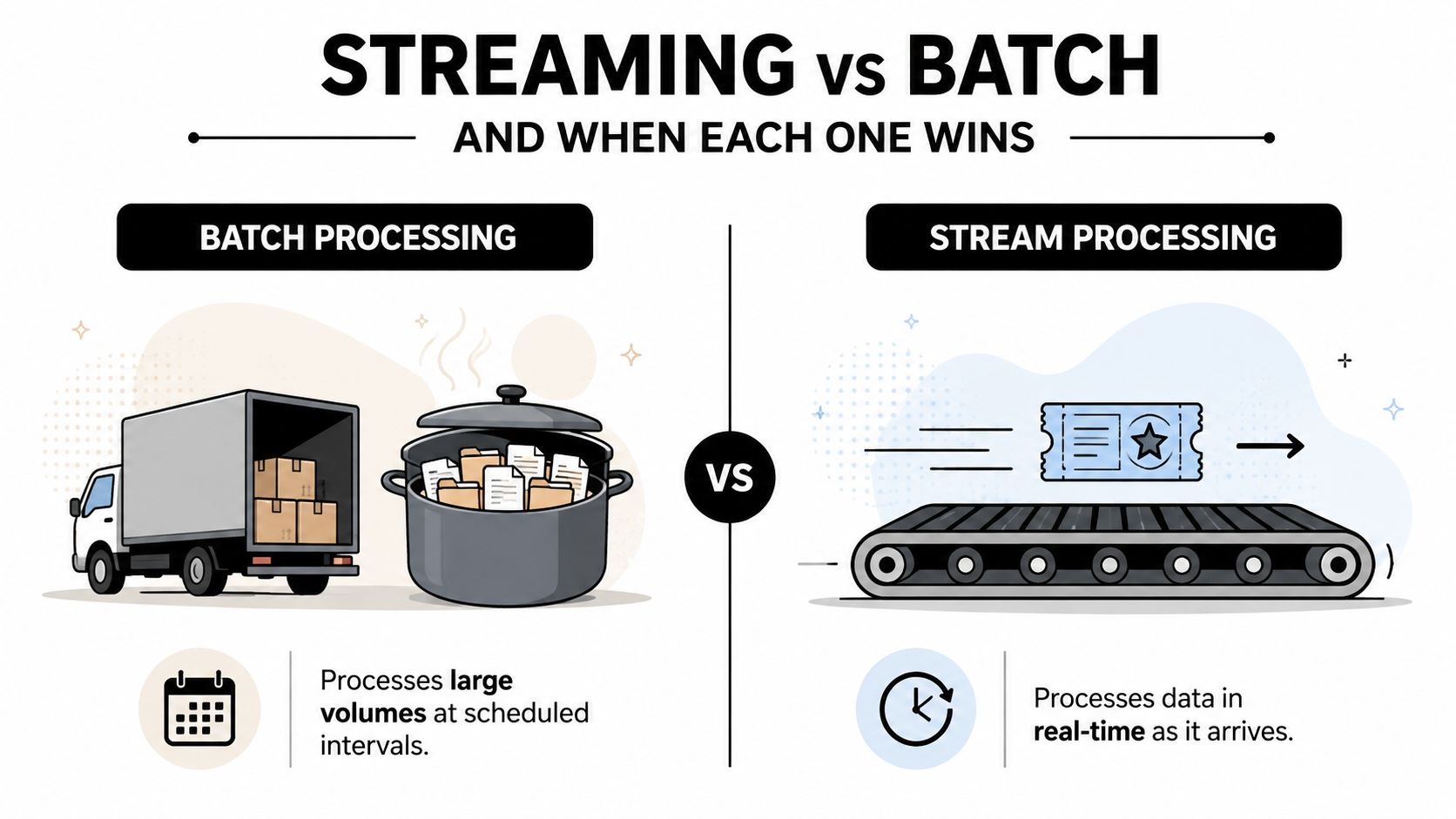
With batch, the system collects records, processes them together, and produces a consistent output. That makes it a strong fit for historical reporting, finance reconciliation, back-office analytics, data warehouse transformations, and workloads where a delay of minutes or hours doesn't affect the decision. Batch jobs are easier to inspect as complete units, and they often make infrastructure usage more predictable.
Streaming processes events continuously. It suits lead routing, fraud controls, operational alerts, customer-facing dashboards, product personalization, and automations that lose value when they arrive late. The trade-off is operational complexity. Teams must handle duplicates, out-of-order events, schema changes, backpressure, retries, state, and recovery while data keeps arriving.
Use the middle ground deliberately
Near-real-time processing is often the best answer. Micro-batches can run on a short schedule without forcing every component into a permanent streaming model. Change data capture can move database changes promptly while preserving a simpler source-of-truth design. Webhooks can update a CRM when a meaningful event occurs, while less important analytics remain scheduled.
| Processing approach | Best fit | Main advantage | Main risk |
|---|---|---|---|
| Streaming | Customer-facing and revenue-touching events | Acts while the signal still matters | More state and failure-handling complexity |
| Near-real-time | Operational syncs with some timing tolerance | Balances freshness and cost | Timing may vary under load |
| Batch | Reporting, reconciliation, and historical analysis | Simpler execution and governance | Delayed decisions and stale records |
A practical decision rule is simple: use streaming when the next action depends on what just happened. Use batch when the work summarizes what already happened. Use near-real-time when freshness matters but immediate response doesn't create enough additional value to justify streaming operations.
Don't build a streaming platform because a vendor demo looks fast. Define the business event, its useful freshness window, the action it triggers, and the consequence of being late. Those answers usually identify the correct processing model before an engineer selects a tool.
Core Components of a Real-Time Pipeline
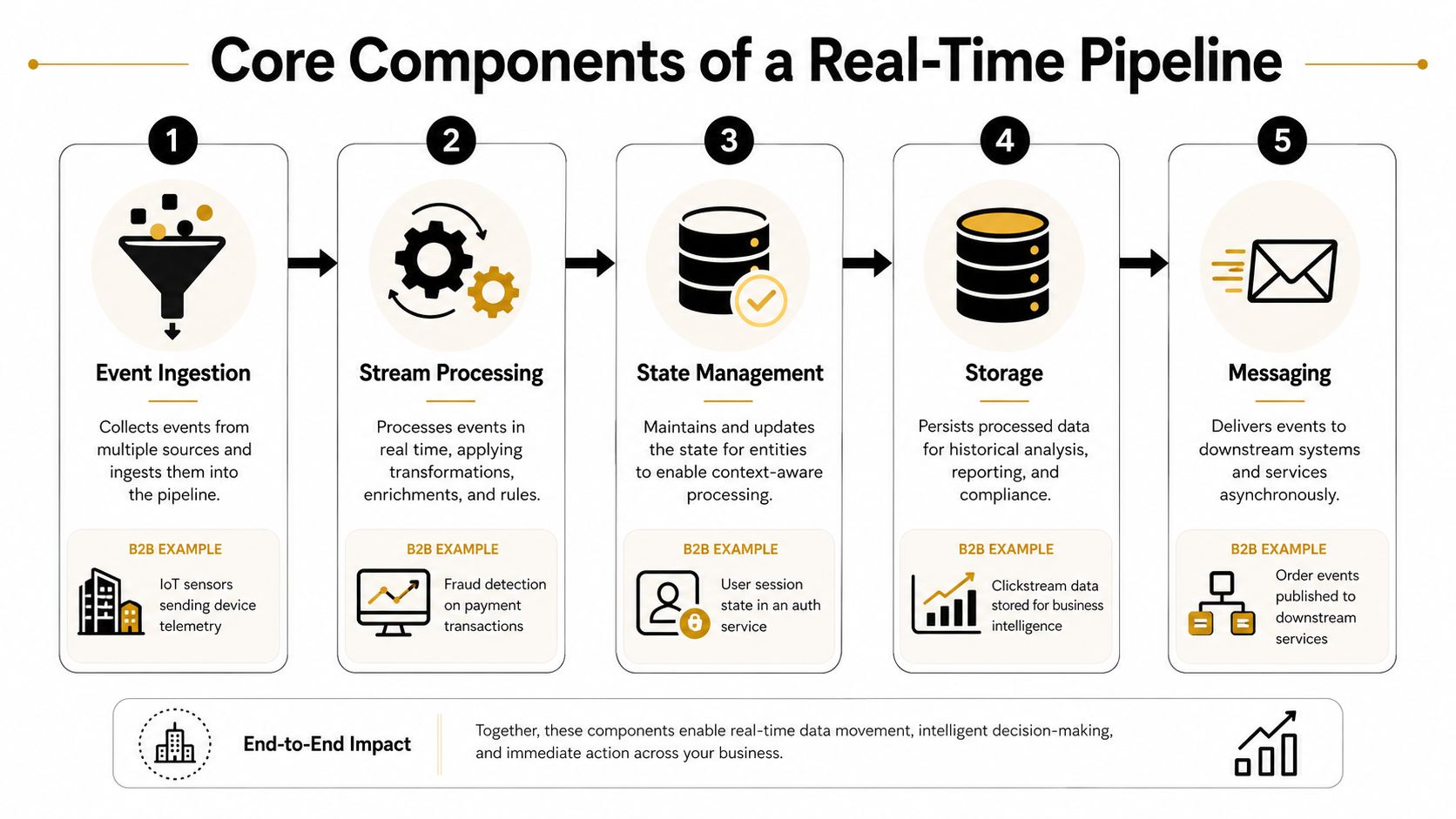
A useful pipeline can be sketched as five connected blocks. Each block has a distinct responsibility, and failures usually happen when teams blur those responsibilities or assume one tool can safely perform all of them.
Event ingestion
Ingestion receives events from sources such as a lead form, product application, CRM, calendar, or webhook. A form submission should carry a stable event identifier, source information, event time, and the fields required for downstream routing. Validate the payload at the edge, reject malformed data clearly, and preserve the original event for troubleshooting.
Stream processing
Processing applies the business logic. A lead event might be normalized, enriched with account information, matched against an existing contact, scored, and routed according to territory. Keep this logic explicit and versioned. If marketing and sales each maintain separate definitions of “qualified,” the pipeline will produce inconsistent outcomes even when its transport is fast.
State management
State lets the system remember what happened before. It supports deduplication, attribution windows, session context, rolling counts, and joins between events. For example, a pipeline may need to know whether a form submission follows a recent product session or whether the same lead event has already triggered a notification.
State is also where event-time correctness becomes difficult. Late-arriving data can change an earlier conclusion, so the design needs a policy for waiting, revising, or compensating for incomplete information.
Storage
Use storage for both the fast path and the recovery path. Hot storage serves current scores, routing decisions, or customer context. Durable storage preserves events so the team can replay them after a code defect, integration failure, or schema correction.
Retention should reflect the workflow, privacy requirements, and replay needs. Storing everything indefinitely creates cost and compliance exposure, while storing too little makes production incidents harder to repair.
Messaging
Messaging hands results to the systems that act on them. That may mean a CRM update, a Slack notification, an outbound task, an ATS change, or an API response for a Voice AI agent. Make the handoff idempotent where possible, so retries don't create duplicate contacts, duplicate tasks, or repeated candidate messages.
Teams designing this layer can use this Kafka data pipeline guide as a practical reference for event transport decisions. The goal isn't to add Kafka by default. It's to make the event path durable, replayable, and understandable.
Latency Throughput and Cost Trade-Offs That Hit in Production
Production pipelines pull in multiple directions at once. Low latency competes with throughput, consistency, recovery behavior, and infrastructure cost. Optimizing one dimension often shifts pressure onto another, so set priorities from the business workflow rather than from processor speed.
A published benchmark shows the operational impact. Apache Flink reached about 160k tuples per second with 1.6 seconds of latency before failure, but throughput fell to roughly 20k tuples per second during failure conditions, an 87% decrease, while latency rose sharply, as documented in this published stream-processing benchmark. The evaluation also describes exactly-once processing as preventing duplicate processing and ensuring that no unprocessed events remain. That guarantee can impose a substantial recovery penalty.
Use exactly-once processing when a duplicate or missing event creates material business risk. A Voice AI router handling an inbound conversation needs current context and predictable recovery. A nightly report can tolerate scheduled processing, reconciliation, and a longer freshness window. Paying for stronger guarantees everywhere wastes infrastructure budget.
A separate peer-reviewed system reported more than 200 million tuples per second on a 16-core server, with 8 ms 95th-percentile latency and sub-second recovery. The result shows how local recovery and reduced coordination can alter the performance curve. See the peer-reviewed stream-processing system evaluation for the underlying result.
| Use Case | Latency Target | Consistency Need | Recommended Approach |
|---|---|---|---|
| Inbound Voice AI routing | Immediate operational response | Strong context consistency | Event-driven streaming with local retry and durable events |
| Lead assignment | Prompt follow-up | Idempotent CRM updates | Streaming or webhook-driven near-real-time |
| Product usage alerts | Fresh enough for intervention | Reliable state and deduplication | Streaming when action expires quickly |
| Executive reporting | Decision cadence determines freshness | Reconciled aggregates | Batch or scheduled near-real-time |
| Financial reconciliation | Completeness over immediacy | Strong consistency and auditability | Batch with controlled corrections |
Set the latency SLA after testing retries, late events, backlog recovery, and ownership during incidents. Review these performance optimization techniques against those operating conditions. A small latency improvement has little value if it lengthens incidents, raises deployment risk, or makes cloud bills unpredictable.
For broader metric and system planning, consult this startup analytics guide. Track business freshness and successful action completion, not processor speed alone.
Choosing a Platform for B2B and SaaS Workloads
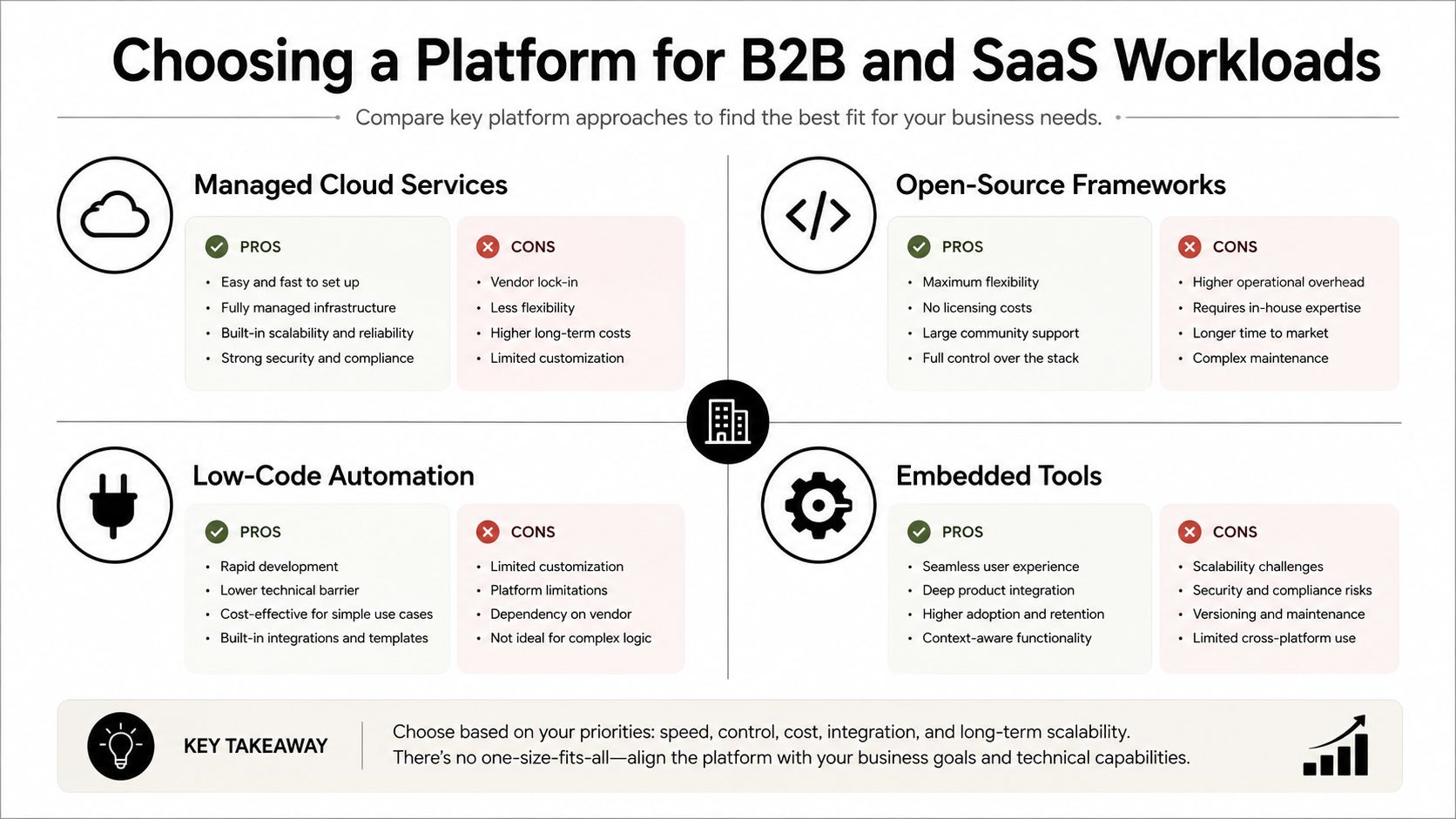
Choose the platform around the workflow and its growth path, not around a category label. A growth-stage SaaS team typically needs a quick first implementation, dependable integrations, understandable costs, and limited maintenance. The most flexible distributed system adds little value if the workflow has modest volume, tolerates delay, or depends mainly on business applications.
Managed cloud services
Managed streaming and processing services reduce operational work. They fit teams that need durable ingestion, scaling controls, and established cloud integrations without managing every cluster concern. The trade-offs are vendor dependence, service-specific semantics, and costs that become harder to explain as event volume or retention changes. Choose this route when reliability and delivery speed matter more than owning the execution layer.
Open-source frameworks
Frameworks such as Apache Kafka and Apache Flink provide control over topology, processing semantics, and deployment. Select them when the team has strong platform engineering capability, unusual workload requirements, or a clear strategic reason to own the processing layer. That choice also assigns responsibility for upgrades, capacity planning, security, observability, and incident response to your organization.
Low-code automation
Low-code platforms often provide the quickest path from an event to a business action. They suit webhook intake, CRM synchronization, notifications, enrichment, approvals, and workflows spanning multiple applications. Their limits emerge with complex stateful computation, custom partitioning, extreme throughput, or specialized recovery behavior. For B2B teams testing a growth workflow, start here unless measured requirements show that the platform cannot keep up.
Embedded tools
CRM, marketing, recruitment, and support suites frequently include automation and event triggers. Match platform scope to workflow scope. Use embedded automation for in-app workflows; deploy a separate platform only when native triggers are insufficient.
Evaluate each option against four tests:
- Time to first event: Can the team prove one valuable workflow quickly?
- Integration surface: Does it connect cleanly with HubSpot, Salesforce, Make, calendars, ATS platforms, and internal APIs?
- Cost predictability: Can you estimate the cost of event growth, retries, storage, and observability?
- Ownership burden: Who maintains schemas, alerts, credentials, replay procedures, and downstream contracts?
Red flags include adding a broker before defining event ownership, building custom state for a workflow that tolerates delay, and choosing a platform because it advertises the lowest theoretical latency. Start with the smallest layer that satisfies the business requirement, then expand when measured constraints demand it.
Real-World Use Cases in Lead Gen CRM Voice AI and Recruitment
A B2B SaaS company receives a form submission while a prospect is active on its site. The ingestion layer validates the event, enrichment adds account context, scoring evaluates fit and intent, and routing assigns the record to a rep. The value lies in timing. The rep receives a usable lead while the prospect is still engaged, rather than just receiving proof that data moved quickly.
Sales operations teams can apply the same design to CRM activity. The pipeline listens for meaningful signals, including page visits, product milestones, meeting changes, and email replies. It updates the opportunity record, creates a task when the event meets the team's rules, and uses an idempotency key to suppress duplicate actions.
The policy must be selective. A click rarely justifies a sales task. Stream the signal, filter aggressively, and send reps only events that warrant attention. If delayed action has no commercial cost, batch or near-real-time processing will usually be cheaper and easier to operate.
Voice AI needs current context
An inbound Voice AI agent can retrieve recent web activity, account status, open opportunities, support history, and appointment availability while a call is in progress. The agent needs a compact, trusted context layer that resolves conflicts when systems disagree, rather than receiving an unfiltered event firehose.
Teams designing this workflow can review how to make an AI voice assistant alongside their call-routing design. Define what the agent may read, what it may change, and which fallback applies when the CRM or an enrichment service is unavailable. Keep retrieved context focused on decisions the agent must make during the conversation.
Recruitment workflows benefit from event coordination
Recruitment also suits coordinated event handling. A candidate submits an application, the ATS records the profile, interview availability changes, a calendar event is created, and candidate communications follow the latest status. Shared updates keep recruiters, hiring managers, candidates, and calendars aligned on the current process.
The pipeline can trigger reminders, update interview stages, and stop messages when a role closes. Human review remains necessary for sensitive decisions. Automation should coordinate verified facts and routine actions, while qualified people handle consequential judgments.
Across these examples, an event creates a time-sensitive next step across multiple systems. Streaming earns its complexity when that next step affects conversion, conversation quality, or candidate experience. Otherwise, use a slower processing model and invest the savings in reliability and data quality.
Monitoring Observability Security and Compliance Checklist
A real-time pipeline is only useful when the team can tell whether it is current, correct, and safe. Create the operational checklist before production, not after the first missed webhook.
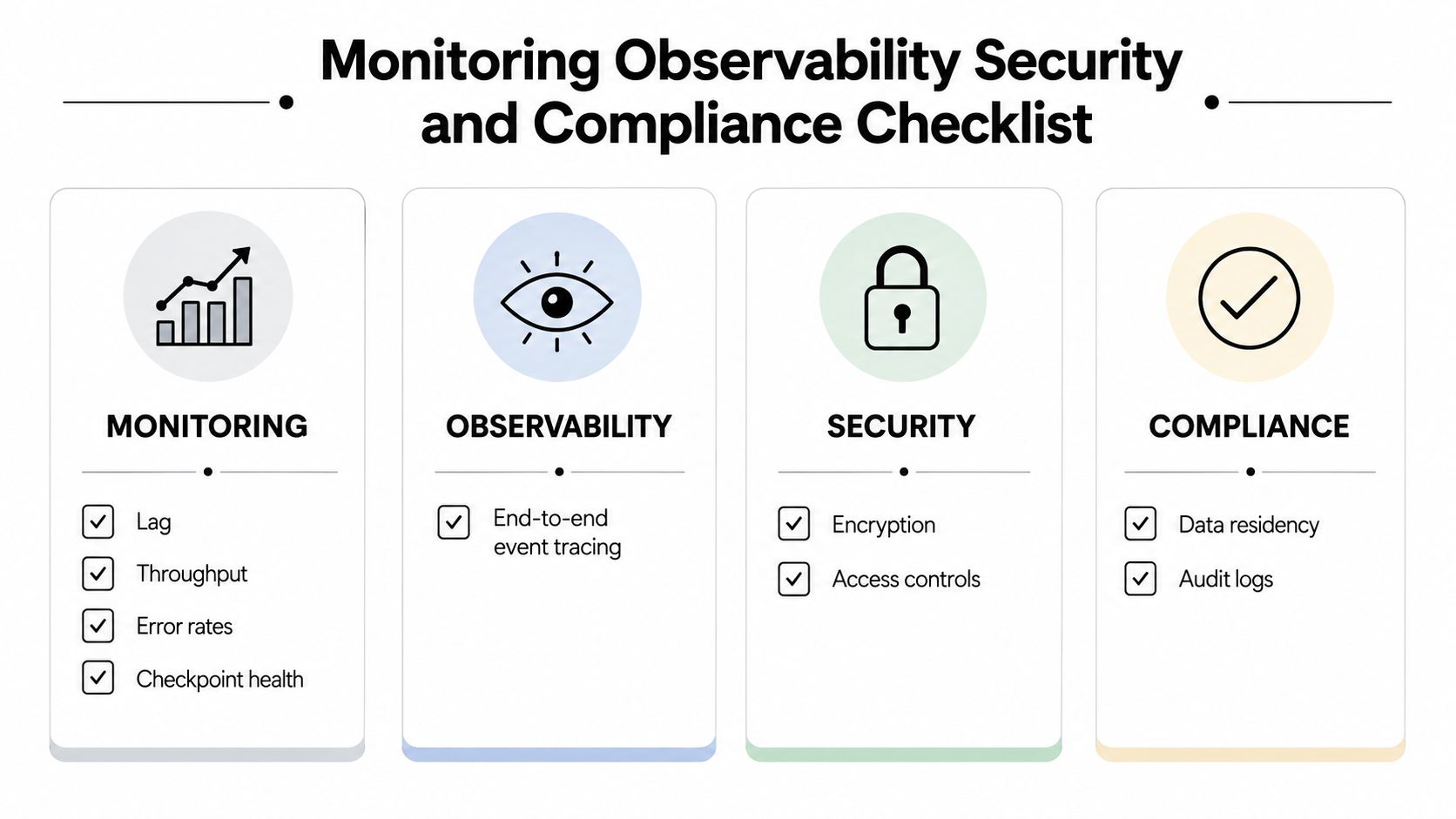
Monitoring
- Measure lag: Track the age of the newest processed event against its event time.
- Watch throughput: Compare incoming volume with successful processing and downstream delivery.
- Track errors: Separate malformed payloads, transformation failures, authorization errors, and destination failures.
- Check checkpoints: Alert when offsets, checkpoints, or recovery markers stop advancing.
- Inspect retries: Identify repeated failures before they create a growing backlog.
Observability
- Trace one event end to end: Carry a correlation identifier from source through processing, storage, and delivery.
- Log decisions: Record the rule version, enrichment result, routing outcome, and reason for suppression.
- Keep replay procedures: Document how engineers restore or reprocess events without duplicating business actions.
- Test late data: Verify that event-time corrections produce the intended downstream result.
Security
- Encrypt transport and storage: Protect personal and customer data across every handoff.
- Validate schemas: Reject unexpected fields and unsafe payloads before they reach business systems.
- Limit access: Give each service only the permissions needed for its role.
- Protect secrets: Store credentials in a managed secret system and rotate them through an approved process.
Compliance
- Define retention: Set retention windows by data type and operational purpose.
- Propagate deletion: A right-to-erasure request must reach derived stores, caches, logs, and replay archives.
- Maintain audit records: Capture access, transformation, delivery, and administrative actions.
- Review residency: Confirm where personal data is processed and stored across vendors.
A founder should be able to ask an engineering lead or vendor to demonstrate these controls with one real event. If the answer depends on manually searching several systems, the pipeline isn't observable enough for a critical workflow.
When Not to Go Real-Time and a Decision Framework to Finish With
Most workflows don't need streaming. Paying for continuous infrastructure, state management, replay capability, and operational coverage when a scheduled job would work is an avoidable expense.
Real-time data processing market reached USD 62.1 billion in 2024 and is projected to reach USD 193.8 billion by 2033 at a 13.7% CAGR, according to the real-time data processing market analysis. Streaming analytics, a narrower segment, was valued at USD 23.4 billion in 2023 and is forecast to reach USD 128.4 billion by 2030 at a 28.3% CAGR, reflecting broad demand for immediate filtering, aggregation, and enrichment. Those market projections show adoption momentum, not a requirement to stream every workflow.
Use this decision test:
- Choose streaming when a customer-facing or revenue-touching action expires quickly.
- Choose near-real-time when freshness matters but a short delay is acceptable.
- Choose batch when the work reconciles, summarizes, audits, or informs decisions on a slower cadence.
- Choose a simpler tool when the workflow has low volume, limited state, and a clear retry path.
- Choose a dedicated platform when measured scale, correctness, or recovery requirements exceed automation-layer capabilities.
Streaming became mainstream because distributed event platforms made continuous pipelines broadly available. That history doesn't eliminate trade-offs. It gives B2B teams more choices, which means they should apply speed selectively rather than treat it as a default.
MakeAutomation helps B2B and SaaS teams map workflows, connect operational systems, and implement AI, CRM, Voice AI, and event-driven automations at the layer of speed each process needs.
Visit MakeAutomation to assess your current workflows and identify which events deserve real-time handling, near-real-time synchronization, or a simpler batch design. Bring one revenue or operations bottleneck, and use the consultation to turn it into a documented, scalable automation plan.