Visual Workflow Builder: The Complete B2B Operations Guide
Most advice about a visual workflow builder starts with speed. Let operations teams drag nodes onto a canvas, connect a few apps, and automate work without waiting for engineering. That promise is real, but it's incomplete. In a B2B environment, the difficult part isn't creating the first workflow. It's proving what changed, recovering from failure, controlling access, and preventing a growing collection of automations from becoming an undocumented operating system.
The strongest builders therefore act as more than no-code interfaces. They expose process logic, create review points, preserve execution context, and give operations leaders a shared language for working with engineering, sales, support, and finance. The market's expansion reflects that broader role. Gartner sized the wider low-code and no-code category at $26.9 billion globally in 2023, with 19.6% year-over-year growth, while Forrester estimated the combined low-code and digital process automation market at $13.2 billion by the end of 2023 and projected it could reach $30 billion by 2028. These figures are reported in this overview of no-code automation statistics.
Why Visual Workflow Builders Are More Than a Speed Tool
A visual workflow builder can shorten the distance between an operational idea and a working automation. That's useful, but speed alone is a weak buying argument. A workflow built quickly and maintained badly creates faster failure.
In practice, the canvas becomes a governance layer. A routing rule hidden inside a script may be understood by its author and nobody else. A node-based workflow makes triggers, decisions, integrations, and exception paths visible to the people responsible for the process. Teams can review the logic before it reaches production, identify ownership, and discuss changes using a shared diagram rather than a technical handoff.
The canvas creates operational memory
A well-designed workflow records more than actions. It records the order of operations, the conditions that change the path, and the systems that receive or return data. That visibility supports:
- Auditability: Reviewers can trace how a record moved from one system to another.
- Transferability: A new operator can understand the process without reconstructing undocumented scripts.
- Version discipline: Teams can compare a current flow with an earlier design before approving a change.
- Incident analysis: Failed branches and missing data become easier to isolate.
The value appears after launch. When a CRM field changes, an API begins rate-limiting requests, or a customer enters an unusual state, operators need to know which branch ran and what the workflow attempted. A visual representation doesn't solve those problems by itself, but it gives the team a practical surface for investigating them.
Practical rule: Treat every workflow as a production asset, not a personal shortcut.
That mindset changes how teams name nodes, document assumptions, test edge cases, and assign ownership. The workflow visualization resource is useful for making those dependencies explicit before automation expands across departments.
The category's adoption also reflects a shift from isolated task automation toward core business processes. A 2026 summary reported that about 60% of companies had implemented some form of automation in the previous year, with adoption reaching 84% among large enterprises, as documented in workflow automation statistics from Thunderbit. Those deployments create more governance pressure because a failed workflow can affect lead distribution, onboarding, support commitments, or financial operations.
The contrarian takeaway is simple. If a team uses a visual workflow builder only to avoid engineering tickets, it captures the smallest part of the value. The durable benefit is controlled change. The builder helps people see how work runs, decide who may modify it, and preserve enough context to operate it when the happy path disappears.
How a Visual Workflow Builder Actually Works
A visual workflow builder translates process logic into a graph. The graph usually contains four core elements: a trigger, a set of nodes, connecting edges, and workflow state. Understanding those elements matters because a clean canvas can still conceal complicated execution behavior.
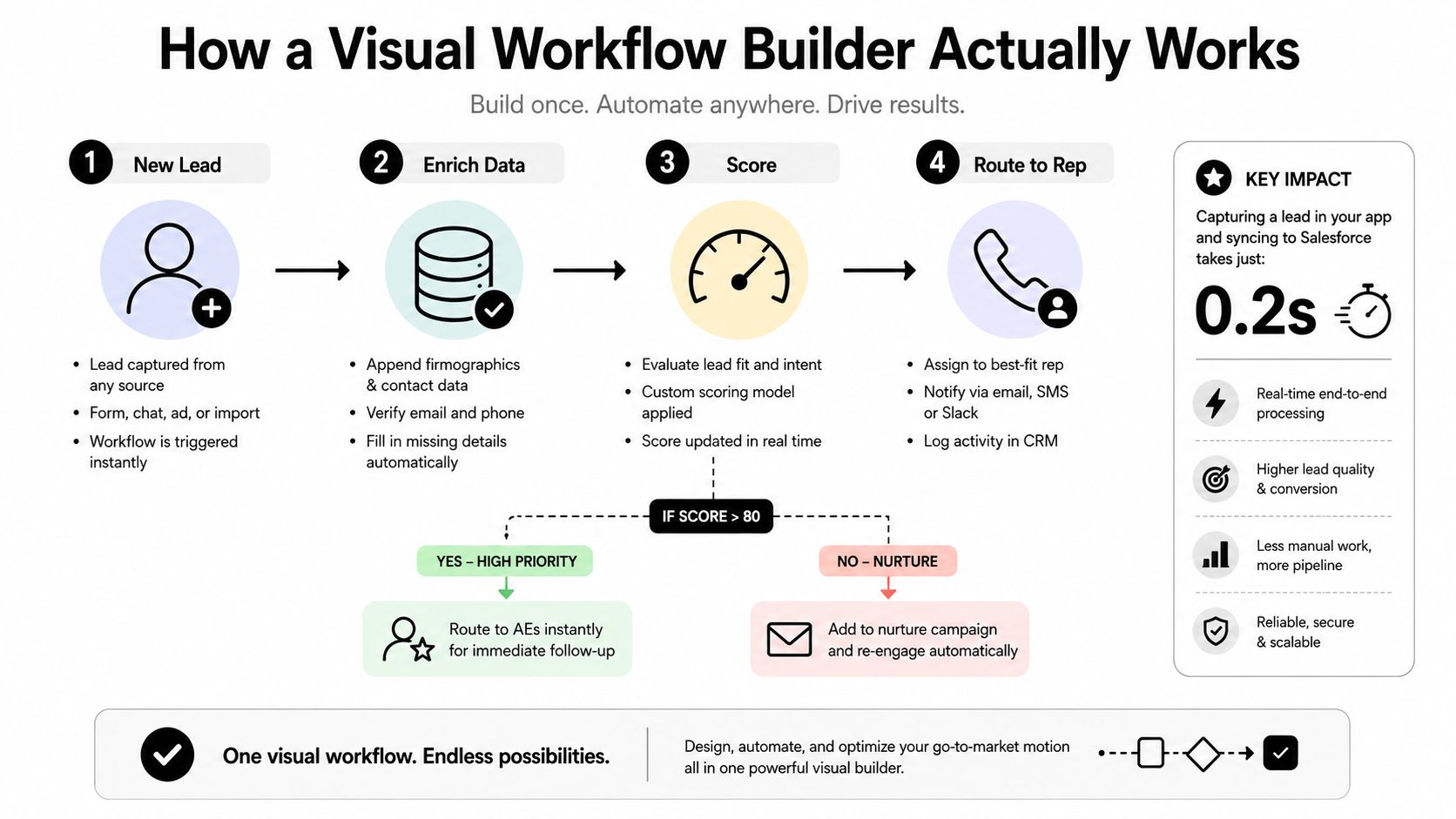
Consider an inbound demo request. A prospect submits a form, the system enriches the company record, sales operations applies qualification logic, and the workflow assigns the request to a representative. If the account fits the target profile, the workflow sends it to a priority queue. If information is missing or the account falls outside the target market, it follows a different path.
Four building blocks
Trigger: The trigger starts execution. It might be a form submission, a CRM status change, an inbound webhook, a scheduled check, or an event from a billing system. A strong trigger definition also specifies what happens when the same event arrives again, because duplicate events are common in distributed systems.
Node: Each node performs a discrete action or decision. In the demo-routing example, nodes might validate the email address, look up firmographic data, calculate a score, check territory ownership, create a CRM task, and send a notification. Smaller nodes are easier to test, but excessive fragmentation can make the workflow difficult to read.
Edge: Edges define the path and data handoff between nodes. A branch may send qualified leads to sales and unqualified leads to nurture. Parallel edges can launch enrichment and duplicate detection at the same time, provided the system can safely reconcile their results.
State: State records where the workflow is, what data it has collected, and whether it's waiting for an external response. A stateful workflow can pause for approval, resume after a webhook, retry a failed API request, and preserve the original lead context. A stateless event pipeline generally processes an event and ends without maintaining that longer-lived position.
The distinction between visual simplicity and execution simplicity is important. A canvas might show a single “enrich lead” node, while that node calls several services, handles timeouts, maps fields, and applies fallback behavior. The diagram is an abstraction, not a guarantee that the underlying process is simple.
For teams selling to marketplaces or managing commerce operations, the same model applies to specialized connectors. An integration for Amazon sellers can be treated as a workflow node with defined inputs, outputs, authentication requirements, and failure handling, rather than as an opaque plug-in.
Execution details determine reliability
Before publishing a workflow, define the behavior for missing fields, duplicate events, timeout responses, and partial completion. Decide whether a failed enrichment step should stop routing, use a default value, or send the record to human review.
AI-assisted authoring can reduce configuration effort when it remains inspectable. Google's Visual Blocks pipeline research reported that an AI-assisted flow reduced user effort to 18.9% of the interactions required to build equivalent pipelines from scratch, as summarized in this low-code platform benchmark. That result supports a practical design principle: let AI generate or wire steps, but keep the resulting graph visible, editable, and subject to review. Teams exploring that model can also examine an AI workflow builder as part of the broader design process.
Real B2B Use Cases That Drive Revenue and Retention
The best workflows sit at handoff points where one team depends on another. They don't merely remove a repetitive click. They preserve context as a prospect, customer, or issue moves through the business.
Lead generation and routing
A typical revenue workflow starts with a form trigger or inbound event. The builder can validate the submission, enrich the company record, check for an existing opportunity, apply qualification rules, and route the lead by territory, segment, or account ownership.
The operational advantage is change control. Sales operations can adjust a routing condition when territories shift without asking engineering to rewrite a spreadsheet import or a hidden script. Engineering can still review the integration and data model, while sales owns the business rule.
A reliable flow should also handle the unattractive cases. If enrichment fails, the workflow shouldn't assign the lead to a random queue. It should preserve the record, mark the missing dependency, and route the exception to an owner who can resolve it.
Client onboarding
Onboarding often crosses sales, implementation, customer success, product, and billing. A visual workflow can create the customer workspace, provision users, send the welcome message, create internal tasks, schedule a kickoff, and wait for completion signals from the customer.
The important feature is not the number of actions. It's the ability to represent dependencies and escalation. If a customer hasn't completed a setup step, the workflow can notify the success manager. If an internal task remains incomplete, the owner and manager can receive a separate alert. The workflow should distinguish customer delay from internal delay, because the response and accountability are different.
Teams should keep sensitive actions behind approvals. Provisioning access, changing plan details, or activating billing events shouldn't happen solely because a previous node returned a superficial success response.
Support escalation
Support teams can use a builder to classify incoming tickets, identify the product area, check severity, attach account context, and assign the issue to the appropriate queue. A high-severity ticket can trigger an engineering notification while preserving the conversation, customer tier, affected feature, and relevant diagnostic fields.
That context is where visual orchestration earns its place. Without it, support agents copy information between systems and engineering receives incomplete escalations. With it, the workflow can create a consistent packet for investigation and keep the customer-facing owner informed.
For broader patterns, customer service automation examples can help teams identify where triage, routing, and follow-up logic belong. The design should still reflect local escalation policies, data permissions, and human judgment.
A short product walkthrough can make these mechanics easier to evaluate in context:
Across all three use cases, the meaningful outcome is operational continuity. A visual workflow connects systems and teams without forcing every participant to understand the implementation details, while still giving owners enough visibility to review and correct the process.
What to Evaluate Before Choosing a Visual Builder
A polished canvas can hide weak operating foundations. Evaluate the platform against the conditions it will face after months of edits, new integrations, staff turnover, and exception handling.
| Criterion | Key Question | Red Flag |
|---|---|---|
| Integration depth | Can the platform handle authentication, field mapping, retries, webhooks, and rate limits for the systems that matter? | A connector works only for a basic demo and drops failures or unusual response formats. |
| Canvas performance | Does the editor remain usable as branches, nodes, and live state increase? | The interface slows down, rerenders excessively, or makes dense graphs difficult to inspect. |
| Version control | Can the team compare changes, restore an earlier version, and identify who approved a release? | Publishing overwrites the active flow or rollback requires manual reconstruction. |
| Audit trail | Does the system preserve execution history, inputs, outputs, errors, and approval events at the required level? | Failed runs disappear, logs are incomplete, or sensitive data is exposed to broad audiences. |
| AI-agent compatibility | Can deterministic workflows invoke agents, receive structured results, and route uncertain outputs to review? | AI steps operate as black boxes with no schema, confidence handling, or fallback path. |
Integration depth beats connector count
A long connector catalog doesn't prove production readiness. Ask whether the platform supports the exact operations required by your process, including pagination, idempotency, authentication renewal, error responses, and field-level permissions.
Webhook-only integration can be enough for a lightweight notification. It's less suitable when the workflow must reconcile records, respect API limits, or recover from delayed responses. Test the difficult path before procurement, not after the first customer-facing failure.
Performance is a design constraint
Large graphs create more than a visual problem. They increase the amount of state the editor must render, store, and update. Independent workflow-builder documentation highlights React-style rendering control, memory management for nodes and edges, JSON serialization, plugin architecture, and auto-layout as important scaling concerns. One implementation reports tested performance at 500 or more nodes, according to this low-code workflow automation tools analysis.
That doesn't mean every process should contain hundreds of nodes. It means the platform should support modular sub-workflows, reusable components, and clear boundaries before a single canvas becomes a map of the entire company.
Governance should be testable
Ask for a sample audit record. Ask how a reviewer sees the difference between two versions. Ask whether a failed run can be replayed safely and whether permissions apply to both the workflow definition and the underlying credentials.
The strongest evaluation process uses a real workflow with real edge cases. A demo flow proves almost nothing. A controlled pilot reveals whether operators can diagnose failures without engineering, whether engineering can enforce standards, and whether the builder supports a clean separation between business rules and integration plumbing.
The Hidden Friction That Derails Automation Projects
Visual automation usually breaks at the operating model, not on the canvas. Teams connect new workflows to old systems, expose sensitive data to broad groups, or automate processes nobody has documented. The failures surface later as missing records, unclear ownership, and disputed process history.
Legacy systems create the first boundary
A modern connector may not reach a SOAP service, on-premise database, or mainframe without an intermediary. Even with a supported connection, the older system may return inconsistent fields, depend on session state, or enforce limits the builder does not represent clearly.
Partial success creates the most dangerous failure pattern. The workflow creates a CRM record, fails to update the legacy application, then reports the operation as complete. Operators trust a status that does not cover the full transaction.
Middleware, queues, adapters, and explicit reconciliation steps can contain this integration debt. Treating it as a simple connector gap leaves the underlying failure unresolved.
Versioning and audit trails determine operational control
A workflow that changes in production needs more than a save button. Teams need version history, named releases, approval records, and a way to compare logic before and after a change. Without those controls, an audit trail may show that a run failed without showing which definition, credential, or rule produced the result.
Fixed-step visual builders offer predictable execution and clear review points, but they become harder to maintain as integrations multiply. Each connector adds authentication, field mapping, rate limits, and failure behavior to govern. Adaptive AI agents introduce a different risk: their path can vary by input, so teams need boundaries around tool access, data handling, approvals, and evidence captured from each run.
Security gaps create shadow operations
Business users need autonomy, yet broad autonomy creates unsanctioned workflows. A team may copy customer information into a third-party service, grant a shared credential excessive permissions, or leave a process unreviewed after its owner departs.
Role-based access, credential separation, approval policies, and execution logs belong in the buying decision. Audit inactive workflows, remove abandoned credentials, and record which system owns each important field.
Maturity determines whether automation scales
A team without clear ownership, naming conventions, escalation rules, and retirement criteria will automate confusion. The builder then repeats an inconsistent process and makes its errors harder to detect.
Before rollout, assign a process owner, define exception handling, and test recovery for partial failures. Scale requires maintenance after the original author moves on, not just a successful initial deployment.
A Practical Framework for Adopting Visual Workflows
Not every process deserves a canvas. The right choice depends on how often the process changes, how much judgment it requires, how much execution volume it carries, and what happens when it fails.
Use three destination categories.
- Keep it visual: Choose a visual workflow builder for cross-functional processes with changing business rules, such as lead routing, partner onboarding, approval coordination, and customer follow-up. The canvas helps sales, operations, and engineering review the same logic.
- Move it to code: Use code for high-volume, low-variance work where deterministic testing, execution efficiency, and fine-grained control matter more than business-user editing. Data transformation and demanding ETL pipelines often fit this model.
- Delegate parts to an AI agent: Use an agent for ambiguous work that requires interpretation, such as initial support classification, research synthesis, or anomaly investigation. Keep the surrounding actions deterministic where records, permissions, and commitments are involved.
Score the process before selecting the tool
A simple assessment can expose a poor fit before implementation begins:
- Change frequency: Does the business rule change often enough that operators need direct control?
- Execution volume: Would a slow or expensive visual layer become a bottleneck?
- Compliance sensitivity: Does every action require approval, traceability, or restricted access?
- Judgment dependency: Can a fixed rule decide the outcome, or must the system interpret context?
- Failure cost: Can a human safely review exceptions, or would an incorrect action create material damage?
High-change, cross-functional processes usually benefit from visual control. High-volume, stable processes often benefit from code. Judgment-heavy tasks may benefit from agents, but only when the workflow defines what the agent may do and where a human must intervene.
Governance guardrails should be concrete. Require peer review for workflows that touch financial or sensitive customer data. Schedule orphan audits, maintain an owner field, and use names that describe the business outcome rather than the temporary project that created the flow.
Operating principle: Put flexibility where the business changes, and put determinism where the business cannot tolerate ambiguity.
The visual workflow builder should remain a boundary between people and systems, not a substitute for process ownership. A team can use a free diagramming tool to map a process first, then decide whether the live implementation belongs in a visual platform, application code, or an AI-assisted system.
Where Visual Builders and AI Agents Converge
The next stage isn't a choice between visual workflows and AI agents. It's a controlled combination of both.
A deterministic visual workflow should handle actions that require predictable sequencing, permissions, and traceability. Lead assignment, contract approval, billing triggers, and account provisioning benefit from explicit branches and reviewable conditions. An AI agent can assist with tasks that require interpretation, such as classifying an unusual support request or summarizing research, then return a structured result to the workflow.
The market is already moving toward that hybrid model. PagerDuty reported that 51% of companies were using AI agents across the United States, United Kingdom, Australia, and Japan in its 2025 survey, as reported in its agentic AI survey announcement. The relevant question for operations leaders isn't whether agents are fashionable. It's whether the platform can contain their uncertainty.
A capable visual workflow builder should expose agent-compatible APIs, event-driven triggers, schema validation, human approval nodes, and fallback routes. If an agent can't classify a ticket confidently, the workflow should send it to a queue. If an agent returns malformed data, the system should reject the result before it updates a customer record.
Market expansion adds pressure to make that architecture durable. Mordor Intelligence estimated the workflow automation market at USD 23.77 billion in 2025 and projected USD 40.77 billion by 2031, with cloud deployment holding 62.15% share and hybrid models rising, according to the verified market summary in the research brief. Growth doesn't remove the need for controls. It makes platform boundaries, data residency, auditability, and recovery design more important.
The teams that scale well will treat automation as a spectrum. They'll keep governance-sensitive work visual, use code for demanding deterministic execution, and delegate bounded interpretation to agents. The canvas becomes the operating spine that makes those choices visible.
MakeAutomation helps B2B and SaaS teams map, design, test, and implement governed AI and automation systems across lead generation, CRM operations, client delivery, recruitment, and customer support. If you're ready to replace fragile handoffs with documented workflows and controlled agent-assisted execution, visit MakeAutomation to discuss the process you want to scale.